2013 CHEVROLET CAMARO light
[x] Cancel search: lightPage 231 of 404

Black plate (37,1)Chevrolet Camaro Owner Manual (Include Mex) - 2012
Driving and Operating 9-37
course race track and are not
intended for use on public roads.
They will not compensate for a
driver’s inexperience or lack of
familiarity with the race track.
Drivers who prefer to allow the
system to have more control of the
engine and brake systems are
advised to turn StabiliTrak on. See
Competitive Driving on page 9‑6 for
more information.
Notice: Do not attempt to shift
when the drive wheels are
spinning and do not have
traction. This may cause damage
to the transmission. Damage
caused by misuse of the vehicle
is not covered by the vehicle
warranty. See the warranty book
for additional information.
Competitive Driving Mode
In Competitive Driving Mode, the
StabiliTrak System helps maintain
directional control of the vehicle by
selective brake application and control of engine torque. The
Traction Control System (TCS)
helps control wheel spin and
Launch Control is available. Adjust
your driving style to account for the
available engine power. See
“Launch Control”
later in this
section.
This light is on when the vehicle is
in the Competitive Driving Mode.
On vehicles with a V8 engine, this
optional handling mode can be
selected by pressing the StabiliTrak/
TCS button on the console quickly
two times. STABILITRAK
COMPETITIVE MODE displays in
the Driver Information Center (DIC).
See Ride Control System Messages
on page 5‑36. When the StabiliTrak button is
pressed again, or the vehicle is
restarted, the StabiliTrak and TCS
systems are on.
Launch Control (V8 with
Manual Transmission
Models Only)
A Launch Control feature is
available, within Competitive Driving
Mode on vehicles with a manual
transmission, to allow the driver to
achieve high levels of vehicle
acceleration in a straight line.
Launch Control is a form of traction
control that manages tire spin while
launching the vehicle. This feature
is intended for use during closed
course race events where
consistent zero to sixty and quarter
mile times are desirable.
Launch Control is only available
when the following criteria are met:
.Competitive Driving Mode is
selected.
.The vehicle is not moving.
Page 233 of 404
Black plate (39,1)Chevrolet Camaro Owner Manual (Include Mex) - 2012
Driving and Operating 9-39
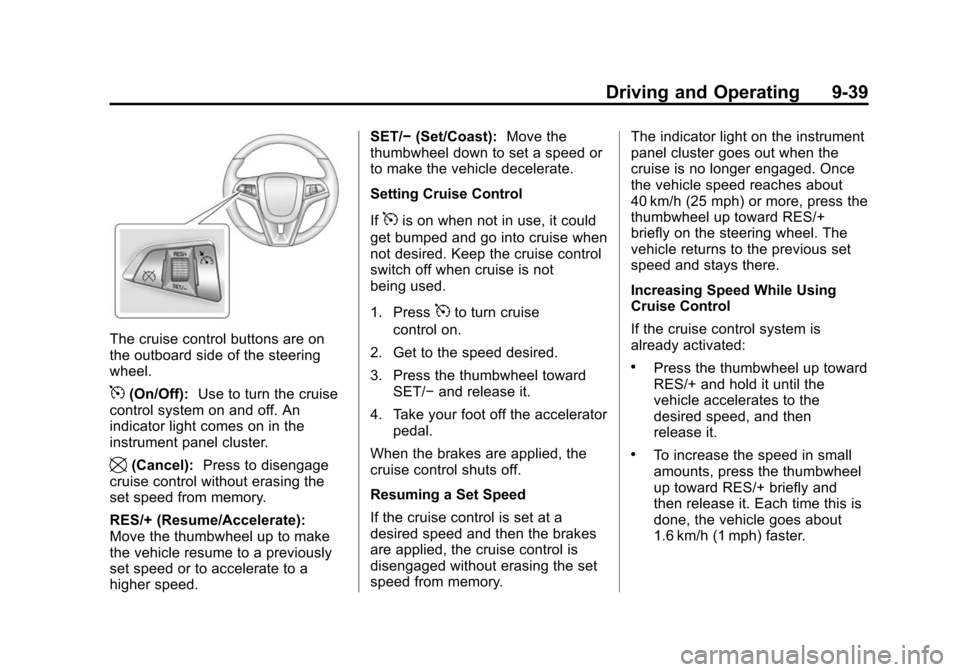
The cruise control buttons are on
the outboard side of the steering
wheel.
5(On/Off):Use to turn the cruise
control system on and off. An
indicator light comes on in the
instrument panel cluster.
\(Cancel): Press to disengage
cruise control without erasing the
set speed from memory.
RES/+ (Resume/Accelerate):
Move the thumbwheel up to make
the vehicle resume to a previously
set speed or to accelerate to a
higher speed. SET/−
(Set/Coast): Move the
thumbwheel down to set a speed or
to make the vehicle decelerate.
Setting Cruise Control
If
5is on when not in use, it could
get bumped and go into cruise when
not desired. Keep the cruise control
switch off when cruise is not
being used.
1. Press
5to turn cruise
control on.
2. Get to the speed desired.
3. Press the thumbwheel toward SET/− and release it.
4. Take your foot off the accelerator pedal.
When the brakes are applied, the
cruise control shuts off.
Resuming a Set Speed
If the cruise control is set at a
desired speed and then the brakes
are applied, the cruise control is
disengaged without erasing the set
speed from memory. The indicator light on the instrument
panel cluster goes out when the
cruise is no longer engaged. Once
the vehicle speed reaches about
40 km/h (25 mph) or more, press the
thumbwheel up toward RES/+
briefly on the steering wheel. The
vehicle returns to the previous set
speed and stays there.
Increasing Speed While Using
Cruise Control
If the cruise control system is
already activated:
.Press the thumbwheel up toward
RES/+ and hold it until the
vehicle accelerates to the
desired speed, and then
release it.
.To increase the speed in small
amounts, press the thumbwheel
up toward RES/+ briefly and
then release it. Each time this is
done, the vehicle goes about
1.6 km/h (1 mph) faster.
Page 234 of 404

Black plate (40,1)Chevrolet Camaro Owner Manual (Include Mex) - 2012
9-40 Driving and Operating
Reducing Speed While Using
Cruise Control
If the cruise control system is
already activated:
.Press the thumbwheel toward
SET/−and hold until the desired
lower speed is reached, then
release it.
.To slow down in small amounts,
press the thumbwheel toward
SET/− briefly. Each time this is
done, the vehicle goes about
1.6 km/h (1 mph) slower.
Passing Another Vehicle While
Using Cruise Control
Use the accelerator pedal to
increase the vehicle speed. When
you take your foot off the pedal, the
vehicle will slow down to the
previous set cruise control speed.
Using Cruise Control on Hills
How well the cruise control works
on hills depends upon the vehicle's
speed, load, and the steepness of
the hills. When going up steep hills, you might have to step on the
accelerator pedal to maintain the
vehicle speed. When going
downhill, you might have to brake or
shift to a lower gear to maintain the
vehicle speed. When the brakes are
applied the cruise control is
disengaged.
Ending Cruise Control
There are three ways to end the
cruise control:
.To disengage cruise control,
step lightly on the brake pedal or
clutch. The indicator light on the
instrument panel cluster
goes out.
.Press\on the steering wheel.
.To turn off cruise control, press5on the steering wheel.
Erasing Speed Memory
The cruise control set speed is
erased from memory if
5is pressed
or if the vehicle is turned off.
Object Detection
Systems
Ultrasonic Parking Assist
For vehicles with the Ultrasonic
Rear Parking Assist (URPA) system,
it assists the driver with parking
and avoiding objects while in
R (Reverse). URPA operates at
speeds less than 8 km/h (5 mph).
The sensors on the rear bumper
detect objects up to 2.5 m (8 ft)
behind the vehicle, and at least
20 cm (8 in) off the ground.
{WARNING
The URPA system does not
detect pedestrians, bicyclists,
animals, or any other objects
located below the bumper or that
are too close or too far from the
vehicle. To prevent injury, death,
or vehicle damage, even with
(Continued)
Page 238 of 404

Black plate (44,1)Chevrolet Camaro Owner Manual (Include Mex) - 2012
9-44 Driving and Operating
Fuel
Use of the recommended fuel is
an important part of the proper
maintenance of this vehicle. To help
keep the engine clean and maintain
optimum vehicle performance, we
recommend the use of gasoline
advertised as TOP TIER Detergent
Gasoline.
Look for the TOP TIER label on the
fuel pump to ensure gasoline meets
enhanced detergency standards
developed by auto companies. A list
of marketers providing TOP TIER
Detergent Gasoline can be found at
www.toptiergas.com.
The eighth digit of the Vehicle
Identification Number (VIN) shows
the code letter or number that
identifies the vehicle's engine. The
VIN is at the top left of the
instrument panel. SeeVehicle
Identification Number (VIN) on
page 12‑1.
Recommended Fuel
If the vehicle has the 3.6L V6 engine
(VIN Code D), use regular unleaded
gasoline with a posted octane rating
of 87 or higher. If the octane rating
is less than 87, an audible knocking noise, commonly referred to as
spark knock, might be heard when
driving. If this occurs, use a
gasoline rated at 87 octane or
higher as soon as possible. If heavy
knocking is heard when using
gasoline rated at 87 octane or
higher, the engine needs service.
If the vehicle has the 6.2L V8 engine
(VIN Code W) or the 6.2L V8 engine
(VIN Code J), use premium
unleaded gasoline with a posted
octane rating of 91 or higher. For
best performance, use premium
unleaded gasoline with a posted
octane rating of 93. You can also
use regular unleaded gasoline rated
at 87 octane or higher, but the
vehicle's acceleration could be
slightly reduced, and a slight audible
knocking noise, commonly referred
to as spark knock, might be heard.
If the octane rating is less than 87, a
heavy knocking noise might be
heard when driving. If this occurs,
use a gasoline rated at 87 octane or
higher as soon as possible.
Page 241 of 404

Black plate (47,1)Chevrolet Camaro Owner Manual (Include Mex) - 2012
Driving and Operating 9-47
The fuel cap is located behind a
hinged fuel door on the passenger
side of the vehicle. To open the fuel
door, push the rearward center edge
in and release and it will open.
To unlock the fuel cap on vehicles
equipped with the locking fuel cap,
use the key that is part of the
Remote Keyless Entry (RKE)
transmitter.
When reinstalling the cap, turn it
clockwise until it clicks, otherwise
the malfunction indicator lamp may
turn on. SeeMalfunction Indicator
Lamp on page 5‑16.
{WARNING
Fuel can spray out on you if you
open the fuel cap too quickly.
If you spill fuel and then
something ignites it, you could be
badly burned. This spray can
happen if the tank is nearly full,
and is more likely in hot weather.
Open the fuel cap slowly and wait
for any hiss noise to stop. Then
unscrew the cap all the way.
Be careful not to spill fuel. Do not
top off or overfill the tank and wait a
few seconds after you have finished
pumping before removing the
nozzle. Clean fuel from painted
surfaces as soon as possible. See
Exterior Care on page 10‑88.
When replacing the fuel cap, turn it
clockwise until it clicks. Make sure
the cap is fully installed. The
diagnostic system can determine if
the fuel cap has been left off or
improperly installed. This would allow fuel to evaporate into the
atmosphere. See
Malfunction
Indicator Lamp on page 5‑16.
{WARNING
If a fire starts while you are
refueling, do not remove the
nozzle. Shut off the flow of fuel by
shutting off the pump or by
notifying the station attendant.
Leave the area immediately.
Notice: If a new fuel cap is
needed, be sure to get the right
type of cap from your dealer. The
wrong type of fuel cap might not
fit properly, might cause the
malfunction indicator lamp to
light, and could damage the fuel
tank and emissions system. See
Malfunction Indicator Lamp on
page 5‑16.
Page 249 of 404

Black plate (1,1)Chevrolet Camaro Owner Manual (Include Mex) - 2012
Vehicle Care 10-1
Vehicle Care
General Information
General Information . . . . . . . . . . 10-2
California Proposition65 Warning . . . . . . . . . . . . . . . . . 10-3
California Perchlorate Materials Requirements . . . . 10-3
Accessories and Modifications . . . . . . . . . . . . . . . 10-3
Vehicle Checks
Doing Your OwnService Work . . . . . . . . . . . . . . . 10-4
Hood . . . . . . . . . . . . . . . . . . . . . . . . 10-5
Engine Compartment Overview . . . . . . . . . . . . . . . . . . . 10-6
Engine Cover . . . . . . . . . . . . . . . 10-10
Engine Oil . . . . . . . . . . . . . . . . . . 10-10
Engine Oil Life System . . . . . 10-13
Automatic Transmission Fluid . . . . . . . . . . . . . . . . . . . . . . 10-14
Manual Transmission Fluid . . . . . . . . . . . . . . . . . . . . . . 10-14
Hydraulic Clutch . . . . . . . . . . . . 10-15
Engine Air Cleaner/Filter . . . . 10-16
Cooling System . . . . . . . . . . . . 10-18
Engine Coolant . . . . . . . . . . . . . 10-19 Engine Overheating . . . . . . . . 10-24
Power Steering Fluid . . . . . . . 10-26
Washer Fluid . . . . . . . . . . . . . . . 10-27
Brakes . . . . . . . . . . . . . . . . . . . . . 10-28
Brake Fluid . . . . . . . . . . . . . . . . . 10-29
Battery . . . . . . . . . . . . . . . . . . . . . 10-30
Starter Switch Check . . . . . . . 10-31
Automatic Transmission Shift
Lock Control Function
Check . . . . . . . . . . . . . . . . . . . . . 10-32
Ignition Transmission Lock Check . . . . . . . . . . . . . . . . . . . . . 10-32
Park Brake and P (Park) Mechanism Check . . . . . . . . 10-33
Wiper Blade Replacement . . . . . . . . . . . . . . 10-33
Windshield Replacement . . . 10-34
Headlamp Aiming
Headlamp Aiming . . . . . . . . . . 10-34
Bulb Replacement
Bulb Replacement . . . . . . . . . . 10-34
Halogen Bulbs . . . . . . . . . . . . . . 10-34
High Intensity Discharge (HID) Lighting . . . . . . . . . . . . . 10-35
Headlamps, Front Turn Signal and Parking Lamps
(Base Vehicle) . . . . . . . . . . . . 10-35 Headlamps, Front Turn
Signal and Parking Lamps
(Up-Level Vehicle) . . . . . . . . 10-36
Daytime Running Lamps (DRL) . . . . . . . . . . . . . 10-37
Fog Lamps . . . . . . . . . . . . . . . . . 10-37
Taillamps, Turn Signal, and Stoplamps . . . . . . . . . . . . . . . . 10-38
License Plate Lamp . . . . . . . . 10-38
Replacement Bulbs . . . . . . . . . 10-39
Electrical System
Electrical System Overload . . . . . . . . . . . . . . . . . . 10-39
Fuses and Circuit Breakers . . . . . . . . . . . . . . . . . . 10-40
Engine Compartment Fuse
Block . . . . . . . . . . . . . . . . . . . . . 10-40
Instrument Panel Fuse Block . . . . . . . . . . . . . . . . . . . . . 10-43
Rear Compartment Fuse Block . . . . . . . . . . . . . . . . . . . . . 10-45
Wheels and Tires
Tires . . . . . . . . . . . . . . . . . . . . . . . . 10-47
Winter Tires . . . . . . . . . . . . . . . . 10-47
Tire Sidewall Labeling . . . . . . 10-48
Tire Designations . . . . . . . . . . . 10-50
Page 264 of 404

Black plate (16,1)Chevrolet Camaro Owner Manual (Include Mex) - 2012
10-16 Vehicle Care
Engine Air Cleaner/Filter
SeeEngine Compartment Overview
on page 10‑6 for the location of the
engine air cleaner/filter.
When to Inspect the Engine Air
Cleaner/Filter
Inspect the air cleaner/filter at the
scheduled maintenance intervals
and replace it at the first oil change
after each 80 000 km (50,000 mi)
interval. See Maintenance Schedule
on page 11‑3 for more information.
If driving in dusty/dirty conditions,
inspect the filter at each engine oil
change.
How to Inspect the Engine Air
Cleaner/Filter
To inspect the air cleaner/filter,
remove the filter from the vehicle
and lightly shake the filter to release
loose dust and dirt. If the filter
remains covered with dirt, a new
filter is required.
To inspect or replace the engine air
cleaner/filter:
1. Open the hood. See Hood on
page 10‑5.
2. Locate the air filter housing on the front of the driver side of the
engine compartment. See
Engine Compartment Overview
on page 10‑6.
Page 272 of 404

Black plate (24,1)Chevrolet Camaro Owner Manual (Include Mex) - 2012
10-24 Vehicle Care
If a spill occurs, rinse the belt
with fresh water.
4. Start the engine.
5. With the engine idling, top off the coolant through the radiator cap
opening until full.
Wait 30 seconds for the coolant
to settle and top off, if the level
drops.
6. Once the system is full, put the radiator cap back on by turning
clockwise.
7. Turn the engine off.
8. Check the coolant level in the engine coolant recovery bottle
and fill it until the level is at the
top mark on the dipstick.
Notice: If the pressure cap is not
tightly installed, coolant loss and
possible engine damage may
occur. Be sure the cap is properly
and tightly secured.
Engine Overheating
The vehicle has an indicator to warn
of engine overheating.
There is an engine coolant
temperature warning light on your
vehicle's instrument panel. See
Engine Coolant Temperature Gauge
on page 5‑11.
You may decide not to lift the hood
when this warning appears, but
instead get service help right away.
See Roadside Assistance Program
(U.S. and Canada) on page 13‑7 or
Roadside Assistance Program
(Mexico) on page 13‑9.
If you do decide to lift the hood,
make sure the vehicle is parked on
a level surface.
Then check to see if the engine
cooling fans are running. If the
engine is overheating, both fans
should be running. If they are not,
do not continue to run the engine
and have the vehicle serviced.