2013 CADILLAC XTS turn signal
[x] Cancel search: turn signalPage 176 of 438

Black plate (2,1)Cadillac XTS Owner Manual - 2013 - 1st - 4/13/12
6-2 Lighting
AUTO (Automatic):Automatically
turns the exterior lamps on and off,
depending on outside lighting.
;(Parking Lamps): Turns on the
parking lamps together with the
following:
.Sidemarker Lamps
.Taillamps
.License Plate Lamps
.Instrument Panel Lights
2(Headlamps): Turns on the
headlamps together with the
following:
.Sidemarker Lamps
.Taillamps
.License Plate Lamps
.Instrument Panel Lights
.Parking Lamps
Automatic High-Beam System
This system turns the vehicle's
high-beam headlamps on and off
according to surrounding traffic
conditions. The system turns the high-beam
headlamps on when it is dark
enough and there is no other traffic
present.
This light comes on in the
instrument cluster when the
automatic high-beam system is
enabled.
Turning On and Enabling
Automatic High Beams
To enable the automatic high-beam
system, with the turn signal/lane
change lever in the neutral position,
turn the exterior lamp control to
AUTO. The blue high-beam on light
appears on the instrument cluster
when the high beams are on.
Driving with Automatic High
Beams
The system only activates the high
beams when driving over 40 km/h
(25 mph).
There is a sensor near the top
center of the windshield that
automatically controls the system.
Keep this area of the windshield
clear of debris to allow for best
system performance.
The high-beam headlamps remain
on, under the automatic control,
until one of the following situations
occur:
.The system detects an
approaching vehicle's
headlamps.
.The system detects a preceding
vehicle's taillamps.
.The outside light is bright
enough that high-beam
headlamps are not required.
.The vehicle's speed drops below
20 km/h (12 mph).
Page 179 of 438

Black plate (5,1)Cadillac XTS Owner Manual - 2013 - 1st - 4/13/12
Lighting 6-5
or;to disable this feature.
Adaptive Forward
Lighting (AFL)
For vehicles with uplevel
headlamps, the AFL system adjusts
the headlamps to provide greater
road illumination in various driving
conditions.
To enable AFL, set the exterior lamp
control to the AUTO position.
Moving the control out of the AUTO
position will deactivate the system.
AFL will operate when the vehicle
speed is greater than 3 km/h
(2 mph). AFL will not operate when
the transmission is in R (Reverse).
AFL is not immediately operable
after starting the vehicle; driving a
short distance is required to
calibrate the AFL. SeeExterior
Lamp Controls on page 6‑1.
Curve Lighting
The light beam pivots based on the
steering wheel position and vehicle
speed of at least 10 km/h (6 mph). The headlamps shine at an angle of
up to 15 degrees to the right or left
of the direction of travel.
Headlamp Leveling
Control
Automatic Headlamp Leveling
For vehicles with headlamp leveling,
the range of the headlamps is
adjusted automatically based on
vehicle load.
Hazard Warning Flashers
|(Hazard Warning Flashers):
Press this button located on the
center stack to make the front and
rear turn signal lamps flash on and
off. Press again to turn the
flashers off.
The hazard warning flashers turn on
automatically if the airbags deploy.
Turn and Lane-Change
Signals
Move the lever all the way up or
down to signal a turn.
An arrow on the instrument cluster
flashes in the direction of the turn or
lane change.
Page 180 of 438

Black plate (6,1)Cadillac XTS Owner Manual - 2013 - 1st - 4/13/12
6-6 Lighting
Raise or lower the lever until the
arrow starts to flash to signal a lane
change. Hold it there until the lane
change is completed. If the lever is
briefly pressed and released, the
turn signal flashes three times.
The turn and lane-change signal
can be turned off manually by
moving the lever back to its original
position.
If after signaling a turn or lane
change, the arrow flashes rapidly or
does not come on, a signal bulb
might be burned out.
Replace any burned out bulbs. If a
bulb is not burned out, check the
fuse. SeeFuses and Circuit
Breakers on page 10‑26.Interior Lighting
Instrument Panel
Illumination Control
The brightness of the instrument
panel lighting and steering wheel
controls can be adjusted.
D(Instrument Panel
Illumination): Move the
thumbwheel up or down to brighten
or dim the lights.
The brightness of the displays
automatically adjusts based on
outdoor lighting. The instrument panel illumination control will set the
lowest level that the displays will
automatically be adjusted.
Courtesy Lamps
The courtesy lamps come on when
any door is opened and the dome
lamp is in the DOOR position.
Dome Lamps
The dome lamp is in the overhead
console.
Page 190 of 438

Black plate (8,1)Cadillac XTS Owner Manual - 2013 - 1st - 4/13/12
7-8 Infotainment System
speakers. The middle position
balances the sound between the
left and right speakers.
.Fade:Turn the MENU knob to
highlight. Press the MENU knob
to select. Turn the MENU knob
to the left for more sound from
the front speakers and to the
right for more sound from the
rear speakers. The middle
position balances the sound
between the front and rear
speakers.
.EQ (Equalizer): Turn the MENU
knob to highlight. Turn the
MENU knob to scroll through the
options. Press the MENU knob
to select. Press the
SBACK
button to go back to the
previous menu.
Station List: Select to display a list
of AM or FM stations. Press
S
BACK to go to the previous menu.
Auto Volume: If equipped, this
feature adjusts the volume based on
the vehicle speed. Select the level between off, low, medium-low,
medium, medium-high, and high.
Press
SBACK to go to the
previous menu.
Bose AudioPilot: If equipped, this
feature adjusts the volume based on
the noise in the vehicle. When
turned on, AudioPilot detects noise
and vehicle speed to continuously
adjust the audio signal so that music
will sound the same at a set volume
level. This feature is most effective
at lower radio volume settings
where background noise can affect
how well the music is being played.
See www.bose.com/audiopilot. This
feature can be turned On or Off.
Options for SiriusXM Only
XM View: Select to display
Channel List in XM source. Turn the
MENU knob to highlight and press
the MENU knob to select. Press
S
BACK to go to the previous menu. Channel List:
Select to display a
list of SiriusXM stations. Turn the
MENU knob to highlight and press
the MENU knob to select. Press
S
BACK to go to the previous menu.
Also see the radio settings common
for all sources earlier in this section.
Finding a Station
Seeking a Station
Press
7or6to search for the
previous or next strongest station.
Tuning a Station
Turn the MENU knob to manually
find a station.
Storing Radio Station Presets
Favorites are stored in the favorites
area at the bottom of the screen.
Press
{to display the Home Page.
Turn the MENU knob to highlight
AUDIO. Press the MENU knob to
access the active audio source
main page.
Page 192 of 438

Black plate (10,1)Cadillac XTS Owner Manual - 2013 - 1st - 4/13/12
7-10 Infotainment System
Channel Unauth:This station is
blocked or cannot be received.
Channel Not Available: This
previously assigned station is no
longer assigned.
No XM Signal/Reception May Be
Blocked: The vehicle may be in a
location where the XM signal is
being blocked. When the vehicle is
moved into an open area, the signal
should return.
XM Radio ID: If tuned to station 0,
this message displays with the XM
radio eight-digit radio ID label. This
label is needed to activate the
service.
Check Antenna: If this message
does not clear within a short period
of time, the receiver could have a
fault. Consult with your dealer.Radio Reception
Frequency interference and static
can occur during normal radio
reception if items such as phone
chargers, vehicle convenience
accessories, and external electronic
devices are plugged into the
accessory power outlet. If there is
interference or static, unplug the
item from the accessory power
outlet.
FM
FM signals only reach about 16 to
65 km (10 to 40 mi). Although the
radio has a built-in electronic circuit
that automatically works to reduce
interference, some static can occur,
especially around tall buildings or
hills, causing the sound to fade in
and out.
AM
The range for most AM stations is
greater than for FM, especially at
night. The longer range can cause
station frequencies to interfere with
each other. Static can also occur when things like storms and power
lines interfere with radio reception.
When this happens, try reducing the
treble on the radio.
SiriusXM® Satellite Radio
Service
SiriusXM Satellite Radio Service
provides digital radio reception. Tall
buildings or hills can interfere with
satellite radio signals, causing the
sound to fade in and out. In
addition, traveling or standing under
heavy foliage, bridges, garages,
or tunnels may cause loss of the
SiriusXM signal for a period of time.
Cell Phone Usage
Cell phone usage, such as making
or receiving phone calls, charging,
or just having the phone on may
cause static interference in the
radio. Unplug the phone or turn it off
if this happens.
Page 195 of 438

Black plate (13,1)Cadillac XTS Owner Manual - 2013 - 1st - 4/13/12
Infotainment System 7-13
If a Blu-ray Disc™or DVD disc is
loaded into the CD player and the
CD screen button is selected, a
message comes on the screen to
use the Video application. The
Video application is only available
on vehicles with rear seat
entertainment.
CD Menu
While on the CD main page, press
the MENU knob to display the CD
menu and the following may display:
Browse: Select to display the files
or songs on the CD. See “Browse
CD Media” later in this section.
Tone Settings: Select to adjust
Bass, Midrange, Treble, Balance,
Fade, and EQ (Equalizer). See
“Tone Settings” underAM-FM Radio
on page 7‑7.
Auto Volume: If equipped, this
feature adjusts the volume based on
the vehicle speed. Select the level
between off, low, medium-low, medium, medium-high, and high.
Press
SBACK to go to the
previous menu.
Bose AudioPilot: If equipped, this
feature adjusts the volume based on
the noise in the vehicle. When
turned on, AudioPilot detects noise
and vehicle speed to continuously
adjust the audio signal so that music
will sound the same at a set volume
level. This feature is most effective
at lower radio volume settings
where background noise can affect
how well the music is being played.
See www.bose.com/audiopilot. This
feature can be turned on or off.
Browse CD Media
Use to browse the track list on
a CD.
Error Messages
If Disc Error displays and/or the disc
comes out, it could be for one of the
following reasons:
.The disc has an invalid or
unknown format.
.The disc is very hot. Try the disc
again when the temperature
returns to normal.
.The road is very rough. Try the
disc again when the road is
smoother.
.The disc is dirty, scratched, wet,
or upside down.
.The air is very humid. Try the
disc again later.
.There was a problem while
burning the disc.
.The label is caught in the CD
player.
If Disc Player Error displays, it could
be for one of the following reasons:
.The player temperature is
too high.
.There are load or eject errors.
If the CD is not playing correctly, for
any other reason, try a known
good CD.
If any error continues, contact your
dealer.
Page 237 of 438

Black plate (9,1)Cadillac XTS Owner Manual - 2013 - 1st - 4/13/12
Driving and Operating 9-9
WARNING (CONTINUED)
to the highest setting. See
“Climate Control Systems”in
the Index.
For more information about
carbon monoxide, see Engine
Exhaust on page 9‑21.
Run the engine for short periods
only as needed to keep warm, but
be careful.
To save fuel, run the engine for only
short periods as needed to warm
the vehicle and then shut the engine
off and close the window most of
the way to save heat. Repeat this
until help arrives but only when you
feel really uncomfortable from the
cold. Moving about to keep warm
also helps.
If it takes some time for help to
arrive, now and then when you run
the engine, push the accelerator
pedal slightly so the engine runs
faster than the idle speed. This keeps the battery charged to restart
the vehicle and to signal for help
with the headlamps. Do this as little
as possible to save fuel.
If the Vehicle Is Stuck
Slowly and cautiously spin the
wheels to free the vehicle when
stuck in sand, mud, ice, or snow.
If stuck too severely for the traction
system to free the vehicle, turn the
traction system off and use the
rocking method. See
Traction
Control System (TCS) on
page 9‑28.
{WARNING
If the vehicle's tires spin at high
speed, they can explode, and you
or others could be injured. The
vehicle can overheat, causing an
engine compartment fire or other
damage. Spin the wheels as little
as possible and avoid going
above 56 km/h (35 mph).
Rocking the Vehicle to Get
it Out
Turn the steering wheel left and
right to clear the area around the
front wheels. Turn off any traction
system. Shift back and forth
between R (Reverse) and a low
forward gear, spinning the wheels
as little as possible. To prevent
transmission wear, wait until the
wheels stop spinning before shifting
gears. Release the accelerator
pedal while shifting, and press
lightly on the accelerator pedal
when the transmission is in gear.
Slowly spinning the wheels in the
forward and reverse directions
causes a rocking motion that could
free the vehicle. If that does not get
the vehicle out after a few tries, it
might need to be towed out. If the
vehicle does need to be towed out,
see Towing the Vehicle on
page 10‑74.
Page 243 of 438
Black plate (15,1)Cadillac XTS Owner Manual - 2013 - 1st - 4/13/12
Driving and Operating 9-15
above 110 km/h (68 mph)
should be limited to
five minutes per use.
.Avoid making hard stops for
the first 322 km (200 mi) or
so. During this time the new
brake linings are not yet
broken in. Hard stops with
new linings can mean
premature wear and earlier
replacement. Follow this
breaking-in guideline every
time you get new brake
linings.
.Do not tow a trailer during
break-in. SeeDriving
Characteristics and Towing
Tips on page 9‑60 for the
trailer towing capabilities of
your vehicle and more
information.
Following break‐in, engine speed
and load can be gradually
increased.
Ignition Positions
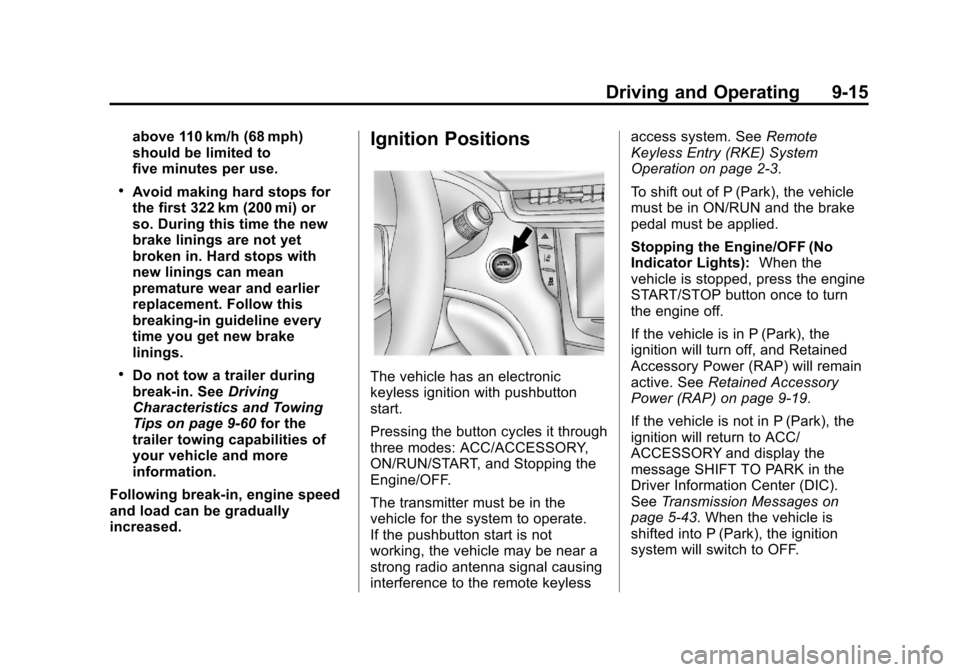
The vehicle has an electronic
keyless ignition with pushbutton
start.
Pressing the button cycles it through
three modes: ACC/ACCESSORY,
ON/RUN/START, and Stopping the
Engine/OFF.
The transmitter must be in the
vehicle for the system to operate.
If the pushbutton start is not
working, the vehicle may be near a
strong radio antenna signal causing
interference to the remote keyless access system. See
Remote
Keyless Entry (RKE) System
Operation on page 2‑3.
To shift out of P (Park), the vehicle
must be in ON/RUN and the brake
pedal must be applied.
Stopping the Engine/OFF (No
Indicator Lights): When the
vehicle is stopped, press the engine
START/STOP button once to turn
the engine off.
If the vehicle is in P (Park), the
ignition will turn off, and Retained
Accessory Power (RAP) will remain
active. See Retained Accessory
Power (RAP) on page 9‑19.
If the vehicle is not in P (Park), the
ignition will return to ACC/
ACCESSORY and display the
message SHIFT TO PARK in the
Driver Information Center (DIC).
See Transmission Messages on
page 5‑43. When the vehicle is
shifted into P (Park), the ignition
system will switch to OFF.