2013 CADILLAC XTS lights
[x] Cancel search: lightsPage 181 of 438

Black plate (7,1)Cadillac XTS Owner Manual - 2013 - 1st - 4/13/12
Lighting 6-7
To change the dome lamp settings,
press:
OFF:Turns the lamp off, even
when a door is open.
DOOR: The lamp comes on when
a door is opened.
ON: Turns the lamp on.
Reading Lamps
There are reading lamps located on
the overhead console and over the
rear passenger doors. These lamps
come on automatically when any
door is opened. To manually turn
the reading lamps on or off:
Pressmornnext to each
overhead console reading lamp.
Press the button near the rear
passenger reading lamps.
Lighting Features
Entry Lighting
The headlamps, taillamps, license
plate lamps, back-up lamps, outside
mirror lamps, exterior door handle
lamps, dome lamp, and most of the
interior lights turn on briefly when
K
is pressed on the Remote Keyless
Entry (RKE) transmitter. See
Remote Keyless Entry (RKE)
System Operation on page 2‑3.
When the driver door is opened, all
control lights, Driver Information
Center (DIC) lights, and door pocket
lights turn on. After about
30 seconds the exterior lamps turn
off, then the dome lamp and
remaining interior lights dim to off.
Entry lighting can be disabled
manually by changing the ignition
out of the OFF position, or by
pressing
Qon the RKE transmitter.
Page 182 of 438

Black plate (8,1)Cadillac XTS Owner Manual - 2013 - 1st - 4/13/12
6-8 Lighting
This feature can be changed. See
“Vehicle Locator Lights”under
Vehicle Personalization on
page 5‑44.
Exit Lighting
The headlamps, taillamps, parking
lamps, back-up lamps, outside
mirror lamps, license plate lamps,
and exterior door handle lamps
come on at night, or in areas with
limited lighting, when a door is
opened after the ignition is turned
off. The dome lamp comes on after
the ignition is changed to the OFF
position. The exterior lamps and
dome lamp remain on after the door
is closed for a set amount of time,
then automatically turn off.
The exterior lamps turn off
immediately by turning the exterior
lamp control off.
This feature can be changed. See
Vehicle Personalization on
page 5‑44.
Battery Power Protection
The battery saver feature is
designed to protect the vehicle's
battery.
If some interior lamps are left on
and the ignition is turned off, the
battery rundown protection system
automatically turns the lamp off after
some time.
Exterior Lighting Battery
Saver
The exterior lamps turn off about
10 minutes after the ignition is
turned off, if the parking lamps or
headlamps have been manually left
on. This protects against draining
the battery. To restart the 10-minute
timer, turn the exterior lamp control
to the off position and then back to
the parking lamp or headlamp
position.
To keep the lamps on for more than
10 minutes, the ignition must be in
the ACC/ACCESSORY or ON/RUN
position.
Page 243 of 438
Black plate (15,1)Cadillac XTS Owner Manual - 2013 - 1st - 4/13/12
Driving and Operating 9-15
above 110 km/h (68 mph)
should be limited to
five minutes per use.
.Avoid making hard stops for
the first 322 km (200 mi) or
so. During this time the new
brake linings are not yet
broken in. Hard stops with
new linings can mean
premature wear and earlier
replacement. Follow this
breaking-in guideline every
time you get new brake
linings.
.Do not tow a trailer during
break-in. SeeDriving
Characteristics and Towing
Tips on page 9‑60 for the
trailer towing capabilities of
your vehicle and more
information.
Following break‐in, engine speed
and load can be gradually
increased.
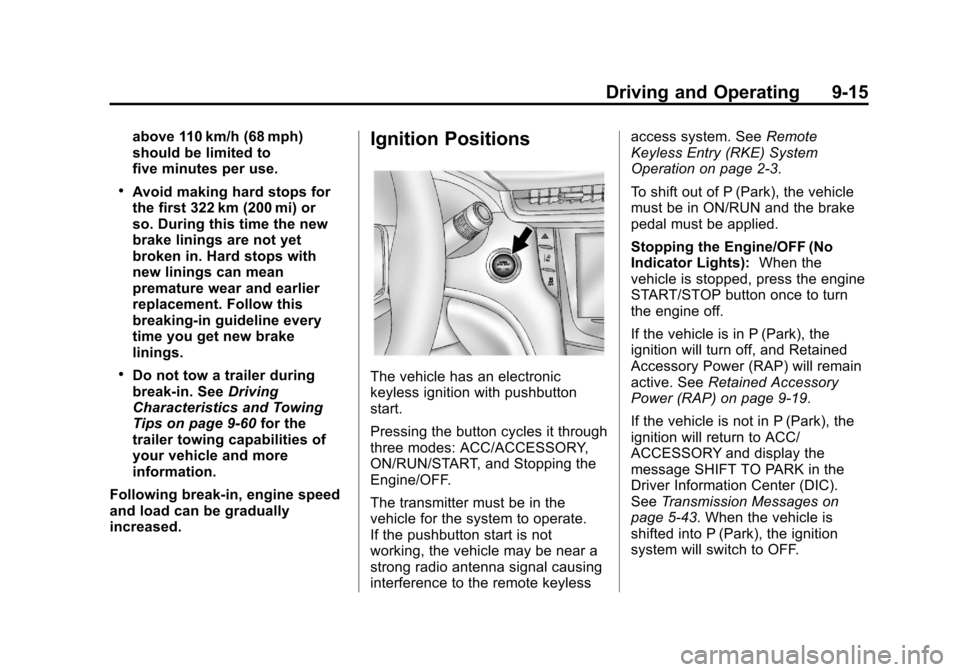
Ignition Positions
The vehicle has an electronic
keyless ignition with pushbutton
start.
Pressing the button cycles it through
three modes: ACC/ACCESSORY,
ON/RUN/START, and Stopping the
Engine/OFF.
The transmitter must be in the
vehicle for the system to operate.
If the pushbutton start is not
working, the vehicle may be near a
strong radio antenna signal causing
interference to the remote keyless access system. See
Remote
Keyless Entry (RKE) System
Operation on page 2‑3.
To shift out of P (Park), the vehicle
must be in ON/RUN and the brake
pedal must be applied.
Stopping the Engine/OFF (No
Indicator Lights): When the
vehicle is stopped, press the engine
START/STOP button once to turn
the engine off.
If the vehicle is in P (Park), the
ignition will turn off, and Retained
Accessory Power (RAP) will remain
active. See Retained Accessory
Power (RAP) on page 9‑19.
If the vehicle is not in P (Park), the
ignition will return to ACC/
ACCESSORY and display the
message SHIFT TO PARK in the
Driver Information Center (DIC).
See Transmission Messages on
page 5‑43. When the vehicle is
shifted into P (Park), the ignition
system will switch to OFF.
Page 266 of 438

Black plate (38,1)Cadillac XTS Owner Manual - 2013 - 1st - 4/13/12
9-38 Driving and Operating
Alerting the Driver
If ACC is engaged, driver action
may be required when:
.ACC cannot apply sufficient
braking because of approaching
a vehicle too rapidly.
.A temporary condition prohibits
ACC from operating. See
Vehicle Messages on page 5‑34.
.A malfunction is detected in the
system. SeeVehicle Messages
on page 5‑34.
When any of these conditions occur,
the collision alert symbol on the
HUD (if equipped) will flash on the
windshield. Either eight beeps will
sound from the front, or both sides
of the Safety Alert Seat will pulse five times. See
“Collision/Detection
Systems” underVehicle
Personalization on page 5‑44.
See Defensive Driving on page 9‑3.
Approaching and Following a
Vehicle
The vehicle ahead symbol is located
in the HUD display.
The vehicle ahead symbol only
displays when a vehicle is detected
in your vehicle’s path.
If this symbol is not displaying, ACC
will not respond to or brake to
vehicles ahead.
ACC automatically slows the vehicle
down and adjusts vehicle speed to
follow the vehicle in front at the
selected follow gap. The vehicle
speed increases or decreases to follow the vehicle in front of you, but
will not exceed the set speed. It may
apply limited braking, if necessary.
When braking is active, the brake
lights will come on. The automatic
braking may feel or sound different
than if the brakes were applied
manually. This is normal.
Stationary or Very Slow-Moving
Objects
{WARNING
Adaptive Cruise Control (ACC)
may not detect and react to
stopped or slow-moving vehicles
ahead of you. For example, the
system will not brake for a vehicle
that it has never detected moving.
This can occur when a detected
vehicle changes lanes at an
intersection or in stop-and-go
traffic and then a stopped or
slow-moving vehicle appears.
Your vehicle may not stop and
could cause a crash. Use caution
(Continued)
Page 276 of 438

Black plate (48,1)Cadillac XTS Owner Manual - 2013 - 1st - 4/13/12
9-48 Driving and Operating
WARNING (CONTINUED)
or ice, or if the windshield is
damaged. It may also not detect a
vehicle on winding or hilly roads,
or in conditions that can limit
visibility such as fog, rain,
or snow, or if the headlamps or
windshield are not cleaned or in
proper condition. Keep the
windshield, headlamps, and FCA
sensors clean and in good repair.Collision Alert
With Head-Up Display
Without Head-Up Display
When the vehicle is started, this
series of red lights, or the collision
alert display on the Head-Up
Display (HUD), will come on to
indicate the system is operating.
When your vehicle approaches
another vehicle too rapidly, the red
lights, or the collision alert symbol
on the HUD, will flash on the
windshield. Either eight beeps will sound from the front, or both sides
of the Safety Alert Seat will pulse
five times.
Tailgating Alert
The vehicle-ahead indicator will
display amber when you are
following a vehicle ahead much too
closely.
Page 280 of 438

Black plate (52,1)Cadillac XTS Owner Manual - 2013 - 1st - 4/13/12
9-52 Driving and Operating
SBZA Detection Zones
The SBZA sensor covers a zone of
approximately one lane over from
both sides of the vehicle, or 3.5 m
(11 ft). This zone starts at each side
mirror and goes back approximately
5 m (16 ft). The height of the zone is
approximately between 0.5 m (1.5 ft)
and 2 m (6 ft) off the ground.
Use caution while changing lanes
when towing a trailer, as the SBZA
detection zones do not change to
become longer when a trailer is
towed.
How the System Works
The SBZA symbol lights up in the
side mirrors when the system
detects a vehicle in the side blind
zone, indicating it may be unsafe to
change lanes. Before making a lane
change, check the SBZA display,
check mirrors, glance over your
shoulder, and use the turn signals.
Left Side MirrorDisplayRight Side Mirror Display
When the vehicle is started, both
outside mirror SBZA displays will
briefly come on to indicate the
system is operating. When the
vehicle is moving forward, the left-
or right-side mirror display will light
up if a vehicle is detected in that
blind zone. If the turn signal is
activated and a vehicle is also
detected on the same side, the
display will flash as an extra
warning not to change lanes.
SBZA displays may come on when
a passed vehicle remains in or
drops back into the detection zone.
SBZA can be disabled through
vehicle personalization. See
“Collision/Detection Systems” under
Vehicle Personalization on page 5‑44. If SBZA is disabled by
the driver, the SBZA mirror displays
will not light up.
When the System Does Not
Seem to Work Properly
SBZA may not always alert the
driver to vehicles in the blind zone,
especially in wet conditions. The
system does not need to be
serviced. The system may light up
due to guardrails, signs, trees,
shrubs, and other non-moving
objects. This is normal system
operation; the vehicle does not need
service.
SBZA may not operate when the
SBZA sensors in the left or right
corners of the rear bumper are
covered with mud, dirt, snow, ice,
or slush, or in heavy rainstorms. For
cleaning instructions, see "Washing
the Vehicle" under
Exterior Care on
page 10‑76. If the DIC still displays
the SIDE DETECTION SYSTEM
UNAVAILABLE message after
cleaning the rear bumper corners,
see your dealer.
Page 367 of 438

Black plate (73,1)Cadillac XTS Owner Manual - 2013 - 1st - 4/13/12
Vehicle Care 10-73
4. Turn the ignition to OFF andswitch off all lights and
accessories in both vehicles,
except the hazard warning
flashers if needed.
{WARNING
An electric fan can start up even
when the engine is not running
and can injure you. Keep hands,
clothing and tools away from any
underhood electric fan.
{WARNING
Using a match near a battery can
cause battery gas to explode.
People have been hurt doing this,
and some have been blinded.
Use a flashlight if you need more
light.
(Continued)
WARNING (CONTINUED)
Be sure the battery has enough
water. You do not need to add
water to the battery installed in
your new vehicle. But if a battery
has filler caps, be sure the right
amount of fluid is there. If it is low,
add water to take care of that
first. If you do not, explosive gas
could be present.
Battery fluid contains acid that
can burn you. Do not get it on
you. If you accidentally get it in
your eyes or on your skin, flush
the place with water and get
medical help immediately.
{WARNING
Fans or other moving engine
parts can injure you badly. Keep
your hands away from moving
parts once the engine is running. 5. Connect one end of the red
positive (+) cable to the jump
start remote positive (+) post for
the discharged battery.
6. Connect the other end of the red positive (+) cable to the
positive (+) terminal of the good
battery.
7. Connect one end of the black negative (–) cable to the
negative (–) terminal of the good
battery.
8. Connect the other end of the black negative (–) cable to the
remote negative (–) post for the
discharged battery.
9. Start the engine in the vehicle with the good battery and run
the engine at idle speed for at
least four minutes.
10. Try to start the vehicle that had the dead battery. If it will not
start after a few tries, it
probably needs service.
Page 388 of 438

Black plate (10,1)Cadillac XTS Owner Manual - 2013 - 1st - 4/13/12
11-10 Service and Maintenance
Additional
Maintenance and Care
Your vehicle is an important
investment and caring for it properly
may help to avoid future costly
repairs. To maintain vehicle
performance, additional
maintenance services may be
required. It is recommended
that your dealer perform these
services—their trained dealer
technicians know your vehicle best.
Your dealer can also perform a
thorough assessment with a multi‐
point inspection to recommend
when your vehicle may need
attention. The following list is
intended to explain the services and
conditions to look for that may
indicate services are required. Battery
The battery supplies power to start
the engine and operate any
additional electrical accessories.
.To avoid break‐down or failure to
start the vehicle, maintain a
battery with full cranking power.
.Trained dealer technicians have
the diagnostic equipment to test
the battery and ensure that the
connections and cables are
corrosion‐free.
Belts
.Belts may need replacing if they
squeak or show signs of
cracking or splitting.
.Trained dealer technicians can
inspect the belts and
recommend replacement when
necessary. Brakes
Brakes stop the vehicle and are
crucial to safe driving.
.Signs of brake wear may include
chirping, grinding, or squealing
noises, or difficulty stopping.
.Trained dealer technicians have
access to tools and equipment
to inspect the brakes and
recommend quality parts
engineered for the vehicle.
Fluids
Proper fluid levels and approved
fluids protect the vehicle’s systems
and components. See
Recommended Fluids and
Lubricants on page 11‑13 for GM
approved fluids.
.Engine oil and windshield
washer fluid levels should be
checked at every fuel fill.
.Instrument cluster lights may
come on to indicate that fluids
may be low and need to be
filled.