2013 CADILLAC SRX load
[x] Cancel search: loadPage 23 of 432

Black plate (17,1)Cadillac SRX Owner Manual - 2013 - CRC - 11/9/12
In Brief 1-17
yorz:Press the five-way
control up or down to go to the next
or previous selection.
SEL: Press to select a highlighted
menu option.
CorB: Press to go to the next or
previous favorite when listening to
the radio. Press to go to the next or
previous track when listening to a
media source.
x+ orx−: Press to increase or
decrease the volume.
See Steering Wheel Controls on
page 5‑2.
Cruise Control
J: Press to turn the system on
and off. An indicator appears in the
instrument cluster when turned on.
+RES: Move the control up briefly
to resume to a previously set speed
or to increase vehicle speed if the
cruise control is already activated. SET−:
Move the control down
briefly to set the speed and activate
cruise control or to decrease vehicle
speed if the cruise control is already
activated.
*: Press to disengage cruise
control without erasing the set
speed from memory.
See Cruise Control on page 9‑35 or
Adaptive Cruise Control on
page 9‑37 (if equipped).
Infotainment System
See the infotainment manual for
information on the radio, audio
players, phone, navigation system,
and voice or speech recognition.
It also includes information on
settings and downloadable
applications (if equipped).
Page 27 of 432

Black plate (21,1)Cadillac SRX Owner Manual - 2013 - CRC - 11/9/12
In Brief 1-21
Performance and
Maintenance
Traction Control
System (TCS)
The traction control system limits
wheel spin. The system is on when
the vehicle is started.
.To turn off traction control, press
and release
gon the center
stack.
iilluminates in the
instrument cluster. The Traction
Control Off message is
displayed in the DIC. See Ride
Control System Messages on
page 5‑37.
.Press and releasegagain to
turn traction control back on.
i
goes out in the instrument
cluster. The Traction Control
On message is displayed in the
DIC. See Ride Control System
Messages on page 5‑37. See
Traction Control System (TCS)
on page 9‑31.
StabiliTrak®System
The StabiliTrak system assists with
directional control of the vehicle in
difficult driving conditions. The
system is on when the vehicle is
started.
.To turn off both Traction Control
and StabiliTrak, press and
hold
gon the center stack,
until
gandiilluminate in the
instrument cluster. The Traction
Control Off message is
displayed in the DIC. See Ride
Control System Messages on
page 5‑37.
.Pressgagain to turn on both
systems.
gandigo out in the
instrument cluster. The Traction
Control On message is
displayed in the DIC. See Ride
Control System Messages on
page 5‑37. See
StabiliTrak
®System on
page 9‑33.
Tire Pressure Monitor
This vehicle may have a Tire
Pressure Monitor System (TPMS).
The low tire pressure warning
light alerts to a significant loss in
pressure of one of the vehicle's
tires. If the warning light comes on,
stop as soon as possible and inflate
the tires to the recommended
pressure shown on the Tire and
Loading Information label. See
Vehicle Load Limits on page 9‑10.
The warning light will remain on until
the tire pressure is corrected.
Page 54 of 432

Black plate (24,1)Cadillac SRX Owner Manual - 2013 - CRC - 11/9/12
2-24 Keys, Doors, and Windows
If there is something blocking the
window during automatic closing,
the window will reverse direction
for a short distance. Weather
conditions such as extreme cold
and/or ice may cause the window to
auto-reverse. The window will return
to normal operation once the object
or condition is removed.
If conditions prevent the window
from closing and the window
continues to auto-reverse, it is
possible to close the window with
the ignition in ON/RUN/START by
holding the window switch in the
partially or fully pulled up position.
Release of the switch from the
partially pulled up position will cause
the window to stop. Release of the
switch from the fully pulled up
position will activate the express-up
and related obstacle detection
features.Overload
If the windows are repeatedly
operated within a short time, the
window operation is disabled for a
short time.
Remote Window Operation
The vehicle may have remote
operating windows that will open
all the windows from outside the
vehicle by pressing and holding
K
on the Remote Keyless Entry (RKE)
transmitter.
Window Lockout
This feature prevents the rear
passenger windows from operating,
except from the driver position.
Press
v{to activate the rear
window lockout, the indicator light in
the switch illuminates.
The rear door lock safety locks are
also enabled. See Safety Locks on
page 2‑12.
Press
v {again to deactivate the
rear window lockout.
Page 115 of 432
Black plate (3,1)Cadillac SRX Owner Manual - 2013 - CRC - 11/9/12
Storage 4-3
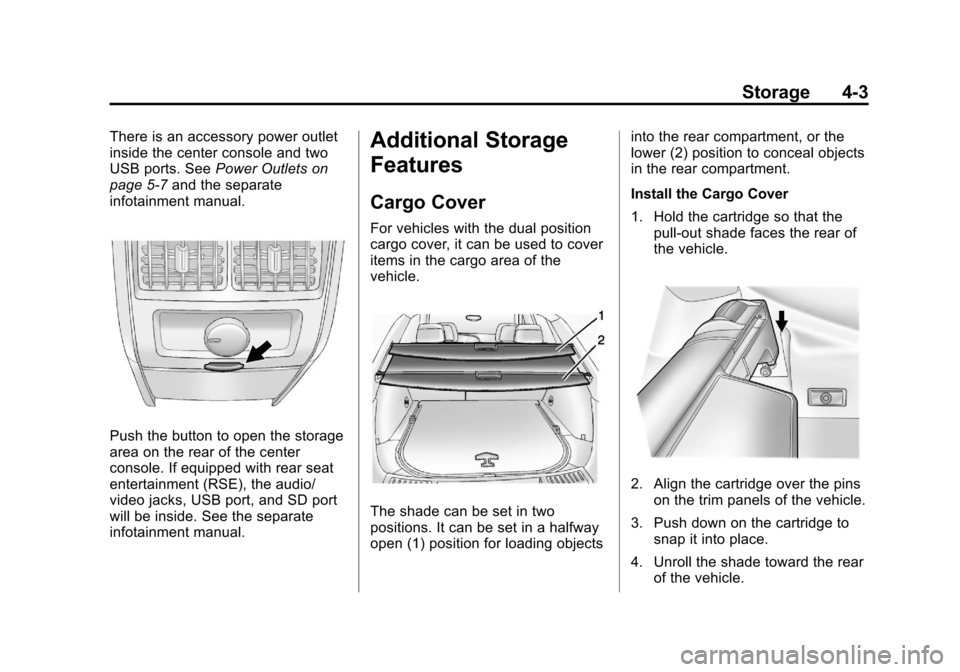
There is an accessory power outlet
inside the center console and two
USB ports. SeePower Outlets on
page 5‑7 and the separate
infotainment manual.
Push the button to open the storage
area on the rear of the center
console. If equipped with rear seat
entertainment (RSE), the audio/
video jacks, USB port, and SD port
will be inside. See the separate
infotainment manual.
Additional Storage
Features
Cargo Cover
For vehicles with the dual position
cargo cover, it can be used to cover
items in the cargo area of the
vehicle.
The shade can be set in two
positions. It can be set in a halfway
open (1) position for loading objects into the rear compartment, or the
lower (2) position to conceal objects
in the rear compartment.
Install the Cargo Cover
1. Hold the cartridge so that the
pull-out shade faces the rear of
the vehicle.
2. Align the cartridge over the pinson the trim panels of the vehicle.
3. Push down on the cartridge to snap it into place.
4. Unroll the shade toward the rear of the vehicle.
Page 116 of 432

Black plate (4,1)Cadillac SRX Owner Manual - 2013 - CRC - 11/9/12
4-4 Storage
5. Insert the shade pins in thechannels (3) on both sides.
6. Slide the shade to the lower (2) position, or the halfway open (1)
position.
Remove the Cargo Cover
1. Remove the cover from the channels and carefully roll it
back up.2. Slide the button on the top torelease the cartridge.
3. Pull up to remove the cartridge from the pins.
{WARNING
An unsecured cargo cover could
strike people in a sudden stop or
turn, or in a crash. Store the
cargo cover securely or remove it
from the vehicle.
Cargo Tie-Downs
For vehicles equipped with cargo
tie‐downs, the four tie-downs are
located in the rear compartment of
the vehicle. Use the tie-downs to
secure small loads.
Cargo Management
System
To open the cargo management
system, press the rear of the handle
to unlatch it and then lift the
handle up.
Page 121 of 432

Black plate (9,1)Cadillac SRX Owner Manual - 2013 - CRC - 11/9/12
Storage 4-9
Cargo Net
{WARNING
Do not stack items higher than
the upper end of the cargo net or
hang anything from the net. Avoid
items that have sharp edges or
that apply excessive force to the
net. If items are not properly
stored, damage to the net could
occur and items can be thrown
about the vehicle. You or others
could be injured. Always store
items behind the net.
For vehicles equipped with a cargo
net, it can be used to store light
loads, keeping them from falling
over or being thrown into the cabin
during heavy braking.
The net should not be overloaded or
used to store heavy loads. There are four openings in the
headliner: two located behind the
front seats and two behind the rear
seats.
1. Insert the top corners of the
cargo net into the large opening
in the headliner and secure by
sliding them into the small
opening.
2. The rear seatbacks should be folded down when the net is
installed in the headliner
opening located behind the front
seats.
3. Mount the cargo net to the rearseat tethers located on the back
of the folded down rear seats
and pull on the straps to tighten
the net.
4. When the net is installed in the headliner opening located
behind the rear seats, the rear
seatbacks should be upright.
Page 122 of 432

Black plate (10,1)Cadillac SRX Owner Manual - 2013 - CRC - 11/9/12
4-10 Storage
5. Mount the cargo net to the cargotie-downs located on the lower
side panels.6. Pull on the straps to tightenthe net.
Cargo Net Storage
The cargo net can be removed from
the vehicle and stored in the cargo
management system.
1. Disconnect the net from the roofopenings and the tethers.
2. Press the red button on the center of the net to fold it in half. 3. Roll up the cargo net, storing it
into the attached vinyl bag.
4. Open the cargo management system cover.
5. For vehicles with an inflator kit, store the cargo net in the
available space next to the kit.
Convenience Net
This vehicle may have a
convenience net located in the rear
of the vehicle. Attach it to the cargo
tie‐downs for storing small loads.
Do not use the net to store heavy
loads.
Page 123 of 432

Black plate (11,1)Cadillac SRX Owner Manual - 2013 - CRC - 11/9/12
Storage 4-11
Roof Rack System
{WARNING
If something is carried on top of
the vehicle that is longer or wider
than the roof rack—like paneling,
plywood, or a mattress —the
wind can catch it while the vehicle
is being driven. The item being
carried could be violently torn off,
and this could cause a collision
and damage the vehicle. Never
carry something longer or wider
than the roof rack on top of the
vehicle unless using a GM
certified accessory carrier.
For vehicles with a roof rack, the
rack can be used to load items.
For roof racks that do not have
crossrails included, GM Certified
crossrails can be purchased as an
accessory. See your dealer for
additional information. Notice:
Loading cargo on the
roof rack that weighs more than
100 kg (220 lbs) or hangs over the
rear or sides of the vehicle may
damage the vehicle. Load cargo
onto the roof rack so that it rests
evenly between the siderails,
making sure to fasten cargo
securely.
To prevent damage or loss of cargo
when driving, check to make sure
crossrails and cargo are securely fastened. Loading cargo on the roof
rack will make the vehicle’
s center
of gravity higher. Avoid high speeds,
sudden starts, sharp turns, sudden
braking, or abrupt maneuvers;
otherwise it may result in loss of
control. If driving for a long distance,
on rough roads, or at high speeds,
occasionally stop the vehicle to
make sure the cargo remains in its
place. Do not exceed the maximum
vehicle capacity when loading the
vehicle. For more information on
vehicle capacity and loading, see
Vehicle Load Limits on page 9‑10.