2013 CADILLAC SRX mirror
[x] Cancel search: mirrorPage 167 of 432

Black plate (43,1)Cadillac SRX Owner Manual - 2013 - CRC - 11/9/12
Instruments and Controls 5-43
Easy Exit Options
This allows the Easy Exit Options
feature to be turned on or off.
Press Easy Exit Options. Press to
select Off or On. Press
SBack to
go back to the last menu.
Chime Volume
This allows the selection of the
chime volume level.
Press Chime Volume. Press + or −
to adjust the volume between 0 and
63. Press
SBack to go back to the
last menu.
Reverse Tilt Mirror
When on, both the driver and
passenger mirrors will tilt downward
when the vehicle is shifted to
R (Reverse) to improve visibility of
the ground near the rear wheels.
They will return to their previous
driving position when the vehicle is
shifted out of R (Reverse) or the
ignition is turned to OFF. Press Reverse Tilt Mirror. Press
to select Off or On, On - Driver
and Passenger, On - Driver or
On - Passenger. Press
SBack to
go back to the last menu.
Language
Select the Language menu and the
following will be displayed:
.English
.French
.Spanish
Press to select the language.
Press
SBack to go back to the
last menu.
Lighting
Select the Lighting menu and the
following will be displayed:
.Vehicle Locator Lights
.Exit Lighting Vehicle Locator Lights
This feature will flash the exterior
lights when
Kon the RKE
transmitter is pressed to locate the
vehicle.
Press Vehicle Locator Lights. Press
to select Off or On. Press
SBack to
go back to the last menu.
Exit Lighting
This allows the selection of how
long the exterior lamps stay on
when leaving the vehicle when it is
dark outside.
Press Exit Lighting. Press to select
Off, 30 Seconds, 60 Seconds,
or 120 Seconds. Press
SBack to
go back to the last menu.
Power Door Locks
Select Power Door Locks and the
following will be displayed:
.Unlocked Door Anti Lock Out
.Auto Door Unlock
.Delayed Door Lock
Page 191 of 432

Black plate (5,1)Cadillac SRX Owner Manual - 2013 - CRC - 11/9/12
Climate Controls 8-5
Pressing this button cancels
automatic recirculation. Press AUTO
to return to automatic operation;
recirculation runs automatically as
needed.
Manual recirculation mode is not
available when in Defrost or Defog
modes.
Auto Defog:The climate control
system may have a sensor to
automatically detect high humidity
inside the vehicle. When high
humidity is detected, the climate
control system may adjust to
outside air supply and turn on the
air conditioner. If the climate control
system does not detect possible
window fogging, it returns to normal
operation. To turn Auto Defog off or
on, see “Climate and Air Quality”
under Vehicle Personalization on
page 5‑40.Rear Window Defogger
=(Rear Window Defogger):
Press to turn the rear window
defogger on or off.
The rear window defogger turns
off automatically after about
10 minutes. If turned on again, it
runs for about five minutes before
turning off. At higher vehicle
speeds, the rear window defogger
may stay on continuously.
The rear window defogger can
be set to automatic operation.
See “Climate and Air Quality”
under Vehicle Personalization on
page 5‑40. When Auto Rear Defog
is selected, the rear window
defogger turns on automatically
when the interior temperature is cold
and the outside temperature is
about 4°C (40°F) and below. The
auto rear defogger turns off
automatically after about
10 minutes. At higher vehicle
speeds, the rear window defogger
may stay on continuously. The heated outside mirrors turn on
when the rear window defogger
button is on and help to clear fog or
frost from the surface of the mirrors.
Notice:
Do not try to clear frost
or other material from the inside
of the front windshield and rear
window with a razor blade or
anything else that is sharp. This
may damage the rear window
defogger grid and affect the
radio's ability to pick up stations
clearly. The repairs would not be
covered by the vehicle warranty.
Driver and Passenger Heated and
Ventilated Seats (If Equipped):
Press
Jorzto heat the driver or
passenger seat cushion and
seatback.
Press
Cor{to ventilate the driver
or passenger seat. See Heated and
Ventilated Seats on page 1‑9.
Page 201 of 432

Black plate (5,1)Cadillac SRX Owner Manual - 2013 - CRC - 11/9/12
Driving and Operating 9-5
2. Turn the steering wheel aboutone-eighth of a turn, until the
right front tire contacts the
pavement edge.
3. Turn the steering wheel to go straight down the roadway.
Loss of Control
Skidding
There are three types of skids that
correspond to the vehicle's three
control systems:
.Braking Skid —wheels are not
rolling.
.Steering or Cornering
Skid —too much speed or
steering in a curve causes tires
to slip and lose cornering force.
.Acceleration Skid —too much
throttle causes the driving
wheels to spin. Defensive drivers avoid most skids
by taking reasonable care suited to
existing conditions, and by not
overdriving those conditions. But
skids are always possible.
If the vehicle starts to slide, follow
these suggestions:
.Ease your foot off the
accelerator pedal and steer the
way you want the vehicle to go.
The vehicle may straighten out.
Be ready for a second skid if it
occurs.
.Slow down and adjust your
driving according to weather
conditions. Stopping distance
can be longer and vehicle
control can be affected when
traction is reduced by water,
snow, ice, gravel, or other
material on the road. Learn to
recognize warning clues
—such
as enough water, ice, or packed
snow on the road to make a
mirrored surface —and slow
down when you have any doubt.
.Try to avoid sudden steering,
acceleration, or braking,
including reducing vehicle speed
by shifting to a lower gear. Any
sudden changes could cause
the tires to slide.
Remember: Antilock brakes help
avoid only the braking skid.
Page 203 of 432

Black plate (7,1)Cadillac SRX Owner Manual - 2013 - CRC - 11/9/12
Driving and Operating 9-7
Highway Hypnosis
Always be alert and pay attention to
your surroundings while driving.
If you become tired or sleepy, find a
safe place to park the vehicle
and rest.
Other driving tips include:
.Keep the vehicle well ventilated.
.Keep the interior
temperature cool.
.Keep your eyes moving—scan
the road ahead and to the sides.
.Check the rearview mirror and
vehicle instruments often.
Hill and Mountain Roads
Driving on steep hills or through
mountains is different than driving
on flat or rolling terrain. Tips for
driving in these conditions include:
.Keep the vehicle serviced and in
good shape.
.Check all fluid levels and brakes,
tires, cooling system, and
transmission.
.Shift to a lower gear when going
down steep or long hills.
{WARNING
If you do not shift down, the
brakes could get so hot that they
would not work well. You would
then have poor braking or even
none going down a hill. You could
crash. Shift down to let the engine
assist the brakes on a steep
downhill slope.
{WARNING
Coasting downhill in N (Neutral)
or with the ignition off is
dangerous. The brakes will have
to do all the work of slowing down
and they could get so hot that
they would not work well. You
would then have poor braking or
even none going down a hill.
Steering may also be affected
when ignition is off. You could
crash. Always have the engine
running and the vehicle in gear
when going downhill.
.Stay in your own lane. Do not
swing wide or cut across the
center of the road. Drive at
speeds that let you stay in your
own lane.
.Be alert on top of hills;
something could be in your lane
(stalled car, accident).
Page 204 of 432

Black plate (8,1)Cadillac SRX Owner Manual - 2013 - CRC - 11/9/12
9-8 Driving and Operating
.Pay attention to special road
signs (falling rocks area, winding
roads, long grades, passing or
no-passing zones) and take
appropriate action.
Winter Driving
Driving on Snow or Ice
Drive carefully when there is snow
or ice between the tires and the
road, creating less traction or grip.
Wet ice can occur at about 0°C
(32°F) when freezing rain begins to
fall, resulting in even less traction.
Avoid driving on wet ice or in
freezing rain until roads can be
treated with salt or sand.
Drive with caution, whatever the
condition. Accelerate gently so
traction is not lost. Accelerating too
quickly causes the wheels to spin
and makes the surface under the
tires slick, so there is even less
traction.Try not to break the fragile traction.
If you accelerate too fast, the drive
wheels will spin and polish the
surface under the tires even more.
The Antilock Brake System (ABS)
improves vehicle stability during
hard stops on slippery roads, but
apply the brakes sooner than when
on dry pavement.
Allow greater following distance on
any slippery road and watch for
slippery spots. Icy patches can
occur on otherwise clear roads in
shaded areas. The surface of a
curve or an overpass can remain icy
when the surrounding roads are
clear. Avoid sudden steering
maneuvers and braking while
on ice.
See
Antilock Brake System (ABS)
on page 9‑27.
Turn off cruise control, on slippery
surfaces.
Blizzard Conditions
Being stuck in snow can be a
serious situation. Stay with the
vehicle unless there is help nearby.
If possible, use Roadside Service.
See Roadside Service (Mexico) on
page 13‑7 orRoadside Service
(U.S. and Canada) on page 13‑11.
To get help and keep everyone in
the vehicle safe:
.Turn on the hazard warning
flashers.
.Tie a red cloth to an outside
mirror.
{WARNING
Snow can trap engine exhaust
under the vehicle. This may
cause exhaust gases to get
inside. Engine exhaust contains
carbon monoxide (CO) which
cannot be seen or smelled. It can
cause unconsciousness and even
death.
(Continued)
Page 241 of 432
Black plate (45,1)Cadillac SRX Owner Manual - 2013 - CRC - 11/9/12
Driving and Operating 9-45
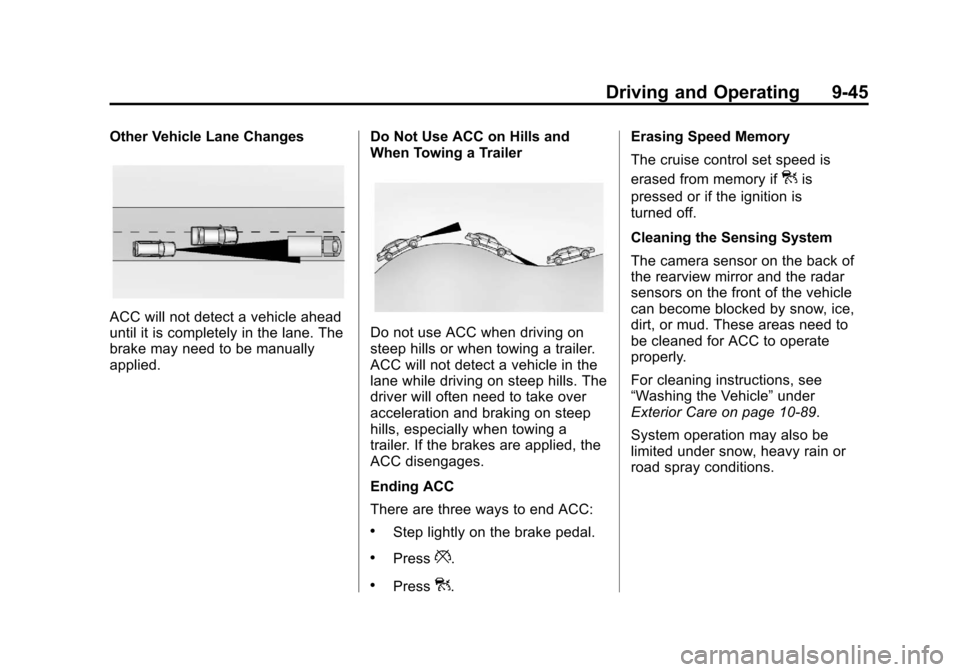
Other Vehicle Lane Changes
ACC will not detect a vehicle ahead
until it is completely in the lane. The
brake may need to be manually
applied.Do Not Use ACC on Hills and
When Towing a TrailerDo not use ACC when driving on
steep hills or when towing a trailer.
ACC will not detect a vehicle in the
lane while driving on steep hills. The
driver will often need to take over
acceleration and braking on steep
hills, especially when towing a
trailer. If the brakes are applied, the
ACC disengages.
Ending ACC
There are three ways to end ACC:
.Step lightly on the brake pedal.
.Press*.
.Press].Erasing Speed Memory
The cruise control set speed is
erased from memory if
]is
pressed or if the ignition is
turned off.
Cleaning the Sensing System
The camera sensor on the back of
the rearview mirror and the radar
sensors on the front of the vehicle
can become blocked by snow, ice,
dirt, or mud. These areas need to
be cleaned for ACC to operate
properly.
For cleaning instructions, see
“Washing the Vehicle” under
Exterior Care on page 10‑89.
System operation may also be
limited under snow, heavy rain or
road spray conditions.
Page 244 of 432

Black plate (48,1)Cadillac SRX Owner Manual - 2013 - CRC - 11/9/12
9-48 Driving and Operating
Use caution while changing lanes
when towing a trailer, as the RCTA
detection zones that extend out
from the back of the vehicle do not
move further back when a trailer is
towed.
With URPA, as the vehicle backs
up at speeds of less than 8 km/h
(5 mph), the sensors on the rear
bumper detect objects up to 2.5 m
(8 ft) behind the vehicle that are
within a zone 25 cm (10 in) high off
the ground and below bumper level.
{WARNING
The parking assist system does
not detect children, pedestrians,
bicyclists, animals, or objects
located below the bumper or that
are too close or too far from the
vehicle. It is not available at
speeds greater than 8 km/h
(5 mph). To prevent injury, death,
or vehicle damage, even with
parking assist, always check the(Continued)
WARNING (Continued)
area around the vehicle and
check all mirrors before moving
forward or backing.
The instrument cluster parking
assist display has bars that show
“distance to object”and object
location information for URPA, and
on some vehicles, for the Front
Parking Assist system. As the object
gets closer, more bars light up.
When an object is first detected in
the rear, one beep will be heard
from the rear, or both sides of the
Safety Alert Seat will pulse two
times. When an object is very close (<0.6 m (2 ft) in the vehicle rear,
or <0.3 m (1 ft) in the vehicle front),
five beeps will sound from the rear
or front, or both sides of the Safety
Alert Seat will pulse five times.
Beeps for Front Parking Assist are
higher pitched than for Rear Parking
Assist.
Vehicles with Adaptive Cruise
Control (ACC) have the Backing
Warning System, which is designed
to help avoid or reduce the harm
caused by backing crashes. The
system can warn of rear objects
when backing up at speeds greater
than 8 km/h (5 mph).
The Backing Warning System will
beep once from the rear when a
potential object threat is first
detected, or pulse twice on both
sides of the Safety Alert Seat. When
the system detects a potential
imminent crash, beeps will be heard
from the rear, or five pulses will be
felt on both sides of the Safety Alert
Seat. There may also be a brief,
sharp application of the brakes.
Page 245 of 432

Black plate (49,1)Cadillac SRX Owner Manual - 2013 - CRC - 11/9/12
Driving and Operating 9-49
{WARNING
The Backing Warning System
only operates at speeds greater
than 8 km/h (5 mph). It does not
detect children, pedestrians,
bicyclists, animals, or objects
below the bumper or that are too
close or too far from the vehicle.
In some situations, such as at
higher backing speeds, there may
not be enough time for the short,
sharp application of the vehicle
brake system to occur. To prevent
injury, death, or vehicle damage,
even with the Backing Warning
System, always check the area
around the vehicle and check all
mirrors before backing.
Vehicles with Adaptive Cruise
Control (ACC) have the Rear
Automatic Braking system, which is
designed to help avoid or reduce
the harm caused by backing
crashes. If the system detects the vehicle is backing too fast to avoid a
crash with a detected object, it may
automatically brake hard to a stop.
{WARNING
Rear Automatic Braking may not
avoid many types of backing
crashes. Do not wait for the
automatic braking to apply. This
system is not designed to replace
driver braking, but only acts when
the vehicle may not stop in time.
The system, in some situations or
environments, may not brake or
may not brake in time to avoid a
crash. It does not detect children,
pedestrians, bicyclists, animals,
or objects below the bumper or
that are too close or too far from
the vehicle. To prevent injury,
death, or vehicle damage, even
with Rear Automatic Braking,
always check the area around the
vehicle before and while backing.
Pressing the brake pedal after the
vehicle comes to a stop will release
the Rear Automatic Braking. If the
brake pedal is not pressed within
two seconds after the stop, the
electric parking brake is set. See
Parking Brake on page 9‑28
to
release the electric parking brake.
When it is safe, pressing the
accelerator pedal firmly at any time
will override the Rear Automatic
Braking.
{WARNING
There may be instances where
unexpected or undesired
automatic braking occurs. If this
happens, either press the brake
pedal or firmly press the
accelerator pedal to release the
brakes from the Rear Automatic
Braking system. Check the RVC
screen and check the area
around the vehicle before
proceeding.