2013 BMW 640I GRAN COUPE ad blue
[x] Cancel search: ad bluePage 226 of 305
OfficeVehicle equipment
All standard, country-specific and optional
equipment that is offered in the model series is
described in this chapter. Therefore, equipment
is also described that is not available in a vehicle,
e. g., because of the selected optional equip‐
ment or country variant. This also applies for
safety-related functions and systems.
At a glance
General information
Contacts, appointments, tasks, notes, text mes‐
sages, and e-mails from the mobile phone can
be displayed on the Control Display if the mobile
phone provides compatible support of these
functions and the necessary Bluetooth stand‐
ards.
Information about which mobile phones support
Office functions can be found at
www.bmwusa.com/bluetooth. A limited number
of compatible mobile phones is available for Of‐
fice.
Contents are only displayed in full length when
the vehicle is stationary.
The mobile phone has read-access only.
Do not use Office while driving
To avoid becoming distracted and posing
an unnecessary hazard to your vehicle's occu‐
pants and to other road users, never attempt to
use the controls or enter information unless traf‐
fic and road conditions allow this.◀
Requirements▷A suitable mobile phone is paired with the
vehicle and connected. In some mobile
phones, data access must be confirmed on
the mobile phone.▷The time, time zone, and date, refer to
page 79, are correctly set on the Control
Display and on the mobile phone to correctly
display appointments, for example.▷Office is activated, refer to page 215.
Updating
Data are updated every time the mobile phone
is connected to the vehicle. Appointment en‐
tries, tasks, notes and reminders can be updated
separately.
1."Office"2."Current office", "Calendar", "Tasks",
"Notes" or "Reminders"3.Open "Options".4."Update data"
Cell phone data are transmitted again to the
vehicle.
Office information
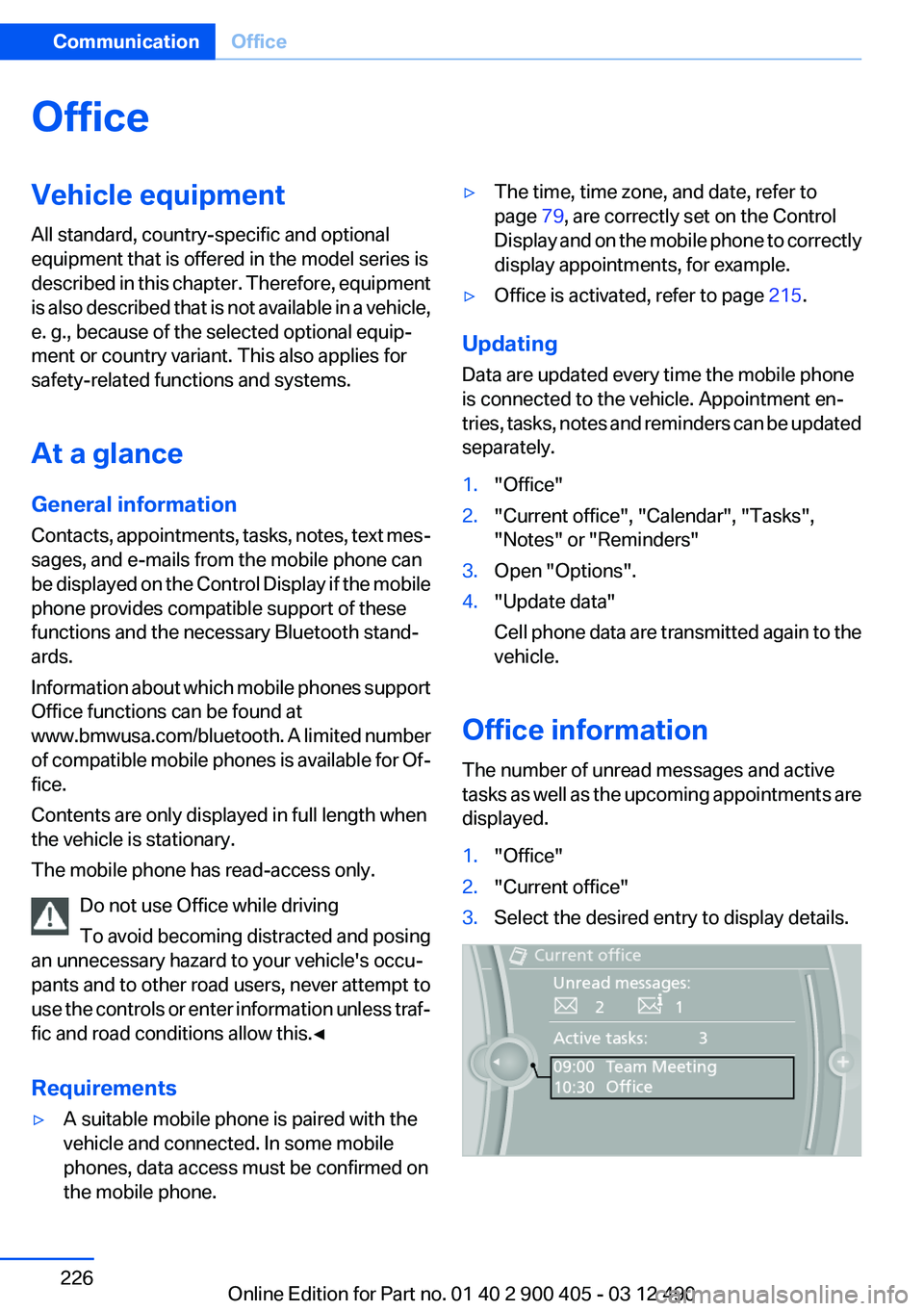
The number of unread messages and active
tasks as well as the upcoming appointments are
displayed.
1."Office"2."Current office"3.Select the desired entry to display details.Seite 226CommunicationOffice226
Online Edition for Part no. 01 40 2 900 405 - 03 12 490
Page 229 of 305
tures depends on the mobile phone. The mobile
phone must support this function.1."Telephone"2."Bluetooth® (phone)"3."Options"4."Configure Bluetooth®"5."Show images"
Display of all contact pictures is activated or de‐
activated.
Exporting/importing contacts
Contacts can be exported and imported via the
Personal Profile, refer to page 31. The contacts
stored in the vehicle are exported, but not those
from the mobile phone.
Deleting contacts
Only contacts that are stored in the vehicle are
deleted. The contacts on the mobile phone can‐
not be deleted.
1."Office"2."Contacts"3.Highlight the contact.4.Open "Options".5."Delete contact"or "Delete all contacts".6.If necessary "Yes"
Messages
General information
Whether or not text messages and e-mails from
the mobile phone are displayed depends on
whether transmission from the mobile phone to
the vehicle is supported. Text messages and e-
mails may not be supported by the service pro‐
vider, or the function may need to be enabled
separately. After the mobile phone is first paired,
transmission may take several minutes. Mes‐
sages are only displayed in full length when the
vehicle is stationary. Messages from the addi‐
tional telephone are not transmitted.
Displaying messages1."Office"2."Messages"
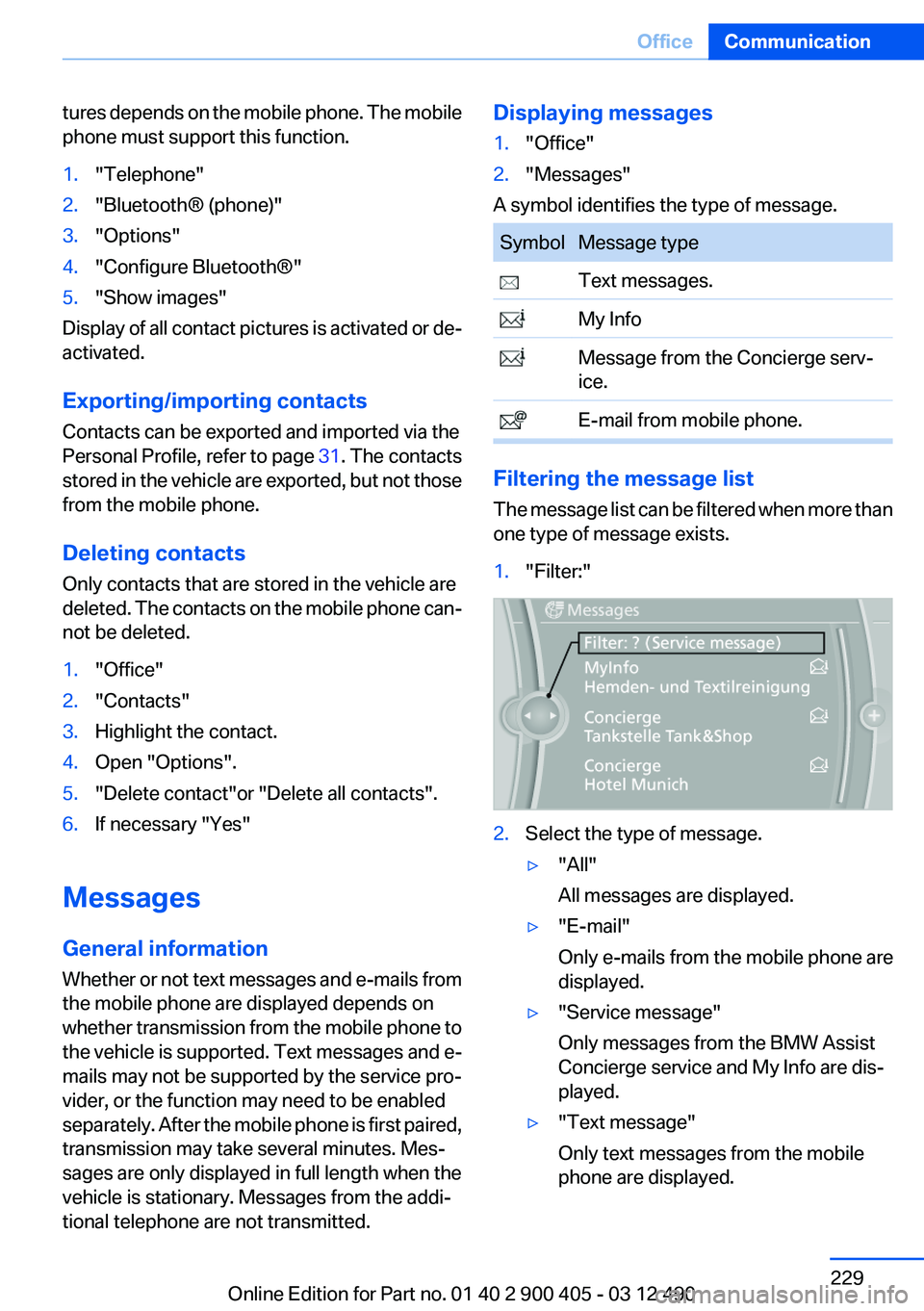
A symbol identifies the type of message.
SymbolMessage type Text messages. My Info Message from the Concierge serv‐
ice. E-mail from mobile phone.
Filtering the message list
The message list can be filtered when more than
one type of message exists.
1."Filter:"2.Select the type of message.▷"All"
All messages are displayed.▷"E-mail"
Only e-mails from the mobile phone are
displayed.▷"Service message"
Only messages from the BMW Assist
Concierge service and My Info are dis‐
played.▷"Text message"
Only text messages from the mobile
phone are displayed.Seite 229OfficeCommunication229
Online Edition for Part no. 01 40 2 900 405 - 03 12 490
Page 242 of 305
software applications are displayed on the Con‐
trol Display.
Operation can be performed via iDrive.
Requirements▷The mobile phone is suitable.▷The cell phone operating system supports
the software applications of Apps.▷Software applications are installed on the
cell phone and ready to use.▷Corresponding mobile wireless contract.
Any additionally incurred costs are not a part
of Apps.▷Use only BMW approved software applica‐
tions; otherwise, it may result in malfunc‐
tions.
Information about suitable cell phones, available
software applications and their installation can
be found at www.bmw.com/connectivity or at
the service center.
Create the entries.
Make entries only when traffic and road
conditions allow. Otherwise, the vehicle occu‐
pants and other road users may be put in danger
because of the distraction from driving.
For reasons of safety, some software applica‐
tions are usable only while the vehicle is station‐
ary.◀
Use apps
1.Connect the cell phone via the snap-in
adapter or via the USB audio interface.2."ConnectedDrive"3.Select the desired software application.
Displaying status
Information about the currently available soft‐
ware applications can be displayed.
1."ConnectedDrive"2."BMW apps"PlugIn
Selected functions of the cell phone are dis‐
played on the Control Display. Operation can be
performed via iDrive.1.Connect cell phone via the snap-in adapter.2."ConnectedDrive"3."PlugIn"4."Activate PlugIn"5.Navigate to the displayed functions via the
controller and select, for example, a desired
category or track.
Press button to switch within the cell
phone functions to a higher level or back.
Press button twice to switch back to the
main menu.
Notes
▷The ranges of Apps that can be displayed on
the Control Display depend on the range of
installed software applications on the cell
phone.▷The data transmission of the software ap‐
plications from the cell phone to the vehicle
can last some time. Some software applica‐
tions depend on the speed of the available
Internet connection of the cell phone.▷Some cell phones cannot simultaneously
use Apps and the Bluetooth hands-free sys‐
tem.
If necessary, restart the software application
on the cell phone after a phone conversa‐
tion.Seite 242CommunicationConnectedDrive242
Online Edition for Part no. 01 40 2 900 405 - 03 12 490
Page 291 of 305
FunctionCommandOpen the CD and Multimedia menus.›C D and multimedia‹CD and DVD.›C D‹Select a DVD.›D V D ...‹ e.g. DVD 3Display the entertainment details on a split
screen.›Entertainment details‹
Music collection
FunctionCommandSearch for music, open a menu.›Music search‹Open the current playback.›Current playback‹Open the music collection.›Music collection‹Play back the music collection.›Music collection on‹Play back the most frequently played tracks.›Top fifty‹
External devices
FunctionCommandOpen the external devices.›External devices‹Open the Bluetooth devices.›Bluetooth‹AUX at front.›AUX front‹
Tone
FunctionCommandOpen the tone settings.›Tone‹Seite 291Short commands of the voice activation systemReference291
Online Edition for Part no. 01 40 2 900 405 - 03 12 490
Page 292 of 305
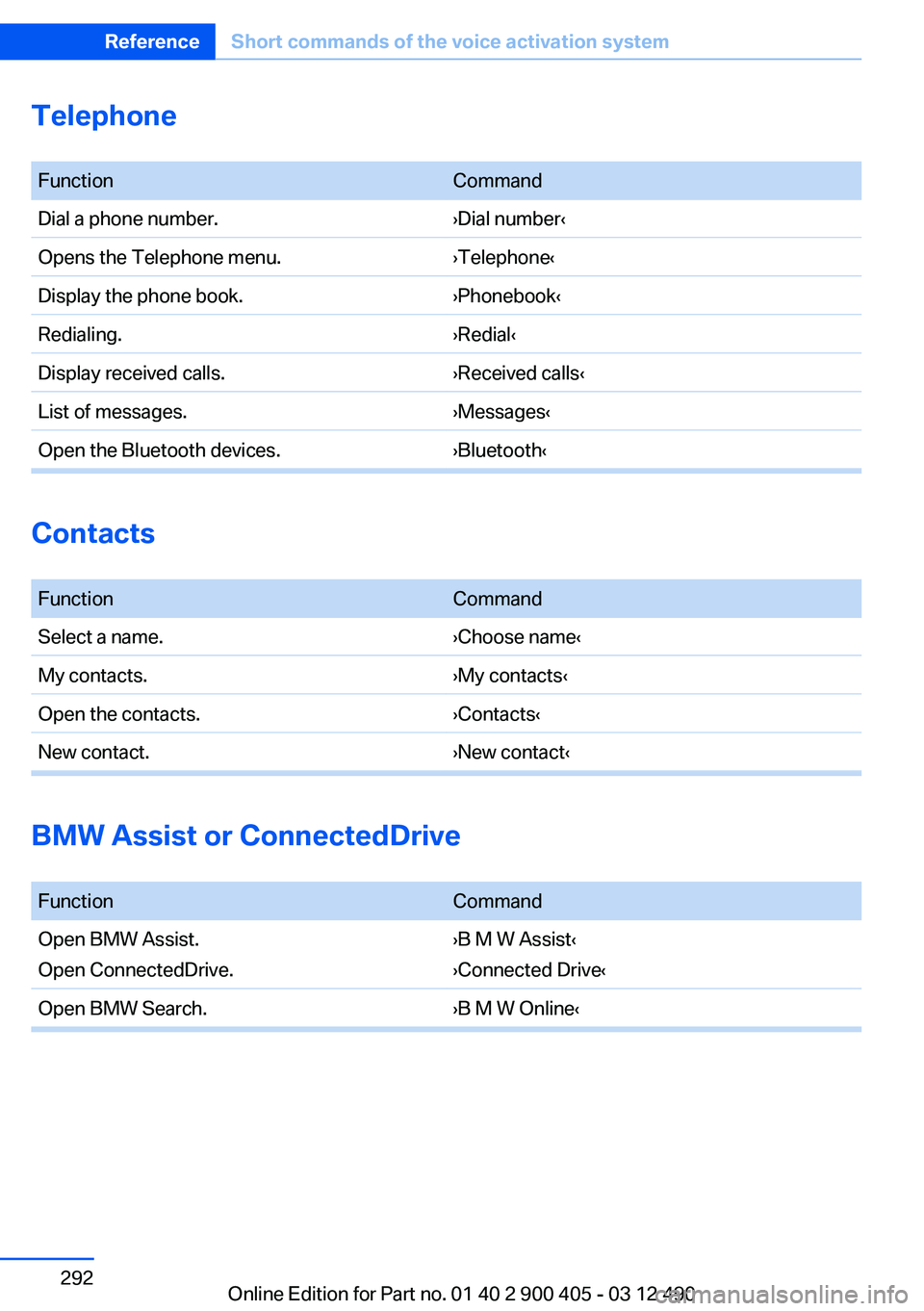
Telephone
FunctionCommandDial a phone number.›Dial number‹Opens the Telephone menu.›Telephone‹Display the phone book.›Phonebook‹Redialing.›Redial‹Display received calls.›Received calls‹List of messages.›Messages‹Open the Bluetooth devices.›Bluetooth‹
Contacts
FunctionCommandSelect a name.›Choose name‹My contacts.›My contacts‹Open the contacts.›Contacts‹New contact.›New contact‹
BMW Assist or ConnectedDrive
FunctionCommandOpen BMW Assist.
Open ConnectedDrive.›B M W Assist‹
›Connected Drive‹Open BMW Search.›B M W Online‹Seite 292ReferenceShort commands of the voice activation system292
Online Edition for Part no. 01 40 2 900 405 - 03 12 490
Page 294 of 305
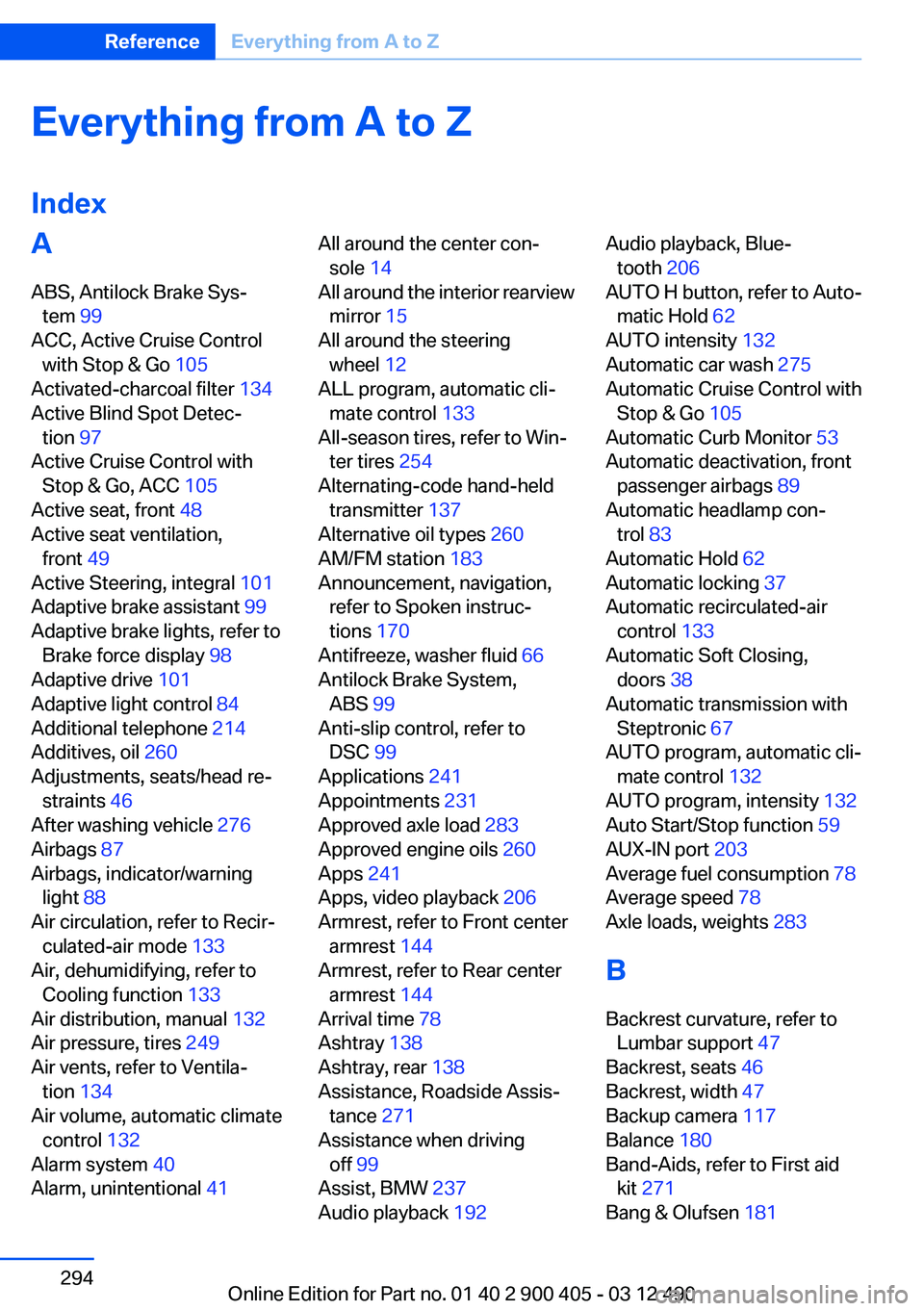
Everything from A to Z
IndexA
ABS, Antilock Brake Sys‐ tem 99
ACC, Active Cruise Control with Stop & Go 105
Activated-charcoal filter 134
Active Blind Spot Detec‐ tion 97
Active Cruise Control with Stop & Go, ACC 105
Active seat, front 48
Active seat ventilation, front 49
Active Steering, integral 101
Adaptive brake assistant 99
Adaptive brake lights, refer to Brake force display 98
Adaptive drive 101
Adaptive light control 84
Additional telephone 214
Additives, oil 260
Adjustments, seats/head re‐ straints 46
After washing vehicle 276
Airbags 87
Airbags, indicator/warning light 88
Air circulation, refer to Recir‐ culated-air mode 133
Air, dehumidifying, refer to Cooling function 133
Air distribution, manual 132
Air pressure, tires 249
Air vents, refer to Ventila‐ tion 134
Air volume, automatic climate control 132
Alarm system 40
Alarm, unintentional 41 All around the center con‐
sole 14
All around the interior rearview mirror 15
All around the steering wheel 12
ALL program, automatic cli‐ mate control 133
All-season tires, refer to Win‐ ter tires 254
Alternating-code hand-held transmitter 137
Alternative oil types 260
AM/FM station 183
Announcement, navigation, refer to Spoken instruc‐
tions 170
Antifreeze, washer fluid 66
Antilock Brake System, ABS 99
Anti-slip control, refer to DSC 99
Applications 241
Appointments 231
Approved axle load 283
Approved engine oils 260
Apps 241
Apps, video playback 206
Armrest, refer to Front center armrest 144
Armrest, refer to Rear center armrest 144
Arrival time 78
Ashtray 138
Ashtray, rear 138
Assistance, Roadside Assis‐ tance 271
Assistance when driving off 99
Assist, BMW 237
Audio playback 192 Audio playback, Blue‐
tooth 206
AUTO H button, refer to Auto‐ matic Hold 62
AUTO intensity 132
Automatic car wash 275
Automatic Cruise Control with Stop & Go 105
Automatic Curb Monitor 53
Automatic deactivation, front passenger airbags 89
Automatic headlamp con‐ trol 83
Automatic Hold 62
Automatic locking 37
Automatic recirculated-air control 133
Automatic Soft Closing, doors 38
Automatic transmission with Steptronic 67
AUTO program, automatic cli‐ mate control 132
AUTO program, intensity 132
Auto Start/Stop function 59
AUX-IN port 203
Average fuel consumption 78
Average speed 78
Axle loads, weights 283
B
Backrest curvature, refer to Lumbar support 47
Backrest, seats 46
Backrest, width 47
Backup camera 117
Balance 180
Band-Aids, refer to First aid kit 271
Bang & Olufsen 181 Seite 294ReferenceEverything from A to Z294
Online Edition for Part no. 01 40 2 900 405 - 03 12 490
Page 295 of 305
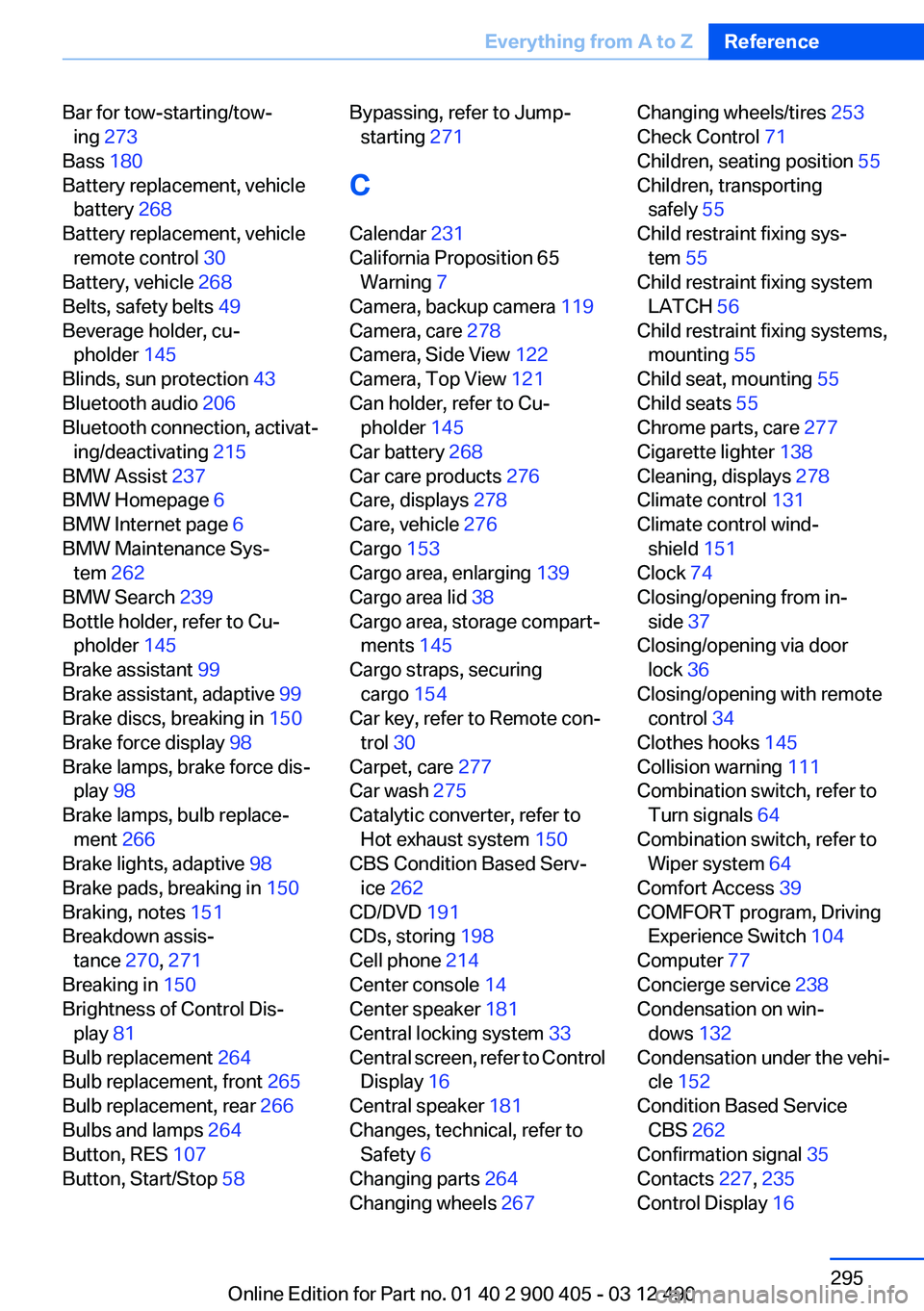
Bar for tow-starting/tow‐ing 273
Bass 180
Battery replacement, vehicle battery 268
Battery replacement, vehicle remote control 30
Battery, vehicle 268
Belts, safety belts 49
Beverage holder, cu‐ pholder 145
Blinds, sun protection 43
Bluetooth audio 206
Bluetooth connection, activat‐ ing/deactivating 215
BMW Assist 237
BMW Homepage 6
BMW Internet page 6
BMW Maintenance Sys‐ tem 262
BMW Search 239
Bottle holder, refer to Cu‐ pholder 145
Brake assistant 99
Brake assistant, adaptive 99
Brake discs, breaking in 150
Brake force display 98
Brake lamps, brake force dis‐ play 98
Brake lamps, bulb replace‐ ment 266
Brake lights, adaptive 98
Brake pads, breaking in 150
Braking, notes 151
Breakdown assis‐ tance 270, 271
Breaking in 150
Brightness of Control Dis‐ play 81
Bulb replacement 264
Bulb replacement, front 265
Bulb replacement, rear 266
Bulbs and lamps 264
Button, RES 107
Button, Start/Stop 58 Bypassing, refer to Jump-
starting 271
C
Calendar 231
California Proposition 65 Warning 7
Camera, backup camera 119
Camera, care 278
Camera, Side View 122
Camera, Top View 121
Can holder, refer to Cu‐ pholder 145
Car battery 268
Car care products 276
Care, displays 278
Care, vehicle 276
Cargo 153
Cargo area, enlarging 139
Cargo area lid 38
Cargo area, storage compart‐ ments 145
Cargo straps, securing cargo 154
Car key, refer to Remote con‐ trol 30
Carpet, care 277
Car wash 275
Catalytic converter, refer to Hot exhaust system 150
CBS Condition Based Serv‐ ice 262
CD/DVD 191
CDs, storing 198
Cell phone 214
Center console 14
Center speaker 181
Central locking system 33
Central screen, refer to Control Display 16
Central speaker 181
Changes, technical, refer to Safety 6
Changing parts 264
Changing wheels 267 Changing wheels/tires 253
Check Control 71
Children, seating position 55
Children, transporting safely 55
Child restraint fixing sys‐ tem 55
Child restraint fixing system LATCH 56
Child restraint fixing systems, mounting 55
Child seat, mounting 55
Child seats 55
Chrome parts, care 277
Cigarette lighter 138
Cleaning, displays 278
Climate control 131
Climate control wind‐ shield 151
Clock 74
Closing/opening from in‐ side 37
Closing/opening via door lock 36
Closing/opening with remote control 34
Clothes hooks 145
Collision warning 111
Combination switch, refer to Turn signals 64
Combination switch, refer to Wiper system 64
Comfort Access 39
COMFORT program, Driving Experience Switch 104
Computer 77
Concierge service 238
Condensation on win‐ dows 132
Condensation under the vehi‐ cle 152
Condition Based Service CBS 262
Confirmation signal 35
Contacts 227, 235
Control Display 16 Seite 295Everything from A to ZReference295
Online Edition for Part no. 01 40 2 900 405 - 03 12 490