2013 AUDI S8 belt
[x] Cancel search: beltPage 66 of 318

64 Seats and storage
Head restraints
Adjusting the head restraints
Head restraints that are adjusted according
to body size, along with the safety belt, offer
effective protection .
Fig. 6 1 Comfort head restraints: adjusting the s ide
bolsters
F ig. 62 Oute r rear seat: adjus ting the head restra int
Ad just the head restraint so the upper edge is
as even as possible with the top of your head.
If that is not possible, try to adjust the head
restra int so that it is as close to this posit ion
as possible ¢
page 64.
Adjusting front he ad restr aints
• To adjust the height of the front head re
stra ints, press/push the button©
Q page 58, fig. 54 up/down Q _&.
• Vehicles with recl ining rear seat : G rasp the
s ides of the passenger's head restra int w ith
bot h hands and slide it upwa rd/downward .
Adjusting re ar he ad restraints (adjustable
head restraints )
The center rear head restra int is not adjusta
b le. •
Grasp the sides of the head restraint with
both hands and slide it upward until you feel
it click into place ¢
A_.
• To lower the head restraints, press button -
small arrow -
Q fig. 62 and slide the head re
straint all the way down .
Adju sting the side bolster s*
• To adjust the side bolsters *, press them into
the desired position ¢
fig. 61.
Refer to Q page 138, Proper adjustment of
head restraints
for guidelines on how to ad
just the height of the front head restraints to
suit the occupant's body size.
A WARNING
--
-All seats are equipped with head re
straints. Driving without head restraints
or w ith head restra ints that are not prop
erly adjusted increases the risk of serious
or fatal neck i nju ry dramatically.
- Read and heed all WARNINGS
¢ page 138, Proper adjustment of head
restrain ts .
- Vehicles w ith a pass through in the cen
ter console have seating for four. The long cen ter console between the two
rear seats is
not a seat ing posi tion.
Therefore, a sa fe ty belt is not provided .
((0 Tips
- To prevent the head rest raints from run
ning into the headliner, t hey re tract au
toma tically when moving the seat for
wa rd or upward .
- Correctly adj usted head restra in ts and
safety belts are an extremely effective
combination of safety features .
Page 67 of 318

Seat memory
Description
Applies to vehicles: with memory function
The memo ry function a llows you to quick ly
and eas ily s to re and re ca ll persona l seating
p rofi les for the driver, fron t passenger an d
ou ter rea r seats* . The memory f unction is op
erated throug h the master key and the memo
ry buttons in the driver 's/front passenger's
doors and the rear doors*.
The drive r's seating profi le is stored and as
signed to t he master key each t ime the vehicle
i s locked. The seating p rofile is recalled auto
mat ica lly when the veh icle is unlocked. If two
Remote control
master key
Driver
Seat X
Head restraint X
Steeri ng w heel* X
Safety belt * X
Both exterior rear-X
view mirrors *
There are two addi tio nal buttons in the re ar
doors * that can be use d to reca ll two stored
seating profi les
¢page 66.
Remote control key
Appl ies to vehicles: with memory function
To assign the d river 's seat settings to the re
mote contro l key when locking the vehicle, the
function must be switc hed on.
~ Se lect: I CAR I f u nct ion button > Car systems
control button > Vehicle setting s > Seats >
Driver seat > Remote control key > On.
(D Tips
If you do n ot want another driver's set
tings to be assigned to the remote control
key, switch off the memory f unction using
the MMI o r the
IOF FI button¢ page 66.
Seats and storage 65
people use one vehicle, it is recommended
t h at each perso n always use s "their own"
mas ter key.
T wo sea ting profiles can be stored in each of
the d river 's/front passenger's doors and one
seat ing p rofile in ea ch of t he rear doors*.
Once stored , these sea ting pro files c an be re
ca lled at any time.
T he following se tt ings a re stored:
Memory button
Driver Front passenger Outer rear seats*
X X X
X X
X
X X
X
Page 72 of 318
70 Seats and storage
Pass-through with ski
sack
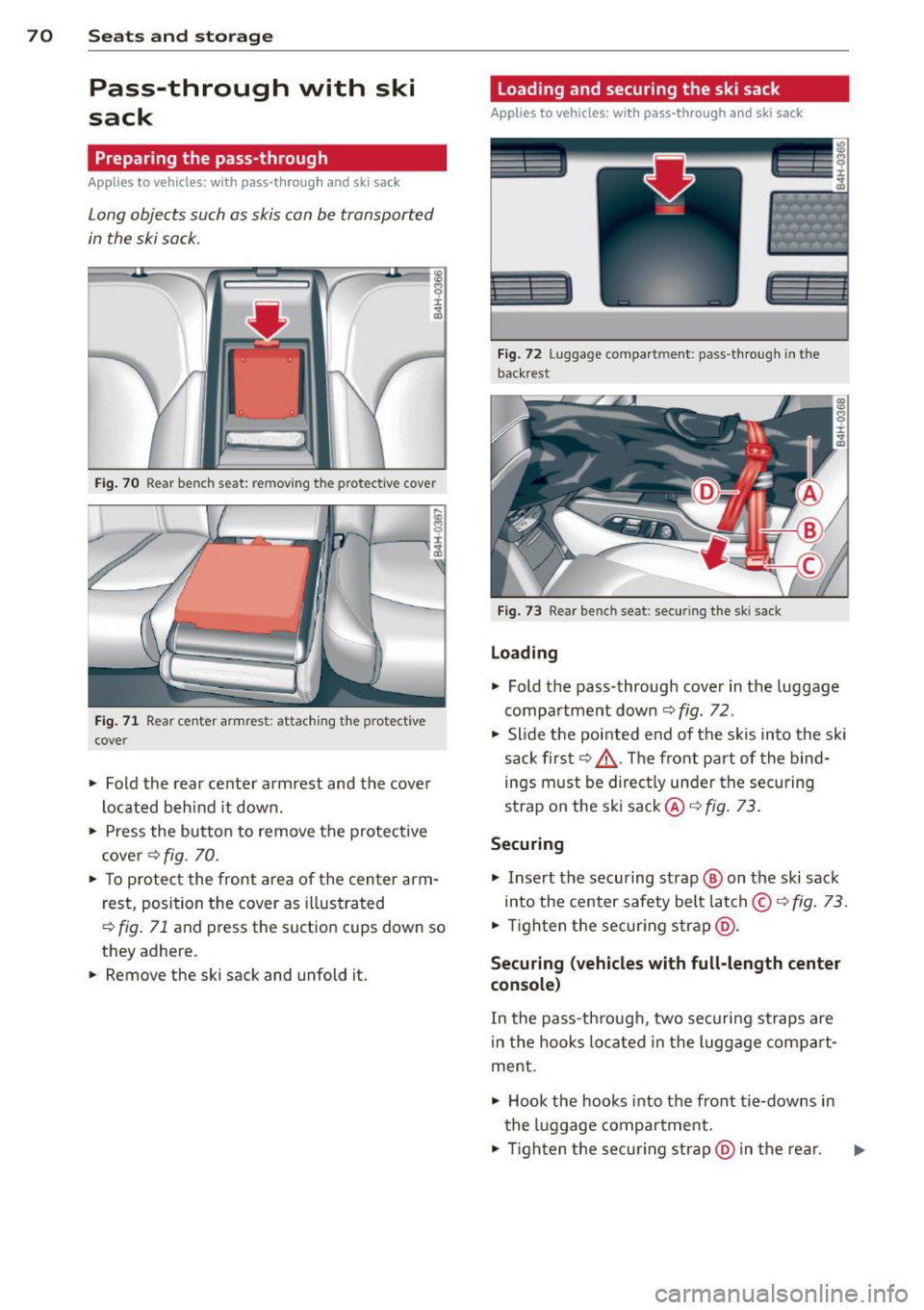
Preparing the pass-through
Appl ies to vehicles: with pass-through and ski sack
Long objects such as skis con be transported
in the ski sock.
Fig. 70 Rear benc h seat: removing t he protective cover
Fig . 71 Rear center armres t: attaching the protective
cover
.. Fold the rear center arm rest and the cover
located beh ind it down .
.,. Press the butto n to remove the p rotective
c ove r¢
fig . 70.
.. To p rotect the front area of the center arm
r est, position the cover as illustrated
,::;, fig. 71 and press the suct io n cups down so
they adhere.
.. Remove the ski sack and unfold it.
Loading and securing the ski sack
Applies to vehicles: with pass -through and ski sack
--~ --
--· ---
Fig. 72 Luggage compartmen t: pass -th roug h in th e
back rest
F ig. 73 Rear bench seat: secu ring the sk i sack
Loading
.,. Fold the pass-through cover in the luggage
compa rtment down ¢
fig. 72.
.,. Slide the pointed end of the s kis into the sk i
sack first¢ &. The front par t of the bind
ings must be direc tly under the securing
strap on the ski sack@¢
fig. 73.
Securing
.,. Insert the securing strap@ on the ski sack
into the center safety belt latch © ¢
fig. 73 .
.,. Tigh ten t he secur ing strap @.
Securing (vehicles with full-length center
console )
In the pass-th rough, two securi ng straps are
i n the hooks lo cated in the lugg age compa rt·
ment .
.,. Hook the hooks into the front tie-downs in
the luggage compartment .
.,. Tigh ten the secur ing str ap @ in the rear .
Page 73 of 318

A WARNING
-The ski sack is intended only for the
transportation of skis and other light ob
jects. To reduce the risk of serious per
sonal injury, never transport heavy or pointed objects in the ski sack.
- When brak ing rapidly or during an acci
dent, the load could be displaced and
cause injury to occupants.
- Sharp edges on the load must be covered
for protect ion. Always fasten the belt
t ightly around the sack and its contents
~fig. 73.
-For safety reasons, do not transport
more than two pairs of skis in the ski
sack.
- You must secure the ski sack with the strap after loading.
- Make sure all objects that you are trans
porting in the pass-th rough a re secured.
Otherwise they cou ld slide around during
s u dden braking maneuvers and cause in
jury.
(D Tips
- Never stow the sk i sack away when it is
still wet or damp ( for example, snow
melting from skis). Allow it to dry com
plete ly before stowing it away.
- Position skis in the ski sack w ith the
pointed ends facing the front and ski
po les w ith the pointed ends facing the
rear.
S ea ts a nd s to rage 71
Roof rack
Description and mounting locations
Additional cargo can be carried with a roof
luggage rack.
Fi g. 74 Roof r ack attac hmen t po ints
.,. Always read and follow the instructions pro
vided by the roof rack man ufacturer when
installing the roof rack system .
If luggage or cargo is to be carr ied on the
roof, you must observe the following:
- To enhance the vehicle's streamlined design,
rai n gutters have been molded into the roof.
It is not poss ible to use normal roof racks.
On ly install a roof rack specifically designed
for your model AB. Contact the nearest Audi
dea ler for information on approved modular
roof racks for your vehicle.
- On ly use roof racks approved for your vehi
cle. These approved roof racks are the basis
for a complete roof rack system. Additional
attachments or carrier systems are needed
to transport luggage and sports equipment.
We recommend using roof racks from the
Audi orig inal accessories program.
- When installing the roof rack, make sure it
is only mou nted on the designated locations
on the roof ~
fig. 74 .
-We recommend that you keep the installa
tion instructions for your roof rack system
together w ith your Owner's literature in the
vehicle.
When sh ould the roof rack be remo ved?
-Before going through an automatic car wash
(it is best to ask the car wash operator for
adv ice)
..
Page 85 of 318

the stored position as soon as you switch on
the ignition.
Starting and stopping
the engine
Starting the engine
This button switches on the ignition and
starts the engine.
Fig. 85 Center console: S TART ENGINE S TOP b utton
Switching the ignition on/off
• To switch the ignition on/off, press the
I START ENGINE STOPI button. Do not press
the brake pedal while doing this.
Starting the engine
• Press the brake pedal QA .
• Press the !START ENGINE STOPI button
Q fig . 85. The engine will start.
If the engine does not start immediately, the
starting process is automatically stopped af
ter a short time. Repeat starting procedure.
Start-Stop-System*:
When you stop and the Start -Stop -System*
turns off the engine, the ignition still remains
switched on.
- If you press the !S TART ENGINE STOPI but
ton now, the ignition will be switched off.
The engine will not start
¢page 89.
- Make sure that the ignit ion is switched off
before exiting the vehicle.
Switching the ignition/engine off
automatically*
The follow ing applies to vehicles with Start
Stop-System*: to prevent the battery from
On the road 83
draining, the ignition and the engine will
switch off automatically under the following
cond itions:
- The vehicle has already been driven.
- The driver's door is opened.
- The driver's seat belt is removed .
- The brake pedal is not pressed down.
- The vehicle is stationary.
In this case, the activated low beam will be re
placed by the side marker lights. The side
marker lights will switch off after a certain pe
riod of time or when you lock the vehicle .
A WARNING
-Never allow the engine to run in conf ined
spaces -danger of asphyx iation.
- Never turn off the engine until the vehi
cle has come to a complete stop.
- The brake booster and power steering
only work when the engine is running. If
the engine is off, you have to use more
force when steering or braking. Because
you cannot steer and brake as you usual
ly would, this could lead to crashes and
serio us injuries.
(D Note
- Avo id h igh engine rpm, full throttle and
heavy engine loads until the engine has
reached operating temperature - other
w ise you risk engine damage.
- The engine cannot be started by pushing
or towing the vehicle.
@ Tips
-After a co ld engine is started, there may
be a brief period of inc reased noise be
cause oil pressure must first build up in
the hydraulic valve adjusters. This is nor
ma l and not a cause for concern.
-If you leave the vehicle with the ignition
switched on, the ignition w ill switch off
after a certain period of time. Please
note that electrical equipment such as
exterior lights will sw itch off as well
when that happens.
Page 89 of 318

When stopping at a traffic signal or stopp ing
i n city traffic, the parking brake can be ap
p lied . The vehicle does not have to be held
with the footbrake. The park ing brake elimi
nates the tendency to creep with a drive range
engaged. As soon as you dr ive off as usual,
the park ing brake is released automatically
and the vehicle starts to move .
Starting on slopes
When starting on inclines, the start ing ass ist
prevents the vehicle from unintentionally roll
i ng back. The braking force of the parking
brake is not released until sufficient dr iv ing
force has been bu ilt up at the whee ls.
O') Tips
For safety reasons, the park ing brake is re
leased automatically only when the dr iv
er's safety belt is engaged in the buck le.
Starting off with a trailer
To prevent rolling back unintentionally on an
incline, do the following:
.. Keep the switch(®) pulled and depress the
acce lerator. The park ing brake stays applied
and prevents the vehicle from rolling back
ward .
.. You can release t he sw itch C®l once you are
s u re that yo u are develop ing eno ugh f or
wa rd momentum at the wheels as you de
press the accelerator.
D epending on the weight of the r ig (veh icle
and trai le r) and the severi ty of the in cli ne, you
may roll backwards as you sta rt. Yo u can pre
ve nt roll ing backwards by holding the parking
brake switch C®) p ulled out and acce lerating -
just as you would when starting on a hill with
a conventional hand brake.
On th e ro ad 87
Emergency braking
In the event that the conventional brake sys
tem fails or locks .
.. In an emergency, pull the sw itch(®) and
cont inue to pull it to s low your ve hicle down
w ith the park ing brake.
.. As soon as you release the switch C®> or ac-
celerate, the b ra ki ng process stops.
If you pu ll the switch C®> and hold it above a
speed of about 5 mph (8 km/h), the emergen
cy brak ing f unction is initia ted . T he ve hicle is
braked at all fou r whee ls by activating the hy
d raulic brake sys tem. The brake pe rform ance
is simila r to making an emergency stop~ .&..
In order not to act ivate the emergency brak
ing by mis take, an audib le wa rn ing tone (buz
z er) so unds whe n the switch(®) is pulled . As
soon as the sw itch<®> is re leased, or the accel
erator peda l is depressed, emergency braking
stops.
_& WARNING
Emergency braking should only be used in
an emergency, when the normal foot bra ke
has fa iled or the brake pedal is obstructed.
Using the parking brake to pe rform emer
gency b rak ing will slow your vehicle down
as if you had made a full bra ke application .
T he laws of physics cannot be su spended
even wi th ESC and i ts asso ciated compo
nents (ABS, ASR , ED L) . In corners and
when road or weather con ditions are bad,
a full brake application can ca use the vehi
cle to sk id or the rear end to break away -
risking an accident.
Start-Stop-System
Description
Applies to veh icles: w ith Start -Stop-System
The Sta rt -Stop -Sys tem can help incre ase fuel
e conomy and redu ce CO2 emissions.
In the Start-S top-mode, the engine shuts off
a utomat ically when the veh icle is stopped,
s u ch a s at a t raff ic lig ht. The igni tion rem ains
lill-
Page 111 of 318

Audi drive select Driving settings
Introduction
Aud i drive select makes it possible to experi
ence different types of vehicle settings in one
veh icle. The driver can select th ree
Comfort,
Auto
and Dynamic modes in the MMI to
switch between a sporty and a comfortable
driving mode.
You can also adjust the setting according to
your preferences in the
individual mode. For
examp le, you can combine settings such as a
sporty engine tuning with comfortab le steer
ing.
A WARNING
Improper use of the Audi drive select can
cause collisions, other acc idents and seri
ous personal injury .
Description
The vehicle setup in each mode depends on
the vehicle's features. The engine, transm is
sion, steering, reve rsible safety belt tension
ers and adaptive air suspension are always in
volved.
Engine and transmission
Depending on the mode, the engine and the
tra nsmission respond quicker or in a more bal
anced manne r to acce lerator pedal move
ments. In the sporty dynamic mode, the
transmission shifts at higher RPMs .
Air suspension
The adaptive air suspension/adaptive air sus
pension sport*
( Air suspension in the MMI) is
an electronically con trolled air suspension and
damping sys tem. They are adjusted depend
ing on the selected driving mode, the drive r's
steering, braking and acceleration input and
the road s urface, vehicle speed and load. A
sporty setting is generally used in vehicles
with adaptive air suspension sport*.
Audi drive select 109
The vehicle clearance varies depending on the
selected mode and the speed .
T he hig hway setting is activated automatically
when you drive above 75 mph (120 km/h) for
more than 30 seconds in the
auto or dynamic
mode. The ground clearance is increased auto
matically if the speed drops below 44 mph
(70 km/h) for more than 120 seconds.
Steering
The steering adapts in terms of steering effort
and steering ratios . Indirect stee ring that
moves easily, like the steering in comfort
mode, is best suited to long drives on a high
way . In contrast, dynamic mode provides
sporty, direct steer ing .
The following applies to vehicles with dynamic steering* : the steering ratio changes based on
vehicle speed in order to ma inta in optimum
steering effort for the driver at all times. This
sets the steering to be less sens itive at higher
speeds in order to provide improved vehicle
control. At reduced speeds, however, steer ing
is mo re direct in order to keep the steering ef
fort as minimal as possible when the driver is
maneuvering the vehicle. At low and average
speeds, dynamic steering additiona lly pro
vides more responsive steering performance.
Sport differential*
As a component of the all whee l dr ive system
(quattro ®)
<:!) page 203, the Sport differen
tia l* distributes the driving power to the rear
axle depending on the situation . The distribu
tion of power varies depending on the select
ed mode, from balanced (comfort) to agile
(dynamic). The goal is a high level of agility
and ability to accelerate on curves . The vehicle
is very responsive to steering.
Curve light*
The curve light adapts to driving on curves.
The pivoting act ion and the lighting are also
adapted to the mode.
Adaptive cruise control*
The behavior when accelerating can be adjust
ed from comfortab le to sporty, depending on .,..
Page 113 of 318

Audi drive select 111
Adjusting the Individual mode
You can adjust the vehicle settings to your personal preferences.
"Se lect: ICARlf unction button> Set individ·
ual
control button. You can now adjust the
individual systems.
The
individual driving mode will automatical
ly be activated when you have finished config
uring the settings .
Systems Comfort
Engine
and Transmission balanced
Air suspension comfortable
Steering comfortable The equipment
in your vehicle will determine
which settings you can adjust. The following
table provides an overview of the characteris
tics of each driving mode.
Dynamic
balanced sporty
---~-
sporty
balanced
Dynamic steering* comfortable/ind ire ct balanced/direct sporty
sporty/direct
sporty
Sport
differential *
Curve light*
Belt tensioner
Adaptive cruise control* Engine sound* balanced
comfortable
Standard
comfortable
subtle agile
---~· balanced
Standard
---~· balanced
subtle/sportyal
sporty
Deployment t ime
adapted
sporty
sporty
al Subt le in the d riving position D and sporty i n the driving pos itio n S
© Tips
Your individual mode settings are auto
matically stored and assigned to the re
mote control key being used.
Raising/lowering the
vehicle
Raising the vehicle
You can raise your veh icle temporarily, for ex
ample to drive over a tall curb.
" Select the following in the MMI: ICARI func
tion button >
Raise control button.
" Wait for the arrows in the display to stop
blinking and the vehicle to reach its final po
sition .
Lowering the vehicle
" To lowe r the vehicle, select the following in
the MMI: ICARlfunction button>
Lower con
t rol button. "
Wait for the arrows in the display to stop
blinking and the vehicle to lower comp lete
ly.
(D Note
- Remember that your vehicle is not suita
ble for driv in g offroad eve n when it is
raised. There is not enough ground clear
ance.
- If the vehicle is raised, it will lower auto
matically when driving 62 mph (100 km/
h) or faster.
Driver messages
Air suspension: vehicle currently too low.
Level control running
Air suspension: vehicle currently too high.
Level control running
The driver message switches off when the lev
el control process is complete .