2013 AUDI S7 park assist
[x] Cancel search: park assistPage 80 of 310
78 On the road
running for approximately two minutes to
prevent excessive heat build-up .
Starting the engine if there is a
malfunction
It may not b e possible to start the engine un
der cer tain circumstances , for example if the
battery in the vehicle key is drained , if inter
ference is affected the key or if there is a sys
tem malfunction.
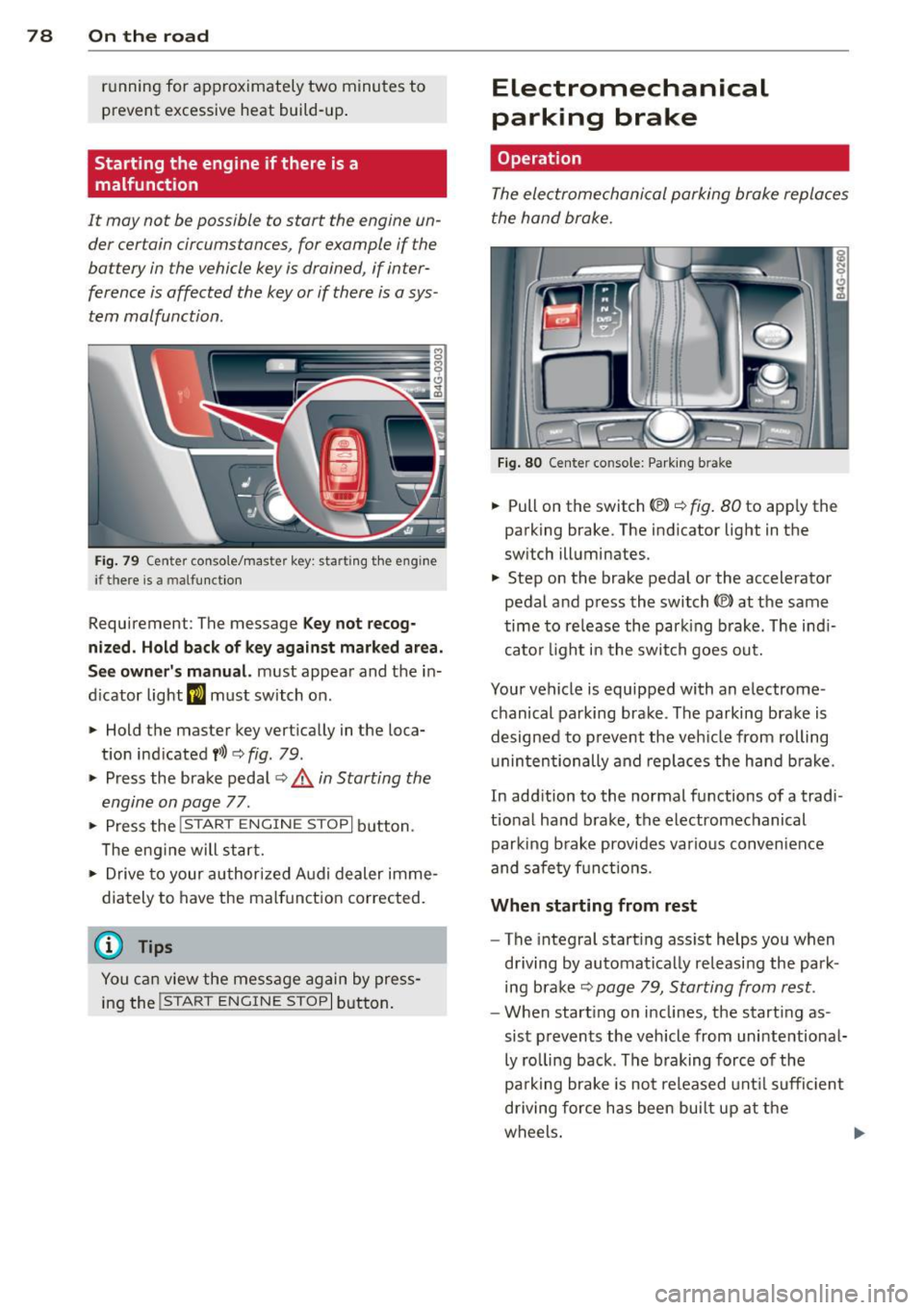
Fig. 79 C en ter console/ma ster key: startin g th e eng ine
if th ere is a mal function
Requirement : The message Key not recog
nized. Hold back of key against marked area.
See owner's manual.
must appear and the in
dicator light
II must switch on .
.,. Hold the master key vertically in the loca
tion indicated
f>l) ¢ fig . 79 .
.,. Press the brake pedal~.& in Starting the
engine on page 77.
.. Press the !~ S_ T_A_R_ T_E _N_G_I_N_ E_S_ T_O_P~I button.
T he eng ine will start.
.,. Drive to your authorized Audi dealer imme
diately to have the malfunction corrected.
{D) Tips
You can view the message again by press
ing the
!S TAR T ENGINE STOP I button.
Electromechanical
parking brake
Operation
The electromechanical parking brake replaces
the hand brake.
Fig. 80 Center co nsole: Parking b ra ke
.,. Pull on the switch (V) ¢ fig. 80 to apply the
parking brake . The indicator light in the
switch illuminates.
.,. Step on the brake pedal or the accelerator
pedal and press the switch
© at the same
time to release the parking brake. The indi
cator light in the switch goes out.
Your vehicle is equipped with an electrome
chanical parking brake . The parking brake is
designed to prevent the vehicle from rolling
unintentionally and replaces the hand brake .
In addition to the normal functions of a tradi
tional hand brake, the electromechanical
parking brake provides various convenience
and safety functions .
When starting from rest
-The integral starting assist helps you when
driving by automatically releasing the park
ing brake
~ page 79, Starting from rest .
-When starting on inclines, the starting as
sist prevents the vehicle from unintentional
ly rolling back. The braking force of the
park ing brake is not released until sufficient
driving force has been built up at the
wheels. .,,_
Page 81 of 310

Emergency brake fun ction
An emergency brake ensures that the vehicle
can be slowed down even if the
normal b rakes
fail
c::> pag e 80 , Emergency broking .
Indicat or light s
-If the par king b rake is closed w ith the igni
t ion
s wit ched on the indicator lights come
on - (USA models)/ . (Canada models)
in the instrument cluster and in the switch.
- If the par king brake is closed w ith the igni
tion
s witc hed off the indicator lights come
on - (USA models)/ . (Canada models)
in the instr ument cluster and in the switch
for about 20 seconds.
A WARNING
Do not press the accelerator peda l inadver
tently if the vehicle is stat ionary but the
eng ine is running and a gear is selected .
Otherw ise the vehicle will start to move
immediately and cou ld result in a crash .
(D Note
If the symbol . in the display or the ind i
cato r light
1111 (USA models) . (Cana
da models) in the instrument cluster flash
es , the re is a malfunction in the bra ke sys
tem. Please refer to the detai led descr ip
tion of the indicator lights ¢
page 15.
- If the indicato r light - (USA mod-
els) . (Canada mode ls) or
IIJ tu rns
on, there may be a malfunction in the
parking brake
r=> page 16.
@ Tips
-You can apply the pa rking brake at any
time -even w ith the ignition swi tched
off. The ignition must be on in order to
release the parking brake.
- Occasiona l noises when the parking
brake is applied and re leased are norma l
and are not a ca use for concern .
- When the vehicle is parked, the parking brake goes thro ugh a se lf-test cycle at
r egular intervals . Any assoc iated noises
are norma l.
On the ro ad 79
Parking
Parking
~ Stop the vehicle with the foot brake .
~ Pull the switch(®) to apply t he pa rking
bra ke .
~ Select the P se lec to r lever posit ion
r=> poge 109.
~ Turn the engine off c::> &_.
In addition on inclines and grades
~ Tu rn the steering wheel so that your vehicle
w il l roll aga inst the c urb in c ase it shou ld
s tart to move .
T he park ing brake activates automat ica lly
when you swit ch the ign ition off. This does not
happe n if you select the N selector lever posi
tion or switch the parking off with the~ but
ton before switching the ignition off .
A WARNING
-When you leave your vehicle -even if on
ly briefly -always take the ign it ion key
with you . This applies particularly when
children remain in the vehicle . Othe rwise
the children could start the engine, re lease the parking brake or operate elec
trica l equipment (e.g. power wi ndows).
There is the r is k of an accident.
- When the veh icle is locked, no one -par
ticularly not childre n should rema in in
the vehicle . Locked doors ma ke it mo re
difficult for emergency wo rke rs to ge t in
to the vehicle -putting lives at risk .
Starting from rest
The starting assist function ensures that the
parking broke is released automatically upon
starting .
Stopping and applying parking brake
~ Pull the switch(®) to apply the pa rking
bra ke .
Page 82 of 310

80 On the road
Starting and automatically releasing the
par king brake
.. When you sta rt to drive as usua l, the park
ing brake is automatically re leased and your
vehicle begins to move.
When stopping at a traffic signa l or stopping
in city traffic, the parking brake can be ap
plied. The veh icle does not have to be held
with the footbrake. The parking brake elimi nates the tendency to creep with a drive range
engaged . As soon as you dr ive off as usual,
the park ing brake is released automatically
and the veh icle sta rts to move .
Starting on slopes
When starting on inclines, the starting assist
prevents the vehicle from unintentionally roll
ing back . The braking force of the parking
brake is not released until sufficient dr iving
fo rce has been bu ilt up at the whee ls.
(D Tips
For safety reasons, the park ing brake is re
leased automatically only when the dr iv
er 's safety belt is engaged in the buck le.
Starting off with a trailer
To prevent rolling back unintentionally on an
incline, do the following:
.. Keep the switch
accelerator. The park ing brake stays applied
and prevents the vehicle from rolling back
ward.
.. You can release the switch
C®l once you are
sure that you a re developing enough for
ward momentum at the wheels as you de
press the accelerator .
Depending on the weight of the rig (vehicle
and trai ler) and the seve rity of the incline, you
may roll backwards as you start. You can pre
vent rolling backwards by holding the parking brake switch(®) pulled out and accelerating -
just as you would when starting on a hill with a conventional hand brake .
Emergency braking
In the event that the conventional brake sys
tem fails or locks .
.. In an emergency, pull the switch C®l and
con tinue to pull it to slow your vehicle down
w ith the park ing brake.
.. As soon as you release the switch (®) or ac-
celerate, the brak ing process stops.
If you pull the switch C®l and hold it above a
speed of about 5 mph (8 km/h), the emergen
cy brak ing funct ion is initiated . T he vehicle is
braked at all fou r whee ls by activating the hy
draulic brake system. The brake performance
is similar to making an emergency stop~&. .
In order not to act ivate the emergency brak
ing by mis take, an audib le warning tone (buz
zer) sounds whe n the switch(®) is pulled . As
soon as the sw itch C®l is released , or the accel
erator pedal is depressed, emergency braking
stops.
_& WARNING
-Emergency braking should only be used in
an emergency, when the normal foot brake
has failed or the brake pedal is obstructed.
Using the parking brake to perform emer
gency braking will slow your veh icle down
as if you had made a full brake application .
The laws of physics cannot be suspended
even with ESC and its associated compo
nents (ABS, ASR, EDL) . In corners and
when road or weather conditions are bad,
a full brake application can cause the vehi
cle to skid or the rear end to break away -
risking an accident.
Start-Stop-System
Description
Applies to vehicles: with Start -Stop -System
T he Start -Stop-System can help increase fuel
economy and reduce CO 2 emissions.
In the Start-Stop-mode, the engine shuts off
automat ically when the veh icle is stopped,
such as at a traffic light. The ignition remains .,.
Page 109 of 310

-they are not in an upright position, for
example if they are sitting, crouching
or lying down and/or
- if the outline in the display is incom
plete or interrupted, for example be
cause the person is partially hidden by
a parked vehicle .
(D Tips
-Pedestrian detection and the pedestrian
warming are limited to objects that are
detected as pedestrians. The system
does not detect animals . Even though
the shape and warmth radiated by each
object detected is evaluated, the system
does have limitations and it can give in
correct warnings.
- For technical reasons , the image pauses
in split second intervals.
Switching on and off
Appl ies to vehicles: with night vision assistant
Fig. 113 Area around the lig ht switch: night vis io n as
si st ant but ton
.. Switch the ignition on and turn the light
switch to the
AUTO position or io.
.. To switch night vision assistant on, press
the
EJ button <::> fig. 113. The image from
the night vision camera appears in the in
strument cluster display.
.. Press the button
EJ again to switch night vi
sion assistant off .
Night vision assistant 107
Settings in the MMI
Applies to vehicles: with night vision assistant
Fig. 114 Disp lay : exa mple of pedest rian detect io n and
warn ing tone sw itched off
.. Select: I CAR I function button > (Car)* sys
tems
control button > Driver assist> Night
vision assist.
Highlight pedestrians -
You can switch pedes
trian detection
on and off . If you switch pe
destrian detection off, the pedestrian warning
tone also switches off. The symbols
(II and ria
appear in the upper right area of the instru
ment cluster display ¢
fig. 114.
Warning tone -You can switch the tone for
the pedestrian warning
on and off. When the
warning tone is switched off, a yellow symbol
for the deactivated warning tone with a line
through it appears in the upper right of the in
strument cluster display¢
fig. 114.
Contrast -When the night vision assistant is
switched on and the image is visible in the in
strument cluster display, you can adjust the
contrast in the image from
Min to Max .
Driver messages
Applies to vehicles: with night vision assistant
Night vision assistant: system malfunction!
The system cannot work properly and is
switched off. See your authorized Audi dealer
for assistance.
Night vision assistant: not available
The system cannot detect properly under cur
rent conditions and is switched off temporari-
~ ~
Page 114 of 310
112 Automatic Tran sm iss ion
_& WARNING
-The veh icle can also roll when the engine
is stopped .
- Unintended vehicle movement can cause
serious injury.
- Never leave your vehicle with the eng ine
running wh ile in gear. If you must leave
yo ur vehicle when the engine is running,
act ivate the parking brake and move the
selector lever to P.
- Power is sti ll transmitted to the whee ls
when the engine is running at idle. To
prevent the vehicle from "creeping", you
must keep your foot on the brake when
the engine is runn ing and the selector
lever is in D/S or R or "tiptron ic" mode is
selected.
- Do not press the accelerator pedal when
chang ing the selector lever pos ition
wh ile the vehicle is stat ionary and the
eng ine is running.
- Never shift into
R or P wh ile driving.
- Before driv ing down a steep slope, re-
duce your speed and shift into a lower
gear with "tiptronic".
- Do not ride the brakes or press the brake
peda l too often or too long when dr iving
down a hill. Constant braking causes the
brakes to ove rheat and s ubstant ially re
duces braking per formance, increases
braking distance or causes comp lete fail
ure of the brake system.
- To prevent the veh icle from rolling back
when stopping on inclines, a lways hold it
in place with the bra ke peda l or parking
brake.
- Never hold the ve hicle on an inc line with
a slipping clutch . The clutch opens auto
matically when it becomes too hot from
the overload. An indicator lamp
[O] illu
mi nates and a dr iver message appears
¢ page 114 when the clutch is overload
ed.
- If the eng ine must remain running, never
have any driv ing pos ition engaged when
c heck ing under the hood. Make sure the
selector lever has securely engaged and is locked in P w
it h the park ing brake set
¢ page 224, Engine compartment. Oth
erwise, any increase in engine speed may
set the veh icle in motion, even with the
parking brake applied.
(D Note
- When stopping on an incl ine, do not try
to hold t he vehicle in place by pressing
the acce lerator pedal while a driving gear
is se lected. This ca n cause the transmis
sion to ove rheat and can damage it . Acti
vate the pa rking brake or press the bra ke
peda l to preven t the vehicle from roll ing.
- Allowing th e vehicle to ro ll when the en
gine is stopped and the selecto r lever is
in N will d amage the tr ansmission be
cause it is not l ubricated unde r those cir
cumstances .
(D Tips
Fo r saf ety reaso ns, the pa rking br ake is re
l eased automatically on ly when the d riv
er's safety belt is engaged in the buckle.
Hill descent control
Appl ies to vehicles: wit h S t ronic/tiptro nic
The hill descent control system assists the
driver when driving down declines.
Hill des cent con trol is activated when these
lector lever is in D/S and yo u press the brake
peda l. The transmission automatica lly selects
a gear that is suitable for the incline . Hi ll de
scent contro l tries to maintain the speed ach
ieved at the time of braking, within phys ica l
and technical lim itations. If may st ill be nec
essary to adjust the speed with the brakes .
Hill descent cont ro l switches off once the de
cline leve ls out or you press the acce lerator
pedal.
On vehicles with the cruise contro l system*
¢ page 83, hill descent control is also activat-
ed when the speed is set. .,..
Page 118 of 310

116 Parking system s
Parking systems
General information
A ppl ies to vehicles: with pa rk in g system plus/ rear view
camera/peripheral cameras/par king ass istant
Depending on your vehicle's equ ipment, vari
ous parking aids will help yo u when pa rk ing
and maneuvering.
The
pa rking sy stem plu s assists you when
pa rking by audib ly and visually indicat ing ob
jects detected
in front of and behind t he vehi
cle
~ page 117.
The rear vi ew cam era shows the area behind
the vehicle in the Infotainment d isp lay. This
d isplay assis ts you when you are c ross o r par
allel parking
q page 118. In addit ion, you are
assisted by the functions from the parking
system plus
~ page 117 .
The peripheral cam era s ass ist you with park
ing and maneuvering. You are aided by var ious
cameras depending on the vehicle equipment l eve l¢
page 121. In addition, you are assist
ed by the function s from the parking sy stem
p lus ¢ page 117.
A WARNING
- Always look for traff ic and check the area
around your vehicle by looking at it di
rectly as well . The parking system cannot
replace the d rive r's attent io n. The dr iver
is a lways respo nsible for safety during
p arki ng and fo r all other maneuvers.
- Please note that some surfac es, such as
cl othing, are not detected by the system.
- Senso rs and cameras have blind spots in
w hich peop le and objects can not be de
tected. Be especially cau tious of children
a nd animals.
- T he sensors can be displaced by impacts
or d amage to t he rad ia to r grille, b umpe r,
wheel housing and the unde rbody. The
par king systems may become impaired
as a result . Have your a uthorized Audi
dealer or qua lified wor kshop check their
function. -
Make s ure the sensors are not covered by
stickers, deposits or any other obstruc
tions as it may impai r the sensor func
tion . For information on cleaning, refer
to
~ page 216 .
(D Note
- Some objects are not detected by the
system under certain c ircumstances :
- Obje cts su ch as ba rrie r ch ains, trailer
draw bars, vertic al po les or fences
- Objects above t he senso rs such as wall
ex tensions
- Objects w ith specific surfaces or st ruc
tures su ch as chain link fences or pow
der snow.
- If you conti nue d riving closer to a low- ly
ing object, it may disappea r from the
sensor range. Note th at yo u w ill no lon
ger be warned abo ut this obstacle.
(j) Tips
- T he sys tem may provide a wa rni ng even
t ho ugh the re are no obs ta cl es in the cov
erage a rea in some situa tions, such as:
- certain road surfaces or for long grass.
- externa l ult rasonic sources e.g. from
clean ing vehicles.
- heavy rain, snow or thick vehicle ex
ha ust.
- We recommend that you practice park
ing in a traff ic- free location or park ing
lot to become familiar w it h the system.
When doing this, there should be good light and weather cond itions .
- Yo u can change the volume and pitch of
the s ignals as we ll as the disp lay
¢ page 126 .
-Please refer t o the instructions for tow
ing a t railer
¢ page 127 .
-What appears in the infotainment dis
play is somewhat time-delayed .
Page 121 of 310

example, after a collision, do not contin
ue to use the system for safety reasons.
Have it checked by your authorized Audi
dealership or authorized repair facility.
- Only use the rear view camera to assist
you if it shows a good, clear picture. For
example, the image may be affected by
the sun shining into the lens, dirt on the
lens or if there is a system fault.
- Use the rear view camera only if the lug
gage compartment lid is completely
closed. Make sure any objects you may
have mounted on the luggage compart
ment lid do not block the rear view cam
era.
- The camera lens enlarges and distorts
the field of vision. The object appears
both altered and inaccurate on the
screen.
- In certain situations, people or objects in
the display appear closer or further
away:
- For objects that do not touch the
ground, such as the bumper of a
parked vehicle, a trailer hitch or the
rear of a truck. Do not use the help
lines in this case.
- If driven from a level surface onto an
incline, or a downward slope.
- If driven toward protruding objects.
- If the vehicle is carrying too much load
in the rear.
(D Note
- Always read and follow the applicable
warnings
¢ (D in General information on
page 116.
- The orange colored orientation lines in
the Infotainment display show the vehi
cle path depending on the steering
wheel angle. The front of the vehicle
front swings out more than the rear of
the vehicle. Maintain plenty of distance
so that your outside mirror or a corner of
your vehicle does not collide with any ob stacles.
Parking systems 119
Switching on/off
App lies to vehicles: wit h parking system plus w ith rear
v iew camera
Switching on
.. Shift into reverse or
.. press the
p,,1A button in the center console
¢ fig. 122 . A short confirmation tone
sounds and the LED in the button turns on .
Switching between the rear view camera
and optical display
.. Press the Graphic control button ®
¢ fig. 128 to see the optical display.
.,. Press the
Rearview control button to see
the rear view camera image.
Switching off
.. Drive forward faster than 6 mph (10 km/h),
or
.,. Press the
p,,1A button, or
.,. Switch the ignition off.
(D Tips
The visual display in the left part of the
display should help you detect the critical
vehicle areas.
Page 123 of 310

r::> & in General information on page 118,
r::> (Din General information on page 119 .
The blue area represents an extension of the
vehicle's outline by approximately 16 ft
(5 m) to the rear . The long side of the blue
area should be on the curb . The entire blue
area must fit into the parking space.
• With the vehicle stopped, turn the steering
wheel to the right as far as it will go.
• Back into the parking space until the blue
curve
r::> fig. 131 touches the curb r::> & in
General information on page 118,
r::> (D in
General information on page 119.
Stop the
vehicle.
• With the vehicle stopped, turn the steering
wheel to the left as far as it will go .
• Continue to back into the parking space un
t il the vehicle is parked parallel to the curb
r::> & in General information on page 118,
r::> (D in General information on page 119.
@ marks the rear bumper. Stop the vehicle,
at the latest, when the red orientation line
@ borders an object. Keep an eye on the
front of your vehicle while do ing th is .
Parking next to obstacles
If there is an obstacle (such as a wall) next to
the parking space, position the vehicle so
there is more space on that side. Position the
long side of the blue surface so that there is
sufficient space from the obstacle. The sur
face must not be touching . You will also need
to star t turning the steering wheel much ear
lier . The blue curve
r::>fig .131 must not touch
the obstacle and should have sufficient room.
(D Tips
The left or right orientation lines and sur
faces will be displayed, depending on the
turn signal being used .
Peripheral cameras
Introduction
Applies to vehicles: with parki ng system plus w ith periph
eral cameras
In addition to parking system plus
r::> page 117, this pa rking system contains pe-
Parking systems 121
ripheral cameras. Depending on the vehicle
equ ipment, you are assisted by various views
such as peripheral view, corner views at the
front and rear of the vehicle, and views direct
ly in front of or behind the vehicle.
General information
Applies to vehicles: with parking system plus with periph
eral cameras
Fig. 132 Locat io n of per ipheral cameras
Depending on the vehicle equipment , the pe
ripheral cameras are found in the radiator
grille, in the luggage compartment lid and on
both exterior mirrors*
r::> fig. 132. Make sure
that the lenses are not covered by deposits or
any other obstructions as it may impair the
system. For information on cleaning, refer to
qpage 216.
In the peripheral mode, black corners are
shown in the vehicle silhouette. Objects in
these areas are outside of the camera's field
of view and are not detected .
The accuracy of the orientation lines and the
blue surfaces is reduced if the adaptive air
suspension* is faulty, if the vehicle is lifted or
if the
Dynamic mode is activated 9 page 102.
A WARNING
-Always read and follow the applicable
warnings
r::> .&. in General information on
page 116 .
-If the position or the installation angle
of a camera was changed, after a colli
sion for example, do not continue to use
the system for safety reasons. Have it checked by your author ized Audi dealer-
-
ship . ~