2013 AUDI S4 SEDAN transmission
[x] Cancel search: transmissionPage 97 of 294
@ Tips
-The t ransm ission tempe rat ure may in
crease significantly after using the l a unch control prog ram. If that happens,
the program may not be availab le for a
few m inutes . It will be ava ilab le aga in af
te r a coo l-down period .
- When accelerating us ing t he Launch
Control program, all vehicle parts a re
subjec t to heavy loads. This can res ult in
i n cre ased wea r.
Transmission malfunction
Applies to vehicles: with S tronic transmission
[O] Transmission: Press brake pedal and se
lect gear again.
P ress th e brake pedal and se lect t he des ired
selec to r lever posi tion aga in. You can then
c o ntinue dr iv ing .
[O] Transmission overheating: Please drive
con servatively.
The transmission temperature has increased
sign ificantly due to the sporty dr iving manner .
Drive in a less spo rty manner unt il the tem
pe rat ure retu rns to the norma l range and the
i nd icator light switches of.
[O] Transmission malfunction: You can con
tinue driving
There is a system ma lf u nction in the transmis
sion. You may continue driving. Drive to your
author ized Audi dealer or qua lified repair fa
cility soon to have the malfunc tion cor rected .
[O] Transmission malfunct ion: Limited driv
ing funct ionality
There is a system ma lf u nction in the transmis
sion. The transmission is sw itching to emer
gency mode. This mode only shifts into cer
tain gears or will no longer shift at a ll. The en
g ine may stall. Drive to your authorized A udi
dealer o r qualified repair facility immediately
to have the ma lfunction co rrected .
[O] lij Transmission malfunction: No reverse
You can continue driving
Transm ission 95
T he re is a system mal func tion in the t ransmis
sion . The transm ission is switching to eme r
gency mode . This mode on ly shifts into cer
ta in gears or will no longer shift at al l. The en
gine may sta ll. You cannot engage t he reverse
gear. Drive to your author ized Audi dealer or
qualified repa ir facili ty immed iately to have
the malfunction cor rected.
[O] Transmission malfunction : Stop vehicle
and shift to park.
Do not continue dr iv ing. Se lect the P selector
lever posit io n and see your authori zed A udi
dealer or qualified repair facility for assis
tance.
(D Note
If the transmission switches t o emergency
mode, you should take t he ve hicle to an
a uth orized Audi d ea lership as soon as pos
sible to have the con dit ion corrected .
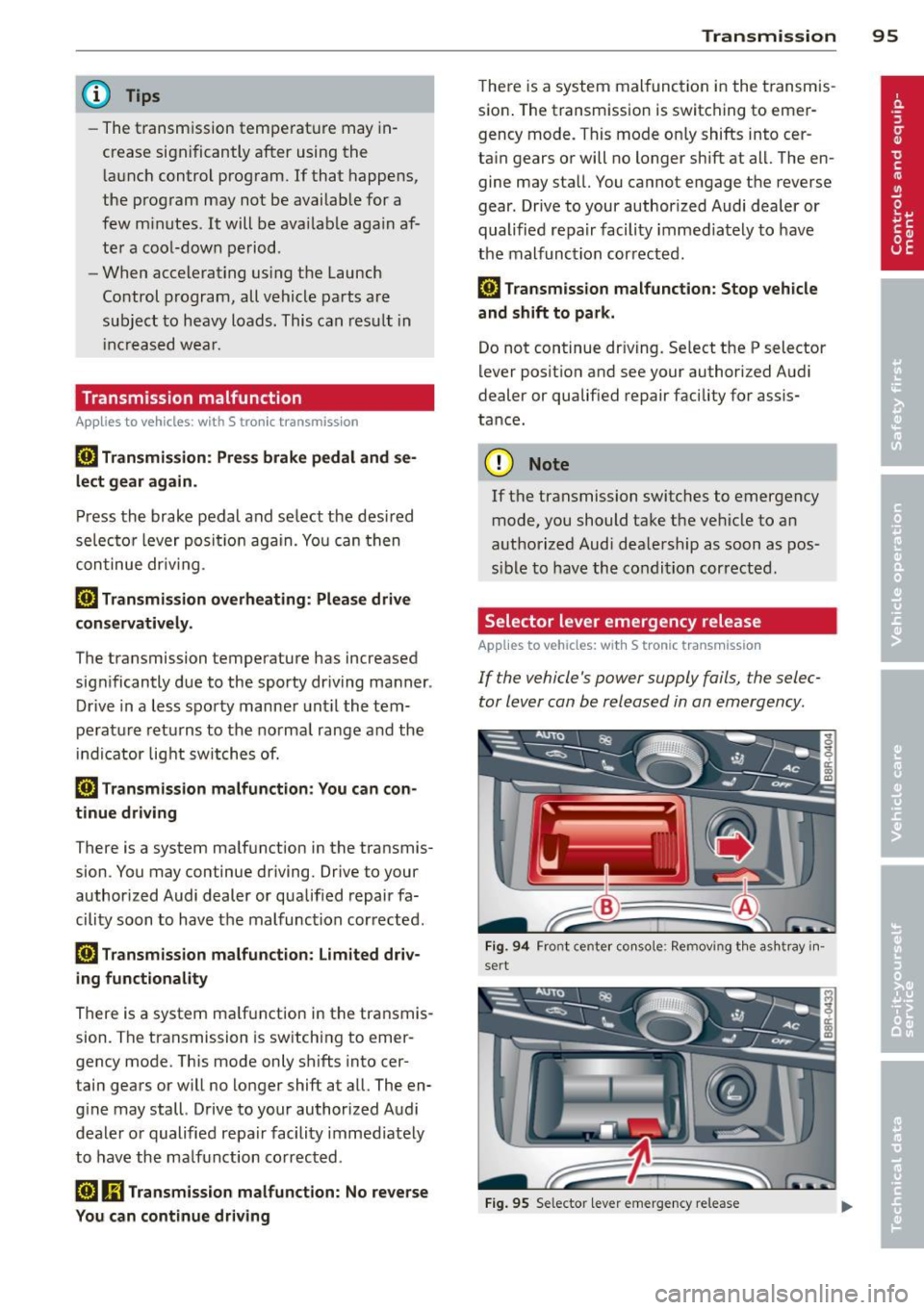
Selector lever emergency release
Applies to vehicles: with S tronic transmission
If the vehicle's power supply fails , the selec
tor lever can be released in an emergency.
Fig . 94 Fro nt cente r co nso le : Remov ing t he as htray in ·
sert
Fi g. 9 5 Selecto r lever e merge ncy release
Page 101 of 294

Audi adaptive cru ise control and brakin g guar d 99
Vehicles with manual transmission
Applies to vehicles: with Audi adaptive cruise control
The adaptive c ruise control is avai lab le from
the 2nd gear through the 6th gea r in the cus
tomary RPM.
When the adapt ive cruise control is turned on,
you must p ress the clutch to shift gears (as
usual) . When sh ifting normally or when press
ing the cl utch, the adap tive c ruise control re
mains turned on.
Afte r you have engaged the gear, you do
not
need to press the gas peda l. The adaptive
cru ise control accelerates a utomat ica lly if nec
essary.
I f you press dow n on the clutch fo r too long or
shift/coup le improperly, the adaptive cruise
control may turn off automat ically.
{D) Tips
You cannot tu rn on the adapt ive cru ise
contro l during a sh ifting operation.
Audi adaptive cruise
control
Description
App lies to vehicles: with Audi adaptive cruise control
Fig . 99 Detectio n range
What c an adaptive cruise contr ol do ?
The adaptive cruise control works in conjunc
tion with a radar sensor installed in the front
of the vehicle¢
page 97 , fig. 96, which is sub
ject to designated system limits ¢
page 99.
Stationary objects are d is regarded .
On open roads w ith no traff ic, adaptive cruise
control works like a regu lar cruise control sys- tern.
The stored speed is maintained . When
approaching a moving vehicle detected up
ahead, the adaptive cruise control system au
tomat ica lly s lows down to match that vehi
cle's speed and then maintains the distance
that the driver previously stored . As soon as
the system does not detect a veh icle up
ahead, adaptive cru ise contro l accelerates
ba ck up to the stored speed.
Which fun ctions can be con trolled?
When you switch adapt ive cruise control on,
you can set the current speed as the "control
speed"
q page 100, Switching on and off.
When dr iving, you can stop cruise contro l
¢
page 101 or change the speed ¢ page 101
at any time.
You can also set the distance to the object
ahead and set the adapt ive cru ise contro l driv
ing program
¢page 102.
Page 107 of 294

Audi adaptive cruise control and braking guard 105
-If you switch the ASR/ESC off or the off
road mode on (allroad), Audi braking
guard switches off automatically
<=> page 186.
-Switch Audi braking guard off when you
are loading the vehicle onto a vehicle car
rier, train, ship or other type of transpor
tation. This can prevent undesired warn ings from the braking guard system .
Messages
Applies to vehicles: with Audi adaptive cruise co ntrol
Braking guard: Off
This driver message appears if the system is
turned off via the radio/MM I*. Otherwise, if
the system is turned off, the information ap
pears every time shortly after the start of the
trip.
Braking guard: Activated
This driver message appears if sharp brake
pressure was applied due to an acute warning.
•••
Three white dots appear if a setting cannot be
selected with the operating lever. For exam
ple, this happens if you want to raise/lower
the speed even though there was no previous
ly saved speed .
ACC: Deactivation
The driver message appears in vehicles with
manual transmission . If the clutch pedal was
pressed down for too long, the adaptive cruise
control turns off. A chime sounds as a remind
er.
ACC: Sensor blocked
This message appears if the sensor view is ob
structed, for example by leaves, snow, heavy
spray or dirt. Clean the sensor
<=>page 97,
fig. 96.
ACC: not available
The driver message appears if there is a mal
function. The adaptive cruise control turns off.
A chime sounds as a reminder. Have the sys- tern checked by an authorized Audi dealer or
authorized Audi Service
Facility.
ACC: unavailable
The driver message appears if, for example,
the brake temperature is too high . The adap
tive cruise control is temporarily unavailable.
A chime sounds as a reminder.
Engine speed!
This driver message appears in vehicles with
manual transmission if the driver had not up
shifted or downshifted in time while using
adaptive cruise control braking or accelerat ing, causing the vehicle to exceed or not reach
the permitted limit speed. The adaptive cruise
control turns off. A chime sounds as a remind
er .
Shift lever position!
Vehicles with an automatic transmission: the
driver message appears if the selector lever is
shifted to the N position . The adaptive cruise
control is not available while in this position .
Vehicles with manual transmission: the driver message appears for vehicles with manual
transmission if there is no forward gear en
gaged, meaning if the reverse gear or the 1st
gear is engaged or if the selector lever is in
the neutral position. The adaptive cruise con
trol is not available while in this position.
Stabilization control (ESC)
This message appears if the electronic stabili
zation control (ESC) is taking action to stabi
lize the vehicle. The adaptive cruise control
turns off . A chime sounds as a reminder.
Speed too low
This message appears if the current speed is
too low
to set or to maintain the desired
speed .
The speed being saved must be at least
20 mph (30 km/h). The cruise control is
turned off for speeds lower than 12 mph
(20 km/h). The adaptive cruise control re
mains turned on for speeds above 95 mph
(150 km/h) (override).
It will stabilize again at.,..
Page 113 of 294

Audi drive select Driving settings
Introduction
App lies to vehicles: w it h drive se lect
Audi drive select provides the possibility to ex
perience different types of veh icle sett ings in
one vehicle. For instance, using the three
Comfort, Auto and Dynamic modes, the driv
er can switch from a sporty to a comfortab le
driving mode with the press of a button.
Addit ionally, in vehicles with MM I*, the vehi
cle setup for
Individual* mode can be cus
tomized by you. This makes it possib le to
combine settings such as a sporty engine tun
ing with comfortable steering.
A WARNING
Improper use of the Audi drive select can
cause collisions, other acc idents and seri
ous personal injury.
Description
Ap plies to vehicles: w it h drive se lect
The vehicle setup in each mode depends on
the vehicle's features. However, the engine,
automatic t ransmission* and steering are al
ways involved.
.
Engine and automatic transmission*
Depending on the mode, the engine and the
automatic transmission respond quicker or in
a more ba lanced manner to acce lerator pedal
movements. In the sporty dynamic mode, the
automatic transmission shifts at higher R PMs.
Steering
The steering adapts in terms of steering effort
and steering ratios . Indirect steer ing that
moves easily, like the stee ring in comfort
mode, is best su ited to long dr ives on a high
way. In contrast, dynamic mode prov ides
sporty, di rect steering .
The follow ing applies to vehicles with dynam ic
steer ing*: the stee ring ratio changes based on
ve hicl e speed in order to maintain optimum
Audi drive select 111
steering effort for the driver at all times. This
sets the steering to be less sensitive at higher
speeds in order to provide improved vehicle
control. At reduced speeds, however, steer ing
is more direct in order to keep the steering ef
fort as minimal as possible when the driver is
maneuveri ng the vehicle . At low and average
speeds, dynamic steering addit iona lly pro
vides more responsive steering pe rformance.
Adaptive dampers*
The adaptive dampers* use sensors to record
i nformation regarding steering movements,
braking and acceleration operations by the
drive r, road surface, driving speed, and load.
T his makes it possible to adapt damp ing to
the driving situation virtually i n rea l time.
Audi drive select also makes it possible to sat
isfy the desire for sporty s uspension (Dynam
ic) and comfortable suspension (Comfort)
without giv ing up balanced tuning (Auto).
Sport differential*
As a component of the all whee l dr ive system
(quattro ®)
q page 189, the sport differential*
distributes the driving power to the rear axle
depending on the situation . The distribution
of power var ies depending on the mode se
lected. The goal is a high level of agility and
ability to accelerate on curves . The ve hicle is
very respons ive to steering .
Adaptive cruise control*
The behavior when accelerating can be adjust
ed from comfortab le to sporty, depending on
the drive select mode. Adaptive cru ise control
also responds to the driving behavior of the
vehicle ahead in a more conservative or sporty
manner .
Engine sound*
The sound of the eng ine is adapted to the se
lected mode and ranges from subtle to sporty.
0) Tips
-In some models, the maximum vehicle
speed can only be reached in the
Auto
and Dynamic modes.
Page 114 of 294
112 Audi drive select
-For vehicles with an automatic transmis
sio n*, se lecting the
Dynamic mode re
su lts in sporty shifting characteristics .
The S gear position engages automati
cally.
- In vehicles that have dynamic steering*,
operating noise is heard when starting or
stopping the eng ine . This does not ind i
cate a problem .
Selecting the driving mode
Applies to vehicles: w ith drive se lect
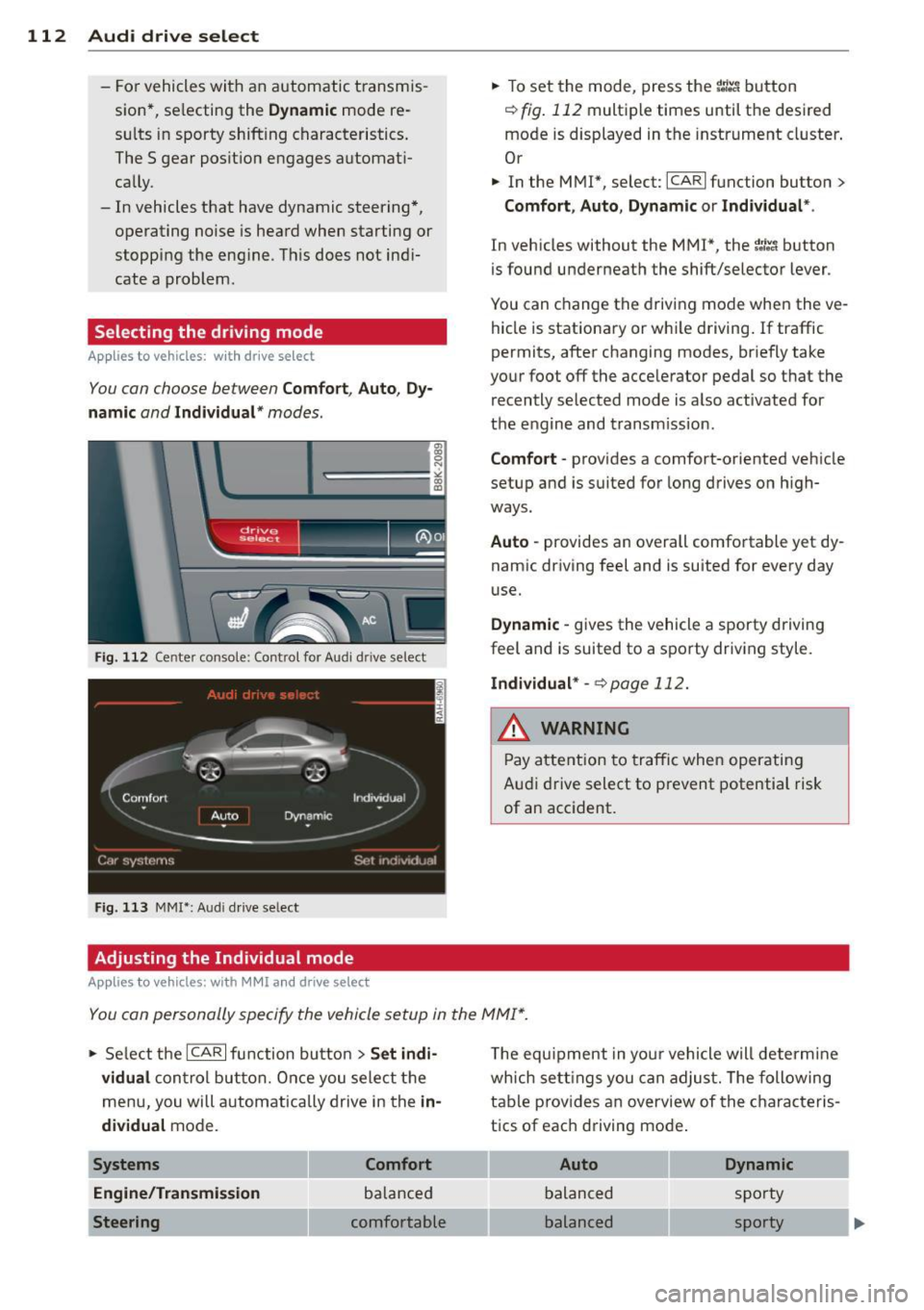
You can choose between Comfort, Auto, Dy
namic
and Individual * modes.
Fig. 112 Center console: Control for Au di dri ve select
Fig. 113 MMI•: Aud i drive select
Adjusting the Individual mode
Applies to vehicles: with MMI a nd drive se lect
.,. To set the mode, press the f:l:-.i button
~ fig. 112 multiple times until the desired
mode is displayed in the instrument cluster .
Or
.,. In the MMI*, select: ICARlfunction button>
Comfort, Auto, Dynamic or Individual *.
In vehicles without the MMI*, the~:/;,~ button
is found underneath the shift/selector lever.
You can change the driving mode when the ve
hicle is stationary or wh ile driving . If traffic
permits, after changing modes, br iefly take
your foot off the accelerator pedal so that the recently selected mode is also activated for
the engine and transm ission .
Comfort -provides a comfort-oriented vehicle
setup and is suited for long drives on h igh
ways .
Auto -provides an overall comfortable yet dy
namic driving feel and is suited for every day
use.
Dynamic -gives the vehicle a sporty driving
feel and is suited to a sporty driving style.
Individual * -¢page 112.
& WARNING
Pay atte ntion to traffic when operating
Audi drive select to prevent potential risk
of an accident.
You can personally specify the vehicle setup in the MMI* .
.,. Select the ICAR I f unc tion button > Set indi
vidual
control button. Once you select the
menu, you will automatically drive in the
in·
dividual
mode.
Systems Comfort
Engine/Transmission
balanced
Steering comfortable T
he equipment in your vehicle will determine
wh ich sett ings you can adjust. The following
table provides an overview of the characteris
tics of each driving mode .
Auto Dynamic
balanced sporty
balanced sporty
Page 190 of 294
188 Intelligent technology
200 kilometers) of normal city driving.
You can compensate for this by pressing
the brake pedal more firmly. This also applies later when new pads are instal
led .
- You should perform braking maneuvers
for the purpose of cleaning the brake
system only if road conditions permit.
Other road users must not be put at risk -
you may cause an acc ident!
- Before descending a steep grade, reduce
speed and shift transmission into a lower
gear or lowe r driving range. Do not ride
the brakes or hold the pedal down too
long or too often. This could cause the
brakes to get hot and diminish braking
efficiency.
- Do not "ride the brakes" by resting your
foot on the pedal when you do not intend
to brake . This may cause the brakes to
overheat, premature wear and increased
stopping distance.
- Under certain climatic and operating
conditions such as passing through wa
ter, driving in heavy rain or after washing
the vehicle, the effectiveness of the
brakes can be reduced. In winter, ice can
accumulate on the brake pads, linings,
discs and drums. Carefully apply brakes
for a test. Brakes will dry and ice coat
ings will be cleaned off after a few care
ful brake applications.
- Driving for an extended period of time on
salt-covered roads without using your
brakes can also affect braking efficiency.
Clean off accumulated salt coating from
brake discs and pads with a few careful
brake applications.
- If you damage the front spoiler, or if you
install a different spoiler, be sure the air
flow to the front brakes is not obstruct
ed . Otherwise the brake system could
overheat reducing the effectiveness of
the entire brake system.
- Failure of one brake c ircuit will impair
the braking capability resulting in an in
creased stopping distance. Avoid driv ing
the vehicle and have it towed to the near- est authorized Audi dealer or
qualified
workshop.
- Never let the vehicle roll to a stop with
the engine shut off.
- If the brake booster is not working, for
example when towing your vehicle, or
because the brake booster has somehow
been damaged, the brake pedal must be
pressed considerably harder to make up
for the lack of booster assistance.
Electro-mechanical
power assist, dynamic
steering
The electro-mechanical power assist helps
the driver when steering.
Power steering adapts electronically based on
the vehicle speed .
Indicator lights and messages
• Steering defective! Do not drive vehicle!
If this indicator light turns on and stays on
and this message appears, the power steering
may have failed.
Do
not continue driving . See your authorized
Audi dealer or other qualified repair facility
for assistance.
E!"4 Dynamic steering: System fault! You can
continue driving
If the indicator light turns on and the mes
sage appears, the steering may be more diffi
cult to move or more sensitive than usual. The
steering wheel may also be at an angle when
driving straight .
Drive slowly to your authorized Audi dealer or
qualified workshop to have the malfunction
corrected .
ls!'fl Dynamic steering: initializing
If this driver message appears and the indica
tor light is flashing on the instrument panel,
dynamic steering* is being reinitialized. Once
you start the engine after this is finished, the ..,..
Page 194 of 294
192 Driving and environment
Driving and
environment
The first 1,000 miles
(1,500 km) and
afterwards
New engine
The engine needs to be run-in during the first
1,000 miles (1,500 km).
For the fir st 600 miles (1,000
kilometers ):
.,. Do not use full throttle.
... Do not drive at engine speeds that are more
than 2/3 of the max imum permitted RPM.
From 600 to 1,000 miles (1 ,000 to
1,500 kilometers):
.,. Speeds can gradually be increased to the
max imum pe rm iss ible road or eng ine speed .
During and after break-in per iod
... Do not rev the eng ine up to h igh speeds
when it is cold. Th is app lies whether the
transmission is in N (Neutral) or in gear.
After the break- in period
... Do not exceed max imum eng ine speed un
der any circumstances .
... Upshift into the next higher gear
before
reaching the red area at the end of the tach
ometer scale¢
page 10.
During the first few hours of driving, the en
g ine's inter na l friction is higher tha n later
when alt the moving parts have been broken
i n. How welt this break- in process is done de
pends to a conside rable extent on the way the
ve hicl e is driven du ring the first 1,000 miles
(1, 500 kilome ters).
(D Note
E xtremely high engi ne speeds are auto
mat ica lly re duced. However, these rpm
lim its are programmed for a n engine welt
r u n- in, not a new eng ine.
{® For the sake of the environment
Do not drive with unnecessarily high en
g ine speeds - upshifting ear ly saves fuel,
reduces no ise and protects the environ
ment.
, New tires
If your vehicle is runni ng on new tires, drive
very carefully for the first 350 miles (500 kilo meters) after fitting.
_& WARNING
N ew tires tend to be slip pery a nd mus t al
so be "broken -in" . Be s ure to remembe r
this dur ing the fi rst 350 mi les (500 kilo
meters) . Brake gently . Avoid fo llow ing
closely behind other vehicles or other sit
uations that m ight require sudden, hard
braking.
Avoid damaging the
vehicle
When you a re d rivi ng on poo r roads, or over
cu rbs, ste ep ramps, etc., ma ke certai n that
low- ly ing parts s uch as spoile rs and ex ha ust
s ystem parts do not bot tom o ut and get dam
aged.
T his is espec ially true for veh icles with low
s lu ng chassis (s por ts chassis)* and fully load
ed vehicles.
Driving through water
on roads
Note th e following to avoid vehicle damage
whe n driving through water, for examp le on
flooded roads:
- The wa ter must not be any hig he r th an the
bottom of the vehicle body .
- Do not dr ive faste r than walk ing speed.
Page 200 of 294
198 Trailer towing
Trailer towing tips
Important to know
Your vehicle hand les different ly when tow ing
a trailer because of the addit ional weight and
different weight distribution . Safety, perform
ance and economy wi ll greatly depend on how
carefully you load your trailer and operate
your rig.
Before you actually tow your trailer, practice
turning, stopp ing and backing up in an area
away from traffic. Keep practicing until you have become completely familiar with the way
your veh icle-trailer combination behaves and
responds.
Backing up is difficult and requires practice.
Backing up with a trai ler generally requires
steering action opposite to that when backing
up your vehicle without a trailer.
Maintain a greater distance between your ve
hicle and the one in front of you. You will need
more room to stop. To compensate for the
trailer, you will need a larger than normal
turning radius .
When passing, remember that you cannot ac
celerate as fast as you normally would be
cause of the added load. Make sure you have
enough room to pass . After passing, allow
plenty of room for your tra iler before chang
in g lanes again.
Avoid jerky starts, sharp turns or rapid lane
changes.
(D Tips
- Do not tow a tra iler dur ing the break-in
period of your vehicle.
- If you tow a trailer, your Audi may re
quire more frequent maintenance due to
the extra load
q page 2 72.
Parking on a slope
Do not park on a slope with a trailer . If it can
not be avoided, do so only after doing the fol lowing :
When parking:
.. App ly the foot brake.
.. Have someone place chocks under both the
vehicle and the trailer wheels .
.,. With chocks in place, slowly release the
brakes until the wheel chocks absorb the
load.
.. Tur n the wheels towards the curb.
.. App ly the parking b rake.
.. Place an automatic transmission* in P, re
spectively a manual transmission in first or reverse gear.
When restarting after parking:
.. App ly the foot brake .
.. Start the engine.
.. Move the se lector lever to D/S, respectively
a manual transmission in first gear.
.. Release the parking brake and slow ly pu ll
out and away from the wheel chocks.
.. Stop and have someone retr ieve the wheel
chocks .
(D Tips
If you move the selector lever of the auto
matic transmission* to P before applying
the parking brake and before blocking the
whee ls, you may have to use more force
lat er to move the lever out of the P posi
tion.