2013 AUDI S4 SEDAN steering
[x] Cancel search: steeringPage 113 of 294

Audi drive select Driving settings
Introduction
App lies to vehicles: w it h drive se lect
Audi drive select provides the possibility to ex
perience different types of veh icle sett ings in
one vehicle. For instance, using the three
Comfort, Auto and Dynamic modes, the driv
er can switch from a sporty to a comfortab le
driving mode with the press of a button.
Addit ionally, in vehicles with MM I*, the vehi
cle setup for
Individual* mode can be cus
tomized by you. This makes it possib le to
combine settings such as a sporty engine tun
ing with comfortable steering.
A WARNING
Improper use of the Audi drive select can
cause collisions, other acc idents and seri
ous personal injury.
Description
Ap plies to vehicles: w it h drive se lect
The vehicle setup in each mode depends on
the vehicle's features. However, the engine,
automatic t ransmission* and steering are al
ways involved.
.
Engine and automatic transmission*
Depending on the mode, the engine and the
automatic transmission respond quicker or in
a more ba lanced manner to acce lerator pedal
movements. In the sporty dynamic mode, the
automatic transmission shifts at higher R PMs.
Steering
The steering adapts in terms of steering effort
and steering ratios . Indirect steer ing that
moves easily, like the stee ring in comfort
mode, is best su ited to long dr ives on a high
way. In contrast, dynamic mode prov ides
sporty, di rect steering .
The follow ing applies to vehicles with dynam ic
steer ing*: the stee ring ratio changes based on
ve hicl e speed in order to maintain optimum
Audi drive select 111
steering effort for the driver at all times. This
sets the steering to be less sensitive at higher
speeds in order to provide improved vehicle
control. At reduced speeds, however, steer ing
is more direct in order to keep the steering ef
fort as minimal as possible when the driver is
maneuveri ng the vehicle . At low and average
speeds, dynamic steering addit iona lly pro
vides more responsive steering pe rformance.
Adaptive dampers*
The adaptive dampers* use sensors to record
i nformation regarding steering movements,
braking and acceleration operations by the
drive r, road surface, driving speed, and load.
T his makes it possible to adapt damp ing to
the driving situation virtually i n rea l time.
Audi drive select also makes it possible to sat
isfy the desire for sporty s uspension (Dynam
ic) and comfortable suspension (Comfort)
without giv ing up balanced tuning (Auto).
Sport differential*
As a component of the all whee l dr ive system
(quattro ®)
q page 189, the sport differential*
distributes the driving power to the rear axle
depending on the situation . The distribution
of power var ies depending on the mode se
lected. The goal is a high level of agility and
ability to accelerate on curves . The ve hicle is
very respons ive to steering .
Adaptive cruise control*
The behavior when accelerating can be adjust
ed from comfortab le to sporty, depending on
the drive select mode. Adaptive cru ise control
also responds to the driving behavior of the
vehicle ahead in a more conservative or sporty
manner .
Engine sound*
The sound of the eng ine is adapted to the se
lected mode and ranges from subtle to sporty.
0) Tips
-In some models, the maximum vehicle
speed can only be reached in the
Auto
and Dynamic modes.
Page 114 of 294
112 Audi drive select
-For vehicles with an automatic transmis
sio n*, se lecting the
Dynamic mode re
su lts in sporty shifting characteristics .
The S gear position engages automati
cally.
- In vehicles that have dynamic steering*,
operating noise is heard when starting or
stopping the eng ine . This does not ind i
cate a problem .
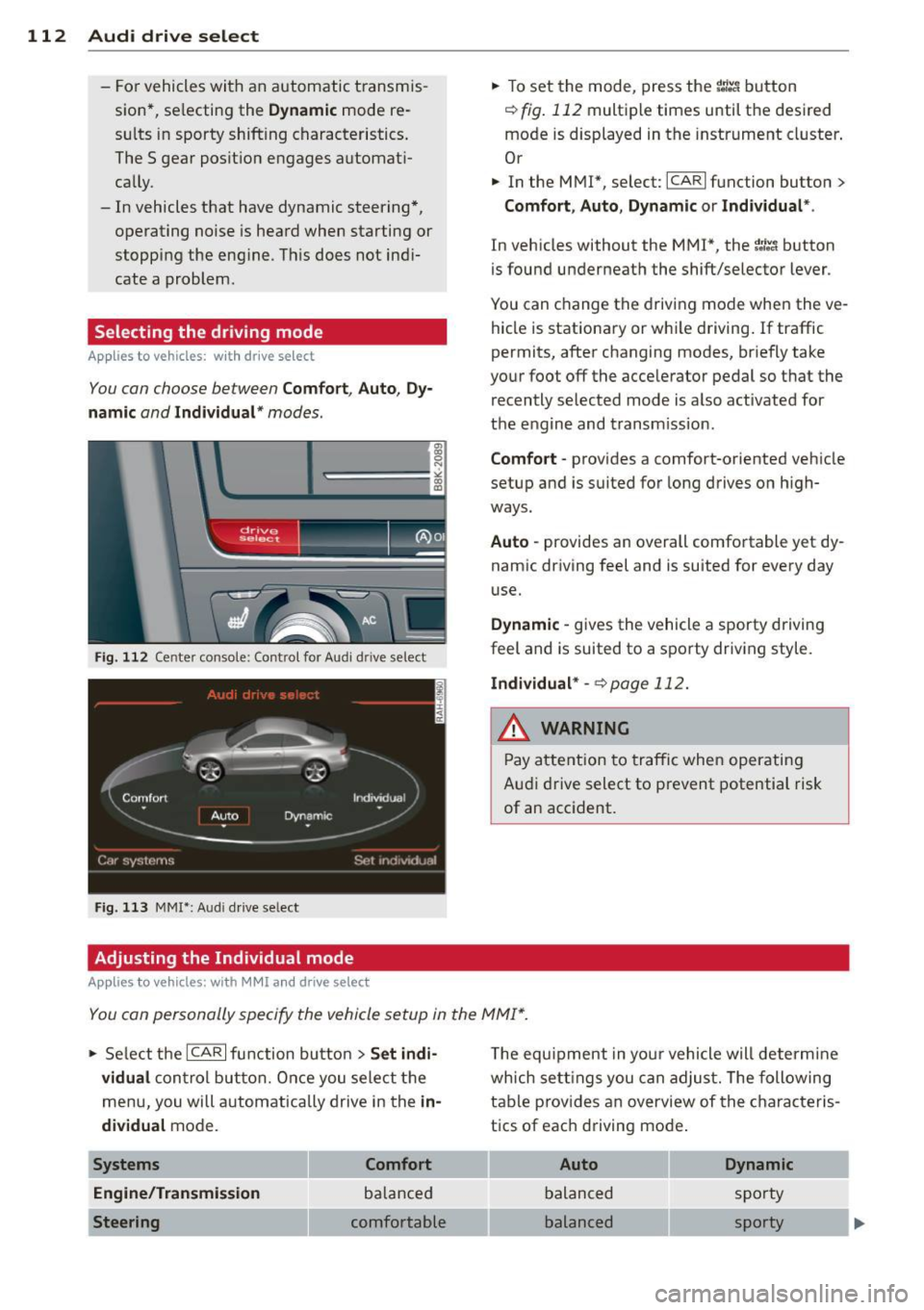
Selecting the driving mode
Applies to vehicles: w ith drive se lect
You can choose between Comfort, Auto, Dy
namic
and Individual * modes.
Fig. 112 Center console: Control for Au di dri ve select
Fig. 113 MMI•: Aud i drive select
Adjusting the Individual mode
Applies to vehicles: with MMI a nd drive se lect
.,. To set the mode, press the f:l:-.i button
~ fig. 112 multiple times until the desired
mode is displayed in the instrument cluster .
Or
.,. In the MMI*, select: ICARlfunction button>
Comfort, Auto, Dynamic or Individual *.
In vehicles without the MMI*, the~:/;,~ button
is found underneath the shift/selector lever.
You can change the driving mode when the ve
hicle is stationary or wh ile driving . If traffic
permits, after changing modes, br iefly take
your foot off the accelerator pedal so that the recently selected mode is also activated for
the engine and transm ission .
Comfort -provides a comfort-oriented vehicle
setup and is suited for long drives on h igh
ways .
Auto -provides an overall comfortable yet dy
namic driving feel and is suited for every day
use.
Dynamic -gives the vehicle a sporty driving
feel and is suited to a sporty driving style.
Individual * -¢page 112.
& WARNING
Pay atte ntion to traffic when operating
Audi drive select to prevent potential risk
of an accident.
You can personally specify the vehicle setup in the MMI* .
.,. Select the ICAR I f unc tion button > Set indi
vidual
control button. Once you select the
menu, you will automatically drive in the
in·
dividual
mode.
Systems Comfort
Engine/Transmission
balanced
Steering comfortable T
he equipment in your vehicle will determine
wh ich sett ings you can adjust. The following
table provides an overview of the characteris
tics of each driving mode .
Auto Dynamic
balanced sporty
balanced sporty
Page 115 of 294
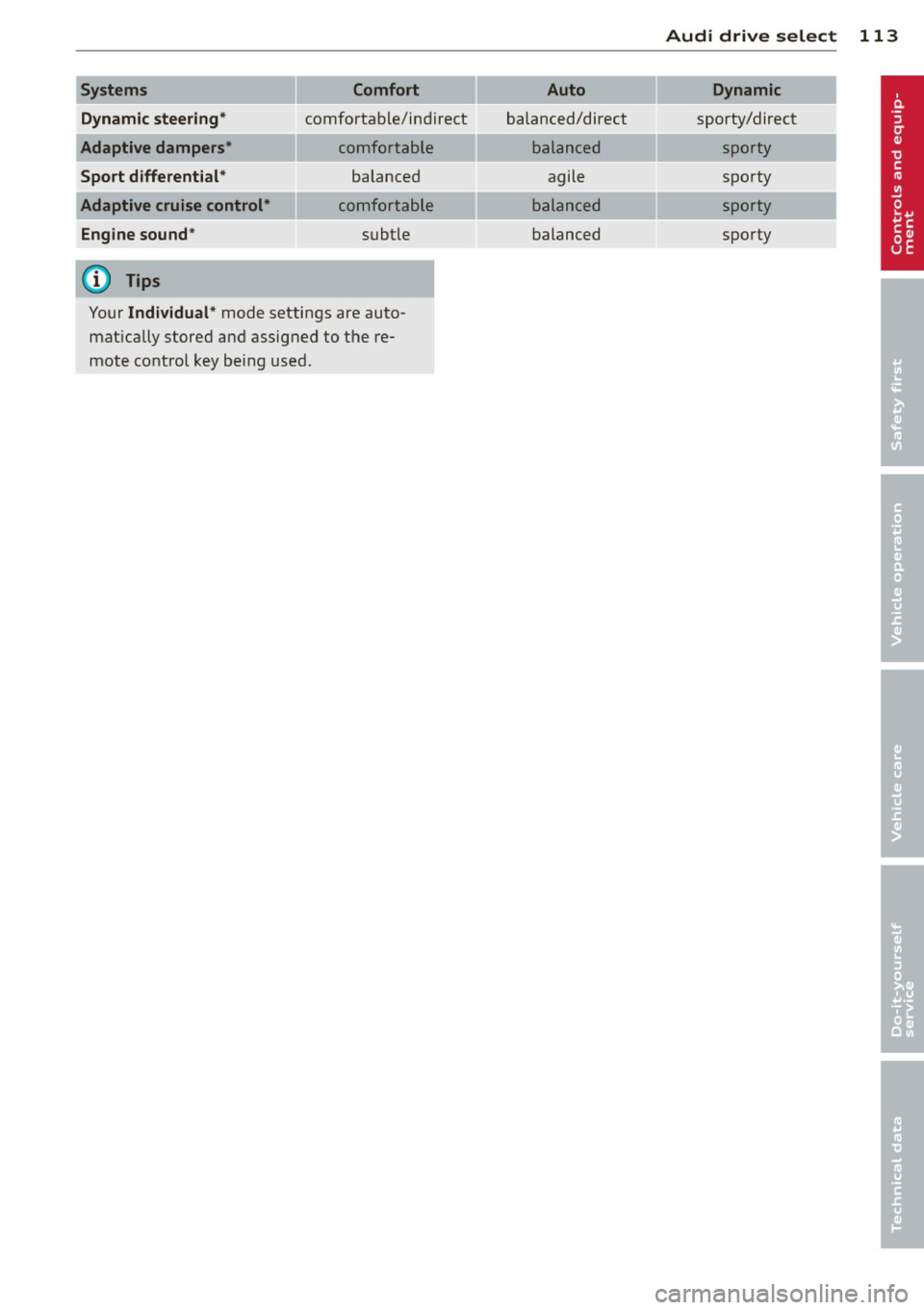
Systems Comfort
Dynamic steering*
comfortable/ind ire ct
Adaptive dampers* comfortable
Sport differential* balanced
Adaptive cruise control* comfortable
Engine sound * subtle
(D) Tips
Your Individual* mode settings are auto
matically stored and assigned to the re
mote control key being used.
Audi drive select 113
Auto Dynamic
balanced/direct sporty/direct
balanced sporty
agile sporty
balanced sporty
balanced sporty
Page 120 of 294

118 Park ass is t
@ Tips
- The rear view camera picture is avai lable
as soon as the MMI D isplay or the MMI is
switched on, or the start-up phase is
completed.
- Keep the sensors in the rear bumper and the rear view camera lens clean and free
of snow and ice, so that the parking sys
tem can work properly . Please follow the
additional notes on
~ pag e 120.
Reverse Park ing
App lies to vehicles: with parking system (rear, wit h rear
view came ra)
Parking mod e 1 can be used when parking in
a garage or parking space.
F ig. 1 18 MMI Di splay : Aim ing at a p arkin g spot
F ig . 119 MMI Disp lay: Ali gning th e vehi cle
"' Switch the MMI on and se lect the reverse
gear.
"' Turn the steering wheel until the orange
orienta tion lines
(D appear in the parking
spot ¢
fig. 118 . Use the mark ings @to help
yo u estimate the distance from an obstacle .
Each marking corresponds to 3
ft (1 m) . T he
blue a rea represents an extension of the ve- hicle's outline by approximate
ly 16
ft (5 m)
to the rear .
"' Wh ile driving in reverse gear, adjust the
steering whee l angle to fit the parking space
w ith the aid of the orange or ientation lines
¢ 0 . @ marks the rear bumper . You should
stop d riving in reve rse as soon as and no lat
er than when the red orientation line©
abuts a n obje ct ¢ _&. !
_& WARNING
- The rear view c amera does not show t he
e ntire area behind t he vehicle
¢ page 116, fig . 11 6. Watch out espe
cially for small children and anima ls. The
rear view camera cannot always detect
them, posing risk of an accident!
- Please note that objects not touching the
ground can appear to be further away
than they really a re (for example, the
bumper of a parked vehicle , a trailer
h itch, o r the rea r of a truck). In this case,
you shou ld not use the h elp lines to help
wit h pa rking, wh ich poses danger of a n
a ccident!
(D Note
- Low obstacles a lready s ignaled by a
wa rning can disappear from th e system's
detec tion range as they are approa ched
and w ill not con tinue to be signaled. Ob
jec ts such as barr ier chains, tr ailer draw
bars, thin painted vertica l poles or fen
ces may not be detecte d by the system,
posing risk of damage.
- In the MMI display, t he direction of trav
el of the vehicle rear is represented de
pending on the steering wheel angle.
The ve hicle fro nt swings out more tha n
the vehicle rear . Maintain plenty of d is
tance from an obstacle so that your out side mirror o r a corner of you r vehicle
d oes not co llide w it h any obs ta cl es -d an
ger of accident!
Page 121 of 294
Parallel Parking
Applies to vehicles: with parking system (rear, with rear
view ca mera)
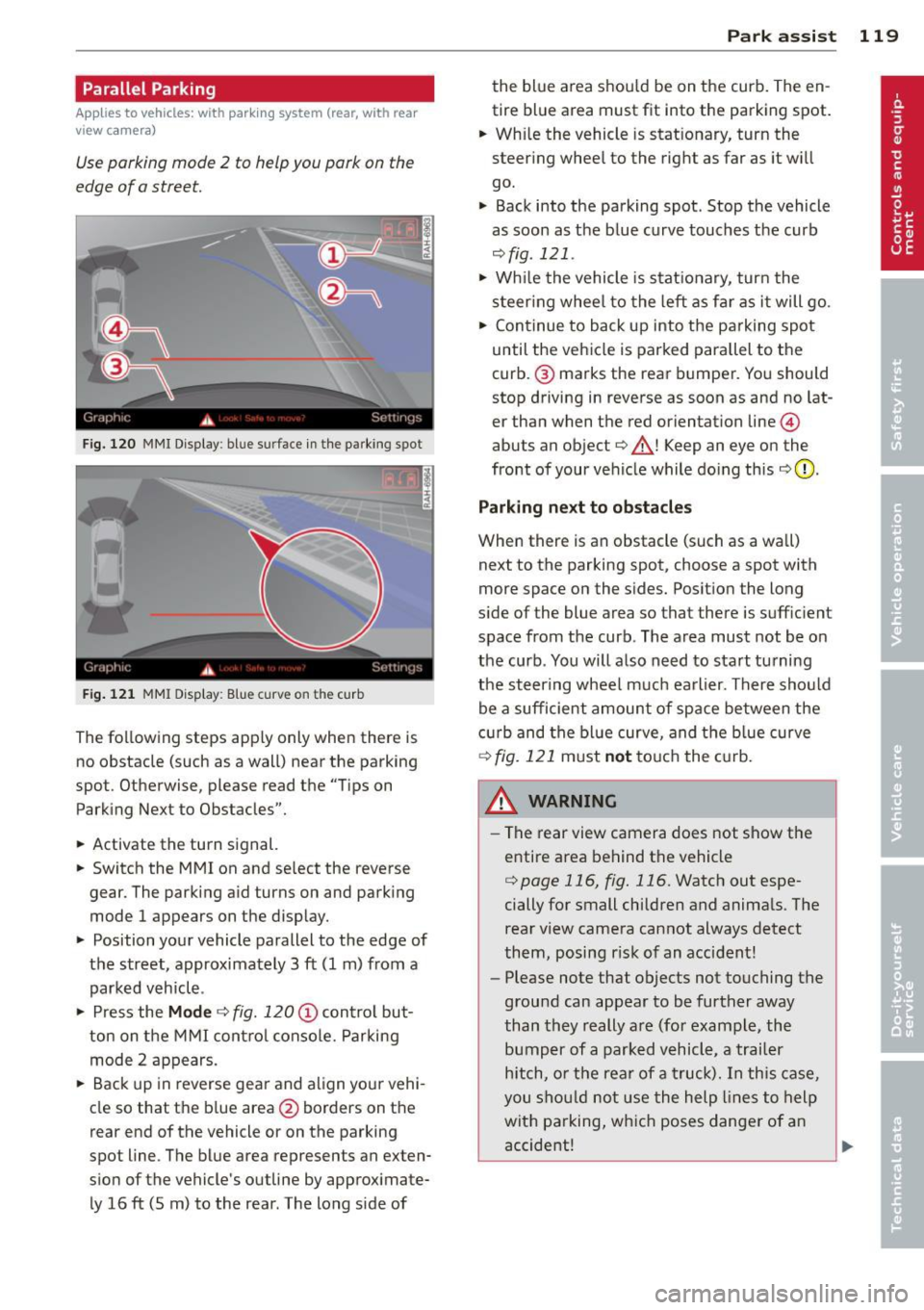
Use parking mode 2 to help you pork on the
edge of o street.
F ig. 120 MMI Display : bl ue s urface in the park ing spot
Fig. 121 MMI Display: Blue curve on t he cur b
The following steps app ly only when there is
no obstacle (such as a wall) near the parking
spot. Otherwise, please read the "Tips on
Parking Next to Obstacles".
• Activate the turn signal.
• Switch the MM I on and se lect the reverse
gear. The parking aid turns on and park ing
mode 1 appears on the display.
• Position your vehicle parallel to the edge of
the street, approximately 3 ft (1 m) from a parked vehicle .
• Press the
Mode ¢ fig. 120 © control but
ton on the MMI control console. Parking
mode 2 appears.
• Back up in reverse gear and align your vehi
cle so that the blue area
@ borders on the
rear end of the vehicle o r on the parking
spot line . The blue area represents an exten
s ion of the vehicle's outline by approximate
ly 16 ft (5 m) to the rear . The long s ide of
Park assist 119
the blue area shou ld be on the curb. The en
tire blue area must fit into the parking spot.
• Wh ile the vehicle is stat ionary, turn the
steer ing whee l to the right as far as it wi ll
go.
• Back into the parking spot . Stop the vehicle
as soon as the blue curve touches the curb
¢ fig . 121 .
• Wh ile the vehicle is stationary, turn the
steering wheel to the left as far as it will go.
• Continue to back up into the parking spot
until the vehicle is parked parallel to the
curb .@ marks the rear bumper. You should
stop driving in reverse as soon as and no lat
er than when the red orientat ion line @
abuts an object¢_& ! Keep an eye on the
front of your vehicle while doing this
¢ 0 .
Parking next to obstacles
When there is an obstacle (such as a wall)
next to the parking spot, choose a spot with
more space on the sides. Posit ion the long
s ide of the blue area so that there is suff ic ient
space from the curb. The area must not be on
the curb . You will also need to start tu rning
the steer ing wheel much earlier. There should
be a sufficient amount of space between the
c urb and the blue curve, and the blue curve
¢fig.121 must nottou chthec urb.
&_ WARNING
- The rear view camera does not show the
entire area behind the vehicle
¢ page 116, fig. 116. Watch out espe
cially for small children and animals. The
rear view camera cannot always detect
them, posing r isk of an accident!
- Please note that objects not touching the
ground can appear to be further away
than they really are (for example, the
bumper of a parked vehicle, a trailer
hitch, or the rear of a truck). In this case,
you should not use the help lines to help
with parking, which poses danger of an
accident!
.__ _____________ _J ...
Page 122 of 294

120 Park assis t
In the MMI display, the d irection of travel
of the vehicle rear is represented depend ing on the steering wheel angle. The vehi
cle front sw ings out more than the ve hicle
rear. Maintain plenty of distance from an
obstacle so that your o utside mirror or a
corne r of your veh icle does not co llide with
any obs ta cl es -danger of ac cident!
@ Tips
The left or right orientation li nes and sur
faces wi ll be displayed, depending on the
t urn sig na l being used.
Adjusting the display and warning tones
A ppl ies to vehicles: with pa rk in g system (rear, with rea r
view ca mera )
The display and warning tones are adjusted in
the radio or MM!*.
"' Se lect:
I CARI f u nction button > Parking sys ·
tern .
Or
"' Se lect: ~I C~A~R~I funct ion button > Car systems
control button > Dr iver assist > Parking aid .
Display
- Off -when the parking system is switched
off, on ly aud ible signals are given .
-On -when t he parking system is switched
on, the pict ure from the rear view camera is
displayed.
Warning tone s
- Rear volume -
rear sensor volume
-Rear frequency -rear sensor frequency
-Music volum e while parking -when the
park ing system is switched on, the volume
of the act ive a udio source is lowered.
The new ly adjusted value is briefly heard from
the signal gene rator. The sett ings a re auto
mat ica lly stored and assigned to the remote
con trol key.
_& WARNING
- Alw ays m ake su re th at the volume and
freq uency of the warning tones is adjus t-
-
ed so that you can easily hear the acous
tic d istance signa l even if the radio is
playing, the air-cond it ioner blower is on
H igh or there is a hig h level of outside
noise.
- Check the settings w henever someone
else has driven the vehicle before you.
(D Tips
- The warn ing tones can also be adjusted
directly from the rear view camera im
age. Simply press the Settings* contro l
butto n.
- Changed settings are activated when
park ing ass ist is switc hed on aga in.
Error messages
App lies to vehicles: wit h parking system (rear, wit h rear
v iew camera)
If a warning tone is aud ible for about five sec
onds when you turn on the ignition, there is a
malfunction in the system . Have the problem
cor rected by your author ized Audi dealer.
Keep the senso rs in the rear bumpe r clean and
free from ice so that the acoustic park assist
system can function properly.
Page 129 of 294
.. Sit properly in your seat and make sure that
your passengers do the same
¢page 54,
Seats and storage.
.. Fasten your safety belt and wear it properly.
Also instruct your passengers to fasten their
safety belts properly¢
page 136 .
What impairs driving safety?
Safe driving is directly related to the condi
tion of the vehicle , the driver as well as the
driver's ability to concentrate on the road
without being distracted .
The driver is responsible for the safety of the
vehicle and all of its occupants. If your ability
to drive is impaired, safety r isks for everybody
in the vehicle increase and you a lso become a
hazard to everyone else on the road
~ .&_.
Therefo re:
.. Do not let yourself be distracted by passen
gers or by using a cellular telephone .
.. NEVE R drive when yo ur driv ing ability is im
paired (by medicat ions, alcohol, drugs, etc.).
.. Observe all traffic laws, rules of the road
and speed limits and plain common sense .
.. ALWAYS adjust your speed to road, traffic
and weather conditions .
.,. Take frequent breaks on long trips. Do not
drive for more than two hours at a stretch.
.. Do NOT drive when you are tired, under
pressure or when you are stressed .
& WARNING
Impaired driving safety increases the risk
of serious personal injury and death when
ever a vehicle is being used.
Driving Safely 12 7
Proper occupant
seating positions
Proper seating position for the driver
The proper driver seating position is impor
tant for safe, relaxed driving.
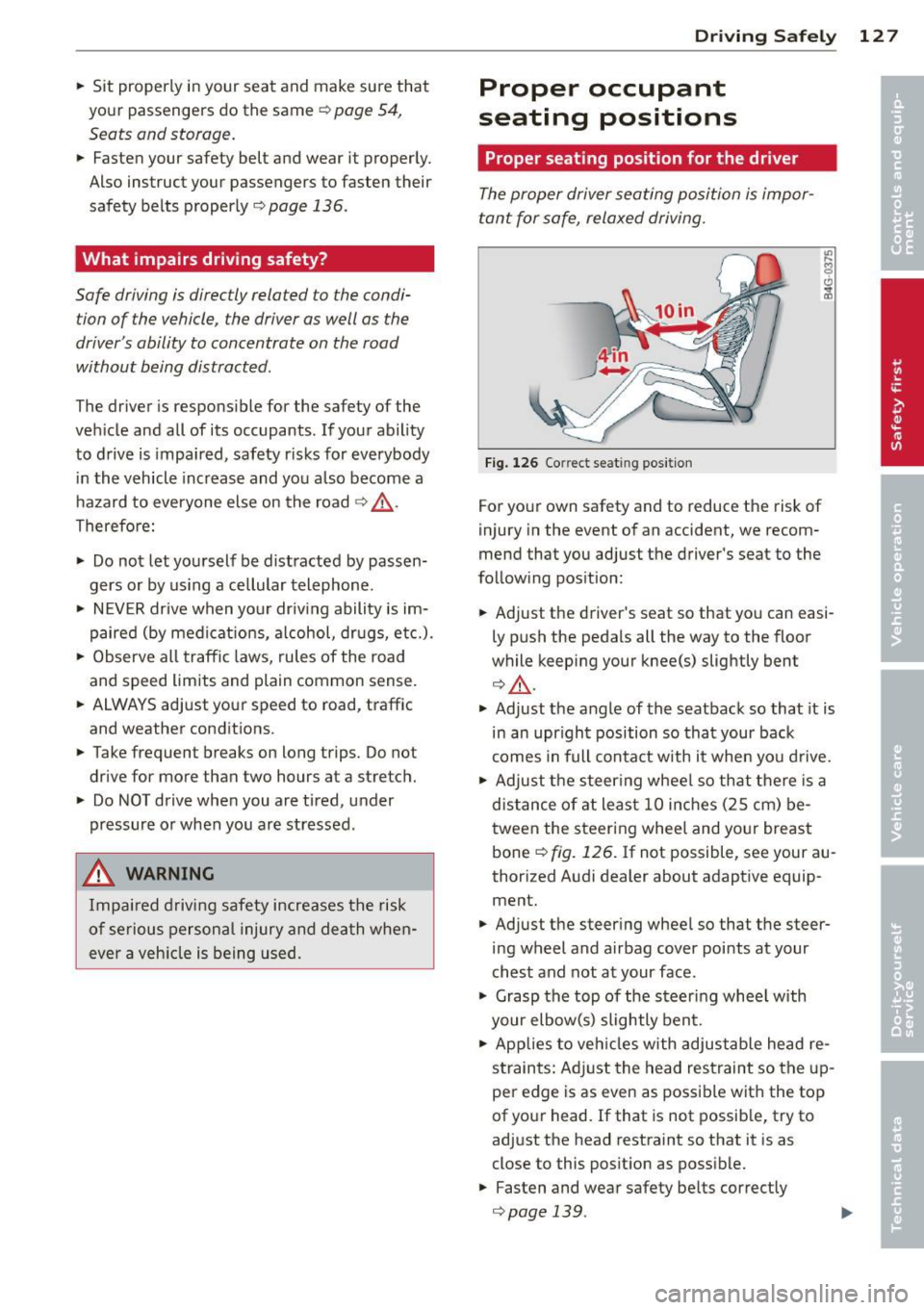
Fig. 126 Correct seat ing pos it ion
For your own safety and to reduce the risk of
injury in the event of an accident, we recom
mend that you adjust the driver's seat to the
follow ing pos ition:
.. Adjust the driver's seat so that you can easi
ly push the pedals all the way to the floor
wh ile keeping your knee(s) slightly bent
¢&_ .
.. Adjust the angle of the seatback so that it is
in an upr ight position so that your back
comes in full contact w ith it when you drive.
.. Adjust the steering wheel so that there is a
distance of at least 10 inches (25 cm) be
tween the steering wheel and yo ur breast
bone
~ fig. 126. If not possible, see your au
thorized Audi dealer about adaptive equip
ment.
.. Adjust the steer ing wheel so that the steer
ing wheel and airbag cover points at your
chest and not at your face .
.,. Grasp the top of the steering whee l with
your elbow(s) slightly bent .
.. App lies to vehicles with adjustable head re
s tra ints: Ad just the head restraint so the up
per edge is as even as possible with the top
of your head. If that is not possible, try to
adjust the head restraint so that it is as
close to this pos it ion as possible .
.. Fasten and wear safety be lts correctly
¢ page 139 . .,._
Page 130 of 294
128 Driving Safely
• Always keep both feet in the footwell so
that you are in control of the vehicle at all
times.
For detailed information on how to adjust the
driver's seat, see
¢ page 56.
A WARNING
Drivers who are unbelted, out of position
or too close to the airbag can be seriously
injured by an airbag as it unfolds. To help
reduce the risk of serious personal injury:
- Always adjust the driver's seat and the
steering wheel so that there are at least
10 inches (25 cm) between your breast
bone and the steering wheel.
- Always hold the steering wheel on the
outside of the steering wheel rim with
your hands at the 9 o'clock and 3 o'clock positions to help reduce the risk of per
sonal injury if the driver's airbag inflates.
- Never hold the steering wheel at the
12 o'clock position or with your hands at
other positions inside the steering wheel
rim or on the steering wheel hub. Hold
ing the steering wheel the wrong way
can cause serious injuries to the hands,
arms and head if the driver's airbag de
ploys.
- Pointing the steering wheel toward your
face decreases the ability of the supple
mental driver 's airbag to protect you in a
collision .
- Always sit in an upright position and nev
er lean against or place any part of your
body too close to the area where the air
bags are located.
- Before driving, always adjust the front
seats and head restraints properly and
make sure that all passengers are prop
erly restrained.
- Never adjust the seats while the vehicle
is moving . Your seat may move unexpect
edly and you could lose control of the ve
hicle.
- Never drive with the backrest reclined or
tilted far back! The farther the backrests
are tilted back, the greater the risk of in- jury due to incorrect positioning of the
safety belt and improper seating posi
tion.
- Children must always ride in child safety
seats ¢
page 165. Special precautions
apply when installing a child safety seat
on the front passenger seat¢
page 144 .
Proper seating position for the front
passenger
The proper front passenger seating position
is important for safe, relaxed driving .
For your own safety and to reduce the risk of
injury in the event of an accident, we recom
mend that you adjust the seat for the front
passenger to the following position :
• Move the front passenger seat back as far
as possible . There must be a minimum of
10 inches (25 cm) between the breastbone
and the instrument panel¢,&. .
• Adjust the angle of the seatback so that it is
in an upright position and your back comes
in full contact with it whenever the vehicle is
moving.
• Applies to vehicles with adjustable head re
straints: Adjust the head restraint so the up
per edge is as even as possible with the top
of your head. If tha t is not possible, try to
adjust the head restraint so that it is as
close to this position as possible.
• Keep both feet flat on the floor in front of
the front passenger seat.
• Fasten and wear safety belts correctly
¢page 139.
For detailed information on how to adjust the
front passenger's seat, see
¢ page 54.
A WARNING
-
Front seat passengers who are unbelted,
out of position or too close to the airbag
can be seriously injured or killed by the air
bag as it unfolds. To help reduce the risk of
serious personal injury: