2013 AUDI Q7 fuel
[x] Cancel search: fuelPage 5 of 348

Adaptive Air Suspension .. .. . .
Air suspension and damping
Homelink ® ... .. .... ... .. .. .. . .
Universal remote control ... .. .. .. . .
S afet y fir st ... ...... ... .. .. .. . .
155
155
161
16 1
165
Driving Safely . . . . . . . . . . . . . . . . . 165
Gene ral notes . . . . . . . . . . . . . . . . . . . . 165
Proper occupant seating posit ions . . . 166
Ped al area . . . . . . . . . . . . . . . . . . . . . . . 170
Stowing luggage . . . . . . . . . . . . . . . . . 171
Report ing Safety Defects . . . . . . . . . . . 172
Safety belts . . . . . . . . . . . . . . . . . . . 175
General notes . . . . . . . . . . . . . . . . . . . . 17 5
Why safety belts? . . . . . . . . . . . . . . . . 176
Safety belts . . . . . . . . . . . . . . . . . . . . . 179
Safety bel t pretens ioners . . . . . . . . . . 182
Airbag system .......... ... ... .
Important things to know ......... .
Fr ont airbags ............ .... .. . .
M on itoring the A dvanced Airbag
System .... .. ... .. ..... ... .. .. . .
Side airbags .... ...... ... .. .. .. . .
Side curtain airbags .... ... .. .. .. . .
Child Safety .. .. .... ... .. .. .. . .
Important things to know . ... .. .. . .
Ch ild safety seats ................ .
Instal ling a child safety seat .. .. .. . .
LATC H Lower anchorages and tethers
for chi ldren .... .. .. ..... ... .. .. . .
Addit ional Information
Vehicle operation ....... .. .. . .
Intelligent technology .... ... .
184
184
188
195
199
202
205
205
211
215
218
224
225
225
Not ice about data recorded by vehi cle
con trol mod ules . . . . . . . . . . . . . . . . . . 225
E lect ronic S tabiliz ation Control ( ESC) . 225
Braking . . . . . . . . . . . . . . . . . . . . . . . . . 228
Servotronic ® -advanced power
steering system . . . . . . . . . . . . . . . . . . 230
Driving w ith your quattro ® . . . . . . . . . 231
Energy management . . . . . . . . . . . . . . 231
Table of contents 3
Driving and environment . . . . .
234
The first 1,000 miles (1,500 km) and
afterwa rds . . . . . . . . . . . . . . . . . . . . . . 234
Catalytic co nverter . . . . . . . . . . . . . . . . 235
Diesel particulate filter . . . . . . . . . . . . 235
Avoid damaging the vehicle . . . . . . . . . 236
Operate your vehicle eco nomically and
min imize poll ution . . . . . . . . . . . . . . . . 236
Driving off road . . . . . . . . . . . . . . . 238
Driving in d ifficult road conditions and
offroad . . . . . . . . . . . . . . . . . . . . . . . . . 238
Trailer towing . . . . . . . . . . . . . . . . . 241
D riving with a trailer . . . . . . . . . . . . . . 241
T rai le r tow ing tips . . . . . . . . . . . . . . . . 243
Vehicle care . . . . . . . . . . . . . . . . . . . 245
Cleaning and protection . . . . . . 245
General information . . . . . . . . . . . . . . 245
Care of exterior . ... .. .. .. .... ... .
Care of inte rior ... .. . .. .. ..... ... .
Fuel supply and filling your
fuel tank ... .... .. . .. .. ..... ... .
Fuel supply ...... .. . .. .. ..... ... .
Diesel f uel .. .. .. .. .. ... ..... ... .
Fuel tank ....................... .
Se lective catalytic reduction ....... .
Checking and filling .......... .
Engine hood ... .. ............... .
E n gine oi l ... .... ..... .... ..... . .
Engine cooling system .. .. ..... ... .
B rake fluid ....... .............. .
B attery ... .. .. .. .. . ............ .
Windsh ie ld/headl ight washer
conta iner . .. .. .. .. ............. . 2
4 5
251
256
256
257
258
261
264
264
266
271
274
2 75
2 79
Tires and wheels . . . . . . . . . . . . . . 280
T ires . . . . . . . . . . . . . . . . . . . . . . . . . . . 280
T ire pressure monitoring system 298
Do -it -yourself service . . . . . . . . . 301
What do I do now? ...... ... .. . 301
Jack , tools and inflatable spare tire . . 301
Changing a wheel . . . . . . . . . . . . . . . . . 304
•
•
Page 12 of 348
10 Instruments and warning/indicator lights
Instruments and warning/indicator Lights
Instruments
Instrument cluster and controls
The instrument cluster is your central source of information.
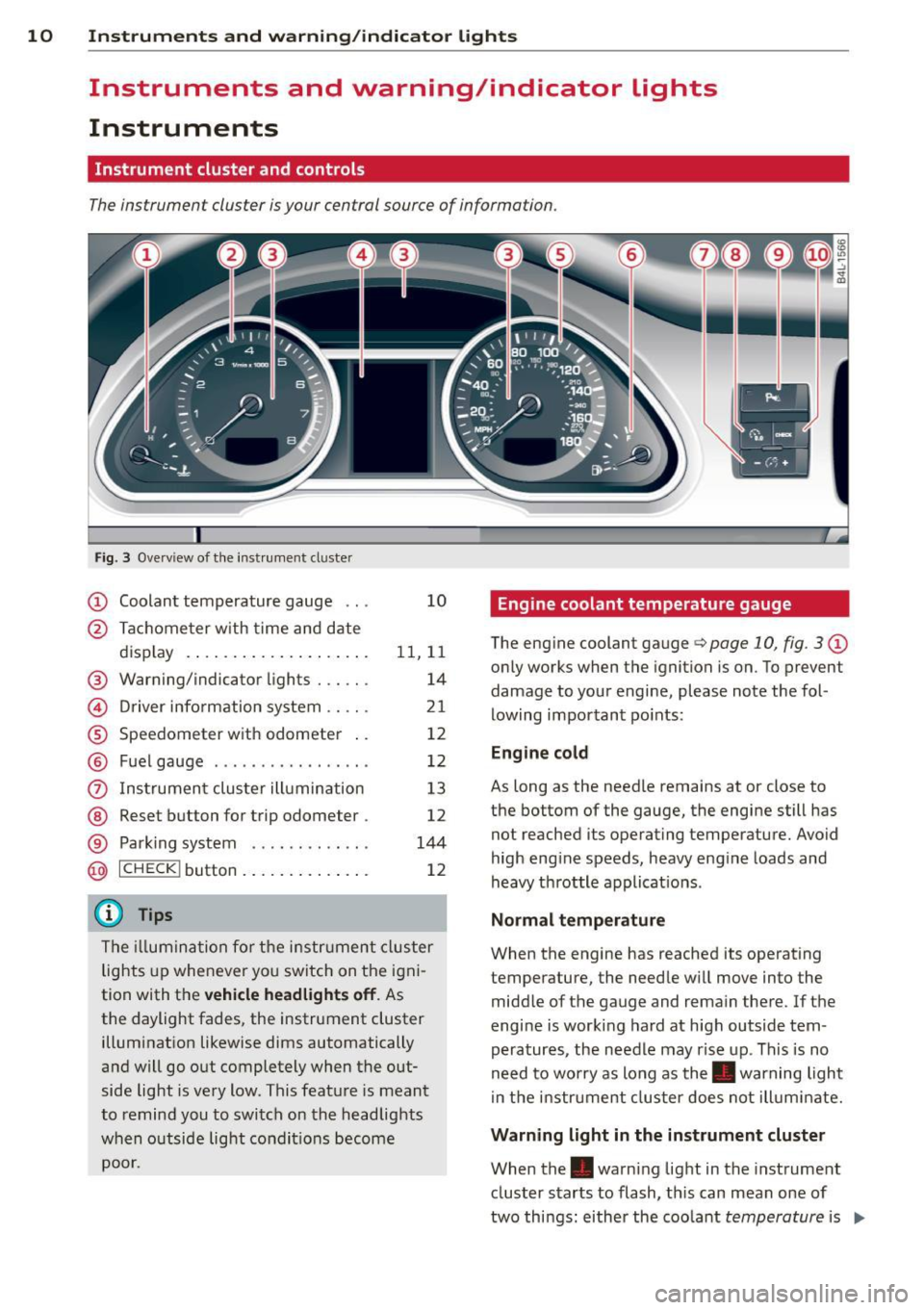
Fig. 3 Ove rv iew of t he inst ru m ent cluster
CD Coolant temperature gauge . . . 10
@ Ta ch ome ter w ith time an d date
d isplay . . . . . . . . . . . . . . . . . . . . 11, 11
® Warning/indicator lights . . . . . . 14
© Driver info rmation system .. .. . 21
® Speedometer with odometer . . 12
® Fuel gauge . . . . . . . . . . . . . . . . . 12
(i) Ins trumen t clus ter ill umination 13
@ Reset button for t rip odometer . 12
® Parking system . . . . . . . . . . . . . 144
@ ICHECK I button . . . . . . . . . . . . . . 12
@ Tips
The ill umi nat ion fo r th e i nstru me nt cl uster
lights up whe never yo u switch on the i gni
tion with t he
vehicle headlights off . As
the daylight fades, the instrument cluster illumi nat ion likewise dims automatically
a n d w ill go out completely when t he out
side light is very low. This feat ure is meant
to remind you to switch on the headlights
w hen o utside lig ht con dit io ns become
poor.
Engine coolant temperature gauge
The eng ine coolant gauge q page 10, fig. 3 CD
only works when the ignition is on. To p revent
damage to you r engine, please note the fol
lowing impor tant po ints:
Engine cold
As long as the needle remains at or close to
the bottom of the gauge, the engi ne still has
not reached its operat ing temperature . Avoid
high eng ine speeds, heavy eng ine loads and
heavy th rottle a pplicat io ns.
Normal temperature
When the engine has reached its operat ing
temperature, the needle w ill move into the
midd le of the gauge and rema in the re. If th e
engine is worki ng ha rd at high outside tem
peratures, the needle may rise up. This is no
need to worry as long as the. warning light
i n the i nstr ument cluster does not ill uminate.
Warning light in the instrument cluster
When the. warn ing light in the inst rument
cluster s tarts to flash, th is can mean one of
two things : eithe r the coo lant
temperature is .,..
Page 13 of 348
Instrument s and warning /indicator lights 11
too high, or the coolant level is too low
¢ page 32.
If the needle is well in the upper area of the
ga uge , the coolant temperature is too high.
Stop the vehicle , switch the eng ine off and
allow the engine to cool.
If the warning light
comes on again after driving a short distance,
contact an authorized dealer.
A WARNING
-Always observe the warning in
¢ page 255, Engine compartment, be
fore opening the hood and checking the
engine coolant level.
- Never open the engine hood if you see or
hear steam, or if you see engine coolant
dripping from the engine compartment.
You could burn yo urself. Let the engine
cool off first un til you can no longer see
or hear steam or coo lant escaping .
(D Note
- Mounting additional lights or accessories
i n front of the air inlets reduces the cool
in g effect of the rad iato r. At high outside
temperatures or high engine load, the
engine could overheat.
- The front spoi ler has been designed to
properly distribute the cooling air when
the vehicle is moving. If the spoiler is
damaged, this cou ld red uce the cooling
effect and the engine could then over
heat. Ask your authorized Aud i dealer for
assistance .
Tachometer (engine rev counter)
The tachometer indicates the engine RPM
(revolutions per minutes) .
The tachometer @¢ page 10, fig. 3 is the left
of the two large clock-type displays.
The engine turns at a speed
1,000 times the
single digit in the display, e.g . if the needle is
pointing at the "2" the engine is turning at
2,000 RPM. If
eng ine RPM drops below 1,500, you should
downshift to the next lower gear. The red area
at the end of the scale indicates maximum
permissible engine RPM after the break -in pe
riod. Before reaching this area, move these
lector lever to position "D (Drive)" or ease
your foot off the accelerator pedal.
Q) Note
The tachometer needle should not move
i nto the red range. If it does, then only for
a very short per iod of t i me. You could
damage your engine by driving at high
RPM .
@ For the sake of the environment
Upsh ifting early saves fuel and reduces en
gine noise .
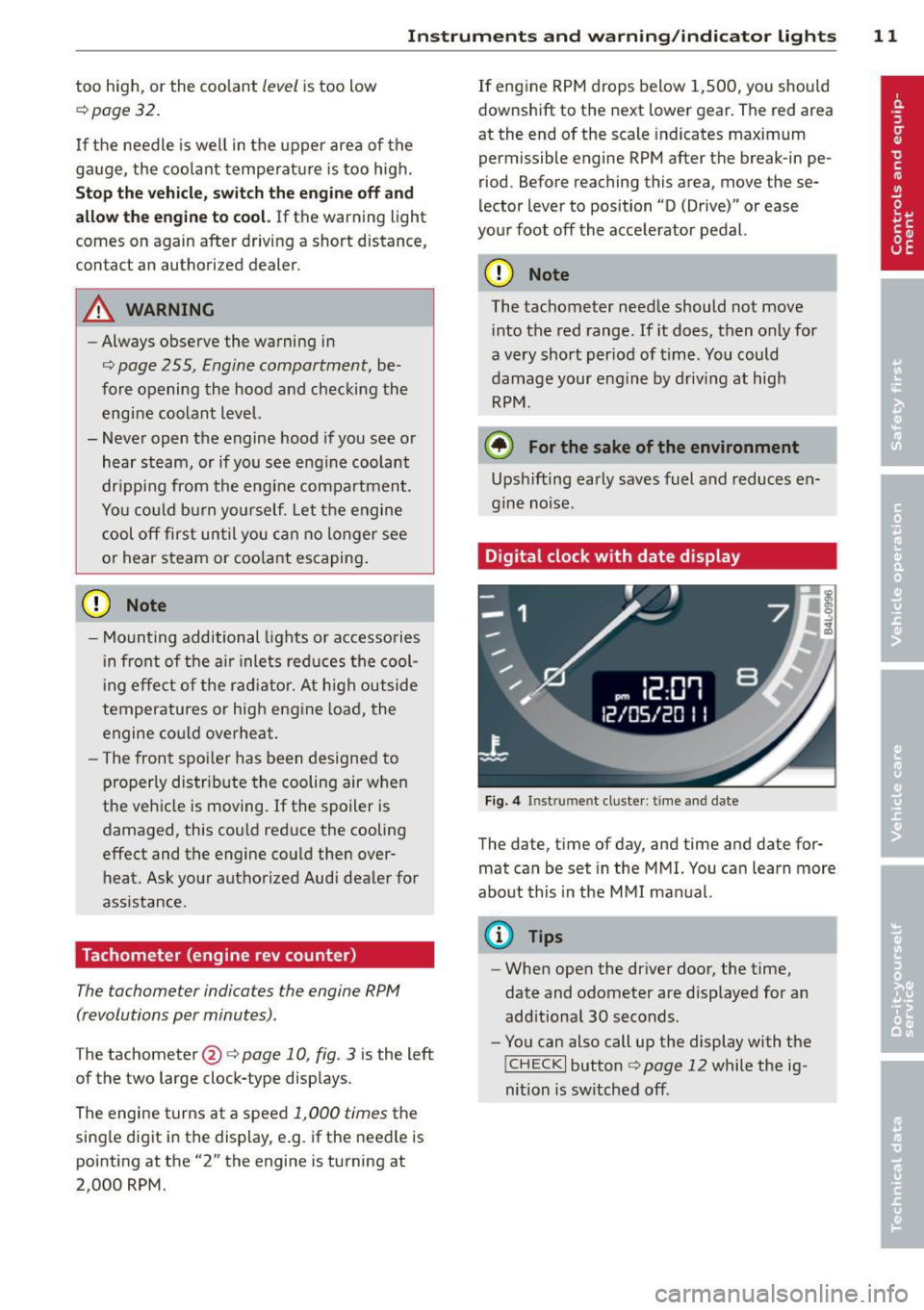
Digital clock with date display
Fig. 4 In st rum en t cluster : time and date
The date, time of day, and time and date for
mat can be set in the MMI. You can learn more
about this in the MMI manual.
{!) Tips
- When open the driver door, the time,
date and odometer are displayed for an
add itional 30 seconds.
- You can also call up the display with the
!CHECK I button c:> page 12 while the ig
nition is sw itched off.
Page 14 of 348

12 Instruments and warning/indicator lights
Speedometer with odometer
The speedometer shows you the vehicle
speed, and the odometer shows you how many miles (kilometers) you have driven.
Fig. 5 Instrument cluster Odometer and reset button
The odometer and trip odometer are located
inside the speedometer.
- USA mode ls - Miles
- Canada models -Kilometers
You can switch the display from miles to kilo meters and vice versa via the MMI. You can
find out more in the MMI manual.
Lower odometer
The lower odometer shows the total number
of mi les (kilometers) driven.
Upper odometer (trip odometer)
The upper odometer shows the tota l number
of mi les (kilometers) driven since you last re
set the odometer to zero. You can use this od
ometer when you want to keep track of how many miles (k ilometers) you have driven for a
single trip or errand. The last digit indicates
1/10 of a mile (100 meters).
You can reset the trip odometer to zero by
pressing the Reset button
~o.
Malfunction message
If there is a malfunction somewhere in the in
strument cluster,
dEF will appear in the trip
odometer and will stay on. Contact your au
thorized Audi dealer to have the problem cor
rected.
(D Tips
- When you open t he driver door, the time,
date and odometer are disp layed for an
add itiona l 30 seconds.
- You can also call up the display with the
I CHECK I button c> page 12 while the ig
nition is switched off.
Fuel gauge
The fue l gauge only works when the ignition is
on .
When the needle reaches the reserve mark,
the
c> page 35 00] symbol appears in the in
strument cluster d isplay as well as the mes
sage
Please refuel. This message is meant to
remind you to
refuel.
The total tank capacity of your vehicle is listed
in
.:> page 322 .
@ Note
Never run the tank completely dry. An ir
regular supply of fuel can cause engine
misfiring and fuel could enter the exhaust
system. The catalytic converter could then
overheat and be damaged.
~ button
You can perform different functions with this
button .
Fig. 6 CHECK button in th e ins trument cluster
The !CHECK I button performs the following
functions:
Page 19 of 348

Instrument s and warnin g/indic ator ligh ts 17
o Malfunction Indicator Lamp (MIL)
The Malfunction Indicator Lamp (M IL) is part
of the On-Board D iagnost ic (OBD II) system.
The symbol
¢'4 lights up when the ignit ion is
turned on and will turn off after the engine
has started and has sett led at a constant idle
speed. This ind icates that the MIL is working
properly .
The warning light i lluminates when there is a
malfunction in the engine e lectronic system .
Contact your author ized Audi dealer and have
the ma lfunction corrected .
An improperl y clo sed fuel filler cap m ay als o
c a u se the MIL light to illumi nate (only
v ehicle s with ga solin e eng in e )
c> page 259.
For more informat ion c> page 2 7.
0 Adaptive Air Suspension
Applies to vehicles: with Adaptive Air Suspension
This IIJ warning/indicator light has the fol
l owing functions:
- It illuminates for a few seconds after the ig
nition is tu rned on as function check and
then goes out .
- If the warning/ind icator light illuminates or
blinks continuously, there is a system fau lt
in the Adaptive A ir Suspension . A system
fault can result in limited ride comfort and
low ground cl earance . Drive safely to the
nearest authorized Aud i dealer or qualified
workshop, and have the fault corrected .
- If the warning/ind icator light flashes, you
should not drive the vehicle. The flash ing
warning/ind icator light po ints to an extreme
High level. A very
pronounced lifting of the
vehicle (extreme High level) can resu lt, fo r
example, when a heavy load is removed
from the vehicle. As soon as the leve l has re
turned to normal, the warning/indicator
light stops flashing, and yo u can drive away.
- If the warning/ind icator light flashes in con
junction with the
II warning/indicator
light, you sho uld not drive off immediate ly
i n order to prevent damage to the under
body . The two warning/ind icator lights flashing together points to an extreme Low
level. A very
pronounced lowering of the ve
hicle (extreme Low leve l) can result, for ex
ample, from a heavy load . As soon as the
level has returned to normal, the warning/
ind icator lights stop flashing, and you can
dr ive away.
(D Note
If the warning/indicator light flashes in
conjunction with the
II warning/ind ica-
tor light, you should not dr ive the veh icle
because low-lying veh icle parts can bot-
tom out as you d rive over uneven ground
a n d be damaged as a result.
c.:, Adaptive Air Suspension
Applies to vehicles: with Adaptive Air Suspension
This II warning/indicator light has the fo l
lowing functions:
- I t illuminates for a few seconds after the ig
nition is turned on as func tion check and
then goes out .
- I t comes o n for approximate ly 15 seconds
as a warning of
reduced ground clear ance , if
the dynam ic mode is activated and i f the ig
nition is switched on
r:!;> page 155, Chassis
controls.
- If the warning/indicator light flashes in con
junction with
the m warning/indicator
light, you should not drive the veh icle imme
diately in order to prevent damage to the
underbody. The two warn ing/ indicator
lights flashing together points to an ex
treme Low level. A very
pronounced lower
ing
of the vehicle (extreme Low level) can re
sult, for example, from a heavy load. As
soon as the level has returned to normal,
the warning/ind icator lights stop flashing,
and you can d rive away.
(D Note
If the warning/ indica tor ligh t flashes in
conjunction with
the m warn ing/ indica
tor light, you should not drive the vehicle
Page 26 of 348

24 Driver information d isplay
Re setting the service interval display
Your au thor ized A udi dealer w ill reset the cor
responding service sched ule after performing
the app rop riate service on yo ur vehicle . Yo u
a lso have the possibility to reset the oil
change sched ule after having performed an
oil c hange according to Audi specifications.
Select
I CAR I function button > Systems * con
trol button
> Service int erva l display > Re set
oil change interval
or ! CARI function button >
Car systems* control button > S ervicing &
check s > Service interval s > Reset oil change
interval.
(D Note
If you disconnect the b attery termi nals, no
c a lcu lations can be m ade for the servi ce
in terva l display during this time and no
service rem inder w ill appear . Remembe r
that obse rv in g the prope r serv ice interva ls
is vita lly im portant to extend ing the life o f
y o ur veh icle , part icu larly the eng ine, and
maintaining its va lue . Do not exceed the
time int erval fo r th e next se rv ice, even if
the vehicle mileage is low .
@ Tips
-Do not reset the display between oil
changes, otherw ise the display will be in
correct.
- The informati on in the Servic e Reminder
r ema ins sto red even when the vehicle
batte ry is discon necte d.
Trip computer
Introduction
The trip computer gives you information on
current and average fuel mileage, average
speed, fuel range and driving time.
Fig. 16 T rip comp ute r di sp lay : Average f ue l m il eage
T he following dr iving inform ation is con tinu
o usly evalua ted by the trip computer and can
b e displayed sequentially in the instrument
cluster disp lay.
Fuel range
T he es tim ated cru is ing r ange in miles ( km)
appea rs in the display. T his tells you how far
yo ur vehicle will be ab le to travel on the c ur
rent ta nk of f uel a nd with the same driving
sty le. The display changes in increments of 6
miles (10 km).
T he cruising range is calculated based o n the
fuel consum ptio n for the last 18 miles
(30 km). I f you drive conservative ly, the cr uis
i ng range w ill increase.
Average fuel mileage
The aver age f ue l economy in MPG ( l/1 00 km)
s ince you last cleared the memo ry appears in
t hi s disp lay . You can use this display to ad just
yo ur driv ing technique to achieve a desired
mileage.
Current fuel mileage
T he ins tan taneous fuel consum ption in m iles
per gallon ( l/100 km) is shown in this disp lay.
You can use this display to adjust your driving
technique to achieve a desired m ileage .
Ill-
Page 27 of 348

Fue l consumption is reca lculated at interva ls
of 33 yards (30 meters). When the vehicle is
stationary, the most recent fue l consumption
is displayed .
Average speed
The average speed in mph (km/h) since the
l ast time the disp lay was reset appears in the
display .
Elapsed time
The length of time that you have been driving
since you last reset the memory appears in
this display.
Distance
The distance that has been covered since the
l ast time the memory was cleared appears in
the disp lay.
(D Tips
- Fuel consumptions (ave rage and cur
rent), range and speed are displayed in
metric units on Canadian models.
-All stored va lues w ill be lost if the veh i
cle battery is disconnected .
Memories
The trip computer is equipped with two fully
automatic memories as well as an efficiency
program".
Fig. 17 Trip computer d isplay: memo ry level 1
You can switch between the trip computer 1
and 2 and the efficiency program* by pressing
the
! RESET I button @¢ page 25, fig. 18.
You can tell which memo ry level is cur rently
active by the number or the sign in the display
Driver information display 25
¢ fig. 17. The data from the single-trip mem
ory (memory level 1) is being displayed if a
D
appears in the display . If a fJ is shown, then
the data from the total-trip memory is being
displayed (memory level 2). The fuel pump nozzle
iii indicates the efficiency program*
¢page 26.
Single-trip memory (Trip computer 1)
The single-trip memory stores the trip infor
mation from the time the ignition is turned on
until it is turned off. If the trip is continued
within 2 hours from the time the ignition was
turned off, the new data will be included in
the calculat ion of the current trip informa
tion. If the trip is interrupted for
more than 2
hours
the memory is reset automatically.
Total-trip memory (Trip computer 2)
Unlike the single -trip memory, the total -trip
memory is not reset automat ical ly. This per
mits you to evaluate your driv ing data for the
entire period between manua l resets.
Efficiency program*
The efficiency program can help you to use
less fuel ¢
page 26.
Operation
The trip computer is controlled by two
switches on the windshield wiper lever .
Fig. 18 Windsh ield wiper lever : contro ls for the t rip
computer
.. To display the trip computer memory levels,
press the
I RESET ! button®¢ fig. 18 re
peatedly until the desired memory level is
shown in the display . .,.
Page 28 of 348

26 Driver in formation d isplay
• To disp lay trip information within a memory
l evel, press the top or bottom part of the
function selection switch
@ .
The trip computer wi ll not operate unless the
ignition is on. When you turn on the ignition,
the function that was in use when you last
turned the ignit ion off will be d isp layed.
I n addition to informa tion on the trip compu t
e r (trip computer 1, 2 and efficiency pro
gram*), the digital speedometer and informa
tion regard ing the nav igat ion system* can al
so be displayed. To switc h the display between
the different information, tap the
I RESET I but
ton @ briefly .
Setting value s to zer o
To erase the single or total trip comp uter va l
ues, se lect the des ired funct ion and p ress and
hold the
I RESET ! button@ for at least one
second . You ca n also erase* the va lues with
the MMI
¢ page 26.
All values currently displayed in the efficiency
program* are a lso erased with the s ingle tr ip
computer.
(D Tips
All stored values will be lost if the vehicle
battery is disconnected.
MMI settings
Basic settings for the trip computer can be
made in the MMI.
• Se lect: I CARI f u nction button > System s*
control button > Instrument cluster > On·
board computer 1 or On-boa rd computer 2 .
The values i n the single -t rip or the total -trip
memory can a ll be reset to zero at the same
time under
Reset in the menu .
I n addi tion, you can de termine what informa
tion from the trip computer sho uld be shown
in the instrument cluster display. If one of the
p ieces of dr iver information is turned
Off , that
driver information w ill not be shown in the
d isplay. The information will continue to be ca
lculated by the tr ip comp ute r and can be
turned back
On at any time .
(D Tips
- This function is not ava ilable on all
vehicles .
- T he d riving info rm ation in the eff ic iency
program * is also reset to zero with t he
sing le-trip memory.
Efficiency program
Description
Applies to vehicles: with efficiency program
Fig. 1 9 Display: eff iciency prog ra m
• Press the I RESET ! button@¢ page 25 ,
fig . 18
repeatedly unt il the effic iency pro
gram appears i n the display .
T he efficiency program ca n he lp you to use
l ess fuel. It evaluates driving info rmation in
reference to fuel consumption and shows ot h
er equipment influencing consumption. Fuel
economy messages
¢ page 27 provide t ips
for effic ient d riving.
The efficiency program uses distance and con
sumption data from trip computer
l. If the
data a re deleted in the efficiency program,
those values a re also reset in tr ip comp ute r
l.