2013 AUDI Q7 unlock
[x] Cancel search: unlockPage 61 of 348

The light switch must not be overturned past
the stops in
either d irectio n.
Switching on the front fog lights }0
~ Turn the light swit ch to :oo: or to io.
~ P ull t he ligh t sw itch to the first stop @.
When the front fog lights are on, the symbol
}O n ext to the lig ht switch will illum inate.
@ Tips
W ith the switch in AUTO front fog lights
and rear fog lights cannot be turned o n in
add it io n.
Rear fog lights
Fig. 55 Inst rument pa ne l: lig ht sw itc h
The light sw itch must not be overturned past
the stops in
either d irect ion.
~ Turn the light switch to :oo: or to io.
~ Pu ll the light sw itch to the second stop @.
When the rear fog lights are on, both the
}0
and 0$ symbols next to the light switch will il
l um inate.
(D Note
The rear fog lights can distract d rivers be
h ind you, so, they should be turned on
on
ly in cond itions of very poor visibility. Al
ways observe local regulations when using
the rear fog lights.
{D) Tips
With the switch in AUTO front fog lights
and rea r fog lights cannot be turned on in
add it io n.
Clear vi sion 59
Adaptive light
Applies to vehicles: wit h adaptive light
When driving around bends, the relevant area
of the road is better illuminated .
Fig. 56 Adapt ive light w hen driv ing
Switching on adaptive light
~ Turn the lig ht switch to AUTO ~ page 57,
fig . 5 3.
The adaptive lig ht is a dy namic corner ing
li ght. Wh en th e light is on, it fo llows th e
cur ve of t he road. It is depen dan t upon the ve
hi cle spee d and the a ngle of the stee ring
whee l. The c urve is then bette r illuminated .
The system wor ks when the vehicle is moving
from 6 mph (10 km/) to 68 mph (110 km/h).
T he co rne ring ligh t will swi tch on automa ti
ca lly a t a specif ic steering wheel angle. I t
wor ks up to an a pproximate speed of 44 mph
(70 km/h).
At approx im at ely 72 mph ( 115 km/h) t he ex
p ressway light swi tches on, which better dis
tributes the light and increases the light cone
r ange . The exp ressway light sw itches
off at
approximate ly 62 mph (100 km/h) .
Perimeter lighting in the mirror housing
Applies to vehicles: wit h lig ht pac kage
LEDs in the exterior mirror housing illuminate
the ground during entry .
This func tion ens ures that when unlocking ,
the vehicle pe riphe ry is illuminated in t he
dar k. LEDs in t he e xterior m irror housing are
switched on. The function cannot be turned
off separate ly.
Page 63 of 348

Notes o n these featur es
- The turn signals only work with t he ignition
turned on . T he indicator light s
II or Ill in
the instrument cluster
¢ page 14 also b link.
- After you have turned a corner , the tur n sig-
nal switches off automatica lly.
- The
high beam works only when the head
lights are on. The indicator light
II in t he
instrument cluster i lluminates when the
high beams a re on.
- The
headlight flasher wo rks only as long as
you hold the lever -even if there are no
lights turned on . The indicator light
II in
the ins trument cluster illuminate s when you
u se the headlight flasher .
A WARNING
-
Do not use the high beam or headlight
flasher if you know that thes e cou ld blind
oncoming traffic.
Interior lights
Front interior lights
The interior lights include reading lights for
both the driver and the front passenger .
Fig. 59 Headlin er: Fro nt in te rior /re adi ng light s
The rocker switch @¢ fig. 59 for ope rating
the in ter ior lighting has the follow ing func
tions :
Door cont act switch
.,. Place the switch @ in the midd le position.
Interior light switched on
.,. Place the switch @ in posit ion I.
.,,
:! .:,
1A
Clear vision 61
Interior light switched off
.,. Place the sw itch @ in position 0.
Re ading lights ~
.,. Press one of the switches @ to turn the
r ight or left reading light on or off .
In the door contact swi tch position (switch @
in the m iddle position), the interior l ights tur n
o n as soon as you unlock the vehicle o r open
the doors . The inte rior lights are also turned
o n when the igni tion key is removed . The light
goes ou t about 30 seconds after the doo rs are
closed. When the veh icle is locked or when
the igni tion is turned on, the i nterior lights
are turned off .
When a door is open, the interior lights are
tu rned off after about 10 minutes to prevent
draining the battery.
T he brigh tness of the lights is cont rolled au
tomat ic all y by a d imme r when they are
switched on and off.
Rear interior lights
There are reading ligh ts in the rear for the
passengers .
0
...
Fig . 60 Headli ner: Rear read ing lig h ts
>l!i:.
r -
' \,
Fi g. 61 Headlin er: Third row r eading light
N .., N
.:,
1A
:::i N
-.:,
1A
Page 64 of 348
62 Clear vis ion
• Press one of the switches ~~ to tu rn the
right or left reading light on or off~
fig. 60.
For vehicles w ith third row seating*, the lug
gage compartment light can be switched on
and off with the button'*' and used as a read
ing light
~fig. 61. The rear lid has to be
closed.
The lights in the l uggage compartment and in
the rear lid sw itch on and off automatically
when the lid is opened and closed .
@ Tips
If the rear lid remains open longer than 10
minutes, the luggage compartment lights
turn off a utomatically to prevent the vehi
cle battery from discharging.
Ambience lighting
App lies to vehicles: with amb ience light ing
The ambience lighting con be adjusted in the
MMI .
• Se lect: ICARI f u nct ion button > Sy stem s*
control button > Ambience lighting . Or
• Se lect:
ICARI function button > Ca r sy s
tems*
control button > Vehicle settings >
Interior l ighting .
When the ve hicle is unlocked, t he standard
lighting turns on automatically and d ims after
approx. 2 minutes, and when the ignition is
turned on it switches off immediately .
The following interior lighting is controlled :
- Front footwe ll
- Rea r footwell
- Front door panel
- Rear doo r panel
Vision
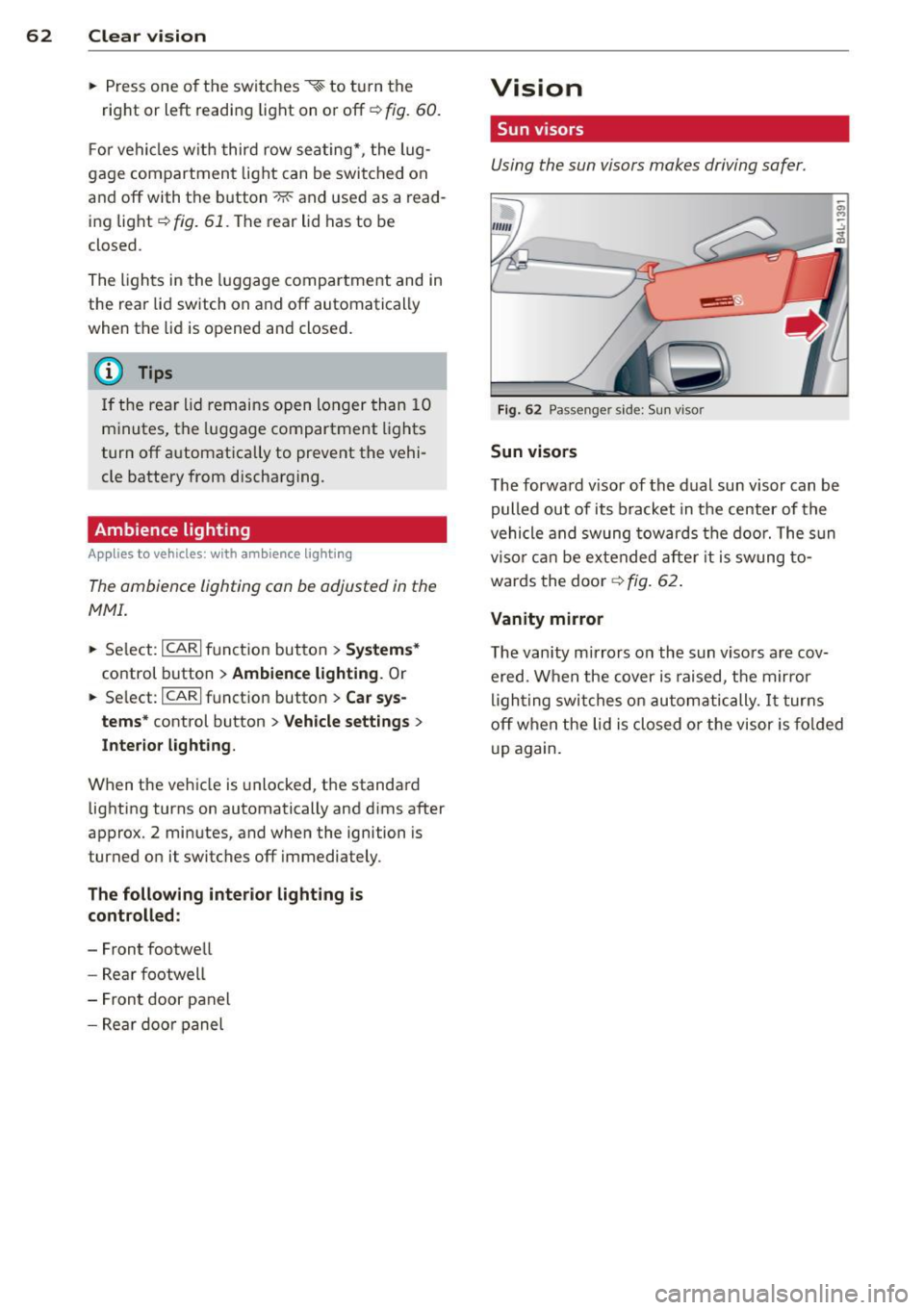
Sun visors
Using the sun visors makes driving safer .
Fig . 62 Passe nger side: Su n visor
Sun visors
The forwa rd v isor of the dual sun visor can be
pulled out of its bracket in the center of the
vehicle and swung tow ards the door. The s un
vi so r ca n be e xtended afte r it is swung to
wards the door
~ fig. 62.
Vanity mirror
The vanity mirrors on the sun viso rs are cov
ered. When the cover is raised, the mirror
l igh ting swit ches on au tom atic ally.
It tur ns
off when the lid is closed or the visor is fol ded
u p again.
Page 76 of 348

7 4 Seats and stor age
• Driver's door closed -press the correspond
ing memory button unti l the stored position
is reached.
Successf ul s torage is conf irmed a ud ibly and
by the l ight i n the
!SET ! button illuminating .
When the ve hicle is
locked , the cur rent set
tings are stored and ass igned to the remo te
control key. Bu t th e set tings stored on memo
ry buttons 1 and 2 are not deleted. They can
be reca lled at any time . When the vehicle is
unlocked , the settings assigned to the remote
control key are restored.
If you r vehicle is driven by other persons using
your remote control key, you should save yo ur
individua l seat position on one of the memory
buttons. You can reca ll your settings aga in
simply and conve niently by pressing the corre
spond ing memory butto n. When the vehicle is
l oc ked, these setti ngs are automatically re-as
signed to t he remote control key and stored.
.&_ WARNING
- F or safe ty re ason s, the sea t sett in g can
only be rec alled w hen the veh icle is st a
t ionary -othe rwise you r isk having an ac
cident.
- In an emergency, the recall operation
can be stoppe d by pressin g the
!ON/OFF I
button or by br iefly p ress ing any given
memory button.
Activating remote control key memory
A ppl ies to veh icles: with seat memo ry
To assign the driver's seat settings to the re
mote contro l key when locking the vehicle, the
function must be activated in the MMI.
• Se lect:
I CARI f u nct ion button > Systems *
control button > Seat adjustment > Driver 's
seat > Key mem. p rofile > On .
Or
• Se lect:
ICARI funct io n button > Car sy s
tems *
control bu tton > Vehicle settings >
Seats > Driver's seat > Remote control key
> On .
(D Tips
If you do not want anothe r driver's set
tings to be assigned to the remote control key, switch off the memory function using
the MMI or the
I ON/OF F! button
c> page 73.
Rear seats
General information
Safe transportation of passengers on the rear
seats requires proper safety pre cautions.
All passengers on the rear seats mus t be seat
ed in comp lian ce with the safety guide lines
exp lained in
c> page 175 and c>page 184.
T he co rrec t seating pos ition is cr it ic al f or the
sa fe ty of front
and rear seat passenge rs a like
c>page 168 .
A WARNING
--Occupants in the f ront and rear seats
m ust always be proper ly restrained.
- Do not let anyone ride in the ve hicle
witho ut the head restraints prov ided.
Head restraints help to reduce injuries.
- Loose items inside the passenge r com
pa rtment, can fly forward in a crash or
sudden maneuve r and injure occupants.
Always store a rticles i n the luggage com
pa rtment an d use the fastening eyes, es
pecially w he n the rea r seatbac ks hav e
been fo lded down.
- Read and heed all WARNI NGS
c> pag e 168, Proper s eating positions
for passengers in rear sea ts.
Page 90 of 348

88 Seats and storage
-Any articles of clothing that you have
hung up must not interfere with the driv
er's view. The coat hooks are designed
only for lightweight clothing. Never hang any clothing with hard, pointed or heavy
objects in the pockets on the coat hooks .
Dur ing sudden braking or in an a ccident -
especi ally if the airbag is deployed -
these objects could injure a ny passe n
gers inside the vehicle.
Glove compartment
F ig . 102 U nlocki ng button for glove compa rtment
To open glove compartment
• Press the button :::!l.....-¢ fig . 102 (arrow) -the
lid opens automatically .
To close glove compartment
• Push the glove compartment lid up until
the lock engages.
In the g love compartment lid you wi ll find a
p lace to store a pen and a pad of paper .
A WARNING
To reduce the risk of personal injury in an
accident or sudden stop, a lways keep the
glove compartment closed wh ile driving.
@ Tips
Should you not be ab le to open the glove
compartment as described, make sure the
valet key function is not activated
¢page 41.
Cooling box in glove compartment
The cooling box works only when the air-con
ditioning is in cooling mode.
F ig . 1 03 Glove box with coo ling box open and sw itched
on
• Open the glove compartment¢ page 88,
fig. 102.
• Turn the rotary switch @counter-clockwise
to sw itch the cooling on. The symbo ls on the
rotary switch must be displayed
¢ fig . 103
according ly.
• Tur n the rotary swi tch@ clockw ise to
switch the cooling off.
T he cooling box wor ks only in the coo ling
mode. If the cl imate control is in the hea ting
mode, we recommend switching the cooling
box off.
Emergency unlocking of glove
compartment
The glove compartment can be unlocked in an
emergency.
F ig. 10 4 In strument panel right: pry off secur it y cover
• Remove the cover with the aid of a screw
driver~
fig . 104 .
• Now press the lo cking p in inwa rd with the
screwdrive r.
Page 107 of 348

Ignition lock and ignition switch
Ignition key positions
The engine con be started or turned off with
the ignition key.
Fig. 119 Igni tion switch pos it io n s
Position @
The ignition key can be inserted into the igni
tion switch in this position . This automatically
unlocks the steering column lock . When the
ignition key is removed, the steering column
lock is automatically locked
Q .&. .
Switching the ignition on/preheating (D
Turn the ignition key to this position and re
lease it. On vehicles with a d iesel engine*, the
system can preheat in this position .
Starting the engine@
The engine starts with the key in this position.
Major electrical loads are temporarily turned
off.
Ignition off@
Turn the ignition key to this position and re
lease it.
A WARNING ,~ ~
- Never remove the key from the ign ition
lock whi le the vehicle is moving. The
steering wheel will lock, causing loss of
control.
- If you have to leave your vehicle, even for
just a minute, always remove the ignition key and take it with you. This is especially
important if you are going to leave chil-
On the road 105
dren unattended in the vehicle. The chil
dren could start the engine or use other
vehicle controls. Unsupervised use of ve
hicle controls (for example, power win
dows) can cause ser ious personal inju
ries.
(D Note
- If the . symbol in the display blinks,
there is a malfunction in the electronic
steering column lock . Follow the instruc
tions in
Q page 33, i Steering malfunc
tion .
-If the . symbol in the display blinks,
there is a malfunction in the electronic
ignition lock . Fol low the instructions in
Q page 34, .P. Ignition lock malfunction.
a) Tips
-If you release the ignition key in position
@, the key automatically returns to posi
tion (!).
- If you open the driver's door when the ig
nition is sw itched on, a buzzer sounds
and the message
Ignition is on appears
in the instrument cluster display. Please
switch the ignition off.
- T o prevent malfunctions in the ign ition
lock, remove any dirt or deposits from
the key bit so that they do not enter the
ignition lock.
Ignition key safety lock
The ignition key con only be removed when
the selector lever is in the "P" (Pork) position.
After turning off the ignition, the ignition key
can only be removed from the ignition lock
when the selector lever is in the "P" (Park) po
sition. After you have removed the key, these lector lever is locked and cannot be moved.
Page 217 of 348

-Children on the front seat of any car,
even with Advanced A irbags, can be seri
ous ly injured or even killed when an a ir
bag inflates.
- Never let a child stand or kneel on any
seat, for examp le the front seat.
- Never let a child ride in the cargo area of
your vehicle .
- Always remember that a ch ild lean ing
forward, sitt ing sideways or out of posi
t ion in any way during an acc ident can be
struck by a deploying airbag . This will re
sult in se rious personal injury or death .
- If you must install a booster seat on the
front passenger seat because of excep
t ional circumstances the
PASSENGER
AIR BAG OFF
light must come on and
stay on, whenever the ignition is switch
ed on.
- If the
PASSENGER AIR BAG OFF light
does not come on and stay on, perform
the checks described¢
page 195, Moni
toring the Advanced Airbag System.
- Ta ke the child restrain t off the front pas
senger seat and install it properly at one
of the rear seat positions if the
PASSEN
GER AIR BAG OFF
light does not stay on
whenever the ignition is switched on.
- Always read and heed all WARNINGS
whenever using a child restrained in ave
hicle is being used¢
page 175, Safety
belts,¢ page 184, Airbag system
and
c:> page 205, Important things to know.
Installing a child safety
seat
Securing a child safety seat using a
safety belt
Safety belts for the rear sea ts and the fron t
passenger can be locked wi th the convertible
locking retractor to properly secure child
safety seats .
The safety belts emergency lock ing retractors
for the rear seats safety belts and for the
front passenger's seat safety belt have a con
ve rtible locking retractor for child restraints.
Child Sa fet y 215
The safety belt must be locked so that be lt
webbing cannot unree l. The retractor can be
activated to lock the safety belt and prevent
the safety belt webbing from loosening up
during normal dr iving . A child safety seat can
only be properly installed when the safety belt
i s locked so that the chi ld and child safety
seat w ill stay in place .
Always remember: Even though your vehicle is equipped with an Advanced Airbag system, all
ch ildren, especially those 12 years and young
er, shou ld always r ide in the back seat proper
ly restrai ned fo r the ir age and size.
A WARNING
Improperly installed chi ld safety seats in
crease the risk of serious personal injury
and death in a collision.
- Always ma ke sure that the safety belt re
tracto r is loc ked when installing a child
safety seat . An unlocked safety belt re
tractor cannot hold the child safety seat
in place during normal dr iving or in a
crash.
- Always buckle the child safety seat firmly
in place even if a ch ild is not sitt ing in it.
A loose child safety seat can fly around during a sudden stop or in a collision .
- Always make sure that the rear seat
backrest to which the center rear safety
be lt is attached is securely latched when
eve r the rea r center safety belt is being
used to secure a ch ild restra int.
- If the backrest is not securely latched,
the child and the child restraint will be
thrown forward together with the back rest and will strike parts of the vehicle
interior. The child can be seriously in
jured or killed.
- Never install rear-fa cing child safety
seats or infant carrie rs on the front pas
senger seat . A child will be serio usly in
jured and can be killed when the passen ger airbag inflates.
- The inflating airbag will h it the ch ild
safety seat or infant carrier with great
force and will smash the child safety seat
~
•
•
Page 219 of 348

-A tight tether strap on a rearward-facing
child restraint attached to the front pas
senger seat can put too much pressure on the weight-mat in the seat and regis
ter a heavier weight in the Advanced Air
bag System . The heavier weight regis
tered can make the system work as
though an adult were on the seat and de
ploy the Advanced Airbag when it must
be suppressed causing serious or even
fatal injury to the child .
- Make sure that the
PASSENGER AIR BAG
OFF
light comes on and stays on all the
time whenever the ignition is switched
on.
- If the
PASSENGER AIR BAG OFF light
does not come on and stay on, immedi
ately install the rear-facing child safety
seat in a rear seating position and have
the airbag system inspected by your Audi dealer.
Activating the convertible locking
retractor
Use the convertible locking retractor to se
cure a child restraint.
Always heed the child safety seat manufactur
er's instructions when installing a child re
straint in your vehicle . To activate the conver
tible locking retractor :
.. Place the child restraint on a seat, prefera
bly on the rear seat.
.. Slowly pull the belt
all the way out .
.. Route it around or through the child re
straint belt path~&_ .
.. Push the child safety seat down with your
full weight to get the safety belt really tight.
.. Insert the belt tongue into the buckle for
that seating position .
.. Guide the safety belt back into the retractor
until the belt lies flat and snug on the child
safety seat .
.. You should hear a "clicking " noise as the
belt winds back into the inertia reel. Test the
convertible locking retractor by pulling on
the belt . You should no longer be able to
Child Safety 21 7
pull the belt out of the retractor. The con
vertible locking retractor is now activated.
.. Make sure that the red release button is fac
ing away from the child restraint so that it
can be unbuckled quickly.
.. Pull on the belt to make sure the safety belt
is properly tight and fastened so that the
seat cannot move forward or sideways more
than one inch (2.5 cm).
_&. WARNING
Using the wrong child restraint or an im
properly installed child restraint can cause
serious personal injury or death in a crash.
- Always make sure that the safety belt re-
tractor is locked when installing a child
safety seat. An unlocked safety belt re
tractor cannot hold the child safety seat
in place during normal driving or in a
crash.
-Always buckle the child safety seat firmly in place even if a child is not sitting in it.
A loose child safety seat can fly around
during a sudden stop or in a crash.
- Always make sure the seat backrest to
which the child restraint is installed is in
an upright position and securely latched
into place and cannot fold forward . Oth
erwise, the seatback with the child safety
seat attached to it could fly forward in
the event of an accident or other emer
gency situation .
- Always read and heed all WARNINGS
whenever using a child restrained in ave
hicle is being used¢
page 205. Special
precautions apply when installing a child
safety seat on the front passenger seat
¢ page 186, Child restraints on the front
seat -some important things to know .
-
•
•