2013 AUDI A8 lights
[x] Cancel search: lightsPage 65 of 318

@ Tips
If you cannot move the seat into the re
clining position, it may be because
- the front passenger's seat memory func
tion is switched off¢
page 66 or
- the child safety lock is switched on (the
@ button
¢ page 40 or the right t but
ton ¢
page 40 lights up in the driver's
door), or
- the front passenger seat adjustment is
switched off in the MMI
¢ page 63.
Massage function remote control
Applies to vehicles: with reclining rear seat and massage
fu nct ion
F ig. 60 Remote control: reclin ing seat massage func
t ions
The remote controls are located in the rear
center console ¢
page 67, fig. 65. The mas
sage function is only available when the igni
tion is switched on.
.,. To open the remote control compartment,
press the left button and fo ld the center
armrest upward .
.,. To adjust the massage type, press the ap
propriate button @-@ . The LED in the but
ton w ill turn on .
.,. To adjust the speed/intensity, turn the
thumbwheel @I® . Th e LED s indicate the
speed/intensity .
.,. Press the selected massage type again to
switch the massage funct ion off .
Massage types
@-Wave
@-Pulse
©-Stretch
Seats and storage 63
@-Lumbar
(D Tips
- Th e massage function switches off auto
matically after approximately 10 mi
nutes .
-If you activate a massage type again, the
last selected intensity and speed will be
selected.
Comfort setting s
Applies to vehicles: wit h co mfort seats in the rear
You can adjust settings for the rear seat from
the cockpit using the MMI.
.,. Select I CAR I function button > Car systems
control button > Vehicle settings > Seats >
Rear seats.
Factory settings position -
This function
moves the outer rear seats and the front pas
senger seatback into the factory settings posi
tion.
Entry as sistance -Entry assistance makes it
easier to enter and exit the rea r seat more
comfortab ly. When the function is activated,
the rear seat moves all the way back automat
ically when the corresponding door opens .
Front passenger seat adjustment * -If the
function is activated in the MMI, the front
passenger seat can be adjusted from the rear
seat ¢
page 60, fig. 5 7.
Page 68 of 318

66 Seats and st o rage
Memory buttons
App lies to vehicles: with memory function
Fig. 63 Drive r's door : m emory f unction butto ns
Fig . 64 Rear door: memory f unction butto ns
The memory buttons are located in the driv
er's/front passenger's door and in the rear
doors".
Storing seating p rofiles
.. To s tore a seating profi le, press the ISETI
button and then one of the memory but
tons .
.. To recall a seating profile, press and hold
the memory button until the seat is adjust
ed to the stored settings .
.. To sw itch the memory function for the driv
er or front passenger off, press the
I OFF I
button. The word OFF lights up when the
memo ry fu nction is sw itched off. Seating
profiles will not be stored .
Adjusting the re cl ining po sition /standard
position
.. To adj ust the recl ining pos it ion, press and
hold the@ button until the seat moves into
the end position .
.. To ad just the standard pos ition, press and
hold the @ button until the seat moves into
the end position.
A WARNING
- For safety reasons, the seat setting
should only be recalled when the veh icle
is stationary· otherw ise you risk hav ing
an accident .
- If necessary, you stop the process by
press ing the
IOF Fj button or any of the
memory buttons.
Adjusting the front passenger seat in
the MMI
Applies to vehicles: with memory function
The driver can adjust the position of the front
passenger seat.
Ad justing the front p assenger seat from
the driv er's s ide
.. Select: !CAR ! function b utton> Car sy ste m s
cont ro l button > V eh icle setting s > Seats >
Front pa ssenger sea t> Adju st seat p osi
ti on.
.. You can now adjust the front passenger seat
using the buttons on the driver's seat
¢ page 58, fig. 54.
Matching the position of the driver's se a t
.. To adjust the front passenger seat to match
the driver's seat settings, select the
ICARI
function button > Car systems contro l but
ton
> V ehicle sett ings > Seats > Fr ont pa s·
s enger seat > Sy mmetry to dri ver seat .
.. Press and hold the control knob unti l the
adjustment process is comp lete .
@ Tips
When matching seat settings, the settings
for the lumbar support and seating sur·
face will not transfer to the front passeng
er's seat .
Page 85 of 318

the stored position as soon as you switch on
the ignition.
Starting and stopping
the engine
Starting the engine
This button switches on the ignition and
starts the engine.
Fig. 85 Center console: S TART ENGINE S TOP b utton
Switching the ignition on/off
• To switch the ignition on/off, press the
I START ENGINE STOPI button. Do not press
the brake pedal while doing this.
Starting the engine
• Press the brake pedal QA .
• Press the !START ENGINE STOPI button
Q fig . 85. The engine will start.
If the engine does not start immediately, the
starting process is automatically stopped af
ter a short time. Repeat starting procedure.
Start-Stop-System*:
When you stop and the Start -Stop -System*
turns off the engine, the ignition still remains
switched on.
- If you press the !S TART ENGINE STOPI but
ton now, the ignition will be switched off.
The engine will not start
¢page 89.
- Make sure that the ignit ion is switched off
before exiting the vehicle.
Switching the ignition/engine off
automatically*
The follow ing applies to vehicles with Start
Stop-System*: to prevent the battery from
On the road 83
draining, the ignition and the engine will
switch off automatically under the following
cond itions:
- The vehicle has already been driven.
- The driver's door is opened.
- The driver's seat belt is removed .
- The brake pedal is not pressed down.
- The vehicle is stationary.
In this case, the activated low beam will be re
placed by the side marker lights. The side
marker lights will switch off after a certain pe
riod of time or when you lock the vehicle .
A WARNING
-Never allow the engine to run in conf ined
spaces -danger of asphyx iation.
- Never turn off the engine until the vehi
cle has come to a complete stop.
- The brake booster and power steering
only work when the engine is running. If
the engine is off, you have to use more
force when steering or braking. Because
you cannot steer and brake as you usual
ly would, this could lead to crashes and
serio us injuries.
(D Note
- Avo id h igh engine rpm, full throttle and
heavy engine loads until the engine has
reached operating temperature - other
w ise you risk engine damage.
- The engine cannot be started by pushing
or towing the vehicle.
@ Tips
-After a co ld engine is started, there may
be a brief period of inc reased noise be
cause oil pressure must first build up in
the hydraulic valve adjusters. This is nor
ma l and not a cause for concern.
-If you leave the vehicle with the ignition
switched on, the ignition w ill switch off
after a certain period of time. Please
note that electrical equipment such as
exterior lights will sw itch off as well
when that happens.
Page 88 of 318

86 On the road
driving force has been built up at the
wheels.
E mergency brake function
An emergency brake ensures t hat the vehicle
can be slowed down even if the
normal brakes
fail
c::> page 87, Emergency braking .
Indicator lights
-If the parking b rake is closed w ith the igni
t ion
sw itch ed on the indicator lights come
on - (USA models)/ . (Canada models)
i n the i nstr ument cluster and in the switch .
- If the par king brake is closed w ith the igni
t ion
s wit ched off the indicato r lights come
on - (USA models)/ . (Canada models)
in the instrument cluster and in the switch
for about 20 seconds.
.&_ WARNING
Do not press the accelerator peda l inadver
tently if the vehicle is stat ionary but the
eng ine is running and a gear is selected.
Otherw ise the vehicle will start to move
immed iate ly and could result in a crash .
@ Note
If the symbo l. in the display or the ind i
cator light
1111 (USA models) . (Cana
da models) in the instrument cluster flash
es, there is a malfunction in the brake sys
tem . Please refer to the detai led descrip
tion of the indicator lights
c::> page 14.
- If the indicato r light - (USA mod-
els) . (Canada mode ls) or
liJ turns
on, there may be a malfunction in the parking b rake
c::> poge 15.
(D Tips
- You can apply the pa rking brake at any
t ime - even w ith the ignition switched
off . T he ignit ion must be on in order to
r elease the parking brake.
- Occ asiona l noises when the par king
brake is applied and re leased are no rma l
and are not a ca use for concern .
- When the vehicle is par ked, the par king
brake goes through a se lf -test cycle at regu
lar interva ls. Any associated noises
are normal.
Parking
Parking
.,. Stop the vehicle with the foot brake .
.,. Pull the switch(®) to apply the parking
brake.
.,. Select the P selector lever position
c::>page 115.
.,. Turn the engine off c::> _&. .
In addit ion on inclin es and g rades
.,. Turn the steering whee l so that your vehicle
w ill roll aga inst the curb in ca se it should
start to move.
.&_ WARNING
- When you leave your vehicle - even if on
ly br iefly - always take the ignit io n key
wit h you. This applies pa rticularly when
children remain in the vehicle. Otherwise
the children co uld s tart the engine, re
lease the parking brake or operate elec
trica l equipment (e.g . power windows) .
There is the r isk o f an accident.
- When the vehicle is locked, no one - par
ticularly not children should rema in in
the vehicle. Locked doors make it more
d ifficult for emergency workers to get in
to the vehicle - putting lives at risk .
· Starting from rest
The starting assist function ensures that the
parking broke is released au tomatically upon
star ting.
Stopping a nd applying parking brak e
.,. Pull the switch(®) to apply the parking
brake.
St arting and automatically releasing the
parking brake
.,. When you start to drive as usual , the park
ing brake is a utomatically rel eased and your
vehicle beg ins to move. ..,..
Page 93 of 318

The stored speed and the indicator light
A;(l)~i4 (US mode ls) 8 (Canad ian mode ls) ap
pear in the instrument cluster d isp lay
¢ fig. 92. The display may vary, depending on
t he type of d isplay in your vehicle.
The speed is k ept constant via an engine out
put adjustment or act ive brake intervention .
A WARNING
-Always pay attention to traffic even when
the cruise control is switched on . You are
always responsible for your speed and
the distance between your vehicle and other vehicles.
- For safety reasons, the cruise control
should not be used in the city, in stop
and-go traff ic, on twisting roads and
when road conditions are poor (such as
ice, fog, grave l, heavy rain and hydro
planing) -risk of accident .
- Turn off the cruise control temporari ly
when entering turn lanes, highway exit lanes or in construction zones.
- Please note that inadvertently "rest ing "
yo ur foot on the accelerator peda l causes
the cruise control not to brake. This is
because the cruise control is overridden
by the driver's acce leration.
- If a brake system malfunction such as
overheating occurs when the cruise con
trol system is sw itched on, the braking
function in the system may be switched
off. The other cruise control functions re
main active as long as the indicator light
[~jlQ~i4 (US models) I ii (Canad ian mod
els) is on.
The brake lights illuminate as soon as the brakes decelerate automat ically .
Changing speed
" To increase/dec rease the speed in incre
ments , tap the lever in the
0 10 d irection
¢ page 90, fig. 91 .
On the ro ad 91
" To increase/decrease the speed quick ly,
hold the lever in the
0 10 direction until
the desired speed is displayed.
You can also press the accelerator pedal down
to increase your speed, e.g . if you want to
pass someone . The speed you saved earlier
will resume as soon as you release the accele r
ator pedal.
If, however, you exceed your saved speed by
6 mph (10 km/h) for longer than S minutes,
the cruise contro l wi ll turn off temporari ly.
The green symbol
A;(l )~i4 (US models) 8 i n
the d isplay is replaced with a white symbol.
The saved speed remains the same .
Presetting your speed
You can preset your desired speed while the
vehicle is not moving .
" Switch on the ignition.
" Pull lever into posit ion
(D ¢ page 90,
fig . 91 .
" Press the lever in the 0 or 0 direction to
increase or decrease your speed .
" Release the lever to save that speed.
This function makes it possible, for example,
to save the speed you want before dr iving on
the h ighway. Once on the highway, act ivate
the cru ise con trol by pulling the lever toward
(D .
Switching the system off
T e mpor ary dea ctivat ion
" Press the brake pedal , or
" Press the lever into position @(not clicked
into place)
¢ page 90, fig. 91 , or
" Drive for longer than 5 minutes at more
than 5 mph (10 km/h) above the stored
speed.
S w itching off complet ely
" Press lever into position @(clicked into
place), or
" Switch the ignition off .
Page 98 of 318

96 Audi adaptive cruise control and braking guard
• You must also press the brake pedal when
the vehicle is stopped.
Switching adaptive cruise control off
• Push the lever away from you into position
@ until it clicks into p lace. The message
ACC off appears.
@ Indicator lights
II-Adaptive cruise control is switched on . No
vehicles are detected up ahead. The stored
speed is maintained.
I-A moving vehicle is detected up ahead .
The adaptive cruise control system regulates
the speed and d istance to the moving vehicle
ahead and acce lerates/brakes automatica lly.
S, -Adaptive cruise contro l is switched o n. A
mov ing vehicle up ahead was detected. Your
vehicle remains stopped .
I-When au tomatic braking is not able to
keep enough distance to a p reviously detected
mov ing vehicle up ahead, you must take con
trol and brake ¢
page 98 , Prompt for driver
intervention.
© Display
If adap tive cruise control is not shown in the
d isplay, you can call it up with the multifunc
tion steering wheel buttons~
page 23.
Based on the symbols in the display , you can
determ ine if the system is maintaining a dis
tance to the vehicle ahead and w hat that dis
tance is.
No vehicle -No vehicle ahead was detected.
White vehicle -A vehicle ahead was detected .
Red vehicle -Prompt for the driver to take ac
tion ¢
page 98 .
Both arrows on the scale© indicate the dis
tance to the vehicle ahead . No arrow appears
when the vehicle is on an open road and there is no object ahead. If an object is detected
ahead, the arrow moves on the scale .
The green zone on the scale shows the stored d istance. For information on changing the stored distance, refer to
¢
page 97. If the
distance se lected is too close or may soon be
come too close, the arrows move into the red
z one on the sca le.
A WARNING
Improper use of the adaptive cruise con
trol can cause collisions, other accidents
and serious personal injur ies .
- Pressing the
!SET ! button when driving at
speeds below
20 mph (30 km/h), w ill au
tomatically accelerate the vehicle to
20
mph (30 km/h), which is the minimum
speed that can be set .
(D Tips
-If you switch the ignit ion or the adaptive
cruise control off, the set speed is erased
from the system memory.
- You cannot switch the Electron ic Stabili
zation Control (ESC) to the SPORT mode
when adaptive cruise control is switched
on .
Changing the speed
Applies to vehicles: with Audi adaptive cruise control
0
f
• 0
Fig. 99 Selecto r lever : chang ing t he spee d
• To increase or reduce the speed in incre
ments,
tap the lever up or down.
-
-a)
N
q :r
~
"' To increase or reduce the speed qu ickly,
hold the lever up or down until the red L ED
@ reaches the desired speed ¢ page 95,
fig . 98.
Following any changes, the new stored speed
will be displayed briefly in the display @
¢ page 95 , fig. 98.
Page 114 of 318
112 Night vision assistant
Night vision assistant
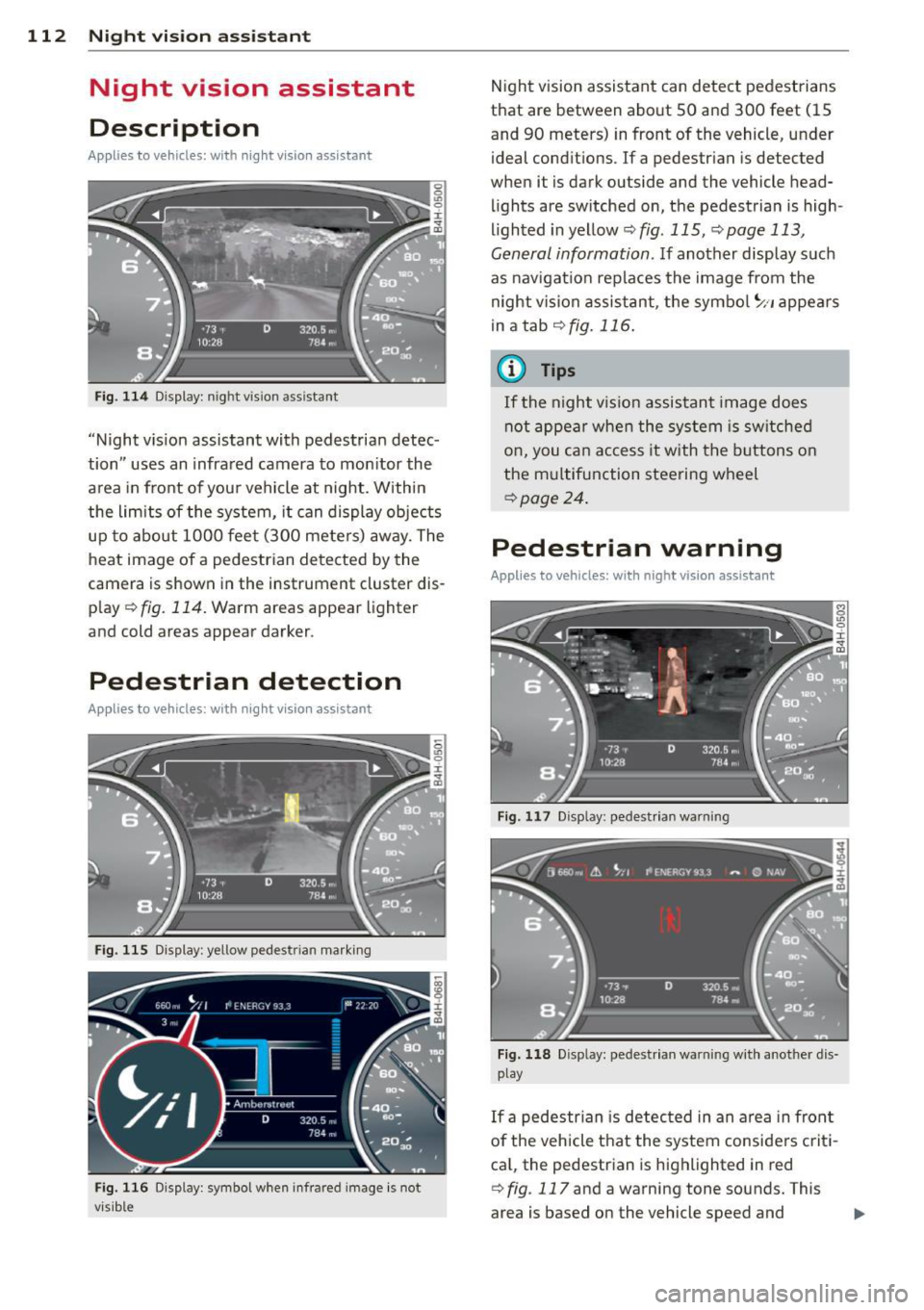
Description
Applies to vehicles: with night v isio n ass istant
Fig. 114 Display: n ight vis ion assistant
"Night vis ion assistant with pedestrian detec
tion" uses an infrared camera to monitor the
area in front of you r vehicle at night. Within
the limits of the system, it can display objects
up to about 1000 feet (300 meters) away. The
heat image of a pedestrian detected by the
camera is shown in the instrument cluster dis
p lay ¢
fig. 114. Warm areas appear lighter
and cold areas appear darker.
Pedestrian detection
Applies to vehicles: with nig ht v isio n ass istant
Fig. 115 Display: yellow pedestr ian marking
Fig. 116 Display: symbol when infrared image is not
visib le
Night vision assistant can detect pedestrians
that are between about 50 and 300 feet (15
and 90 meters) in front of the vehicle, under
ideal conditions.
If a pedestrian is detected
when it is dark outside and the vehicle head
lights are switched on, the pedestrian is high
lighted in yellow¢
fig. 115, ¢page 113,
General information.
If another display such
as navigation replaces the image from the
night vision assistant, the symbo l
~11 appears
in a tab
¢fig . 116 .
(D Tips
If the night v ision assistant image does
not appear when the system is switched
on, you can access it with the buttons on
the multifunction steering wheel
¢page 24.
Pedestrian warning
Applies to vehicles: wit h night vision assistant
Fig. 117 D isp lay: pedestrian warning
Fig. 118 Disp lay: pedestr ian warning w ith another dis
play
If a pedestr ian is detected in an area in fron t
of the vehicle that the system considers criti
ca l, the pedestrian is highlighted in red
¢
fig . 117 and a warning tone sounds. This
area is based on the vehicle speed and
Page 116 of 318
114 Night vision assistant
• Switch the ignition on and turn the light
sw itch to the
AUTO position or tD .
• To sw itch night vision ass istant on, press
the~ ,, button
c> fig. 120 . The image from
the night vision camera appea rs in the in
strument cluster display .
• Press the button~ -, aga in to switc h night vi
s ion assistant off .
Settings in the MMI
Appl ies to vehicles: with night v isio n ass istant
Fig. 121 Disp la y: examp le of pede strian detect ion and
warn ing tone switc hed off
• Select : I CARI funct ion button > Car systems
control button > Driver assist > Night vision
assist.
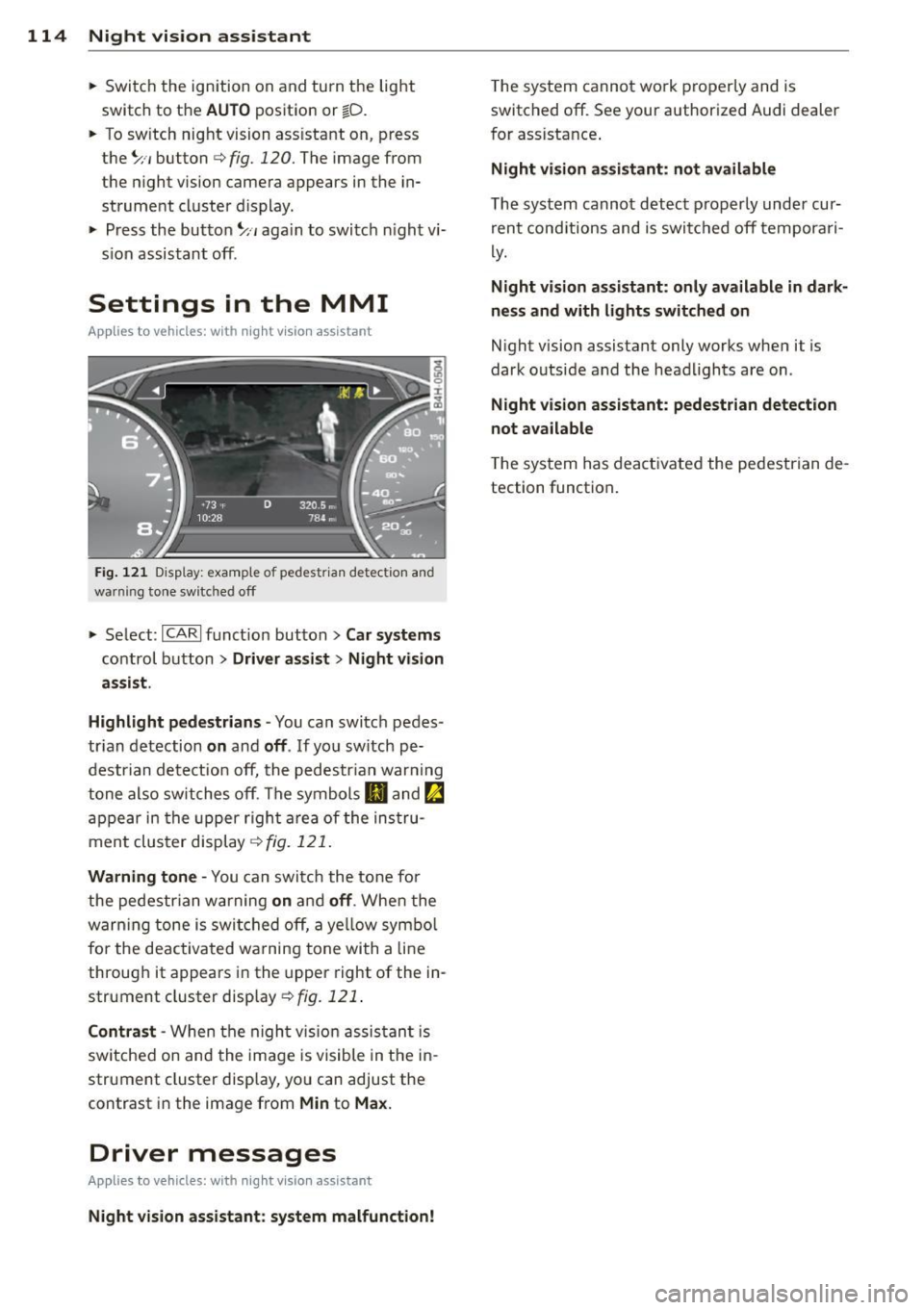
Highlight pedestrians -
You can switch pedes
tr ian detection
on and off . If you sw itch pe
destrian detection off, the pedestr ian war ning
tone also switches off. The symbols
IJ and ~
appear in the upper right area of the instru
ment cluster display
c> fig. 121.
Warning tone -You can switch the tone for
the pedestrian warning
on and off . When the
warn ing tone is switched off, a ye llow symbol
for the deactivated wa rning tone with a line
through it appears in the upper right of the in
strument cluster display
c> fig. 121 .
Contrast -When the night vis ion assistant is
sw itched on and the image is visible in the in
strument cluster display, you can adjust the
contrast in the image from
Min to Max.
Driver messages
Appl ies to veh icles: with night visi on ass istant
Night vision assistant: system malfunction!
The system cannot work properly and is
switched off. See your authorized Audi dealer
for assistance .
Night vision assistant: not available
The system cannot detect properly under cur
rent cond itions and is switched off temporari
ly.
Night vision assistant: only available in dark
ness and with lights switched on
Night vision assistant only works when it is
dark outside and the headlights are on.
Night vision assistant: pedestrian detection
not available
T he system has deactivated the pedestrian de
tection function.