2013 AUDI A8 steering wheel
[x] Cancel search: steering wheelPage 59 of 318

Seats and storage
General recommen
dations
Why is your seat adjustment so important?
The safety belts and the airbag system can
only provide maximum protection if the front
seats are correctly adjusted.
There are various ways of adjusting the front
seats to provide safe and comfortable support
for the driver and the front passenger. Adjust
your seat properly so that :
- you can easily and quick ly reach all the
switches and controls in the instrument
panel
- your body is properly supported thus reduc ing physical stress and fatigue
- the safety belts and airbag system can offe r
maximum protection
¢ page 152.
In the following sections, you will see exactly
how you can best adjust your seats .
There are special regulations and instructions
for installing a child seat on the front pas
senger's seat. Always fo llow the information
regarding chi ld safety provided in
¢ page 176, Child Safety.
A WARNING
Incorrect seating position of the driver and
all other passengers can result in serious
personal injury.
- Always keep your feet on the f loor when
the vehicle is in motion -never p ut your
feet on top of the instrument panel, out
of the window or on top of the seat cush
ion. Th is applies especially to the passen
gers . If your seating position is incorrect,
you increase the r isk of injury in the case
of sudden braking or an acc ident. If the
airbag inflates and the seating position
is incorrect, this could result in persona l
injury or even death.
- It is important for both the driver and
front passenger to keep a distance of a t
Seat s an d sto rage 57
least 10 inches (25 cm) between them
selves and the steering wheel and/or in
strument panel. If you're s itting any
closer than th is, the airbag system can
not protect you properly. In addition, the
front seats and head restraints must be
adjusted to your body height so that t hey
can give you maximum protect ion.
- Always try to keep as much distance as
possible between yourself and the s teer
ing wheel o r instrument pane l.
- Do not adjust the driver's or front pas
senger's seat whi le the vehicle is moving.
Your sea t may move unexpected ly, caus
ing sudden loss of vehicle cont rol and
personal injury . If you adjust yo ur seat
while the veh icle is moving, yo u are out
of posit ion.
Driver's seat
The correct seat position is important for safe
and relaxed driving.
We recommend that you adjus t the dr iver's
seat in the fo llowing manner:
.,. Adjust t he seat in fore and aft direction so
that you can easily push the peda ls to the
floor wh ile keeping your knees s lightly bent
i:::> A in Why is your seat adjustment so im
portant? on page 57.
.,. Adjust the backrest so that when you sit
w ith your back against the backrest, you can
still grasp the top of the steering wheel.
.,. Adjust the head restraint so the upper edge
is as even as possible with the top of your head . If that is not poss ible , try to adjust
the head res traint so that it is as close to
this pos ition as possib le
i:::> page 64.
A WARNING
Never place any objects in the dr iver's foot
well. An object could get into the pedal
area and interfere with pedal funct ion . In
case of sudden braking or an acc ident, you
wo uld not be able to brake or accelerate.
Page 83 of 318

(D Note
To avoid damage to the heating elements in the seats, do not kneel on the seats or
place heavy loads on a small area of the
seat.
Setup
The climate control system setup is accessed
through the MMI.
• Se lect: ICARI function button > Car systems
control button > A/C.
Rear cabin settings*
When this function is selected, all sett ings for
the rear can be adjusted through the climate
control system in the cockpit . The climate
control system settings cannot be adjusted in
the rear seat at the same time. This function
switches off after a certain period of time or
when one of the dials in the cockp it is press
ed .
Auto recirculation*
The sensitivity level of the automatic recircu
l ation mode can be set at various levels from
off to sensitive. The recirculation mode l"""I is
controlled on automatically. You must press
the ~ button if fog forms on the w indows .
Footwell temperature
You can adjust the footwe ll temperature so
that it is cooler or warmer.
A/C mode
The strength of the airflow can be adjusted to
light, medium o r strong .
Windshield heat*
When the defroster~ is switched on and the
Auto settin g is selec ted, the windshie ld de
froster is controlled automatically.
Solar roof*
Park ing vent ilation is controlled automat ically
in the
auto setting .
Warm and cold 81
When the ignition is off, solar-powered park
ing ventilation may switch on, as long as
- t here is sufficient sunlight,
- the outside temperatur e is not too low,
- the sunroof is closed or tilted and
-auto (MMI) is selected.
~ Steering wheel heating
App lies to vehicles: with heated steering wheel
The steering wheel rim can be heated .
Fig. 83 Steering column: steering wheel heating but ·
ton
~ 0
± ... CD
• Press the~ button to switch steering whee l
heating on/off. The message
Steering wheel
heating on! /Steering wheel heating off!
appears in the instrument cluster disp lay.
The temperature is maintained at a constant
level when steering wheel heating is switched
on.
T he steering wheel heating settings are stor
ed a utomatically and assigned to the remote
control key that is in use .
Page 84 of 318

82 On the road
On the road
Steering
Adjusting steering wheel position
The steering wheel position can be adjusted
for height and reach .
Fig. 84 Switch for steering whee l adjustment
F irst, adjust the driver's seat correctly.
• To adjust the height, press the switch up/
down. The steering column will continue
moving as long as you a re pressing the
switch.
• To move the steeri ng wheel forward or
back, press the switch forward/back . The
steering column wi ll continue moving as
long as you are pressing the switch .
There must be at least 10 inches (25 cm) be
tween your chest and the center of the steer ing wheel. If you cannot sit more than 10 in
ches (25 cm) from the steering wheel, see if
adaptive equipment is available to help you
reach the pedals and increase the distance
from the steering wheel.
For detai led informat ion on how to adjust the
driver's seat, see
Q page 58.
In vehicles with the memory function* , the
steering column settings are stored together
with the seat position.
A WARNING
Improper use of steering wheel adjust
ment and improper seating position can
cause serious personal injury . -
Adjust the steering wheel col umn only
when the vehicle is not mov ing to pre
vent loss of vehicle control.
- Adj ust the driver's seat or steering whee l
so that there is a m inimum of 10 inches
(25 cm) between your chest and the
steer ing wheel
Q page 135, fig . 153 . If
you cannot maintain th is m inimum dis
tance, the airbag system cannot p rotect
you properly.
- If physical limitations prevent you from sitt ing 10 inches (25 cm) or more from
the steering wheel, check wit h your au
thorized A udi dealer to see if adaptive
equipment is available .
- I f the steering wheel is al igned with your
face, the supplementa l driver's airbag
cannot provide as much protection in an
accident. Always make sure that the
steering whee l is aligned with your
chest.
- Always hold the steering wheel w ith your
hands at the 9 o'clock and 3 o'clock posi
tions to reduce the risk of persona l injury
if the dr iver's airbag dep loys.
- Never hold the steering wheel at the 12
o'clock position or with your hands inside
the steeri ng wheel rim or on t he steering
wheel hub. Holding the steer ing wheel
the wrong way can cause serious injuries
to the hands, arms and head if the driv
er's airbag deploys.
Easy entry feature
The easy entry feature makes it easier to en
ter and exit the vehicle by automatically ad
justing the steering wheel.
• Select in the MMI : ICAR lfunction button>
Car sy st e m s control button > Ve hicle set·
tin gs > Se ats > Driver's s eat > Ea sy entr y>
On .
When the easy entry feature is turned on, the
steering wheel moves up to the park position
whe n you switch off the ignition. Afte r you en-
ter the ve hicl e, the steering wheel moves to .,..
Page 88 of 318

86 On the road
driving force has been built up at the
wheels.
E mergency brake function
An emergency brake ensures t hat the vehicle
can be slowed down even if the
normal brakes
fail
c::> page 87, Emergency braking .
Indicator lights
-If the parking b rake is closed w ith the igni
t ion
sw itch ed on the indicator lights come
on - (USA models)/ . (Canada models)
i n the i nstr ument cluster and in the switch .
- If the par king brake is closed w ith the igni
t ion
s wit ched off the indicato r lights come
on - (USA models)/ . (Canada models)
in the instrument cluster and in the switch
for about 20 seconds.
.&_ WARNING
Do not press the accelerator peda l inadver
tently if the vehicle is stat ionary but the
eng ine is running and a gear is selected.
Otherw ise the vehicle will start to move
immed iate ly and could result in a crash .
@ Note
If the symbo l. in the display or the ind i
cator light
1111 (USA models) . (Cana
da models) in the instrument cluster flash
es, there is a malfunction in the brake sys
tem . Please refer to the detai led descrip
tion of the indicator lights
c::> page 14.
- If the indicato r light - (USA mod-
els) . (Canada mode ls) or
liJ turns
on, there may be a malfunction in the parking b rake
c::> poge 15.
(D Tips
- You can apply the pa rking brake at any
t ime - even w ith the ignition switched
off . T he ignit ion must be on in order to
r elease the parking brake.
- Occ asiona l noises when the par king
brake is applied and re leased are no rma l
and are not a ca use for concern .
- When the vehicle is par ked, the par king
brake goes through a se lf -test cycle at regu
lar interva ls. Any associated noises
are normal.
Parking
Parking
.,. Stop the vehicle with the foot brake .
.,. Pull the switch(®) to apply the parking
brake.
.,. Select the P selector lever position
c::>page 115.
.,. Turn the engine off c::> _&. .
In addit ion on inclin es and g rades
.,. Turn the steering whee l so that your vehicle
w ill roll aga inst the curb in ca se it should
start to move.
.&_ WARNING
- When you leave your vehicle - even if on
ly br iefly - always take the ignit io n key
wit h you. This applies pa rticularly when
children remain in the vehicle. Otherwise
the children co uld s tart the engine, re
lease the parking brake or operate elec
trica l equipment (e.g . power windows) .
There is the r isk o f an accident.
- When the vehicle is locked, no one - par
ticularly not children should rema in in
the vehicle. Locked doors make it more
d ifficult for emergency workers to get in
to the vehicle - putting lives at risk .
· Starting from rest
The starting assist function ensures that the
parking broke is released au tomatically upon
star ting.
Stopping a nd applying parking brak e
.,. Pull the switch(®) to apply the parking
brake.
St arting and automatically releasing the
parking brake
.,. When you start to drive as usual , the park
ing brake is a utomatically rel eased and your
vehicle beg ins to move. ..,..
Page 91 of 318

@ Tips
When you stop and the start-stop-system
turns the engine off, the ignition remains on. Make sure that the ign ition is switched
off before exiting the vehicle.
General information
App lies to vehicles: with Start-Stop-System
The standard Start-Stop-mode can be cancel·
led for different system-related reasons.
Fig. 89 Instrument cluster : eng ine-Stop temporar ily
u navailable
Engine will not switch off
Before each stop phase, the system checks if
certain cond itions have been met . For exam
p le, the engine will
not be switched off in the
following situations:
- The engine has not reached the minimum
required temperature for Start -Stop-mode .
- The interio r temperature selected by the A/C
system has not been reached.
- Th e outside temperature is extremely h igh/
low.
- The windshield is being defrosted
9page 81.
- The parking system* is switched on.
- The battery charge level is too low .
- The steering wheel is sharply turned or there is a steer ing movement.
- After engaging the reverse gear.
- On sharp inclines .
The
(jj indicator light appears in the informa
tion line in the instrument cluster display
9fig. 89.
On the road 89
Engine automatically restarts
The stop phase is interrupted in the following
situations, for example. The engine restarts
without any action by the driver.
- The interior temperature varies from the
temperature selected in the A/C system.
- The windsh ield is being defrosted
9page 81.
-The brake pedal is pressed severa l times in a
row.
- The battery charge level becomes too low .
- High power consumpt ion.
@ Tips
If you shift into the D, Nor S positions af
ter sh ifting into
reverse, the vehicle must
be driven faster than 6 mph (10 km/h) in
order for the engine to sw itch off aga in.
Switching the Start-Stop-System on/off
manually
App lies to vehicles: wi th Start-Stop-Sys te m
If you do not wish to use the system, you can
switch it off manually.
Fig. 90 Center console: Start-Stop-System button
.,. To switch the Start-Stop-System off/on
manually, press the
l "'I button. The LED in
the button turns on when the system is
sw itched off.
@ Tips
If you switch the system off during a stop
phase, the engine will start again auto
matically.
Page 98 of 318

96 Audi adaptive cruise control and braking guard
• You must also press the brake pedal when
the vehicle is stopped.
Switching adaptive cruise control off
• Push the lever away from you into position
@ until it clicks into p lace. The message
ACC off appears.
@ Indicator lights
II-Adaptive cruise control is switched on . No
vehicles are detected up ahead. The stored
speed is maintained.
I-A moving vehicle is detected up ahead .
The adaptive cruise control system regulates
the speed and d istance to the moving vehicle
ahead and acce lerates/brakes automatica lly.
S, -Adaptive cruise contro l is switched o n. A
mov ing vehicle up ahead was detected. Your
vehicle remains stopped .
I-When au tomatic braking is not able to
keep enough distance to a p reviously detected
mov ing vehicle up ahead, you must take con
trol and brake ¢
page 98 , Prompt for driver
intervention.
© Display
If adap tive cruise control is not shown in the
d isplay, you can call it up with the multifunc
tion steering wheel buttons~
page 23.
Based on the symbols in the display , you can
determ ine if the system is maintaining a dis
tance to the vehicle ahead and w hat that dis
tance is.
No vehicle -No vehicle ahead was detected.
White vehicle -A vehicle ahead was detected .
Red vehicle -Prompt for the driver to take ac
tion ¢
page 98 .
Both arrows on the scale© indicate the dis
tance to the vehicle ahead . No arrow appears
when the vehicle is on an open road and there is no object ahead. If an object is detected
ahead, the arrow moves on the scale .
The green zone on the scale shows the stored d istance. For information on changing the stored distance, refer to
¢
page 97. If the
distance se lected is too close or may soon be
come too close, the arrows move into the red
z one on the sca le.
A WARNING
Improper use of the adaptive cruise con
trol can cause collisions, other accidents
and serious personal injur ies .
- Pressing the
!SET ! button when driving at
speeds below
20 mph (30 km/h), w ill au
tomatically accelerate the vehicle to
20
mph (30 km/h), which is the minimum
speed that can be set .
(D Tips
-If you switch the ignit ion or the adaptive
cruise control off, the set speed is erased
from the system memory.
- You cannot switch the Electron ic Stabili
zation Control (ESC) to the SPORT mode
when adaptive cruise control is switched
on .
Changing the speed
Applies to vehicles: with Audi adaptive cruise control
0
f
• 0
Fig. 99 Selecto r lever : chang ing t he spee d
• To increase or reduce the speed in incre
ments,
tap the lever up or down.
-
-a)
N
q :r
~
"' To increase or reduce the speed qu ickly,
hold the lever up or down until the red L ED
@ reaches the desired speed ¢ page 95,
fig . 98.
Following any changes, the new stored speed
will be displayed briefly in the display @
¢ page 95 , fig. 98.
Page 106 of 318

104 Audi lane assist
Setting the warning point and steering
wheel vibration
Applies to vehicles: with lane assist
You can adjust individual settings in the MMI.
.. Se lect: ICARI function button> Car systems
control button > Driver assist > Audi lane
assist .
Setting the warning point
Early: With this setting, a warning is provided
before a wheel touches the detected lane
boundary line . The warning depends on the
angle in which the veh icle is approaching the
line. The distance at which the warning is giv
en increases as the angle becomes sharper. If
you dr ive towa rd a boundary line at a very
sha rp angle, the warning will come just before
a wheel touches the line.
Medium : With this setti ng, the warn ing po int
is adapted to the course of the road, the lane
width and the speed. You wi ll sti ll be warned
if you cross slightly over a dotted line when
driving on curves.
Late : This setting has the same properties as
medium. You will only be warned once a
wheel crosses a detected line.
Setting the steering wheel vibration
The steering wheel v ibration can be set to
Low , Medium or Strong . Selecting each of the
settings will cause the steering wheel to vi
b rate so you can check the strength of the vi
bration in that setting.
(D Tips
Your settings are automatically stored and
assigned to the remote contro l key being
used .
Page 114 of 318
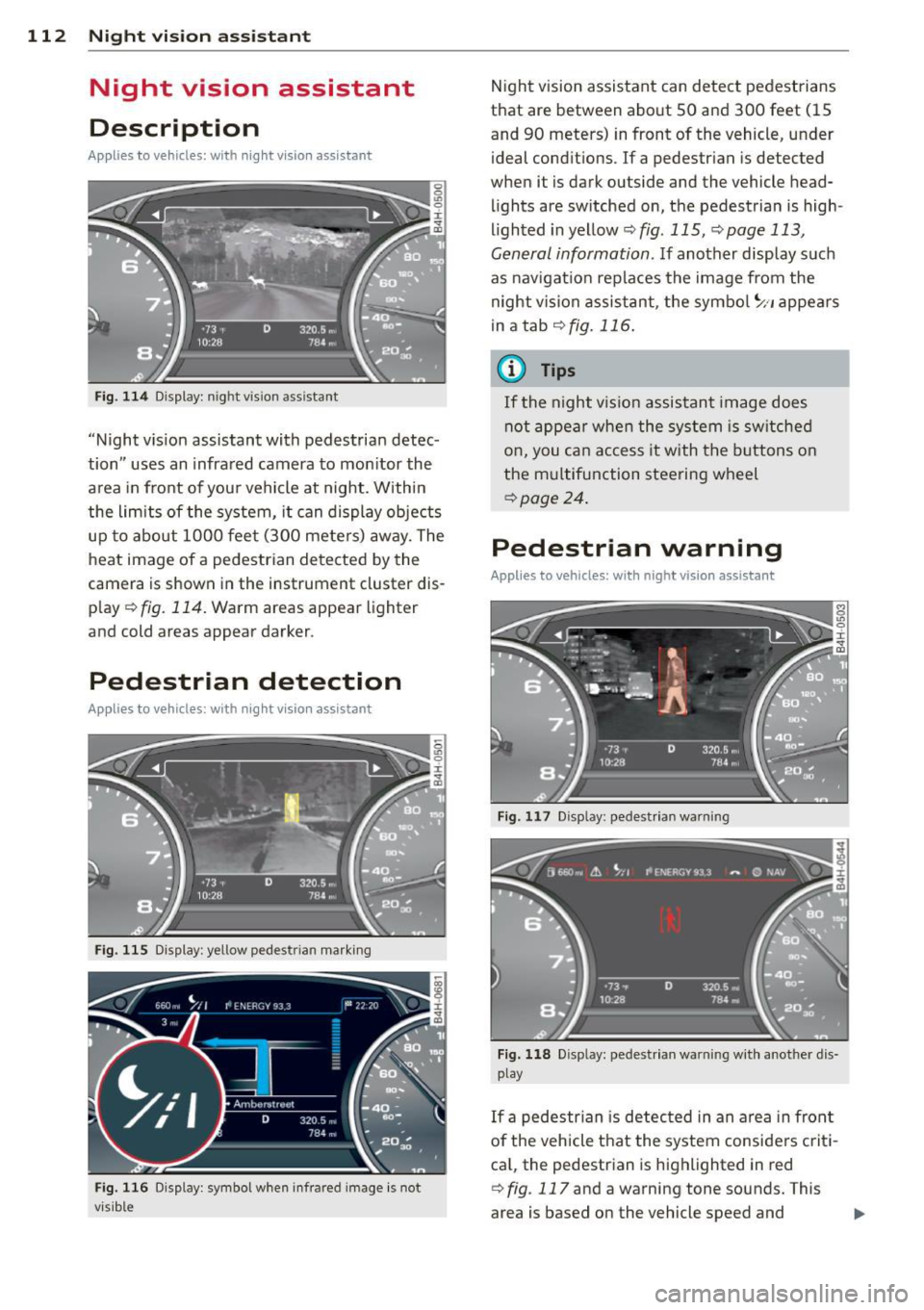
112 Night vision assistant
Night vision assistant
Description
Applies to vehicles: with night v isio n ass istant
Fig. 114 Display: n ight vis ion assistant
"Night vis ion assistant with pedestrian detec
tion" uses an infrared camera to monitor the
area in front of you r vehicle at night. Within
the limits of the system, it can display objects
up to about 1000 feet (300 meters) away. The
heat image of a pedestrian detected by the
camera is shown in the instrument cluster dis
p lay ¢
fig. 114. Warm areas appear lighter
and cold areas appear darker.
Pedestrian detection
Applies to vehicles: with nig ht v isio n ass istant
Fig. 115 Display: yellow pedestr ian marking
Fig. 116 Display: symbol when infrared image is not
visib le
Night vision assistant can detect pedestrians
that are between about 50 and 300 feet (15
and 90 meters) in front of the vehicle, under
ideal conditions.
If a pedestrian is detected
when it is dark outside and the vehicle head
lights are switched on, the pedestrian is high
lighted in yellow¢
fig. 115, ¢page 113,
General information.
If another display such
as navigation replaces the image from the
night vision assistant, the symbo l
~11 appears
in a tab
¢fig . 116 .
(D Tips
If the night v ision assistant image does
not appear when the system is switched
on, you can access it with the buttons on
the multifunction steering wheel
¢page 24.
Pedestrian warning
Applies to vehicles: wit h night vision assistant
Fig. 117 D isp lay: pedestrian warning
Fig. 118 Disp lay: pedestr ian warning w ith another dis
play
If a pedestr ian is detected in an area in fron t
of the vehicle that the system considers criti
ca l, the pedestrian is highlighted in red
¢
fig . 117 and a warning tone sounds. This
area is based on the vehicle speed and