2013 AUDI A8 service
[x] Cancel search: servicePage 44 of 318

42 Opening and clo sing
• Leave the master key with the service per
sonnel for parking and keep the mechanical
key with you.
When the "valet pa rking" feature is activated:
- the unlocking button for the luggage com
partment lid~ in the driver's doo r is inac
t ive
- the button~ on the master key is inact ive
- the opening handle in the luggage compart-
ment lid is inactive.
The vehicle can be driven and locked and un locked with the master key . Access to the lug
gage compartment is blocked .
When the va let parking function is switched
on, the message
V alet pa rk ing act iv ated ap
pears in the instrument cluster disp lay when
you switch the ign it ion on .
Sliding/tilting sunroof
Operation
Fig . 3 4 Sect io n of the he adli ner: S lidin g/tiltin g sunroof
b utto n
@ Tilting and sliding
• To tilt the sunroof comp lete ly, press the
switch briefly to the second leve l
9 fig. 34
briefly.
• To close the sunroof completely, pull the
switch briefly to the second leve l
9 .&,.
• To select a n in termed iate position, press/
pull the switch to the fi rst level until the de
s ired posit ion is reached.
@ Opening and closing
• To open the sunroof completely, slide the
button back briefly to the second level. •
To close the sun roof completely, slide the
button forward briefly to the second level
Q .&, .
• To se lect a partially open pos ition, slide the
bu tton forward/back to the first level unt il
the roof reaches the desired position .
A wind deflector integrated into the sliding/
t il ting sunroof adapts automatically to the
speed and sunroof pos ition . This reduces wind
noise to a m inimum in all sunroof positions .
You can sti ll close or open the sunroof for up
to ten minutes after you have switched the ig nition
off . The sw itch is deact ivated once the
driver's or front passenger 's doo r is opened .
Solar prot ection
The solar protection opens automatica lly
when the sunroof opens.
Vehicles with a g lass pane l s u nroo f: the sun
shade can be opened and closed by hand
when the sunroof is closed.
Vehicles wi th a solar pa nel sunroof*: the
cl osed s unshade opens au tomatically when
t h e sunroof opens.
A WARNING
Pay careful attention when closing the
sliding/tilt ing sunroof -otherwise serious
i njury could result ! Always take t he key
with you w hen leav ing the veh icle .
(D Note
Always close your sliding/tilt ing sunroof
when leaving your veh icle. S udden rain can
cause damage to the interior equ ipment of
your vehicle, particularly the e lectronic
equipmen t.
@ Tips
- Informat ion regarding the so lar roof*
¢ page 81 .
-The sliding/tilt ing sunroof w ill only open
at temperatures above -4 °F
(-20 °() .
Page 48 of 318

46 Clear vision
Highway light function* (vehicles with LED
headlights) -this function adapts the lighting
for highway driving based on vehicle speed.
.&_ WARNING
- Automatic headlights are only intended
to assist the driver. They do not relieve
the driver of his responsibility to check
the headlights and to turn them on man
ually according to the current light and
visibility conditions. For example, fog
cannot be detected by the light sensors.
So always switch on the headlights §.0
under these weather conditions and
when driving in the dark.
- Crashes can happen when you cannot see the road ahead and when you cannot be
seen by other motorists. Always turn on
the headlights so that you can see ahead
and so that others can see your car from
the back.
- Please observe legal regulations when
using the lighting systems described.
(D Note
The rear fog lights should only be turned
on in accordance with traffic regulation, as
the lights are bright for following traffic.
@ Tips
- The light sensor* for automatic dynamic
headlight range control* is located in the
rear view mirror mount. You should
therefore not apply any stickers to the
windshield in this area in order to pre
vent malfunctions or failures .
- In the event of a light sensor malfunc
tion, the driver is notified in the instru
ment cluster display¢
page 22 .
- You will hear a warning tone if you open
the driver door when the exterior lights
are switched on.
- In cool or damp weather, the inside of
the headlights, turn signals and tail
lights can fog over due to the tempera
ture difference between the inside and
outside. They will clear shortly after switching them on. This does not affect
the service life of the lighting.
Emergency flasher
The emergency flasher makes other motorists
aware that you or your vehicle ore in an emer
gency situation.
,--~
,_'
. ;.' --- --~-.sc-
Fig. 38 Center console: emergency flasher switch
.,. Press the switch 11 ¢ fig. 38 to turn the
emergency flashers on or off .
When the emergency flasher is on, all four
turn signals blink at the same time. The turn
s ignal ind icator light s
N 1B in the instrument
cluster, as well as the light in the emergency
flasher switch
11 blink likewise. The emergen
cy flasher also works when the ignition is
turned off.
The emergency flashers will turn on automati
cally if you are in an accident where the airbag
has deployed.
(D Tips
You should turn on the emergency flashers
when:
- you are the last vehicle standing in a traf
fic jam so that any other vehicles coming
can see you, or when
- your vehicle has broken down or you are
in an emergency situation, or when
-your vehicle is being towed by a tow
truck or if you are towing another vehicle
behind you.
Page 50 of 318

48 Clear vis ion
instrument cluster illuminates when the
high beams are on.
- T he
headlight flash er works only as long as
yo u hold the lever -even if there are no
li ghts turned on . The indicator light
El in
the instrument cluster i llum inates when you
use the headlight flasher.
A WARNING
Do not use the hig h beam or headlight
flasher if you know that these could blind
oncoming traffic.
High beam assist
App lies to vehicles: with high beam assist
The high beam assist au tomatically swi tches
the high beams on or off, depending on the
surroundings and traffic conditions .
Fig. 40 Turn sig na l an d high beam leve r: T urnin g on
an d off the high be am assist
Act ivating h igh beam a ssis t
8
9 :r ... (0
Requirement: The light sw itch must be in the
AUTO position, the low beam headlights must
be on and the high beam assis t must be
switched on in the Infotainment <=>
page 47.
.. Press the leve r into position @ in order to
act ivate the high beam assist . The indicator
li ght
ml turns on in the instrument cluster
display and the h igh beams switch on or off
automat ically. The indicato r light
El turns
on if the high beams were switched on .
Switching the high beams on /off
manually
Requi rement : Hig h beam ass ist is activated .
If the high beams d id not switch on/off a uto
matically when expected, you may instead
switch them on/off manually:
.. To swi tch the hig h beams o n manually ,
press the lever into position
(D . The indica
to r li ght
II turns on. To switch the high
beams off again, pull the lever into pos ition
@ .
.. To switch the hig h beams off man ually after
they have turned on automat ica lly, pull the
lever i nto pos it io n @ .
Oper ating the headlight flasher
.. To operate the flashers while the h igh beam
assist is act ive, pu ll the lever into position
@ . The high beam assist will remain act ive.
Messages in the in strument clu ster
di splay
Headlight assist: System fault
D rive to your authori zed A udi dealer immedi
ately to have the ma lfunction corrected. Yo u
can still switch the high beams on or off man
ually.
Headlight assi st: Unavailable. No camera
view
T he came ra v iew is b locked, for examp le by a
sticker or deb ris .
T he sensor is loca ted between the inter io r
r earview mirror a nd the w indshield. There
f ore , do no t place any s tickers in this a rea o n
t h e windshie ld .
Service setting
The re is a different sens it iv ity sett ing for serv
ic ing . Thi s sett ing can be activat ed by pressing
and holding the b utton on the in ter io r r ear
view m irror for mo re th an 18 seconds. The
LE D next to the button blinks three times.
If
yo u have accidentally se lected this service
funct ion, the orig inal sensitivity will be a uto
matically restored the next t ime yo u sw itch
t h e ignit ion on. ..,.
Page 55 of 318

rain sensor funct ion . Check your
windshield wiper b lades regularly.
- The washer fluid nozzles of the wind
sh ield washer system are heated at low
temperatures when the ig nitio n is on .
- When stopping temporarily, e .g. at a
traffic light , the set speed of the wind
sh ield wipers is automatically red uced by
one speed.
Replacing windshield wiper blades
Wip er blad es in good condition h elp keep the
windshield clear.
Fi g. 49 Rem ov ing wi nds hield w iper bla des
Service pos ition
.. Switc h the windshield wipers off (posit ion
@ ¢
page 52, fig . 48).
.. Se lect in the M MI:: !CAR ! function button>
Car s ystem s control button > Servicing &
che ck s > Wip er servic e po sition > On . The
wi ndshield wipe rs move into the serv ice po
s ition.
Or
.,. Swi tch the ignition off and move the wind
shield wipe r lever to posit io n © ¢
page 52 ,
fig . 48.
R emoving the wiper blade
.. Fold the w indshield wipe r arm away from
t h e windshie ld.
.,. Press the locking knob(!)
¢fig. 49 on t he
wiper blade . Hold the wiper blade fi rm ly.
.. Remove the w iper blade in the direction of
the arrow .
Clear vision 5 3
Installing the wiper blade
.. Insert the new w iper blade into the mount
on the wiper arm @unti l you hear it latch
i nto place .
.. Place the wiper arm back on the windshield.
.. Switch the ignit ion on.
.. Select:
I CAR ! function button > Car systems
control button > Servicing & checks > Wiper
serv ice position > Off .
Or
.. Press the windshie ld wiper lever.
.&_ WARNING
- If the windshie ld w ipers smear the w ind
shie ld , clean the wiper b lades with wind
shie ld washer fluid. If the w iper blades
are ex tremely dirty, you can a lso clea n
them with a so ft sponge o r clo th.
- For your safety, you should rep lace the
wiper blades once o r twi ce a year. See
your author ized Audi dealer for replace
ment b lades.
(D Note
- T he windsh ie ld w iper blades m ust only
be folded aw ay whe n in the service pos i
tion! Otherwise, yo u ris k damaging the
paint on the hood or the windshie ld wip
er motor.
- Yo u should not move your vehicle or
press the windshield wiper lever when
the wipe r arms are folded away from the
w indshield. The windsh ield wipers wou ld
move back into their or iginal position
and could damage the hood and wind
shield .
- To help prevent damage to the w iper sys
tem , always loosen blades wh ich are fro
zen to the windshield before operating
w ipers .
- To help p revent damage to wiper blades,
do not use gasoline, kerosen e, paint
thinne r, or other solvents on or near the
w iper blades .
- T o help prevent damage to the w iper
arms or other components, do not at-
t empt to move the wipe rs by hand. .,._
Page 56 of 318
54 Clear vis ion
@ Tips
- Commercial hot waxes applied by auto
matic car washes affect the cleanability
of the windshield .
- You can also use the service position, for
example, if you want to protect the
winds hield from icing by using a cover .
- You cannot activate the service position
when the hood is open.
Mirrors
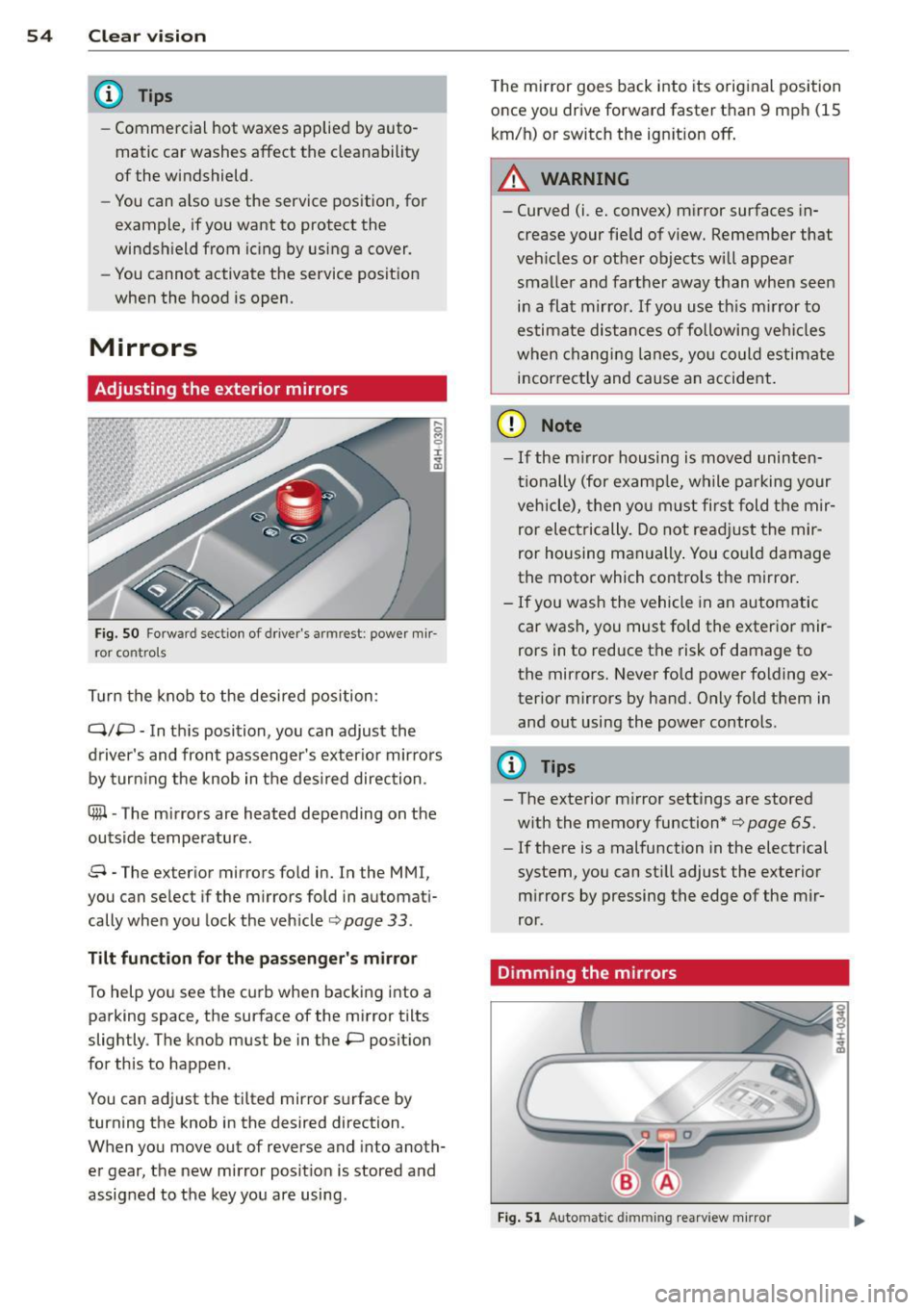
Adjusting the exterior mirrors
... g C)
I
~
Fig. S O Fo rw ar d s ecti on of driver's armr est: powe r m ir
r or con tro ls
T urn the knob to the desired position :
Q/P -In th is position, you can adjust the
driver's and front passenger's exter io r mirrors
by turn ing the knob in t he des ired direction .
®-The m irrors are heated depending on the
outside temperature .
8 -The exte rior m irrors fo ld in. In the MMI,
you c an se lec t if the m irror s fold in automat i
cally when you lock the vehicle ¢ page
33 .
Tilt funct ion for th e pa ssenger' s mi rro r
To help yo u see the c urb when bac king into a
parking space, the su rface of the mirror tilts
slightly . The knob must be in the P posit ion
for this to happen .
You can ad just the tilted mirror s urface by
turning the knob in the desired direction .
When you move out of reverse and into anoth
er gear, the new mirror posit ion is stored and
assigned to the key you are using . T
he mi rror goes back into its orig inal position
once you drive forward faster than 9 mph (15
km/h) or switch the ign ition off .
A WARNING
--
-Curved (i .e. conve x) mirror surfaces in
crease your fie ld of view. Remember that
veh icles o r ot he r objects will appea r
smalle r and farther away than when seen
in a flat mirror . If you use th is m irror to
estimate distances of following ve hicles
when chang ing lanes, yo u co uld estimate
i n correct ly and cause an accide nt.
(D Note
- If the m irror housing is moved uninten
ti onally (for examp le, w hile parking your
veh icle), then yo u must first fold the mir
ror electrically. Do not re adjust the mir
ror housing man ually . You co uld damage
the motor which controls the mirror .
-If you wash the vehicle in an automatic
car was h, you must fo ld the exter ior mir
rors in to reduce the risk of damage to
the mirro rs. Never fold power folding ex
terior mirrors by hand. O nly fold t hem in
and out using the power controls.
{I) Tips
- The exterior m irror settings are stored
w ith the memory function*
¢ page 65 .
-If there is a malfunction in the electrical
system, you can sti ll adjust the exterior
m irrors by pressing the edge of the mir
ror .
Dimming the mirrors
Fig. 5 1 Auto matic dimming rearview mirro r
Page 80 of 318

78 Warm and cold
Warm and cold Climate controls
Description
The climate control system warms, cools and
adds humidity to the air in the vehicle interior.
It is the most effect ive when the windows and
sunroof* are closed . If the temperature inside
the parked vehicle becomes very warm, open ing the window briefly will speed up the cool
ing process.
I n all heating mode functions except
defrost,
the blower on ly switches to a higher speed
once the engine coolant has reached a certain
temperature.
Condensation from the cooling system can
drip and form a puddle of water under the ve
hicle. This is normal and does not mean there
is a leak.
Pollutant filter
The pol lutant filter removes pollutants such
as dust and pollen from the air.
The air pollutants filter must be changed at
the intervals spec ified in you r Warranty
&
Maintenance booklet, so that the air condi
tioner can properly work.
I f you drive your vehicle in an a rea with high
a ir po llution, the fi lter may need to be
changed more frequent ly than specified in
your Aud i Warranty
& Maintenance booklet. If
in doubt, ask your authorized Audi Service Ad
visor for advice .
Key coded settings
The climate control settings are a utomat ically
stored and assigned to the remote control key
that is in use.
A WARNING
Reduced visibility is dangerous and can
cause accidents. -
- For safe driving it is very important that
all windows be free of ice, snow and con
densation.
- Comp letely familiarize yourself with the
proper use and funct ion of the heat ing
and ventilation system and especially how to defog and defrost the windows.
- Never use the windshield wiper/washer
system in freez ing weather unt il you
have warmed the windshield first, using
the heating and ventilation system. The
washer solution may freeze on the wind sh ie ld and reduce visib ility.
(D Note
- If you suspect that the air conditioner has been damaged, switch the system
off to avoid further damage and have it
inspected by a qualified dealership.
- Repairs to the Audi air conditioner re
quire special technical know ledge and
special tools. Contact an authorized Aud i
dea ler fo r assistance.
@ For the sake of the environment
By reducing the amount of fuel you use,
you also reduce the amount of pollutants
emitted into the air.
(D Tips
- Keep the air intake s lots (in fro nt of the
w indshield) free from ice, snow and de
bris in order to maintain the proper func
tion of the climate control system.
- T he energy management system may
switch the seat heating* or rear window
defroster off temporari Ly . These systems
are available again as soon as the energy
balance has been restored.
- Air escapes through vents under the rear
window. When placing items of clothing
on the luggage compartment cover, en
sure that the openings are not covered.
Page 96 of 318

94 Audi adapti ve cruise control and bra king gu ard
vehicles or obstacles that are not moving
can trigger a collision warning and if con
firmed by the v ideo camera, an acute col
lis ion warn ing .
- For safety reasons, do not use adaptive
cruise co ntrol when driving on roads with
many curves, when the road surface is in
poor condit ion and/or in bad weather
(such as ice, fog, gravel, heavy rain and
hydroplan ing) . Using the system under
these cond it ions cou ld result in a co lli
sion .
- Swi tch adap tive c ruise control off tempo
rar ily when driv ing in turning lanes, on
expressway exits or in construction
zones . This prevents the vehicle from ac
celerat ing to the set speed when in these
situations.
- The adapt ive cruise control system wi ll
not brake by itse lf if you put your foot on
the accelerator pedal. Doing so can over
ride the speed and d istance regulation .
- When approaching stationary objects such as stopped traff ic, adaptive cruise
co ntrol will not respond and braking
guard w ill have limited function.
- The adapt ive cruise control system and
braking guard do not react to people, an
imals, objects c rossing the road or on
coming objects .
- The function of the radar senso rs can be
affected by reflective objects such as
guard rai ls , the entrance to a tunnel,
heavy rain or ice.
- Never follow a ve hicle so closely that you
cannot stop your vehicle safe ly. The
adaptive cruise contro l canno t slow or
brake the vehicle safely when you follow
another vehicle too closely. Always re
member that the automatic braking
function cannot br ing the vehicle to a
sudden or emergency stop under these condit ions.
- To prevent unintended operation, always switch ACC off when it is not being used. (D Note
The sensors can be displaced by impacts or
damage to the bumper, wheel housing and
underbody. That cou ld affect the adaptive
cruise control system and brak ing guard.
Have your authorized Aud i dea ler or au
thorized Audi Service Facility check their
funct ion .
In curves
Applies to vehicles: with Audi adaptive cru ise contro l
I
Fig. 9 4 Exampl e: dri ving in to a curve
When d riving into a curve c> fig. 94 and out of
a curve, the ad aptive cruise control may react
to a vehicle in the next lane and apply the
brakes. You can override or prevent the brak
i ng by pressing the acce lerator pedal b riefly .
' Stationary objects
Applies to vehicles: with Audi adaptive cruise control
Fig. 95 Exampl e: objec t ch anging l anes and sta tio nar y
object
T he adaptive cru ise control system only reacts
to objects that a re mov ing o r that the system
has already detected as moving . For examp le,
if a vehicle @, which has already been detect-
ed by the adaptive c ruise contro l, tu rns or
ch anges lanes and another stationary vehicle .,.
Page 102 of 318

100 Audi adaptive cruise control and braking guard
(end of a traffic jam or vehicle that has
broken down in traffic).
- Always remember that the radar sensor
for the braking guard works only within
defined detection and range limits that
may prevent the proper detection of oth
er vehicles.
- The radar sensor's function and range
can be reduced by rain, snow and heavy
spray. Moving vehicles up ahead may not
be promptly detected or may not be de
tected at all.
- Reflective surfaces including crash barri
ers or tunnel entrances may impair the
function of the radar sensor.
(D Tips
- You can cancel the braking with increas
ing force that is initiated by the system
by braking yourself, by accelerating no
ticeably or by swerving.
- Braking guard error messages
r::> page 100.
-Keep in mind that braking guard can
brake unexpectedly . Always secure any
cargo or objects that you are transport
ing to reduce the risk of damage or in
jury.
Settings in the MMI
Applies to vehicles: with Audi adaptive cruise control
• Select: ICARI function button > Car systems
control button > Driver assist > Audi brak
ing guard.
System -
Switch braking guard On and Off.
When you switch the ignition on, the message
Audi braking guard off appears if the system
is switched off.
Early warning -The distance and approach
warnings in the display can be switched
On/
Off.
Tips
- Your settings are automatically stored
and assigned to the remote control key being used at the time the settings are
made.
- If you switch the ESC to sport mode,
braking guard switches off automatically
~page 200.
- Switch braking guard off when you are
loading the vehicle onto a vehicle carrier,
train, ship or other type of transporta
tion. This can prevent undesired warn
ings from the braking guard system.
Messages
Applies to vehicles: with Aud i adapt ive cru ise contro l
ACC unavailable
ACC and braking guard: unavailable
The system cannot detect moving vehicles up
ahead correctly and is switched off. The sen
sors have been displaced or are not working
properly. The Audi pre sense functions may al
so be affected. Drive to your authorized Audi
dealer or authorized Audi service facility im
mediately to have the malfunction corrected.
ACC: unavailable at this time. No sensor vi
sion
ACC and braking guide: unavailable at this
time. No sensor vision
This message appears if the sensor view is ob structed, for example by leaves, snow, heavy
spray or dirt . Clean the sensors
r:> page 93,
fig. 93.
ACC: unavailable at this time. Incline too
steep
The road exceeds the maximum possible an
gle for proper adaptive cruise control opera
tion. Adaptive cruise control is switched off .
ACC: only selector lever positions D, S or M
available
Select the D, Sor M selector lever position.
ACC: unavailable at this time. Parking brake
set
The adaptive cruise control system switches
off automatically if the parking brake is set. .,.