2013 AUDI A6 seats
[x] Cancel search: seatsPage 58 of 306

56 Seats and storage
Ashtray
Fig. 53 Center console: front ashtray~
Fig. 54 Rear ashtray
Opening /clo sing
.. To open the front ashtray, slide the cover
up .
.. To close the front ashtray, press down on
the cover .
.. To open the rear ashtray, tap the cover on
t h e rim.
Emptying
.. To empty the front ashtray, pull it upward
and out .
.. To empty the rear asht ray, press the rear
s ide of the cover down w hen it is open
Q fig. 54. T he ashtray will lift up out of its
mount.
.. To i nse rt t he ashtray again, press it down in
to the mount until it locks into p lace.
_&. WARNING
Never put waste paper in the ashtray. Hot
ashes or other hot objects in the ashtray
could set waste paper on fire.
Cigarette lighter
Applies to vehicles: wit h cigaret te lighter
Fig . 55 Ce nter console: cigarette lighter
.. Push the knob on the cigarette lighter in .
.. Remove the cigarette lighter when it pops
out.
_&. WARNING
The cigaret te lig hter on ly works w hen t he
i gnition is switched on. Incorrect usage
can lead to ser ious injuries or b urns. For
this reason, children should never be left
unattended in the veh icle because this in
creases the risk of inj ury .
12-volt sockets
Fig. 56 Sect io n of the tr im pane l of th e luggage com·
part men t: 12 -vo lt socket
•
F ig . 5 7 Rear center console: 12 -vo lt socket
Page 59 of 306

.. To reach the 12-volt socket in the luggage
compartment , press the net down
~ fig. 56 .
There is an additional 12-volt socket in the
front and rear cente r console ¢
fig. 57.
The 12-volt sockets can be used for electr ical
accessories . Th e power input must not exceed
120 watts.
Before you purchase any accessories, always
read and follow the information in
¢ page 287, Additional accessories and ports
replacement.
& WARNING
The sockets and the electrica l accessories
connected to them operate only when the
ignition is switched on . Incorrect usage
can lead to serious injuries or burns. To re
duce the risk of injuries, never leave chil
dren unattended in the vehicle with the ve
hicle key.
(D Note
To avoid damaging the socket, only use
plugs that fit properly.
- Never connect equipment that generates
electrical current, such as a so lar panel
or battery charger, to the 12-volt socket.
This could damage the vehicle's electri
cal system .
- The 12-volt socket should only be used
for a short period of time as a power
source for electr ical equipment . Please
use the electrical sockets in the vehicle
when connecting equipment for longer
periods .
- To avoid damaging the socket, only use
plugs that fit p roperly .
(D Tips
When the engine is off and accessor ies are
still plugged in and are on, the vehicle bat
tery can still be drained .
Seats and storage 57
Storage
(upholder
Fig. 58 Center co n sole: c uphold er
Fig. 59 Rea r cen ter armre st: c uphold er ext en ded
Front cupholder
.. To open the cupholder, tap the cover
~fig. 58.
Rear cupholder
(
.. To open the rear cupholder, press on the
symbolii @¢fig.
59 .
.. To adjust the arm @, swing it in the direc
tion of the arrow.
.. Place the beverage in the holder and release
the arm. The arm swings back by itself and
au toma tically secures the beverage.
.. To close the rear cupholder, press on the
center section between the two arms and
push the cupholder in the slot as far as it
w ill go.
& WARNING
Spilled hot liqu id can cause an accident
and personal injury.
- Never carry any beverage containers with
hot liquids, such as hot coffee or hot tea,
in the vehicle while it is moving . In case
of an acc ident , sudden braking or other
Ill-
Page 60 of 306
58 Seats and storage
vehicle movement, hot liquid could spill,
causing scalding burns. Spilled hot liquid
can also cause an accident and personal
injury .
- Use only soft cups in the cupholder. Hard
cups and glasses can cause injury in an
accident .
- Never use the cupholder or adapter as an
ashtray- risk of fire.
([) Note
Only drink containers with lids should be
carried in the cupholder. Liquid could spill
out and damage your vehicle's electronic
equipment or stain the upholstery, etc.
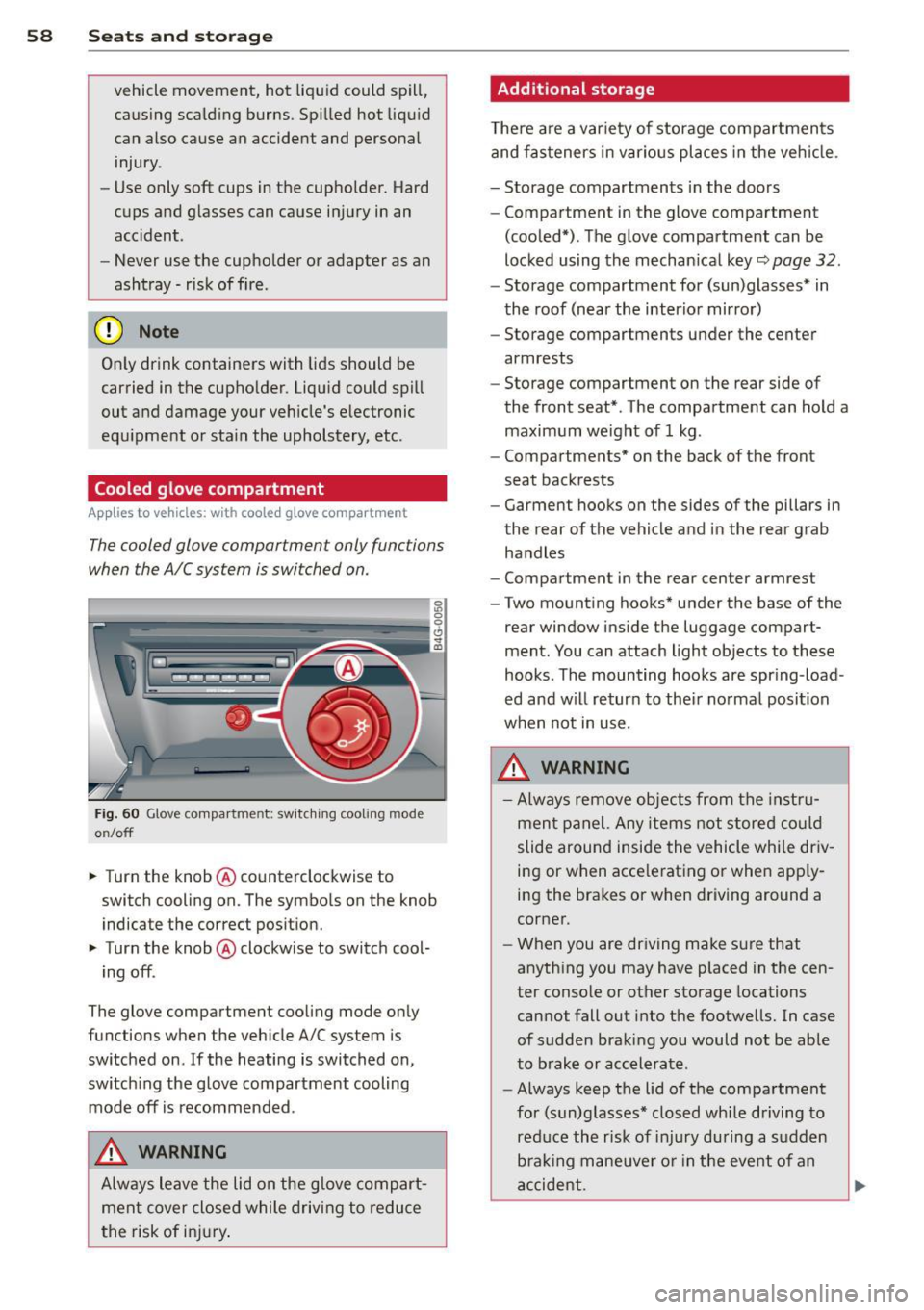
Cooled glove compartment
Ap plies to vehicles: with coole d glove compa rtm ent
The cooled glove compartment only functions
when the AIC system is switched on.
Fig. 60 Glove compa rtment: switc hing cooling mode
o n/off
~ Turn the knob@ counterclockwise to
switch cooling on. The symbols on the knob
indicate the correct position.
~ Turn the knob @ clockwise to switch cool-
ing off .
The glove compartment cooling mode only
functions when the vehicle A/C system is
switched on .
If the heating is switched on,
switching the glove compartment cooling
mode
off is recommended .
_& WARNING
Always leave the lid on the glove compart
ment cover closed while driving to reduce
th e risk of injury.
Additional storage
Ther e are a variety of storage compartments
and fasteners in various places in the vehicle.
- Storage compartments in the doors
- Compartment in the glove compartment
(cooled*) . The glove compartment can be
locked using the mechanical key
r::;, page 32.
-Storage compartment for (sun)glasses* in
the roof (near the interior mirror)
- Storage compartments under the center
armrests
- Storage compartment on the rear side of
the front seat* . The compartment can hold a
maximum weight of 1 kg .
- Compartments* on the back of the front
seat backrests
- Garment hooks on the sides of the pillars in
the rear of the vehicle and in the rear grab
handles
- Compartment in the rear center armrest
- Two mounting hooks* under the base of the
rear window inside the luggage compart
ment. You can attach light objects to these
hooks . The mounting hooks are spring -load
ed and will return to their normal position
when not in use.
_& WARNING
- Always remove objects from the instru
ment panel. Any items not stored could
slide around inside the vehicle while driv
ing or when accelerating or when apply
ing the brakes or when driving around a
corner.
- When you are driving make sure that
anything you may have placed in the cen
ter console or other storage locations
cannot fall out into the footwells. In case
of sudden braking you would not be able
to brake or accelerate.
- Always keep the lid of the compartment
for (sun)glasses* closed while driving to
reduce the risk of injury during a sudden
braking maneuver or in the event of an
accident.
-
Page 62 of 306

60 Seats and storage
can cause the roof rack or the items at
tached to it to fall off the roof onto the
road .
- Objects falling from the roof of a vehicle
can cause a crash and personal injury .
- Only mount the roof rack on the desig
nated locations on the roof
c> fig. 61.
-The roof rack system must be installed
exactly according to the instructions pro
vided.
- When driving with a roof rack system,
changes to the center of gravity and wind
resistance can change the vehicle han
dling and lead to a collision . Always
adapt your driving and your speed to the
current conditions .
@ Note
-Your vehicle warranty does not cover any
damages to the vehicle caused by using
roof racks or mounting structures not
approved by Audi for your vehicle . The
same applies to damage resulting from
incorrect roof rack installation .
- Always check the roof rack mountings
and hardware before each trip and dur
ing a trip to make sure everything is se
curely tightened. If necessary, retighten
the mountings and check the entire sys
tem from time to time.
- After mounting a roof rack system, or when you transport objects on the roof
of your vehicle, the height of the vehicle is naturally increased. Be careful when
driving under low bridges or in parking
garages for example . This could cause
damage to the load and even the vehicle itself.
- Make sure the open rear lid and the sun
roof* do not come into contact with the
roof rack.
Loading the roof rack
Always distribute loads evenly. Make sure
anything on the roof rack is securely tied
down.
.. Always distribute the loads on the roof rack
evenly .
.. Always attach items to the roof rack secure-
ly before you drive off.
The maximum permissible roof weight is
220 lb (100 kg). The roof weight is the total
of the weight of the roof rack, the attach
ments and the cargo you are carrying. You
must also not exceed the maximum load
weight for the roof rack you are using.
When using a roof rack system which has a lower load carrying capacity, you must not use
up the total maximum permissible load carry
ing capacity specified above. Instead, you
should load the roof rack system only to the
maximum capacity specified by the manufac
turer of the roof rack system .
A WARNING
-Weak, damaged or improper straps used
to secure items to the roof rack can fail
during hard braking or in a collision and
cause serious personal injury .
- Make sure the roof rack is installed exact
ly as specified above
c> page 59.
-Always use suitable mounting straps for
securing items to the roof rack to help
prevent items from shifting or flying for
ward .
- Items on the roof rack must always be
securely mounted .
- The use of a roof rack can negatively af
fect the way a vehicle handles . Cargo
that is large, heavy, bulky, long or flat
will have a greater negative influence on
the vehicle's aerodynamics, center of
gravity and overall handling. Always
drive slowly, avoid sudden braking and
maneuvers when transporting cargo on
the roof of your vehicle.
ll>-
Page 63 of 306

-Never exceed the maximum permissible
load carry ing capacity of the roof of your
vehicle, the permissible axle weights and
the permissible total weight of your vehi cle
c;, page 280, Weights.
@ For the sake of the environment
As a result of the increased wind resistance created by a roof rack, your vehicle is
using fue l unnecessarily. So remove the
roof rack after using it.
Luggage compartment
Loading luggage compartment
Luggage items must be stowed securely.
Fig. 62 Place heavy objects as far forward as possib le.
Not e the following to preserve the vehicle's
good handling characteristics.
.. Distribute the load as evenly as possible.
.. Place heavy objects as far forward as possi
ble
c;, fig. 62 .
.. Secure luggage items with the cargo net* or
with non-elastic retaining straps to the tie down rings*
c;, page 62.
A WARNING
- Loose objects in the luggage compart
ment can slide about suddenly and alter
the vehicle's handling characterist ics.
- Loose objects in the passenger compart
ment can fly forward during abrupt ma
neuvers or accidents and injure occu
pants.
Seats and storage 61
-Always store objects in the luggage com
partment and use suitable straps, partic
ularly with heavy objects.
- When you transport heavy objects, al
ways remember that a change in the cen
ter of gravity may result in a change in
the vehicle's handling characteristics.
- Follow all warnings
c;, page 126, Driving
Safely.
(D Tips
The tire pressure must be adjusted to the
load - see the t ire pressure sticker located
on the driver's side 8-pillar.
Enlarging cargo capacity of the vehicle
interior
The seat backs can be folded forward to en
large the cargo capacity.
Fig. 63 Release handle on th e seatback
Folding the seatback forward
.. When you pull the release lever @ ¢ fig. 63
in the direction of the arrow, the safety knob
@ pops out far enough for the red marking
on knob to be visib le .
.. Fold the seatback forward.
Raising the seatback
.. Raise the seatback until it is securely la tch
ed
c;, ,&_ . When you can no longer see the
red mark on the safety knob@, the seat is
latched.
When the seatback is latched in its upright
position, it can be locked and unlocked w ith
the mechanical key
c;, page 32 next to the re-
leas e handle @c>
fig. 63. This prevents any ...,
Page 64 of 306
62 Seats and storage
entry from the vehicle interior into the lug
gage compartment.
The luggage compartment can on ly enlarged
when the seatback is unlocked .
A WARNING
-
-The backrest must a lways be securely
latched so that the safety belt of the cen
ter seating pos ition can work properly to
help protect the occupant.
- The backrest must be securely latched in
position so that no items contained in
the luggage compartment can slide for
ward upon sudden braking .
-Always check whether the latch is fully
engaged by p ulling the seatback for
ward .
- Never allow safety belts to become dam
aged by being caught in door or seat
hardware .
- Torn or frayed safety belts can tear and
damaged belt hardware can break in a
c rash . Inspect the be lts periodically .
Belts showing damage to webbing, bind
ings, b uckles, or retractors mus t be re
placed .
W Note
- If you move the front sea t back when the
r ear seat bac krest is fo lded fo rward, yo u
could damage the head restraints on t he
r e ar seat.
- Slide the belt guide on th e outside safety
b elt all the way up before folding the
ba ckrest b ack fo rward. Make su re the
seat belt is no t pinched or dam aged
when the rear seat backrest if folded back . Other objects shou ld be removed
from the rear seat bench to protect the
seatback from damage.
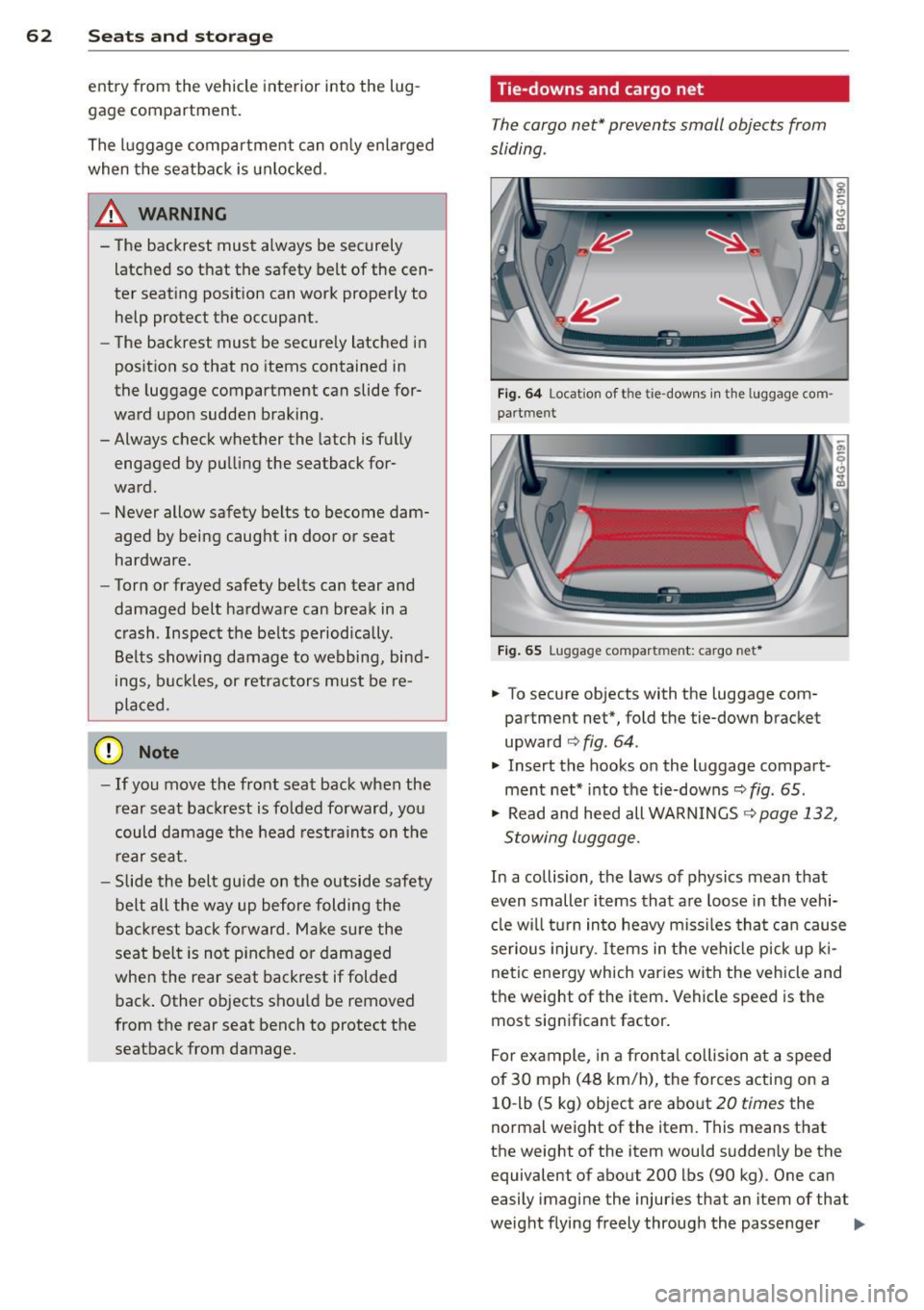
Tie-downs and cargo net
The cargo net* prevents small objects from
sliding .
Fig . 6 4 Locat io n of t he ti e-dow ns in the lu ggage com
pa rt m en t
Fig. 65 Lugga ge compart men t: cargo net *
.. To secure objects with the luggage com
partment net*, fold the tie-down bracket
upward
c:> fig . 64 .
.. Insert the hooks on the luggage compart
ment net * into t he tie-downs~
fig . 65 .
.. Read and heed all WARNINGS ~ page 132,
Stowing luggage.
In a collision, the laws of physics mean that
even smaller items that a re loose in the vehi
cl e w ill turn in to heavy m iss iles tha t ca n cause
serious injury. Items in the veh icle p ick up ki
ne tic energy which varies with the vehicle and
the weight of the item . Vehicle speed is the
most sign ificant factor.
F o r ex ample, in a fro nta l collision at a speed
of 30 mph (48 km/h), the forces acting on a
10 -lb (5 kg) object are abo ut
20 times the
norma l weight of the item. This means that
the weight of the item wou ld sudden ly be the
equivalent of about 200 lbs (90 kg) . One can
easily imagi ne the injuries that an item of that
weight flying freely through the passenger ..,.
Page 68 of 306

66 Warm and cold
l
ed or cleared o f condensation as quickly as
possib le. The maximum amo unt of air flows
mainly from the vents below the windshield.
Recirculation mode switches off .
The
IAU TOI b utton switches the defroster off.
ICmJ REAR I Switching rear window heater
on /off
The rear w indow heater only operates when
the engine is running . It switches off auto
matica lly after a few minutes, depending on
the outside temperature.
To prevent the rear w indow heater from
switch ing off automatically, press and hold
the ~ button for more than 2 seconds. This
remains stored unti l the ignition is switched
off.
~ Ad justing s eat h eat ing
Press ing the button switches the seat heat ing
on at the highest setting ( leve l 3) . T he LEDs
indicate the temperature leve l. To reduce the
temperature, press the button again. To
switch the seat heating off, press the button
repeatedly unt il the LED turns off.
After 10 minutes, the seat heating automati
cally switches from leve l 3 to level 2.
The seat heating for both outer rear seats* is
ad justed using the buttons in the center con
sole.
Air vents
You can open or close the center and outer
vents in the cockpit and the vents in the rear center console using the ridged thumbwhee ls.
The levers adj ust the direction of the airflow
from the vents.
T he air temperature in the rear can be ad just
ed so that it is warmer or co lder by turning
the knob to the red or blue area.
A WARNING
- Do not use the recirc ulation for extended
periods of time. The windows could fog
up since no fresh a ir can enter the vehi
cle . If the windows fog up, p ress the air
recirc ulation button again immediately
to switch off the air reci rculation func
tion o r se lect defros t.
- I ndividuals w ith reduced sensitivity to
pa in or temperature cou ld deve lop burns
when using the seat heating fu nction. To
red uce the risk of injury, these indiv idu
a ls shou ld not use seat heating.
0 Note
To avoid damage to the heat ing elements
i n the seats, do not kneel o n the sea ts or
place heavy loads on a sma ll area of the
seat.
Page 71 of 306
(D Note
To avoid damage to the heating elements in the seats, do not kneel on the seats or
place heavy loads on a small area of the
seat.
Setup
App lies to vehicles: with four-zone a utomat ic climate con·
tro t
The climate con trol system setup is accessed
through the MMI.
" Select: ICARI function button > ( Car) * sys-
tems con trol button > AC.
Rear cabin settings*
When this function is selected, all settings for
the rear can be adjusted through the climate
control system in the cockpit. The climate
control system settings cannot be adjusted in
the rear seat at the same time. This function
switches
off after a certain period of time or
when one of the dials in the cockpit is press
ed .
Auto recirculation*
The sensitivity level of the automatic rec ircu
la tion mode can be set at various leve ls from
off to sensitive. The recirculation mode is con
trolled automat ica lly. You must press the~
button if fog forms on the windows.
Footwell temperature
You can adjust the footwell temperature so
that it is cooler or warmer.
AC mode
The strength of the airflow can be adjusted to
light, med ium or strong.
Warm and cold 69
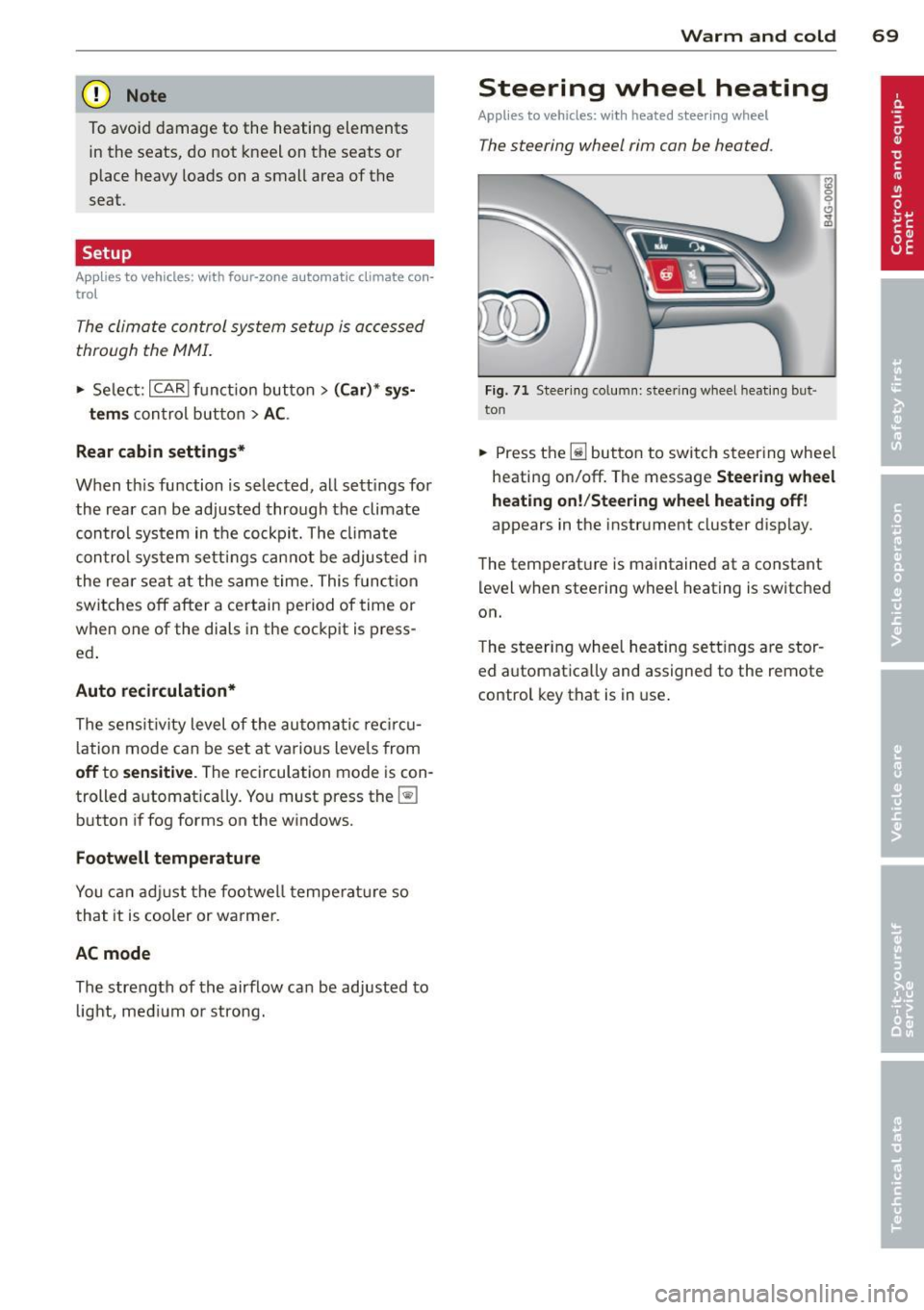
Steering wheel heating
Applies to vehicles: wit h hea ted stee ring wheel
The steering wheel rim con be heated .
Fig. 71 Steering column: steering wheel hea tin g but ·
ton
.. Press the lil button to switch steering whee l
heating on/off. The message
Steering wheel
heating on! /Steering wheel heating off!
appears in the instrument cluster disp lay.
The temperat ure is maintained at a constant
level when steering wheel heating is switched
on.
T he steer ing wheel heating settings are stor
ed automat ica lly and assigned to the remote
control key that is in use .