2013 AUDI A6 brake
[x] Cancel search: brakePage 22 of 306

20 Instruments and warning/indicator lights
ABS/{ @) Anti-lock braking system (ABS)
This warning/indicator light monitors the ABS
and the electronic differential lock (EDL) .
The warning/indicator light & (USA mod
e ls)
;tlJ (Canada mode ls) will co me on fo r a
few seconds when the igni tion is switched on .
Th e ligh t w ill go out after an a utomatic chec k
se quence is completed.
There is a malfunction in the ABS when :
-The warni ng/i ndicator lig ht does not ill umi
nate whe n yo u switch the ign ition on .
- The warni ng/indicator lig ht does not go out
after a few seconds .
- The wa rning/indicator lig ht ill uminates
wh ile dr iving.
The ESC indicator light a lso ill uminates if
there is a malfunction in the ABS . T h e mes
sage
Stabilization control (ESC/ABS ): Fault!
See owner's manual
a lso appea rs in the in
strument cluster display and a warning tone
sou nds .
The brake system will still respond even
without the assistance of the ABS system .
See your authorized Audi dealer as soon as
possible to restore full braking performance.
For mo re in forma tion regarding the A BS
¢ page 192.
Malfunction in the brake system
If the brake wa rning light ¢ page 15 and t he
ABS warning ill uminate
together there may be
a malf u nc tion in the ABS, and there may also
be a ma lf u n ct ion in the b rak e system itse lf
¢ ,&. . The ABS will not work and you will no
tice a change in braking response and per
formance.
I n the eve nt of a malfunction in the brake
system
t h e warn ing/ indicato r light 1111
(USA model s). (C an ada models) in th e i n
s tru men t cluster flashes¢
page 1 5.
Malfunction in the electronic differential
lock (EDL)
The EDL works t oget he r with the A BS. T he
A BS w arning ligh t will come on i f there is a malfunction in the
ED L sys tem
¢ page 192.
See your author ized Audi dealer as soon as
poss ible.
A WARNING
"---
- I f the E (U SA mo de ls)l ii] (Canada
models) warning light does not go out,
or if it c om es on whi le driving, t he ABS
sys tem is not wor king properly . Th e vehi
cl e ca n th en be sto pped on ly wit h th e
st an dard b rakes (with out A BS). Y ou w ill
no t have the pro te ct ion ABS pro vide s.
Con tact your Audi de aler as so on as pos
sible .
-USA m odels: If th e 1111 warn ing ligh t,
the
J;.J w ar nin g light and t he & warn
in g light come on together, the rear
whee ls could lock up first under har d
b rak ing. Rear wheel lock-up can ca use
l o ss of vehicle control and an acci dent .
Have your vehicle repaired immediately
by your au thoriz ed A udi deale r or a quali
fi ed workshop. Dr ive sl ow ly and avo id
sud de n, hard bra ke a ppli catio ns.
- Canada models: If the brake warning
light ., th e
DJ warning light and t he
A BS war ning ligh t
[(Gia come on toget her,
the re ar wheel s could lock up firs t under
ha rd br aking. Rea r whee l loc k-up ca n
cause loss of ve hicl e contro l and an acci
dent . Have your veh icle repa ired immedi
ately by your authorized Audi dealer or a
qua lified w ork shop. Drive s lowly and
av oid sudden, hard b rake applications .
{0) Worn brake pads
EtJ Brake pads!
If the warning light i lluminates, immed iate ly
contact your a uthori zed Audi dea ler or qua li
fied workshop to have all brake pads i nspect
ed . On USA mode ls t he war ning ligh t
EtJ
comes on toge ther w ith the warn ing light
1111 . Both se ts of brake pads on an ax le
mu st always be re place d at th e same t ime.
Page 23 of 306

Instrument s and warnin g/indic ator ligh ts 21
A WARNING 1= ~
Driv ing with bad brakes can cause a coll i-
sion and serious personal injury .
- If the warning light
EiJ and the warning
light
11111> w ith the message B rake
pad s!
comes on in the instrument cluster
display, immediately contact your au
tho rized Aud i dealer o r qualified work
shop to have a ll brake pads chec ked or
replaced if necessary.
EPC Electronic power control
This warning/indicator light monitors the
electronic power control.
The Ga warn ing/ indicator light (Electron ic
Power Control) illuminates when you switch
the ignition on as a function check .
(D Tips
If this warning/indicator light illuminates
while you are dr iving, then there is a mal
function in the engine elect ron ics. Have
the malfunction co rrected as soon as pos
sible by yo ur autho rized Aud i dea ler o r
qualified repair facility.
Ci Malfunction Indicator Lamp (MIL)
The Malfunction Indicator Lamp (MIL) is part
of the On-Board Diagnostic (OBD II) system.
The symbot
¢1111ij lights up when the ignit ion is
switched on and w ill turn
off after the engine
has started and has settled at a constant idle
speed. Th is ind icates that the MIL is working
properly .
The warning light illuminates when there is a
malfunct ion in the engine electronic system.
Contact your author ized Audi dealer and have
the ma lfunction corrected.
An improperly closed fuel filler cap may also
cause the MIL light to illum inate
c.> page 222.
For more information c.> page 29.
1) - : USA mod els only
!'1 Engine speed limitation
App lies to veh icles : w ith eng ine speed limitatio n
(I! Engine sp ee d ma ximum XXXX RPM
The eng ine speed is automatically limited to
the speed d isplayed in the dr iver information
system . Th is protects the engine from over
heating.
The eng ine speed limitation deactivates once
the engine is no longer in the critical tempera
ture range and you have re leased the acce lera
tor pedal once.
If the engine speed limitation was activated
by an engine control malfunction, the indica
tor light
Ga a lso turns on. Make sure that the
speed does not go above the speed disp layed.
Drive to your author ized A udi dealer immedi
ate ly to have the malfunction corrected.
~, Engine oil level
II Add o il, ma x. x qt (l). You ma y continue
dri ving
When the symbol II and dr iver message ap
pear, add the amount of oil appearing in the
display at the next opportunity¢
page 230.
~ •. Engine oil sensor
II Oil le vel! Sensor d efecti ve
If the symbol i lluminates, contact your au
thorized Audi dea ler and have the oil sensor
inspected. Until you have this done, check the
oi l level each time you refue l just to be on the
safe s ide
c.> page 230.
Bil Fuel level indicator
Ii] Ple ase re fuel
If the indicator light turns on for the first
time and the message appears, there are
about 2.6 gallons (10 liters) of fuel left in the
tank. Time to refuel
c.> page 221.
Ii] Tank system malfun ction! Contact dealer ..,_
Page 52 of 306

50 Seat s a nd s tor ag e
Seats and storage
General recommen
dations
Why is your seat adjustment so
important?
The safety belts and the airbag system can
only provide maximum protection if the front
seats are correctly adjusted.
There are various ways of adjust ing the front
seats to provide safe and comfortable support
for the driver and the front passenger . Adjust
you r seat prope rly so that :
- you can easily and quick ly reach all the
switches and controls in the instrument
panel
-your body is prope rly supported thus reduc
ing physical stress and fatigue
- the safety be lts and a irbag system can offer
maximum protection
¢ page 145 .
In the following sec tions, you will see exactly
how you can best adjust you r seats .
There are special regulations and instructions
for insta lling a child seat on the front pas
senger's seat. Always fo llow the information
regarding ch ild safety provided in
q page 171, Child Safety.
A WARNING
Incorrect seating position of the driver and
all other passengers can result in serious
personal in jury.
- Always keep your feet on the floor when
the vehicle is in motion -never p ut your
f eet on top of the instrument panel, out
of the w indow or on top of the seat cush
ion . Th is app lies especially to the passen
gers .
If your seating posi tion is incorrect,
yo u increase the r isk of injury in the case
of sudden braking or an acc ident.
If the
a irbag infla tes and the seating positio n
is incorrect, this could result in personal
injury o r even death.
- It is import ant for bo th the driver and
front passenger to keep a distance of at least 10 inches (25 cm) between them
selves and the steering wheel and/or in
strument panel. If you're s itting any
closer than th is, the a irbag system can
not protect you properly . In addition, the
front seats and head restraints must be
adjusted to your body height so that they
can give you max imum protect ion.
- Always try to keep as much distance as
possible between yourself and the steer
ing wheel o r inst rument pane l.
- Do not adjust the driver's o r front pas
senger's seat whi le the vehicle is moving.
Your sea t may move unexpected ly, caus
ing sudden loss of vehicle cont rol and
personal injury . If you adjust yo ur seat
while the veh icle is moving, yo u are out
of posit ion.
Driver's seat '
The correct seat position is important for safe
and relaxed driving.
We recommend tha t you adjus t the dr iver's
seat in the fo llowing manner :
.,. Adjust t he seat in fo re and aft direction so
t ha t you can eas ily pus h the peda ls to the
floor w hile keeping your knees sl igh tly bent
q A in Why is your seat adjustment so im
portant? on page 50.
.. Adjust the back rest so that when you sit
w ith your back against t he backrest, you can
still grasp the top of the steering wheel.
.. Adjust the head restraint so the upper edge
is as even as poss ible with the top of your
head . If that is not poss ible , try to adjust
t he head restraint so that it is as close to
t his pos it ion as possib le
q page 53.
A WARNING
Neve r place any objects in the dr iver's foot
well. An object could get into the pedal
area and interfere with pedal function . In
case of sudden braking or an acc ident, you
would not be able to brake or accelerate .
Page 60 of 306
58 Seats and storage
vehicle movement, hot liquid could spill,
causing scalding burns. Spilled hot liquid
can also cause an accident and personal
injury .
- Use only soft cups in the cupholder. Hard
cups and glasses can cause injury in an
accident .
- Never use the cupholder or adapter as an
ashtray- risk of fire.
([) Note
Only drink containers with lids should be
carried in the cupholder. Liquid could spill
out and damage your vehicle's electronic
equipment or stain the upholstery, etc.
Cooled glove compartment
Ap plies to vehicles: with coole d glove compa rtm ent
The cooled glove compartment only functions
when the AIC system is switched on.
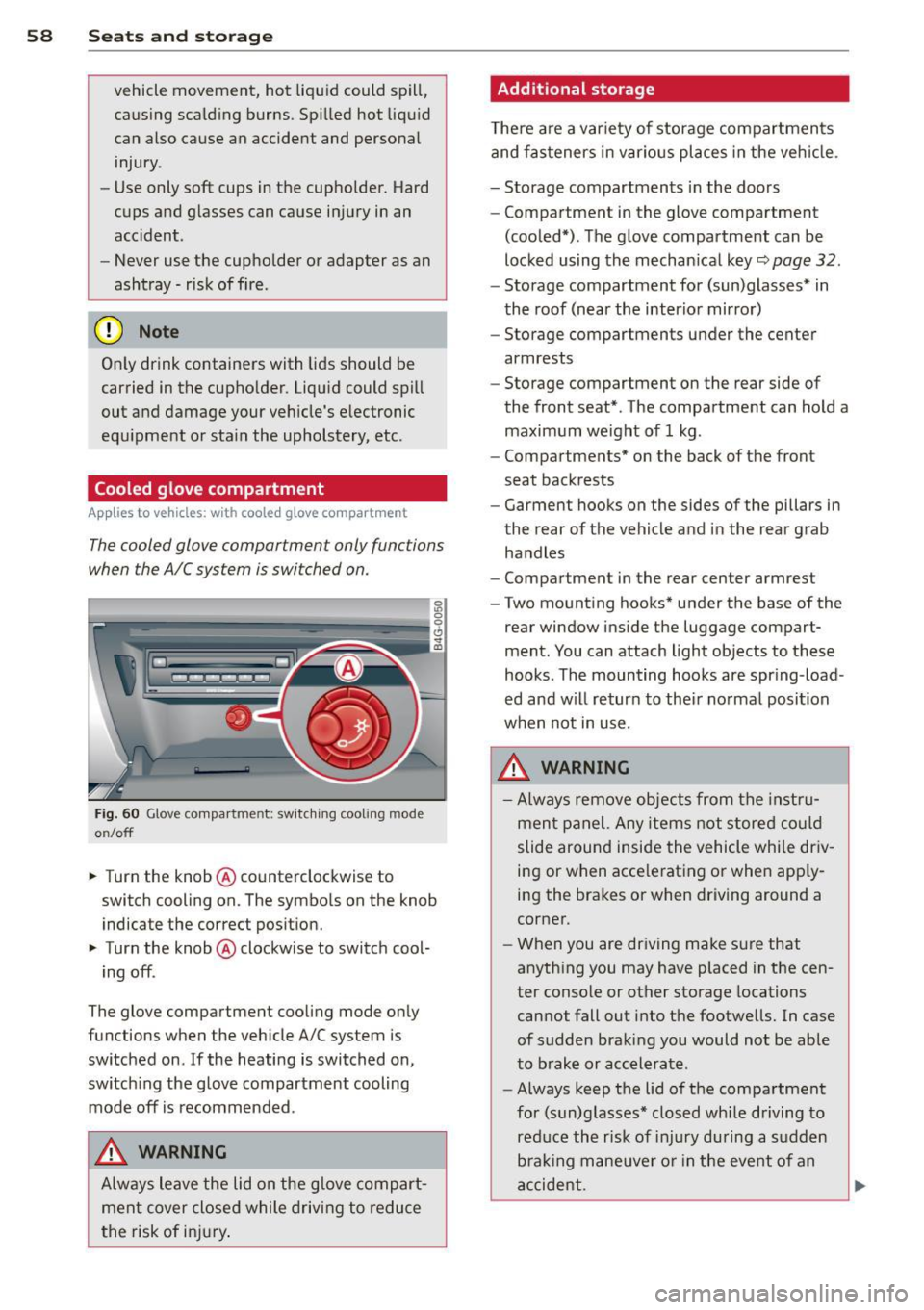
Fig. 60 Glove compa rtment: switc hing cooling mode
o n/off
~ Turn the knob@ counterclockwise to
switch cooling on. The symbols on the knob
indicate the correct position.
~ Turn the knob @ clockwise to switch cool-
ing off .
The glove compartment cooling mode only
functions when the vehicle A/C system is
switched on .
If the heating is switched on,
switching the glove compartment cooling
mode
off is recommended .
_& WARNING
Always leave the lid on the glove compart
ment cover closed while driving to reduce
th e risk of injury.
Additional storage
Ther e are a variety of storage compartments
and fasteners in various places in the vehicle.
- Storage compartments in the doors
- Compartment in the glove compartment
(cooled*) . The glove compartment can be
locked using the mechanical key
r::;, page 32.
-Storage compartment for (sun)glasses* in
the roof (near the interior mirror)
- Storage compartments under the center
armrests
- Storage compartment on the rear side of
the front seat* . The compartment can hold a
maximum weight of 1 kg .
- Compartments* on the back of the front
seat backrests
- Garment hooks on the sides of the pillars in
the rear of the vehicle and in the rear grab
handles
- Compartment in the rear center armrest
- Two mounting hooks* under the base of the
rear window inside the luggage compart
ment. You can attach light objects to these
hooks . The mounting hooks are spring -load
ed and will return to their normal position
when not in use.
_& WARNING
- Always remove objects from the instru
ment panel. Any items not stored could
slide around inside the vehicle while driv
ing or when accelerating or when apply
ing the brakes or when driving around a
corner.
- When you are driving make sure that
anything you may have placed in the cen
ter console or other storage locations
cannot fall out into the footwells. In case
of sudden braking you would not be able
to brake or accelerate.
- Always keep the lid of the compartment
for (sun)glasses* closed while driving to
reduce the risk of injury during a sudden
braking maneuver or in the event of an
accident.
-
Page 73 of 306

steering column will continue moving as long as you are pressing the switch.
There must be at least
10 inches (25 cm) be
tween your chest and the cente r of the steer
ing wheel. If you cannot sit more than
10 in
ches (25 cm) from the steering wheel, see if
adaptive equipment is available to help you
reach the pedals and increase the distance
from the steer ing wheel.
F or detailed information on how to adjust the
driver's seat, see
r::> page 51 .
In vehicles with the memory f unction* , the
steering column settings are stored together
with the seat position.
A WARNING
Improper use of steering wheel adjust
ment and improper seating position can
cause serious personal injury .
- Adjust the steering wheel column only
when the vehicle is not moving to pre
vent loss of veh icle control.
-
- Adjust the driver's seat or steering wheel
so that there is a min imum of
10 inches
(25 cm) between your chest and the
steering wheel ¢
fig. 143. If you cannot
mainta in this min imum d istance, the a ir
bag system cannot protect you properly.
- If physica l limitations prevent you from
sitting
10 i nches (25 cm) or more from
the steering wheel, check with your au
thorized Aud i dea ler to see if adaptive
equipment is availab le.
- If the steering wheel is aligned with your
f ace, the supp lemental driver's airbag
cannot provide as much protection in an
accident. A lways make sure that the
steering wheel is aligned with your
chest.
- Always hold the steering wheel with your
hands at the 9 o'clock and 3 o'clock posi
tions to reduce the risk of personal injury if the driver's airbag deploys.
- Never hold the steering wheel at the 12
o'clock posit ion or with your hands inside
the steering wheel rim or on the steer ing
On th e road 71
wheel hub. Holding the steering wheel
the wrong way can cause serious injuries
to the hands, arms and head if the driv
er's airbag deploys.
Easy entry feature
App lies to vehicles: with electrically adj ustable steer ing
wheel
The easy entry feature makes it easier to en
ter and exit the vehicle by automatically ad
justing the steering wheel.
.,. Select in the MMI: ICARlfunction bu tton>
(C ar)* sys tems control button > Vehicle set
t ing s > Se ats
> Drive r's sea t > Easy e ntry>
On.
When the easy entry feature is turned on, the steering wheel moves up to the park position
when you switch off the ignition . After you en
ter the vehicle, the steering wheel moves to
the stored posit ion as soon as you switch on
the ignition.
Starting and stopping
the engine
Starting the engine
This button switches on the ignition and
starts the engine.
F ig. 74 Center console: S TART ENGINE S TOP button
.,. Step on the brake pedal and move the selec
tor lever to P or N ¢
£..
.,. Press on the ...., , s=T ""'A --=R=T ,..., E= N~ G-::,I N:-:-= E-=s= T::-::0 :-:: Pc-i l button
c> fig. 74 -the engine will start. ..,.
Page 74 of 306

72 On the road
By pressing the I STAR T ENGINE ST OP I button
without depressing the brake peda l, the igni
tion is on and switched
off by pressing it
again .
After a cold engine is started, the re may be a
brief period of increased noise because oil
pressure must first bu ild up in the hydraulic
va lve adjusters. This is normal and not a cause
f or concern.
If the engine should not start immediately,
the starting process is automatically stopped
after a short time . Repeat starting procedure.
Start-Stop-S ystem *:
When you stop and the Start-Stop-System*
turns
off the engine, the ignition still remains
switched on.
- If you press the I STAR T ENGINE STOPI but
ton now, the ignition wi ll be switched
off.
T he engine will not start ¢ page 78 .
-Make sure tha t th e ig nit ion is swi tched off
before ex iting the vehicle.
Sw itching the ignition /engine off
automat icall y*
The fo llow ing applies to vehicles with Start
Stop -System*: to prevent the battery from
draining, the ignition and the engine wi ll
switch
off automatically under the following
conditions :
- T he vehicle has already been dr iven.
- T he d river's door is opened.
- T he driver's seat be lt is removed.
- The brake pedal is not pressed down .
- The veh icle is sta tionary.
In t his case, the activated low beam w ill be re
p laced by the side marker lights. The side
marker lights will switch
off after a certain pe
riod of time or when you lock the vehicle.
Driver m essage in the in strument clu ster
di spl ay
P ress b rake pedal to start engine
This message appears i f you press the
I S TAR T ENGINE STOP ! button to start the en
gine and do not depress the brake peda l. The engine can only be started if the brake pedal
is depressed.
!I C
o nveni ence key: I s ke y not in th e vehi
cle?
T h is message appears along with the !I sym
bol if the master key is removed from the ve
hicle with the eng ine runn ing.
It is in tended
to rem ind yo u (e.g . when chang ing dr ivers)
not to continue the journey without the mas
ter key.
If the master key is no longe r in t he ve hicl e,
yo u canno t swi tch on the igni tion after stop
ping the engine and you also cannot start the
engine again. Moreover, you cannot lock the
vehicle from the outside with the key.
Tu rn off ignition before leav ing car
This message appears if the drive r's door is
opened wh ile the ign ition is switched on. Al
ways swi tch off the ignit io n if you a re leav ing
the vehi cle. See also
¢ page 72 .
Shift to P, otherwi se vehicle can roll away.
Doors do not lock if lever is not in P .
This message appears for safety reasons
along with an audible warning tone if the P
selector lever position is not engaged when
stopp ing the eng ine with t he
I S TAR T ENGI NE ST OP I but ton. Select the P se
l ector lever posi tion. Otherwise the vehicle
could roll and it cannot be locked.
Ke y not r ecogni sed . Hold back of ke y again st
marked ar ea . See owner' s manual.
If the indicato r light turns on and this mes
sage appears, there is a malfunct ion
Q page 74.
Turn off ignition b efore leaving car
This message appears if the driver's door is
opened wh ile the ignition is switched on. Al
ways switch off the ignit ion if you a re leav ing
the vehicle. See also
¢ page 72 .
Shift to P and turn off ignition before leav-
ing car, otherwise vehicle can roll awa y
This message appears if the drive r's door is
opened while the ignition is switched on and
jll,,
Page 75 of 306
the sel ector lever is not in the P position. Shift
the s ele ctor lever into th e P position and
sw itch
off the ign ition when you ex it the vehi
cle . Otherwise the vehicle could ro ll. See a lso
c::;,page
72.
St eeri ng lock
The steering locks when you turn the engine
off using the I S TAR T ENGINE STOP I button
and open the d river 's door. The locked steer
ing helps prevent vehicle theft.
A WARNING
- Never allow the engine to ru n in confined
spaces -dange r of asphyxiation .
- Never turn
off the eng ine until the vehi
cle has come to a complete stop .
- The brake booster and power steer ing
only work when the engine is running . If
the engine is
off, you have to use more
force when steering or braking . Because
you cannot stee r and brake as you usua l
ly wou ld, this could lead to crashes and
serious injur ies.
(IT),) Note
- Avoid high eng ine rpm , fu ll th rottle and
heavy engine loads unti l the engine has
r eached operating temperat ure -ot her
wise yo u risk eng ine dam age.
- The eng ine cannot be sta rted by pushing
or tow ing the veh icle.
-If the engine has been under heavy load
fo r an ex tended pe riod, hea t builds up in
the engine compartment after the en
gine is switched
off -there is a risk of
damaging the engine. Allow the engine
to run at idle for about 2 m inutes befo re
switch ing it
off.
@ Tips
- If you open the driver's door with the ig
nitio n on, a buzzer sounds and the mes
sage
Ignition is on appears in the instru
ment cluster disp lay. Switch the ign it ion
off .
- If you leave the vehicle with t he ignit ion
switched on, the igniti on will switch
off
On th e ro ad 73
after a cer tain per iod of t ime. P lease
note that electrical eq uipment such as
exterior lights will sw itch
off as well
when that happens.
Stopping the engine
... Bri ng your ve hicle to a complete stop.
... Move the se lector lever to the P or N posi
tion .
... Press the
I STA RT ENGINE ST OP ! button
¢fig. 74 .
Emergency off
If necessary, the engine can be switched off
with the selector lever in the R or D/S posi
t ion . The eng ine stops if you press the
I S TAR T ENG INE S T OPI button at speeds below
6 mph (10 km/h) and press the b rake peda l.
A WARNING
-Never turn off the en gine until the vehi
cle has come to a complete stop .
- The brake booster and p owe r stee ring
only work when the eng ine is r unning .
If
the engine is off, you have to use more
force when steering or braking. Because
you cannot steer and bra ke as you usual
ly would, this cou ld lead to crashes and
serious inju ries.
- For safety reasons, you sho uld a lways
park your vehicle w it h the selector lever
in P. Otherwise, the vehicle could inad
vertently roll away .
- After the eng ine has been switched
off,
the radiator fa n can cont in ue to run for
up to 10 minutes - even with the ignition
sw itc hed
off. It can also sw itch on again
afte r some t ime if the coo lant tempera
ture rises as the resu lt of a hea t buildu p
or if the engine is hot and the engine
compa rtment is additionally heated by
the s un's rays .
(D Note
Do no t stop the eng ine immedia tely after
hard o r extended driving . Keep the engine
.
Page 76 of 306

7 4 On the road
running for approximately two minutes to
prevent excessive heat build-up .
Starting the engine if there is a
malfunction
It may not b e possible to start the engine un
der cer tain circumstances , for example if the
battery in the vehicle key is drained , if inter
ference is affected the key or if there is a sys
tem malfunction.
Fig. 75 C en ter conso le/ma ster key: startin g th e eng ine
if th ere is a mal function
Requirement : The message Key not recog
nized. Hold back of key against marked area.
See owner's manual.
must appear and the in
dicator light
II must switch on .
.,. Hold the master key vertically in the loca
t ion ind icated
f >l) ¢ fig . 75 .
.,. Press the brake pedal~.& in Starting the
engine on page 73.
.. Press the !~ S_ T_A_R_ T_E _N_G_I_N_ E_S_ T_O_P~I button.
T he eng ine will start.
"' Drive to your authorized Audi dealer imme
dia tely to have the malfunction corrected.
{D) Tips
You can view the message again by press
ing the
!S TAR T ENGINE STOP I button.
Electromechanical
parking brake
Operation
The electromechanical parking brake replaces
the hand brake.
Fig. 76 Center co nsole: Park ing b ra ke
.,. Pull on the switch (V) ¢ fig. 76 to app ly the
parking brake . The indicator light in the
sw itch ill uminates.
.,. Step on the brake pedal or the accelerator
pedal and p ress the switch
© at the same
time to release the park ing brake . The ind i
cato r light in the swit ch goes out.
Your vehicle is equipped with an electrome
chanical parking brake . The parking brake is
designed to p revent the veh icle from rolling
un intentionally and replaces the hand brake .
In addition to the no rmal functions of a tradi
tional hand brake, the electromechanical
parki ng brake provides vario us convenience
and safety functi ons.
When starting from rest
-The integral starting ass ist helps you when
driving by automat ically releasi ng the park
ing brake
~ page 75 , Starting from rest .
-When start ing on inclines, the start ing as
sist prevents the vehicle from unintentional
ly rolling back. The braking force of the
pa rking brake is not released until sufficient
driving force has been bui lt up at the
wheels . .,,.