2013 AUDI A5 COUPE lock
[x] Cancel search: lockPage 92 of 294

90 Transmi ssion
When st a tiona ry apply brake ped al while se
lecti ng gear
The se lector lever lo ck only funct ions when
the vehicle is stationary and at speeds up to
3 mph (5 km/h). At higher speeds, the lock is
automatically deactivated i n the N position .
The se lector lever is not loc ked when s hifting
q ui ckly thro ugh N, for examp le from R to D/5.
This makes it possible to free the veh icle when
it is stuck by " rocking" it . The selector lever
l ock engages if the lever stays in N longer
than 1 second when the brake pedal is not pressed.
Inte rlock button
The interlock button in the selector lever han
d le prevents you from moving the selector
l ever inadvertently while in some selector lev
er positions. Press ing the interlock button re
leases the se lector lever lock. The pos itions
that require the interlock button to be press
ed are marked in color in the i llustration
~ fig.91.
Ignition key safety inte rlock
You can only remove the key after switching
the ign it ion off if the selec tor lever is in the P
position . T he selector lever w ill be locked in
the P pos ition as long as the key is not in the
ignit io n.
Driving information
App lies to vehicles: with S tronic transmission
The transmission shifts up and down auto
matically when in the driving gears .
Fig. 92 Sect io n of the ce n ter conso le: Sele ctor lev er
w it h inte rlock b utton
M N N N
" CD CD
You can on ly start the engine when the se lec
tor lever is in the P or N position.
Sta rting from a stop
" Press and hold the b ra ke peda l.
.. Press and hold the interlock button (in the
selecto r lever hand le), move the selector
lever to the desired position s uch as D/5
~ page 88 and re lease the interlock button .
.. Wait a moment until the transmission
shifts. You will notice a slight movement
when the gear engages.
.. Release the brake peda l and press the accel
erator pedal¢& .
Stopping t emporarily
.. Press the brake peda l to prevent the veh icle
from mov ing, for example at traffic lights .
.. Do not press the accelerator peda l when do-
ing this .
Parking
If the selector lever is not in the P position
when you open the driver's door, the veh icle
could roll. The message
Transmission : Car
may roll! Shift to park!
appears .
.. Press and hold the brake pedal¢ ,&. .
.. Activate the park ing brake.
.. Hold the interlock button down, place the
selector lever in the P posit ion and re lease
the interlock button .
Stopping on an incline
.. Always press the brake pedal to ho ld the ve
hicle in place and preven t it from "ro lling
back" ¢,&. . Do
not try to prevent the vehicle
from "roll ing back" when a gear is engaged
by increasing the eng ine speed
~ CD .
St arting on an incline
.. Activate the park ing brake .
.. With the driving gear selected, press the ac
celera tor peda l carefully . The parking brake
w ill release automatically if your seat be lt is
fastened .
Driving o n an incline: Under certain c ircum-
sta nces, such as dr iv ing in the mounta ins, it ..,_
Page 93 of 294

may be useful to switch temporarily to the
manual shift program in order to adjust the
gears to the driving conditions by hand
Q & .
On slopes, activate the parking brake first and
then move the selector lever to the P position.
This prevents the locking mechanism from be ing loaded too heavily and will make it easier
to move the selector lever out of P.
A WARNING
-Never leave your vehicle with the engine
running while in gear. If you must leave
your vehicle when the engine is running, activate the parking brake and move the
selector lever to P.
- Power is still transmitted to the wheels
when the engine is running at idle. To
prevent the vehicle from "creeping", you
must keep your foot on the brake when
the engine is running and the selector
lever is in D/S or R or "tiptronic" mode is
selected.
- Do not press the accelerator pedal when
changing the selector lever position
while the vehicle is stationary and the
engine is running.
- Never shift into R or P while driving.
- Before driving down a steep slope, re-
duce your speed and shift into a lower
gear with "tiptronic".
- Do not ride the brakes or press the brake
pedal too often or too long. Constant
braking causes the brakes to overheat
and substantially reduces braking per
formance, increases braking distance or
causes complete failure of the brake sys
tem .
- To prevent the vehicle from rolling back
when stopping on inclines, always hold it
in place with the brake pedal or parking
brake.
- Never hold the vehicle on an incline with
a slipping clutch . The clutch opens auto
matically when it becomes too hot from
the overload. An indicator lamp
[O] illu
minates and a driver message appears
Transmission 91
Q page 93 when the clutch is overload
ed.
(D Note
- When stopping on an incline, do not try
to hold the vehicle in place by pressing
the accelerator pedal while a driving gear
is selected. This can cause the S tronic
transmission to overheat and can dam
age it . Activate the parking brake or
press the brake pedal to prevent the ve
hicle from rolling .
- Allowing the vehicle to roll when the en
gine is stopped and the selector lever is
in N will damage the S tronic transmis
sion because it is not lubricated under
those circumstances.
(D Tips
For safety reasons, the parking brake is re
leased automatically only when the driv
er's safety belt is engaged in the buckle.
Hill descent control
App lies to vehicles : wi th S tronic t ra nsmi ssio n and hill de ·
sce nt contro l
The hill descent con trol system assists the
driver when driving down declines .
Hill descent control is activated when these
lector lever is in D/S and you press the brake
pedal. The S tronic transmission automatically
shifts down into a gear suitable for the de cline. Hill descent control tries to maintain
the speed achieved at the time of braking,
within physical and technical limitations. If
may still be necessary to adjust the speed
with the brakes.
Hill descent control switches off once the de
cline levels out or you press the accelerator
pedal.
On vehicles with the cruise control system*
Q page 80, hill descent control is also activat-
ed when the speed is set. .,,.
Page 96 of 294
94 Transmi ssion
There is a syste m ma lf un ction in t he tr ansmis
sion. The transm ission is switching to emer
gency mode. Th is mode only sh ifts into cer
tain gears or will no longer shift at all. The en
gine may stall. Drive to your authorized Audi
dealer o r qualified repair facility immediately
to have the malfunction co rrected .
[O] Ii) Transmi ssion malfunct ion: No re verse
You can conti nue d riving
There is a system ma lf u nction in the transmis
sion. The transmission is sw itching to emer
gency mode. Th is mode only shifts into cer
tain gears or will no longer shift at a ll. The en
g ine may stall. You cannot engage the reve rse
gear . D rive to your authorized A udi dealer or
qua lified r epai r faci lity immediate ly to have
the ma lf u nction co rrec ted .
[O] Tran smission malfunct ion : Stop veh icle
and shift to park .
Do not continue driving. Select the P se lector
lever pos ition and see your authorized Audi
dealer o r qualified repair facility for assis
tance.
({D Note
If the transmiss io n sw itches to emergency
mode, you sho uld take the vehicle to an
author ized Audi dealersh ip as soon as pos
sib le to have the cond ition co rrected.
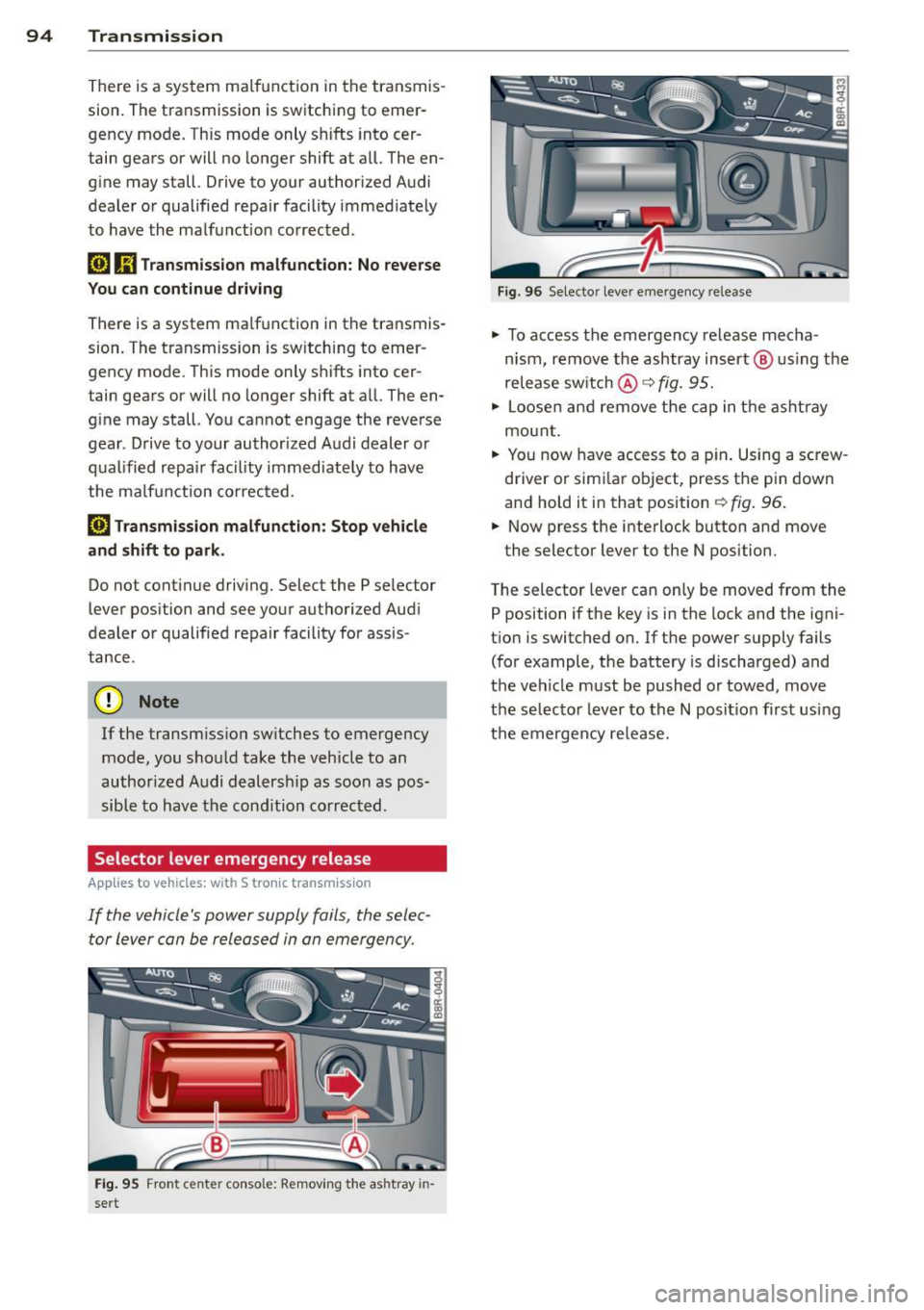
Selector lever emergency release
App lies to vehicles: with S tronic tr ansmiss ion
If the vehicle's power supply fails , the selec
tor lever can be released in an emergency .
Fig. 95 Fron t cen te r con so le: Remov ing the ashtray in
sert
F ig. 96 Selec to r lever eme rge ncy re lease
"' To access the emergency re lease mecha
n ism , remove the ashtray insert @ us ing the
release switch @q
fig. 95.
"' Loosen an d remove the cap in t he asht ray
mou nt.
"' Yo u n ow have access to a p in . Using a sc rew
driver or simi la r object, press the pin down
and hold it in that position
¢ fig . 96.
"' Now press the i nterlock button and move
the selector lever to the N posi tion .
T he selector lever can only be moved from the
P position i f the key is in the lock and the igni
t ion is switched on. If the power supply fails
(for example, the battery is discharged) and
t h e veh icle must be pushed or towed, move
the selecto r lever to th e N position fi rst usi ng
the emergency re lease.
Page 105 of 294

Audi adaptive cruise control and braking guard 103
-If you switch the ASR/ESC off or the off
road mode on (allroad), Audi braking
guard switches off automatically
<=> page 187.
-Switch Audi braking guard off when you
are loading the vehicle onto a vehicle car
rier, train, ship or other type of transpor
tation. This can prevent undesired warn ings from the braking guard system .
Messages
Applies to vehicles: with Audi adaptive cruise co ntrol
Braking guard: Off
This driver message appears if the system is
turned off via the radio/MM I*. Otherwise, if
the system is turned off, the information ap
pears every time shortly after the start of the
trip.
Braking guard: Activated
This driver message appears if sharp brake
pressure was applied due to an acute warning.
•••
Three white dots appear if a setting cannot be
selected with the operating lever. For exam
ple, this happens if you want to raise/lower
the speed even though there was no previous
ly saved speed .
ACC: Deactivation
The driver message appears in vehicles with
manual transmission . If the clutch pedal was
pressed down for too long, the adaptive cruise
control turns off. A chime sounds as a remind
er.
ACC: Sensor blocked
This message appears if the sensor view is ob
structed, for example by leaves, snow, heavy
spray or dirt. Clean the sensor<=>
page 95,
fig. 97.
ACC: not available
The driver message appears if there is a mal
function. The adaptive cruise control turns off.
A chime sounds as a reminder. Have the sys- tern checked by an authorized Audi dealer or
authorized Audi Service
Facility.
ACC: unavailable
The driver message appears if, for example,
the brake temperature is too high . The adap
tive cruise control is temporarily unavailable.
A chime sounds as a reminder.
Engine speed!
This driver message appears in vehicles with
manual transmission if the driver had not up
shifted or downshifted in time while using
adaptive cruise control braking or accelerat ing, causing the vehicle to exceed or not reach
the permitted limit speed. The adaptive cruise
control turns off. A chime sounds as a remind
er .
Shift lever position!
Vehicles with an automatic transmission: the
driver message appears if the selector lever is
shifted to the N position . The adaptive cruise
control is not available while in this position .
Vehicles with manual transmission: the driver message appears for vehicles with manual
transmission if there is no forward gear en
gaged, meaning if the reverse gear or the 1st
gear is engaged or if the selector lever is in
the neutral position. The adaptive cruise con
trol is not available while in this position.
Stabilization control (ESC)
This message appears if the electronic stabili
zation control (ESC) is taking action to stabi
lize the vehicle. The adaptive cruise control
turns off . A chime sounds as a reminder.
Speed too low
This message appears if the current speed is
too low
to set or to maintain the desired
speed .
The speed being saved must be at least
20 mph (30 km/h). The cruise control is
turned off for speeds lower than 12 mph
(20 km/h). The adaptive cruise control re
mains turned on for speeds above 95 mph
(150 km/h) (override).
It will stabilize again at.,..
Page 110 of 294

108 Audi side assist
- Side assist is not active while you are
making the adjustment.
- Your settings are automatically stored
and assigned to the remote control key
being used.
Driver messages
App lies to vehicles: with side assist
If side assist switches off by itself, the LED in
the button turns off and a message will ap
pear in the instrument cluster display:
Audi side assist unavailable: Sensors blocked
The radar sensors' vision is affected. Do not
cover the area in front of the sensors with bike
wheels, stickers, dirt or other objects. Clean
the area in front of the sensors, if necessary
c:::;,page 106, fig. 111.
Audi side assist: Currently unavailable
Side assist cannot be switched on temporarily
because there is a malfunction (for example,
the battery charge level may be too low) .
Audi side assist: System fault!
The system cannot guarantee that it will de
tect vehicles correctly and it is switched off .
The sensors have been displaced or are faulty .
Have the system checked by an authorized
Aud i dealer or authorized Audi Service Facility
soon .
Audi side assist: Unavailable when towing
Side assist switches off automatically when a
factory-installed trailer hitch is connected to
the electrical connector on the trailer . There is
no guarantee the system will switch off when
using a retrofitted trailer hitch. Do not use
side assist when towing a trailer.
Page 128 of 294

126 Driving Safely
• Always keep both feet in the footwell so
that you are in control of the vehicle at all
times.
For detailed information on how to adjust the
driver's seat, see
¢ page 54 .
A WARNING
Drivers who are unbelted, out of position
or too close to the airbag can be seriously
injured by an airbag as it unfolds. To help
reduce the risk of serious personal injury:
- Always adjust the driver's seat and the
steering wheel so that there are at least
10 inches (25 cm) between your breast
bone and the steering wheel.
- Always hold the steering wheel on the
outside of the steering wheel rim with
your hands at the 9 o'clock and 3 o'clock positions to help reduce the risk of per
sonal injury if the driver's airbag inflates.
- Never hold the steering wheel at the
12 o'clock position or with your hands at
other positions inside the steering wheel
rim or on the steering wheel hub. Hold
ing the steering wheel the wrong way
can cause serious injuries to the hands,
arms and head if the driver's airbag de
ploys.
- Pointing the steering wheel toward your
face decreases the ability of the supple
mental driver 's airbag to protect you in a
collision .
- Always sit in an upright position and nev
er lean against or place any part of your
body too close to the area where the air
bags are located.
- Before driving, always adjust the front
seats and head restraints properly and
make sure that all passengers are prop
erly restrained.
- Never adjust the seats while the vehicle
is moving . Your seat may move unexpect
edly and you could lose control of the ve
hicle.
- Never drive with the backrest reclined or
tilted far back! The farther the backrests
are tilted back, the greater the risk of in- jury due to incorrect positioning of the
safety belt and improper seating posi
tion.
- Children must always ride in child safety
seats ¢
page 166. Special precautions
apply when installing a child safety seat
on the front passenger seat¢
page 142 .
Proper seating position for the front
passenger
The proper front passenger seating position
is important for safe, relaxed driving .
For your own safety and to reduce the risk of
injury in the event of an accident, we recom
mend that you adjust the seat for the front
passenger to the following position :
• Move the front passenger seat back as far
as possible . There must be a minimum of
10 inches (25 cm) between the breastbone
and the instrument panel¢,&. .
• Adjust the angle of the seatback so that it is
in an upright position and your back comes
in full contact with it whenever the vehicle is
moving.
• Applies to vehicles with adjustable head re
straints: Adjust the head restraint so the up
per edge is as even as possible with the top
of your head. If tha t is not possible, try to
adjust the head restraint so that it is as
close to this position as possible.
• Keep both feet flat on the floor in front of
the front passenger seat.
• Fasten and wear safety belts correctly
¢page 137.
For detailed information on how to adjust the
front passenger's seat, see
¢ page 53.
A WARNING
-
Front seat passengers who are unbelted,
out of position or too close to the airbag
can be seriously injured or killed by the air
bag as it unfolds. To help reduce the risk of
serious personal injury:
Page 133 of 294

-Never transport objects larger than
those fitting completely into the luggage
area because the rear lid cannot be fully
closed.
- If you absolutely must drive with the rear
lid open, observe the following notes to
reduce the risk of poisoning:
- Close all windows,
- Close the sunroof,
- Open all air outlets in the instrument
panel,
- Switch off the air recirculation,
- Set the fresh air fan to the highest
speed .
A WARNING
Always make sure that the doors, all win
dows, the sunroof and the rear lid are se
curely closed and locked to reduce the risk
of injury when the vehicle is not being
used.
- After closing the rear lid, always make
sure that it is properly closed and locked.
- Never leave your vehicle unattended es
pecially with the rear lid left open. A
child could crawl into the vehicle through
the luggage compartment and close the
rear lid becoming trapped and unable to
get out. Being trapped in a vehicle can
lead to serious personal injury.
- Never let children play in or around the
vehicle.
- Never let passengers ride in the luggage
compartment . Vehicle occupants must
always be properly restrained in one of
the vehicle's seating positions.
@ Tips
- Air circulation helps to reduce window fogging. Stale air escapes to the outside
through vents in the trim panel. Be sure
to keep these slots free and open.
- The tire pressure must correspond to the
load. The tire pressure is shown on the
tire pressure label. The tire pressure la bel is located on the driver's side B-pillar.
The tire pressure label lists the recom-
-
Driving Safely 131
mended cold tire inflation pressures for
the vehicle at its maximum capacity
weight and the tires that were on your
vehicle at the time it was manufactured.
For recommended tire pressures for nor
mal load conditions, please see chapter
r::> page235 .
Tie-downs
The luggage compartmen t is equipped with
four tie -downs to secure luggage and other
items .
Use the tie-downs to secure your cargo prop
erly
r::> page 130, Loading the luggage com
partment .
In a collision, the laws of physics mean that
even smaller items that are loose in the vehi
cle will become heavy missiles that can cause
serious injury. Items in the vehicle possess en
ergy which vary with vehicle speed and the
weight of the item. Vehicle speed is the most
significant factor.
For example, in a frontal collision at a speed
of 30 mph (48 km/h), the forces acting on a
10-lb (4.5 kg) object are about 20 times the
normal weight of the item . This means that
the weight of the item would suddenly be about 200 lbs . (90 kg). You can imagine the
injuries that a 200 lbs. (90 kg) item flying
freely through the passenger compartment
could cause in a collision like this.
A WARNING
Weak, damaged or improper straps used
to secure items to tie-downs can fail dur
ing hard braking or in a collision and cause
serious personal injury.
-Always use suitable mounting straps and
properly secure items to the tie-downs in
the luggage compartment to help pre
vent items from shifting or flying for
ward as dangerous missiles.
- When the rear seat backrest is folded
down , always use suitable mounting
straps and properly secure items to the
tie-downs in the luggage compartment
•
•
Page 140 of 294

138 Safet y belt s
To provide maximum protection, sa fety belts
must always be positioned correctly on the
wearer 's body .
.,. Adjust the front seat and head restra int
properly ¢
page 53, Seats and storage .
.,. Make sure the seatback of the rear seat
bench is in an upright pos ition and securely
latched in place befo re using the belt¢.&, .
.,. Hold the belt by the tongue and pull it
evenly across the chest and pelvis
c:> .&, .
.,. Insert the tongue into the correct buckle of
you r seat until you hea r it latch securely
¢ fig . 136.
.,. Pull on the be lt to make sure that it is se-
curely latched in the b uckle .
Automatic safety belt retractors
Every safety belt is equipped w ith an automat
ic belt retractor on the shoulder be lt . T his fea
ture locks the be lt when the belt is pulled out
fast, dur ing hard bra king and in an ac cident.
The belt may also lock when yo u drive up or
down a steep hill or through a sharp curve. During normal driving the belt lets you move
freely .
Safety belt pret ensioners
The sa fe ty belts are equippe d wi th a be lt pre
tensioner that helps to tighten the safety belt
and remove s lack when the pretensioner is ac
tivated. The function of the pretensioner is
monitored by a warning light¢
page 20 .
Switchable locking feature
Every sa fe ty belt ex cep t the one on the dr iver
seat is eq uipped w ith a switchable locking fea
ture that
mu st be used w hen the safety belt is
used to attach a child safety seat . Be sure to
read the important information about this
feature
¢ page 176.
A WARNING
Imprope rly positioned safety belts can
cause serious injury in an accident
¢ page 138, Safety belt position .
- Safety belts offer optimum protection
only when the seatback is up right and
-
be lts are properly posit ioned on the
body.
- Always make sure that the rear seat
backrest to wh ich the center rear safety
be lt is attached is securely latched when
ever the rea r center safety belt is being
used. If the backrest is not secure ly
latched, t he passenger w ill move for
ward with the ba ckr est dur ing sudd en
bra king, in a sudden maneuver and espe
ci ally in a crash .
- Neve r attach the safety be lt to t he buck
le for ano ther sea t. At taching the belt to
the wrong buckle will redu ce s afe ty be lt
effec tiveness and can cause serio us per
sonal injury.
- A passenger who is not properly restrain
ed can be seriously injured by the safety
be lt itself w hen it moves from the stro n
ger parts of the body into cr itical areas
like the abdomen .
- Always loc k the convertible locking re
tractor when you are secu ring a child
safety seat in the vehicle
c:> page 178.
Safety belt position
Correct belt position is the key to gett ing
maximum protection from safety belts.
Fig . 1 3 7 Safe ty bel t pos it ion
Standard features on your veh icle help you ad
j u st the pos ition of the safety be lt to match
you r body si ze.
- he ight-adjustable front seats.