2013 AUDI A5 CABRIOLET ABS
[x] Cancel search: ABSPage 195 of 290

Trailer towing tips
Important to know
Your vehicle hand les different ly when tow ing
a trailer because o f the addit ional weight and
d iffe ren t weight distribution . Safety, perform
ance and economy w ill greatly depend on how
caref ully you load your trailer and operate
your rig.
B efore you actua lly tow your trailer, pr actice
turning, stopp ing and bac king up in an area
away from traffic. Keep practicing until you have become comp lete ly fam iliar with the way
your veh icle-trailer comb ination behaves and
responds.
Backing up is d ifficu lt a nd requires practice .
Backing up with a tra iler genera lly requires
steer ing action opposite to that when backing
up your vehicle without a trailer.
M aintain a g reater distance betwee n your ve
h icle and the one in front o f you . You will need
mo re room to stop. To compensate for the
trailer, you will need a larger than normal
turning radius .
W hen pass ing, remember that yo u cannot ac
celerate as fast as yo u normally wo uld be
cause of the added load. Make sure you have
e nough room to pass . After passing , allow
p lenty o f room fo r your tra iler before chang
in g la nes aga in .
Avoid jerky starts, sharp turns or rap id lane
changes.
(D Tips
- Do n ot tow a tra ile r during the break-in
period of you r vehicle.
- If you tow a trailer, your A udi may re
quire more frequent maintenance due to
t h e ext ra load
o page 269.
Trailer towin g 193
Parking on a slope
Do not park on a slope with a trailer . If it can
not be avoided, do so only after doing the fol lowing:
When parking:
.. App ly the foot brake.
"' Have someone p lace chocks under both the
veh icle and the tra iler wheels .
"' With chocks in place, slowly release t he
bra kes unt il t he whee l chocks absorb the
load .
.. Tur n the whee ls towa rds t he curb .
.,. App ly the parking brake.
.. Move the se lector lever to P.
When restarting after parking:
.. App ly the foot brake .
.,. Sta rt t he engine .
.. Move the se lector lever to D/S .
.. Release the pa rking brake and s low ly pull
out a nd away from the wheel chocks .
.. Stop and have someone retr ieve the wheel
chocks .
(D Tips
If you move the selector leve r of the auto
matic transmission to P befo re a pplying
the parking brake and before bloc king the
whee ls, you may have to use more force
l ater to move the l ever out of the P posi
tion .
•
•
Page 204 of 290

202 Cleaning and protection
Aluminum trim
Use only neutral-pH products to remove spots
and depos its from alum inum s urfaces.
Chrome care products and alkaline cleaners
will attack aluminum surfaces and can dam
age them over time.
A WARNING
Always read and heed all WARNINGS and other information
9 page 194.
Fabrics and fabric coverings
Fabrics and fabric coverings (e.g. seats, door
trim panels, etc .) should be cleaned at regular
intervals with a vacuum cleaner . This removes
surface dirt particles which could become em
bedded in the fabric through use. Steam
cleane rs shou ld not be used, because the
steam tends to push the dirt deeper into the
fabric and lock it there.
Normal cleaning
Generally, we recommend using a soft sponge
or a l int-free m icrofiber cloth to the clean fab
ric. Brushes should only be used for carpets
and floor mats, since other fabric surfaces
could be harmed by brushes.
Normal surface sta ins can be cleaned using a
commercially available foam cleaner. Spread
the foam on the surface of the fabric with a
soft sponge and work it in gently. Do not satu
rate the fabric . Then pat the foam dry using
absorbent, dry cloths (e.g . microfiber cloth)
and vacuum it after it has dried completely.
Cleaning stains
Stains caused by beverages (e.g. coffee, fruit
juice, etc .) can be treated with a mild deter
gent solut ion . App ly the detergent so lution
with a sponge. In the case of stubborn stains,
a detergent paste can be applied directly to
the stain and worked into the fabric. After
wards, use copious amounts of clean water to remove the remaining detergent . Apply the
water with a damp cloth or sponge and pat
the fabric dry with an absorbent, dry cloth. Stains
from choco late or makeup should have
detergent paste rubbed into them. After
wards, remove the soap with water (damp
sponge).
Alcohol can be used to treat stains from
grease, oil, lipstick or a ballpoint pen. Melted
grease or dye must be patted off using ab
sorbent material. It may be necessary to re
treat the areas with detergent paste and wa
ter .
In the case of general soiling of the uphols
tery and cover material, we recommend hir ing
a specialist that has the equipment to clean
the seat covers and other fabric surfaces by
shampooing a nd spray extraction.
A WARNING ,..__
Always read and heed all WARNINGS and
the information
9page 194.
(j) Tips
Open Velcro fasteners on your clothing can
damage the seat cover. Please make sure
that Velcro fasteners are closed .
Plastic parts and instrument panel
Always use a clean cloth moistened in clear
water to clean these areas. For persistent dirt
use an Audi approved
solvent-free plastic
clea ner/protectant.
A WARNING
-Solvents can change the properties of
some p lastics and make it harder for the
a ir bag to deploy.
-
-Never clean the instrument panel or the
surface of airbag modules w ith cleaning
products that conta in solvents.
- Products containing solvents will make the surface of this part porous.
- Serious injuries can resu lt if plastic parts
come loose when the airbag is deployed.
- Always read and heed all WARNINGS and
other information
9 page 194.
Page 206 of 290

204 Cleaning and protec tio n
Cleaning and caring for leather
upholstery and trim
Appl ies to vehicles: with natural leather
Natural leather requires special care and at
tention.
Norm al cleaning
"' Clean soiled areas w ith a slightly mo istened
cotton or woolen cloth.
M ore stub born d irt
"' More stubborn dirt can be removed using a
cloth saturated with a mild soap so lution (2
tablespoons mi ld liquid soap).
"' Never allow the soap solution to saturate
the leather, and make certain that no water
soaks into the seams .
• Wipe off the soap solut ion with a soft, dry
cloth .
Clean ing s pots
"' Remove fresh wa te r-b ase d spots (such as
coffee, tea, ju ices, blood) w ith an absorbent
cloth or paper towel.
"' Remove fresh
grea se or oil-b ase d spot s
(such as b utter, m ayonnaise , chocolate) with
an absorbent cloth or paper towe l, or use
the cleaner from the leather care kit if the
spot has not yet penetrated into the surface
of the leather.
"' Use an oil/grease dissolving spray, if
oil /
gre ase spot s ha ve drie d on.
• Remove spec ific kinds of spots (ballpoint
pen, felt marker, fingernail polish, water
based paint, shoe polish, etc.) with a spot
remove r specifically formulated for leather .
Leather care
"' Every half year use an approved leather care
product (available from your authorized
Audi dealer) to care for the leather .
• Apply the product
very sparingly.
• Wipe it off wi th a damp cloth .
If you have any questions about cleaning and
car ing for the leathe r in your vehicle, it is best
to contact your author ized Audi dealer, who
will be glad to he lp you and te ll yo u about ou r
fu ll range of leather care products, s uch as: -
Leather cleaning and care kit
- Creams to care for colored leather
- Spot
removers for ballpoint pens, shoe pol-
ish, etc.
- Oi l/grease d issolving spray
- New and upcom ing products .
_&. WARNING
-Always read and heed all WARNINGS and
other information
~ page 194.
(D Note
- Never use chemical so lvents (e.g. lighter
fluid, turpentine), waxes, shoe polish or sim ilar products on the leather surfaces
in your Audi .
I
-To avoid damage, have stubborn sta ins
removed by a comme rcial clean ing spe
cialist.
Cleaning Alcantara ® (synthetic suede)
Applies to vehicles: with Alcantara® upholstery
Removing dust and dirt
• Moisten a cloth, squeeze out excess water
and wipe down the seat surfaces.
Removing stains
"' Moisten a cloth with lukewarm water o r
w ith di luted
eth yl (rubbing ) alcohol.
"' Dab at the stain . Start at the outside and
work inwards .
"' Once the sta in is no longe r vis ible, use a
soft dry cloth or tissue to soak up the mois
ture .
Do no t use leather cleaning prod ucts on A l
cantara ®.
You may use a suitab le shampoo for removing
dust and d irt.
Dust and grit in the pores and seams can
scratch and damage the surface. If the car is left standing in the sun for long per iods, the
Alcanta ra ® should be protected aga inst direct
s u nl ight to prevent it from fading. S light color
variations will develop in norma l use and are
not an indication of materia l deterioration . ..,.
Page 224 of 290

222 Check ing and filling
• Read the brake fluid leve l from the brake
fluid reservoir ¢
fig. 179, ¢ fig. 175. The
brake f lu id leve l must be between the "MIN"
and "MAX" markings.
The brake fluid reservoir is located at the rear partition of the engine compartment on the
left side ¢
page 214 .
The fluid level may drop slightly after some
time due to the automatic adjustment of the brake pads . This is not cause for alarm .
I f the brake fluid level falls
considerably be
l ow the "MIN" mark, the brake wa rning/indi
cator light (U .S . mode ls:
1111 , Canadian
models :. ) will come on
¢ page 15. Do not
continue to operate the vehicle. The complete brake system should be thoroughly checked
by an authorized Audi dealer or qualified
workshop and the cause corrected . If the
brake fluid level is too low, the b rake war ning/
i ndicato r light w ill illuminate . Contact an au
thor ized Audi dealer
imm ediately .
@ Tips
The brake f lu id reservoir is located unde r
neath the cove r.
Changing brake fluid
Have the brake fluid changed by an experi
enced technician .
Brake fluid absorbs moisture from the a ir . If
the water content in the brake fluid is too
h igh, corrosion in the brake system may result
after a per iod of t ime . The bo iling po int of the
b rake fluid w ill also decrease considerably and
dec rease braking per formance.
Therefore, the brake flu id must be changed
e ver y two ye ars. A lways use new b rake fluid
which confo rms to Fede ral Motor Vehicle
S tanda rd "FMVSS 116 DO T 4".
The brake flu id reservoir can be difficult to
r each, therefo re , we recommend that yo u
have the brake fl uid changed by yo ur au tho r
i z ed
Audi dealer . Your dealer has the co rrec t tools, the
right brake flu id and t he know -how
to do this for you.
A WARNING
'-
- Brake flu id is poisonous. It must be stor-
ed only in the closed or igina l container
out of the reach of children!
- Brake failure can res ult from o ld or inap
propriate brake f lu id. Observe these pre
cautions:
- Use only brake f luid that meets SA E
spe cifi cat ion
J 17 03 and conforms to
Federa l Motor Vehi cle Standard 1 16.
Always chec k with yo ur authorized A udi
dealer to make sure yo u are using the
correct brake fluid. The cor rect type of
brake flu id is also ind icated on the
brake f lu id reservoir.
- The brake fluid must be new. Heavy use
of the brakes can cause a vapor lock if
the brake fluid is left i n the system too
long . This can se riously affect the effi
c iency of the brakes as well as your
safety . T his could result in an accident.
W Note
Brake fluid will damage the pai nt of you r
vehicle .
@ For the sake of the environment
Because of the prob lem of proper disposal
of brake fluid as well as the spec ial too ls
r equired and the necessary expertise, we
r ecommend that yo u have the brake flu id
changed by yo ur autho rized Aud i dea le r.
Battery
General information
U nder normal operat ing cond itions, the bat
te ry in your Audi does not need any ma inte
nance. With
high outside temperatu res or
long da ily drives we recommend that you have
the e lectrolyte leve l che cked by an autho riz ed
A udi dealer or qu alified workshop. The elec
tro ly t e level should also be checked e ach time
the battery is charged
¢ page 225. ...
Page 225 of 290

Have the battery checked when you take your
vehicle in for service. Yo u are well advised to
replace a battery that is older than 5 years.
W ith certa in types o f airbag deployment, the
battery is disconnec ted from the vehicle elec
trica l system for safety reasons
c::> &. in Re
pair, care and disposal of the airbags on
page 154.
Di sconn ecting the battery t erminal s
Some vehicle functions (power w indow regu
l ators, for example) are lost if the battery ter
minals are disconnected . These functions have
to be re learned after the battery terminals are
connec ted again. To prevent this, the battery
should only be disconnected from the vehicle
e lectrical system when absolutely necessary
for repairs .
Vehicl es not driven for long p eriod s
If you do not drive your vehicle over a period
of several days or weeks, electrical compo
nents are gradually cu t back or switched off .
This reduces energy consumption and main
tains starting capability over a longer per iod
c::> page 185.
Some of the conven ience functions may not
operate, such as the inter ior lights or the
power seat adjustment. The conven ience
functions will be ava ilable again whe n you
turn on the ignition and sta rt the eng ine.
Winter operation
During the winter months, battery capacity
tends to decrease as temperatures drop . This
i s because more powe r is also consumed while
start ing , and the head lights, rea r window de
fogger, etc., are used more often .
Avo id unnecessary power consumption, par
ticularly in c ity t raffic or when t rave ling on ly
short d istances. Let you r authorized Audi
dea le r che ck t he capacity of the vehicle bat
t ery before w inte r sets in
c::> page 225. A well
cha rged batte ry w ill no t only p revent sta rting
p rob lems when the weathe r is cold, b ut will
a lso last longer.
Checkin g and fillin g 223
(D Tips
If your vehicle is left standing for seve ral
weeks at extremely low temperatures, the
vehicle battery shou ld be removed and
stored where it w ill not freeze. This will
prevent it from be ing damaged and having
to be replaced .
Working on the battery
Be especially careful when working on or near
the battery.
The battery is located in the l uggage compart
ment under the floor. Before you check any
th ing in the luggage compartment,
read and
h eed all WARNINGS
c::> &_ .
Always heed the safety warnings , when work
ing on the vehicle battery or the vehicle e lec
trical system to prevent injury.
The following WARNINGS are very
important when working on the battery:
Al ways heed the follo wing WARNING SYM
BOLS and safety precautions when working on the battery.
® Always wear eye protection .
/).. Batte ry acid contains sulfuric acid . Al
~ ways w ear glov es and ey e protection .
IC No
\!!51 -sparks
-flames
- smoking.
A Wh en a battery i s charged , it produces
~ hydrogen g as which i s explosive and
could cau se per sonal injur y.
~ Always keep the battery well out of
'if!:11 reach of children .
_&. WARNING
Whenever working on t he battery o r on
the electrical system, there is the risk of
injury, accident and even fire . Read and
heed the following WARNINGS:
-
•
•
Page 248 of 290
246 Tires and wheels
wheels on your vehicle to ensure that the re
p lacement or a lternate tires and wheels allow
the TPMS to continue to function properly.
Tire pressure indicator appears
Applies to vehicles: with tire pressure monitoring system
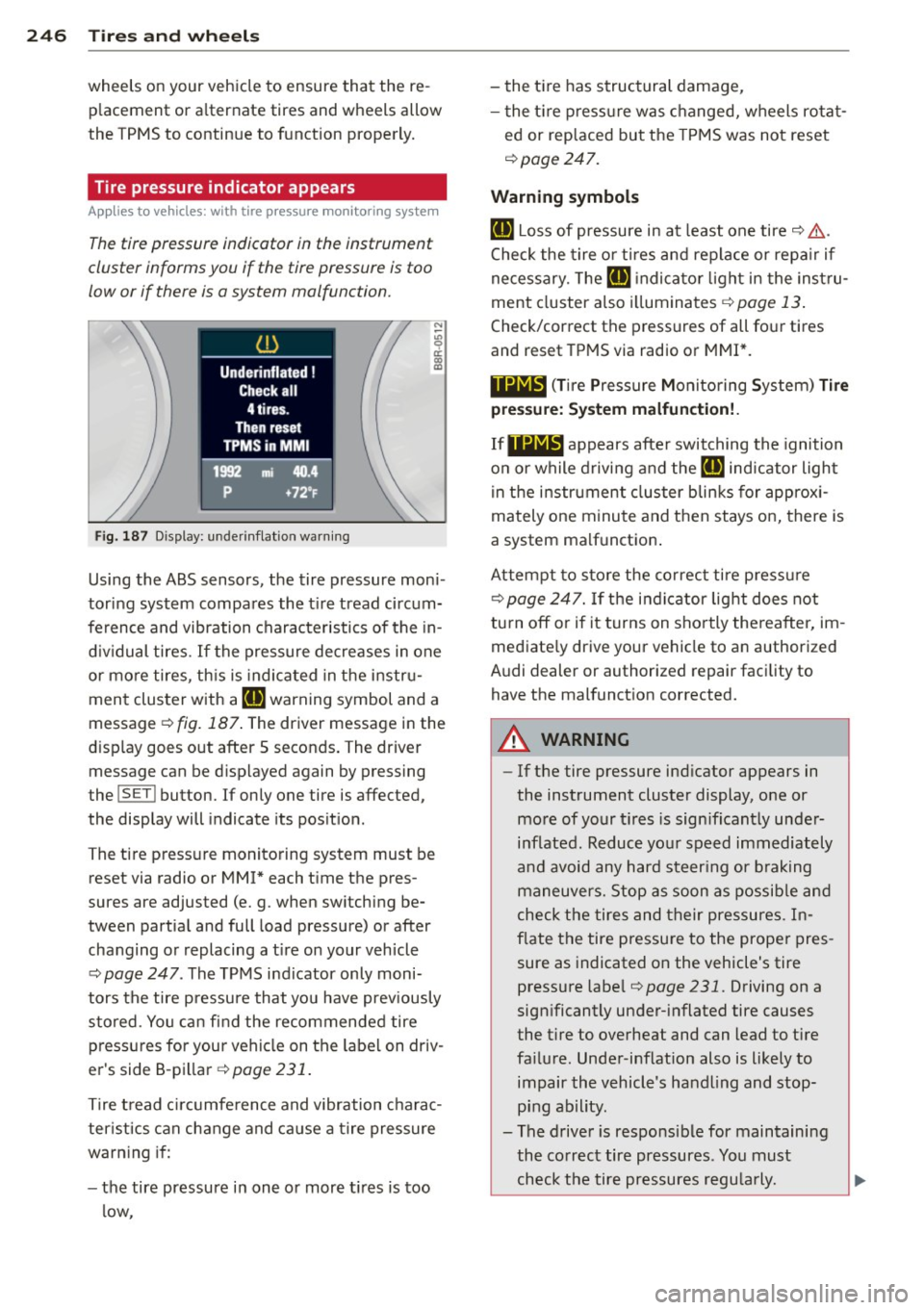
The tire pressure indicator in the instrument
cluster informs you if the tire pressure is too
low or if there is a system malfunction.
Fig. 187 Display: underinflation warning
N :;:; 9 a:
l:l
Using the ABS sensors, the tire pressure moni
tor ing system compares the tire tread circum
ference and vibration characteristics of the in
dividual tires.
If the pressure decreases in one
or mo re tires, this is indicated in the instru
ment cluster with a
[I] warning symbol and a
message
r:!> fig. 187 . The driver message in the
display goes out after S seconds. The driver
message can be displayed again by pressing
the
! SET ! button. If only one tire is affected,
the display will indicate its position.
The tire press ure monitoring system must be
reset via radio or MMI* each time the pres
sures are adjusted (e. g . when switching be
tween partial and full load pressure) or after
changing or replacing a tire on your veh icle
r:!> page 247 . The TPMS indicator only moni
tors the tire pressure that you have prev iously
stored . You can find the recommended tire
pressures for your vehicle on the label on driv
er's side 8-pillar
¢page 231.
Tire tread circumference and vibration charac
ter istics can change and cause a tire pressure
warning if:
- the tire pressure in one or more tires is too
low, - the
tire has structural damage,
- the tire pressure was changed, wheels rotat-
ed or replaced but the TPMS was not reset
c;, page 247.
Warning symbols
[I] Loss of pressure in at least one tire c;, .&,..
Check the tire or tires and replace or repa ir if
necessary. The
[I] indicator light in the instru
ment cluster also illuminates
¢page 13.
Check/correct the pressures of all four tires
and reset TPMS via radio or MMI*.
11Nl~1 (Tir e Pressure Mon itor ing System) Tire
pressure: System malfunction!.
IfllilB appears after switching the ignition
on or while driving and the
[I] indicator light
in the instrument cluster blinks for approx i
mately one minute and then stays on, there is
a system malfunction .
Attempt to store the correct tire pressu re
c;, page 247. If the indicator light does not
turn off or if it turns on shortly thereafter, im
mediate ly driv e your vehicle to an author ized
Audi dealer or authorized repair facility to
have the malfunct ion corrected.
A WARNING
-
- If the tire pressure ind icator appears in
the instrument cluster display, one or
more of your t ires is sign ificantly under
inflated . Reduce yo ur speed immediately
and avoid any hard steering or braking
maneuvers. Stop as soon as possible and
check the tires and their pressures. In
f la te the tire pressure to the prope r pres
sure as indicated on the vehicle's tire
pressure label
r:!> page 231. Driving on a
significantly under-inflated tire causes
the t ire to overheat and can lead to tire
fa ilure . Under -inflation also is likely to
impair the vehicle's handling and stop ping ability.
- The driver is responsible for maintaining
the co rrect tire pressures. You must
check the tire pressures regularly.
Page 249 of 290

-Under certain conditions (such as a spor
ty driving style, winter conditions or un
paved roads), the pressure monitor indi
cator may be delayed.
- Ask your authorized Audi dealer if run
flat tires may be used on your vehicle.
Your vehicle registration becomes invalid
if you use these tires when not permit
ted. Damage to your vehicle or accidents could also result.
(D Tips
- The tire pressure monitoring system
stops working when there is an ESC/ABS
malfunction.
- Using snow chains may result in a system
malfunction .
- The tire pressure monitoring system on
your Audi was developed using tires with the "AO" or "RO" identification on the
tire sidewall ~
page 238. We recom
mend using these tires.
Reset tire pressure monitoring system
Applies to vehicles: with tire pressure monito ring system
If the tire pressure is adjusted, wheels are ro
tated or changed, the
TPMS must be reset via
radio or
MMI*.
~ Before resetting the TPMS, the current pres
sures of all four tires must correspond to
the specified values. Adjust the tire pressure and reset the pressure in the tire pressure
monitoring system according to the load
you are carrying
~ page 231.
~ Turn on the ignition.
~ Select: the ICARI function button> Tire
pressure monitoring
> Store now . Or
~ Select: the ICARI function button > Car sys
tems*
control button > Servicing & checks >
Tire pressure monitoring > Store tire pres
sures.
(D Tips
Do not store the ti re pressure if there a re
snow chains on the tire.
Tires and wheels 24 7
•
•
Page 258 of 290

256 Fuses a nd bulb s
I
I
-No. Consumer
6 Headlight range control sys-
tern/cornering light
7 Headlight (cornering light) Control modules (electro-
mechanical parking brake,
8 shock absorber, quattro sport, trailer hitch), DCDC
converter
9 Adaptive cruise control
10 Shift gate
11 Side assist
1 2 Headlight range control,
parking system
13 Airbag
14 Rear wiper (allroad)
15 Aux
iliary fuse (instrument
panel)
1 6 Auxiliary fuse terminal 15
(engine area)
Fu se pa nel@ (brown)
2
3
4
5
6
7 Brake light sensor
Fuel pump
Clutch sensor
Left seat heating with/w ith
out seat ventilation
ESC
Horn
Front left door (window reg-
8 ulator, central locking, mir
ror, switch, lighting)
Two-door models: rear left
w indow regulator, Four-door
11 models: rear left door (win-
dow regulator, central lock-
ing, switch,
lighting)
12 Rain and light sensor
Fu se p ane l© (red)
3 Lumbar support
4 Dynamic steering
5 Interior lighting (Cabriolet)
Amps
5/7,5
7,5
5
s
5
5
5
5
15
10
40
5
25
5
-
15/30
5
15
30
30
25
30
5
10
35
5
No . Consumer
6
7
8
9
Windshield washer system,
headlight washer system
Vehicle electrical system
control module 1
Vehicle electr ical system
control module
1
Left rear window regulator
motor (Cabriolet)/sunroof
Amps
35
20
30
7,5/20
10 Vehicle e
lectr ical system
30
control module 1
11
Right rear window regulator
7,5/20 (Cabriolet)/sun shade motor
12 Anti-theft alarm warning
system 5
Right cockpit fuse assignment
Fig.
199 Right cockpit: fuse panel wit h plastic cl ip
No . Consume r Amps
F use panel@ (bl ac k)
5 Steering column switch
5
module
.. -.. -
7
Term inal 15 diagnos tic con-
nector
5
8 Gateway (Databus diagnos-
5
tic interface) ...