2013 AUDI A4 SEDAN tow
[x] Cancel search: towPage 51 of 294

-If swallowed and person is conscious ,
r inse mouth with wate r for at least 15
minutes . Do not induce vom iting unless
inst ructed to do so by medical professio
nal. Get medical at tention immediately .
(D Note
Liquid electro lyte leaking from broken mir
ror glass will damage any plastic surfaces
it comes i n contact with . Clean up spilled
electrolyte immed iately w ith clean water
and a sponge .
@ Tips
-Switch ing off the dimming function of
the inside rear view m irror also deact i
vates the automat ic d imm ing f unction of
t h e exte rior m irrors .
- Automat ic dimming for the m irror only
operates properly i f the sun shade* f or
the rear window is no t in use o r the light
str iking the ins ide mir ro r i s no t hindered
by other objects .
- The au tomati c dimm ing mirro rs do no t
dim when the interio r lighting is turned
on or the reverse gear is se lec ted.
Sun visors
Fi g. 44 D rive r's side : sun viso r
Th e sun v isors for the driver and passenger
can be pulled out of the ir brackets in the cen
ter of the vehicle and turned towards the
doors @¢
fig. 44. After the sun visor has
been turned to the doo r, it can be extended
l e ngthwise.
The mirror light switches on whe n the cover
over the vanity mirror @opens .
Clear vision 49
Sun shade
App lies to veh icles : w ith sun s had e
~ flou , ~---
Fig. 45 W ith MMI: Button for rear w indow s un sh ade
Fi g. 46 Witho ut M MI: But ton for rea r w in d ow s un
s h ade
Rear door sunshade*
.,. Pull the sun shade out and attach it to the
hooks on the upper door frame .
Rear window sun shade*
.,. To extend/retract the sun shade, press the
~ bu tton ¢ fig. 45 or~ fig . 46 .
You can adjust the settings for the rea r su n
shade so the shade retracts automatically
when you selec t the reverse gear. To do this,
selec t the
ICARI func tion bu tton > Windows >
Rear blind > automatic > on
or I CAR I funct ion
button >
Car Sy stem s control button > Vehi
cl e se tting s
> Automatic r ear blind > On . The
c u rrent setti ng is au toma tic al ly s to red and as
s igned to the remote key. The s un shade is ex
tended again as soon as t he veh icle is trave l
ing fo rward at a speed g reater than 9 mph
(15 km/h) if th e ign ition has not been switch-
ed off in the meantime.
11>-
Page 66 of 294

64 Seats and storage
loading the roof rack
Always distribute loads evenly . Make sure
anything on the roof rack is securely tied
down.
,. Always distribute the loads on the roof rack
evenly .
,. Always attach items to the roof rack secure-
ly befo re you dr ive off.
The maximum perm iss ible roof we ight is
2 00 lb (90 kg ). The roof weight is the total of
the we ight of the roof rack, the attachments
and the cargo you are car ry ing. You m ust also
not exceed the maximum load weight for the
roof rack you are using.
When us ing a roof rack system which has a
l owe r load carry ing capac ity, you must not use
up the total max imum pe rm issib le load carry
i ng capac ity specified
above . Instead, you
should load the roof rack system only to the
maximum capacity specified by the manufac
turer of the roof rack system.
A WARNING
Weak, damaged or improper straps used to secure items to the roof rack can fail
during hard braking or in a collision and
cause se rious personal injury .
- Make sure the roof rack is insta lled exact
ly as specified
above ¢ page 63.
- Always use suitable mounting straps for
sec uring items to the roof rack to help
prevent items from shift ing o r fly ing for
wa rd.
- Items on the roof rack must always be sec urely mounted.
- The use of a roof rack can negative ly af
fect the way a vehicle handles . Ca rgo
that is larg e, h eavy, bulky, long o r flat
will have a g reater negative influence on
the vehicle's aerodynamics, center of
gravity and overal l ha ndling. Always
dr ive slowly, avo id sudden braking and
mane uvers when transporting cargo o n
the roof of your vehicle.
- Never exceed the maxim um permissible
load carrying capacity of the roof of your
veh icle, the permissible axle weights and
the permissible total weight of your vehi cle ¢
page 268, Weights.
(D Note
Make sure that the opened rear lid does
not come in contact with the cargo on the
r oof.
@ For the sake of the environment
As a result of the increased wind resist
ance created by a roof rack, your vehicle is
us ing fuel unnecessarily. So
remove the
r oof rack after using it .
Luggage compartment
, General information
A WARNING
-Read and follow the important safety pre-
cautions on¢
page 132, Stowing lug
gage.
Enlarging the luggage compartment
Applies to vehicles: with folding rear seatback
The rear seat backrests can be folded forward
either separately or together .
Fig . 65 Back rest : re lease lever , securing knob and latch
Folding the backr est forward
,. Pull the release lever @¢
fig. 65 in the di
rection of the arrow and fo ld the back rest
forward.
IJ,-
Page 69 of 294

@ Tips
-Never stow the ski sack away when it is
still wet or damp (for example, snow
melting from skis) . A llow it to dry com
plete ly before stowing it away .
- When transporting skis or snowboards,
tighten the securing strap between the
bindings.
- Position skis in the ski sack w ith the
po inted ends facing the front and ski
poles w ith the pointed ends facing the
rear .
- You can lock or unlock the pass-through
using the mechanical key . This prevents
any access to the luggage compartment
from the vehicle interio r.
Parcel shelf
The parce l shelf behind the rear seatback can
be used to carry light items of cloth ing.
& WARNING
No heavy or hard objects should be placed
on the parcel she lf. They are a hazard to
the vehicle occupants during sudden brak
ing. The is a r isk of injury .
Please make sure that the heating wires
for the rear window defogger are not dam
age by abrasive objects.
To ensure problem -free ventilation, the
ventilation s lots between the rear window
and the parce l shelf must not be covered .
Seat s an d sto rage 67
Page 72 of 294
70 Warm and cold
switching recirculation mode on when driving
through a tunnel or when sitting in traffic
c:::> &. .
The IAU TO I button or I@ FRON T I butt on
switches recircu lation mode off .
IAUTO I Switching automatic mode on
Automatic mode mainta ins a constant tem
perature inside the vehicle. Air temperature,
airflow and air distribution are controlled au
tomatically.
Adjusting the temperature
Temperatures between 60 °F (+16 °C) and
84 °F ( +28 °C) can be set . Outside of this
range,
LO or HI will appea r in the climate con
trol system disp lay. At both of these settings,
the climate control system runs continuously
at maximum cooling or heating power . There
is no temperature regu lation.
~ Adjusting the airflow
You can adjust the airflow manually to su it
your needs . To have the airflow regulated au
tomatically , press the
!AUTO ! button.
~ Adjusting the air distribution
You can manually select the vents where the
a ir will flow . To have the air d istribution regu
lated automatically, press the
IAUTOI button .
~ Adjusting seat heating*
Pressing the button switches the seat heating
on at the highest sett ing (level 3) . The LEDs
indicate the temperature leve l. To reduce the
temperature, press the button again . To
switch the seat heating off , press the button
repeatedly until the LED turns off .
After 10 minutes , the seat heating automati
cally switches from level 3 to leve l 2.
I@ FR ON T I Switch the defroster on/off
The windshield and s ide windows are defrost
ed or cleared of condensation as quickly as
possible . The max imum amount of air flows
mainly from the vents below the windshield.
Recirculation mode switches off . Th e tempera
ture is controlled automatically. T
he
!AUTO I button switches the defroster off.
l !iiil R EAR I Switching rear window heater
on/off
T he rea r window heater only operates when
the engine is running. It switches off auto
matically after a few m inutes, depending on
the outside temperature .
T o prevent the rea r window heater from
switching off automatically, press and hold
the
l oo REAR I button for more than 2 seconds .
This remains stored until the ignition is
switched off.
Air vents
You can open and close the center and rear air
vents using the thumbwhee ls. The levers ad
just the direction of the airflow from the
vents.
In vehicles with a 3-zone deluxe automatic cli
mate control system*, you can adjust the air
temperature in the rear by turning the thumb
wheel toward the red side to make it warmer
or toward the b lue s ide to make it cooler.
A WARNING
-- Do not use the recirculation for extended
periods of time . The windows could fog
up since no fresh air can enter the vehi
cle . If the windows fog up, press the air
recir culation butto n aga in imm ediately
to switch off the air recirculation func
tion or se lect defrost.
- I ndivid uals w ith reduced sensitivity to
pa in or temperature could develop burns
when using the seat heating function . To
red uce the risk of injury, these individu
als shou ld not use seat heating.
(D Note
To avoid damage to the heating elements
in the seats, do not kneel on the seats or
place heavy loads on a small area of the
seat.
Page 84 of 294

82 On the road
• To increase/dec rease the speed qu ickly,
hold the lever in the
G) !Q direction unti l
the des ired speed is d isplayed.
You can a lso press the accelerator pedal down
to increase your speed , e .g. if you want to
pass someone . The speed yo u saved earlier
will resume as soon as you let off of the accel
erator pedal.
If , however, you exceed your saved speed by
6 mph (10 km/h) for longer than 5 minutes ,
the cruise contro l will be turned off tempora
rily. The green symbol in the display turns
white . The saved speed remains the same .
Presetting your speed
You con preset your desired speed while the
vehicle is not moving.
• Switch on the ignition.
• Pu ll lever into pos ition
CD c:> page 81 ,
fig. 79.
• Press the lever in the 0 or O direction to
incr ease or decrease yo ur speed .
• Re lease the lever to save that speed .
This funct ion makes it possible, for example,
to save the speed you want before driving on
the hig hway . Once o n the hig hway, activate
the cruise contro l by pulling the lever towa rd
(D .
Switching off
Temporary deactivation
• Pres s the bra ke peda l, or
• Manual transmission : Keep the clutch pedal
pressed down
longer , or
• Press the lever into position @ (not clicked
into p lace)
¢ page 81, fig . 79, or
• Drive for longer than 5 minutes at more
t h an 6 mph (10 km/h) above the stored
speed .
Switching off completely
• Press lever into position @(clicked into
place), or
• Switch the ignition off. The speed you saved will be retained if the
cruise control has been switched off tempora
rily . To resume the saved speed, let up on the
brake or clutch pedal and pu ll the lever to po
s ition (!).
Switching the ignition off erases the saved
speed.
_& WARNING
You shou ld only return to the saved speed
if it is not too fast for the current traffic
conditions -risk of an accident!
Page 91 of 294
There is a system malfunction in the transmis
sion. You may continue driving. Drive to your
authorized Audi dealer or qualified repair fa
cility soon to have the malfunction corrected.
[O] Transmission malfunction: Limited driv·
ing functionality
There is a system malfunction in the transmis
sion . The transmission is switching to emer
gency mode. This mode only shifts into cer
tain gears or will no longer shift at all. The en
gine may stall. Drive to your authorized Audi
dealer or qualified repair facility immediately
to have the malfunction corrected .
[O] Transmission malfunction: Stop vehicle
and shift to park.
Do not continue driving. Select the P selector
lever position and see your authorized Audi
dealer or qualified repair facility for assis
tance.
([) Note
If the transmission switches to emergency
mode, you should take the vehicle to an
authorized Audi dealership as soon as pos
sible to have the condition corrected.
Emergency release of the selector lever
Applies to vehicles: with multitronic or tiptro nic
If the vehicle's power supply foils, the selec
tor lever can be released in an emergency.
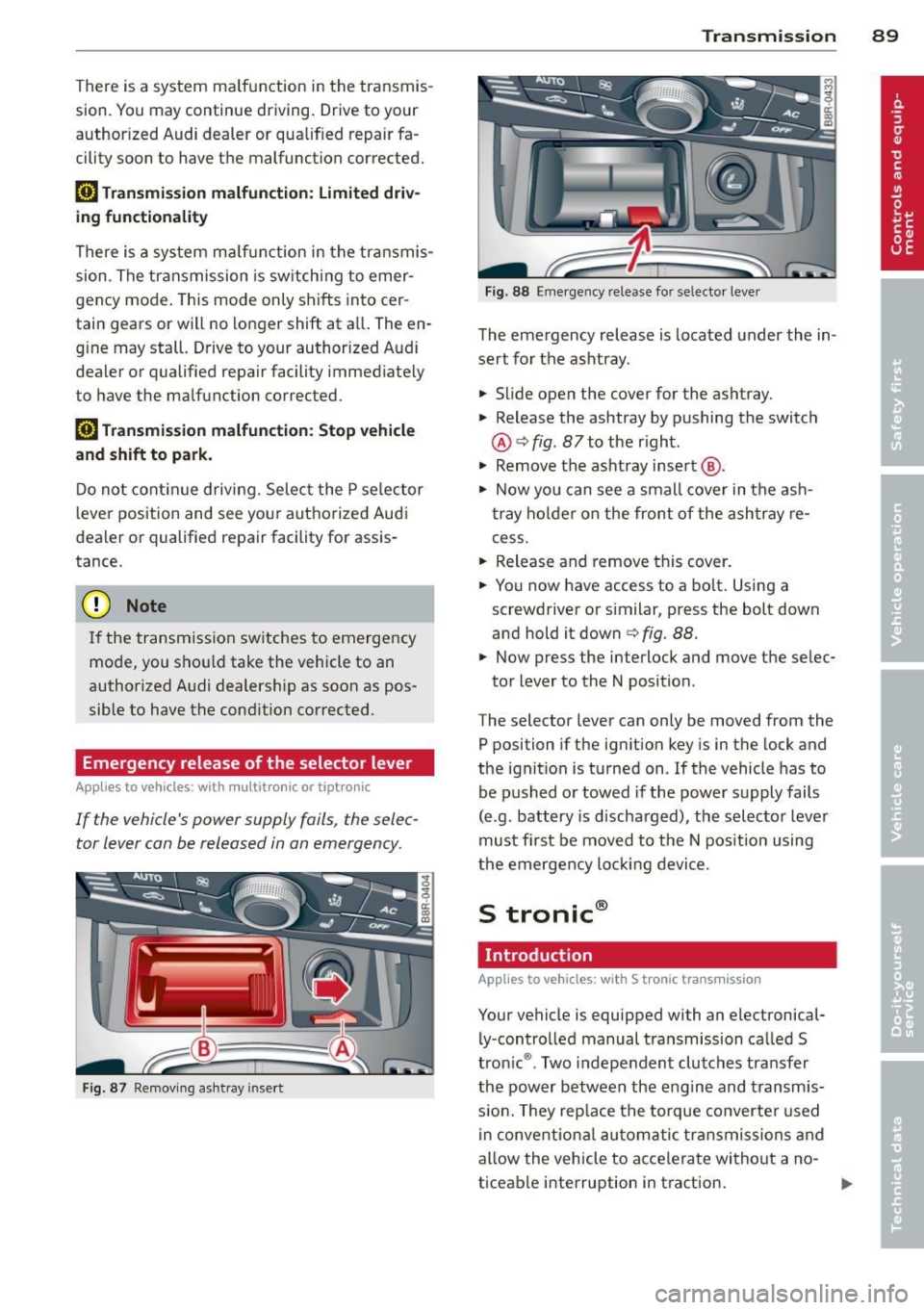
Fig . 87 Removing ashtray insert
Transmission 89
Fig . 88 Emerge ncy release fo r se lecto r lever
The emergency release is located under the in
sert for the ashtray.
.,. Slide open the cover for the ashtray.
.,. Release the ashtray by pushing the switch
@ ¢
fig. 87 to the right .
.,. Remove the ashtray insert @ .
.,. Now you can see a small cover in the ash
tray holder on the front of the ashtray re
cess .
.,. Release and remove this cover.
.,. You now have access to a bolt. Using a
screwdriver or similar, press the bolt down
and hold it down ¢
fig. 88.
.,. Now press the interlock and move the selec-
tor lever to the N position .
The selector lever can only be moved from the
P position if the ignition key is in the lock and
the ignition is turned on . If the vehicle has to
be pushed or towed if the power supply fails
(e .g . battery is discharged), the selector lever
must first be moved to the N position using
the emergency locking device.
S tronic®
Introduction
Applies to vehicles : with S tronic transmission
Your vehicle is equipped with an electronical
ly -controlled manual transmission called S
tronic ®. Two independent clutches transfer
the power between the engine and transmis
s ion. They rep lace the torque converter used
in conventional automatic transmissions and
allow the vehicle to accelerate without a no
ticeable interruption in traction.
Page 98 of 294
96 Transmi ssion
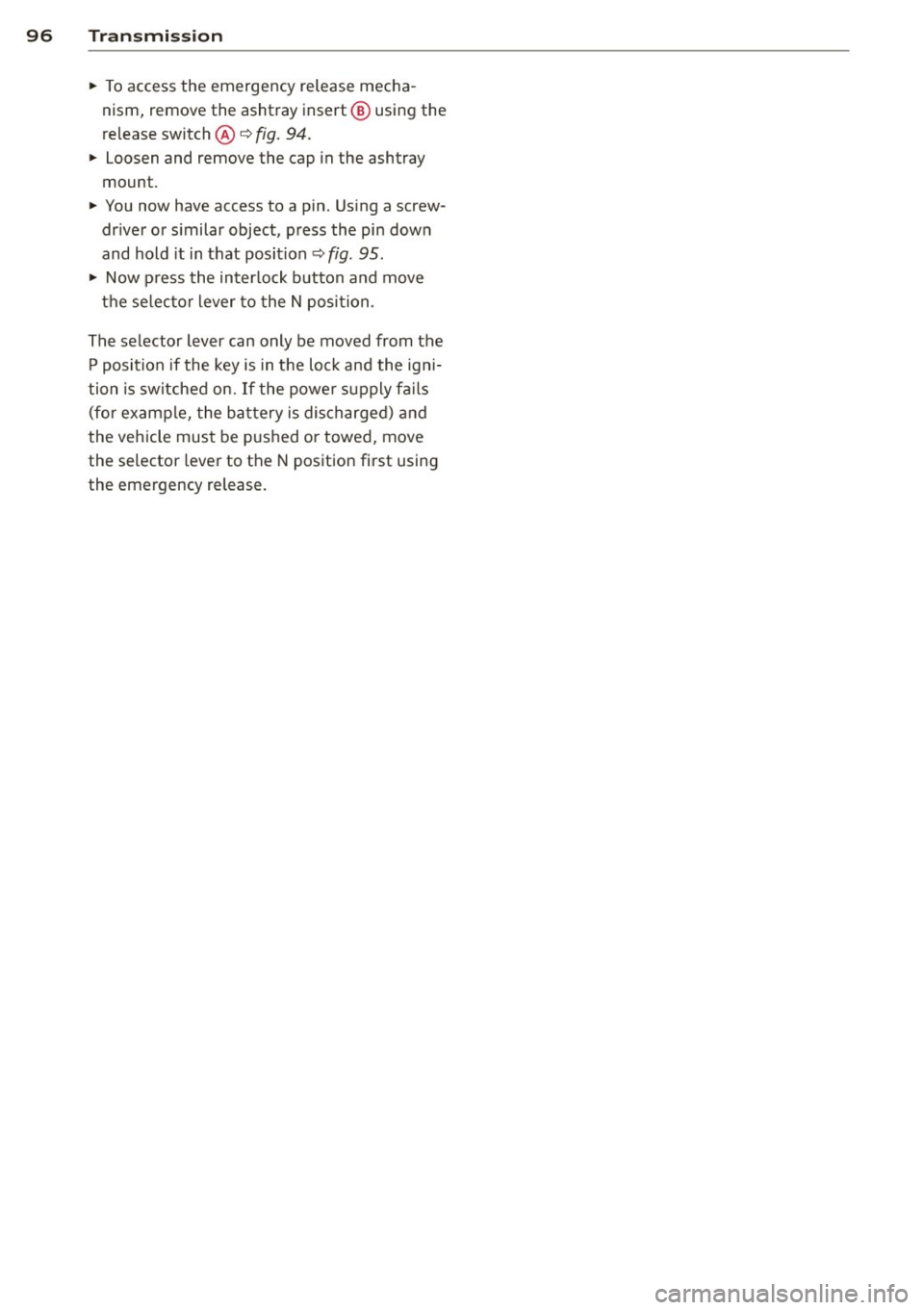
• To access the emergency release mecha
nism, remove the ashtray insert @ using the
release switch@~
fig. 94.
• Loosen and remove the cap in the ashtray
mount.
• You now have access to a pin . Us ing a screw
dr iver or s imilar object, press the pin dow n
and hold it in that position~
fig. 95.
• Now p ress the in terlock button and move
t h e se lecto r lever to the N posi tion.
The selector lever can only be moved from the P position if the key is in the loc k and the ign i
tion is switched on. If the powe r supply fa ils
(fo r examp le, the ba tte ry is dis charged) and
the vehicle mus t be p ushed or towed, move
the selector leve r to the N pos ition first using
the emergency release.
Page 99 of 294

Audi adaptive cruise control and braking guard 97
Audi adaptive cruise
control and braking
guard
Introduction
App lies to vehicles: with Audi adaptive cruise co ntrol
The adaptive cruise control system assists the
driver by regu lating vehicle speed and helping
to maintain a set distance to the vehicle
ahead, within the limits of the system . If the
system detects a moving vehicle up ahead,
adaptive cruise control can brake and then ac
celerate your vehicle. This he lps to make driv
ing more comfortable on long highway
stretches.
The braking guard system can warn you about
an impending collision and initiate braking
maneuvers ¢
page 103.
Adaptive cruise control and braking guard
have technical limitations that you must
know , so please read this section carefully, un
derstand how the system works and use them properly at all times.
General information
General information
Applies to vehicles: with Audi adaptive cruise control
Fig. 96 Front of the veh icle: Pos ition of radar sensor
The area that contains the radar sensor
¢
fig. 96 must never be covered by st ickers or
other objects or obstructed with dirt, insects,
snow or ice that will interfere with the adap
tive cruise control system and Audi braking
guard. For information on cleaning, refer to
¢
page 201. The same applies for any modifi
cations made in the front area . The
function of the adaptive cruise contro l
system and braking guard is limited under
some cond itions:
- Objects can only be detected when they are
within sensor range
¢page 99, fig . 99.
-The system has a limited ability to detect
objects that are a short distance ahead, off
to the side of your vehicle or moving into
your lane.
- Some kinds of vehicles are hard to detect;
for examp le motorcycles, vehicles with high
ground clearance or overhanging loads may
be detected when it is too late or they may
not be detected at all.
- When driving through curves¢
page 98.
-Stationary objects¢ page 98.
A WARNING
-Always pay attention to traffic when adap-
tive cruise control is switched on and brak ing guard is active. As the dr iver, you are
still responsible for starting and for ma in
tain ing speed and distance to other ob
jects. Braking guard is used to assist you.
The driver must always take action to avoid
a collision. The driver is always responsible
for braking at the correct time.
- Improper use of adaptive cruise con trol
can caus e collisions, other accidents and
serious personal injury .
- Never let the comfort and convenience
that adaptive cruise control and Audi
braking guard offer distract you from the
need to be alert to traff ic conditions and
the need to remain in full control of yo ur
veh icle at a ll times,
- Always remember that the adaptive
cru ise contro l and Aud i brak ing guard
have lim its -they will not slow the vehi
cle down or maintain the set d istance
when you drive towards an obstacle o r
someth ing on or nea r the road that is not
moving, such as vehicles stopped in a
traffic jam, a stalled or disabled vehicle.
If registered by the radar sensor, vehicles
or obstacles that are not moving can
trigger a collision warning and if .,.