2013 AUDI A4 reset
[x] Cancel search: resetPage 32 of 302
30 Driver information display
Resetting the service interval display
Your authorized Audi dealer will reset the cor
responding service schedule after performing
the appropriate service on yo ur vehicle . Yo u
also have the possibility to reset the oil
change schedule after having performed an
oil change according to Audi specifications.
Select
I CAR I function button > Service interval
display > Reset oil change interval
or ICARI
function button> Car systems* control but
ton
> Servicing & checks > Reset oil change
interval.
(D Note
If you disconnect the battery terminals, no
calculations can be made for the serv ice
interval display during this time and no
service rem inder wi ll appear. Remember
that observing the proper service intervals
is vitally important to extend ing the life of
your vehicle, particu larly the eng ine, and
maintaining its value. Even if the mileage
driven is low, the maximum period of one
yea r from one service to the next must not
be exceeded .
@ Tips
-Do not reset the display between oil
changes, otherwise the display will be in
correct.
- The information in the Service Reminder
r ema ins stored even when the vehicle
battery is disconnected.
On-Board Diagnostic
system (OBD)
Malfunction Indicator Lamp (MIL)
The Malfunction Indicator Lamp (MIL) (4 i n
the instrument cluster is part of the On-Board
Diagnostic (OBD II) system.
The warning/indicator light illuminates when
the ignition is switched on and goes out after
the engine starts and the idle has stabilized .
This indicates that the MIL is working proper
ly.
If the light does not go out after the engine
is started, or illuminates while you are driv
ing, a malfunction may exist in the eng ine sys
tem . If the light illuminates, the catalytic con
verter could be damaged .
Continue driving
with reduced power (avoid
ing sustained high speeds and/or rapid accel
erations) and have the cond ition corrected.
Contact your authorized Audi dealer.
If the light illuminates, the electronic speed
limiter may also be malfunct ioning. For more
information
c:> page 31 , Electronic speed
limiter.
An improperly closed fuel filler cap may also
cause the
MIL light to illuminate
c:>page 217.
On-Board Diagnostics
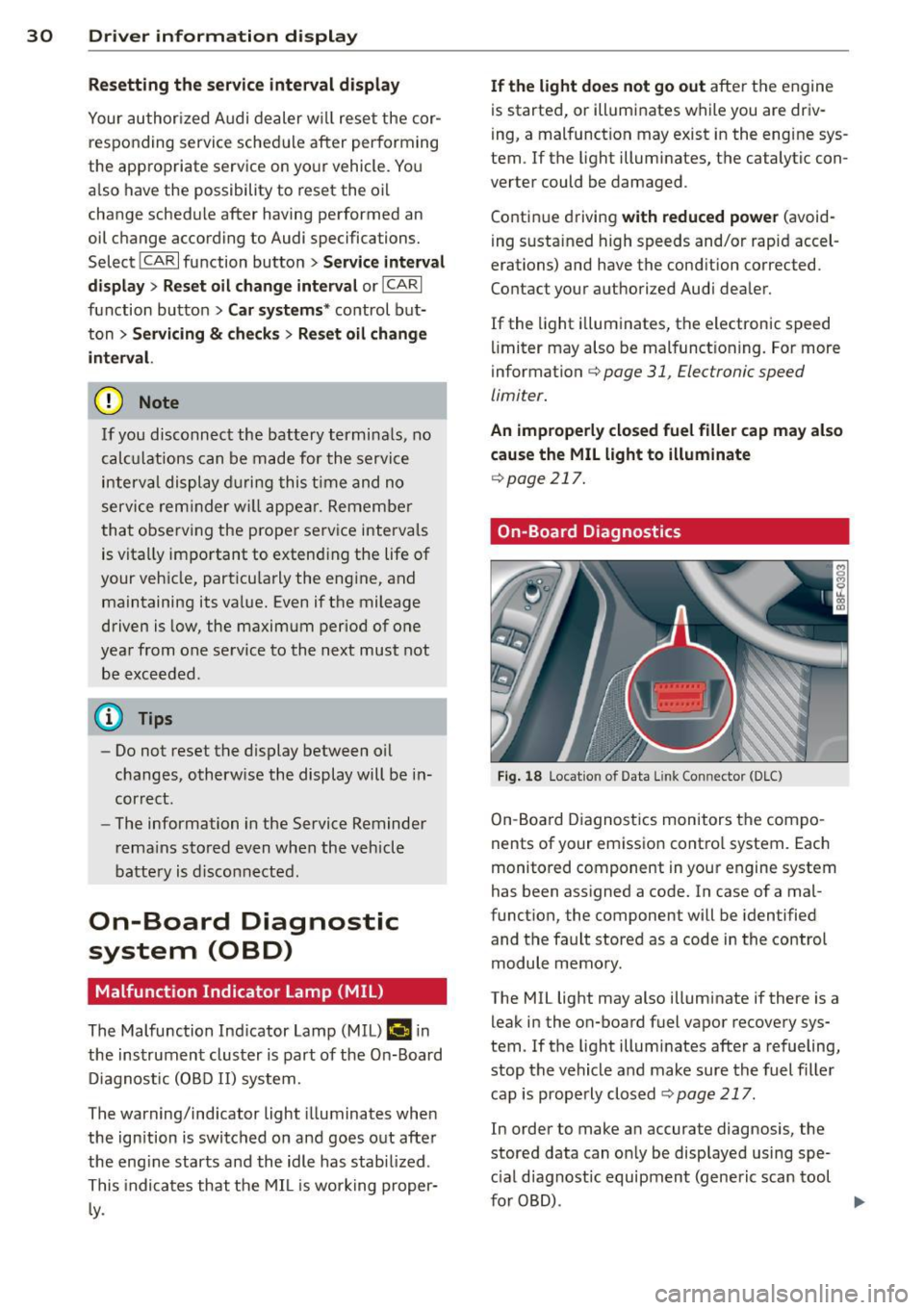
Fig. 18 Locat io n of Data Link Con nector (D LC)
On-Board Diagnostics monitors the compo
nents of your emission control system . Each
monitored component in your engine system
has been assigned a code. In case of a mal
function, the component will be identified
and the fault stored as a code in the control
module memory.
The MIL light may also illuminate if there is a leak in the on-board fuel vapor recovery sys
tem. If the light illuminates after a refueling,
stop the vehicle and make sure the fuel filler
cap is properly closed
c:> page 217.
In order to make an accurate diagnosis, the
stored data can on ly be displayed using spe
c ial diagnostic equipment (generic scan tool
furOBD) .
~
Page 90 of 302

88 On the road
vehicle speed exceeds the set speed by about
3 mph (3 km/h). At the same time, a warning
symbol appears in the d isp lay . The symbol's
appeara nce m ight be d ifferent in some mod
els.
The speed warning system has one or two*
warn ing thresholds that f unct ion independ
ently of each other and that have somewhat
d ifferent purposes:
Speed warn ing 1
You can use speed warning 1 to set the maxi
m um speed w hile you are driv ing. T his setting
will remain in effect until you turn
off the igni
tion, assuming that you have not changed or
reset the setting.
The . (USA models)/ . (Canada models)
speed warning symbol in the warning 1 dis
p lay appears whe n you exceed the maximum
speed. It goes out when the speed fa lls below
the stored max imum speed .
The speed warning symbo l w ill also go out if
the speed
exceeds the stored max imum speed
by more than about 25 mph (40 km/h) for at
least 10 seconds. The stored maximum speed
is deleted .
Sett ing speed warning 1
c::> page 88.
Speed warning 2*
Sto ring warning 2 is recommended if you al
ways
want to be reminded of a certain speed,
for example when yo u are traveling in a coun
try that has a general maximum speed limit,
or if you do not want to exceed a specified
speed for winter tires.
The . (USA mode ls)/ . (Canada mode ls)
speed warning 2 symbo l appears in the dis
play when you exceed the stored speed lim it.
Unlike warning 1, it will not go out until the
vehicle speed drops below the stored speed
lim it.
Sett ing speed warning 2
c::> page 88.
(D Tips
Even tho ugh your vehicle is equipped with
a speed warning system, you should st ill watch the speedome
ter to ma ke s ure you
are not dr iving faster than the speed limit .
Speed warning 1: setting a speed limit
Warning threshold 1 is set by the ISETI but
ton.
F ig . 99 SET bu tton in the instr ume nt cluste r
Storing the max imum speed
.. Drive at the desired maximum speed .
.,. Press t he
ISE TI button in the instrument
panel disp lay
c::> fig . 99 for 1 second .
Resetting the maximum speed
.. Drive the vehicle at a speed of at least
3 mph (5 km/h)
.. Press the
ISET I button for more than 2 sec-
onds.
T he . (USA mode ls)/ . (Canada mode ls)
speed warning symbo l w ill appear briefly in
the display when you release the
I SE TI button
to indicate that the maximum speed has been
stored successfully.
The maximum speed remains stored until it is changed by pressing the
I SET ! button again
briefly or until it is deleted by a lengthy push
on the button.
Speed warning 2: setting a speed limit
App lies to vehicles: wi th trip co mp uter
The radio or MMI* control unit is used to set,
change or delete warning threshold 2.
.. Select: !CAR ! function b utton > In st rument
cluster > Speed warning .
Or
Page 92 of 302

90 On the road
• To increase/dec rease the speed qu ickly,
hold the lever in the
G) !Q direction unti l
the des ired speed is d isplayed.
You can a lso press the accelerator pedal down
to increase your speed , e .g. if you want to
pass someone . The speed yo u saved earlier
will resume as soon as you let off of the accel
erator pedal.
If , however, you exceed your saved speed by
6 mph (10 km/h) for longer than S minutes ,
the cruise contro l will be turned off tempora
rily. The green symbol in the display turns
white . The saved speed remains the same .
Presetting your speed
You con preset your desired speed while the
vehicle is not moving.
• Switch on the ignition.
• Pu ll lever into pos ition
CD c:> page 89,
fig. 100.
• Press the lever in the 0 or O direction to
incr ease or decrease yo ur speed .
• Re lease the lever to save that speed .
This funct ion makes it possible, for example,
to save the speed you want before driving on
the hig hway . Once o n the hig hway, activate
the cruise contro l by pulling the lever towa rd
(D .
Switching off
Temporary deactivation
• Pres s the bra ke peda l, or
• Manual transmission : Keep the clutch pedal
pressed down
longer , or
• Press the lever into position @ (not clicked
into p lace) ¢
page 89, fig . 100, or
• Drive for longer than S minutes at more
t h an 6 mph (10 km/h) above the stored
speed .
Switching off completely
• Press leve r into position @(clicked into
place), or
• Switch the ignition off. The speed you saved will be retained if the
cruise control has been switched off tempora
rily . To resume the saved speed, let up on the
brake or clutch pedal and pu ll the lever to po
s ition (!).
Switching the ignition off erases the saved
speed.
_& WARNING
You shou ld only return to the saved speed
if it is not too fast for the current traffic
conditions -risk of an accident!
Page 104 of 302

102 Audi adaptive cruise control and braking guard
Switching on and off
Applies to vehicles: with Audi adaptive cruise control
Fig. 114 Se lec tor lever: switching on/off
Fig. 115 Instrument clus te r: A udi adap tive c ru ise co n·
trol
You can set any speed between 20 mph and
95 mph (30 and 150 km/h).
Indicator lamps and messages in the instru·
ment cluster display inform you about the cur·
rent system status and settings.
Switching Audi adaptive cruise control on
• Pull the lever toward you into position@
r=;,fig. 114. ACC standby appears in the in ·
strument cluster display.
Setting the speed and activating
regulation
.. To set the current speed, press the !SE T!
button r=;, page 11, fig . 4. The set speed is shown in
the tachometer @and is also
shown briefly in the display@~
fig. 115.
Switching Audi adaptive cruise control off
• Push the lever away from you into position
@ until it clicks into place. The message
ACC off appears.
@ Indicator lights
11 · Adaptive cruise control is switched on. No
vehicles are detected up ahead. The stored
speed is maintained.
I-A moving vehicle is detected up ahead.
T he adaptive cru ise control system regulates
the speed and distance to the moving vehicle
ahead and accelerates/brakes automatically.
I-When automatic braking is not able to
keep e nough distance to a previously detected
moving veh icle up ahead, you must take con·
trol and brake ~
page 105, Request for driver
intervention.
© Display
If adapt ive cru ise control is not shown in the
display, you can call it up w ith the
I RESET I
button r=;, page 24.
Based on the symbols in the display, you can
determine if the system is maintain ing a d is ·
tance to the vehicle ahead and what that dis
tance is.
No vehicle· No vehicle ahead was detected .
White vehicle· A vehicle ahead was detected .
Red vehicle -Prompt for the driver to take ac
tion
,=;, page 105.
Both arrows on the scale© indicate the dis·
tance to the vehicle ahead. No arrow appears
when the vehicle is on an open road and there
is no object ahead. If an object is detected
ahead, the arrow moves on the scale .
T he green zone on the scale shows the stored
distance. For information on changing the
stored distance, refer tor=;,
page 104 . If the
distance se lected is too close or may soon be·
come too close , the arrows move into the red
zone on the sca le. .,..
Page 255 of 302

Tire pressure monitoring system
UJ General notes
Applies to vehicles: with tire pressure monito ring system
Each t ire, i ncluding the spare (if provi ded),
should be chec ked month ly w hen cold and in
flated to the inflation pressure recommended by the vehicle manufacture r o n the vehicle
placar d or tire infla tion pressure label. (If your
veh icle has t ires of a diff erent siz e than the
size ind icat ed on the vehicle p lacard or tir e in
flation pressure label, you should deter mine
the proper tire inflation pressure for those
tires).
As an added safety feature, your vehicle has been equipped with a tire pressure monitor ing
system (TPMS) that illuminates a low tire
pr essu re tellta le when one or mo re of your
tires is significantly under -inflated . Accord ing
l y, when the low tire p ress ure telltale illumi
nates, you should stop and check your tires as
soon as possible, and inflate them to the
proper pressure. Driv ing on a signif icantly un
der-inflated tire causes the tire to overheat
and can lead to tire failure. Under -inflation al
so reduces fuel efficiency and tire t read life,
and may affect the ve hicle's handling and
stopping ab ility.
Please note that the TPMS is not a subst itute
for p roper t ire mainte nance , and it is the dr iv
e r's responsib ility to ma inta in cor re ct t ire
p ress ure, even if under- infla tion has no t
reached the leve l to trigger ill umin ation of the
TPMS low tire pressure telltale.
Your veh icle has also bee n equ ipped with a
TPMS malfunc tion indica to r to indica te when
the system is not opera ting properly. The
TPMS mal function indicato r is combined wi th
the low tire press ure tellta le . When the sys
tem detects a malf unct ion, the te lltale will
flash for approximately one minute and then remain cont inuo usly illuminated. This se
quence will continue upon subsequent vehicle
start-ups as long as the ma lf u nction ex ists .
Tire s an d wheel s 253
When the malfunction indicator is illum inat
ed , the system may not be ab le to detect or
s ignal low tire pressure as intended . TPMS
malfunctions may occur for a var iety of rea
sons, including the insta llation of replace
ment or alternate tires or wheels on the vehi
cle that p revent the TPMS from functioning
proper ly. Always check the TPMS malfunction
te lltale after rep laci ng one or more tires o r
whee ls on you r vehicle to e nsur e th at the re
placement or alterna te t ires and wheels a llow
the TPMS to continue to func tion p roperly.
Tire pressure indicator appears
Applies to vehicles: with tire pressure monitoring system
The tire pressure indica tor in the instrument
cluster informs you if the tire pressure is too
Low or if there is a system malfunction.
Fi g. 19 6 Disp lay: un de rin flat io n warni ng
U sing the ABS sensors, the tire pressure mo ni
toring system compares the tire tread c ircum
ference and vib rat ion character istics of the in
dividua l tir es . If the pressure decreases i n one
o r more t ires, this is indicated in the inst ru
ment cluster with a
[ti wa rning symbo l and a
message ¢
fig. 196. Th e d river message in the
display goes o ut afte r 5 seconds . The driver
message can be displayed again by pressing
the
ISE TI button. If on ly one t ire is affected,
the d isplay w ill indicate its position.
T he tire pressure monitoring system m ust be
reset via radio or M MI* each time the pres
sures are ad justed (e.g. when switc hing be
tween part ial and f ull load press ure) o r after
changing or rep lacing a tire on your ve hicle
¢
page 254. T he TPMS indicator o nly mo ni-
tors the t ire p ress ure t hat yo u have p revio usly ..,.
•
•
Page 256 of 302
254 Tire s and wheel s
stored. You can find the recommended tire
pressures for your vehicle on the label on driv
er 's side 8-p illar
c> page 238.
Tire tread c ircumference and vibration charac
teristics can change and ca use a tire pressure
warning if :
- the tire pressure in one or more t ires is too
low,
- the tire has st ructu ral damage,
- the tire pressure was changed, wheels rotat-
ed o r replaced but the TPMS was not reset
c>page254.
Warning s ymbols
[DJ Loss of pressure in at least one tire c> .&..
Check the tire or tires and replace o r repair if
n ecessary. The
[DJ ind icator light in the instru
ment cluster also illuminates
c> page 13.
Chec k/correc t the pressures of all four tires
and reset TPMS via radio or
MMI* .
1181&1 (T ire Pressure Monitor ing System) Tire
pr essur e: Sy st e m malfuncti on !.
If!JHJL, appears after switching the ignition
on or wh ile driving and the
[DJ indicator light
i n the instrument cluster blinks for approxi
mately one mi nute and then stays on, the re is
a system ma lfunction .
Attempt to store the correct tire pressure
¢
page 254. If the ind icator light does not
turn
off or if it tu rns o n short ly thereafter, im
mediately drive your veh icle to an autho riz ed
Aud i dea le r or autho rized repair facility to
have the ma lfunction corrected.
A WARNING
- If the tire pressure indicator appears in
the instrument cl uster display, one or
more of your tires is significantly under
inflated. Reduce your speed immediately
and avoid any hard stee ring or braki ng
maneuvers. Stop as soon as possible and
check the t ires and the ir pressures. In
flate the tire pres sure to the proper p res
s u re as in dic ated on the vehicle 's t ire
pressure label ¢
page 238. Driving on a
significantly under-inf lated tire ca uses the tire to overheat and can
lead to tire
fa ilure. Under-inflation also is likely to
impair the vehicle's handling and stop
ping ability.
- The driver is responsible for maintaining
the correct tire pressures. You must
check the tire pressures regu larly .
- Under certain conditions (such as a spor
ty driving style, winter conditions or un paved roads), the pressure monitor indi
cato r may be delayed .
-Ask your authorized Aud i dea ler if run
flat t ires may be used on you r vehicle.
Your vehicle registration becomes invalid
if you use these t ires when not perm it
ted. Damage to your vehicle or accidents
could a lso result.
(D Tips
- The tire pressure mon itoring system
stops work ing whe n there is an ESC/ABS
m alfu nction.
- Us ing snow chains may result in a system
ma lf u nction.
- The tire pressure mon itoring system on
your Audi was deve loped using tires with
t he "AO" or "R O" ident ifi cat ion on the
tire s idewa ll
c> page 246 . We recom
mend using these tires.
Reset tire pressure monitoring system
Appl ies to vehicles: wit h tire p ressu re mo nito rin g system
If the tire pressure is adjusted, wheels are ro
tated or changed, the TPMS must be reset via
radio or MMI*.
.. Before resett ing the TPMS, the current pres
sures of a ll four tires must correspond to
the specified values . Ad just the tire p ressu re
and reset the pressure in the tire pressure
mon ito ring system according to the load
you are carrying
i=>page 238.
.. Turn on the ignition.
.. Select: the
ICARI funct ion button > Tire
pressur e monitoring
> Stor e now . Or
.,. Select: the
ICARI funct ion button> Car sy s
tem s*
cont ro l button > Servi cing & che ck s > .,.
Page 290 of 302

288 Index
Convertible locking retractor
Activating .. ... ....... ... ... ..... . 178
Deactivating . .. ... ...... ... .. .... . 179
Using to secure a ch ild safety seat l76, 178
Coolan t system . ........... .. .. .... . 226
Cooling mode (automatic climate control) 77
Cooling System Expansion tank ........... .... .... . 226
Cornering light .......... .. .. .. .. .. .. 47
Cruise control
Changing speed . . . . . . . . . . . . . . . . . . . . 89
Presetting your speed . . . . . . . . . . . . . . . 90
Sw itching off .......... .. .. .. .. .. .. 90
Sw itch ing on ....................... 89
Cruising range . . . . . . . . . . . . . . . . . . . . . . . 25
(upho lder . . . . . . . . . . . . . . . . . . . . . . . . . . 65
D
Data .. .. .. .. ............. .. .. .. .. . 27 7
Data reco rder .................. .... 185
Date display .... .. ..... ... .. .. .... .. 12
D aytime r unning lights.... .. .. .. .. 47, 48
Declaration of compliance
Adaptive cruise control ............. 283
Aud i side assist .... ...... ... ... .. . 283
Ce ll phone package ........... .. ... 283
Conve nience key .......... .... .... . 283
E lec tronic immobi lizer ..... .. .. .... . 283
H omelink ® universal remote contro l .. 283
Remote control key .. ... .. .. .. .... . 283
Tire pressure monitoring system .... . 283
D efe ctive light bulb warning . . . . . . . . . . . 2 1
Defrosting (w indows) ................. 78
D etermin ing cor rect load limit ... .... . 2 43
D ig ita l clock .... ... .... ... ... ... .. .. 12
Dig ita l compass ..................... 56
D imensions .. ... .......... .. .. .. .. . 276
D imm ing the rearview mirro r .. .. .. .. . . 51
Doors Ch ild safety locks . ..... ... .. .. .... .. 42
emergency locking .................. 38
D river info rm ation sys tem
E nhanced sh ift indicator ... .. .. .. .. . . 28
Open doo r or front lid warning . . . . . . . . 24
O utside temperature display .. ... ... .. 24
Sound system display . . . . . . . . . . . . . . . 24 Driver seat
refer
to Seating position
128
D riving offroad ..................... 197
Driving safely ..... ............. .... 12 7
Driving through water . .. ..... ... .. .. 194
D rivi ng time . . . . . . . . . . . . . . . . . . . . . . . . 25
D ust filter
refer to Pollutant filter (automatic AC
system) ....... .. ............. .... . 76
Dynam ic steer ing . . . . . . . . . . . . . . 113, 190
E
E85 (Fuel) . . . . . . . . . . . . . . . . . . . . . . . . . 215
Efficiency program ................. .. 27
Fuel economy messages . . . . . . . . . . . . . 29
Memo ry levels . .. ................ .. 25
Other equ ipment ... ........... .. .. . 28
S hi ft indica tor . . . . . . . . . . . . . . . . . . . . . 28
E lectro-mechan ica l power assist .... ... 190
E lectromechanica l pa rking brake
Emergency brak ing .... ..... ... .. .. . 87
Indicator light .. .. ................ . 85
Parking ... .. .. .. .. .............. .. 86
Re leas ing and closing ... ....... .. .. . 85
Start ing assist . . . . . . . . . . . . . . . . . . . . . 86
Start ing from rest . . . . . . . . . . . . . . . . . . 86
Start ing off w ith a t railer ........ .... . 87
Wa rning/ind icator lights ........ .... . 16
Elec tronic differen tial lock (EDL) ....... 185
Warning/ind icator lights ........... .. 19
E lectronic immobilizer . . . . . . . . . . . . 12, 38
El ectronic power con trol
( E PC) warning/indicator ligh t . . . . . . . . . 20
E lectronic speed
Li miter . . . . . . . . . . . . . . . 31
E lectronic Stabilization Contro l (ESC) . .. 185
Warning/ind icator lights ..... ... .. .. . 19
E mergen cy actua tion
Doors ............................ 38
Ignit ion key ..... .. .... .... ... .. .. . 35
Rear lid ... .... .. ... .. .. ..... ... .. . 41
S liding/tilting su nroof .. ..... ... .. .. . 45
E mergency bra king .............. .... . 87
Emergency flasher .............. .... . 49
Warning/ind icator lights ........... .. 23
Emergency key .... ... .. ..... ... .. .. . 33
Starting engine .. ............. .... . 82
Page 296 of 302

294 Index
Escape hand le ...
..... ... .. .. .... .. 42
Opening and closing
Rear light 39
Defective . . . . . . . . . . . . . . . . . . . . . . . . . 21
Rear view camera Parking mode 1
Parking mode 2 120
121
Rear view mirror . . . . . . . . . . . . . . . . . . . . . 51
Rear window heating . . . . . . . . . . . . . . . . . 78
Rear window sun shade . . . . . . . . . . . . . . . 53
Rear window washer system . . . . . . . . . . . 53
Recirculation mode (automatic climate
control) . . . . . . . . . . . . . . . . . . . . . . . . . . . . 77
Refuelling . .. .. . .......... .. .. .... . 217
Release lever for hood . . . . . . . . . . . . . . . 219
Remote control
Hom elink .. ............. .. .. .. .. . 123
Remote control key ........... .. .... .. 33
Personalizing ............. ... .. .. .. 33
unlocking/locking ....... ... .. .. .. .. 35
Remote rear lid release . . . . . . . . . . . . . . . 39
Repair manuals .. ........ .. .. .. .. .. . 280
Repairs Airbag system ............ ... .. ... 158
Replacement key . . . . . . . . . . . . . . . . . . . . 33
Replacing Windshield wiper blades ..... .. .... .. 55
Replacing bulbs ............ ... .. .. . 268
Replacing tires and wheels ... .. .. .. .. . 246
Replacing wipe r blades . .. .. .. .. .. .. .. 54
Reporting Safety Defects .... .. .. .... . 135
Reset button .. .. ........ ...... .... .. 12
Retractor .... .......... ...... ... .. . 140
Reversible floor .. ........ .. .. .. .... .. 75
Reversible mat .. ........ .. .. .. .. .. .. 73
Right hand drive ........... .... .... .. 49
Rims Cast alloy . .. .... ........ .. .. .... . 208
Roof rack .. ... ............ .. .. .. .. .. 67
Roof load .. ... .......... .. .. .. .. .. 68
Roof weight . . . . . . . . . . . . . . . . . . . . . . . 68
s
SAFE . .. .. ... ............ .. .. .. .. .. 12
Safe driving hab its ......... .. .. .. .. . 127 Safety
belt position . . . . . . . . . . . . . . . . . 141
Safety belt height adjustment ... .. .. 143
Safety belts worn by pregnant women . 142
Safety belt pretensioner . . . . . . . . . . . . . . 143
Service and disposal ............... 144
Safety belts . . . . . . . . . . . . . . . . . . . . . . . . 140
Cleaning .. ... ... ................ . 212
Danger to passengers who do not wear a
safety belt .... .. ............. .... 138
Fastening . .. .. . .. ............ .. .. 140
Height adjustment .. ... ........ .. .. 143
Improperly worn ... ........... .. .. 143
Not worn . . . . . . . . . . . . . . . . . . . . . . . . 138
Safety be lt position . . . . . . . . . . . . . . . . 141
Safety instructions ............. .... 140
Securing child safety seats ....... ... 176
Spec ial considerations for pregnant
women ...... ... .. .............. . 142
Unfa stening ... .. ... .......... .. .. 142
Warning/indicator light ......... .... 13 7
Warning light . . . . . . . . . . . . . . . . . . . . . . 17
Why YOU MUST wear them .......... 137
Worn properly ... .. ........... .. .. 139
Safety belt warning light ......... .. .. 13 7
Safety compliance sticker ........ .... 275
Safety equipment . ... ........... .. .. 127
Safety features for occupant restraint and
protection . . . . . . . . . . . . . . . . . . . . . . . . . 12 7
Safety guidelines
Seats . .... .... .. ............. .... . 58
Safety instructions
Engine compartment ........... .. .. 219
for side c urtain airbags ............. 165
for using child safety seats ...... .... 169
for using safety belts ........... .. .. 140
Monitoring the Advanced Airbag Sys-
tem .. ..... ... .. .. .............. . 158
Seat adjustment Head restra ints ... ................ 131
Seat belts
refer to Safety belts . . . . . . . . . . . . . . . . 13 7
Seat heating . . . . . . . . . . . . . . . . . . . . . . . . 78
Seating capac ity ... ............. .... 137
Seating position Driver .. .. .... .. .. ........... .. .. 128
Front passenger .. ... .......... .. .. 129
How to adjust the front seats ........ 129