Page 103 of 364

uuLocking and Unlocking the Doors uLocking/Unlocking the Doors from the Outside
102Controls
■
Unlocking the doors and tailgate
Grab the driver’s door handle: uThe driver’s door unlocks.
u Some exterior lights flash twice and the
beeper sounds twice.
Grab the front passenger’s door handle:
uAll the doors unlock.
u Some exterior lights flash twice and the
beeper sounds twice.
Press the tailgate release button: uThe tailgate unlocks and opens.
u Some exterior lights flash twice and the
beeper sounds twice.2 Opening/Closing the Tailgate Using the
Tailgate Release Button P. 108
1Using the Keyless Access System•Even within the 32 inches (80 cm) radius, you may
not be able to lock/unlock the doors with the
keyless access remote if it is above or below the
outside handle.•The keyless access remote may not operate if it is
too close to the door and door glass.
If you do not open a door within 30 seconds of
unlocking the vehicle, the doors will automatically
relock.
The light flash, beep and unlock settings can be
customized using the multi-information display. 2 Customized Features P. 87
Tailgate Release
Button
Page 154 of 364
153
uuClimate Control System uUsing Automatic Climate Control
Controls
Pressing the button turns the air
conditioning system on and automatically
switches the system to fresh air mode.
Pressing the button again to turn off, the
system returns to the previous settings.
■
To rapidly defrost the windows
1.Press the button.
2. Press the button.
■
Defrosting the Windshield and Windows
1Defrosting the Windshield and Windows
For your safety, make sure you have a clear view
through all the windows before driving.
Do not set the temperature near the upper or lower
limit.
When cold air hits the windshield, the outside of the
windshield may fog up.
If the side windows fog up, adjust the vents so that
the air hits the side windows.1To rapidly defrost the windows
After defrosting the windows, switch over to fresh air
mode.
If you keep the system in recirculation mode, the
windows may fog up from humidity. This impedes
visibility.
Page 162 of 364
161Features
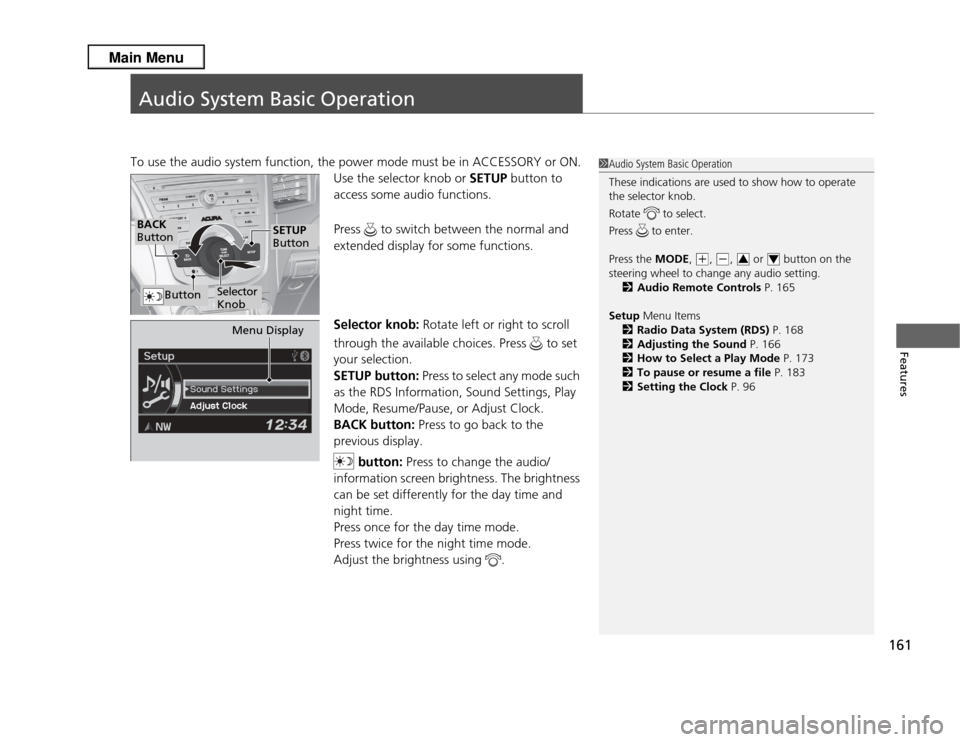
Audio System Basic OperationTo use the audio system function, the power mode must be in ACCESSORY or ON.Use the selector knob or SETUP button to
access some audio functions.
Press to switch between the normal and
extended display for some functions.
Selector knob: Rotate left or right to scroll
through the available choices. Press to set
your selection.
SETUP button: Press to select any mode such
as the RDS Information, Sound Settings, Play
Mode, Resume/Pause, or Adjust Clock.
BACK button: Press to go back to the
previous display.
button: Press to change the audio/
information screen brightness. The brightness
can be set differently for the day time and
night time.
Press once for the day time mode.
Press twice for the night time mode.
Adjust the brightness using .
1 Audio System Basic Operation
These indications are used to show how to operate
the selector knob.
Rotate to select.
Press to enter.
Press the MODE,
(+
, (-
, or button on the
steering wheel to change any audio setting. 2 Audio Remote Controls P. 165
Setup Menu Items
2 Radio Data System (RDS) P. 168
2 Adjusting the Sound P. 166
2 How to Select a Play Mode P. 173
2 To pause or resume a file P. 183
2 Setting the Clock P. 963
4
BACK
Button
Selector
Knob
SETUP
Button
Button
Menu Display
Page 167 of 364
166
uuAudio System Basic Operation uAdjusting the Sound
Features
Adjusting the Sound
Press the SETUP button, and rotate to
select Sound Settings , then press . Rotate
to scroll through the following choices:
1 Adjusting the Sound
The SVC has four modes: OFF, LOW , MID , and
HIGH .
SVC adjusts the volume level based on the vehicle
speed. As you go faster, audio volume increases. As
you slow down, audio volume decreases.
Selector Knob
SETUP Button
Treble is selectable.
Speed-sensitive
Volume
Compensation Bass
Subwoofer Treble
Balance Fader
Page 275 of 364

uuMaintenance Minder
TMuTo Use Maintenance Minder
TM
274Maintenance
Reset the engine oil life display if you have performed the maintenance service.
1. Set the power mode to ON.
2. Select CUSTOMIZE SETTINGS using the / button, then press the SEL/
RESET button.
3. Select MAINTENANCE INFO. using the / button, then press the SEL/
RESET button.
4. Select RESET using the / button, then press the SEL/RESET button.
u The service code will disappear and the engine oil life display will return to
100%.
To cancel the oil life reset mode, select CANCEL, then press the SEL/RESET button.■
Resetting the Display
1Resetting the Display
NOTICEFailure to reset the engine oil life after a maintenance
service results in the system showing incorrect
maintenance intervals, which can lead to serious
mechanical problems.
The dealer will reset the engine oil life display after
completing the required maintenance service. If
someone other than a dealer performs maintenance
service, reset the engine oil life display yourself.
Engine Oil Life
SEL/RESET
Button
/ Button
Maintenance Item Codes

