2013 Acura RDX all wheel drive
[x] Cancel search: all wheel drivePage 9 of 364

8Quick Reference Guide
Instrument Panel
(P 67)
System Indicators
Malfunction
Indicator Lamp
Low Oil Pressure
Indicator
Charging System
Indicator
Anti-lock Brake
System (ABS)
Indicator
Vehicle Stability
Assist (VSA ®) System
Indicator
VSA ® OFF Indicator
Low Tire Pressure/
TPMS Indicator
Lights Reminders
Lights On Indicator
High Beam Indicator
Fog Light Indicator
*
Immobilizer System
Indicator Seat Belt Reminder
Indicator
System Indicators
CRUISE CONTROL
Indicator
Parking Brake and
Brake System
Indicator (Red) Supplemental
Restraint System
Indicator
Side Airbag Off
Indicator
Door and Tailgate
Open Indicator
CRUISE MAIN
Indicator
Tachometer Speedometer
Fuel Gauge
Security System Alarm
Indicator
Shift Lever Position Indicator
Low Fuel Indicator
Gauges
(P 82)
/Multi-Information Display
(P 83)
/
System Indicators
(P 68)
System Message
Indicator
Brake System
Indicator (Amber)
Temperature Gauge
Electric Power
Steering (EPS) System
Indicator Turn Signal and
Hazard Warning
IndicatorsAWD
(All-Wheel
Drive) with
Intelligent Control
System Indicator
*
Canada U.S.
Canada
U.S.Canada
U.S.
Keyless Access System
Indicator
Page 39 of 364

38
uuAirbags uAirbag System Components
Safe Driving
The front, front side, and side curtain
airbags are deployed according to the
direction and severity of impact. Both side
curtain airbags are deployed in a rollover.
The airbag system includes:a
Two SRS (Supplemental Restraint System)
front airbags. The driver's airbag is stored
in the center of the steering wheel; the
front passenger's airbag is stored in the
dashboard. Both are marked SRS
AIRBAG.
b
Two side airbags, one for the driver and
one for a front passenger. The airbags are
stored in the outer edges of the seat-
backs. Both are marked SIDE AIRBAG.
c
Two side curtain airbags, one for each
side of the vehicle. The airbags are stored
in the ceiling, above the side windows.
The front and rear pillars are marked
SIDE CURTAIN AIRBAG .
d
An electronic control unit that continually
monitors and records information about
the sensors, the airbag activators, the
seat belt tensioners, and driver and front
passenger seat belt use when the power
mode is in ON.
e
Automatic front seat belt tensioners. The
driver's and front passenger's seat belts
incorporate sensors that detect whether
or not they are fastened.
f
A driver's seat position sensor. If the seat
is too far forward, the airbag will inflate
with less force.
g
Weight sensors in the front passenger's
seat. The front passenger's airbag will be
turned off if the weight on the seat is 65
lbs (29 kg) or less (the weight of an infant
or small child).
h
Impact sensors that can detect a
moderate to severe front or side collision.
i
An indicator on the dashboard that alerts
you that the front passenger's front
airbag has been turned off.
j
Sensors that can detect if a child or small
statured adult is in the deployment path
of the front passenger's side airbag.
k
An indicator on the instrument panel that
alerts you to a possible problem with your
airbag system or seat belt tensioners.
l
An indicator on the instrument panel that
alerts you that the front passenger's side
airbag has been turned off.
m
Safing Sensor
n
A rollover sensor that detects whether
the vehicle is about to roll over.
Page 73 of 364
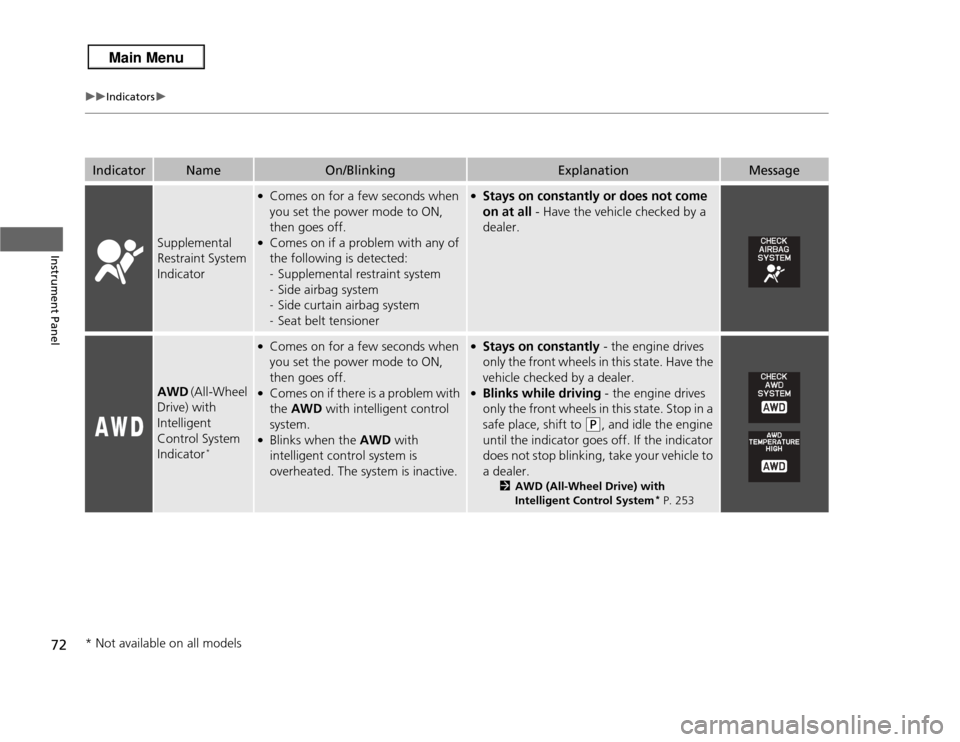
72
uuIndicators u
Instrument Panel
Indicator
Name
On/Blinking
Explanation
Message
Supplemental
Restraint System
Indicator
●Comes on for a few seconds when
you set the power mode to ON,
then goes off.●Comes on if a problem with any of
the following is detected:
-Supplemental restraint system
- Side airbag system
- Side curtain airbag system
- Seat belt tensioner
●Stays on constantly or does not come
on at all - Have the vehicle checked by a
dealer.
AWD (All-Wheel
Drive) with
Intelligent
Control System
Indicator
*
●Comes on for a few seconds when
you set the power mode to ON,
then goes off.●Comes on if there is a problem with
the AWD with intelligent control
system.●Blinks when the AWD with
intelligent control system is
overheated. The system is inactive.
●Stays on constantly - the engine drives
only the front wheels in this state. Have the
vehicle checked by a dealer.●Blinks while driving - the engine drives
only the front wheels in this state. Stop in a
safe place, shift to
(P
, and idle the engine
until the indicator goes off. If the indicator
does not stop blinking, take your vehicle to
a dealer.
2 AWD (All-Wheel Drive) with
Intelligent Control System
* P. 253
* Not available on all models
Page 81 of 364

80
uuIndicators uMulti-Information Display Warning and Information Messages
Instrument Panel
Message
Condition
Explanation
●Appears if there is a problem with the starting system.
●As a temporary measure, press and hold the ENGINE
START/STOP button for 15 seconds while depressing
the brake pedal and manually start the engine.
Have the vehicle checked by a dealer.
●Appears after you unlock and open the driver’s door.
2 Starting the Engine P. 240
●Appears three seconds after the TO START ENGINE
message appears.
2 Starting the Engine P. 240
●Appears when the steering wheel is locked.
●Move the steering wheel left and right after pressing
the ENGINE START/STOP button.
U.S.Canada
Page 125 of 364

uuOperating the Switches Around the Steering Wheel uLight Switches
124Controls
The headlights automatically come on when the wipers are used several times within
certain number of intervals while the headlight switch is in
#Y
.The headlights
automatically go off a few minutes after the wipers are stopped.
The headlights, all other exterior lights, and the instrument panel lights turn off
within 15 seconds after you set the power mode to VEHICLE OFF (LOCK), take the
remote with you, and close the driver's door.
uYou can change the headlight auto off timer setting.
2 Customized Features P. 87
If you set the power mode to VEHICLE OFF (LOCK) with the headlight switch on, but
do not open the door, the lights turn off after 10 minutes (three minutes, if the
switch is in the
#Y
position).
The lights turn on again when you unlock or open the driver's door. If you unlock
the door, but do not open it within 15 seconds, the lights go off. If you open the
driver's door, you will hear a lights on reminder chime.
■
Headlight Integration with Wiper
■
Automatic Lighting Off Feature
1 Headlight Integration with Wiper
*
This feature activates while the headlights are in #Y
. The instrument panel brightness does not
change when the headlights come on.
If the ambient light is dark, the automatic lighting
control overrides this feature, and the headlights
come on whether or not the wipers cycle several
times.
* Not available on all models
Page 131 of 364

130
uuOperating the Switches Around the Steering Wheel uDriving Position Memory System
Controls
Driving Position Memory SystemYou can store two driver’s seat and door mirror positions with the driving position
memory system.
When you unlock and open the driver’s door with a remote transmitter, the seat and
door mirrors adjust automatically to one of the two preset positions.
The multi-information display shows you which remote transmitter you used to
unlock the vehicle when you enter.
• Driver 1 transmitter is linked to memory button 1.
• Driver 2 transmitter is linked to memory button 2.
1Driving Position Memory System
Using the multi-information display, you can disable
the automatic seat adjustment function.
2 Customized Features P. 87
Driver 1
Driver 2
Page 132 of 364

131
uuOperating the Switches Around the Steering Wheel uDriving Position Memory System
Controls
1. Set the power mode to ON. Adjust the
driver’s seat and the door mirrors to the
desired position.
2. Press the SET button.
u You will hear a beep, and the memory
button indicator light will blink.
3. Press and hold memory button
(1
or
(2
within five seconds of pressing the SET
button.
u Once the seat and the door mirrors
position has been memorized, the
indicator light on the button you pressed
stays on.
1. Move the shift lever to
(P
.
2. Apply the parking brake.
3. Press a memory button ((1
or
(2
).
u You will hear a beep, and the indicator
light will blink.
The seat and the door mirrors will
automatically move to the memorized
positions. When they have finished moving,
you will hear a beep, and the indicator light
stays on.
■
Storing a Position in Memory
1 Storing a Position in Memory
After you press the SET button, the storing operation
will be canceled when: •You do not press the memory button within five
seconds.•You readjust the seat position before the double-
beep.•You readjust the door mirrors.•You set the power mode to any position except
ON.
Memory
Button 1Memory
Button 2SET Button■
Recalling the Stored Position
1 Recalling the Stored Position
The seat and the door mirrors will stop moving if you: •Press the SET button, or a memory button (
(1
or
(2
).
•Adjust the seat position.•Adjust the door mirrors.•Shift into any position except
(P
.
Memory
Button 1Memory
Button 2SET Button
Page 137 of 364

136Controls
Adjusting the SeatsAdjusting the Seat Positions
Adjust the driver's seat as far back as possible
while allowing you to maintain full control of
the vehicle. You should be able to sit upright,
well back in the seat and be able to
adequately press the pedals without leaning
forward, and grip the steering wheel
comfortably. The passenger's seat should be
adjusted in a similar manner, so that it is as far
back from the front airbag in the dashboard
as possible.
■
Adjusting the front power seats
1Adjusting the Seats
The National Highway Traffic Safety Administration
and Transport Canada recommend that drivers allow
at least 10 inches (25 cm) between the center of the
steering wheel and the chest.
Always make seat adjustments before driving.
3
WARNING
Sitting too close to a front airbag can result
in serious injury or death if the front
airbags inflate.
Always sit as far back from the front
airbags as possible while maintaining
control of the vehicle.
Move back.
Allow sufficient
space.
Horizontal Position
Adjustment
Height Adjustment
(Driver’s seat only)
Seat-back Angle
Adjustment Lumbar Support
Adjustment
(Driver’s seat
only)