INSTRUMENT AND CONTROL FUNCTIONS
3-15
3Select mode again by pushing and
holding “SELECT” and “RESET” for at
least three seconds.
Checking and resetting the system sta-tusThe status/readings of the following
items are displayed, and the tripmeters
can be reset.●
tripmeters and odometer
●
fuel consumption
●
air intake temperature
●
throttle opening position
TIP●
The “System status” menu cannot
be entered if the fuel level warning
light or coolant temperature warn-
ing light is on.
●
If, when the engine is running
while the system status menu is
displayed, the fuel level warning
light or coolant temperature warn-
ing light comes on, the Normal
mode is automatically displayed.
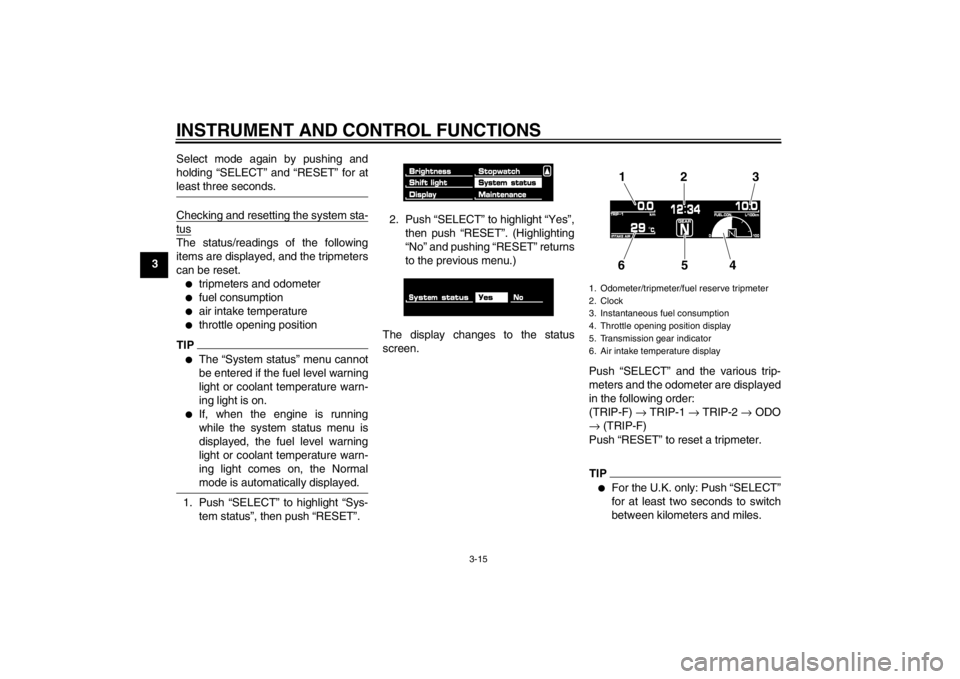
1. Push “SELECT” to highlight “Sys-
tem status”, then push “RESET”. 2. Push “SELECT” to highlight “Yes”,
then push “RESET”. (Highlighting
“No” and pushing “RESET” returns
to the previous menu.)
The display changes to the status
screen. Push “SELECT” and the various trip-
meters and the odometer are displayed
in the following order:
(TRIP-F) → TRIP-1 → TRIP-2 → ODO
→ (TRIP-F)
Push “RESET” to reset a tripmeter.
TIP●
For the U.K. only: Push “SELECT”
for at least two seconds to switch
between kilometers and miles.
1. Odometer/tripmeter/fuel reserve tripmeter
2. Clock
3. Instantaneous fuel consumption
4. Throttle opening position display
5. Transmission gear indicator
6. Air intake temperature display
12 3
654
U2S3E3E0.book Page 15 Monday, September 19, 2011 8:42 AM
INSTRUMENT AND CONTROL FUNCTIONS
3-16
3
●
Pushing “RESET” displays the
Normal mode for five seconds.
Pushing “SELECT” and “RESET”
for at least three seconds, chang-
es the display to the Normal mode.
●
To perform further multi-function
display settings, enter the Select
mode again by pushing and hold-
ing “SELECT” and “RESET” for at
least three seconds.
Resetting the maintenance countersThis function allows you to reset the
maintenance counters for the tires, the
engine oil, and an item of your choice.1. Push “SELECT” to highlight “Main- tenance”.
2. Push “RESET”.
3. Push “SELECT” to highlight the item to reset. 4. Push “RESET” to reset the item.
TIP●
The bottom area was left blank for
another item the rider cares to
check the distance of since it has
been changed, replaced or
checked (i.e., air filter element, en-
gine parts, etc.).
●
Letters and numbers cannot be
entered in the blank area.
5. Push “SELECT” to scroll to “ ”.
6. Push “RESET” to return to the pre-
vious menu. Self-diagnosis device
TIPThe display indicates error codes only
in the Normal mode.This model is equipped with a self-diag-
nosis device for various electrical cir-
cuits.1. Immobilizer system indicator light
2. Engine trouble warning light “ ”
1. Error code display
2
1
1
U2S3E3E0.book Page 16 Monday, September 19, 2011 8:42 AM