2012 YAMAHA VMAX lock
[x] Cancel search: lockPage 25 of 110

INSTRUMENT AND CONTROL FUNCTIONS
3-10
3
coolant temperature warning indicator
flash, stop the vehicle and let the en-
gine cool. (See page 6-42.)
NOTICE
ECA10021
Do not continue to operate the en-
gine if it is overheating.Select mode
The various functions of this multi-func-
tion display are adjusted in the Select
mode.TIP●
The transmission must be in neu-
tral to change settings in this
mode.
●
Shifting the transmission into gear
saves all settings made, then can-
cels the Select mode and displays
the Normal mode in all screens.
●
Depending on the screen, pushing
“RESET” saves settings or can-
cels the Select mode to display the
Normal mode.
Push and hold “SELECT” and “RESET”
for at least three seconds to enter the
Select mode. The following items can be set/adjusted
in this mode:
●
brightness
●
shift timing indicator light
●
clock
●
stopwatch
●
countdown clock
●
system status
●
maintenance counters
TIPTo return to the Normal mode, push
“SELECT” to scroll to “ ”, then push
“RESET”.Adjusting the brightnessThis function allows you to adjust the
brightness of the tachometer panel and
speedometer (“Meter panel”), the ta-
chometer needle (“Needle”), and the
multi-function display (“Display”) to suit
the outside lighting conditions.
1. Push “SELECT” to highlight “Brightness”. 2. Push “RESET”, then push “SE-
LECT” to scroll through the func-
tions and to highlight an item.
3. Push “RESET”; the brightness lev- el segments for the selected item
starts flashing.
4. Push “SELECT” to highlight the desired brightness level.
5. Push “RESET” to set the bright- ness level.
6. Push “SELECT” to scroll to “ ”, then push “RESET” to return to the
previous menu.
U2S3E3E0.book Page 10 Monday, September 19, 2011 8:42 AM
Page 28 of 110

INSTRUMENT AND CONTROL FUNCTIONS
3-13
33. Push “SELECT” to highlight the
desired brightness level.
4. Push “RESET” to set the selected brightness level.
5. Push “RESET” to return to the pre- vious menu.
6. Push “SELECT” to scroll to “ ”, then push “RESET”. This allows
you to select another item in the
menu.
Setting the clock
1. Push “SELECT” to highlight “Dis- play”.
2. Push “RESET”; the following screen is displayed.
3. Push “RESET” and the hour digits start flashing.
4. Push “SELECT” to increment the hours. 5. Push “RESET”, and the minute
digits start flashing.
6. Push “SELECT” to increment the minutes.
7. Push “RESET” to start the clock.
8. Push “RESET” again to return to the previous menu.
Resetting all the brightness and shift
timing indicator light functionsThis resets all settings made to the
brightness and shift timing indicator
light functions. 1. Push “SELECT” to highlight “Dis- play”.
2. Push “RESET”.
3. Push “SELECT” to highlight “All re- set”.
4. Push “RESET”, then push “SE- LECT” to highlight “Yes”. 5. Push “RESET” to reset the bright-
ness and shift timing light indicator
values to the factory setting. The
display returns to the Normal
mode.
TIPTo perform further multi-function dis-
play settings, enter the Select mode
again by pushing and holding “SE-
LECT” and “RESET” for at least three
seconds.Using the stopwatchThe stopwatch can be activated as fol-
lows.1. Push “SELECT” to highlight “Stop- watch”.
2. Push “RESET”.
U2S3E3E0.book Page 13 Monday, September 19, 2011 8:42 AM
Page 29 of 110

INSTRUMENT AND CONTROL FUNCTIONS
3-14
3
3. Push “SELECT” to highlight “Stop-
watch”.
4. Push “RESET”. The multi-function display chang-
es to the Normal mode and the
stopwatch is displayed in place of
the clock.
5. Push “SELECT” to start the stop- watch.
6. Push the start switch “ ” or “SE- LECT” to stop the stopwatch.
7. Push “RESET” to reset the stop- watch.
TIP●
If neither “SELECT” nor “RESET”
are pushed for one minute, the
screen automatically changes to
the Normal mode.
●
Pushing “RESET” for at least two
seconds changes the screen to
the Normal mode.
●
To perform further multi-function
display settings, enter the Select
mode again by pushing and hold-
ing “SELECT” and “RESET” for at
least three seconds.
Using the countdown clockThe countdown clock can be activated
as follows.1. Push “SELECT” to highlight “Stop- watch”.
2. Push “RESET”.
3. Push “SELECT” to highlight “Countdown”.
4. Push “RESET”. The multi-function display changes to the Normal
mode, the stopwatch is displayed
in place of the clock, and the trans-
mission gear indicator changes to
the countdown clock. 5. Push “SELECT” or shift into gear
and the countdown clock starts
counting down from “5”. Simulta-
neously, the shift timing indicator
light flashes according to the num-
ber displayed (i.e., when “5” is dis-
played, the indicator light flashes
five times, when “4” is displayed,
the indicator light flashes four
times, etc.). The stopwatch starts
counting when the countdown
clock finishes counting.
6. Push the start switch “ ” or “SE- LECT” to stop the countdown
clock.
7. Push “RESET” to reset the count- down clock and stopwatch.
8. Repeat steps 5–7, or push “RE-
SET” again for at least two sec-
onds to enter the Normal mode.
TIPTo perform further multi-function dis-
play settings, be sure the transmis-
sion is in neutral, then enter the
U2S3E3E0.book Page 14 Monday, September 19, 2011 8:42 AM
Page 30 of 110
INSTRUMENT AND CONTROL FUNCTIONS
3-15
3Select mode again by pushing and
holding “SELECT” and “RESET” for at
least three seconds.
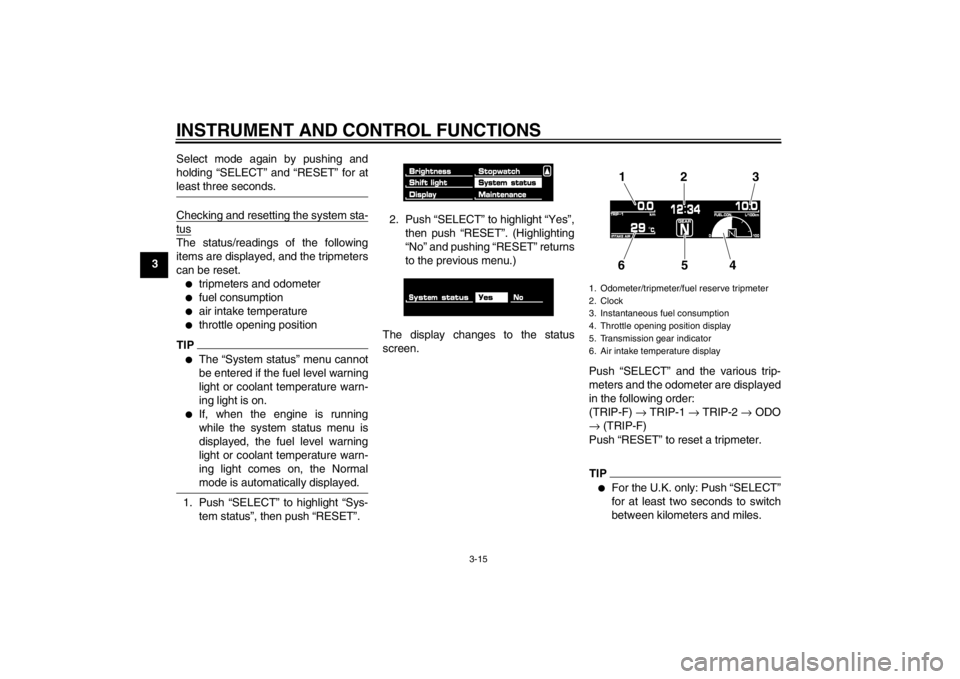
Checking and resetting the system sta-tusThe status/readings of the following
items are displayed, and the tripmeters
can be reset.●
tripmeters and odometer
●
fuel consumption
●
air intake temperature
●
throttle opening position
TIP●
The “System status” menu cannot
be entered if the fuel level warning
light or coolant temperature warn-
ing light is on.
●
If, when the engine is running
while the system status menu is
displayed, the fuel level warning
light or coolant temperature warn-
ing light comes on, the Normal
mode is automatically displayed.
1. Push “SELECT” to highlight “Sys-
tem status”, then push “RESET”. 2. Push “SELECT” to highlight “Yes”,
then push “RESET”. (Highlighting
“No” and pushing “RESET” returns
to the previous menu.)
The display changes to the status
screen. Push “SELECT” and the various trip-
meters and the odometer are displayed
in the following order:
(TRIP-F) → TRIP-1 → TRIP-2 → ODO
→ (TRIP-F)
Push “RESET” to reset a tripmeter.
TIP●
For the U.K. only: Push “SELECT”
for at least two seconds to switch
between kilometers and miles.
1. Odometer/tripmeter/fuel reserve tripmeter
2. Clock
3. Instantaneous fuel consumption
4. Throttle opening position display
5. Transmission gear indicator
6. Air intake temperature display
12 3
654
U2S3E3E0.book Page 15 Monday, September 19, 2011 8:42 AM
Page 36 of 110

INSTRUMENT AND CONTROL FUNCTIONS
3-21
3
EAU12941
Brake pedal The brake pedal is on the right side of
the motorcycle. To apply the rear
brake, press down on the brake pedal.
EAU51670
ABS The Yamaha ABS (Anti-lock Brake
System) features a dual electronic con-
trol system, which acts on the front and
rear brakes independently.
Operate the brakes with ABS as you
would conventional brakes. If the ABS
is activated, a pulsating sensation may
be felt at the brake lever or brake pedal.
In this situation, continue to apply the
brakes and let the ABS work; do not
“pump” the brakes as this will reduce
braking effectiveness.
WARNING
EWA16050
Always keep a sufficient distance
from the vehicle ahead to match the
riding speed even with ABS.●
The ABS performs best with
long braking distances.
●
On certain surfaces, such as
rough or gravel roads, the brak-
ing distance may be longer with
the ABS than without.
The ABS is monitored by an ECU,
which will revert the system to conven-
tional braking if a malfunction occurs.
TIP●
The ABS performs a self-diagno-
sis test each time the vehicle first
starts off after the key is turned to
“ON” and the vehicle has traveled
at a speed of 10 km/h (6 mi/h) or
higher. During this test, a “clicking”
noise can be heard from under the
seat, and if the brake lever or
brake pedal is even slightly ap-
plied, a vibration can be felt at the
lever and pedal, but these do not
indicate a malfunction.
●
This ABS has a test mode which
allows the owner to experience the
pulsation at the brake lever or
brake pedal when the ABS is oper-
ating. However, special tools are
required, so please consult your
Yamaha dealer when performing
this test.
NOTICE
ECA16120
Keep any type of magnets (including
magnetic pick-up tools, magnetic
screwdrivers, etc.) away from the
front and rear wheel hubs, otherwise
the magnetic rotors equipped in the
1. Brake pedal
1
U2S3E3E0.book Page 21 Monday, September 19, 2011 8:42 AM
Page 37 of 110

INSTRUMENT AND CONTROL FUNCTIONS
3-22
3
wheel hubs may be damaged, result-
ing in improper performance of the
ABS system.
EAU46850
Fuel tank cap To remove the fuel tank cap
1. Pull the rider seat backrest release lever on the left side of the vehicle
as shown. The backrest will slide
forward. 2. Insert the key into the lock, and
then turn it 1/4 turn clockwise. The
lock will be released and the fuel
tank cap can be removed.
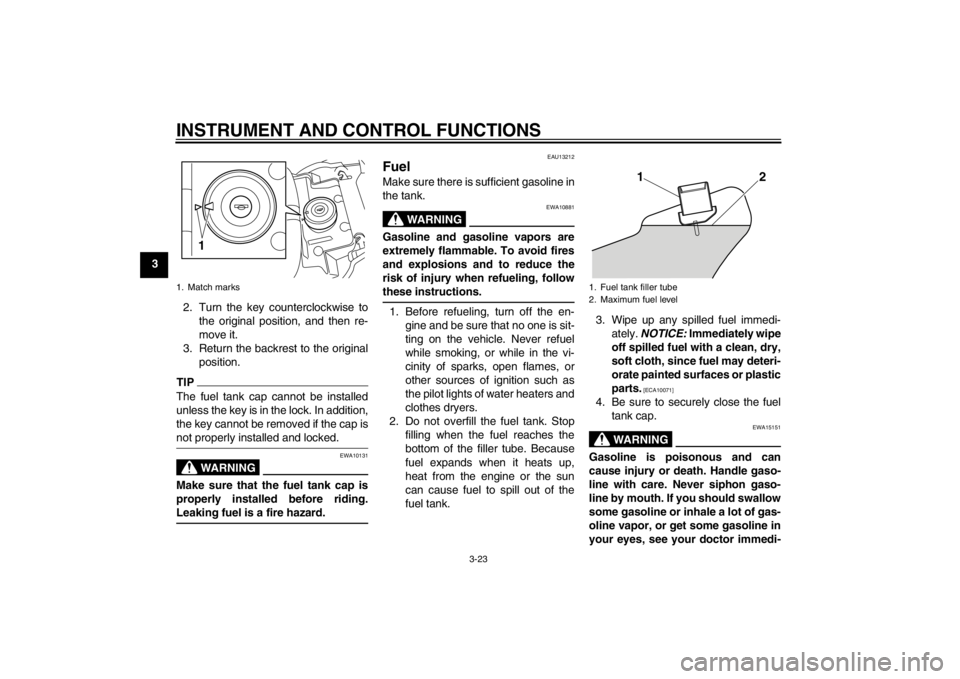
To install the fuel tank cap 1. Insert the fuel tank cap into the tank opening with the key inserted
in the lock and with the mark on the
cap aligned with the mark on the
fuel tank.
1. Front wheel hub
1. Rear wheel hub
11
1. Rider seat backrest release lever
1. Rider seat backrest
1
1
1. Unlock.
1
U2S3E3E0.book Page 22 Monday, September 19, 2011 8:42 AM
Page 38 of 110
INSTRUMENT AND CONTROL FUNCTIONS
3-23
32. Turn the key counterclockwise tothe original position, and then re-
move it.
3. Return the backrest to the original position.
TIPThe fuel tank cap cannot be installed
unless the key is in the lock. In addition,
the key cannot be removed if the cap is
not properly installed and locked.
WARNING
EWA10131
Make sure that the fuel tank cap is
properly installed before riding.
Leaking fuel is a fire hazard.
EAU13212
Fuel Make sure there is sufficient gasoline in
the tank.
WARNING
EWA10881
Gasoline and gasoline vapors are
extremely flammable. To avoid fires
and explosions and to reduce the
risk of injury when refueling, follow
these instructions.1. Before refueling, turn off the en-gine and be sure that no one is sit-
ting on the vehicle. Never refuel
while smoking, or while in the vi-
cinity of sparks, open flames, or
other sources of ignition such as
the pilot lights of water heaters and
clothes dryers.
2. Do not overfill the fuel tank. Stop filling when the fuel reaches the
bottom of the filler tube. Because
fuel expands when it heats up,
heat from the engine or the sun
can cause fuel to spill out of the
fuel tank. 3. Wipe up any spilled fuel immedi-
ately. NOTICE: Immediately wipe
off spilled fuel with a clean, dry,
soft cloth, since fuel may deteri-
orate painted surfaces or plastic
parts.
[ECA10071]
4. Be sure to securely close the fuel tank cap.
WARNING
EWA15151
Gasoline is poisonous and can
cause injury or death. Handle gaso-
line with care. Never siphon gaso-
line by mouth. If you should swallow
some gasoline or inhale a lot of gas-
oline vapor, or get some gasoline in
your eyes, see your doctor immedi-
1. Match marks
1
1. Fuel tank filler tube
2. Maximum fuel level
12
U2S3E3E0.book Page 23 Monday, September 19, 2011 8:42 AM
Page 39 of 110

INSTRUMENT AND CONTROL FUNCTIONS
3-24
3
ately. If gasoline spills on your skin,
wash with soap and water. If gaso-
line spills on your clothing, change
your clothes.
EAU13391
NOTICE
ECA11400
Use only unleaded gasoline. The use
of leaded gasoline will cause severe
damage to internal engine parts,
such as the valves and piston rings,
as well as to the exhaust system.Your Yamaha engine has been de-
signed to use premium unleaded gaso-
line with a research octane number of
95 or higher. If knocking (or pinging) oc-
curs, use a gasoline of a different brand. Use of unleaded fuel will extend
spark plug life and reduce maintenance
costs.
EAU51170
Fuel tank breather hose and
overflow hose Before operating the motorcycle:●
Check each hose connection.
●
Check each hose for cracks or
damage, and replace if damaged.
●
Make sure that the end of each
hose is not blocked, and clean if
necessary.
Recommended fuel:
Premium unleaded gasoline only
Fuel tank capacity: 15.0 L (3.96 US gal, 3.30 Imp.gal)
Fuel reserve amount (when the fuel
level warning light comes on): 3.9 L (1.03 US gal, 0.86 Imp.gal)
1. Fuel tank breather hose
2. Fuel tank overflow hose
12
U2S3E3E0.book Page 24 Monday, September 19, 2011 8:42 AM