2012 VOLVO V60 clutch
[x] Cancel search: clutchPage 130 of 400

03 Your driving environment
Eco Start/Stop DRIVe*
03
128* Option/accessory, for more information, see Introduction.
SymbolMessageInfo/ActionM/AA
Auto Start-Stop ONIlluminates for about 5 seconds after Start/Stop has been
activated.
Auto Start-Stop OFFIlluminates for about 5 seconds after Start/Stop has been
switched off.
Auto Start-Stop serv. requiredStart/Stop is not operational. A workshop should be contac-
ted - in which case an authorised Volvo workshop is recom-
mended.
Emission managementStart/Stop is temporarily disengaged. The function is reacti-
vated after an automatic system check.
AUTO-
STOPEngine in Auto StartThe engine is ready to start automatically - waiting for the
brake pedal to be released.A
Select P or N to startStart/Stop has been deactivated - move the gear selector to
N or P position and start the engine as normal with the
START/STOP ENGINE button.A
Press Start buttonThe engine will not start automatically - start the engine as
normal with the START/STOP ENGINE button and the gear
selector in P or N.A
AUTO-
STOPEngine in Auto StartThe engine is ready to start automatically - waiting for the
brake or clutch pedal to be depressed.M
Press Start buttonThe engine will not start automatically - start the engine as
normal with the START/STOP ENGINE button.M
Depress clutch pedal to startThe engine is ready to auto-start - waiting for the clutch pedal
to be depressed.M
ProCarManuals.com
Page 131 of 400

03 Your driving environment
Eco Start/Stop DRIVe*
03
* Option/accessory, for more information, see Introduction.129
SymbolMessageInfo/ActionM/AA
Depress the foot brake to startThe engine is ready to auto-start - waiting for the brake pedal
to be depressed.M
Press brake and clutch to startThe engine is ready to auto-start - waiting for the brake or
clutch pedal to be depressed.M
Put gear in neutralGear is engaged without declutching - disengage and set the
gear lever in neutral position.M
AM = Only manual gearbox, A = Only automatic gearbox and model D3.
If a message does not go out following com-
pletion of the action then a workshop should
be contacted - an authorised Volvo workshop
is recommended.
ProCarManuals.com
Page 132 of 400
03 Your driving environment
All-wheel drive – AWD*
03
130* Option/accessory, for more information, see Introduction.
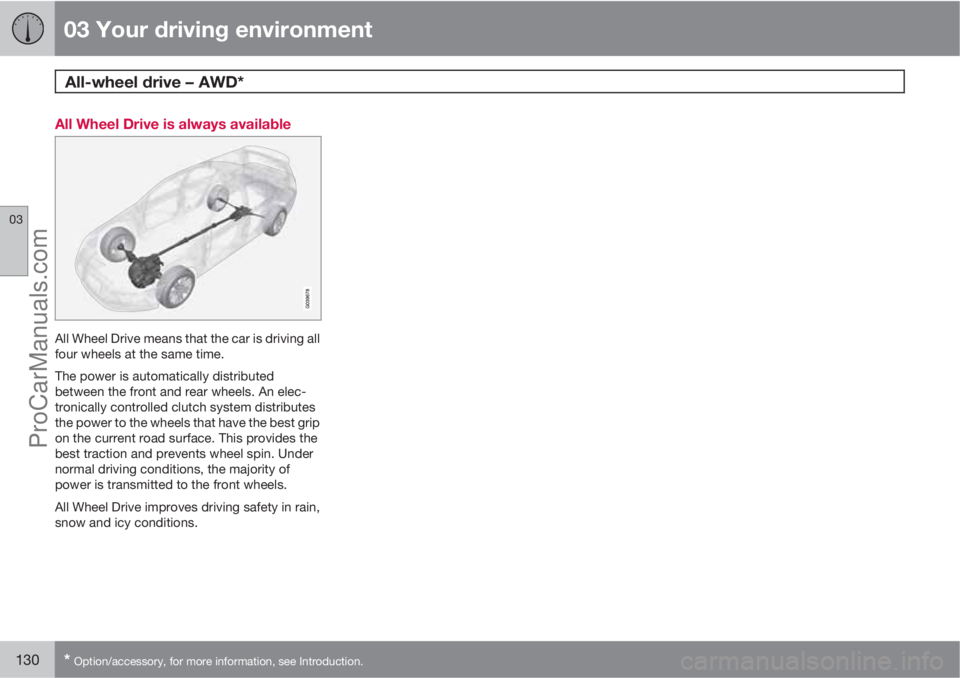
All Wheel Drive is always available
All Wheel Drive means that the car is driving all
four wheels at the same time.
The power is automatically distributed
between the front and rear wheels. An elec-
tronically controlled clutch system distributes
the power to the wheels that have the best grip
on the current road surface. This provides the
best traction and prevents wheel spin. Under
normal driving conditions, the majority of
power is transmitted to the front wheels.
All Wheel Drive improves driving safety in rain,
snow and icy conditions.
ProCarManuals.com
Page 136 of 400

03 Your driving environment
Parking brake
03
134
Disengaging the parking brake
Parking brake control - release.
Cars with manual gearbox
Releasing manually
1. Insert the remote control key in the ignition
switch.1
2. Press the foot brake pedal down firmly.
3. Pull the control.
> The parking brake releases and the
combined instrument panel symbol
goes out.
NOTE
The parking brake can also be released
manually by depressing the clutch pedal
instead of the brake pedal. Volvo recom-
mends the use of the brake pedal.
Releasing automatically1. Start the engine.
2. Engage 1st gear or reverse gear.
3. Ease up the clutch and depress the accel-
erator.
> The parking brake releases and the
combined instrument panel symbol
goes out.
Cars with automatic gearbox
Releasing manually
1. Insert the remote control key in the ignition
switch1.
2. Press the foot brake pedal down firmly.
3. Pull the control.
> The parking brake releases and the
combined instrument panel symbol
goes out.
Releasing automatically1. Put the seatbelt on.
2. Start the engine.
3. Press the foot brake pedal down firmly.
4.
Move the gear selector to position D or R
and depress the accelerator.
> The parking brake releases and the
combined instrument panel symbol
goes out.
NOTE
For safety reasons, the parking brake is only
released automatically if the engine is run-
ning and the driver is wearing a seatbelt. The
parking brake is released immediately on
cars with automatic gearbox when the
accelerator pedal is depressed and the gear
selector is in position D or R.
Heavy load uphillA heavy load, such as a trailer, can cause the
car to roll backward when the parking brake is
released automatically on a steep incline.
Avoid this by depressing the control while driv-
ing off. Release the control when the engine
achieves traction.
1For a car with the Keyless system: Press START/STOP ENGINE.
ProCarManuals.com
Page 173 of 400

04 Comfort and driving pleasure
Cruise control*
04
* Option/accessory, for more information, see Introduction.171 Operation
Steering wheel keypad and display.
Cruise control - On/Off.
Standby mode ceases and the stored
speed is resumed.
Standby mode
Activate and adjust the speed.
Selected speed (in brackets = Standby
mode).
Activating and setting the speedSwitch on the cruise control with one press on
the steering wheel button
- the symbol
is illuminated in the display (5) and the brackets
around (---) km/h show that the cruise control
is set in standby mode.The cruise control is then activated with
or
, after which the current speed is stored in
the memory - the display text
(---) km/hchanges to show the selected speed, e.g. 100
km/h.
NOTE
Cruise control cannot be engaged at
speeds below 30 km/h.
Changing the speedIn active mode the speed is adjusted with long
or short presses on
or - the last press is
stored in the memory.
A temporary increase in speed with the accel-
erator pedal, e.g. during overtaking, does not
affect the cruise control setting - the car returns
to the set speed when the accelerator pedal is
released.
NOTE
If any cruise control button is held
depressed for more than approx. 1 minute
then cruise control is disengaged. The
engine must be switched off in order to reset
cruise control.
Temporary deactivation - standby mode
Press to temporarily disengage the cruise
control and set it in standby mode - set speed
is shown in brackets in the display (5), e.g.
(100) km/h.
Automatic standby modeCruise control is temporarily disengaged and
set in standby mode if:
•wheels lose traction
•the foot brake is used
•speed falls below approx. 30 km/h
•the clutch pedal is depressed
•the gear selector is moved to neutral posi-
tion (automatic gearbox)
•the driver maintains a speed higher than
the set speed for longer than 1 minute.
The driver must then regulate the speed.
Resume set speedCruise control in standby mode is re-activated
with one press on the steering wheel button
- the speed is then set to the last stored
speed.
NOTE
A significant increase in speed may arise
after the speed has been resumed with .
ProCarManuals.com
Page 180 of 400

04 Comfort and driving pleasure
Adaptive cruise control*
04
178* Option/accessory, for more information, see Introduction.
Changing the speedIn active mode the speed is adjusted 5 km/h
with each press on
or . In active mode
the button
has the same function as but
results in a lower increase in speed. The last
press is stored in the memory.
NOTE
If any cruise control button is held
depressed for more than approx. 1 minute
then cruise control is disengaged. The
engine must be switched off in order to reset
cruise control.
In certain situations, cruise control cannot
be activated. Then the display shows
Cruise control Unavailable, see
page 183.
Set time intervalDifferent time intervals to the
vehicle in front can be
selected and shown in the
display as 1-5 horizontal lines
- the more lines the longer the
time distance. One line corre-
sponds to approximately
1 second, 5 lines approximately 2.5 seconds.
The time interval is increased or decreased
with the steering wheel keypad's thumbwheel
(or the buttons
/ for cars without Speed
limiter).
At low speed, when the distances are short, the
adaptive cruise control increases the time
interval slightly.
The adaptive cruise control allows the time
interval to vary noticeably in certain situations
in order to allow the car to follow the vehicle in
front smoothly and comfortably.
Note that a short time interval only allows the
driver a short time to react and take action if
any unforeseen traffic problem should arise.
The number of lines for the
selected time interval is
shown during the setting itself
and for several seconds after-
wards. Then a smaller scale
version of the symbol is
shown to the right of the dis-
play. The same symbol is also shown when
Distance Warning is activated, see page 185.
NOTE
Only use the time interval that is allowed in
accordance with local traffic regulations.
If cruise control does not seem to react to
activation the reason may be that the time
interval to the closest vehicle prevents an
increase in speed.
The higher the speed, the longer the calcu-
lated distance in metres for a specific time
interval.
Temporary deactivation - standby mode
Press the steering wheel button to tempo-
rarily disengage the cruise control and set it in
standby mode - set speed is shown in brackets
in the display, e.g.
(100).
Keypad without Speed limiter*
Press the steering wheel button to tempo-
rarily disengage cruise control and set it in
standby mode.
Standby mode due to driver interventionCruise control is temporarily disengaged and
set in standby mode if:
•the foot brake is used
•the clutch pedal is depressed for longer
than 1 minute7
7Disengaging and selecting a higher or lower gear does not involve standby mode.
ProCarManuals.com
Page 192 of 400

04 Comfort and driving pleasure
City Safety™
04
190
When City Safety™ has prevented a collision
with a stationary object the car remains sta-
tionary for a maximum of 1.5 seconds. If the car
is braked for a vehicle in front that is moving,
then speed is reduced to the same speed as
that maintained by the vehicle in front.
On a car with manual gearbox the engine stops
when City Safety™ has stopped the car, unless
the driver manages to depress the clutch pedal
beforehand.
NOTE
•Keep the windscreen surface in front of
the laser sensor free from ice, snow and
dirt (see the illustration for sensor loca-
tion, page 188).
•Do not affix or mount anything on the
windscreen in front of the laser sensor
•Remove ice and snow from the bonnet
- snow and ice must not exceed a height
of 5 cm.
Fault tracing and action
If the message Windscreen Sensors
blocked is shown on the instrument panel dis-
play, it indicates that the laser sensor is
blocked and cannot detect vehicles in front of
the car. This means that City Safety™ is not
operational.The
Windscreen Sensors blocked message
is not shown for all situations in which the laser
sensor is blocked. The driver must therefore be
diligent about keeping the windscreen and
area in front of the laser sensor clean.
The following table presents possible causes
for the message being shown, along with sug-
gestions for appropriate action.
CauseAction
The windscreen sur-
face in front of the
laser sensor is dirty
or covered with ice
or snow.Clean the wind-
screen surface in
front of the sensor
from dirt, ice and
snow.
The laser sensor
field of vision is
blocked.Remove the block-
ing object.
IMPORTANT
If there are cracks, scratches or stone chips
in the windscreen in front of either of the
laser sensor's "windows" and they cover a
surface of approx. 0.5 x 3.0 mm (or larger),
then a workshop must be contacted for
repair or replacement of the windscreen
(see the illustration for sensor location, page
188) - an authorised Volvo workshop is rec-
ommended.
Failure to take action may result in reduced
performance for City Safety™.
To avoid the risk of reducing City Safety™
performance the following also applies:
•The same type or a Volvo-approved
windscreen must be fitted during
replacement
•The same type or Volvo-approved
windscreen wipers must be fitted during
replacement.
Laser sensor
The City Safety™ function includes a sensor
which transmits laser light. Contact a qualified
workshop in the event of a fault or if the laser
sensor needs servicing - an authorised Volvo
workshop is recommended.
ProCarManuals.com
Page 197 of 400

04 Comfort and driving pleasure
Collision Warning with Auto Brake & Pedestrian Protection*
04
* Option/accessory, for more information, see Introduction.195
WARNING
Warnings and brake interventions could be
implemented late or not at all if the traffic
situation or external influences mean that
the radar or camera sensor cannot detect a
pedestrian or a vehicle in front correctly.
The sensor system has a limited range for
pedestrians and the system therefore pro-
vides effective warnings and brake inter-
ventions at vehicle speeds up to 50 km/h.
For stationary or slow-moving vehicles,
warnings and brake interventions are effec-
tive at vehicle speeds up to 70 km/h.
Warnings for stationary or slow-moving
vehicles could be disengaged due to dark-
ness or poor visibility.
The collision warning system uses the same
radar sensors as adaptive cruise control. For
more information on the radar sensor and its
limitations, see page 181.
If warnings are perceived as being too frequent
or disturbing then the warning distance can be
reduced. This would lead to the system warn-
ing at a later stage, which reduces the total
number of warnings.
When the car is reversing Collision Warning
with Auto Brake cannot be activated.
Collision Warning with Auto Brake is not acti-
vated at low speeds - under 4 km/h, which iswhy the system does not intervene in situations
where the car is approaching a vehicle in front
very slowly, e.g. when parking.
Driver commands are always prioritised, which
is why Collision Warning with Auto Brake does
not intervene in situations where the driver is
steering, braking or accelerating in a clear
manner, even if a collision is unavoidable.
When Auto Brake has prevented a collision
with a stationary object the car remains sta-
tionary for a maximum of 1.5 seconds. If the car
is braked for a vehicle in front that is moving,
then speed is reduced to the same speed as
that maintained by the vehicle in front.
On a car with manual gearbox the engine stops
when Auto Brake has stopped the car, unless
the driver manages to depress the clutch pedal
beforehand.
Camera sensor limitationsThe car's camera sensor is used by the three
functions - Collision Warning with Auto Brake,
Driver Alert Control, see page 199 and Lane
Departure Warning, see page 202.
NOTE
Keep the windscreen surface in front of the
camera sensor clean from ice, snow, mist
and dirt.
Do not attach or fit anything to the wind-
screen in front of the camera sensor, as this
could reduce or prevent the function of one
or more camera-dependent systems.
The camera sensors have limitations similar to
the human eye, i.e. they "see" worse in dark-
ness, heavy snowfall or rain and in thick fog for
example. Under such conditions the functions
of camera-dependent systems could be sig-
nificantly reduced or temporarily disengaged.
Strong oncoming light, reflections in the car-
riageway, snow or ice on the road surface, dirty
road surfaces or unclear lane markings could
also significantly reduce camera sensor func-
tion when it is used to scan the carriageway
and detect pedestrians and other vehicles.
During very high temperatures the camera is
temporarily switched off for about 15 minutes
after the engine is started in order to protect
camera functionality.
ProCarManuals.com