Page 10 of 211
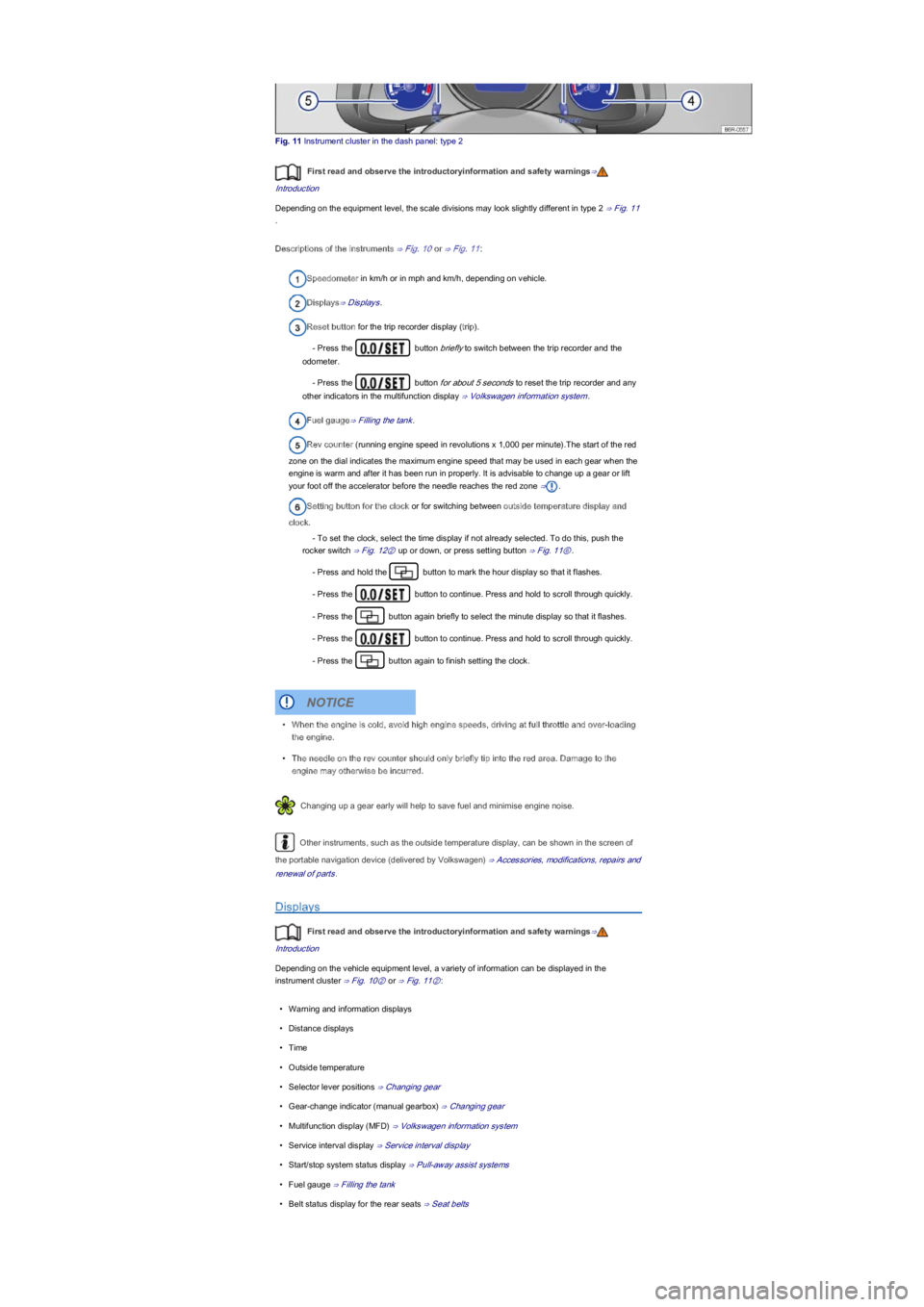
Fig. 11 Instrument cluster in the dash panel: type 2
First read and observe the introductoryinformation and safety warnings⇒
Introduction
Depending on the equipment level, the scale divisions may look slightly different in type 2 ⇒ Fig. 11
.
Descriptions of the instruments ⇒ Fig. 10 or ⇒ Fig. 11:
Speedometer in km/h or in mph and km/h, depending on vehicle.
Displays⇒ Displays.
Reset button for the trip recorder display (tripyf.
- Press the button briefly to switch between the trip recorder and the
odometer.
- Press the button for about 5 seconds to reset the trip recorder and any
other indicators in the multifunction display ⇒ Volkswagen information system.
Fuel gauge⇒ Filling the tank.
Rev counter (running engine speed in revolutions x 1,000 per minuteyf.The start of the red
zone on the dial indicates the maximum engine speed that may be used in each gear when the
engine is warm and after it has been run in properly. It is advisable to change up a gear or lift
your foot off the accelerator before the needle reaches the red zone ⇒.
Setting button for the clock or for switching between outside temperature display and
clock.
- To set the clock, select the time display if not already selected. To do this, push the
rocker switch ⇒ Fig. 12② up or down, or press setting button ⇒ Fig. 11⑥.
- Press and hold the button to mark the hour display so that it flashes.
- Press the button to continue. Press and hold to scroll through quickly.
- Press the button again briefly to select the minute display so that it flashes.
- Press the button to continue. Press and hold to scroll through quickly.
- Press the button again to finish setting the clock.
Changing up a gear early will help to save fuel and minimise engine noise.
Other instruments, such as the outside temperature display, can be shown in the screen of
the portable navigation device (delivered by Volkswagenyf ⇒ Accessories, modifications, repairs and
renewal of parts.
Displays
First read and observe the introductoryinformation and safety warnings⇒
Introduction
Depending on the vehicle equipment level, a variety of information can be displayed in the
instrument cluster ⇒ Fig. 10② or ⇒ Fig. 11②:
\f
Page 40 of 211

Switch off the seat heating when the seat is not occupied.
FunctionAction ⇒ Fig. 41
Switching onPress the button. The seat heating is switched on at the
highest setting. All indicator lamps light up in the button.
Adjusting the heating
outputPress the button again until the required heating level is set.
Switching offPress the button until the indicator lamps in the button go out.
If the second temperature level has been switched on for more than 15 minutes, it will automatically
switch to the first temperature level. Only one indicator lamp will be lit up.
The seat heating should be switched off as soon as it is no longer needed. Fuel is otherwise
wasted.
Seat belts
Introduction
This chapter contains information on the followingsubjects:
⇒ Warning lamp
⇒ Frontal collisions and the laws of physics
⇒ What happens to vehicle occupants who have not fastened their seat belts
⇒ Seat belt protection
⇒ Using seat belts
⇒ Fastening and unfastening seat belts
⇒ Seat belt routing
⇒ Automatic belt retractor, belt tensioner, belt tension limiter
⇒ Service and disposal of belt tensioners
Check the condition of all seat belts regularly. If the belt webbing, belt connections, belt retractor or
seat belt buckle become damaged, the seat belt in question should be replaced immediately by a
qualified workshop ⇒. The qualified workshop must use correct spare parts that are compatible
with the vehicle, equipment level and model year. Volkswagen recommends using a Volkswagen
dealership for this purpose.
Additional information and warnings:
\f
Page 122 of 211
Keep the air intake slots in front of the windscreen free of snow, ice and leaves to ensure
heating and cooling is not impaired, and to prevent the windows from misting over.
Controls
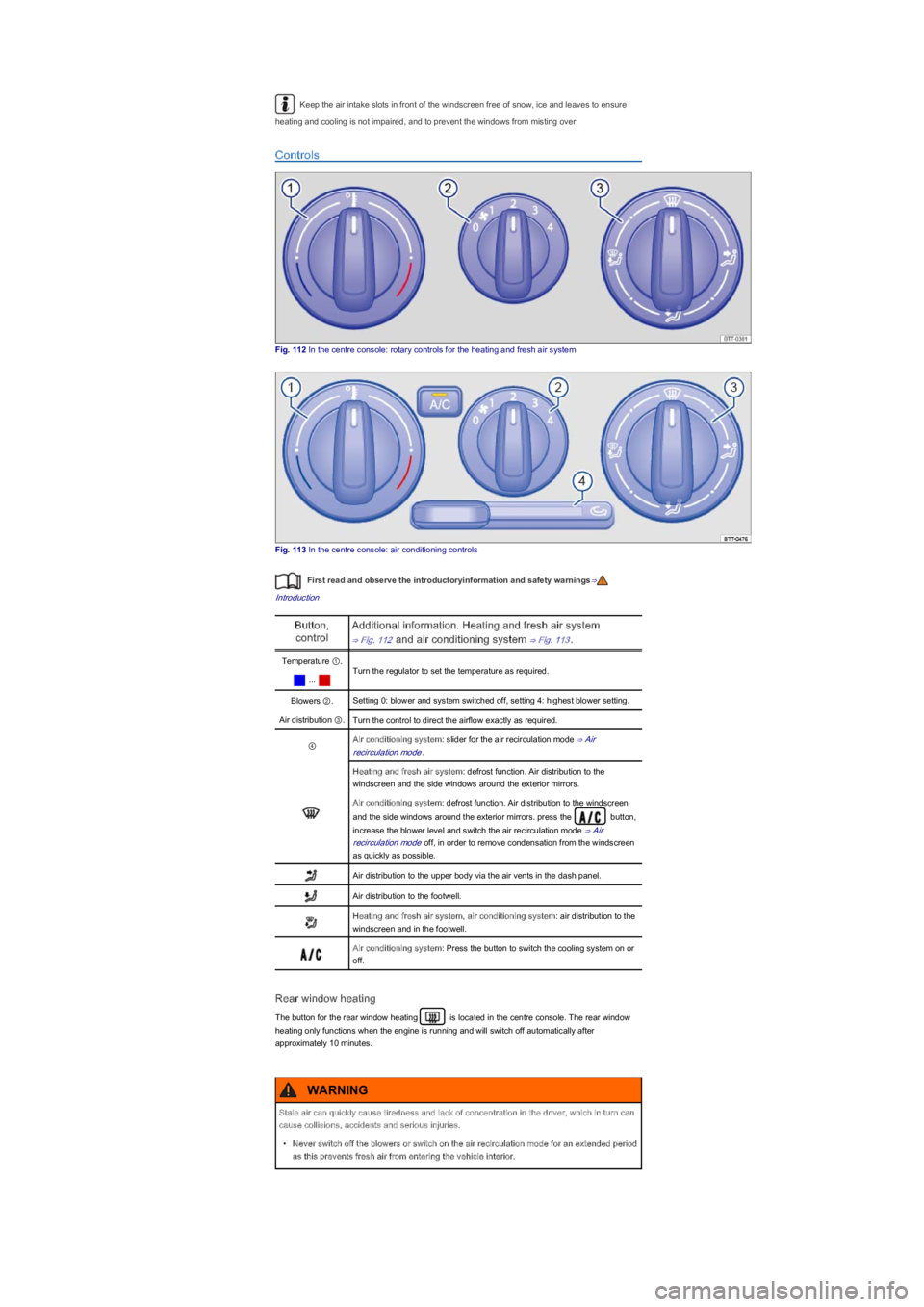
Fig. 112 In the centre console: rotary controls for the heating and fresh air system
Fig. 113 In the centre console: air conditioning controls
First read and observe the introductoryinformation and safety warnings⇒
Introduction
Button,
control
Additional information. Heating and fresh air system
⇒ Fig. 112 and air conditioning system ⇒ Fig. 113.
Temperature ①.
Turn the regulator to set the temperature as required.
...
Blowers ②.Setting 0: blower and system switched off, setting 4: highest blower setting.
Air distribution ③.Turn the control to direct the airflow exactly as required.
④Air conditioning system: slider for the air recirculation mode ⇒ Air
recirculation mode.
Heating and fresh air system: defrost function. Air distribution to the
windscreen and the side windows around the exterior mirrors.
Air conditioning system: defrost function. Air distribution to the windscreen
and the side windows around the exterior mirrors. press the button,
increase the blower level and switch the air recirculation mode ⇒ Air
recirculation mode off, in order to remove condensation from the windscreen
as quickly as possible.
Air distribution to the upper body via the air vents in the dash panel.
Air distribution to the footwell.
Heating and fresh air system, air conditioning system: air distribution to the
windscreen and in the footwell.
Air conditioning system: Press the button to switch the cooling system on or
off.
Rear window heating
The button for the rear window heating is located in the centre console. The rear window
heating only functions when the engine is running and will switch off automatically after
approximately 10 minutes.
Stale air can quickly cause tiredness and lack of concentration in the driver, which in turn can
cause collisions, accidents and serious injuries.
\f
Page 123 of 211
General information on the heating and fresh air system
First read and observe the introductoryinformation and safety warnings⇒
Introduction
The required interior temperature cannot be lower than the outside temperature as the heating and
fresh air system cannot cool or dehumidify the air.
Settings for optimal road visibility
\f