2012 VOLKSWAGEN TRANSPORTER mechanical
[x] Cancel search: mechanicalPage 40 of 486
• Cleaning and caring for the vehide exterior 380
• Manual opening and dosing 413
A WARNING
Improper use of the central locking system could lead to serious injury.
• The central locking system locks all doors. Locking the vehicle from the inside can prevent accidental opening of the doors and unauthorised persons from entering the vehicle. However, locked doors can delay as-sistance to passengers inside the vehicle in the event of an accident or emergency.
• Never leave children or people requiring assistance alone in the vehicle. All doors can be locked from the Inside using the central
6 WARNING (Continued)
locking button. This may mean that people lock themselves In the vehicle. People locked In the vehicle may be subjected to very high or very low temperatures.
• Temperatures Inside a locked vehicle may reach extremes of heat or cold, according to season. This can cause serious Injuries and Illness or fatalities, especially to small chil-dren.
• Never leave anyone Inside a locked vehi-cle. People In the vehicle could become trap-ped In an emergency and may not be able to get themselves to safety.
• Doors and the tailgate should therefore only be opened or closed when you are sure that nobody Is in their path.
Description of the central locking system
r"'f"n First read and observe the Introductory L-Jc.l.l Information and safety warnings & on page 39.
The central locking system enables you to lock and unlock all the doors and the tailgate or wing doors from one point.
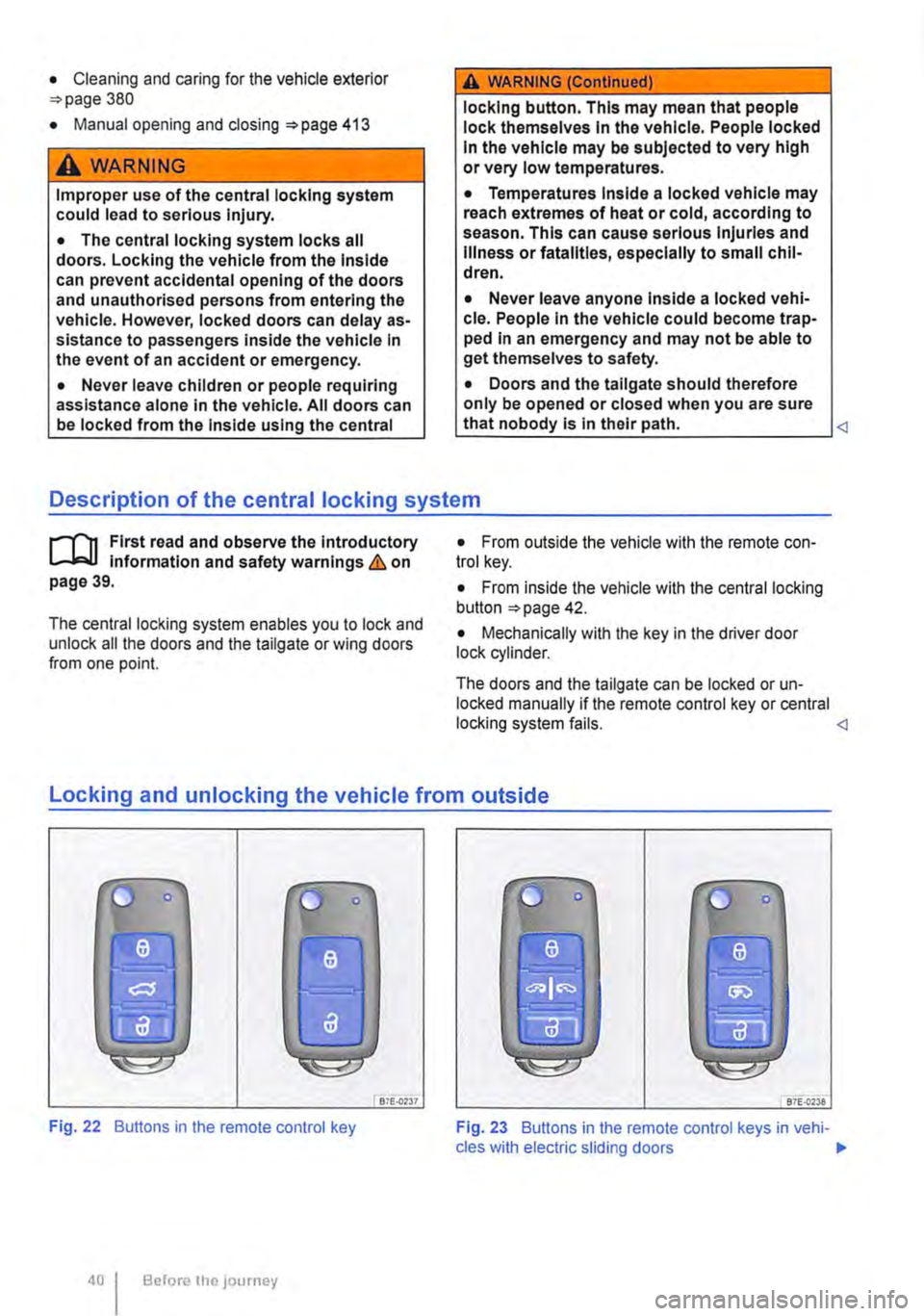
• From outside the vehicle with the remote con-trol key.
• From inside the vehicle with the central locking button 42.
• Mechanically with the key in the driver door lock cylinder.
The doors and the tailgate can be locked or un-locked manually if the remote control key or central locking system fails. <1
locking and unlocking the vehicle from outside
liJ
Fig. 22 Buttons in the remote control key
Before the JOurney
Bi£..0237 87E-{)'238
Fig. 23 Buttons in the remote control keys in vehi-cles with electric sliding doors .,.
Page 41 of 486
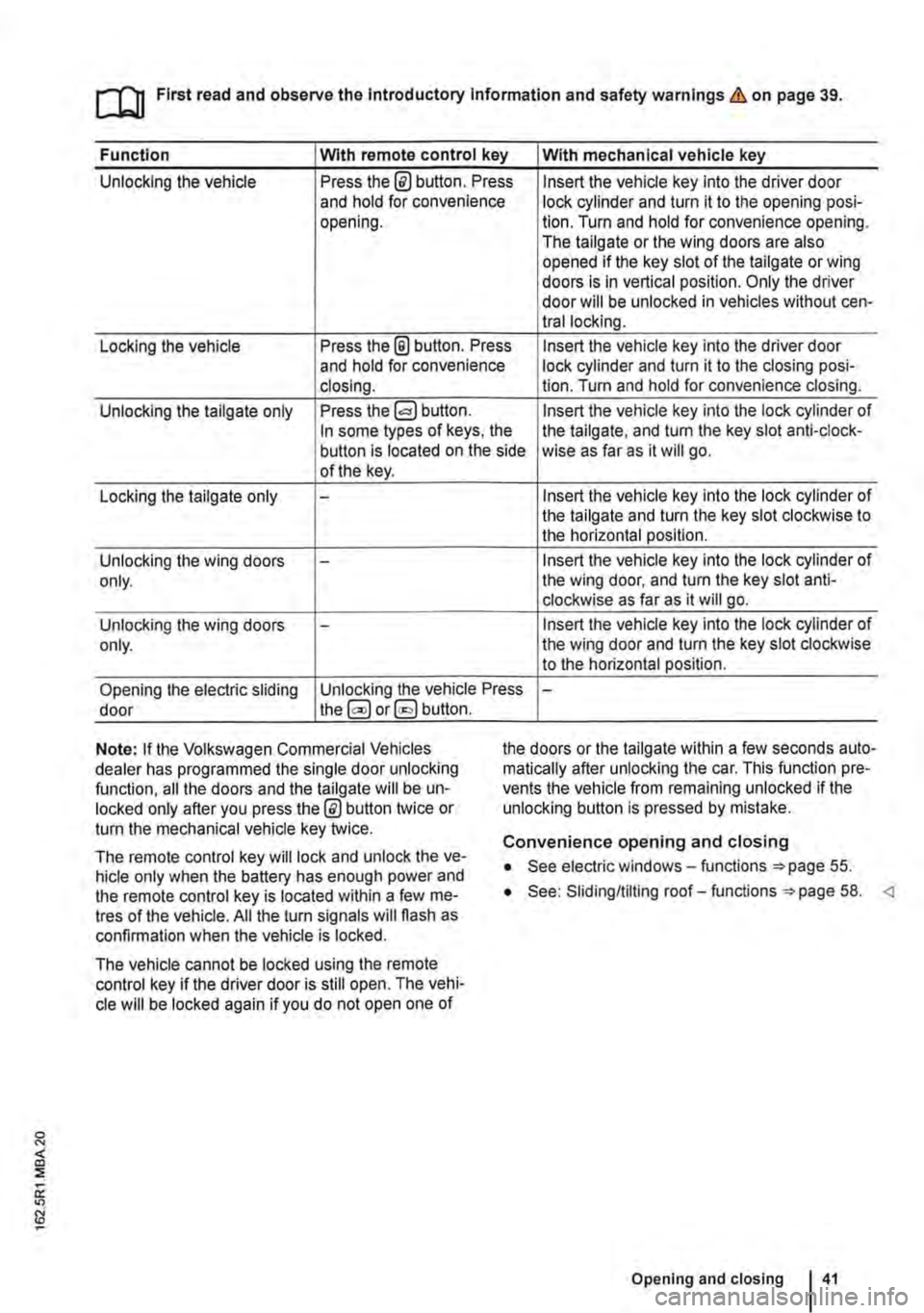
ro First read and observe the Introductory Information and safety warnings & on page 39.
Function Wlth remote control key With mechanical vehicle key
Unlocking the vehicle Press the@ button. Press Insert the vehicle key into the driver door and hold for convenience lock cylinder and turn it to the opening posi-opening. lion. Turn and hold for convenience opening. The tailgate or the wing doors are also opened if the key slot of the tailgate or wing doors is in vertical position. Only the driver door will be unlocked in vehicles without cen-trallocking.
Locking the vehicle Press the @ button. Press Insert the vehicle key into the driver door and hold for convenience lock cylinder and turn it to the closing posi-closing. lion. Turn and hold for convenience closing.
Unlocking the tailgate only Press the Insert the vehicle key into the lock cylinder of In some types of keys, the the tailgate, and turn the key slot anti-clock-button is located on the side wise as far as it will go. of the key.
Locking the tailgate only -Insert the vehicle key into the lock cylinder of the tailgate and turn the key slot clockwise to the horizontal position.
Unlocking the wing doors -Insert the vehicle key into the lock cylinder of only. the wing door, and turn the key slot anti-clockwise as far as it will go.
Unlocking the wing doors -Insert the vehicle key into the lock cylinder of only. the wing door and turn the key slot clockwise to the horizontal position.
Opening the electric sliding Unlocking the vehicle Press -door the@ or§] button.
Note: If the Volkswagen Commercial Vehicles dealer has programmed the single door unlocking function, all the doors and the tailgate will be un-locked only after you press the @ button twice or turn the mechanical vehicle key twice.
the doors or the tailgate within a few seconds auto-matically after unlocking the car. This function pre-vents the vehicle from remaining unlocked if the unlocking button is pressed by mistake.
The remote control key will lock and unlock the ve-hicle only when the battery has enough power and the remote control key is located within a few me-tres of the vehicle. All the turn signals will flash as confirmation when the vehicle is locked.
The vehicle cannot be locked using the remote control key if the driver door is still open. The vehi-cle will be locked again if you do not open one of
Convenience opening and closing
• See electric windows-functions 55.
• See: Sliding/tilting roof-functions =:>page 58.
Page 43 of 486

• If the SAFELOCK mechanism has been activa-ted using the remote control key: the anti-theft alarm is active.
Indicator lamp in the driver door
After locking the vehicle:
• If the SAFELOCK mechanism has been activa-ted using the remote control key in the driver door lock cylinder: the anti-theft alarm is not active.
• The interior monitoring system and anti-tow alarm are deactivated.
Meaning
A red LED flashes for approximately 2 seconds, firstly at short inteNals and then more slowly. The SAFELOCK mechanism is activated.
A red LED flashes for approximately 2 seconds and then goes out. The LED light starts to flash again after approxi-mately 30 seconds.
The SAFELOCK mechanism is deactivated.
A red LED lights up steadily for approximately 30 seconds. Fault in the locking system. Go to a qualified workshop.
Notes for vehicles without SAFELOCK
mechanism
Please note the following when the vehicle is locked with the remote control key or with the vehi-cle key in the driver door lock cylinder:
• The anti-theft alarm and the interior monitoring system are immediately activated. All turn signals flash briefly to confirm activation.
Anti-theft alarm
rflt First read and observe the introductory 1..-.L::.U information and safety warnings & on page 39.
The anti-theft alarm makes it more difficult to break into the vehicle or steal it.
The anti-theft alarm system is automatically activa-ted when the vehicle is locked.
When does the system trigger an alarm?
The anti-theft alarm will sound an acoustic alarm for approximately 30 seconds and trigger a visible warning for up to 5 minutes if any of the following unauthorised actions are performed while the vehi-cle is locked:
• Mechanical unlocking of the vehicle with the ve-hicle key and failure to switch on the ignition within 15 seconds
• A door is opened.
A WARNING
Take care when using the SAFELOCK mecha-nism to avoid accidents or injuries.
• Never leave anybody in the vehicle if the vehicle has been locked using the remote control key. The doors can no longer be opened from the inside once the SAFELOCK mechanism is activated.
• Locked doors make it more difficult for emergency service personnel to gain access to the vehicle and provide assistance when needed. In an emergency, people locked in-side the vehicle would not be able to leave the vehicle by unlocking the doors.
• The tailgate is opened.
• The ignition is switched on using an invalid key.
• Movement inside the vehicle (in vehicles with interior monitoring).
• The vehicle is towed (vehicles with anti-tow alarm).
• The vehicle is lifted (vehicles with anti-tow alarm).
• Transportation of the vehicle on a ferry or train.
• Disconnection of the vehicle battery (only an acoustic alarm)
Switching off the alarm
Unlock the vehicle using the release button on the remote control key or insert the ignition key into the ignition lock. 11>-
Opening and closing 43
Page 44 of 486

m Due to the current legislation on the Israel W market, the acoustic warning signals are de-activated there.
m The alarm will be triggered again if a person W gains access to the same or a different se-cured zone after the alarm has been switched off. For example, if the tailgate is opened after a door had been opened.
m The anti-theft alarm will not be activated if W the vehicle is locked from the Inside using the central locking button @.
m If you unlock the driver door mechanically us-L!J ing the vehicle key, only the driver door is un-locked, and not the whole vehicle. The SAFELOCK mechanism on all doors is not deactivated and the central locking button is not activated until you switch on the ignition (however the doors will not be unlocked).
m The anti-theft alarm will not function correctly W if the vehicle battery is weak or discharged.
m lt is not possible to include the trailer in the W anti-theft alarm system.
81f·01U
Fig. 25 Next to the driver seat: button for switch-ing off the interior monitoring system and anti-tow alarm.
r-f"n First read and observe the introductory information and safety warnings & on page 39.
The interior monitoring system will trigger an alarm if movement is detected inside the vehicle when the vehicle is locked.
The anti-tow alarm will be triggered if the vehicle is lifted.
Switching on the interior monitoring system and anti-tow alarm
Lock the vehicle using the remote control key. When the anti-theft alarm is switched on, the interi-or monitoring system and the anti-tow alarm are al-so active.
Switching off the interior monitoring system and anti-tow alarm
The orientation lighting in the =>Fig. 25 button must be lit up when switching the systems off. To switch the orientation lighting on, remove the key from the ignition or open one of the doors.
Before the journey
• Press the =>Fig. 25 button. A yellow indicator lamp will light up in the button until the vehicle is locked.
• Close all doors and the tailgate.
• Lock the vehicle using the remote control key. The interior monitoring system and anti-towing alarm are switched off until the next time the vehi-cle is locked.
The interior monitoring system and anti-tow alarm should therefore be switched off before the vehicle is locked in any of the following, or similar, situa-tions:
• If any people or animals are to remain inside the vehicle for a short period & =>page 39.
• If the vehicle is to be loaded onto another vehi-cle.
• If the vehicle is being transported (e.g. on a fer-ry).
• If the vehicle is going to be towed with one axle off the ground.
• If the vehicle is to be parked in a car wash.
Risk of false alarm
Interior monitoring can only work properly if the ve-hicle is completely closed. Comply with legal regu-lations. A false alarm can be triggered in any of the following circumstances:
• If one or more windows are fully or partly open.
• If the slidingflilting roof is completely or partly open.
• If items such as loose pieces of paper and items attached to the Interior mirror (e.g. air-fresh-eners) are left in the vehicle.
• If a mobile telephone that is left in the vehicle vibrates. 11>-
Page 47 of 486
Function
Opening the sliding door from the outside
Opening the sliding door from the inside
Closing the sliding door
Action
Pull the outside handle of the unlocked sliding door and open the door fully.
Pull the inside handle CD of the unlocked sliding door and open the door fully.
Pulling the inside or outside door handle and push the sliding door using a little force to close it. Make sure that the sliding door is properly closed.
IL
850-0043 .--87£..0147
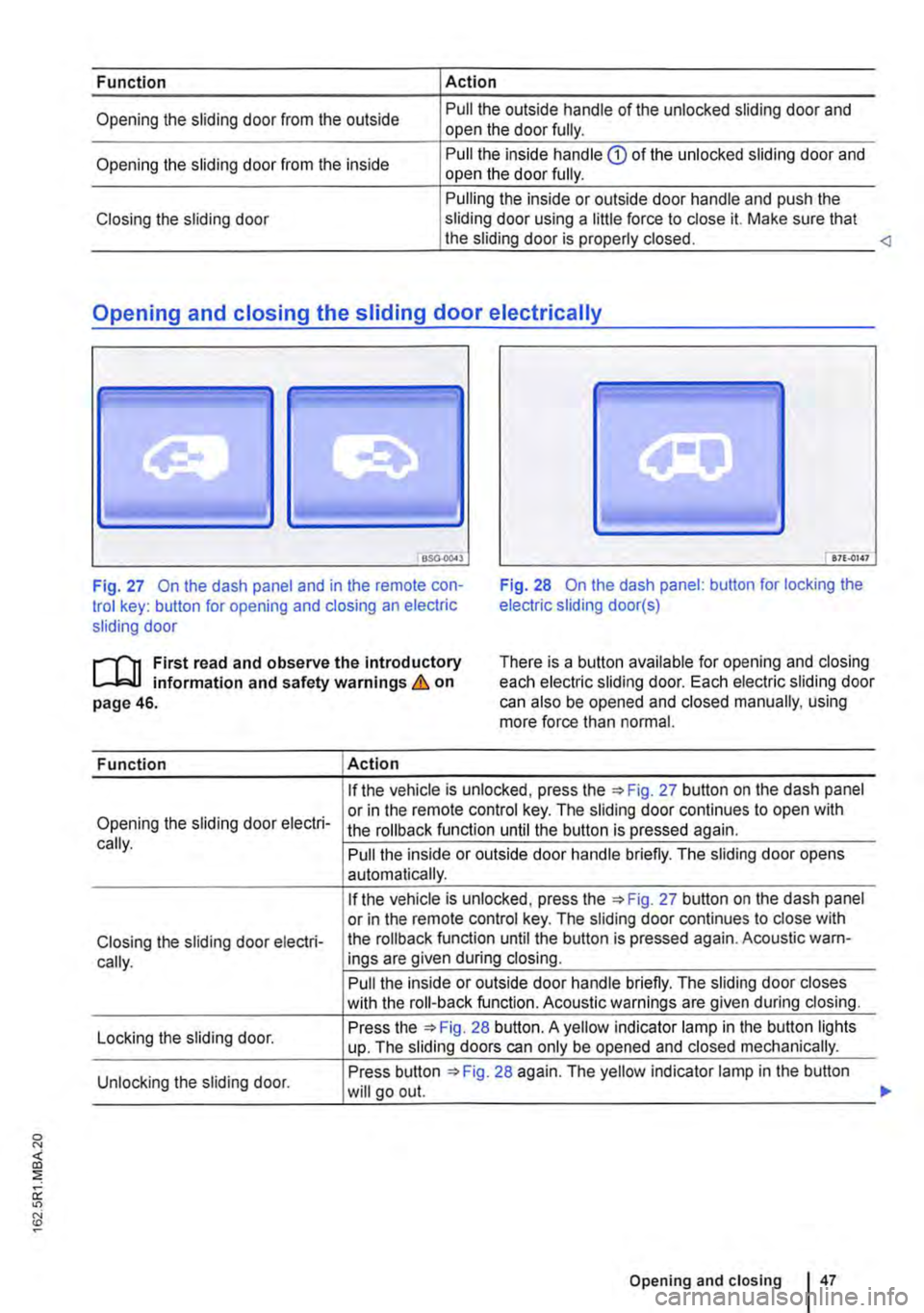
Fig. 27 On the dash panel and in the remote con-trol key: button for opening and closing an electric sliding door
Fig. 28 On the dash panel: button for locking the electric sliding door(s)
.--m First read and observe the introductory l-J,::JJ information and safety warnings & on page 46.
There is a button available for opening and closing each electric sliding door. Each electric sliding door can also be opened and closed manually, using more force than normal.
Function Action
If the vehicle is unlocked, press Fig. 27 button on the dash panel
Opening the sliding door electri-or in the remote control key. The sliding door continues to open with the rollback function until the button is pressed again. cally. Pull the inside or outside door handle briefly. The sliding door opens automatically.
If the vehicle is unlocked, press the 27 button on the dash panel or in the remote control key. The sliding door continues to close with
Closing the sliding door electri-the roll back function until the button is pressed again. Acoustic warn-
cally. ings are given during closing.
Pull the inside or outside door handle briefly. The sliding door closes with the roll-back function. Acoustic warnings are given during closing.
Locking the sliding door. Press the 28 button. A yellow indicator lamp in the button lights up. The sliding doors can only be opened and closed mechanically.
Unlocking the sliding door. Press button 28 again. The yellow indicator lamp in the button will go out.
Opening and closing I 47
...
Page 55 of 486
Opening the wing door from the inside
• Make sure that the child proof lock is not active and that the safety knob is in the upper position 35{!).
• Pull the lever® to unlock the wing doors.
• Push the left-hand wing door back to open it. <1
Childproof lock in the wing doors
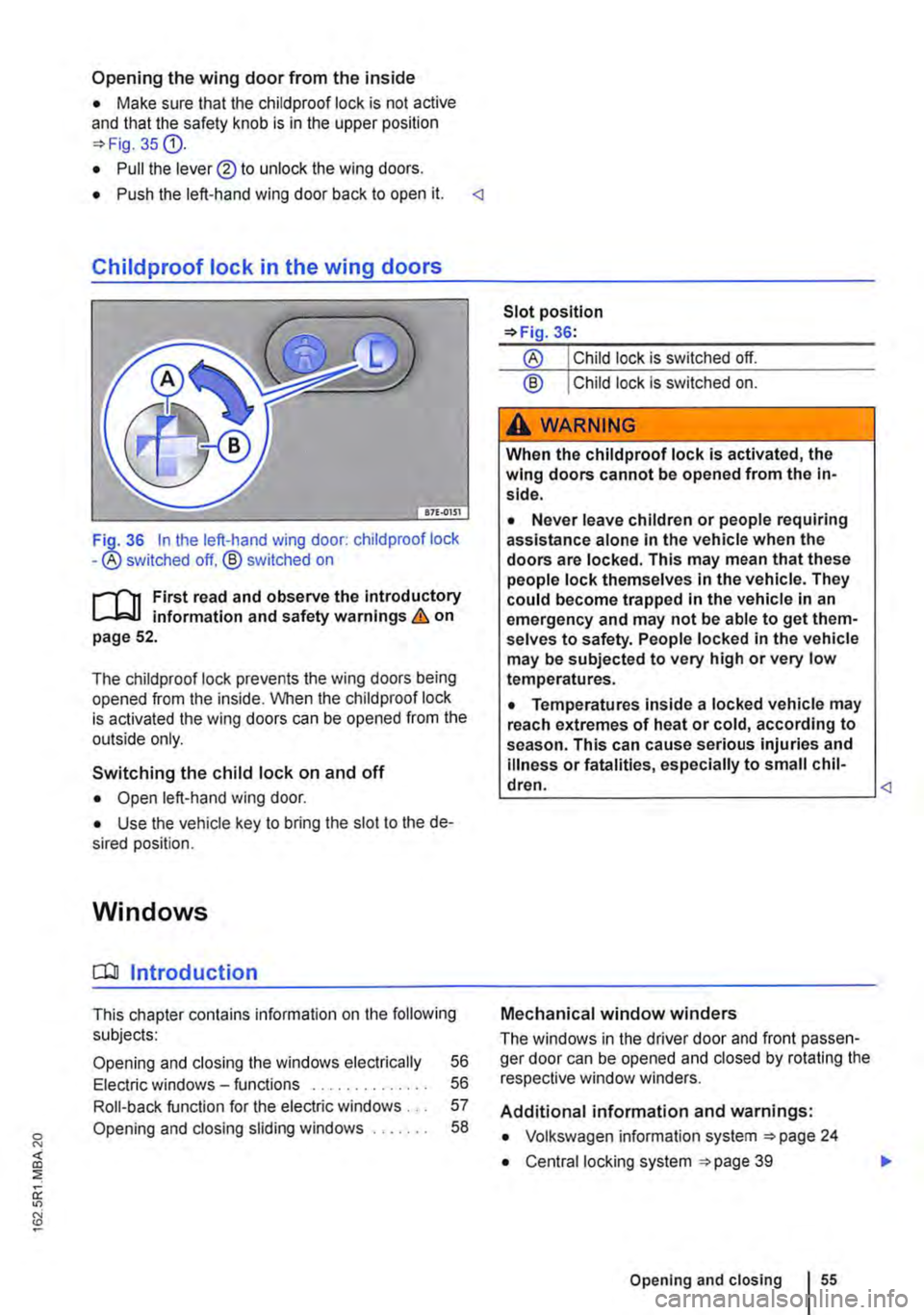
36 In the left-hand wing door: child proof lock -® switched off. ® switched on
,......,.., First read and observe the introductory information and safety warnings & on page 52.
The chiidproof lock prevents the wing doors being opened from the inside. When the child proof lock is activated the wing doors can be opened from the outside only.
Switching the child lock on and off
• Open left-hand wing door.
• Use the vehicle key to bring the slot to the de-sired position.
Windows
a:n Introduction
This chapter contains information on the following subjects:
Opening and closing the windows electrically 56
Electric windows -functions . . . . . . . . . . . . . . 56
Roll-back function for the electric windows . . . 57
Opening and closing sliding windows . . . . . . . 58
® Child lock is switched on.
A WARNING
When the child proof lock is activated, the wing doors cannot be opened from the in-side.
• Never leave children or people requiring assistance alone in the vehicle when the doors are locked. This may mean that these people lock themselves in the vehicle. They could become trapped in the vehicle in an emergency and may not be able to get them-selves to safety. People locked in the vehicle may be subjected to very high or very low temperatures.
• Temperatures inside a locked vehicle may reach extremes of heat or cold, according to season. This can cause serious injuries and illness or fatalities, especially to small chil-dren. <1
Mechanical window winders
The windows in the driver door and front passen-ger door can be opened and closed by rotating the respective window winders.
Additional information and warnings:
• Volkswagen information system 24
• Central locking system 39
Opening and closing I 55
..
Page 56 of 486
A WARNING
Always take care when using the mechanical or electric windows otherwise you could cause serious accidents or injuries.
• Windows should only be opened or closed when you are sure that nobody is In their op-erating area.
• Never leave children or people requiring assistance alone in the vehicle when the ve-hicle is locked. Electric windows can no lon-ger be opened in an emergency.
A WARNING (Continued)
• Always take all vehicle keys with you ev-ery time you leave the vehicle. The electric windows can still be operated using the but-tons several minutes after the ignition has been switched off, provided the driver door and the front passenger door are not opened.
CD
During sudden rain showers, water can enter the vehicle interior via open windows and cause damage to the vehicle.
'----------------: BSG-0031
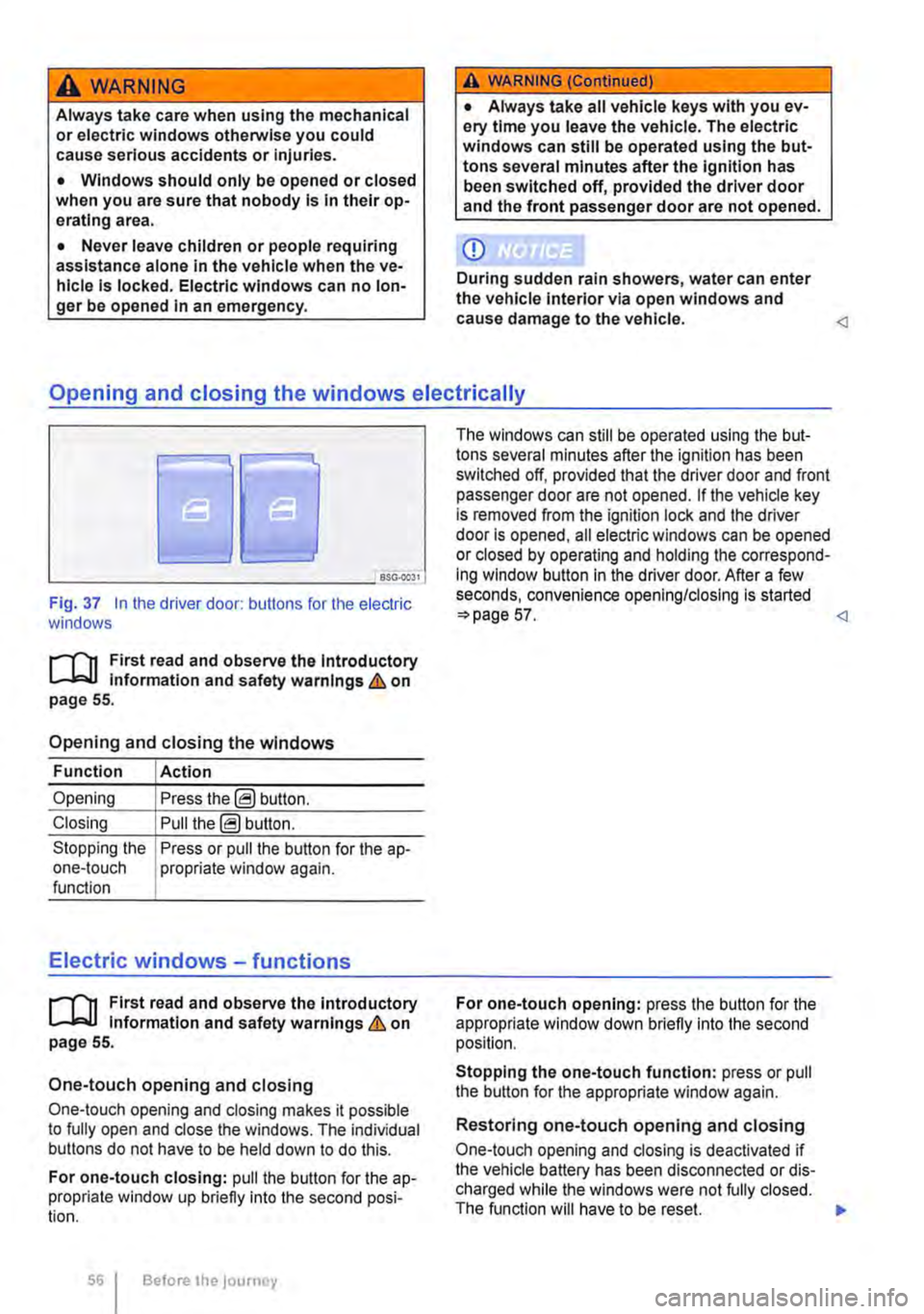
Fig. 37 In the driver door: butlons for the electric windows
r-111 First read and observe the Introductory L-J,::.JJ information and safety warnings & on page 55.
Opening and closing the windows
Function Action
Opening Press the@ button.
Closing Pull the@ button.
Stopping the Press or pull the button for the a p-one-touch propriate window again. function
Electric windows -functions
r-111 First read and observe the introductory L-J,::.JJ information and safety warnings & on page 55.
One-touch opening and closing
One-touch opening and closing makes it possible to fully open and close the windows. The individual buttons do not have to be held down to do this.
For one-touch closing: pull the butlon for the ap-propriate window up briefly into the second posi-tion.
56 Before the journey
The windows can still be operated using lhe but-tons several minutes after the ignition has been switched off, provided that the driver door and front passenger door are not opened. If the vehicle key is removed from the ignition lock and lhe driver door Is opened, all electric windows can be opened or closed by operating and holding lhe correspond-ing window button in the driver door. After a few seconds, convenience opening/closing is started 57.
Stopping the one-touch function: press or pull the button for the appropriate window again.
Restoring one-touch opening and closing
One-touch opening and closing is deactivated if the vehicle battery has been disconnected or dis-charged while the windows were not fully closed. The function will have to be reset.
Page 61 of 486
Sitting correctly and safely
Adjusting the seat position
COl Introduction
This chapter contains information on the following subjects:
The dangers of assuming an incorrect sitting position . . . .............. .
Correct sitting position . . . . . . ......... . Overview of seats ...................... .
Mechanical controls on the front seats ..... .
Electrical controls on the front seats ....... . Adjusting and removing head restraints .... .
Adjusting the steering wheel position ...... .
Additional information and warnings:
• Seat functions, front 69
• Seat functions, passenger compartment 72
• Seat belts 79
• Airbag system 87
• Child seats (accessories) 96
A WARNING
62
63
64
65
66
67
68
Assuming an incorrect sitting position in the vehicle can increase the risk of severe or fa-tal injuries during a sudden driving or brak-ing manoeuvre, in the event of a collision or accident, or if the airbags are triggered.
• All vehicle occupants must assume a cor-rect sitting position before setting off and maintain this position throughout the trip. This also applies to the fastening of seat belts.
• The number of vehicle occupants must never exceed the number of seats with seat belts in the vehicle.
• Always secure children in the vehicle in an authorised restraint system which Is suita-ble for their height and page 96, 87.
• Always keep your feet in the footweli while the vehicle is in motion. Never place your feet on the seat or dash panel, for example, and never ride with your feet out the window. When you are sat like this, the airbag and seat belt cannot provide optimal protection and could actually increase the risk of Injury during an accident.
A WARNING
Always adjust seats, seat belts and head re-straints to their correct position before any journey and ensure that ail passengers have fastened their seat belt.
• Push the front passenger seat as far back as possible.
• Adjust the driver seat so that there is at least 25 cm between your breastbone and the hub of the steering wheel. If your build makes it impossible to fulfil this requirement then you must contact a qualified workshop so they can make any necessary modifications.
• Never travel with the back rest tilted far back. The further back the backrest is tilted, the greater the risk of injury caused by incor-rect seat belt routing or an incorrect sitting position.
• Never travel with the back rest tilted far forwards. When a front airbag is triggered it could force the seat backrest backwards and injure vehicle occupants on the back seats.
• Adopt and maintain the greatest possible distance from the steering wheel and dash panel.
• You should always sit upright with your back against the seat back rest with the front seats properly adjusted. Do not position any body part too close where the airbags are fit-ted.
• The risk of serious injury Is increased for passengers on the rear seat if they are not sitting upright because the seat belts are in-correctly positioned.
A WARNING
Incorrect adjustment of the seats can cause accidents and serious injuries.
• The seats may only be adjusted when the vehicle is stationary, or else the seat could change position unexpectedly while the vehi-cle is in motion, leading to a loss of control of the vehicle. Furthermore, an incorrect seating position is adopted while adjusting the seat. .,.
Sitting correctly and safely 61