Page 177 of 744
177
2-1. Driving procedures
2
When driving
NOTICE
■
When encountering flooded roads
Do not drive on a road that has flooded after heavy rain etc. Doing so may
cause the following serious damage to the vehicle.
●Engine stalling
● Short in electrical components
● Engine damage caused by water immersion
In the event that you drive on a flooded road and the vehicle is flooded, be
sure to have your Toyota dealer check the following.
● Brake function
● Changes in quantity and quality of oil and fluid used for the engine, trans-
mission, transfer (4WD models), differentials, etc.
● Lubricant condition for the propeller shaft, bearings and suspension joints
(where possible) and the function of all joints, bearings, etc.
Page 180 of 744
180 2-1. Driving procedures
NOTICE
■To prevent battery discharge
Do not leave the engine switch in the ACC or ON position for long periods if
the engine is not running.
■ When starting the engine
●Do not crank for more than 30 seconds at a time. This may overheat the
starter and wiring systems.
● Do not race a cold engine.
● If the engine becomes difficult to start or stalls frequently, have the engine
checked immediately.
Page 182 of 744
182 2-1. Driving procedures
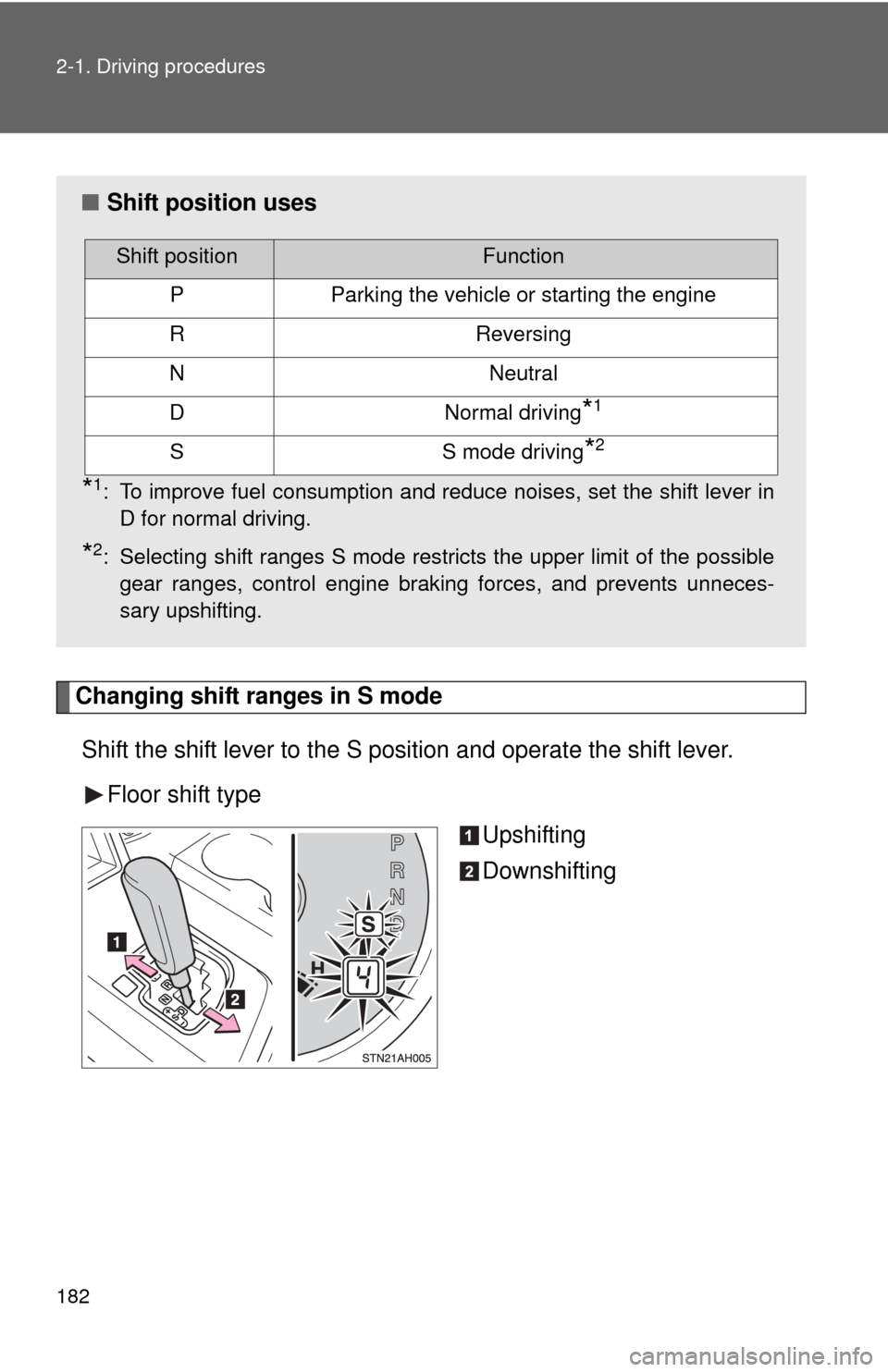
Changing shift ranges in S modeShift the shift lever to the S position and operate the shift lever. Floor shift type Upshifting
Downshifting
■Shift position uses
*1: To improve fuel consumption and reduce noises, set the shift lever in
D for normal driving.
*2: Selecting shift ranges S mode restricts the upper limit of the possiblegear ranges, control engine braking forces, and prevents unneces-
sary upshifting.
Shift positionFunction
PParking the vehicle or starting the engine
RReversing
NNeutral
DNormal driving*1
SS mode driving*2
Page 194 of 744
194 2-2. Instrument cluster
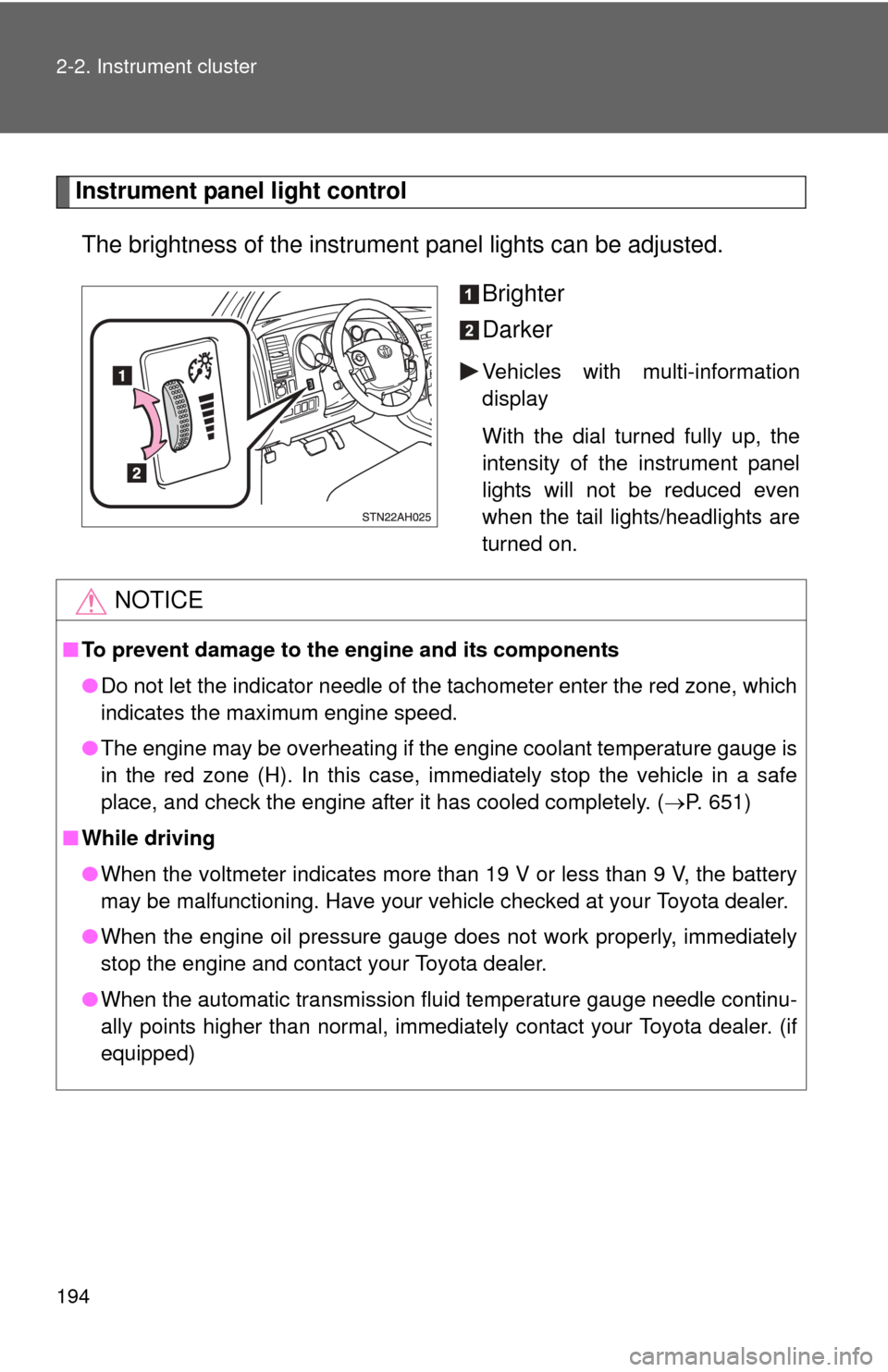
Instrument panel light controlThe brightness of the instrument panel lights can be adjusted.
Brighter
Darker
Vehicles with multi-information
display
With the dial turned fully up, the
intensity of the instrument panel
lights will not be reduced even
when the tail lights/headlights are
turned on.
NOTICE
■To prevent damage to the engine and its components
●Do not let the indicator needle of the tachometer enter the red zone, which
indicates the maximum engine speed.
● The engine may be overheating if the engine coolant temperature gauge is
in the red zone (H). In this case, immediately stop the vehicle in a safe
place, and check the engine after it has cooled completely. ( P. 651)
■ While driving
●When the voltmeter indicates more than 19 V or less than 9 V, the battery
may be malfunctioning. Have your vehicle checked at your Toyota dealer.
● When the engine oil pressure gauge does not work properly, immediately
stop the engine and contact your Toyota dealer.
● When the automatic transmission fluid temperature gauge needle continu-
ally points higher than normal, immediately contact your Toyota dealer. (if
equipped)
Page 214 of 744
214 2-3. Operating the lights and wipers
■Automatic light off system
●When the headlights come on: The headlights and tail lights automati-
cally turn off after 30 seconds when all doors are closed with the engine
switch turned to the ACC or LOCK position. (The lights turn off immedi-
ately if the button on the wireless remote control is pressed after all
doors are locked.)
● When only the tail lights come on: The tail lights turn off automatically
with the engine switch turned to the ACC or LOCK position and the
driver’s door is opened.
Vehicles with automatic light control system: If any of the doors is kept open,
the lights automatically turn off after 20 minutes.
To turn the lights on again, turn the engine switch to the ON position, or turn
the headlight switch off once and then back to the or position.
■ Customization
●That can be configured at Toyota dealer. (vehicles without multi-informa-
tion display)
Settings (automatic light off system) can be changed. (Customizable
features P. 696)
● It is possible to change the settings. (vehicles with multi-information dis-
play) (Feature customization P. 203)
NOTICE
■To prevent battery discharge
Do not leave the lights on longer than necessary when the engine is not run-
ning.
Page 232 of 744

232 2-4. Using other driving systems
In addition to the examples above, there are instances in which, because of
their shapes, signs and other objects may be judged by a sensor to be closer
than they are.
●The shape of the obstacle may prevent a sensor from detecting it. Pay
particular attention to the following obstacles:
• Wires, fences, ropes, etc.
• Cotton, snow and other materials that absorb sound waves
• Sharply-angled objects
• Low obstacles
• Tall obstacles with upper sections projecting outwards in the direction
of your vehicle
• A person near the vehicle (depending on the type of clothes worn)
• When the bumper is damaged.
■ Certification (Canada only)
This ISM device complies with Canadian ICES-001.
■ If the indicator is continuously on
Have the vehicle inspected by your Toyota dealer.
■ If the indicator remains blinking but do not sound the buzzer
Clean the sensors with soft cloth.
CAUTION
■Caution when using the intuitive parking assist
Observe the following precautions.
Failure to do so may result in the vehicle being unable to be driven safely
and possibly cause an accident.
●Do not use the sensor at speeds in excess of 6 mph (10 km/h).
● When moving forward or reversing, always check your surroundings for
safety and drive carefully.
● Do not attach any accessories within the sensor range.
Page 241 of 744
241
2-4. Using other
driving systems
2
When driving
NOTICE
■Handling of the camera
●As the camera has a water proof construction, do not detach, disassemble
or modify it. This may cause incorrect operation.
● Do not subject the camera to a strong impact.
● Do not allow organic solvent, car wax, window cleaner or glass coat to
adhere to the camera. If this happens, wipe it off as soon as possible.
● When washing the vehicle, do not apply intensive bursts of water to the
camera or camera area. Doing so may result in the camera malfunction-
ing.
● When replacing the tires, please consult your Toyota dealer. If you replace
the tires, the area displayed on the screen may change.
Page 249 of 744
249
2-4. Using other driving systems
2
When driving
Driving assist systems
To help enhance driving safety and performance, the following sys-
tems operate automatically in res ponse to various driving situations.
Be aware, however, that these systems are supplementary and
should not be relied upon too heavi ly when operating the vehicle.
■ABS (Anti-lock Brake System)
Helps to prevent wheel lock when the brakes are applied suddenly, or if
the brakes are applied while driving on a slippery road surface.
■Brake Assist
Generates an increased level of braking force after the brake pedal is
depressed, when the system detects a panic stop situation.
■VSC (Vehicle Stability Control)
Helps the driver to control skidding when swerving suddenly or turning
on slippery road surfaces.
■Trailer Sway Control
Helps the driver to control trailer sway by selectively applying brake
pressure for individual wheels and reducing engine torque when trailer
sway is detected.
Trailer Sway Control is part of the VSC system and will not operate if
VSC is turned off or experiences a malfunction.
■ TRAC (Traction Control) for 2WD models and 2WD mode on
4WD models
Maintains drive power and prevents the rear wheels from spinning
when starting the vehicle or accelerating on slippery roads.
■A-TRAC (Active Traction Control) for 4WD mode on 4WD
models
Maintains drive power and prevents all wheels from spinning when
starting the vehicle or accelerating on slippery roads.