Page 438 of 860

438 3-2. Using the audio system
SIENNA_U (OM45477U)
■Lens cleaners
P. 428
■ MP3 and WMA files
MP3 (MPEG Audio LAYER3) is a standard audio compression format.
Files can be compressed to approximately 1/10 of their original size by using
MP3 compression.
WMA (Windows Media Audio) is a Microsoft audio compression format.
This format compresses audio data to a size smaller than that of the MP3
format.
There is a limit to the MP3 and WMA file standards and to the media/formats
recorded by them that can be used.
● MP3 file compatibility
• Compatible standards
MP3 (MPEG1 LAYER3, MPEG2 LSF LAYER3)
• Compatible sampling frequencies MPEG1 LAYER3: 32, 44.1, 48 (kHz)
MPEG2 LSF LAYER3: 16, 22.05, 24 (kHz)
• Compatible bit rates MPEG1 LAYER3: 64, 80, 96, 112, 128, 160, 192, 224, 256, 320 (kbps)
• MPEG2 LSF LAYER3: 64, 80, 96, 112, 128, 144, 160 (kbps)
* Compatible with VBR
• Compatible channel modes: stereo, joint stereo, dual channel and monaural
● WMA file compatibility
• Compatible standards
WMA Ver. 7, 8, 9
• Compatible sampling frequencies 32, 44.1, 48 (kHz)
• Compatible bit rates Ver. 7, 8: CBR 48, 64, 80, 96, 128, 160, 192 (kbps)
Ver. 9: CBR 48, 64, 80, 96, 128, 160, 192, 256, 320 (kbps)
* Only compatible with 2-channel playback
Page 439 of 860

439
3-2. Using the audio system
3
Interior features
SIENNA_U (OM45477U)
●
Compatible media
Media that can be used for MP3 and WMA playback are CD-Rs and CD-
RWs.
Playback in some instances may not be possible, depending on the status
of the CD-R or CD-RW. Playback may not be possible or the audio may
jump if the disc is scratched or marked with fingerprints.
● Compatible disc formats
The following disc formats can be used.
• Disc formats: CD-ROM Mode 1 and Mode 2
CD-ROM XA Mode 2, Form 1 and Form 2
• File formats: ISO9660 Level 1, Level 2, (Romeo, Joliet) MP3 and WMA files written in any format other than those listed above
may not play correctly, and their file names and folder names may not
be displayed correctly.
Items related to standards and limitations are as follows.
• Maximum directory hierarchy: 8 levels
• Maximum length of folder names/file names: 32 characters
• Maximum number of folders: 192 (including the root)
• Maximum number of files per disc: 255
● File names
The only files that can be recogniz ed as MP3/WMA and played are those
with the extension .mp3 or .wma.
Page 440 of 860

440 3-2. Using the audio system
SIENNA_U (OM45477U)
●Multi-sessions
As the audio system is compatible with multi-sessions, it is possible to play
discs that contain MP3 and WMA files. However, only the first session can
be played.
● ID3 and WMA tags
ID3 tags can be added to MP3 files, making it possible to record the track
title and artist name, etc.
The system is compatible with ID3 Ver. 1.0, 1.1, and Ver. 2.2, 2.3 ID3 tags.
(The number of characters is based on ID3 Ver. 1.0 and 1.1.)
WMA tags can be added to WMA files, making it possible to record the
track title and artist name in the same way as with ID3 tags.
● MP3 and WMA playback
When a disc containing MP3 or WMA files is inserted, all files on the disc
are first checked. Once the file check is finished, the first MP3 or WMA\
file
is played. To make the file check finish more quickly, we recommend you
do not write in any files other than MP3 or WMA files or create any unnec-
essary folders.
If the discs contain a mixture of music data and MP3 or WMA format data,
only music data can be played.
Page 441 of 860

441
3-2. Using the audio system
3
Interior features
SIENNA_U (OM45477U)
●
Extensions
If the file extensions .mp3 and .wma are used for files other than MP3 and
WMA files, they will be mistakenly recognized and played as MP3 and
WMA files. This may result in large amounts of interference and damage
to the speakers.
● Playback
• To play MP3 file with steady sound quality, we recommend a fixed bit
rate of 128 kbps and a sampling frequency of 44.1 kHz.
• CD-R or CD-RW playback may not be possible in some instances, depending on the characteristics of the disc.
• There is a wide variety of freeware and other encoding software for MP3 and WMA files on the market, and depending on the status of the
encoding and the file format, poor sound quality or noise at the start of
playback may result. In some cases, playback may not be possible at
all.
• When files other than MP3 or WMA files are recorded on a disc, it may take more time to recognize the disc and in some cases, playback may
not be possible at all.
• Microsoft, Windows, and Windows Media are the registered trade- marks of Microsoft Corporation in the U.S. and other countries.
NOTICE
■CDs and adapters that cannot be used ( P. 429)
■ Player precautions ( P. 430)
Page 442 of 860
442
3-2. Using the audio system
SIENNA_U (OM45477U)
Operating an iPod
: If equipped
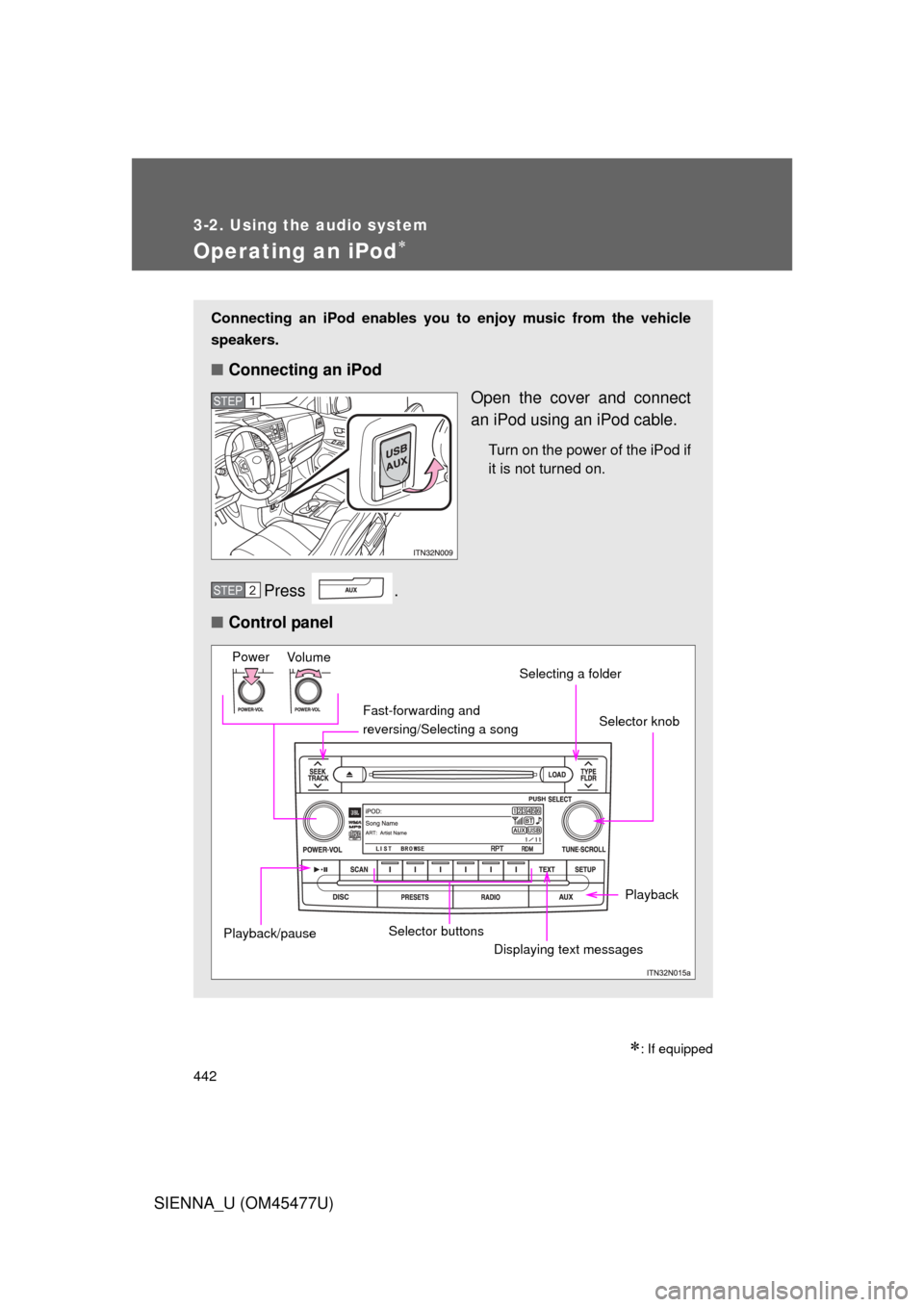
Connecting an iPod enables you to enjoy music from the vehicle
speakers.
■ Connecting an iPod
Open the cover and connect
an iPod using an iPod cable.
Turn on the power of the iPod if
it is not turned on.
Press .
■ Control panel
STEP1
STEP2
Fast-forwarding and
reversing/Selecting a song
Vo lu m e
PowerSelector knob
Displaying text messages
Selecting a folder
Selector buttons
Playback/pause
Playback
Page 443 of 860
443
3-2. Using the audio system
3
Interior features
SIENNA_U (OM45477U)
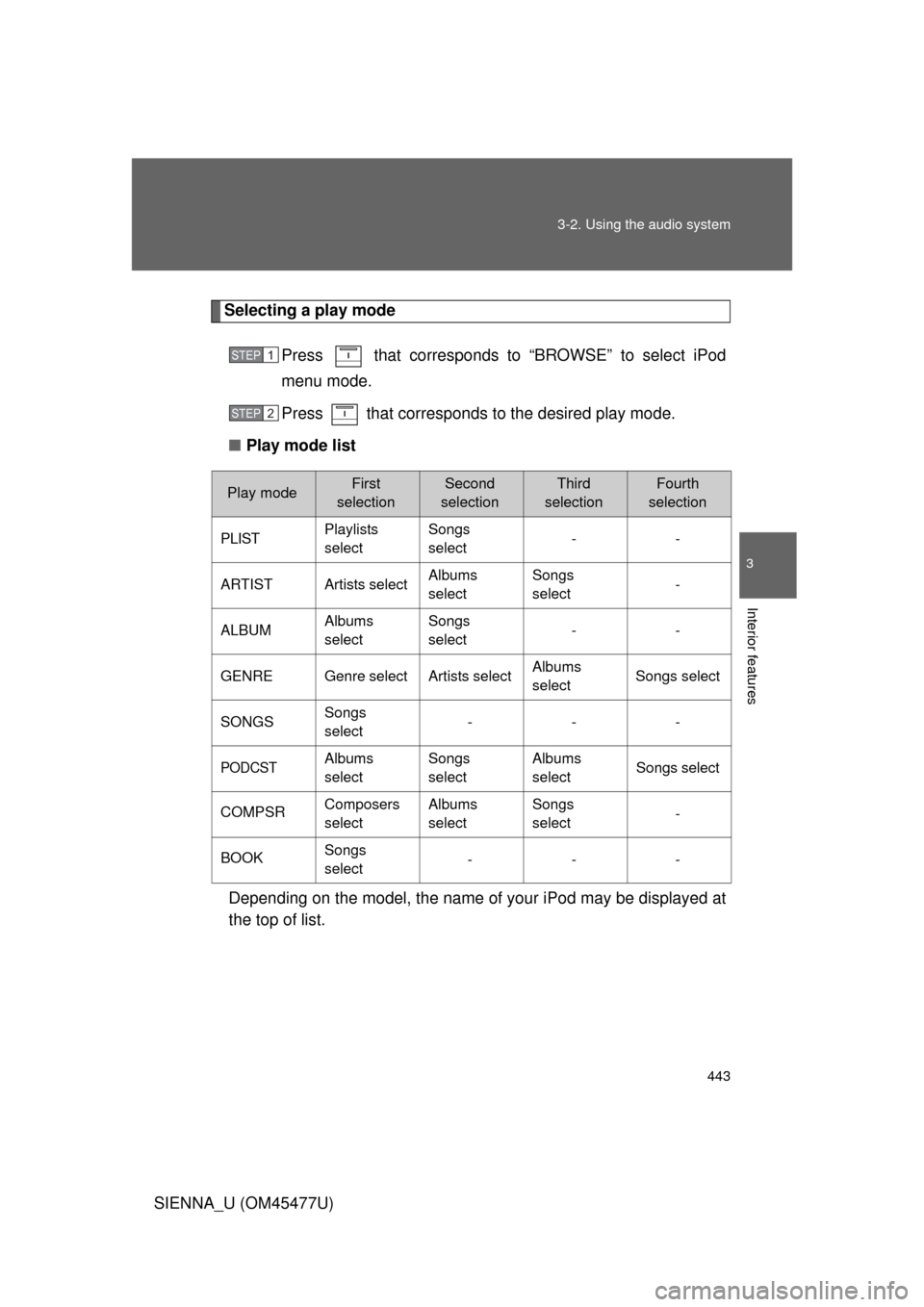
Selecting a play mode
Press that corresponds to “BROWSE” to select iPod
menu mode.
Press that corresponds to the desired play mode.
■ Play mode list
Depending on the model, the name of your iPod may be displayed at
the top of list.
STEP1
STEP2
Play modeFirst
selectionSecond
selectionThird
selectionFourth
selection
PLISTPlaylists
selectSongs
select--
ARTISTArtists selectAlbums
selectSongs
select-
ALBUMAlbums
selectSongs
select--
GENREGenre selectArtists selectAlbums
selectSongs select
SONGSSongs
select---
PODCSTAlbums
selectSongs
selectAlbums
selectSongs select
COMPSRComposers
selectAlbums
selectSongs
select-
BOOKSongs
select---
Page 444 of 860
444 3-2. Using the audio system
SIENNA_U (OM45477U)■
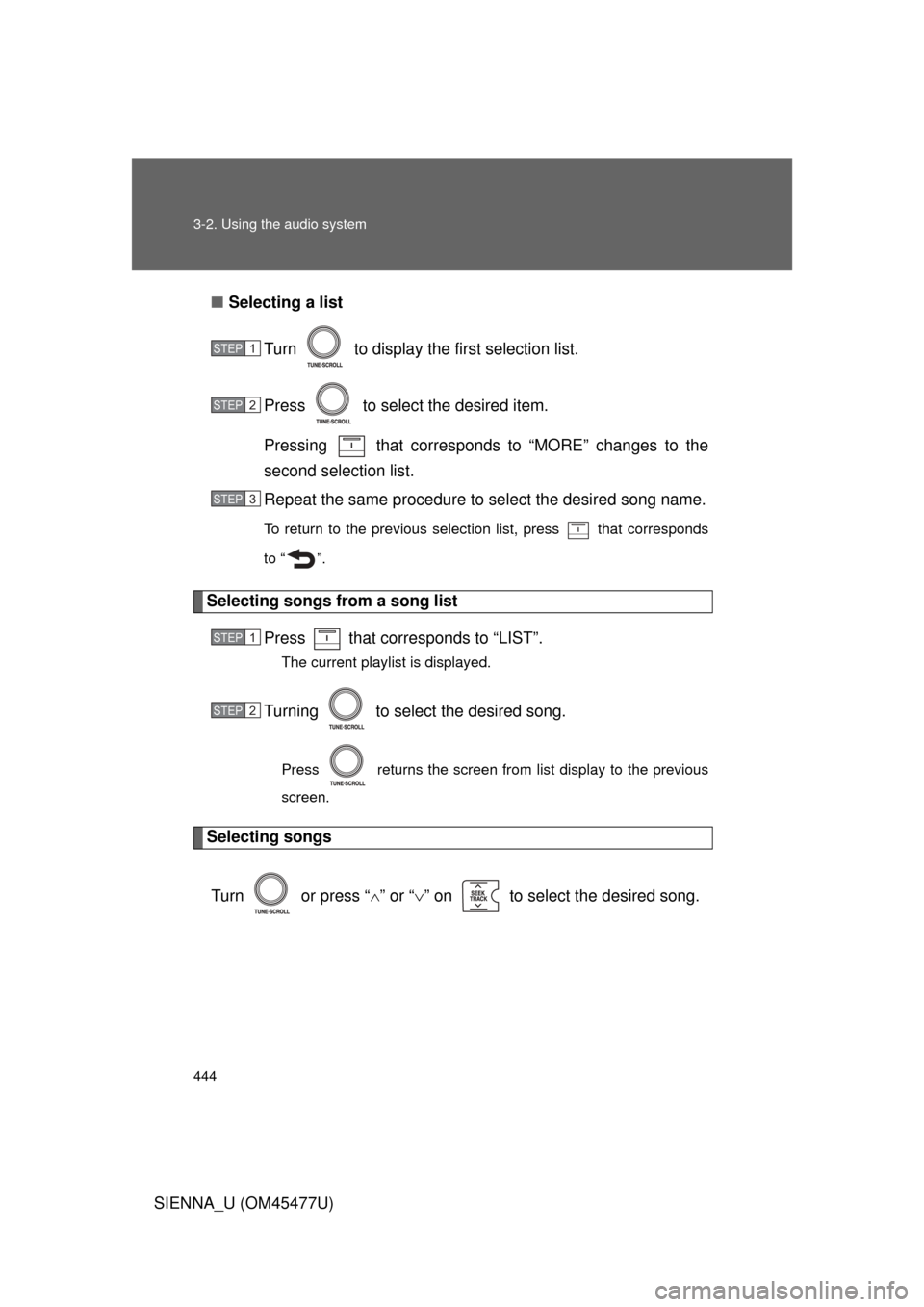
Selecting a list
Turn to display the first selection list.
Press to select the desired item.
Pressing that corresponds to “MORE” changes to the
second selection list.
Repeat the same procedure to select the desired song name.
To return to the previous selection list, press that corresponds
to “ ”.
Selecting songs from a song list
Press that corresponds to “LIST”.
The current playlist is displayed.
Turning to select the desired song.
Press returns the screen from list display to the previous
screen.
Selecting songs
Turn or press “ ” or “ ” on to select the desired song.
STEP1
STEP2
STEP3
STEP1
STEP2
Page 445 of 860
445
3-2. Using the audio system
3
Interior features
SIENNA_U (OM45477U)
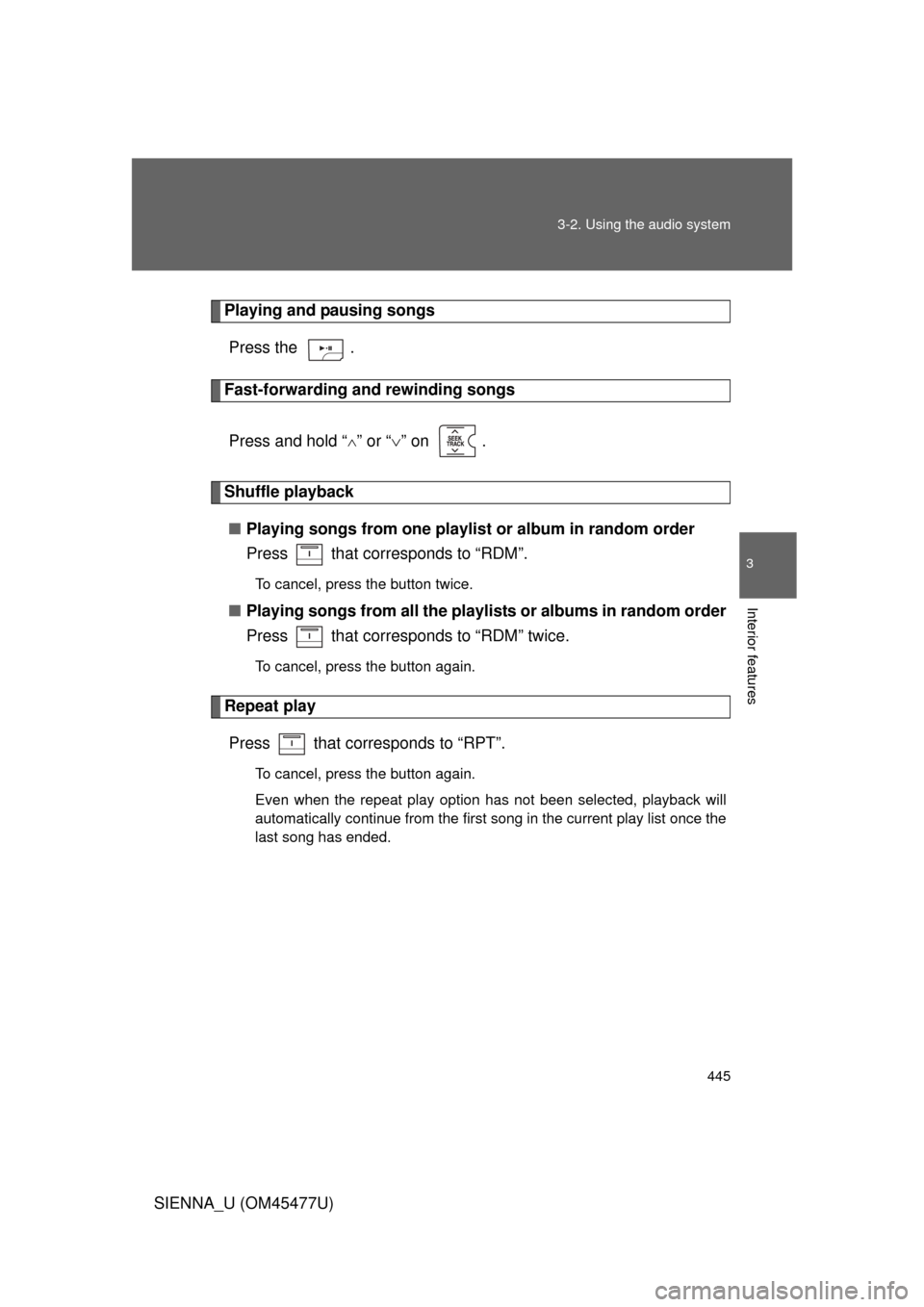
Playing and pausing songs
Press the .
Fast-forwarding and rewinding songs
Press and hold “
” or “ ” on .
Shuffle playback
■ Playing songs from one playlis t or album in random order
Press that corresponds to “RDM”.
To cancel, press the button twice.
■ Playing songs from a ll the playlists or albums in random order
Press that corresponds to “RDM” twice.
To cancel, press the button again.
Repeat play
Press that corresponds to “RPT”.
To cancel, press the button again.
Even when the repeat play option has not been selected, playback will
automatically continue from the first song in the current play list once the
last song has ended.