Page 763 of 860
5
When trouble arises
763
5-2. Steps to take in an emergency
SIENNA_U (OM45477U)
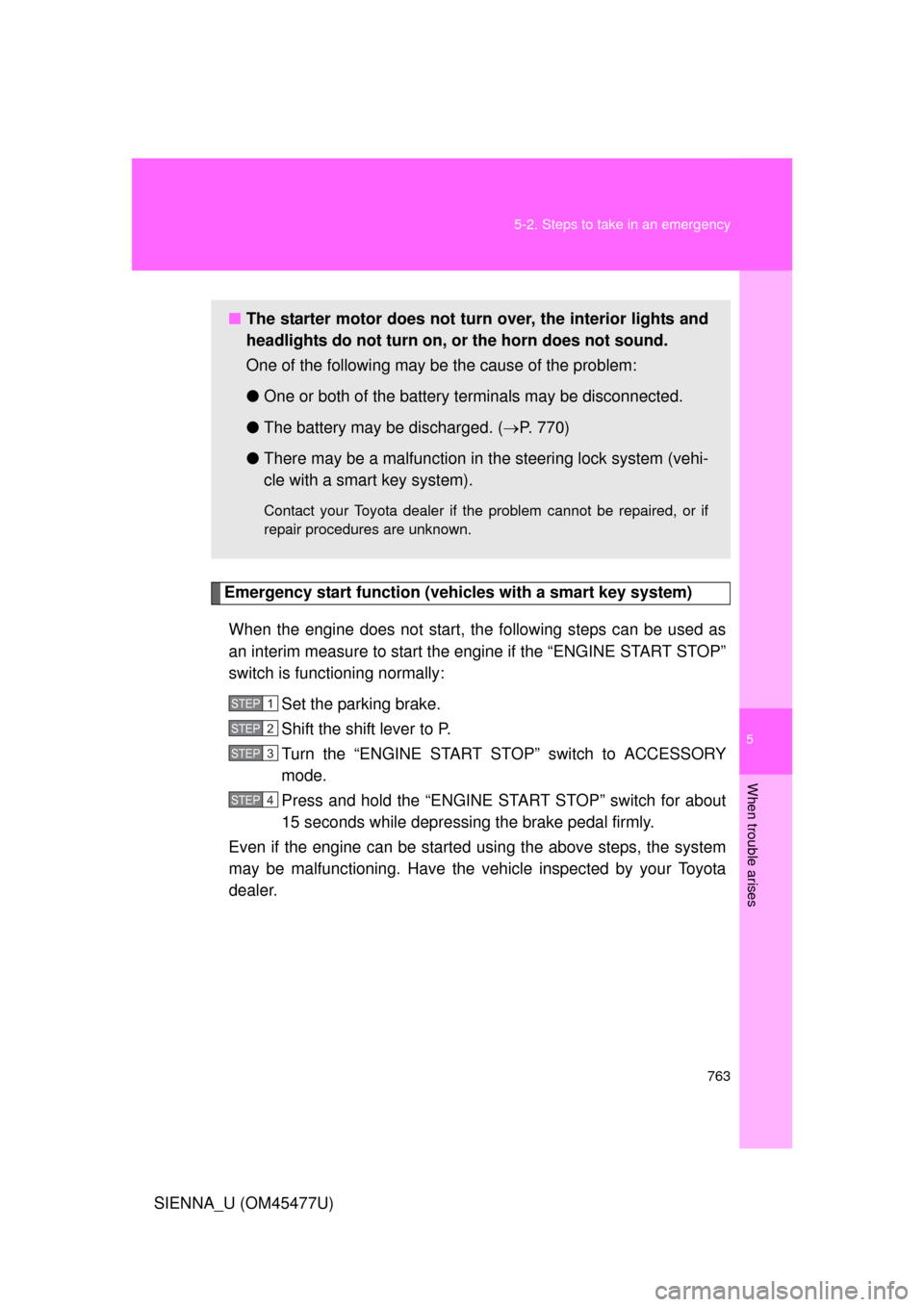
Emergency start function (vehicles with a smart key system)
When the engine does not start, the following steps can be used as
an interim measure to start the engine if the “ENGINE START STOP”
switch is functioning normally: Set the parking brake.
Shift the shift lever to P.
Turn the “ENGINE START STOP” switch to ACCESSORY
mode.
Press and hold the “ENGINE START STOP” switch for about
15 seconds while depressing the brake pedal firmly.
Even if the engine can be start ed using the above steps, the system
may be malfunctioning. Have the vehicle inspected by your Toyota
dealer.
■ The starter motor does not turn over, the interior lights and
headlights do not turn on, or the horn does not sound.
One of the following may be the cause of the problem:
● One or both of the battery terminals may be disconnected.
● The battery may be discharged. ( P. 770)
● There may be a malfunction in the steering lock system (vehi-
cle with a smart key system).
Contact your Toyota dealer if the problem cannot be repaired, or if
repair procedures are unknown.
STEP1
STEP2
STEP3
STEP4
Page 764 of 860
764
5-2. Steps to take in an emergency
SIENNA_U (OM45477U)
If the shift lever cannot be shifted from P
If the shift lever cannot be shifted with your foot on the brake pedal,
there may be a problem with the shift lock system (a system to pre-
vent accidental operation of the shift lever). Have the vehicle
inspected by your Toyo ta dealer immediately.
The following steps may be used as an emergency measure to
ensure that the shift lever can be shifted:
Set the parking brake.
Vehicles without a smart ke y system: Turn the engine
switch to the “ACC” position.
Vehicles with a smart key system: Turn the “ENGINE
START STOP” switch to ACCESSORY mode.
Depress the brake pedal.
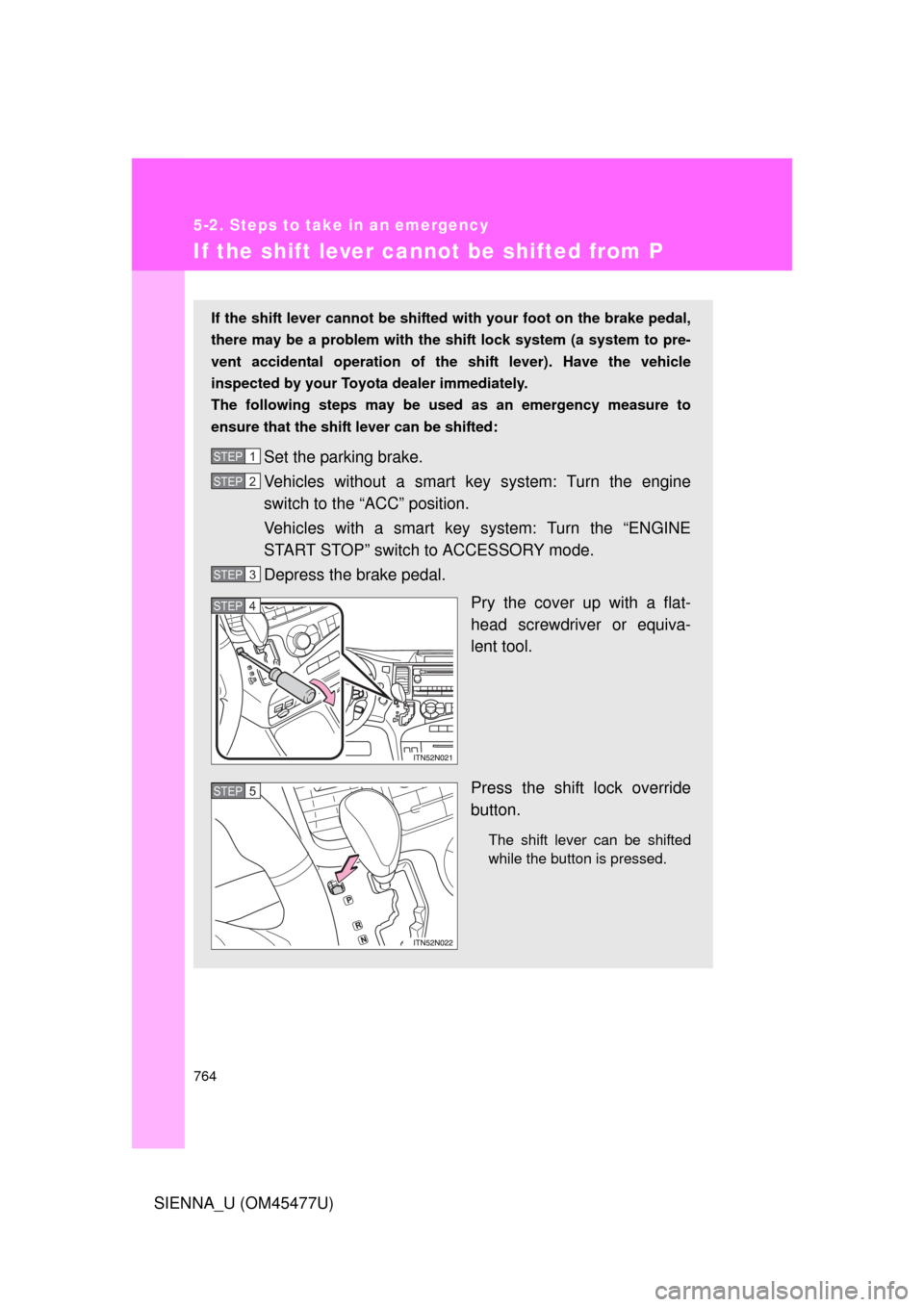
Pry the cover up with a flat-
head screwdriver or equiva-
lent tool.
Press the shift lock override
button.
The shift lever can be shifted
while the button is pressed.
STEP1
STEP2
STEP3
STEP4
STEP5
Page 765 of 860
5
When trouble arises
765
5-2. Steps to take in an emergency
SIENNA_U (OM45477U)
■
If the beep sounds continuously when the shift lever is shifted from P
(vehicles with an AUTO ACCESS SEAT)
The AUTO ACCESS SEAT may not be locked in place.
For details, refer to “AUTO A CCESS SEAT OWNER’S MANUAL”.
Page 767 of 860
5
When trouble arises
767
5-2. Steps to take in an emergency
SIENNA_U (OM45477U)
If the electronic key does not operate properly
Locking and unlocking the doors and key linked functions
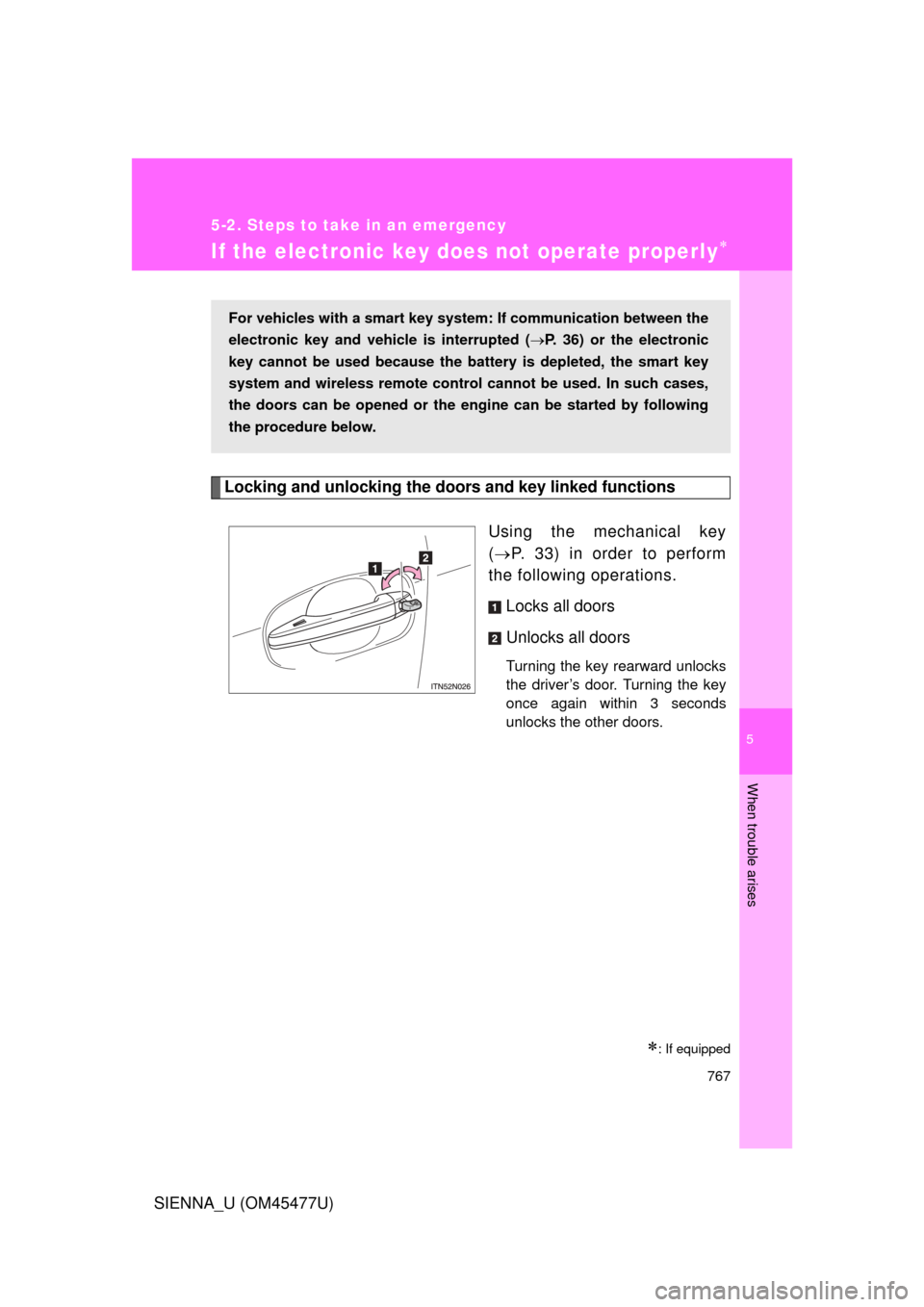
Using the mechanical key
( P. 33) in order to perform
the following operations.
Locks all doors
Unlocks all doors
Turning the key rearward unlocks
the driver’s door. Turning the key
once again within 3 seconds
unlocks the other doors.
: If equipped
For vehicles with a smart key system : If communication between the
electronic key and vehic le is interrupted (P. 36) or the electronic
key cannot be used because the batt ery is depleted, the smart key
system and wireless remote contro l cannot be used. In such cases,
the doors can be opened or the engine can be started by following
the procedure below.
Page 769 of 860
5
When trouble arises
769
5-2. Steps to take in an emergency
SIENNA_U (OM45477U)
■
Stopping the engine
Shift the shift lever to P and press the “ENGINE START STOP” switch as
you normally do when stopping the engine.
■ Replacing the key battery
As this above procedure is a temporary measure, it is recommended that the
electronic key battery be replaced immediately when the battery depletes.
(P. 693)
■ Alarm (if equipped)
Using the mechanical key to lock the doors will not set the alarm system.
If a door is unlocked using the mechanical key when the alarm system is set,
the alarm may be triggered. ( P. 162)
Page 781 of 860
5
When trouble arises
781
5-2. Steps to take in an emergency
SIENNA_U (OM45477U)
CAUTION
■
If the engine has to be turned off while driving
● Power assist for the brakes and steering wheel will be lost, making the
brake pedal harder to depress and the steering wheel heavier to turn.
Decelerate as much as possible before turning off the engine.
● Vehicles without a smart key system: Never attempt to remove the key, as
doing so will lock the steering wheel.
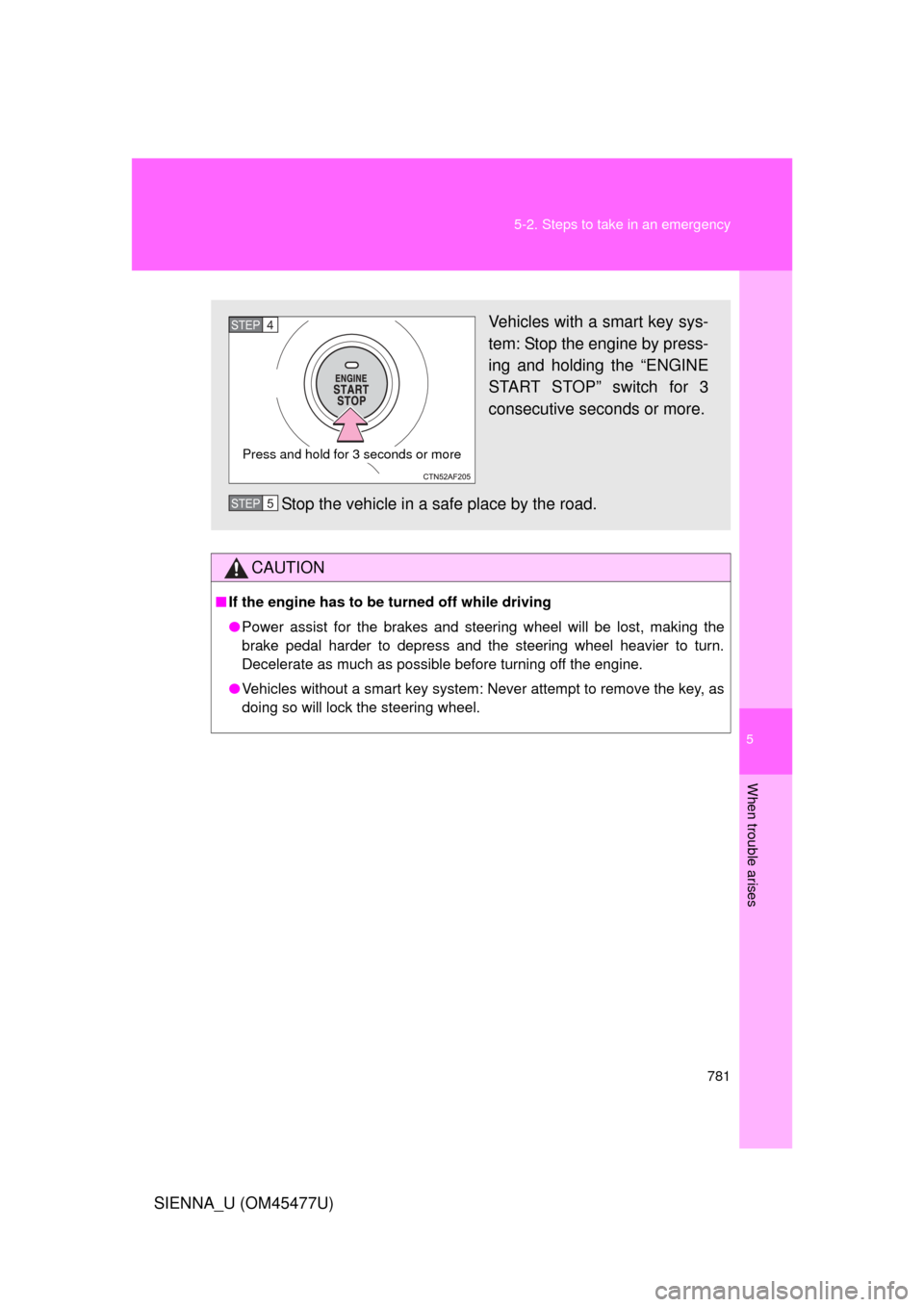
Vehicles with a smart key sys-
tem: Stop the engine by press-
ing and holding the “ENGINE
START STOP” switch for 3
consecutive seconds or more.
Stop the vehicle in a safe place by the road.
Press and hold for 3 seconds or more
STEP4
STEP5
Page 791 of 860
791
6-1. Specifications
6
Vehicle specifications
SIENNA_U (OM45477U)
Electrical system
Automatic transaxle
*: The fluid capacity is a reference q
uantity. If replacement is necessary,
contact your Toyota dealer.
Battery
Open voltage* at
68 F (20 C): 12.6 12.8 V Fully charged
12.2 12.4 V Half charged
11 . 8
12.0 V Discharged
(
*: Voltage checked 20 minutes after the engine
and all the lights turned off)
Charging rates 5 A max.
Fluid capacity*
2WD models
AWD models6.9 qt. (6.5 L, 5.7 Imp.qt.)
7.1 qt. (6.7 L, 5.9 Imp.qt.)
Fluid type
Toyota Genuine ATF WS
NOTICE
■Transmission fluid type
Using transmission fluid other than “Toyota Genuine ATF WS” may cause
deterioration in shift quality, locking up of your transmission accompanied by
vibration and, ultimately, damage to the vehicle’s transmission.
Page 815 of 860
815
6
Vehicle specifications
SIENNA_U (OM45477U)
6-2. Customization
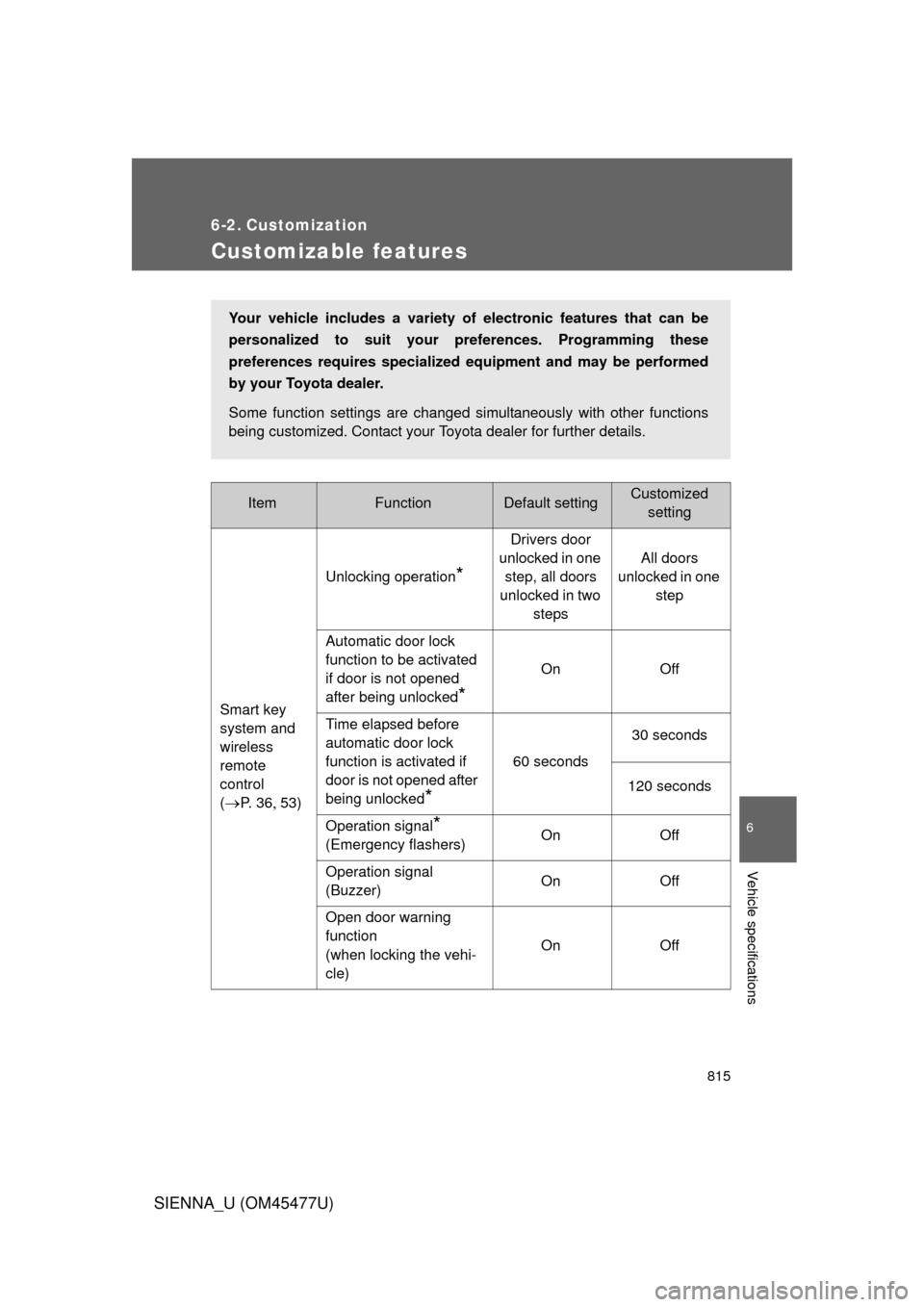
Customizable features
ItemFunctionDefault settingCustomizedsetting
Smart key
system and
wireless
remote
control
(
P. 3 653) Unlocking operation
*
Drivers door
unlocked in one step, all doors
unlocked in two steps All doors
unlocked in one step
Automatic door lock
function to be activated
if door is not opened
after being unlocked
*
On Off
Time elapsed before
automatic door lock
function is activated if
door is not opened after
being unlocked
*
60 seconds 30 seconds
120 seconds
Operation signal
*
(Emergency flashers) On Off
Operation signal
(Buzzer) On Off
Open door warning
function
(when locking the vehi-
cle) On Off
Your vehicle includes a variety of
electronic features that can be
personalized to suit your preferences. Programming these
preferences requires specialized eq uipment and may be performed
by your Toyota dealer.
Some function settings are changed simultaneously with other functions
being customized. Contact your Toyota dealer for further details.