Page 389 of 860
389
3-1. Using the air conditioning system
and defogger
3
Interior features
SIENNA_U (OM45477U)
Using the automatic mode
Press .
The air conditioning system will begin to operate. In outside air or
recirculated air mode, air outlets, fan speed and air conditioning on/
off are automatically adjusted according to the temperature setting.
“AUTO” will be displayed on the multi-information display.
Turn the temperature control dial clockwise (warm) or coun-
terclockwise (cool).
The temperature for the driver and passenger seat can be set sepa-
rately.
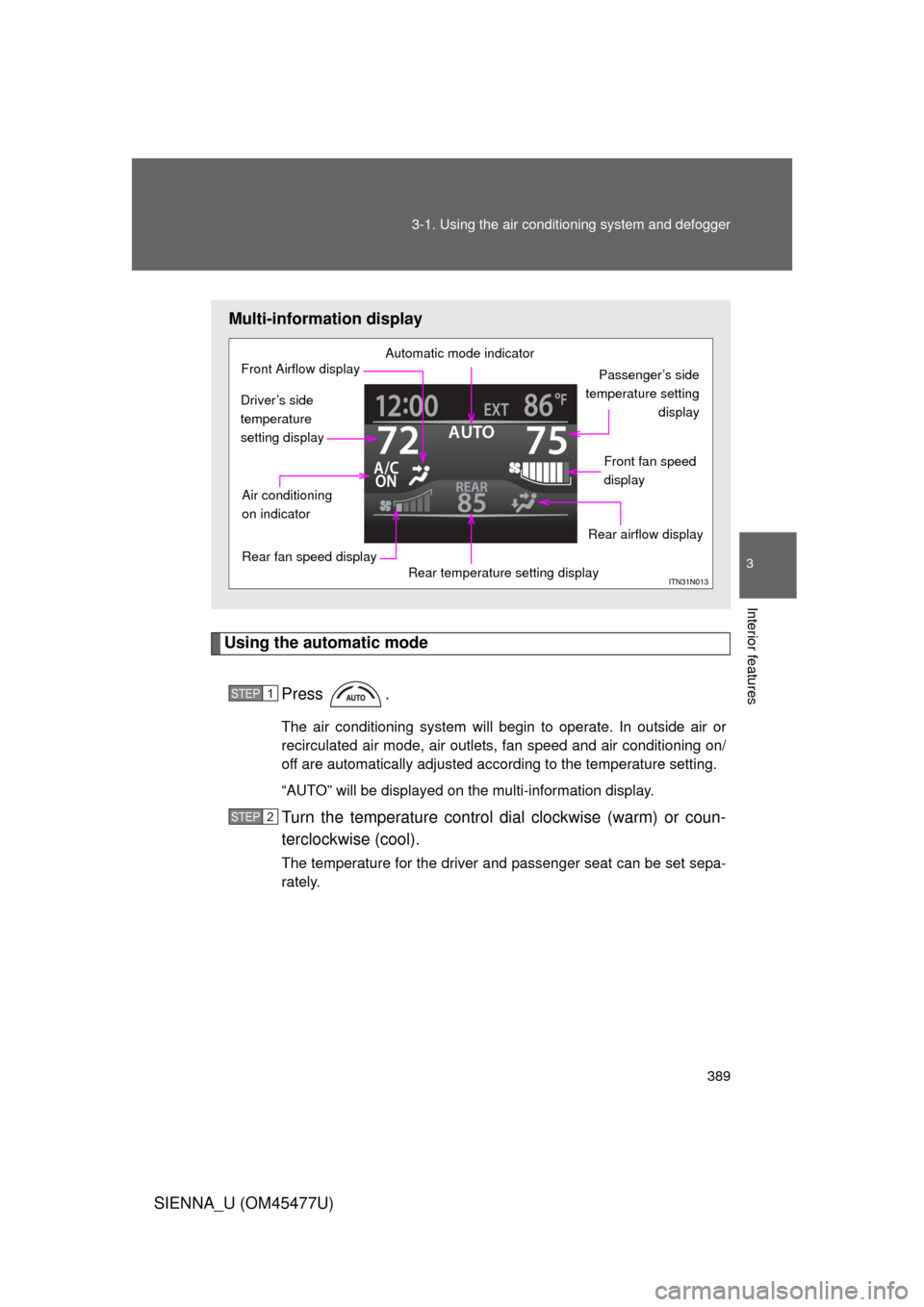
Multi-information display
Automatic mode indicator
Passenger’s side
temperature setting display
Front fan speed
display
Rear airflow display
Rear temperature setting display
Rear fan speed display
Air conditioning
on indicator
Front Airflow display
Driver’s side
temperature
setting display
STEP1
STEP2
Page 390 of 860
390 3-1. Using the air conditioning system and defogger
SIENNA_U (OM45477U)
Adjusting the settings
■ Adjusting the temperature setting
Turn the temperature control dial clockwise (warm) or counter-
clockwise (cool).
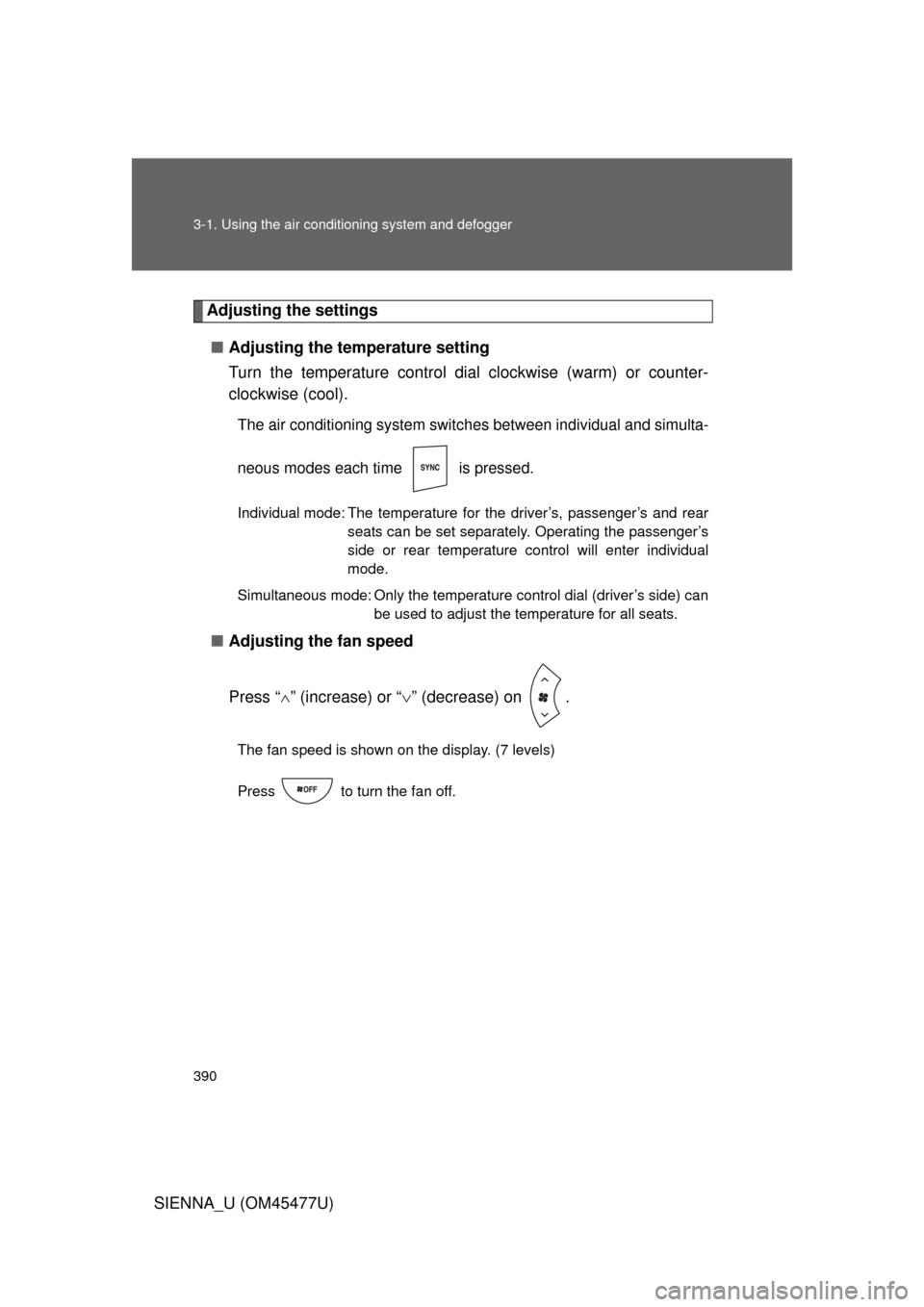
The air conditioning system switch es between individual and simulta-
neous modes each time is pressed.
Individual mode: The temperature for the driver’s, passenger’s and rear seats can be set separately. Operating the passenger’s
side or rear temperature control will enter individual
mode.
Simultaneous mode: Only the temperature control dial (driver’s side) can be used to adjust the temperature for all seats.
■Adjusting the fan speed
Press “ ” (increase) or “ ” (decrease) on .
The fan speed is shown on the display. (7 levels)
Press to turn the fan off.
Page 391 of 860
391
3-1. Using the air conditioning system
and defogger
3
Interior features
SIENNA_U (OM45477U)
Adjusting the settings manually
■ Basic setting
To turn on the air conditioning system and adjust the fan
speed, press “ ” on to increase the fan speed and “ ” to
decrease the fan speed.
Press to turn the fan off.
To adjust the temperature setting, turn the temperature control
dial (driver’s side) clockwise to increase the temperature and
turn the temperature control dial (driver’s side) counterclock-
wise to decrease the temperature.
When is pressed or the passenger’s side temperature
control is pressed, the temper ature for the driver and passen-
ger seats can be adjusted separately.
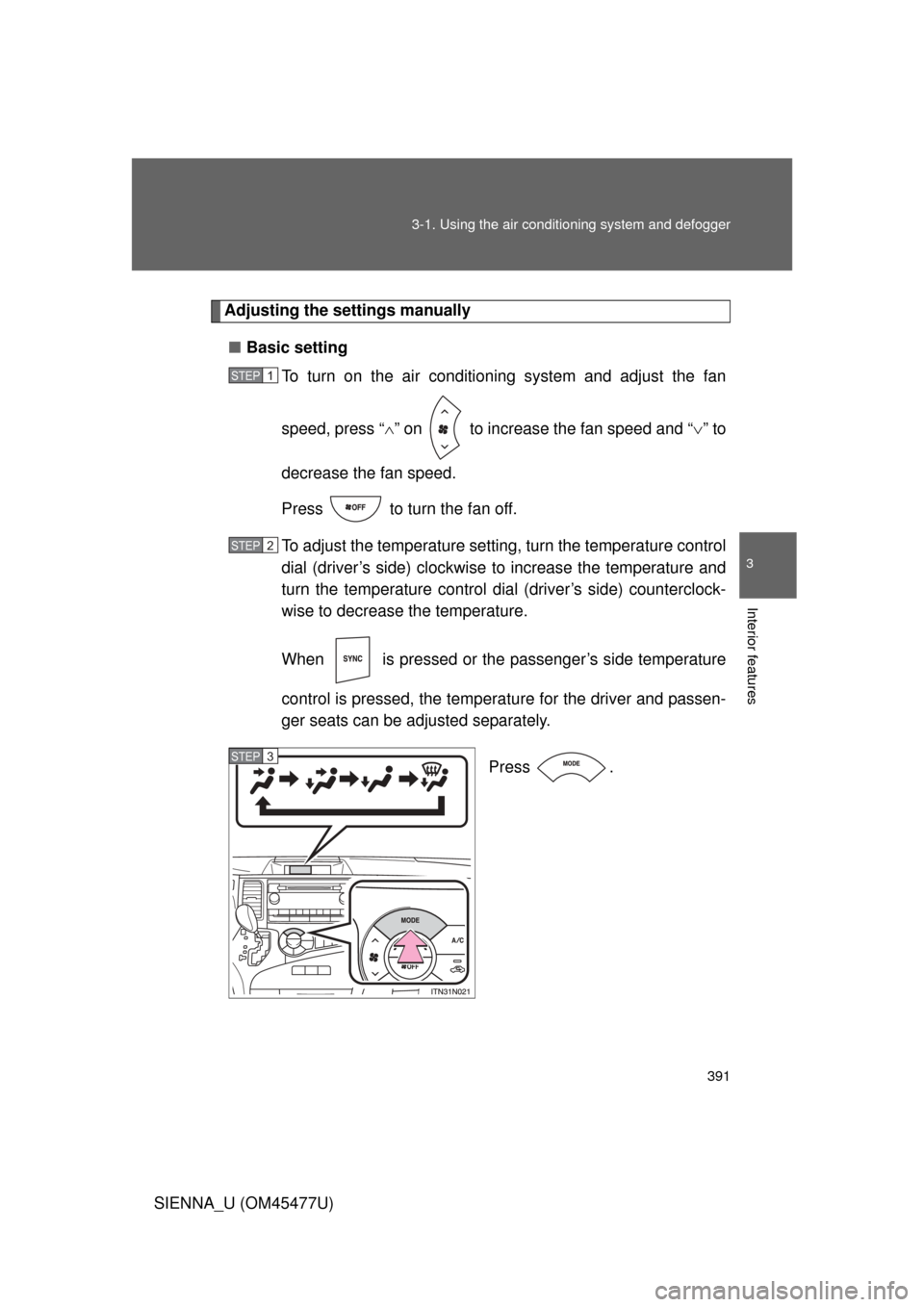
Press .
STEP1
STEP2
STEP3
Page 397 of 860
397
3-1. Using the air conditioning system
and defogger
3
Interior features
SIENNA_U (OM45477U)
■When the “A/C ON” in the mu lti-information display flashes
Press
and turn off the air conditioning system before turning it on
once more. There may be a problem in the air conditioning system if the indi-
cator light continues to flash. Turn the air conditioning system off and have it
inspected by your Toyota dealer.
■ Air conditioning odors
● During use, various odors from inside and outside the vehicle may enter
into and accumulate in the air conditioning system. This may then cause
odor to be emitted from the vents.
● To reduce potential odors from occurring:
• It is recommended that the air conditioning system be set to outside air
mode prior to turning the vehicle off.
• The start timing of the blower may be delayed for a short period of time immediately after the air conditioning system is started in automatic
mode.
CAUTION
■To prevent the windshield from fogging up
Do not use during cool air operation in extremely humid weather. The
difference between the temperature of the outside air and that of the wind-
shield can cause the outer surface of the windshield to fog up, blocking your
vision.
NOTICE
■To prevent battery discharge
Do not leave the air conditioning system on longer than necessary when the
engine is stopped.
Page 398 of 860
398
3-1. Using the air conditioning system and defogger
SIENNA_U (OM45477U)
Rear manual air conditioning system
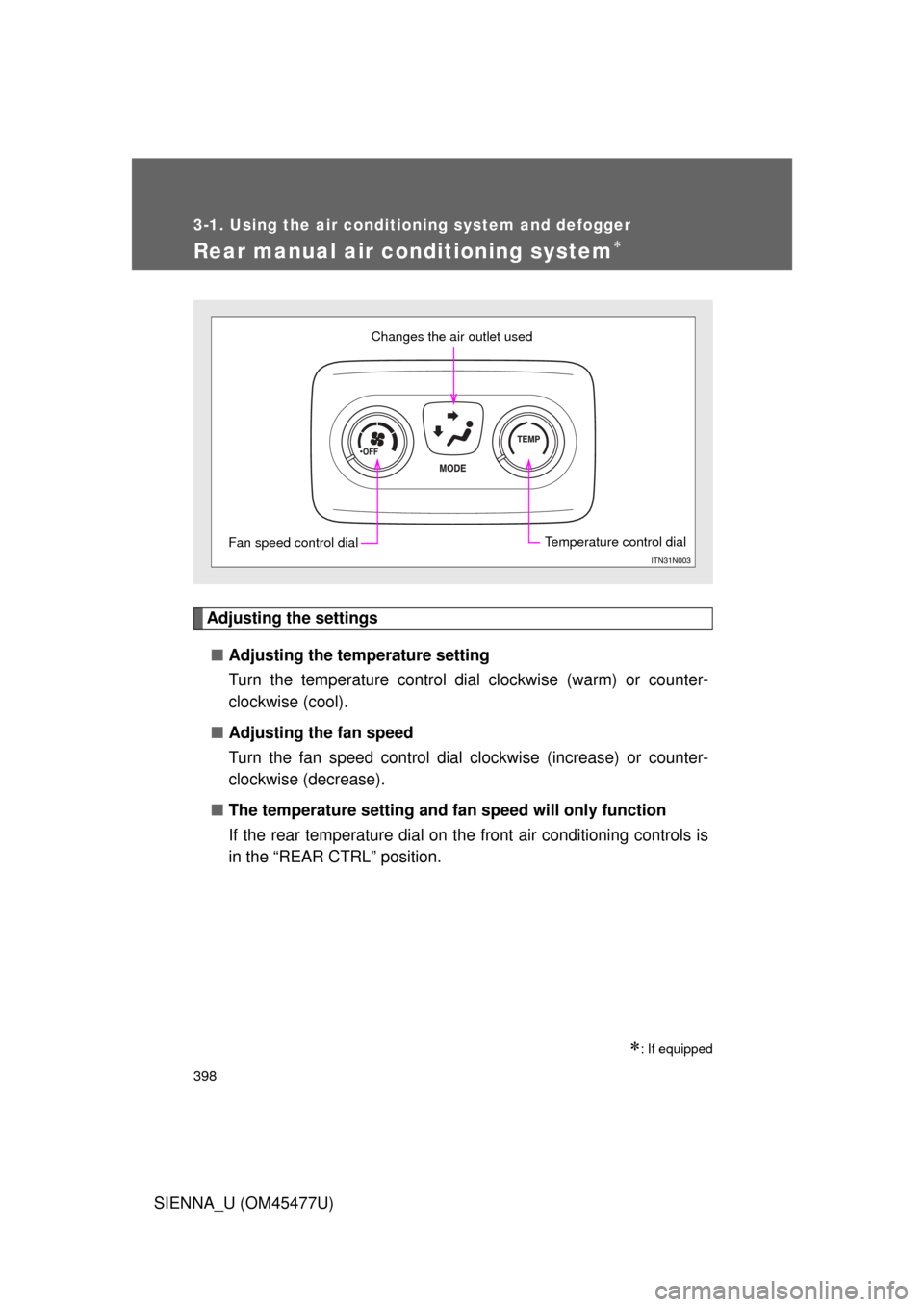
Adjusting the settings■ Adjusting the temperature setting
Turn the temperature control dial clockwise (warm) or counter-
clockwise (cool).
■ Adjusting the fan speed
Turn the fan speed control dial clockwise (increase) or counter-
clockwise (decrease).
■ The temperature setting and fa n speed will only function
If the rear temperature dial on the front air conditioning controls is
in the “REAR CTRL” position.
: If equipped
Changes the air outlet used
Fan speed control dialTemperature control dial
Page 418 of 860
418 3-2. Using the audio system
SIENNA_U (OM45477U)
Silencing the sound (type B and C)Press .
Press the button again to turn the system back on.
■ When the battery is disconnected (type A only)
All preset stations are erased.
■ Radio antenna type
● Detachable antenna (type A and B)
To remove a detachable antenna, carefully turn it counterclockwise.
● Wire antenna (type C)
The radio antenna is mounted inside the rear quarter window.
■ Reception sensitivity
● Type B and C Cargo loaded on the roof luggage carrier, especially
metal objects, may adversely affect the reception of XM
® Satellite Radio.
● Maintaining perfect radio reception at all times is difficult due to the con-
tinually changing position of the antenna, differences in signal strength
and surrounding objects, such as trains, transmitters, etc.
● Type C The radio antenna is mounted inside the rear quarter window.
To maintain clear radio reception, do not attach metallic window tinting or
other metallic objects to the antenna wire mounted inside the rear quarter
window.
Page 489 of 860
489
3-4. Using the rear audio system
3
Interior features
SIENNA_U (OM45477U)
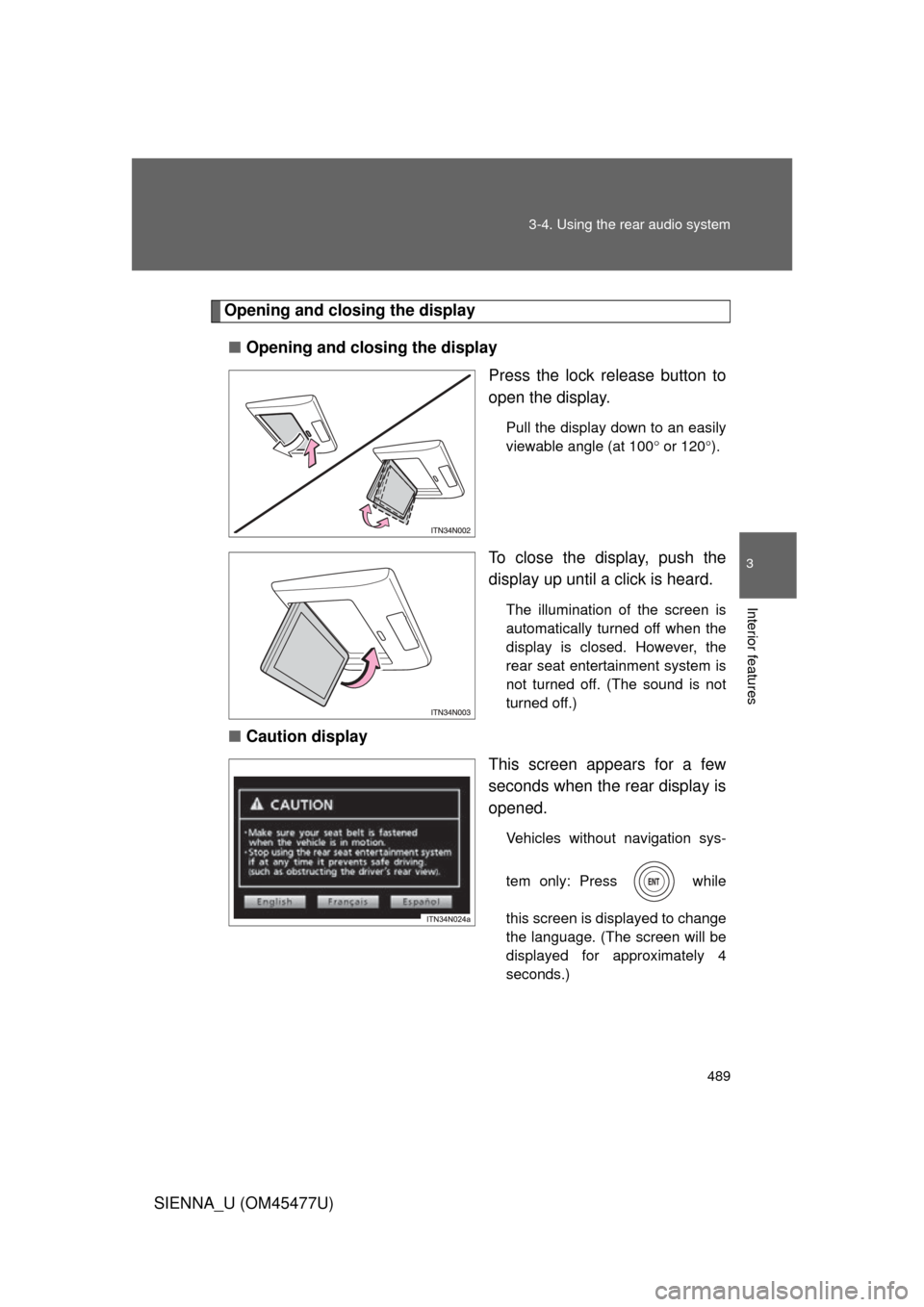
Opening and closing the display
■ Opening and closing the display
Press the lock release button to
open the display.
Pull the display down to an easily
viewable angle (at 100 or 120 ).
To close the display, push the
display up until a click is heard.
The illumination of the screen is
automatically turned off when the
display is closed. However, the
rear seat entertainment system is
not turned off. (The sound is not
turned off.)
■ Caution display
This screen appears for a few
seconds when the rear display is
opened.
Vehicles without navigation sys-
tem only: Press while
this screen is displayed to change
the language. (The screen will be
displayed for approximately 4
seconds.)
Page 492 of 860
492 3-4. Using the rear audio system
SIENNA_U (OM45477U)
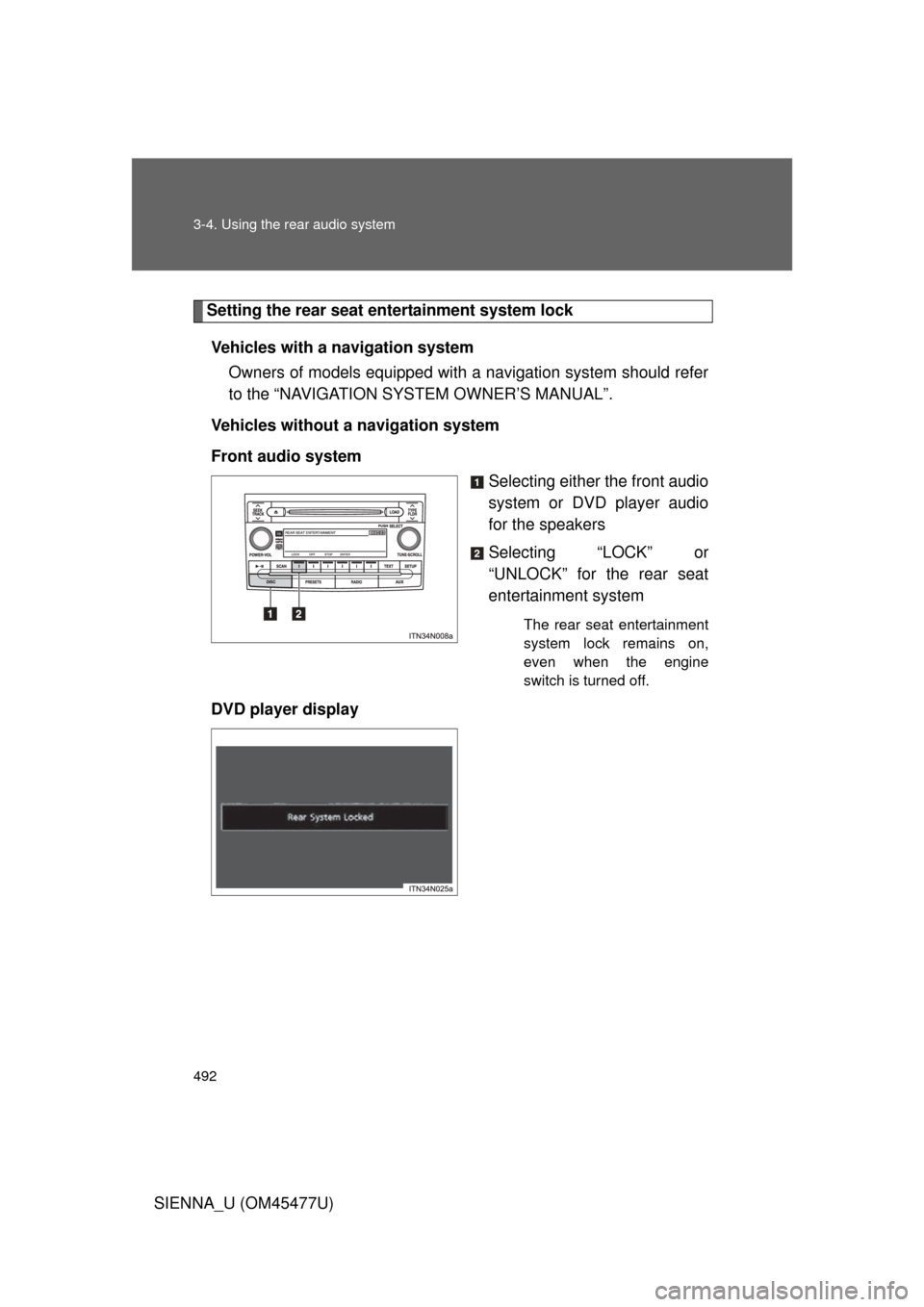
Setting the rear seat entertainment system lockVehicles with a navigation system Owners of models equipped with a navigation system should refer
to the “NAVIGATION SYSTEM OWNER’S MANUAL”.
Vehicles without a navigation system
Front audio system Selecting either the front audio
system or DVD player audio
for the speakers
Selecting “LOCK” or
“UNLOCK” for the rear seat
entertainment system
The rear seat entertainment
system lock remains on,
even when the engine
switch is turned off.
DVD player display