Page 299 of 708

Interior features3
299
3-5. Using the hands-free phone system (for cellular phone)
Hands-free phone system (for cellular phone)
features .......................... 419
Using the hands-free phone system ................ 423
Making a phone call ......... 432
Setting a cellular phone ... 436
Security and system setup .............................. 440
Using the phone book ...... 443
3-6. Using the interior lights Interior lights list ............... 449
• Personal/interior light main switch .................... 450
• Personal/interior lights ... 451
• Interior light .................... 452
3-7. Using the storage features List of storage features .... 453
• Glove boxes ................... 454
• Coin holder .................... 455
• Front console box .......... 456
• Card holder .................... 458
• Map holder ..................... 459
• Pen holder ..................... 461
• Tissue pocket................. 462
• Rear console box ........... 463
• Overhead console.......... 466
• Cup holders ................... 468 • Bottle holders ................. 472
• Auxiliary boxes............... 473
3-8. Other interior features Sun visors ........................ 475
Vanity mirrors ................... 476
Clock ................................ 477
Outside temperature display............................ 478
Portable ashtray ............... 480
Cigarette lighter................ 481
Conversation mirror ......... 482
Power outlets ................... 483
Seat heaters..................... 489
Seat heaters and ventilators ...................... 492
Armrests........................... 494
Rear side sunshades ....... 495
Seatback table ................. 497
Floor mat .......................... 498
Luggage compartment features .......................... 500
Garage door opener......... 505
Compass .......................... 511
Page 312 of 708
312
3-1. Using the air conditioning system and defogger
Rear window and outside rear view mirror defoggers
: If equipped
■The rear window and outside rear vi ew mirror defoggers can be oper-
ated when
The engine switch is in the ON position.
■ Outside rear view mirror defoggers (vehicles with outside rear view
mirror defoggers)
Turning the rear window defogger on will turn the outside rear view mirror
defoggers on.
These features are used to defog the rear window, and to remove
raindrops, dew and frost from the outside rear view mirrors.
On/off
Press the button to turn on the
rear window defogger. The
indicator will come on. The
defoggers will automatically
turn off after approximately 15
minutes. Pressing the button
again also turns the defoggers
off.
Page 313 of 708
313
3-1. Using the air conditioning system
and defogger
3
Interior features
CAUTION
■When the outside rear view mirror defoggers are on (vehicles with out-
side rear view mirror defoggers)
Do not touch the rear view mirror surfaces, as they can become very hot and
burn you.
Page 476 of 708
476
3-8. Other interior features
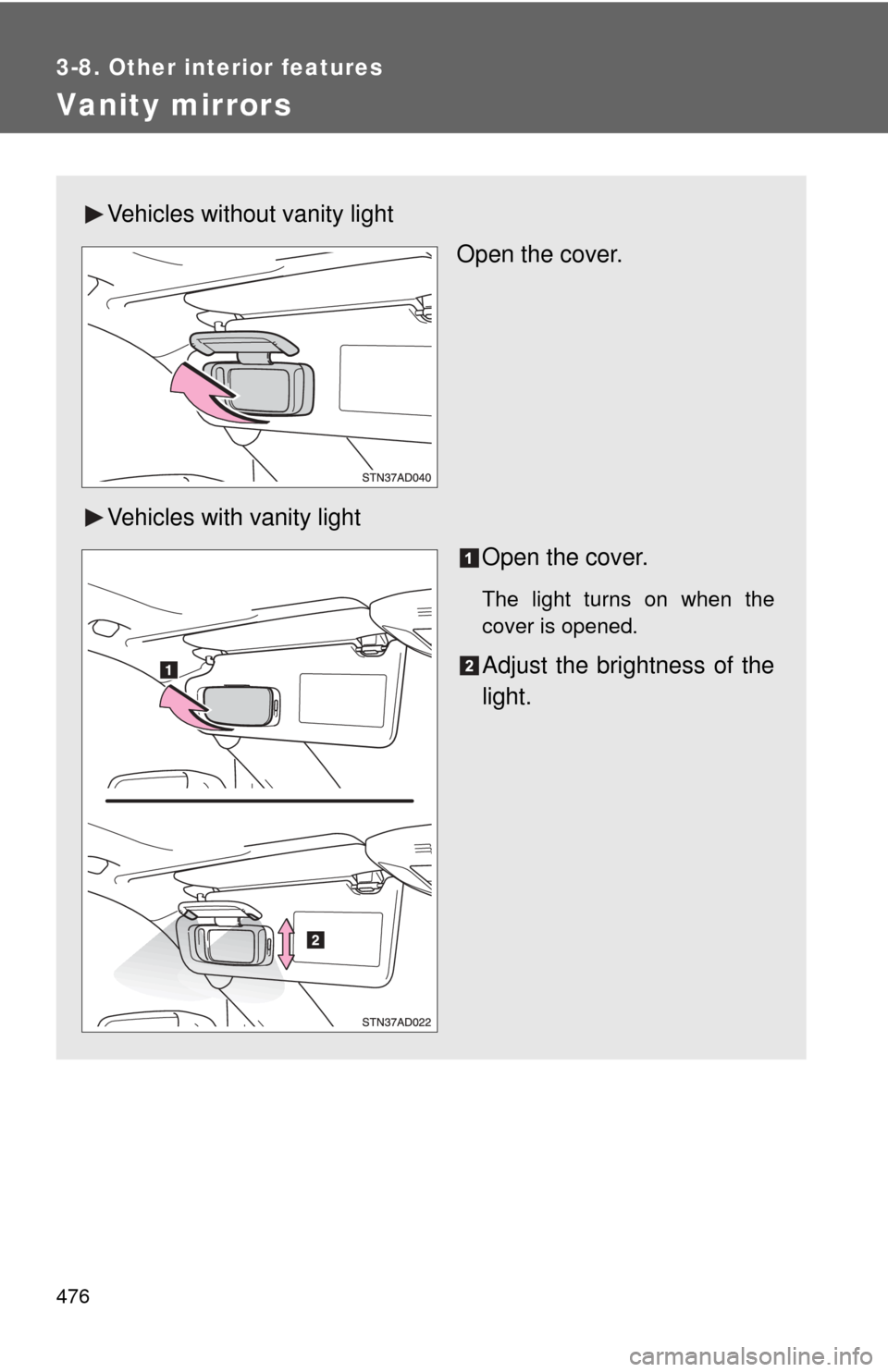
Vanity mirrors
Vehicles without vanity lightOpen the cover.
Vehicles with vanity light Open the cover.
The light turns on when the
cover is opened.
Adjust the brightness of the
light.
Page 482 of 708
482
3-8. Other interior features
Conversation mirror
CAUTION
■Caution while driving
Do not adjust the position of the mirror while driving.
Doing so may lead to mishandling of the vehicle and an accident, resulting in
death or serious injury.
Push the lid.
The mirror can be adjusted by
pushing the mirror edge.
Page 511 of 708
511
3-8. Other interior features
3
Interior features
Compass
: If equipped
The compass on the inside rear view mirror indicates the direction in
which the vehicle is heading.
■ Operation
Ty p e A
To turn the compass on or off,
press the switch.
Ty p e B To turn the compass on or off,
press the switch.
Page 514 of 708

514 3-8. Other interior features
■Circling calibration
When “C” appears on the dis-
play, drive the vehicle at 5 mph
(8 km/h) or less in a circle until a
direction is displayed.
If there is not enough space to
drive in a circle, drive around the
block until the direction is dis-
played.
■Conditions unfavorable to correct operation
The compass may not show the correct direction in the following conditions:
●The vehicle is stopped immediately after turning.
● The vehicle is on an inclined surface.
● The vehicle is in a place where the earth’s magnetic field is subject to
interference by artificial magnetic fields (underground car park/parking
lot, under a steel tower, between buildings, roof car park/parking lot, near
an intersection, near a large vehicle, etc.).
● The vehicle has become magnetized.
(There is a magnet or metal object near the inside rear view mirror.)
● The battery has been disconnected.
● A door is open.
CAUTION
■While driving the vehicle
Do not adjust the display. Be sure to adjust the display only when the vehicle
is stopped.
■ When doing the circling calibration
Be sure to secure a wide space, and watch out for people and vehicles in the
neighborhood. Do not violate any local traffic rules while performing circling
calibration.
Page 515 of 708
515
3-8. Other interior features
3
Interior features
NOTICE
■
To avoid the compass malfunctions
Do not place magnets or any metal objects near the inside rear view mirror.
Doing this may cause a malfunction of the compass sensor.
■ To ensure normal operation of the compass
●Do not perform circling calibration of the compass in a place where the
earth’s magnetic field is subject to in terference by artificial magnetic fields.
● During calibration, do not operate electric systems (moon roof, power win-
dows, etc.) as they may interfere with the calibration.