Page 34 of 636

34 1-1. Hybrid system
■Sounds and vibrations specific to a hybrid vehicle
There may be no engine sounds or vibration even though the vehicle is able
to move. For safety, apply the parking brake and make sure to shift the shift
position to P when parked.
The following sounds or vibrations may occur when the hybrid system is
operating and are not a malfunction:
●The brake system operation sound heard from the front of the vehicle
when the driver’s door is opened.
● Motor sounds may be heard from the engine compartment.
● Sounds may be heard from the hybrid battery (traction battery) when the
hybrid system starts or stops.
● Sounds may be heard from the transmission when the gasoline engine
starts or stops, when driving at low speeds, or during idling.
● Engine sounds may be heard when accelerating sharply.
● Sounds may be heard due to regenerative braking when the brake pedal
is depressed and accelerator is loosened.
● Other sounds, such as motors and mechanical noises, may be heard
from the brake system when the brake pedal is depressed.
● Vibration may be felt when the gasoline engine starts or stops.
● Cooling fan sounds may be heard from the air intake vent. (
P. 37)
● The operation sound of the air conditioning system (air conditioning com-
pressor, blower motor).
Page 68 of 636
68 1-3. Opening, closing and locking the doors
AlarmSituationCorrection procedure
Interior alarm
pings continu-
ously
*1
The “POWER” switch was
turned to ACCESSORY
mode while the driver’s
door was open (or the
driver’s door was opened
while the “POWER” switch
was in ACCESSORY
mode) Turn the “POWER”
switch off and close
the driver’s door
Interior alarm
sounds continu-
ously
*1
When the “POWER”
switch is in ON mode or
ACCESSORY mode, an
attempt was made to open
the door and exit the vehi-
cle, and the shift position
was not in P Shift the shift position
to P and turn the
“POWER” switch off
Interior and exte-
rior alarms sound
continuously
*1
When the “POWER”
switch is in ON mode or
ACCESSORY mode, the
driver’s door was closed
after the key was carried
outside the vehicle, and
the shift position not in P Shift the shift position
to P, turn the
“POWER” switch off
and close the driver’s
door again
Page 70 of 636
70 1-3. Opening, closing and locking the doors
■Security feature
If a door is not opened within approximately 60 seconds after the vehicle is
unlocked, the security feature automatically locks the vehicle again.
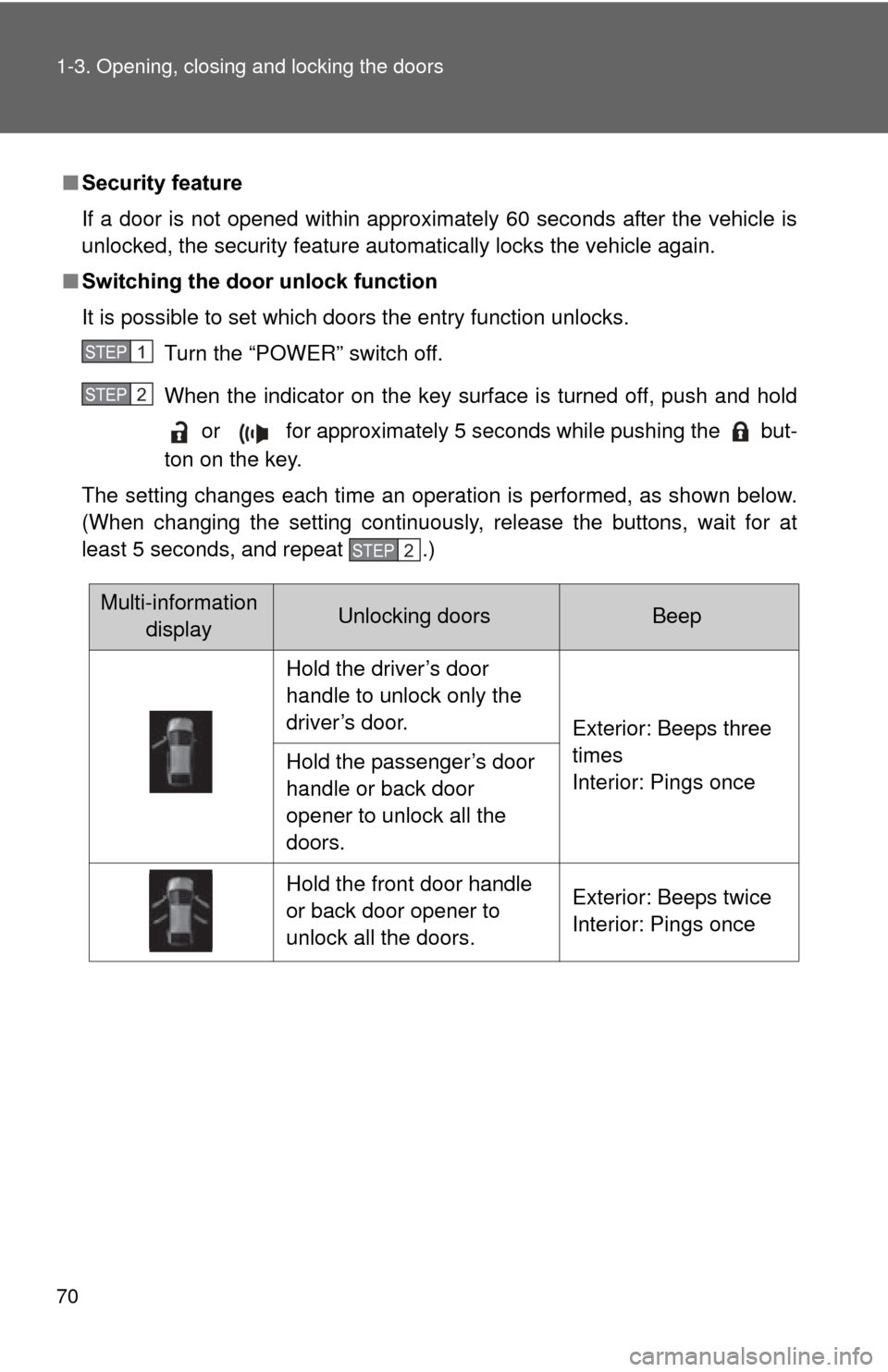
■ Switching the door unlock function
It is possible to set which doors the entry function unlocks.
Turn the “POWER” switch off.
When the indicator on the key surface is turned off, push and hold or for approximately 5 seconds while pushing the but-
ton on the key.
The setting changes each time an operation is performed, as shown below.
(When changing the setting continuously, release the buttons, wait for at
least 5 seconds, and repeat .)
STEP 1
STEP 2
STEP 2
Multi-information displayUnlocking doorsBeep
Hold the driver’s door
handle to unlock only the
driver’s door. Exterior: Beeps three
times
Interior: Pings once
Hold the passenger’s door
handle or back door
opener to unlock all the
doors.
Hold the front door handle
or back door opener to
unlock all the doors. Exterior: Beeps twice
Interior: Pings once
Page 82 of 636
82 1-3. Opening, closing and locking the doors
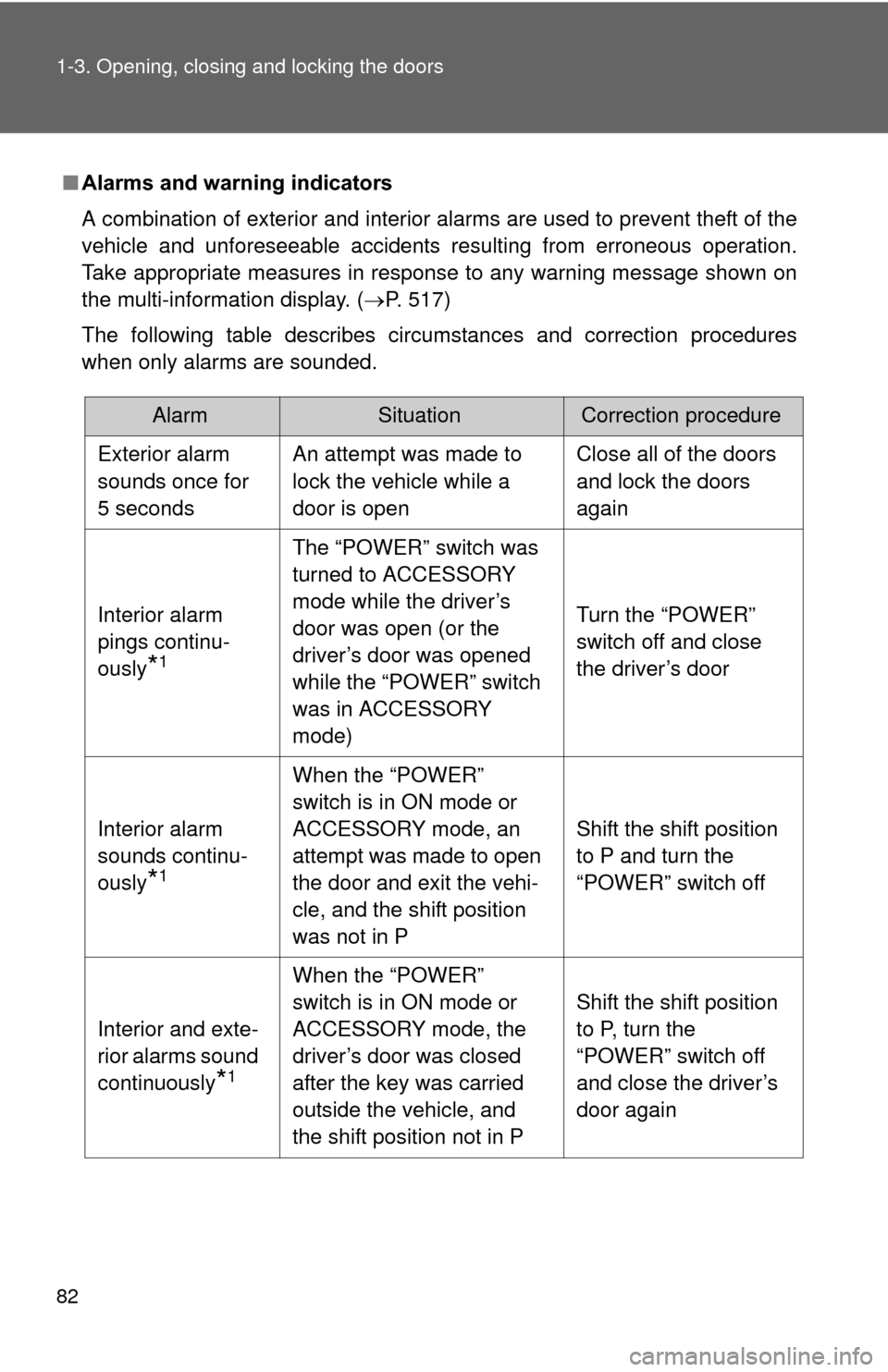
■Alarms and warning indicators
A combination of exterior and interior alarms are used to prevent theft of the
vehicle and unforeseeable accidents resulting from erroneous operation.
Take appropriate measures in response to any warning message shown on
the multi-information display. (P. 517)
The following table describes circumstances and correction procedures
when only alarms are sounded.
AlarmSituationCorrection procedure
Exterior alarm
sounds once for
5 seconds An attempt was made to
lock the vehicle while a
door is open Close all of the doors
and lock the doors
again
Interior alarm
pings continu-
ously
*1
The “POWER” switch was
turned to ACCESSORY
mode while the driver’s
door was open (or the
driver’s door was opened
while the “POWER” switch
was in ACCESSORY
mode) Turn the “POWER”
switch off and close
the driver’s door
Interior alarm
sounds continu-
ously
*1
When the “POWER”
switch is in ON mode or
ACCESSORY mode, an
attempt was made to open
the door and exit the vehi-
cle, and the shift position
was not in P Shift the shift position
to P and turn the
“POWER” switch off
Interior and exte-
rior alarms sound
continuously
*1
When the “POWER”
switch is in ON mode or
ACCESSORY mode, the
driver’s door was closed
after the key was carried
outside the vehicle, and
the shift position not in P Shift the shift position
to P, turn the
“POWER” switch off
and close the driver’s
door again
Page 89 of 636
89
1-3. Opening, closing and locking the doors
1
Before driving
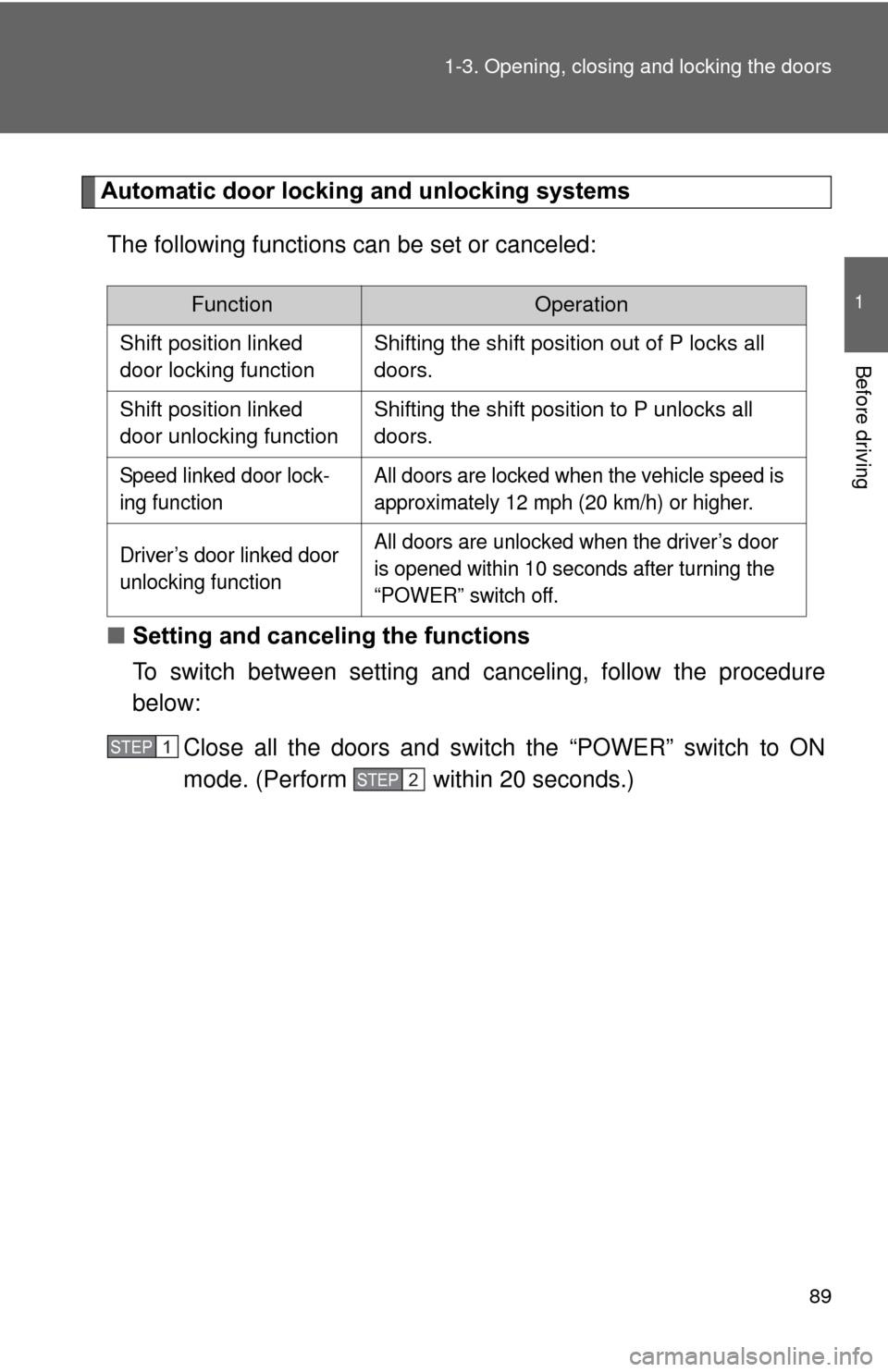
Automatic door locking and unlocking systems
The following functions can be set or canceled:
■ Setting and canceling the functions
To switch between setting and canceling, follow the procedure
below:
Close all the doors and switch the “POWER” switch to ON
mode. (Perform within 20 seconds.)
FunctionOperation
Shift position linked
door locking function Shifting the shift position out of P locks all
doors.
Shift position linked
door unlocking function Shifting the shift position to P unlocks all
doors.
Speed linked door lock-
ing function All doors are locked when the vehicle speed is
approximately 12 mph (20 km/h) or higher.
Driver’s door linked door
unlocking function All doors are unlocked when the driver’s door
is opened within 10 seconds after turning the
“POWER” switch off.
STEP 1
STEP 2
Page 128 of 636

128 1-5. Opening and closing the windows and moon roof
■Jam protection function
If an object is detected between the moon roof and the frame while closing
or tilting down, travel is stopped and the moon roof opens slightly.
■ To reduce moon roof wind noise
When the moon roof is opened automatically, it will stop slightly before the
fully open position. Driving with the moon roof in this position can help
reduce wind noise.
■ Sunshade
The sunshade can be opened and closed manually. However, the sunshade
will open automatically when the moon roof is opened.
■ Solar Panel
The solar panel contains solar cells, and produces energy to operate the
Solar Ventilation System by receiving sunlight.
■ Moon roof open warning buzzer
The buzzer sounds when the “POWER” switch is turned off and the driver’s
door is opened with the moon roof open.
■ If the moon roof cannot be closed
If the moon roof cannot be closed, such as when the jam protection function
activates accidentally due to a malfunction, pressing and holding “CLOSE”
switch closes the moon roof.
After this, to make the automatic opening function and jam protection func-
tion available again, press and hold the “OPEN” switch until the moon roof
opens fully and then closes slightly.
If the functions do not activate, contact your Toyota dealer.
Page 254 of 636

254 2-3. Operating the lights and windshield wipers
■Headlight control sensor (if equipped)
■ Automatic light off system
●When the headlights come on: The headlights and tail lights turn off 30
seconds after a door is opened and closed if the “POWER” switch is
turned to ACCESSORY mode or turned off. (The lights turn off immedi-
ately if on the key is pressed after all the doors are locked.)
● When only the tail lights come on: The tail lights turn off automatically if
the “POWER” switch is turned to ACCESSORY mode or turned off and
the driver’s door is opened.
To turn the lights on again, turn the “POWER” switch to ON mode, or turn the
light switch off once and then back to or .
The sensor may not function properly if
an object is placed on the sensor, or any-
thing that blocks the sensor is affixed to
the windshield.
Doing so interferes with the sensor
detecting the level of ambient light and
may cause the automatic headlight sys-
tem to malfunction.
Air conditioning operation may also be
interrupted.
ITO23P105
Page 515 of 636
5
When trouble arises
515
5-2. Steps to take in an emergency
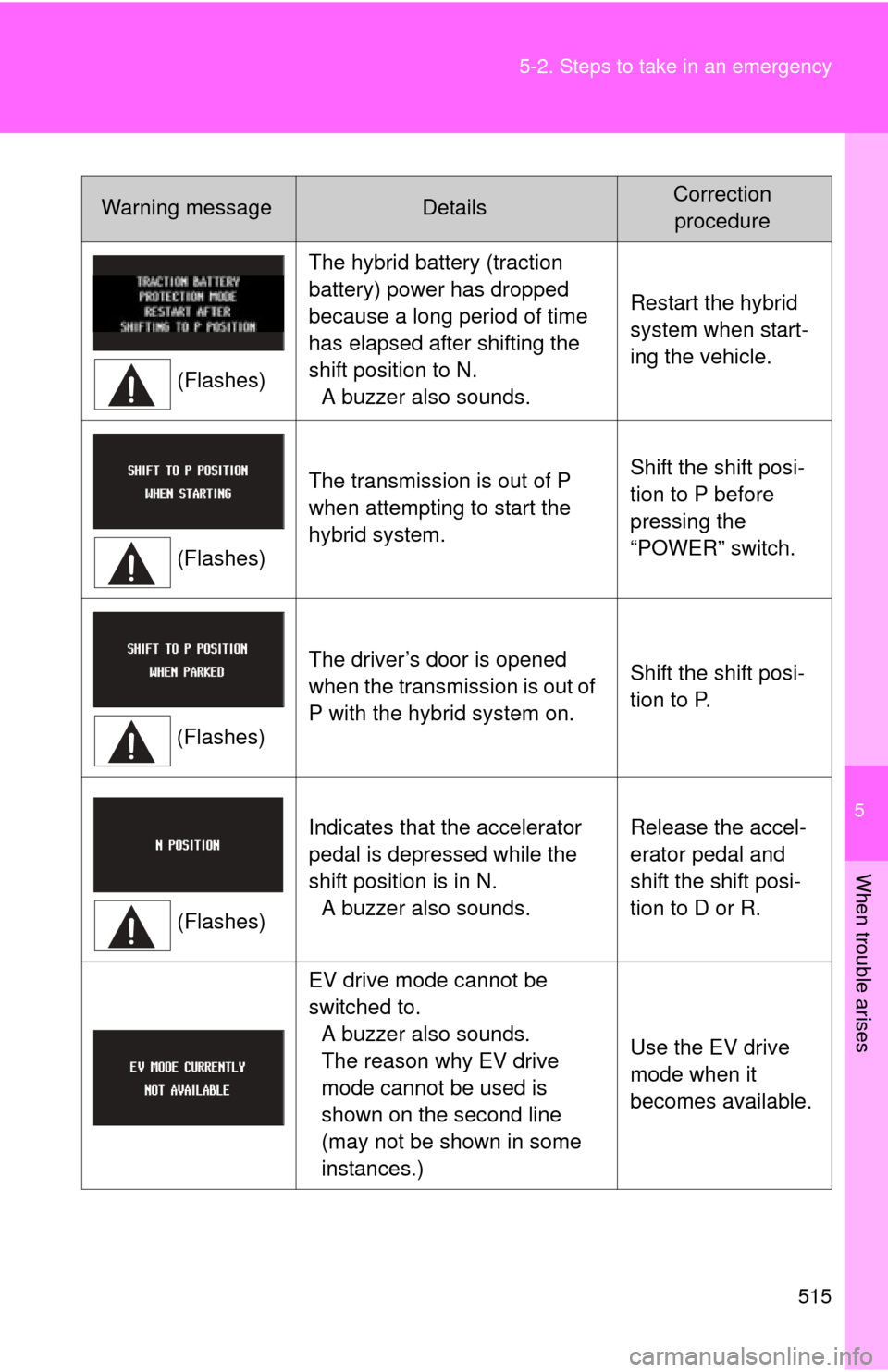
Warning messageDetailsCorrection
procedure
(Flashes) The hybrid battery (traction
battery) power has dropped
because a long period of time
has elapsed after shifting the
shift position to N.
A buzzer also sounds. Restart the hybrid
system when start-
ing the vehicle.
(Flashes) The transmission is out of P
when attempting to start the
hybrid system.
Shift the shift posi-
tion to P before
pressing the
“POWER” switch.
(Flashes) The driver’s door is opened
when the transmission is out of
P with the hybrid system on.
Shift the shift posi-
tion to P.
(Flashes) Indicates that the accelerator
pedal is depressed while the
shift position is in N.
A buzzer also sounds. Release the accel-
erator pedal and
shift the shift posi-
tion to D or R.
EV drive mode cannot be
switched to. A buzzer also sounds.
The reason why EV drive
mode cannot be used is
shown on the second line
(may not be shown in some
instances.) Use the EV drive
mode when it
becomes available.