Page 289 of 636
289
2-4. Using other
driving systems
2
When driving
Indication on the multi-information display
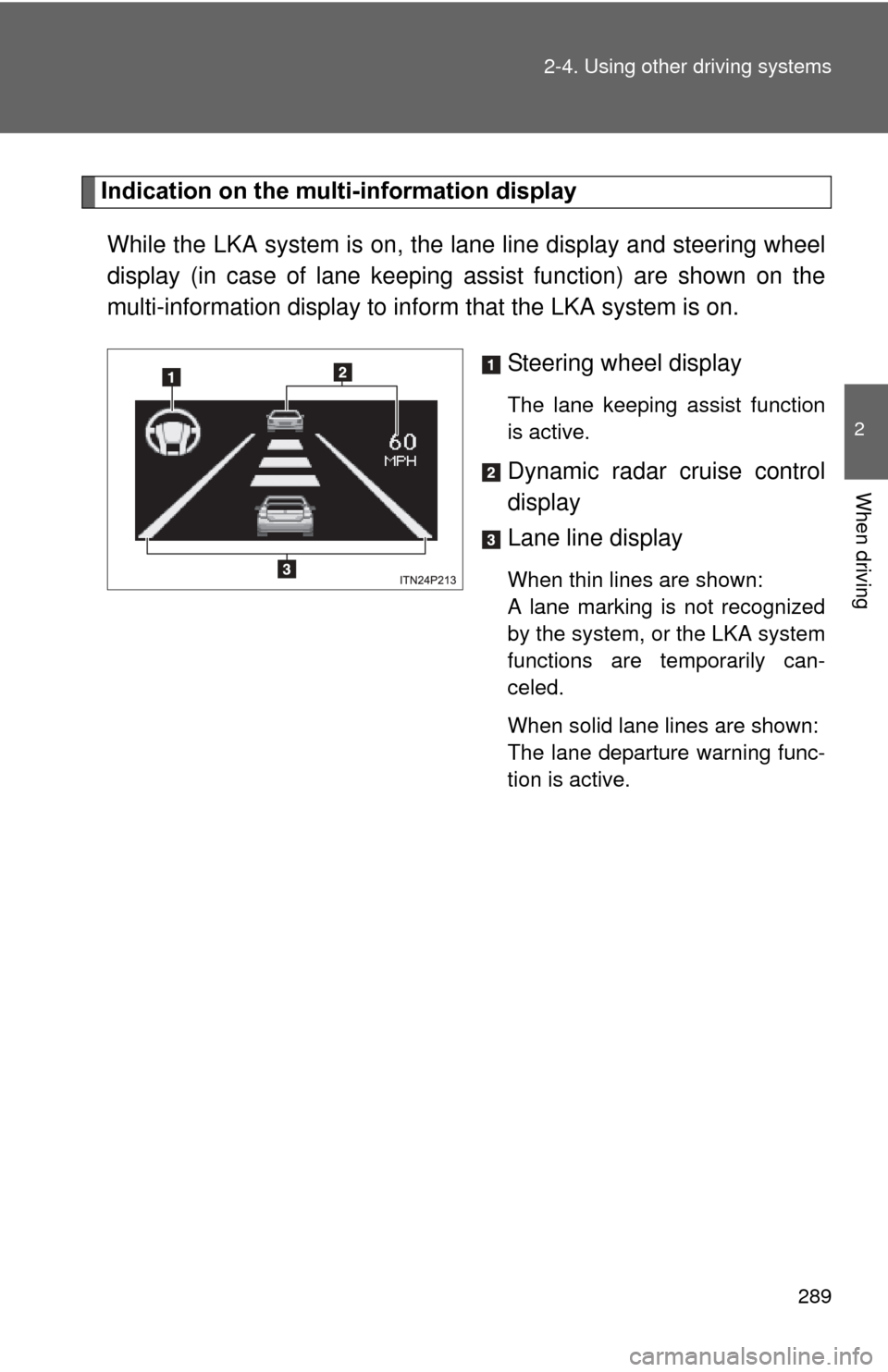
While the LKA system is on, the lane line display and steering wheel
display (in case of lane keeping assist function) are shown on the
multi-information display to info rm that the LKA system is on.
Steering wheel display
The lane keeping assist function
is active.
Dynamic radar cruise control
display
Lane line display
When thin lines are shown:
A lane marking is not recognized
by the system, or the LKA system
functions are temporarily can-
celed.
When solid lane lines are shown:
The lane departure warning func-
tion is active.
Page 290 of 636

290 2-4. Using other driving systems
■Temporary cancelation of the LKA system functions
If any of the following occurs, the LKA system functions will be temporarily
canceled. The functions will resume after the necessary operating conditions
have returned.
● The turn signal lever is operated.
● The steering wheel is turned as far as necessary to cause the vehicle to
change lanes.
● The brake pedal is depressed.
However, the lane keeping assist function will not resume even after the
brake pedal is released because depressing the brake pedal also can-
cels the dynamic radar cruise control. (Only lane departure warning func-
tion will resume.)
● The vehicle speed deviates from the operating range of the LKA system
functions.
● When the lane lines cannot be recognized while driving.
● The wiper operates continuously.
■ When the lane departure wa rning function is activated
The lane departure warning function will be temporarily canceled and will not
resume until a few seconds elapse after it is activated.
Page 291 of 636

291
2-4. Using other
driving systems
2
When driving
■No-handed driving warning
If the steering wheel is not operated for about 15 seconds on a straight road
or about 5 seconds on a curve, the buzzer will beep twice, indicators on the
multi-information display will flash, and the lane keeping assist function will
be temporarily canceled. If you drive the vehicle with your hands lightly
touching the steering wheel, this may also be detected as no-handed driv-
ing.
■ When the vehicle has been parked in the sun
The LKA system functions may not be available for a while after driving has
started. In such cases, turn the LKA system off and turn it on again after nor-
mal temperature returns. When the temperature in the cabin decreases and
the temperature around the camera sensor becomes suitable for its opera-
tion, the functions will begin to operate.
■ Warning lights and warning messages for LKA
Warning lights and messages are used to indicate a system malfunction or
to inform the driver of the need for caution while driving. ( P. 496, 510)
CAUTION
■Before using the LKA system
Do not rely on the LKA system to remain within a selected lane. The LKA
system is not designed to enable inattentive driving. The steering wheel
should be operated by the driver to mainta in the vehicle in a suitable position
within its lane. Always drive carefully.
Page 296 of 636
296
2-4. Using other driving systems
Driving assist systems
To help enhance driving safety and performance, the following sys-
tems operate automatically in res ponse to various driving situations.
Be aware, however, that these systems are supplementary and
should not be relied upon too h eavily when operating the vehicle.
■ABS (Anti-lock Brake System)
Helps to prevent wheel lock when the brakes are applied suddenly, or if
the brakes are applied while driving on a slippery road surface
■Brake assist
Generates an increased level of braking force after the brake pedal is
depressed when the system detects a panic stop situation
■VSC (Vehicle Stability Control)
Helps the driver to control skidding when swerving suddenly or turning
on slippery road surfaces
■TRAC (Traction Control)
Helps to maintain drive power and prevent the drive wheels from spin-
ning when starting the vehicle or accelerating on slippery roads
■EPS (Electric Power Steering)
Employs an electric motor to reduce the amount of effort needed to turn
the steering wheel
■Enhanced VSC (Enhanced Vehicle Stability Control)
Provides cooperative control of the ABS, TRAC, VSC and EPS.
Helps to maintain directional stability when swerving on slippery road
surfaces by controlling steering performance.
Page 298 of 636

298 2-4. Using other driving systems
■Sounds and vibrations caused by the ABS, brake assist, VSC and
TRAC
● A sound may be heard from the engine compartment when the hybrid
system is started, just after the vehicle begins to move, if the brake pedal
is depressed forcefully or repeatedly, or 1-2 minutes after the hybrid sys-
tem is stopped. This sound does not indicate that a malfunction has
occurred in any of these systems.
● Any of the following conditions may occur when the above systems are
operating. None of these indicates that a malfunction has occurred.
• Vibrations may be felt through the vehicle body and steering.
• A motor sound may be heard after the vehicle comes to a stop.
• The brake pedal may pulsate slightly after the ABS is activated.
• The brake pedal may move down slightly after the ABS is activated.
■ EPS operation sound
When the steering wheel is operated, a motor sound (whirring sound) may
be heard. This does not indicate a malfunction.
■ Reduced effectiveness of the EPS system
The effectiveness of the EPS system is reduced to prevent the system from
overheating when there is frequent steering input over an extended period of
time. The steering wheel may feel heavy as a result. Should this occur,
refrain from excessive steering input or stop the vehicle and turn the hybrid
system off. The EPS system should return to normal within 10 minutes.
■ Electric power steering system warning light (warning buzzer)
P. 501
Page 316 of 636
316
2-5. Driving information
Vehicle load limits
■Total load capacity and seating capacity
These details are also described on the tire and loading information
label. (P. 447)
CAUTION
■Overloading the vehicle
Do not overload the vehicle.
It may not only cause damage to the ti res, but also degrade steering and
braking ability, resulting in an accident.
Vehicle load limits include total load capacity, seating capacity,
towing capacity and cargo capacity.
■ Total load capacity: 825 lb. (370 kg)
Total load capacity means the combined weight of occupants,
cargo and luggage.
■ Seating capacity: 5 occupants (Front 2, Rear 3)
Seating capacity means the ma ximum number of occupants
whose estimated average weight is 150 lb. (68 kg) per person.
■ Towing capacity
Toyota does not recommend towing a trailer with your vehicle.
■ Cargo capacity
Cargo capacity may increase or decrease depending on the
weight and the number of occupants.
Page 325 of 636
Interior features3
325
3-1. Using the air conditioning system and defogger
Air conditioning system ........................... 326
Using the steering wheel climate remote control
switches ......................... 337
Solar Ventilation System ........................... 339
Remote Air Conditioning System ........................... 342
Rear window and outside rear view mirror defogger
switch ............................. 346
3-2. Using the audio system Audio system types .......... 347
Using the AUX port/USB port................................. 352 3-3. Using the interior lights
Interior lights list ............... 353
• Front interior lights ......... 354
• Personal lights ............... 355
• Rear interior light ........... 355
3-4. Using the storage features List of storage features .... 357
• Glove boxes ................... 358
• Console box ................... 359
• Cup holders ................... 360
• Bottle holders ................. 362
• Auxiliary boxes ............... 363
3-5. Other interior features Sun visors ........................ 364
Vanity mirrors ................... 365
Outside temperature display............................ 366
Power outlets ................... 367
Seat heaters..................... 369
Armrest ............................ 371
Floor mats ........................ 372
Luggage compartment features .......................... 374
Garage door opener......... 380
Safety Connect ................ 388
Page 337 of 636
337
3-1. Using the air conditioning system and defogger
3
Interior features
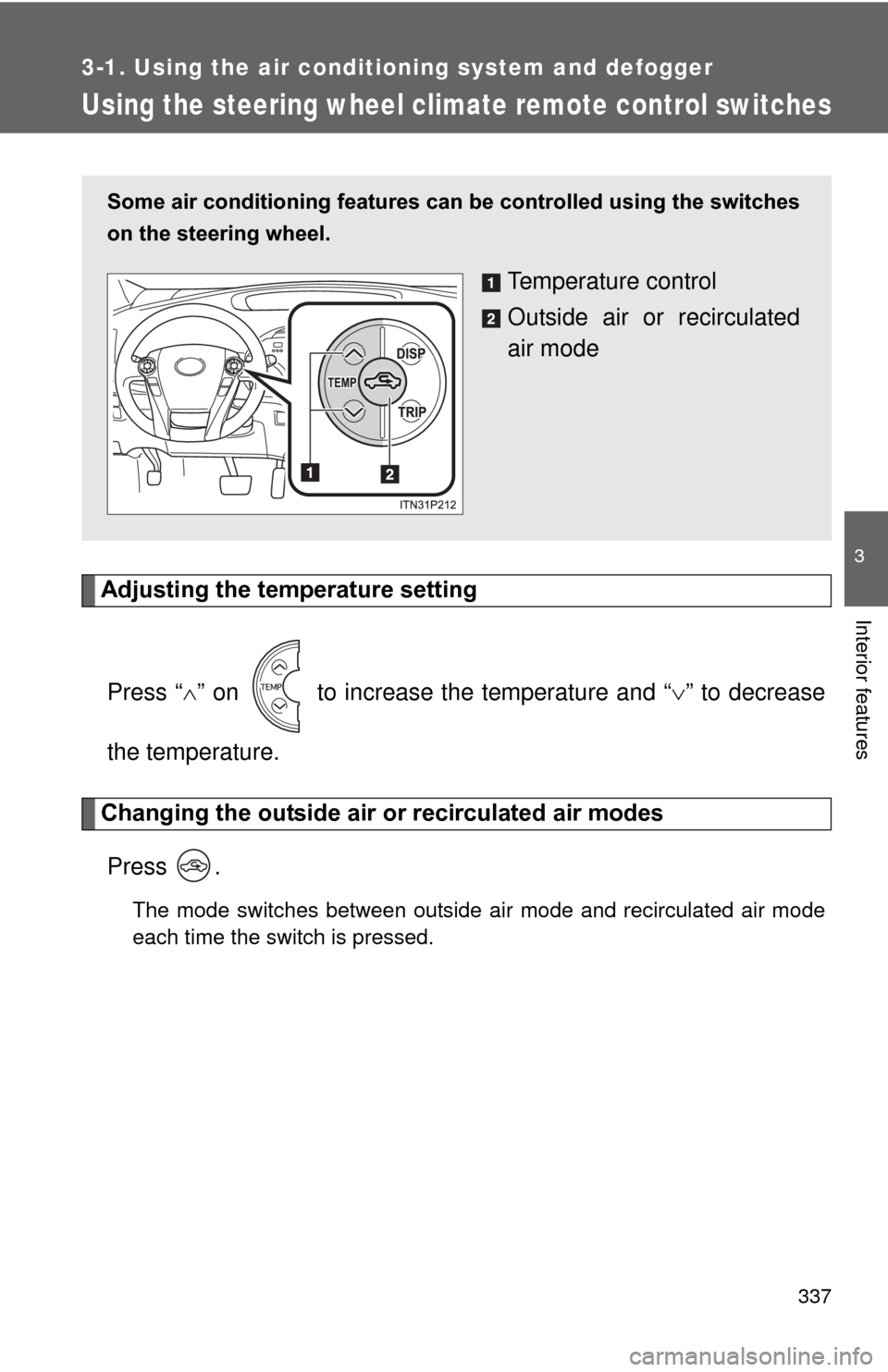
Using the steering wheel climate remote control switches
Adjusting the temperature settingPress “ ” on to increase the temperature and “ ” to decrease
the temperature.
Changing the outside air or recirculated air modes
Press .
The mode switches between outside air mode and recirculated air mode
each time the switch is pressed.
Some air conditioning features can be controlled using the switches
on the steering wheel.
Temperature control
Outside air or recirculated
air mode