Page 607 of 692
5
607 5-2. Steps to take in an emergency
When trouble arises
L/C200_EE (OM60G38E)
CAUTION
Using the tire jack
Improper use of the tire jack may lead to death or serious injuries due to the
vehicle suddenly falling off the jack.
Do not use the tire jack for any purpose other than replacing tires or install-
ing and removing tire chains.
Only use the tire jack that comes with this vehicle for replacing a flat tire.
Do not use it on other vehicles, and do not use other tire jacks for replac-
ing tires on this vehicle.
Always check that the tire jack is securely set to the jack point.
Be sure to turn off the 4-Wheel AHC and stop the engine. (Vehicles with 4-
Wheel AHC)
Do not put any part of your body under the vehicle supported by a jack.
Do not start or run the engine while your vehicle is supported by the jack.
Do not raise the vehicle while someone is in it.
When raising the vehicle, do not put an object on or under the jack.
Do not raise the vehicle to a height greater than that required to replace
the tire.
Use a jack stand if it is necessary to get under the vehicle.
Take particular care when lowering the vehicle to ensure that no one working
on or near the vehicle will be injured.
Using the jack handle
Tighten all the jack handle bolts securely using a Phillips-head screwdriver,
to prevent the extension parts from coming apart unexpectedly.
Page 610 of 692
610
5-2. Steps to take in an emergency
L/C200_EE (OM60G38E)
If you have a flat tire (vehicles with an emergency tire puncture repair kit)
: If equipped
Your vehicle is equipped with an emergency tire puncture repair kit.
A puncture caused by a nail or screw passing through the tire tread
can be repaired temporarily with the emergency tire puncture repair
kit.
Before repairing the vehicle
Stop the vehicle in a safe place on a hard, flat surface.
Set the parking brake.
Shift the shift lever to “P”.
Turn off the intrusion sensor and tilt sensor (if equipped)
(P. 129)
Turn off the 4-Wheel AHC (if equipped). (P. 248)
Stop the engine.
Turn on the emergency flashers.
Page 616 of 692
616 5-2. Steps to take in an emergency
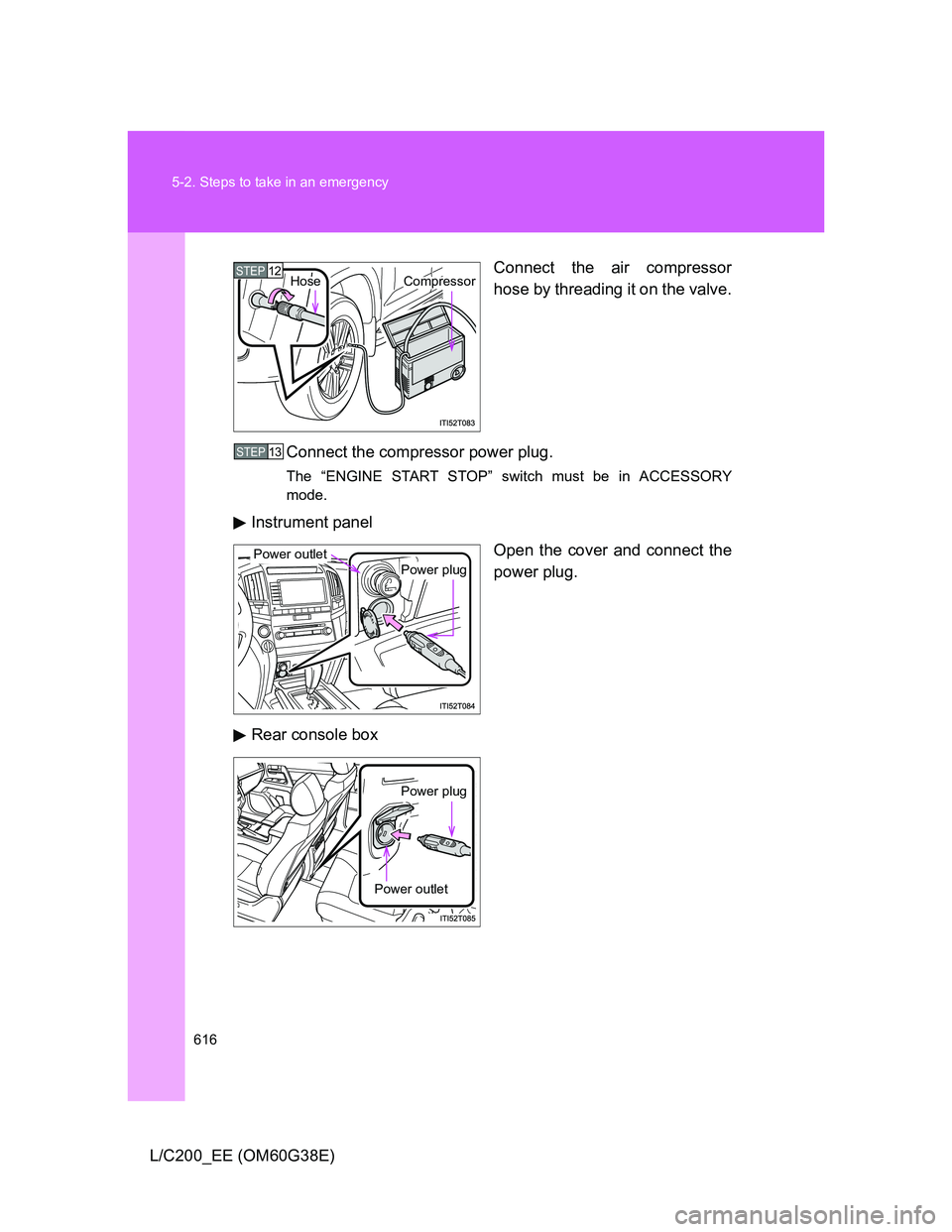
L/C200_EE (OM60G38E)Connect the air compressor
hose by threading it on the valve.
Connect the compressor power plug.
The “ENGINE START STOP” switch must be in ACCESSORY
mode.
Instrument panel
Open the cover and connect the
power plug.
Rear console box
STEP12CompressorHose
STEP13
Power plug
Power outlet
Power plug
Power outlet
Page 623 of 692
5
623
5-2. Steps to take in an emergency
When trouble arises
L/C200_EE (OM60G38E)
If the engine will not start
If the engine still does not start after following the correct starting
procedure (P. 190) or releasing the steering lock (P. 192), confirm
the following points.
The engine will not start even when the starter motor oper-
ates normally
One of the following may be the cause of the problem.
There may not be sufficient fuel in the vehicle’s tank.
Gasoline engine: Refuel the vehicle.
Diesel engine: (P. 637)
The engine may be flooded. (gasoline engine)
Try to restart the engine once more following correct starting
procedures. (P. 190)
There may be a malfunction in the engine immobilizer system.
(P. 120)
The starter motor turns over slowly, the interior lights and
headlights are dim, or the horn does not sound or sounds at
a low volume
One of the following may be the cause of the problem.
The battery may be discharged. (P. 630)
The battery terminal connections may be loose or corroded.
The starter motor does not turn over
The engine starting system may be malfunctioning due to an
electrical problem such as an open circuit or a blown fuse. How-
ever, an interim measure is available to start the engine.
(P. 624)
Page 624 of 692
624 5-2. Steps to take in an emergency
L/C200_EE (OM60G38E)
Emergency start function
When the engine does not start, the following steps can be used as
an interim measure to start the engine if the “ENGINE START STOP”
switch is functioning normally.
Set the parking brake.
Put the shift lever in “P”.
Set the “ENGINE START STOP” switch to the ACCESSORY
mode.
Push and hold the “ENGINE START STOP” switch about 15
seconds while depressing the brake pedal firmly.
Even if the engine can be started using the above steps, the system
may be malfunctioning. Have the vehicle checked by any authorized
Toyota dealer or repairer, or another duty qualified and equipped pro-
fessional.
The starter motor does not turn over, the interior lights and
headlights do not turn on, or the horn does not sound
One of the following may be the cause of the problem.
One or both of the battery terminals may be disconnected.
The battery may be discharged. (P. 630)
There may be a malfunction in the steering lock system.
Contact any authorized Toyota dealer or repairer, or another duly
qualified and equipped professional, if the problem cannot be
repaired, or if repair procedures are unknown.
STEP1
STEP2
STEP3
STEP4
Page 625 of 692
5
625
5-2. Steps to take in an emergency
When trouble arises
L/C200_EE (OM60G38E)
If the shift lever cannot be shifted from P
If the shift lever cannot be shifted with your foot on the brake, there
may be a problem with the shift lock system (a system to prevent
accidental operation of the shift lever). Have the vehicle inspected by
any authorized Toyota dealer or repairer, or another duly qualified
and equipped professional, immediately.
The following steps may be used as an emergency measure to
ensure that the shift lever can be shifted.
Set the parking brake.
Set the “ENGINE START STOP” switch to the ACCES-
SORY mode.
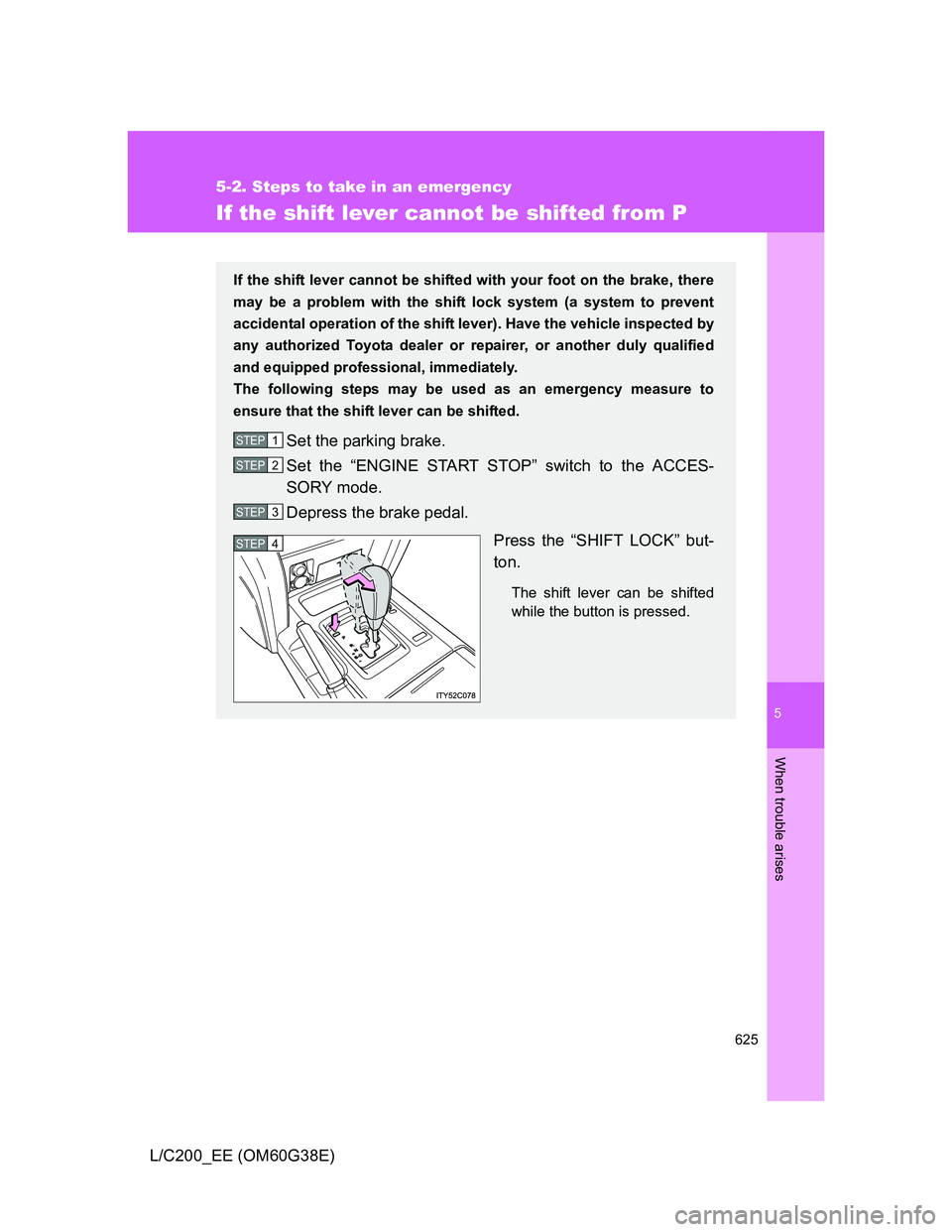
Depress the brake pedal.
Press the “SHIFT LOCK” but-
ton.
The shift lever can be shifted
while the button is pressed.
STEP1
STEP2
STEP3
STEP4
Page 627 of 692
5
627
5-2. Steps to take in an emergency
When trouble arises
L/C200_EE (OM60G38E)
If the electronic key does not operate properly
Locking and unlocking the doors and key linked functions
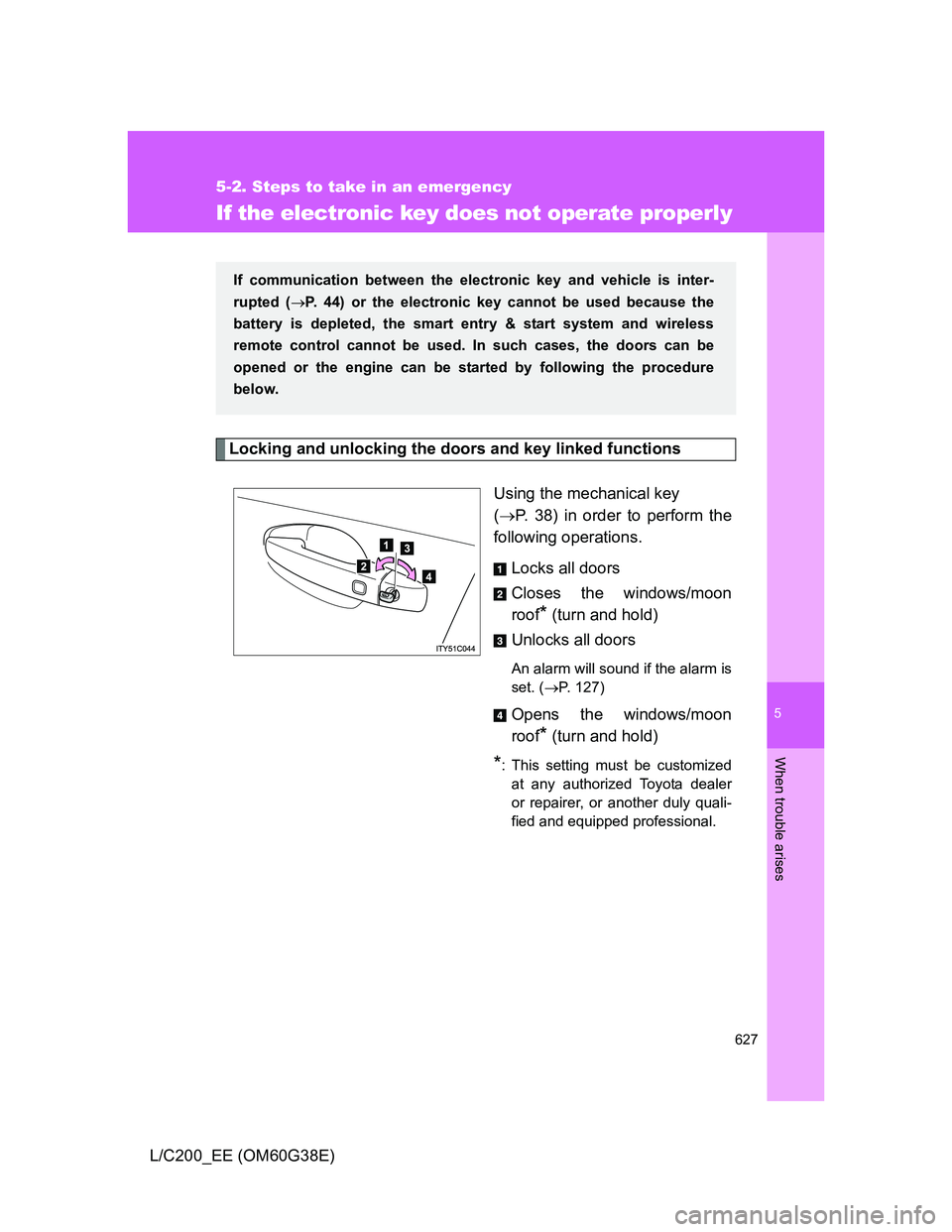
Using the mechanical key
(P. 38) in order to perform the
following operations.
Locks all doors
Closes the windows/moon
roof
* (turn and hold)
Unlocks all doors
An alarm will sound if the alarm is
set. (P. 127)
Opens the windows/moon
roof
* (turn and hold)
*: This setting must be customized
at any authorized Toyota dealer
or repairer, or another duly quali-
fied and equipped professional.
If communication between the electronic key and vehicle is inter-
rupted (P. 44) or the electronic key cannot be used because the
battery is depleted, the smart entry & start system and wireless
remote control cannot be used. In such cases, the doors can be
opened or the engine can be started by following the procedure
below.
Page 628 of 692
628 5-2. Steps to take in an emergency
L/C200_EE (OM60G38E)
Changing “ENGINE START STOP” switch modes and starting the
engine
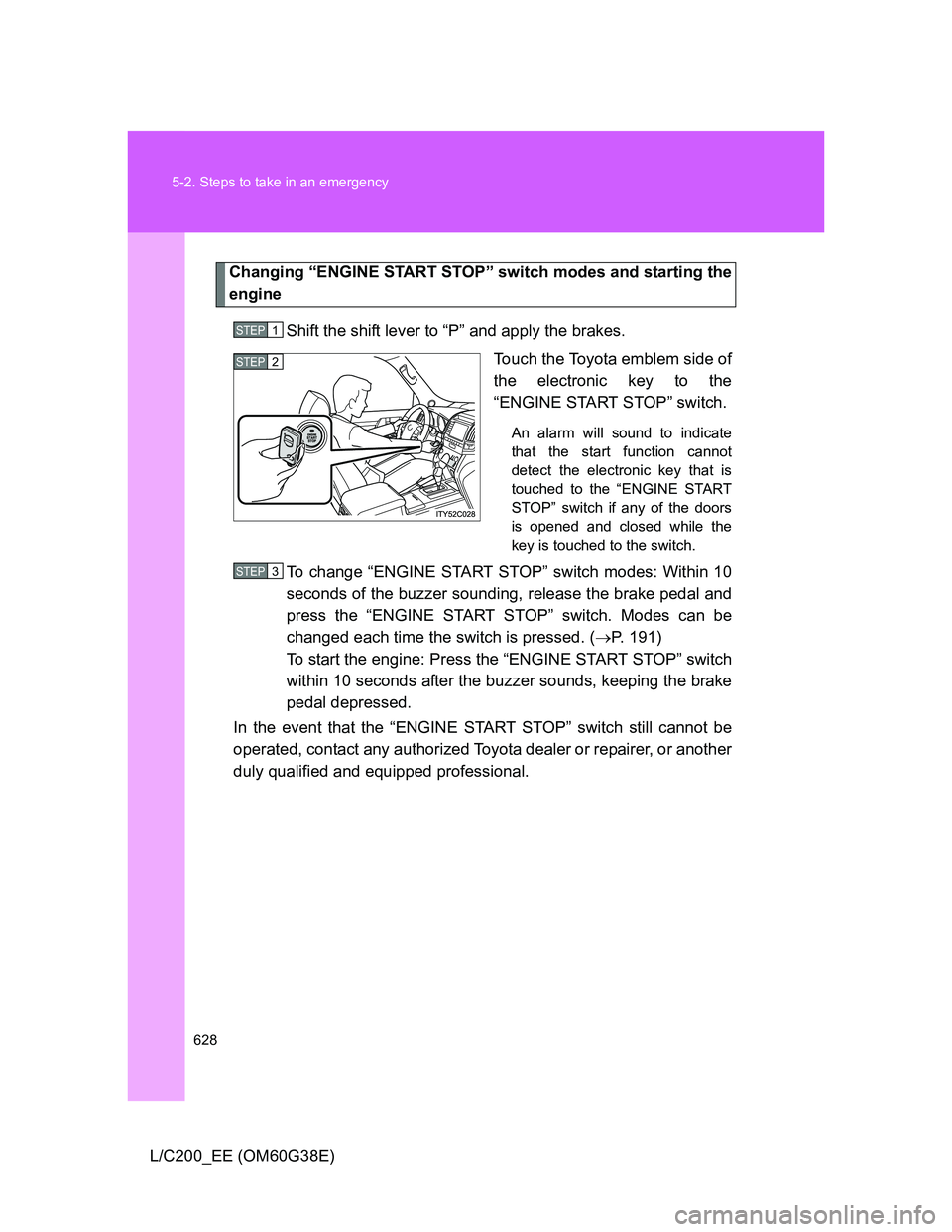
Shift the shift lever to “P” and apply the brakes.
Touch the Toyota emblem side of
the electronic key to the
“ENGINE START STOP” switch.
An alarm will sound to indicate
that the start function cannot
detect the electronic key that is
touched to the “ENGINE START
STOP” switch if any of the doors
is opened and closed while the
key is touched to the switch.
To change “ENGINE START STOP” switch modes: Within 10
seconds of the buzzer sounding, release the brake pedal and
press the “ENGINE START STOP” switch. Modes can be
changed each time the switch is pressed. (P. 191)
To start the engine: Press the “ENGINE START STOP” switch
within 10 seconds after the buzzer sounds, keeping the brake
pedal depressed.
In the event that the “ENGINE START STOP” switch still cannot be
operated, contact any authorized Toyota dealer or repairer, or another
duly qualified and equipped professional.
STEP1
STEP2
STEP3