Page 117 of 636

117
1-6. Theft deterrent system
1
Before driving
■
System maintenance
The vehicle has a maintenance-free type alarm system.
■ Items to check before locking the vehicle
To prevent unexpected triggering of the alarm and vehicle theft, make sure
of the following.
●Nobody is in the vehicle.
● The windows and moon roof are closed before the alarm is set.
● No valuables or other personal items are left in the vehicle.
Vehicles with navigation system
Close the doors, glass hatch
and hood, and lock all the
doors. The system will be set
automatically after 30 sec-
onds.
The indicator light changes
from being on to flashing when
the system is set.
■ Deactivating or stopping the alarm
●Unlock the doors.
● Vehicles without smart key system: Turn the engine switch to
the “ON” position, or start t he engine. (The alarm will be deac-
tivated or stopped after a few seconds.)
● Vehicles with smart key system: Turn the “ENGINE START
STOP” switch to IGNITION ON mode, or start the engine.
(The alarm will be deactivated or stopped after a few sec-
onds.)
● Open the glass hatch using the entry function (vehicles with
smart key system) or wireless remote control (vehicles with-
out smart key system).
Page 159 of 636

When driving2
159
2-1. Driving proceduresDriving the vehicle............ 160
Engine (ignition) switch (vehicles with smart
key system).................... 170
Engine (ignition) switch (vehicles without smart
key system).................... 174
Automatic transmission...... 177
Turn signal lever .............. 182
Parking brake ................... 183
Horn ................................. 184
2-2. Instrument cluster Gauges and meters ......... 185
Indicators and warning lights .............................. 187
Multi-information display............................ 191 2-3.
Operating the lights and
wipers
Headlight sw itch ............... 200
Fog light switch ................ 206
Windshield wipers and washer ........................... 208
Rear window wiper and washer ........................... 212
2-4. Using other drivin g
s ystems
Cruise control ................... 215
Rear view monitor system ........................... 219
Driving assist systems ..... 223
Hill-start assist control ...... 228
Downhill assist control system (4WD models) ... 230
2-5. Driving information Off-road precautions ........ 233
Cargo and luggage .......... 238
Vehicle load limits ............ 242
Winter driving tips ............ 243
Trailer towing ................... 247
Dinghy towing .................. 265
Page 170 of 636
170
2-1. Driving procedures
Engine (ignition) switch (vehicles with smart key system)
Performing the following operations when carrying the electronic
key on your person starts the en gine or changes “ENGINE START
STOP” switch mode.
■ Starting the engine
The engine can be started in any mode by operating the “ENGINE
START STOP” switch at the same time as depressing the brake
pedal.
Check that the parking brake is set.
Check that the shift lever is set in P.
Sit in the driver’s seat and firmly depress the brake pedal.
The “ENGINE START STOP” switch indicator turns green. If the
indicator does not turn green, the engine cannot be started.
Press the “ENGINE START
STOP” switch.
The engine can be started
from any “ENGINE START
STOP” switch mode.
Continue depressing the brake
pedal until the engine is com-
pletely started.
The engine will crank until it
starts or for up to 30 seconds,
whichever is less.
STEP1
STEP2
STEP3
STEP4
Page 171 of 636
171
2-1. Driving procedures
2
When driving
■
Changing “ENGINE START STOP” switch modes
Modes can be changed by pressing the “ENGINE START STOP”
switch with the brake pedal released. (The mode changes each
time the switch is pressed.)
OFF*
The emergency flashers can
be used.
ACCESSORY mode
Some electrical components
such as the audio system can
be used.
The “ENGINE START STOP”
switch indicator turns amber.
IGNITION ON mode
All electrical components can
be used.
The “ENGINE START STOP”
switch indicator turns amber.
*: If the shift lever is in a position other than P when turning off
the engine, the “ENGINE
START STOP” switch will be
turned to ACCESSORY mode,
not to OFF.
Page 174 of 636
174
2-1. Driving procedures
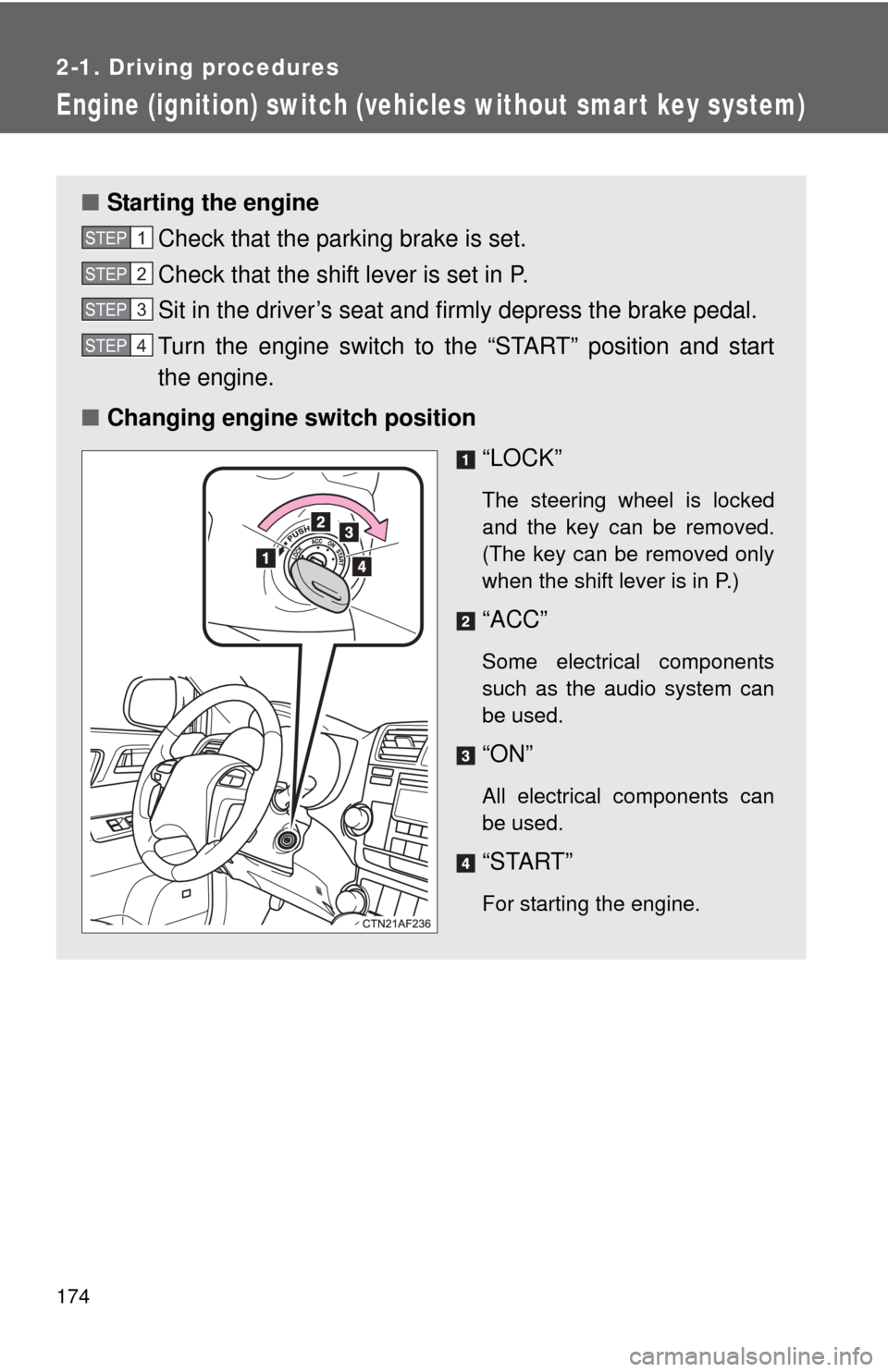
Engine (ignition) switch (vehicles without smart key system)
■Starting the engine
Check that the parking brake is set.
Check that the shift lever is set in P.
Sit in the driver’s seat and firmly depress the brake pedal.
Turn the engine switch to the “START” position and start
the engine.
■ Changing engine switch position
“LOCK”
The steering wheel is locked
and the key can be removed.
(The key can be removed only
when the shift lever is in P.)
“ACC”
Some electrical components
such as the audio system can
be used.
“ON”
All electrical components can
be used.
“START”
For starting the engine.
STEP1
STEP2
STEP3
STEP4
Page 177 of 636
177
2-1. Driving procedures
2
When driving
Automatic transmission
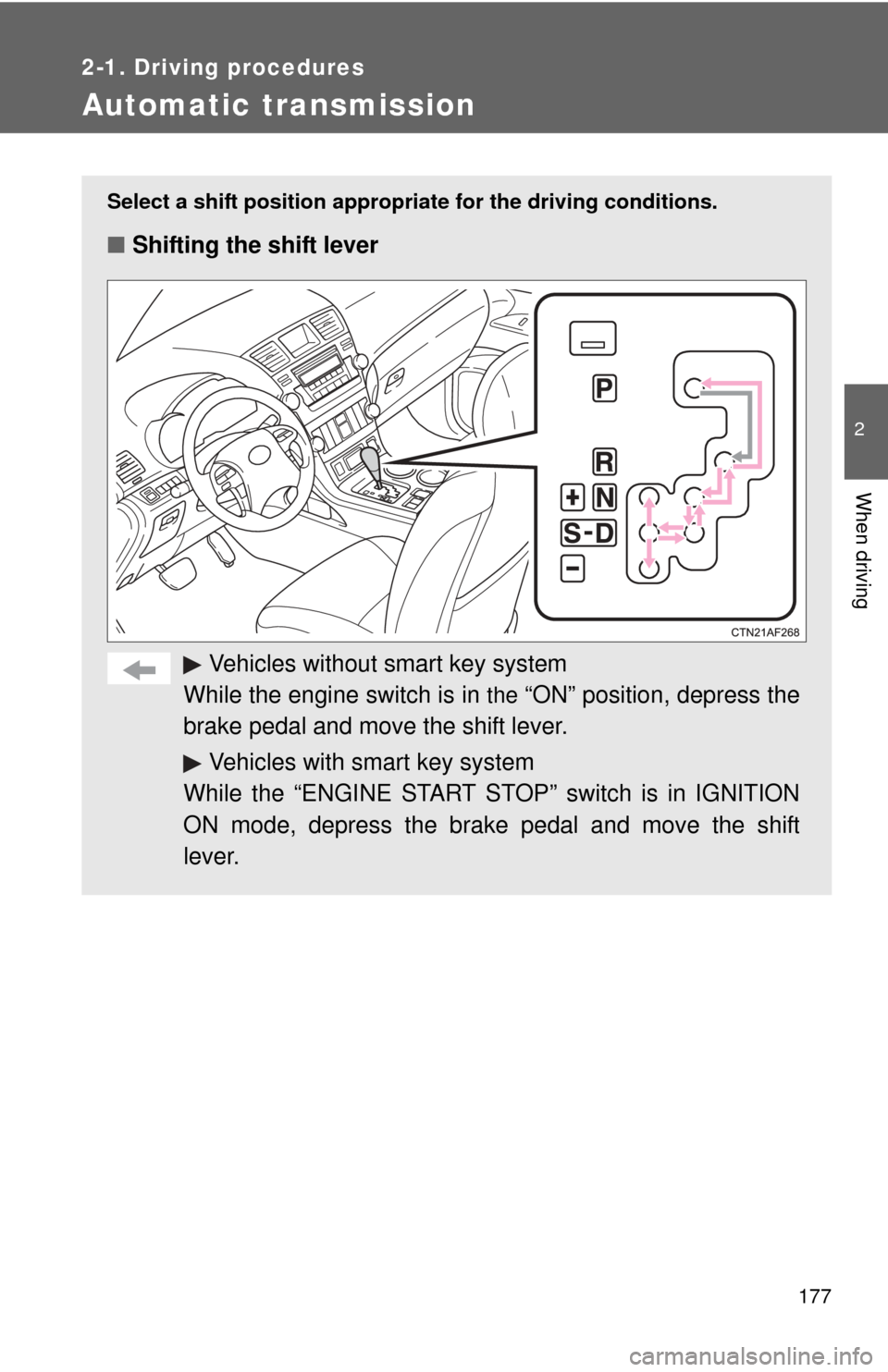
Select a shift position appropriate for the driving conditions.
■Shifting the shift lever
Vehicles without smart key system
While the engine switch is in
the “ON” position, depress the
brake pedal and move the shift lever.
Vehicles with smart key system
While the “ENGINE START STOP” switch is in IGNITION
ON mode, depress the brake pedal and move the shift
lever.
Page 182 of 636
182
2-1. Driving procedures
Tur n signal lever
■Turn signals can be operated when
Vehicles without smart key system
The engine switch is in
the “ON” position.
Vehicles with smart key system
The “ENGINE START STOP” switch is in IGNITION ON mode.
■ If the indicators flash faster than usual
Check that a light bulb in the front or rear turn signal lights has not burned
out.
Right turn
Left turn
Move and hold the lever
partway to signal a lane
change.
The right hand signal will flash
until you release the lever.
Move and hold the lever
partway to signal a lane
change.
The left hand signal will flash
until you release the lever.
Page 185 of 636
185
2
When driving
2-2. Instrument cluster
Gauges and meters
Vehicles without smart key system
The following gauges and meters illuminate when the engine
switch is in the “ON” position.
Vehicles with smart key system
The following gauges and meters illuminate when the “ENGINE
START STOP” switch is in IGNITION ON mode.
Tachometer
Displays the engine speed in revolutions per minute.
Engine coolant temperature gauge
Displays the engine coolant temperature.
Fuel gauge
Displays the quantity of fuel remaining in the tank.
Speedometer
Displays the vehicle speed.
Odometer/trip meter switching and trip meter resetting button
Switches between odometer and trip meter displays. Pushing and hold-
ing the button will reset the trip meter when the trip meter is being dis-
played.