Page 107 of 540
107
1-7. Safety information
1
Before driving
Run the seat belt through the
child seat and insert the plate
into the buckle. Make sure that
the belt is not twisted.
Fully extend the shoulder belt
and then allow it to retract
slightly in order to activate the
ALR lock mode.
Lock mode allows the seat belt to
retract only.
While pushing the child seat
down into the rear seat, allow the
shoulder belt to retract until the
child seat is securely in place.
After the shoulder belt has
retracted to a point where there is
no slack in the belt, pull the belt to
check that it cannot be extended.
■
Forward facing Convertible seat
Place the child seat on the seat
facing the front of the vehicle.
Page 108 of 540
108 1-7. Safety information
Run the seat belt through the
child seat and insert the plate
into the buckle. Make sure that
the belt is not twisted.
Fully extend the shoulder belt
and then allow it to retract
slightly in order to activate the
ALR lock mode.
Lock mode allows the seat belt to
retract only.
While pushing the child seat into
the rear seat, allow the shoulder
belt to retract until the child seat
is securely in place.
After the shoulder belt has
retracted to a point where there is
no slack in the belt, pull the belt to
check that it cannot be extended.
If the child restraint has a top tether strap, the top tether strap
should be latched onto the top tether strap anchor. ( P. 110)
Page 109 of 540
109
1-7. Safety information
1
Before driving
■
Booster seat
Place the booster seat on the
seat facing the front of the vehi-
cle.
Sit the child in the booster seat.
Fit the seat belt to the booster
seat according to the manufac-
turer’s instructions and insert the
plate into the buckle. Make sure
that the belt is not twisted.
Check that the shoulder belt is
correctly positioned over the
child’s shoulder, and that the lap
belt is as low as possible.
( P. 58)
Removing a child restraint installed with a seat belt
Push the buckle release button
and fully retract the seat belt.
Page 115 of 540

When driving2
115
2-1. Driving proceduresDriving the vehicle............ 116
Engine (ignition) switch .... 127
Automatic Transmission... 130
Manual Transmission ....... 132
Turn signal lever .............. 134
Parking brake ................... 135
Horn ................................. 137
2-2. Instrument cluster Gauges and meters ......... 138
Indicators and warning lights .............................. 141
Accessory meter .............. 144
2-3. Operating the lights and wipers
Headlight switch ............... 146
Windshield wipers and washer ........................... 148
Rear window wiper and washer ........................... 150
2-4. Using other driving systems Cruise control ................... 151
Intuitive parking assist...... 155
Rear view monitor system ........................... 160 Four-wheel drive system
(4WD models with
a manual
transmission) ................. 164
Four-wheel drive system (4WD models with
an automatic
transmission) ................. 167
Active traction control system ........................... 170
AUTO LSD system (2WD models) ................ 172
Rear differential lock system ........................... 174
Clutch start cancel switch (vehicles with a manual
transmission) ................. 177
Driving assist systems ..... 178
2-5. Driving information Off-road precautions ........ 183
Cargo and luggage .......... 188
Vehicle load limits ............ 192
Winter driving tips ............ 193
Trailer towing ................... 196
Dinghy towing .................. 214
Page 142 of 540
142 2-2. Instrument cluster
■Indicators
The indicators inform the driver of the operating state of the
vehicle’s various systems.
Turn signal indicator
(P. 134)*1
(if equipped)
AUTO LSD indicator
( P. 172)
Headlight high beam
indicator ( P. 146)
(if equipped)
Four-wheel drive
indicator(P. 167)
Security indicator
(P. 76)
(if equipped)
Center differential lock
indicator ( P. 164)
(Automatic
transmission vehicles)
Shift position and shift
range indicators
(P. 130)
*1
(if equipped)
Rear differential lock
indicator ( P. 174)
*1AIR BAG ON indicator
(P. 94)
*1AIR BAG OFF indicator
(P. 94)
(if equipped)
Cruise control indicator
(P. 151)*1RSCA OFF indicator
( P. 92)
*1,2Slip indicator
(P. 170, 172, 178)*1
(Canada)
TRC OFF indicator
( P. 180)
*1VSC OFF indicator
(P. 172, 179, 180)*1
(U.S.A.)
TRAC OFF indicator
( P. 179, 180)
(if equipped)
Active traction control
system indicator
(P. 170)
Page 164 of 540
164
2-4. Using other driving systems
Four-wheel drive system (4WD models with a manual transmission)
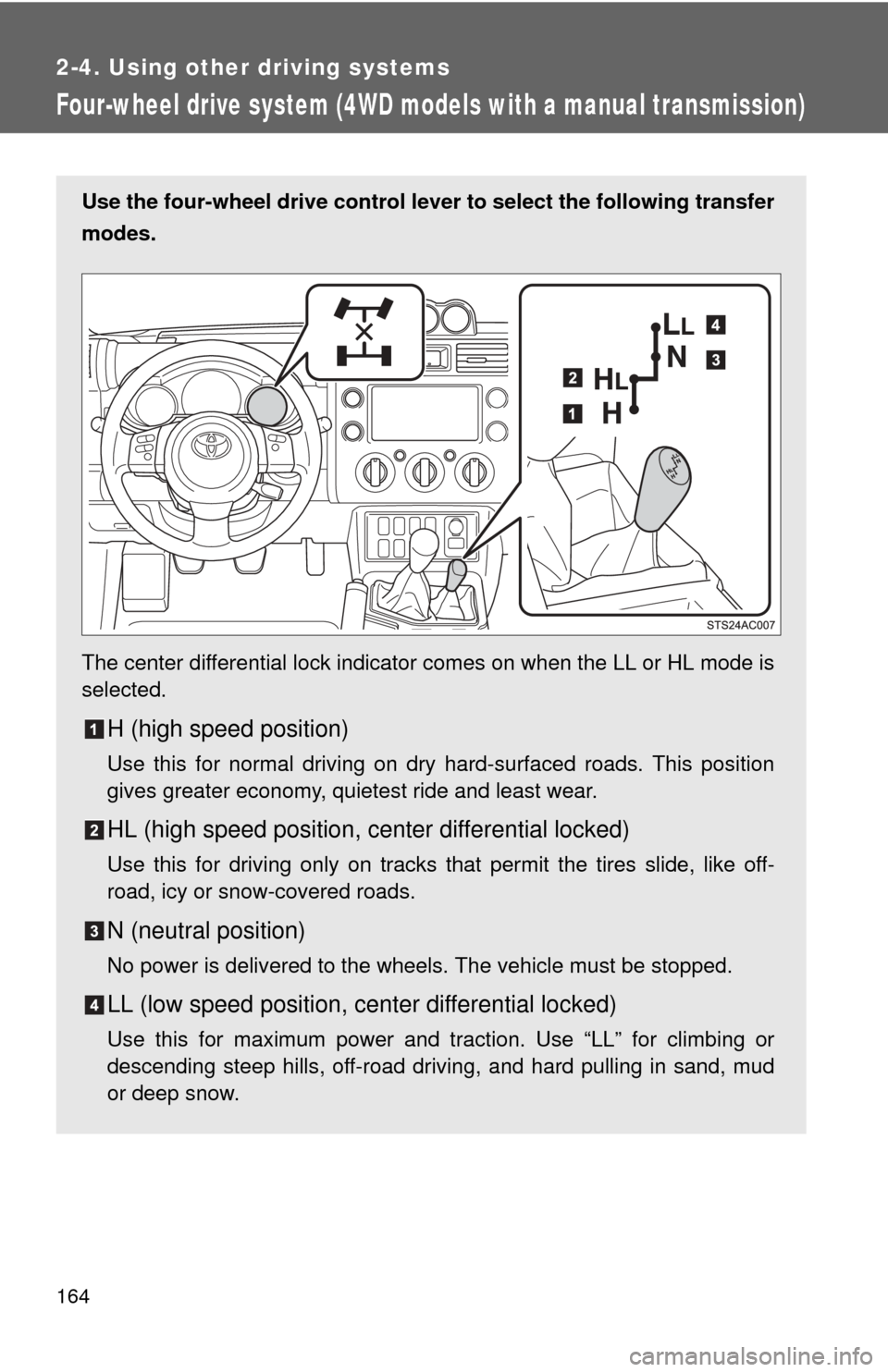
Use the four-wheel drive control lever to select the following transfer
modes.
The center differential lock indicator comes on when the LL or HL mode is
selected.
H (high speed position)
Use this for normal driving on dry hard-surfaced roads. This position
gives greater economy, quietest ride and least wear.
HL (high speed position, center differential locked)
Use this for driving only on tracks that permit the tires slide, like off-
road, icy or snow-covered roads.
N (neutral position)
No power is delivered to the wheels. The vehicle must be stopped.
LL (low speed position, ce nter differential locked)
Use this for maximum power and traction. Use “LL” for climbing or
descending steep hills, off-road driving, and hard pulling in sand, mud
or deep snow.
Page 167 of 540
167
2-4. Using other driving systems
2
When driving
Four-wheel drive system (4WD models with an automatic transmission)
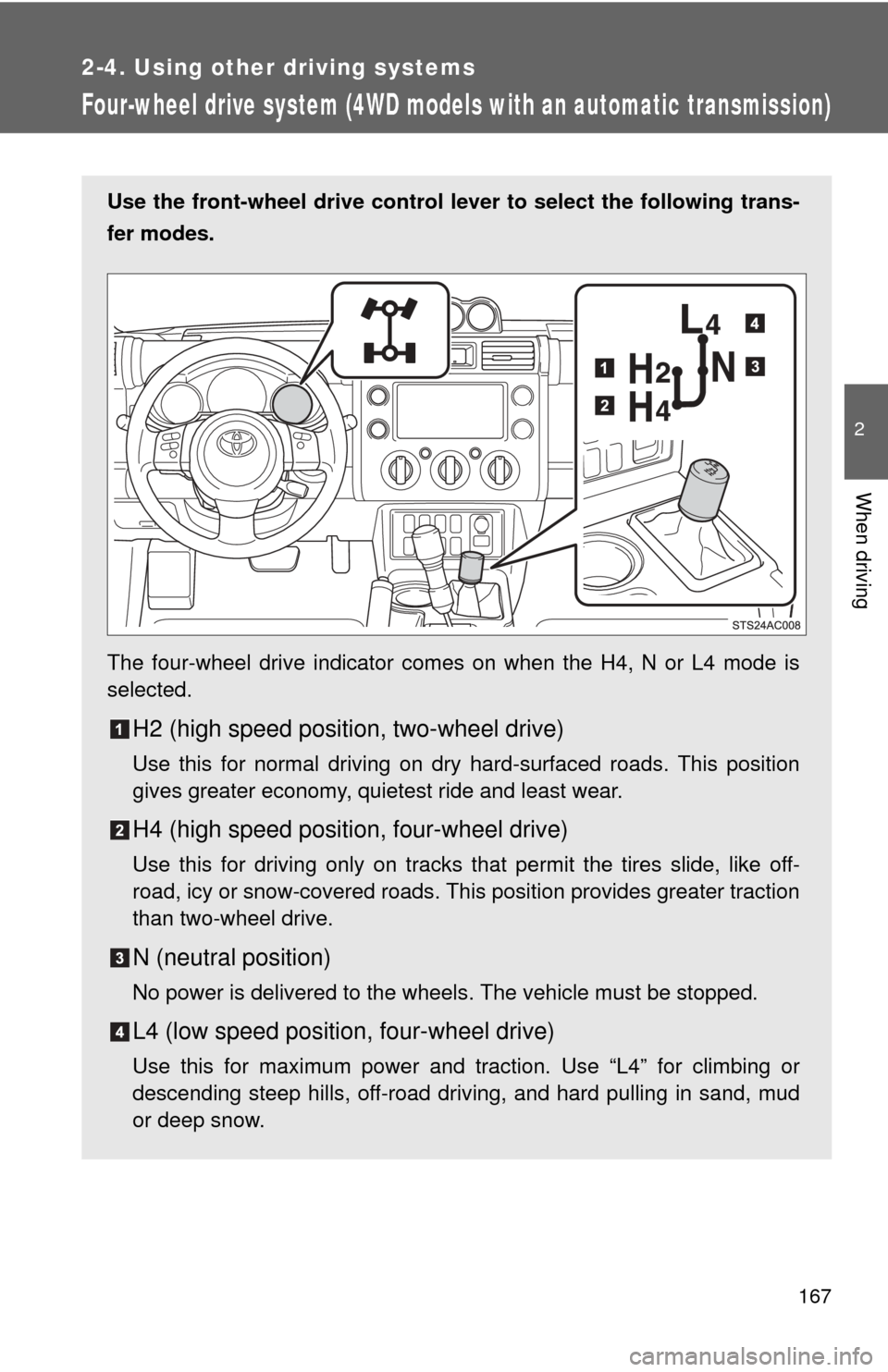
Use the front-wheel drive control lever to select the following trans-
fer modes.
The four-wheel drive indicator comes on when the H4, N or L4 mode is
selected.
H2 (high speed position, two-wheel drive)
Use this for normal driving on dry hard-surfaced roads. This position
gives greater economy, quietest ride and least wear.
H4 (high speed position, four-wheel drive)
Use this for driving only on tracks that permit the tires slide, like off-
road, icy or snow-covered roads. This position provides greater traction
than two-wheel drive.
N (neutral position)
No power is delivered to the wheels. The vehicle must be stopped.
L4 (low speed position, four-wheel drive)
Use this for maximum power and traction. Use “L4” for climbing or
descending steep hills, off-road driving, and hard pulling in sand, mud
or deep snow.
Page 170 of 540
170
2-4. Using other driving systems
Active traction control system
When the active traction control system is operatingIf any of the drive wheels spins,
the slip indicator flashes to indi-
cate that the active traction con-
trol system have been engaged.
: If equipped
The active traction control system automatically helps prevent the
spinning of 4 wheels when the vehicle is started or accelerated on
slippery road surfaces.
■ System operation
Vehicles with an automatic transmission:
Stop the vehicle, shift the shift lever to N and shift the front-
wheel drive control lever into L4.
Vehicles with a manual transmission:
Stop the vehicle or reduce your speed to less than 5 mph (8
km/h). Depress the clutch pedal and shift the four-wheel
drive control lever into LL.
Press the A-TRAC switch to
activate the system.
At this time, the active traction
control system indicator will
come on.
To cancel the system, push the
switch again.