Page 199 of 529
199
2-5. Driving information
2
When driving
CAUTION
■
Hitch
Trailer hitch assemblies have different weight capacities established by the
hitch manufacturer. Even though the vehicle may be physically capable of
towing a higher weight, the operator must determine the maximum weight
rating of the particular hitch assembly and never exceed the maximum
weight rating specified for the trailer-hitch. Exceeding the maximum weight
rating set by the trailer-hitch manufacturer can cause an accident resulting in
death or serious personal injuries.
■ When towing a trailer
Toyota recommends trailers with brakes that conform to any applicable fed-
eral and state/provincial regulations.
● If the gross trailer weight exceeds unbraked TWR, trailer brakes are
required. Toyota recommends trailers wi th brakes that conform to all appli-
cable federal and state/provincial regulations.
● Never tap into your vehicle’s hydraulic system, as this will lower the vehi-
cle’s braking effectiveness.
● Never tow a trailer without using a safety chain securely attached to both
the trailer and the vehicle. If damage occurs to the coupling unit or hitch
ball, there is danger of the trailer wandering into another lane.
NOTICE
■When installing a trailer hitch
Use only the position recommended by your Toyota dealer. Do not install the
trailer hitch on the bumper; this may cause body damage.
■ Do not directly splice trailer lights
Do not directly splice trailer lights. Directly splicing trailer lights may damage
your vehicle’s electrical system and cause a malfunction.
Page 205 of 529
Interior features3
205
3-3. Using the Bluetooth®
audio system
Blu etooth
®
audio/phone ................... 279
Using the Bluetooth
®
audio/phone ................... 282
Operating a Bluetooth
®
enabled portable
player ............................. 287
3-4. Using the hands-free phone system
(for cellular phone)
Making a phon e call ......... 290
Using the “SET UP” menu (“Bluetooth” menu) ......... 295
Using the “SET UP” menu (“Phone” menu).............. 301
3-5. Using the interior lights Interior lights list ............... 307
• Interior light .................... 309
• Personal lights ............... 309
• Personal/interior lights ... 310 3-6.
Using the storage
features
List of storage fea tures .... 311
• Glove box....................... 312
• Console box ................... 312
• Cup holders ................... 314
• Auxiliary boxes ............... 317
• Bottle holders ................. 319
3-7. Other interior features Sun visors ........................ 320
Vanity mirrors ................... 321
Clock ................................ 322
Ashtray ............................. 323
Cigarette lighter................ 324
Power outlet ..................... 325
Seat heaters..................... 326
Floor mat .......................... 328
Compass .......................... 329
Page 242 of 529
242 3-2. Using the audio system
NOTICE
■CD player precautions
Failure to follow the precautions below may result in serious damage to the
CDs or the player itself.
●Do not insert anything other than CDs into the CD slot.
● Do not apply oil to the CD player.
● Store CDs away from direct sunlight.
● Never try to disassemble any part of the CD player.
Page 307 of 529
307
3
Interior features
3-5. Using the interior lights
Interior lights list
Interior light (P. 309)
Personal lights or personal/interior lights ( P. 309, 310)
“ENGINE START STOP” switch light (vehicles with smart key
system)
Page 308 of 529

308 3-5. Using the interior lights
■Illuminated entry system
Vehicles without moon roof
The interior light (with the switch in the “DOOR” position) and “ENGINE
START STOP” switch light (vehicles with smart key system) automatically
turn on/off according to “ENGINE START STOP” switch mode (vehicles with
smart key system) or engine switch position (vehicles without smart key sys-
tem), the presence of the electronic key (vehicles with smart key system),
whether the doors are locked/unlocked (vehicles with power door lock sys-
tem) and whether the doors are open/closed.
Vehicles with moon roof
The interior light, personal/interior lights (with the switch in the “DOOR” posi-
tion) and “ENGINE START STOP” switch light (vehicles with smart key sys-
tem) automatically turn on/off according to “ENGINE START STOP” switch
mode (vehicles with smart key system) or engine switch position (vehicles
without smart key system), the presence of the electronic key (vehicle\
s with
smart key system), whether the doors are locked/unlocked (vehicles with
power door lock system) and whether the doors are open/closed.
■ To prevent the battery from being discharged
If the interior light, personal/interior lights (vehicles with moon roof) and
“ENGINE START STOP” switch light (vehicles with smart key system)
remain on when the door is not fully closed and the switch is in the “DOOR”
position, the lights will go off automatically after 20 minutes.
■ Customization that can be co nfigured at Toyota dealer
Settings (e.g. The time elapsed before lights turn off) can be changed.
(Customizable features P. 491)
Page 309 of 529
309
3-5. Using the interior lights
3
Interior features
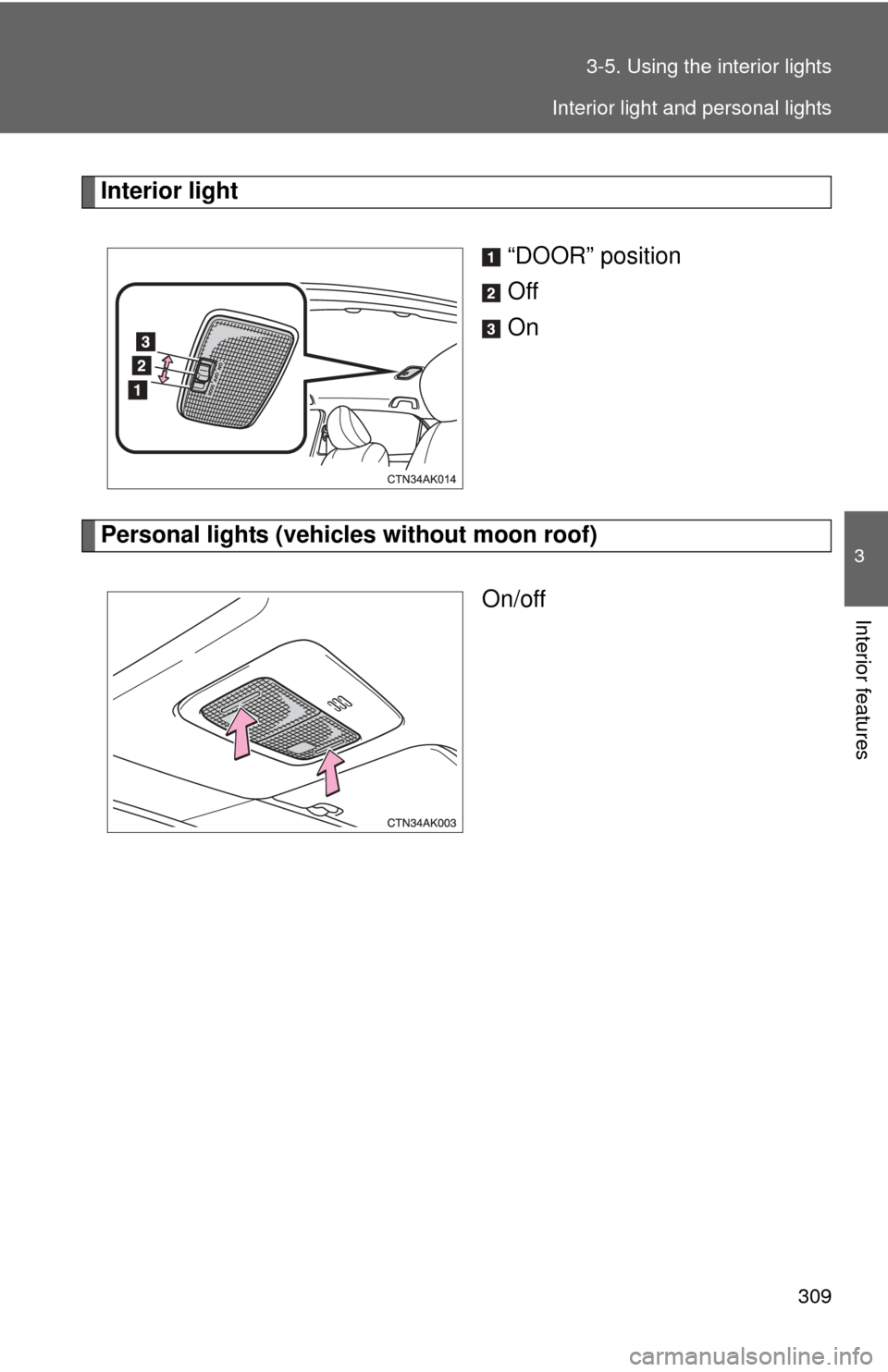
Interior light
“DOOR” position
Off
On
Personal lights (vehicles without moon roof)On/off
Interior light and personal lights
Page 310 of 529
310 3-5. Using the interior lights
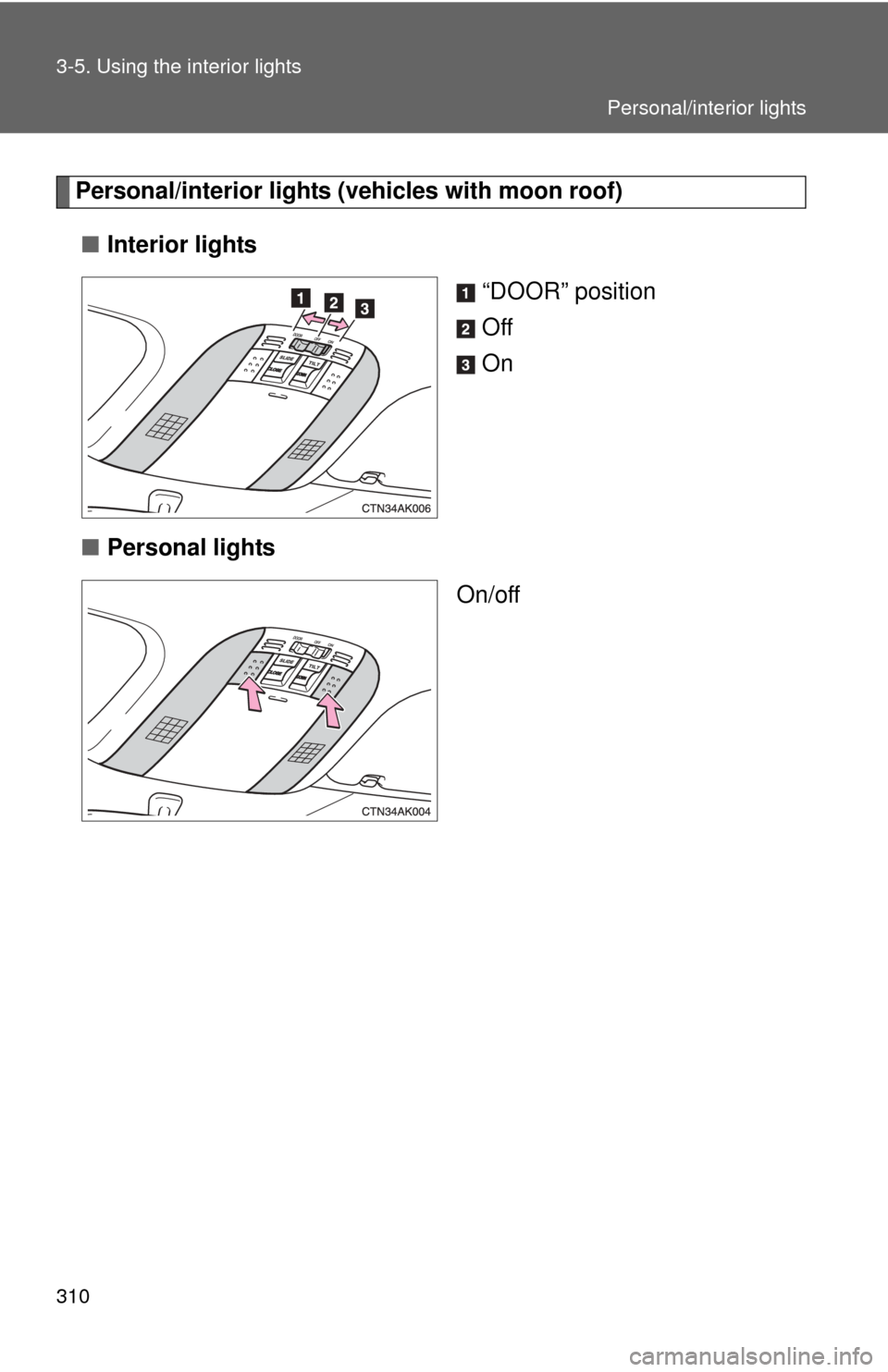
Personal/interior lights (vehicles with moon roof)■ Interior lights
“DOOR” position
Off
On
■ Personal lights
On/off
Personal/interior lights
Page 311 of 529
311
3
Interior features
3-6. Using the storage features
List of storage features
CAUTION
■Items that should not be left in the storage spaces
Do not leave glasses, lighters or spray cans in the storage spaces, as this
may cause the following when cabin temperature becomes high:
● Glasses may be deformed by heat or cracked if they come into contact
with other stored items.
● Lighters or spray cans may explode. If they come into contact with other
stored items, the lighter may catch fire or the spray can may release gas,
causing a fire hazard.
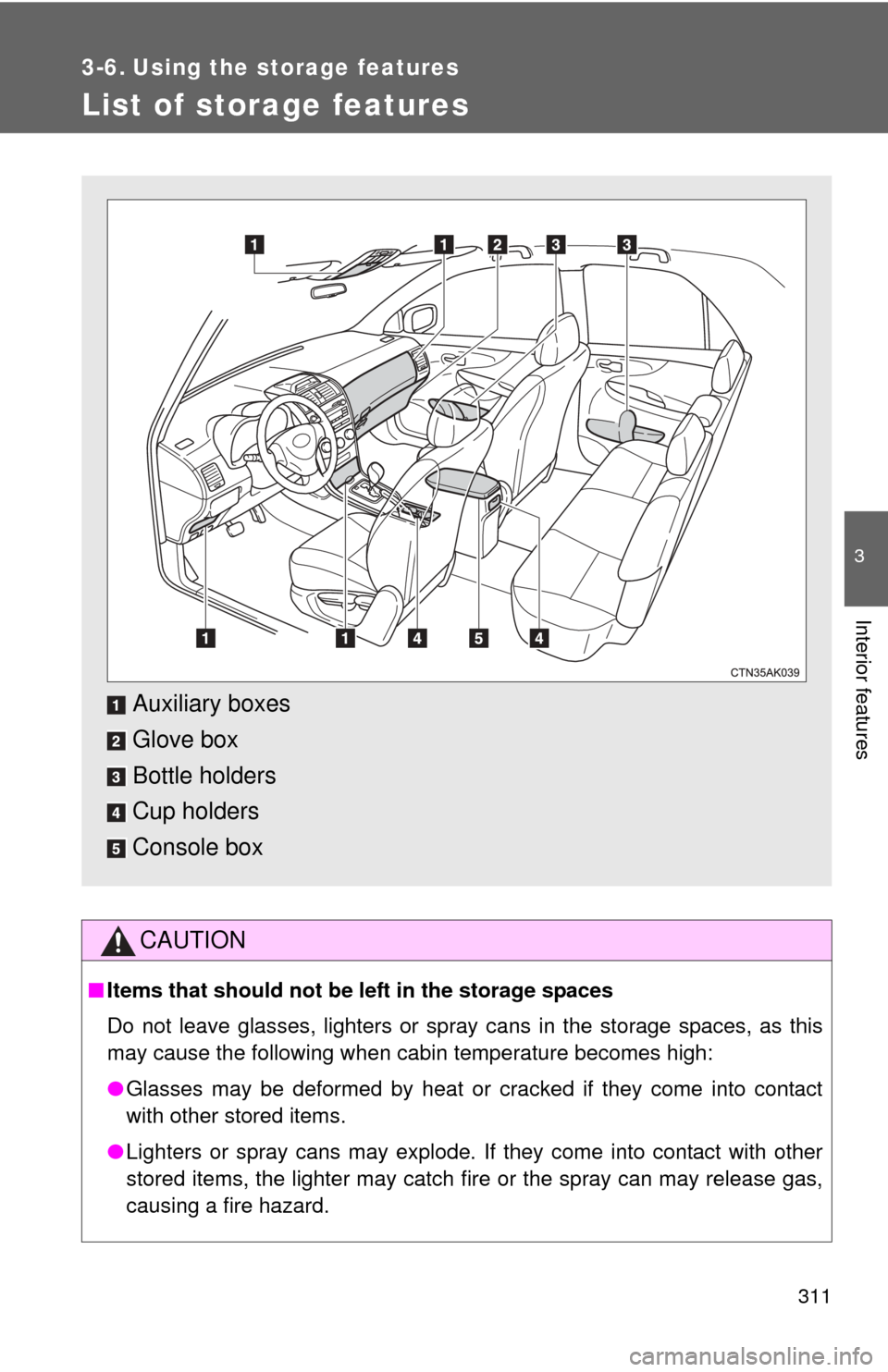
Auxiliary boxes
Glove box
Bottle holders
Cup holders
Console box