Page 156 of 532
156 2-1. Driving procedures
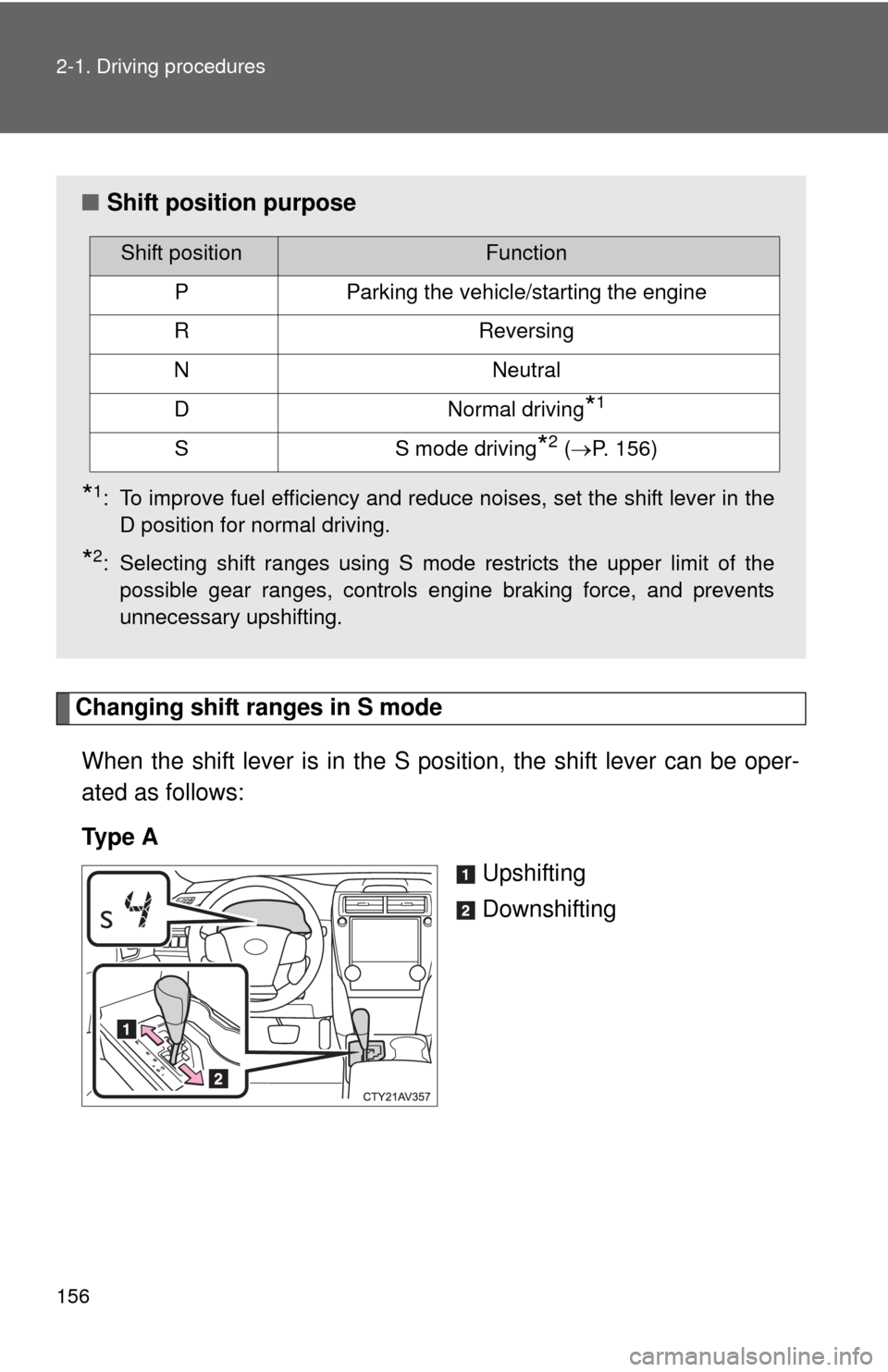
Changing shift ranges in S modeWhen the shift lever is in the S position, the shift lever can be oper-
ated as follows:
Ty p e A Upshifting
Downshifting
■Shift position purpose
*1: To improve fuel efficiency and reduce noises, set the shift lever in the
D position for normal driving.
*2: Selecting shift ranges using S mode restricts the upper limit of thepossible gear ranges, controls engine braking force, and prevents
unnecessary upshifting.
Shift positionFunction
PParking the vehicle/starting the engine
RReversing
NNeutral
DNormal driving*1
SS mode driving*2 (P. 156)
Page 159 of 532
159
2-1. Driving procedures
2
When driving
Automatic transmission (vehicles with paddle shift switches)
Select a shift position appropriate for the driving conditions.
■Shifting the shift lever
Vehicles without a smart key system:
While the engine switch is in the “ON” position, move the
shift lever with the brake pedal depressed.
Vehicles with a smart key system:
While the “ENGINE START STOP” switch is in IGNITION
ON mode, move the shift lever with the brake pedal
depressed.
When shifting the shift lever between P and D, make sure that the
vehicle is completely stopped.
Page 160 of 532
160 2-1. Driving procedures
■Shift position purpose
*1: To improve fuel efficiency and reduce noises, set the shift lever in the
D position for normal driving.
*2: Selecting shift ranges using S mode restricts the upper limit of thepossible gear ranges, controls engine braking force, and prevents
unnecessary upshifting.
Shift positionFunction
PParking the vehicle/starting the engine
RReversing
NNeutral
DNormal driving*1
SS mode driving*2 (P. 162)
Page 166 of 532
166
2-1. Driving procedures
Tur n signal lever
■Turn signals can be operated when
Vehicles without a smart key system: The engine switch is in the “ON” posi-
tion.
Vehicles with a smart key system: The “ENGINE START STOP” switch is in
IGNITION ON mode.
■ If the indicators flashes faster than usual
Check that a light bulb in the front or rear turn signal lights has not burned
out.
The turn signal lever can be used to show the following intentions
of the driver:
Right turn
Left turn
Lane change to the right
(push and hold the lever
partway)
The right hand signals will
flash until you release the
lever.
Lane change to the left
(push and hold the lever
partway)
The left hand signals will flash
until you release the lever.
Page 177 of 532
177
2-2. Instrument cluster
2
When driving
Ty p e B
Eco Driving Indicator Light and
current fuel consumption gauge
can be activated or deactivated
While the odometer is
being displayed, press
and hold the display
change button to display
the Eco Driving Indicator
Light customization
screen
Press the display change
button to set Eco Driving
Indicator Light to on or
off.
Press and hold the dis-
play change button to
complete the setting
If off is selected, Eco Driving
Indicator Light and the current
fuel consumption gauge (if
equipped) will not be displayed.
STEP1
STEP2
STEP3
■ The meters and display illuminate when
Vehicles without a smart key system:
The engine switch is in the “ON” position.
Vehicles with a smart key system:
The “ENGINE START STOP” switch is in IGNITION ON mode.
Page 178 of 532

178 2-2. Instrument cluster
■The brightness of the instrument panel lights
When the tail lights are turned on, the meter’s brightness will be reduced
slightly unless the meter brightness level adjustment is set to the brightest
setting.
On some models: If the tail lights are turned on when the surroundings are
dark, the meter’s brightness will reduce slightly. However, when the sur-
roundings are bright, such as during the daytime, the meter’s brightness will
not be reduced even if the tail lights are turned on.
■ Fuel gauge and odometer/trip meter display remain on mode
Vehicles without a smart key system:
After the engine switch has been turned off, the fuel gauge and odometer/
trip meter display remain on for 10 minutes, enabling the fuel gauge and
odometer/trip meter values to be checked again without having to turn the
engine switch to the “ON” position.
When confirming the gauges and meters, turn the headlight switch to the
position. Press the display change button to change between the
odometer and trip meter displays.
Vehicles with a smart key system:
After the “ENGINE START STOP” switch has been turned off, the fuel gauge
and odometer/trip meter display remain on for 10 minutes, enabling the fuel
gauge and odometer/trip meter values to be checked again without having to
turn the “ENGINE START STOP” switch to IGNITION ON mode.
When confirming the gauges and meters, turn the headlight switch to the
position. Press the display change button to change between the
odometer and trip meter displays.
NOTICE
■ To prevent damage to the engine and its components
●Do not let the indicator needle of the tachometer enter the red zone, which
indicates the maximum engine speed.
● The engine may be overheating if the rightmost segment of the engine
coolant temperature display is flashing. In this case, immediately stop the
vehicle in a safe place, and check the engine after it has cooled com-
pletely. (
P. 459)
Page 182 of 532

182 2-2. Instrument cluster
*1: These lights turn on when the engine switch is turned to the “ON”position (vehicles without a smart key system) or the “ENGINE
START STOP” switch is turned to IGNITION ON mode (vehicles
with a smart key system) to indicate that a system check is being
performed. They will turn off after the engine is started, or after a
few seconds. There may be a malfunction in a system if a light does
not come on, or if the lights do not turn off. Have the vehicle
inspected by your Toyota dealer.
*2: In order to confirm operation, the BSM outside rear view mirror indi-cators illuminate in the following situations:
• When the “ENGINE START STOP” switch is turned to IGNITION
ON mode while the BSM main switch is set to ON.
• When the BSM main switch is set to ON while the “ENGINE START STOP” switch is in IGNITION ON mode.
If the system is functioning correctly, the BSM outside rear view mir-
ror indicators will turn off after a few seconds.
If the BSM outside rear view mirror indicators do not illuminate or do
not turn off, there may be a malfunction with the system.
If this occurs, have the vehicle inspected by your Toyota dealer.
*3: The light flashes to indicate that the system is operating.
Page 183 of 532
183
2-2. Instrument cluster
2
When driving
■
Warning lights
Warning lights inform the driver of malfunctions in any of the
vehicle’s systems. ( P. 420)
*1: These lights turn on when the engine switch is turned to the “ON”
position (vehicles without a smart key system) or the “ENGINE
START STOP” switch is turned to IGNITION ON mode (vehicles
with a smart key system) to indicate that a system check is being
performed. They will turn off after the engine is started, or after a
few seconds. There may be a malfunction in a system if a light does
not come on, or if the lights do not turn off. Have the vehicle
inspected by your Toyota dealer.
(U.S.A.)(Canada)(U.S.A.)(Canada)(U.S.A.)
(Canada)(U.S.A.)(if equipped)(if equipped)
(if equipped)
Ty p e ATy p e B
*1*1*1*1*1*1*1*1
*1*1*3*1*1*1*4
*1*2