Page 212 of 580
212
2-5. Driving information
Cargo and luggage
Capacity and distributionCargo capacity depends on the total weight of the occupants.
(Cargo capacity) = (Total load capacity) – (Total weight of occupants)
Steps for Determining Correct Load Limit—
(1) Locate the statement “The co mbined weight of occupants and
cargo should never exceed XXX kg or XXX lbs.” on your vehi-
cle’s placard.
(2) Determine the combined weight of the driver and passengers that will be riding in your vehicle.
(3) Subtract the combined weight of the driver and passengers from
XXX kg or XXX lbs.
Take notice of the following information about storage precau-
tions, cargo capacity and load.
● Stow cargo and luggage in the trunk whenever possible. Be
sure all items are secured in place.
● Be careful to keep the vehicle le vel. Placing the weight as far
forward as possible helps maintain vehicle balance.
● For better fuel economy, do no t carry unnecessary weight.
Page 215 of 580
215
2-5. Driving information
2
When driving
CAUTION
■Things that must not be carried in the trunk
The following things may cause a fire if loaded in the trunk.
●Receptacles containing gasoline
●Aerosol cans
■Storage precautions
Observe the following precautions.
Failing to do so may result in death or serious injury.
●Do not place cargo or luggage in or on the following locations as the
item may get under the brake or accelerator pedal and prevent the
pedals from being depressed properly,
block the driver’s vision, or hit
the driver or passengers, causing an accident.
• Driver’s feet
• Front passenger or rear seats (when stacking items)
• Instrument panel
• Dashboard
●Secure all items in the occupant compartment, as they may shift and
injure someone during an accident or sudden braking.
●Never allow anyone to ride in the trunk. It is not designed for passen-
gers. They should ride in their seats with their seat belts properly fas-
tened. Otherwise, they are much more likely to suffer death or serious
injury, in the event of sudden braking, sudden swerving or an accident.
Page 227 of 580

Interior features3
227
3-3. Using the Bluetooth® audio
system
Blu etooth
® audio
system ........................... 289
Using the Bluetooth
®
audio system.................. 292
Operating a Bluetooth
®
enabled portable
player ............................. 299
Setting up a Bluetooth
®
enabled portable
player ............................. 301
Bluetooth
® audio system
setup .............................. 307
3-4. Using the hands-free system
(for cellular phone)
Hands-free sys tem
(for cellular phone) ......... 308
Using the hands-free system ........................... 311
Making a phone call ......... 320
Setting a cellular phone ............................. 325
Security and system setup .............................. 332
Using the phone book ...... 337 3-5. Using the interior lights
Interior lights list ............... 346
3-6. Using the storage features List of storage features .... 349
3-7. Other interior features Sun visors ........................ 357
Vanity mirrors ................... 358
Clock ................................ 359
Ashtrays ........................... 360
Power outlets ................... 361
Seat heaters/ventilators ...................... 363
Armrest ............................ 365
Rear sunshade................. 366
Floor mats ........................ 368
Trunk features .................. 370
Garage door opener......... 372
Compass .......................... 380
Page 370 of 580
370
3-7. Other interior features
Trunk features
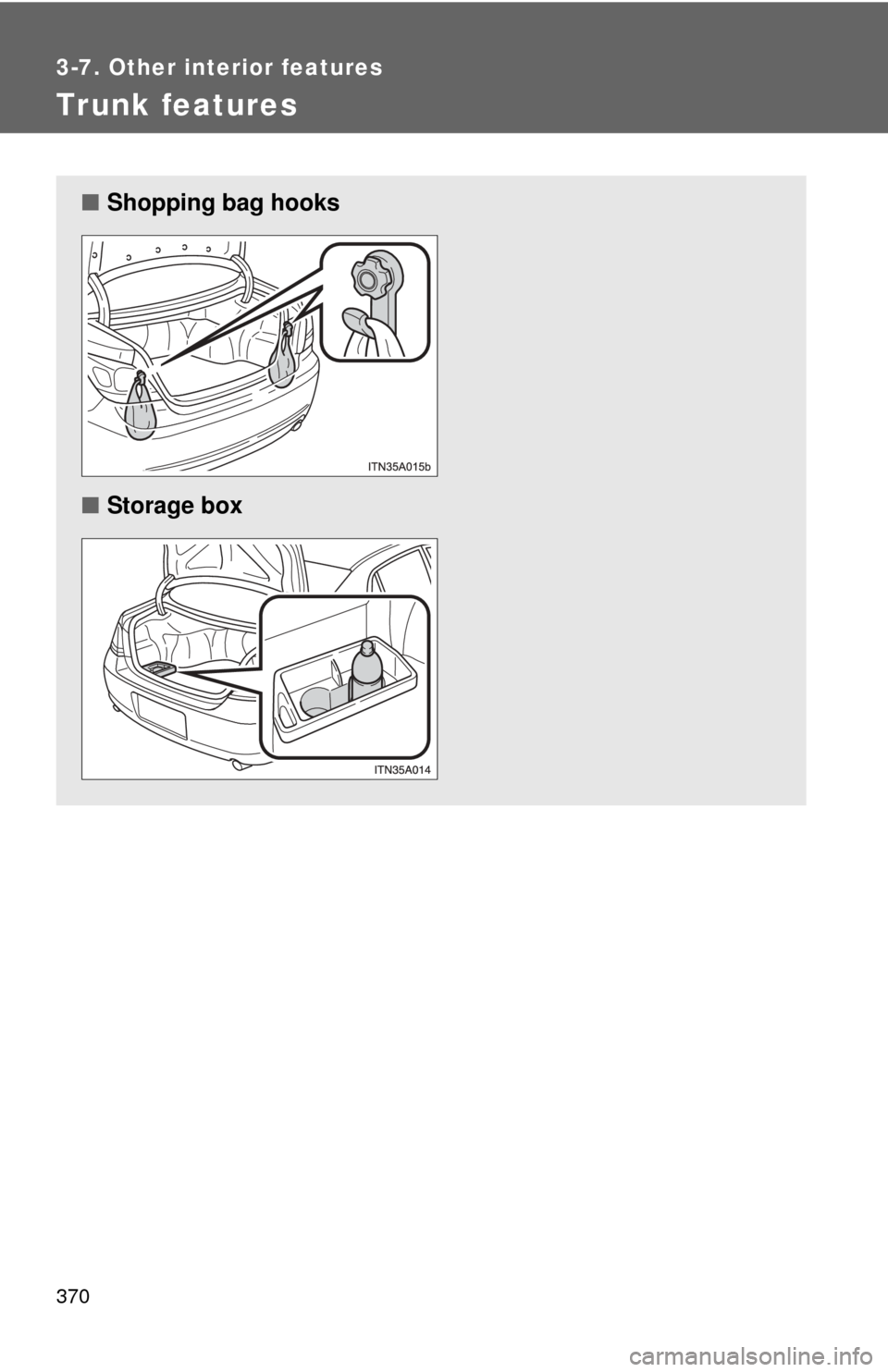
■Shopping bag hooks
■ Storage box
Page 371 of 580
371
3-7. Other interior features
3
Interior features
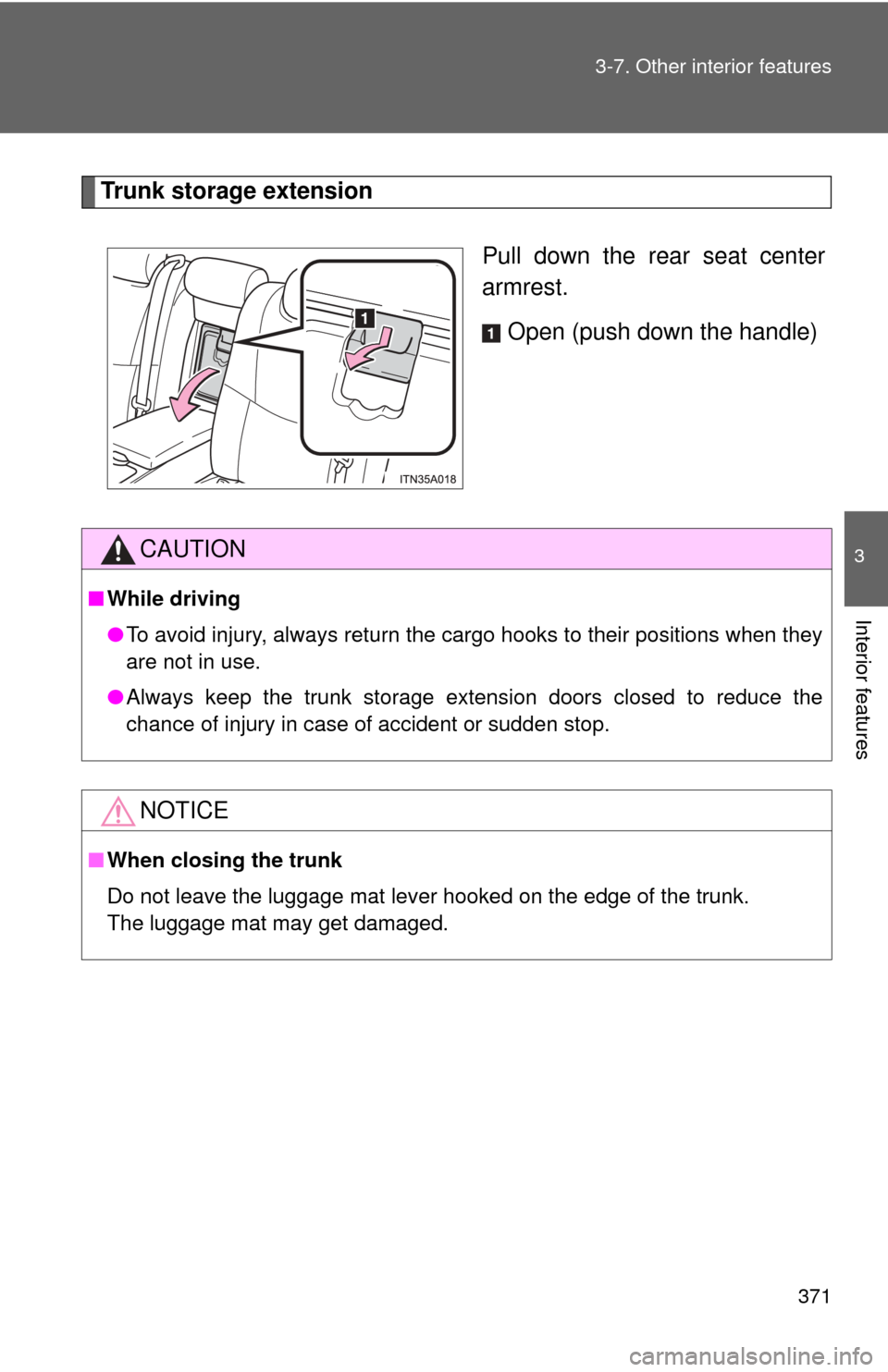
Trunk storage extension
Pull down the rear seat center
armrest.Open (push down the handle)
CAUTION
■While driving
●To avoid injury, always return the cargo hooks to their positions when they
are not in use.
● Always keep the trunk storage extension doors closed to reduce the
chance of injury in case of accident or sudden stop.
NOTICE
■When closing the trunk
Do not leave the luggage mat lever hooked on the edge of the trunk.
The luggage mat may get damaged.
Page 397 of 580
397
4-2. Maintenance
4
Maintenance and care
Vehicle exterior
ItemsCheck points
Doors/trunk • Operate smoothly?
Engine hood • The lock system works properly?
Fluid leaks • Is there any leakage after parking?
Tire • Inflation pressure is correct?
• Tire surfaces not worn or damaged?
• Tires rotated according to the mainte-
nance schedule?
• Wheel nuts are not loose?
CAUTION
■ If the engine is running
Turn off the engine and ensure that there is adequate ventilation before per-
forming maintenance checks.
Page 448 of 580
448 4-3. Do-it-yourself maintenance
FuseAmpereCircuit
21 EFI No.1 25 A Multiport fuel injection system/
sequential multiport fuel injection
system, fuel pump
22 HORN 10 A Horn
23 HEAD LH UPR 15 A Left-hand headlight (high beam)
24 HEAD RH UPR 15 A Right-hand headlight (high beam)
25 A/F 25 A Air fuel ratio sensor
26 WASHER 20 A Windshield washer
27 S-HORN 7.5 A Horn
28 DOME 7.5 A Gauges and meters, clock, front
personal lights, door courtesy
lights, garage door opener, rear
personal lights, trunk light
29 ECU-B 10 A Center display, multiplex
communication system
30 RAD No.1 15 A Audio system, center display,
navigation system
31 EFI No.2 10 A Multiport fuel injection system/
sequential multiport fuel injection
system
32 STOP No.2 7.5 A Stop lights, high mounted
stoplight, vehicle stability control
system, anti-lock brake system
33 HEAD RH LWR 15 A Right-hand headlight (low beam)
34 HEAD LH LWR 15 A Left-hand headlight (low beam)
Page 465 of 580
4
Maintenance and care
465
4-3. Do-it-yourself maintenance
■
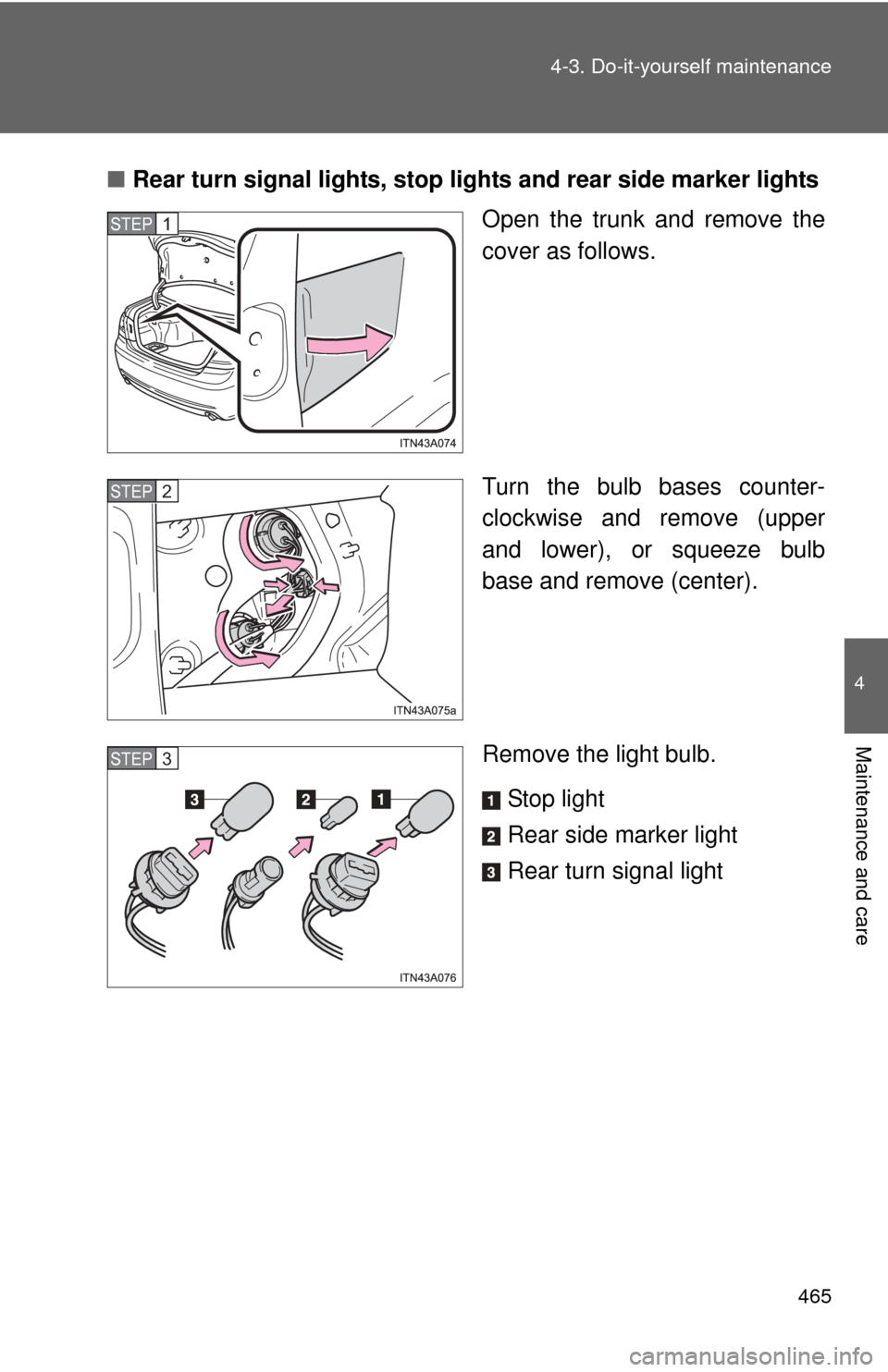
Rear turn signal lights, stop lights and rear side marker lights
Open the trunk and remove the
cover as follows.
Turn the bulb bases counter-
clockwise and remove (upper
and lower), or squeeze bulb
base and remove (center).
Remove the light bulb.
Stop light
Rear side marker light
Rear turn signal light
STEP1
STEP2
STEP3