Page 310 of 580

310 3-4. Using the hands-free system (for cellular phone)
■Certification for the hands-free system
Type A
FCC ID: BABFT0001A
IC ID: 2024B-FT0001A
MADE IN CHINA
Type B
FCC ID: L2C0045TR
IC ID: 3432A-0045TR
MADE IN MEXICO
This device complies with Part 15 of the FCC Rules and RSS-210 Rules.
Operation is subject to the following two conditions: (1) this device may not
cause harmful interference, and (2) this device must accept any interference
received, including interference that may cause undesired operation.
CAUTION
■FCC WARNING
Changes or modifications in construction not expressly approved by the
party responsible for compliance could void the user’s authority to operate
the equipment.
Radio frequency exposure. This device is approved for Mobile Application
only and, to comply with applicable FCC radio frequency exposure regula-
tions, must be used with a distance of at least 7.9 in. (20 cm) between the
antenna and the body of any person at all time during use.
■ While driving
Do not use a cellular phone, or connect the Bluetooth
® phone.
NOTICE
■To prevent damage to a cellular phone
Do not leave a cellular phone in the vehicle. The temperature inside may
become high resulting in damage to the phone.
Page 347 of 580
347
3-5. Using the interior lights
3
Interior features
■
To prevent battery discharge
If the interior lights, personal lights and engine switch light (if equipped)
remain on when the door is not fully closed or the interior light switch in
“DOOR” position, the lights will go off automatically after 20 minutes.
■ Customization that can be co nfigured at Toyota dealer
Setting (e.g. The time elapsed before lights turn off) can be changed.
(Customizable features
P. 545)
Page 427 of 580

4
Maintenance and care
427
4-3. Do-it-yourself maintenance
■When initialization of the tire
pressure warning system has failed
Initialization can be completed in a few minutes. However, in the follow-
ing cases, the settings have not b een recorded and the system will not
operate properly. If repeated attempts to record tire inflation pressure
settings are unsuccessful, have the vehicle inspected by your Toyota
dealer.
●When operating the tire pressure warning reset switch, the tire pres-
sure warning light doe s not blink 3 times.
●After carrying out the initialization procedure, the tire pressure warn-
ing light blinks for 1 minute then stays on after driving for about 20
minutes.
■Routine tire inflation pressure checks
The tire pressure warning system doe s not replace routine tire inflation
pressure checks. Make su re to check tire inflation pressure as part of
your routine of daily vehicle checks.
■Tire pressure warning system certification
FCC ID: PAXPMV107J
FCC ID: HYQ13BCX
For vehicles sold in the U.S.A.
This device complies with part 15 of the FCC Rules. Operation is subject
to the following two conditions: (1) This device may not cause harmful
interference, and (2) this device must accept any interference received,
including interference that may cause undesired operation.
FCC WARNING:
Changes or modifications not expre ssly approved by the party responsi-
ble for compliance could void the user’s authority to operate the equip-
ment.
For vehicles sold in Canada
Operation is subject to the following two conditions: (1) this device may
not cause interference, and (2) this de vice must accept any interference,
including interference that may caus e undesired operation of the device.
Page 457 of 580
4
Maintenance and care
457
4-3. Do-it-yourself maintenance
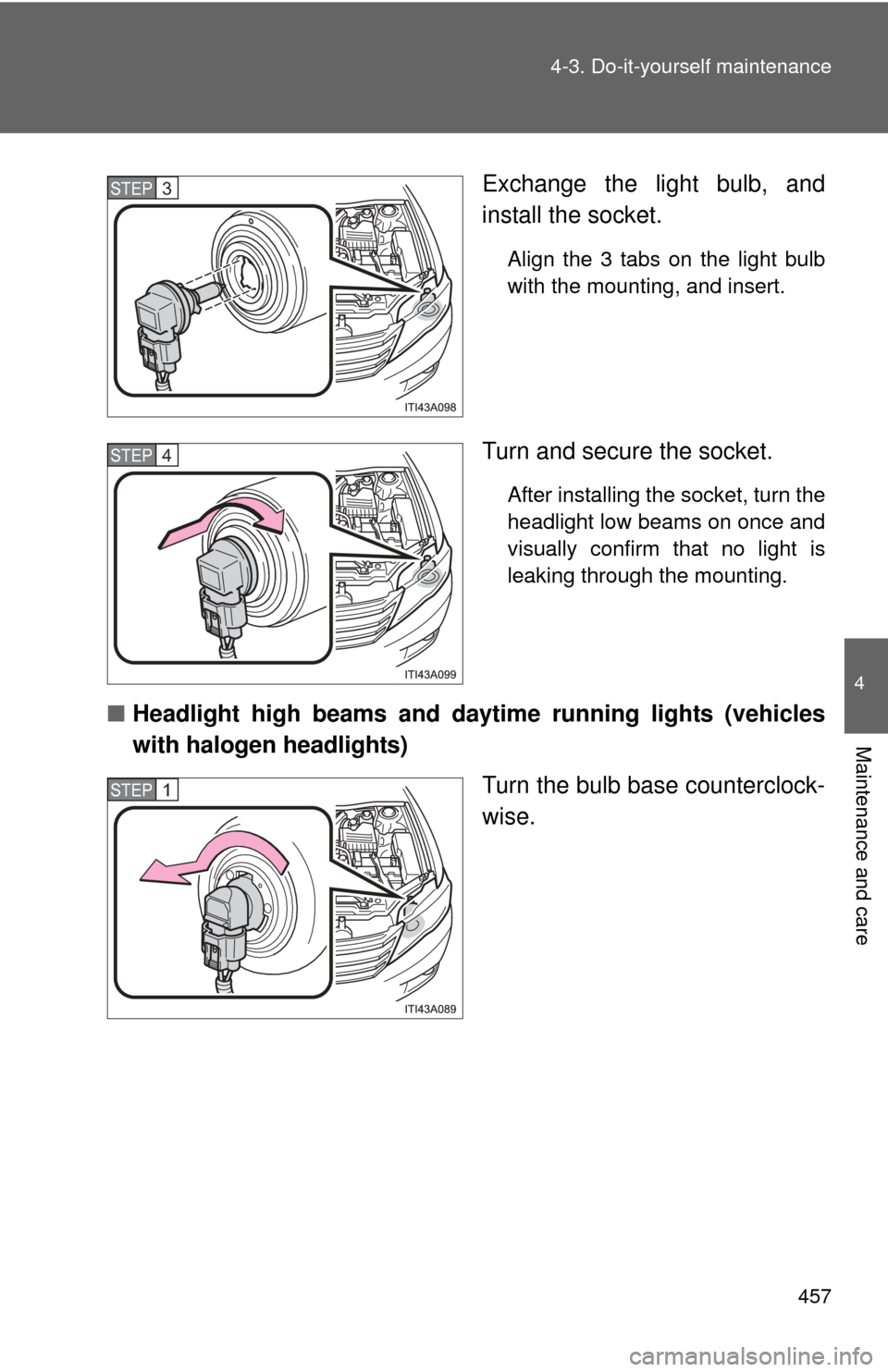
Exchange the light bulb, and
install the socket.
Align the 3 tabs on the light bulb
with the mounting, and insert.
Turn and secure the socket.
After installing the socket, turn the
headlight low beams on once and
visually confirm that no light is
leaking through the mounting.
■
Headlight high beams and d aytime running lights (vehicles
with halogen headlights)
Turn the bulb base counterclock-
wise.
STEP3
STEP4
STEP1
Page 497 of 580
5
When trouble arises
497
5-2. Steps to take in an emergency
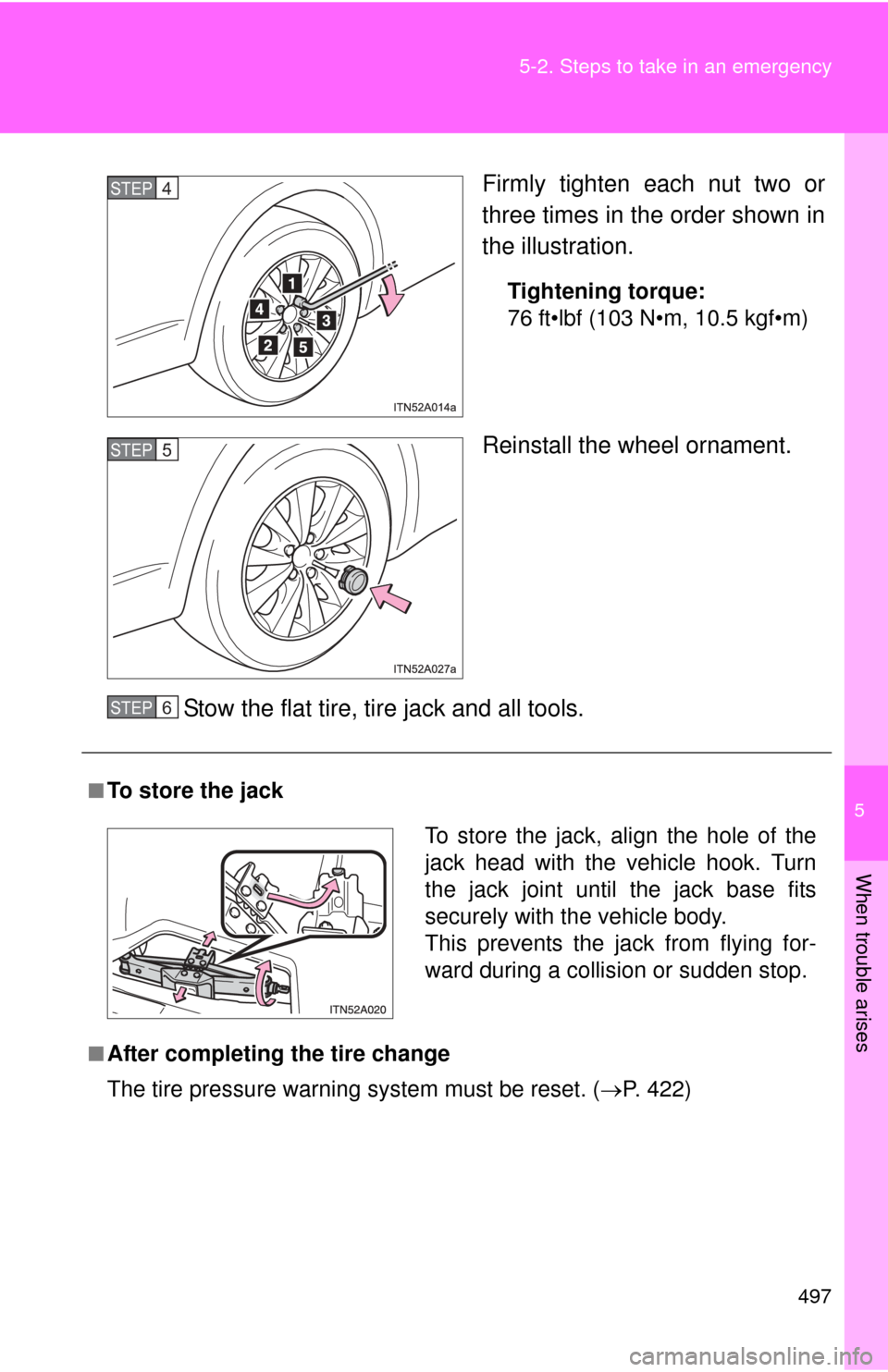
Firmly tighten each nut two or
three times in the order shown in
the illustration.
Tightening torque:
76 ft•lbf (103 N•m, 10.5 kgf•m)
Reinstall the wheel ornament.
Stow the flat tire, tire jack and all tools.
STEP4
STEP5
■To store the jack
■After completing the tire change
The tire pressure warning system must be reset. (P. 422)
STEP6
To store the jack, align the hole of the
jack head with the vehicle hook. Turn
the jack joint until the jack base fits
securely with the vehicle body.
This prevents the jack from flying for-
ward during a collisio n or sudden stop.
Page 506 of 580
506 5-2. Steps to take in an emergency
Changing “ENGINE START STOP” switch modes and starting the
engine
Put the shift lever in “P” and apply the brakes. Touch the Toyota emblem side of
the electronic key to the
“ENGINE START STOP” switch.
An alarm will sound to indicate
that the start function cannot
detect the electronic key that is
touched to the “ENGINE START
STOP” switch if any of the doors
is opened and closed while the
key is touched to the switch.
To change the “ENGINE START STOP” switch modes: Within
5 seconds of the buzzer soundi ng, release the brake pedal
and press the “ENGINE START STOP” switch. Modes can be
changed each time the sw itch is pressed. (P. 154)
To start the engine: Press the “ENGINE START STOP” switch
within 5 seconds after the buzzer sounds, keeping the brake
pedal depressed.
If the “ENGINE START STOP” switch still cannot be operated, con-
tact your Toyota dealer.
STEP1
STEP2
STEP3
Page 545 of 580
545
6
Vehicle specifications
6-2. Customization
Customizable features
ItemFunctionDefault settingCustomizedsetting
Smart key
system
( P. 30) Smart key system
ONOFF
Operation signal
(Emergency flashers) ON
OFF
Operation signal
(Buzzer) ON
OFF
Wireless
remote
control
( P. 42) Unlocking operation
Driver’s door
unlocked in 1-
step, all doors
unlocked
in 2-stepAll doors
unlocked in 1-step
Time elapsed before
automatic door lock
function is activated if
door is not opened after
being unlocked 60 secondsOFF
30 seconds
120 seconds
Your vehicle includes a variety of electronic features that can be per-
sonalized to your preferences. Programming these preferences
requires specialized equipment and may be performed by your
Toyota dealer.
Some function settings are changed simultaneously with other functions
being customized. Contact your Toyota dealer for further details.
Page:
< prev 1-8 9-16 17-24