Page 356 of 750

3544-5. Using the driving support systems
UK_AURIS/AURIS_HV_EE (OM12E33E)When to use the Stop & Start system
Use the Stop & Start system when stopping the vehicle temporarily at red
lights, intersections, etc. When stopping the vehicle for a longer period of
time, turn off the engine completely.
Stop & Start system warning buzzer
If the engine is stopped by the Stop & Start system and the following action is
performed, a buzzer will sound and will flash. This indicates that the
engine is only stopped by the Stop & Start system, not that the engine has
been turned off completely.
The shift lever is shifted into a position other than N with the clutch pedal
released.
If the Stop & Start cancel indicator continues to flash
The Stop & Start system may be malfunctioning. Contact any authorized
Toyota dealer or repairer, or another duly qualified and equipped professional.
If the windshield is fogged up while the engine is stopped by the Stop &
Start system
Turn the windshield defogger on. (The engine will start due to the automatic
engine start function.) (P. 379, 388)
If the windshield fogs up frequently, press the Stop & Start cancel switch to
deactivate the system.
The Stop & Start system operation time and Stop & Start system total
operation time display
P. 124, 130
Replacing 12-volt battery
The installed 12-volt battery is specific to the Stop & Start system. It should
only be replaced with a 12-volt battery of identical type and rating.
Ask any authorized Toyota dealer or repairer, or another duly qualified and
equipped professional for further details.
Page 380 of 750
3785-1. Using the air conditioning system and defogger
UK_AURIS/AURIS_HV_EE (OM12E33E)
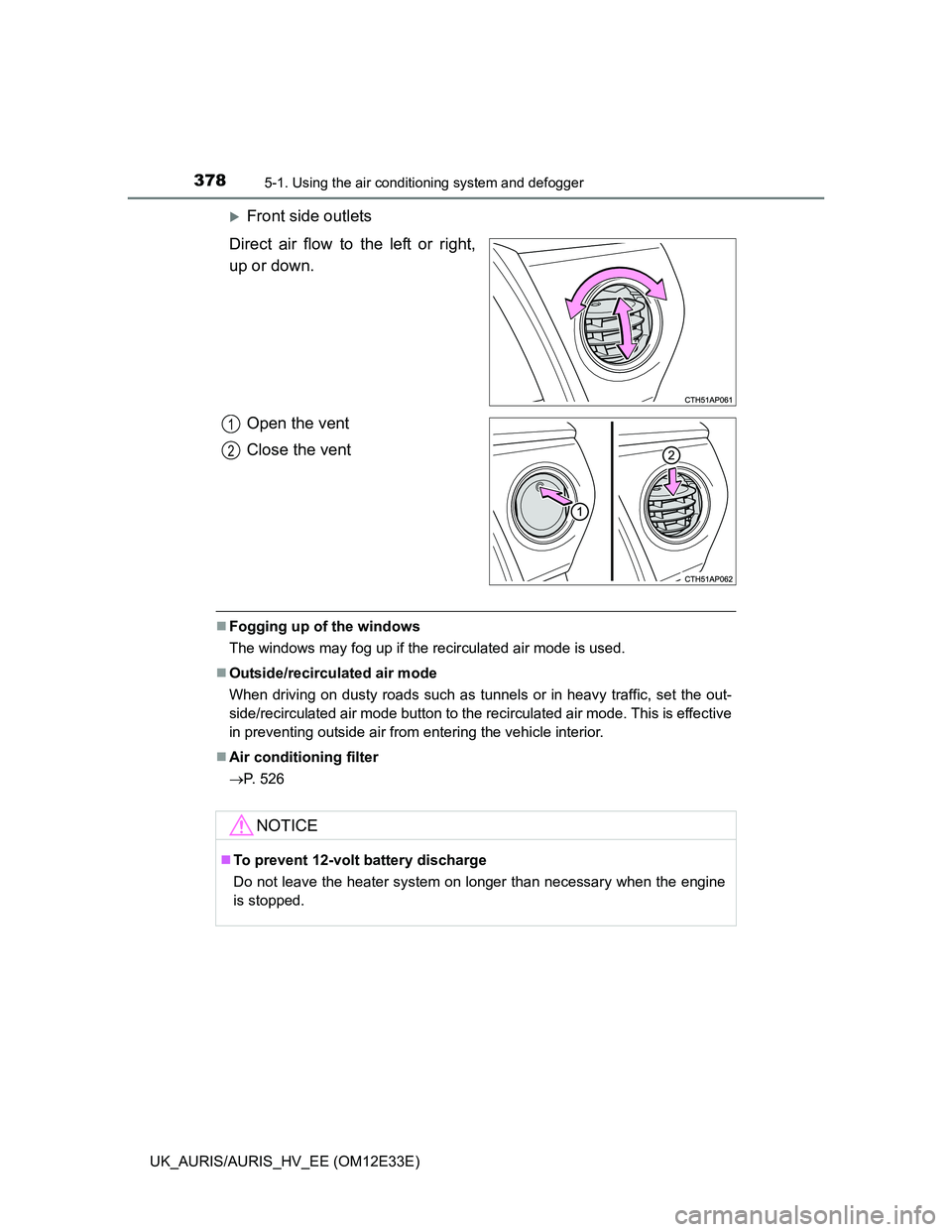
Front side outlets
Direct air flow to the left or right,
up or down.
Open the vent
Close the vent
Fogging up of the windows
The windows may fog up if the recirculated air mode is used.
Outside/recirculated air mode
When driving on dusty roads such as tunnels or in heavy traffic, set the out-
side/recirculated air mode button to the recirculated air mode. This is effective
in preventing outside air from entering the vehicle interior.
Air conditioning filter
P. 526
1
2
NOTICE
To prevent 12-volt battery discharge
Do not leave the heater system on longer than necessary when the engine
is stopped.
Page 389 of 750
3875-1. Using the air conditioning system and defogger
UK_AURIS/AURIS_HV_EE (OM12E33E)
5
Interior features
CAUTION
To prevent the windshield from fogging up
Do not use during cool air operation in extremely humid weather. The
difference between the temperature of the outside air and that of the wind-
shield can cause the outer surface of the windshield to fog up, blocking your
vision.
NOTICE
To prevent 12-volt battery discharge (except hybrid model)
Do not leave the air conditioning system on longer than necessary when the
engine is stopped.
To prevent 12-volt battery discharge (hybrid model)
Do not leave the air conditioning system on longer than necessary when the
hybrid system is off.
Page 397 of 750

3955-1. Using the air conditioning system and defogger
UK_AURIS/AURIS_HV_EE (OM12E33E)
5
Interior features
When the windshield is fogged up and the engine is stopped due to the
Stop & Start system (vehicles with a Stop & Start system)
Press the Stop & Start cancel switch to restart the engine and turn on
to defog the windshield. Simply pressing will restart the engine and
defog the windshield.
If the windshield continuously fogs up, press the Stop & Start cancel switch
and refrain from using the Stop & Start system.
When an odor comes from the air conditioning system while the engine
is stopped due to the Stop & Start system (vehicles with a Stop & Start
system)
Press the Stop & Start cancel switch to restart the engine.
Air conditioning filter
P. 526
CAUTION
To prevent the windshield from fogging up
Do not use during cool air operation in extremely humid weather. The
difference between the temperature of the outside air and that of the wind-
shield can cause the outer surface of the windshield to fog up, blocking your
vision.
NOTICE
To prevent 12-volt battery discharge (except hybrid model)
Do not leave the air conditioning system on longer than necessary when the
engine is stopped.
To prevent 12-volt battery discharge (hybrid model)
Do not leave the air conditioning system on longer than necessary when the
hybrid system is off.
Page 405 of 750
4035-2. Using the audio system
UK_AURIS/AURIS_HV_EE (OM12E33E)
5
Interior features
About Bluetooth® (vehicles with a “touch screen”)
Using cellular phones
Interference may be heard through the audio system's speakers if a cellular
phone is being used inside or close to the vehicle while the audio system is
operating. Bluetooth is a registered trademark of
Bluetooth SIG, Inc.
The Bluetooth word mark and logos are
owned by the Bluetooth SIG, Inc. and any
use of such marks by Panasonic
Corporation is under license. Other trade-
marks and trade names are those of their
respective owners
NOTICE
To prevent 12-volt battery discharge (except hybrid model)
Do not leave the audio system on longer than necessary when the engine is
stopped.
To prevent 12-volt battery discharge (hybrid model)
Do not leave the audio system on longer than necessary when the hybrid
system is off.
To avoid damaging the audio system
Take care not to spill drinks or other fluids over the audio system.
Page 409 of 750
4075-2. Using the audio system
UK_AURIS/AURIS_HV_EE (OM12E33E)
5
Interior features
EON (Enhanced Other Network) system (for traffic announcement func-
tion)
If the RDS station (with EON data) you are listening to is not broadcasting a
traffic information program and the audio system is in the TA (traffic
announcement) mode, the radio will be switched automatically to a station
broadcasting a traffic information program in the EON AF list when traffic
information begins.
When the 12-volt battery is disconnected (except hybrid model)
Stations presets are erased.
When the 12-volt battery is disconnected (hybrid model)
Stations presets are erased.
Reception sensitivity
Maintaining perfect radio reception at all times is difficult due to the continu-
ally changing position of the antenna, differences in signal strength and sur-
rounding objects, such as trains, transmitters, etc.
The radio antenna is mounted on the rear roof. The antenna can be
removed from the base by turning it.
NOTICE
To prevent damage, remove the antenna in the following cases.
The antenna will touch the ceiling of a garage.
A cover will be put on the roof.
Page 427 of 750

4255-2. Using the audio system
UK_AURIS/AURIS_HV_EE (OM12E33E)
5
Interior features
iPod functions
When an iPod is connected and the audio source is changed to iPod mode,
the iPod will resume play from the same point in which it was last used.
Depending on the iPod that is connected to the system, certain functions
may not be available. If a function is unavailable due to a malfunction (as
opposed to a system specification), disconnecting the device and recon-
necting it once again may resolve the problem.
While connected to the system, the iPod cannot be operated with its own
controls. It is necessary to use the controls of the vehicle’s audio system
instead.
When the battery level of an iPod is very low, the iPod may not operate. If
so, charge the iPod before use.
Supported models (P. 426)
iPod problems
To resolve most problems encountered when using your iPod, disconnect
your iPod from the vehicle iPod connection and reset it.
For instructions on how to reset your iPod, refer to your iPod Owner’s Man-
ual.
Display
P. 410
Error messages
“iPod ERROR”: This indicates that the data in the iPod cannot be read.
“ERROR 3”: This indicates that the iPod may be malfunctioning.
“ERROR 4”: This indicates that an over current error has occurred.
“ERROR 5”: This indicates that an iPod communication error has
occurred.
“ERROR 6”: This indicates that an authentication error has occurred.
“NO SONGS”: This indicates that there is no music data in the iPod.
“NO PLAYLIST”: This indicates that some available songs are not found in a
selected playlist.
“UPDATE YOUR iPod”: This indicates that the version of the iPod is not com-
patible. Upgrade your iPod software to the latest ver-
sion.
Page 446 of 750
4445-3. Using the interior lights
UK_AURIS/AURIS_HV_EE (OM12E33E)
Illuminated entry system
Vehicles without a smart entry & start system (except hybrid model)
When the interior light switch is in the “DOOR” position, the interior light auto-
matically turns on/off according to the engine switch position, whether the
doors are locked/unlocked and whether the doors are open/closed.
Vehicles with a smart entry & start system (except hybrid model)
When the interior light switch is in the “DOOR” position, the interior light and
engine switch light automatically turn on/off according to engine switch mode,
the presence of the electronic key, whether the doors are locked/unlocked
and whether the doors are open/closed.
Hybrid model
When the interior light switch is in the “DOOR” position, the interior light and
power switch light automatically turn on/off according to power switch mode,
the presence of the electronic key, whether the doors are locked/unlocked
and whether the doors are open/closed.
To prevent 12-volt battery discharge (except hybrid model)
The following lights will go off automatically after 20 minutes:
Personal/interior lights
Luggage compartment light
Vanity lights (if equipped)
To prevent 12-volt battery discharge (hybrid model)
The following lights will go off automatically after 20 minutes:
Personal/interior lights
Luggage compartment light
Vanity lights
Customization that can be configured at any authorized Toyota dealer or
repairer, or another duly qualified and equipped professional
Setting (e.g. the time elapsed before lights turn off) can be changed.
(Customizable features: P. 719)