2012 TOYOTA AURIS HYBRID shift lock
[x] Cancel search: shift lockPage 164 of 524
164
UK_AURIS_HV_EE
2-1. Driving procedures
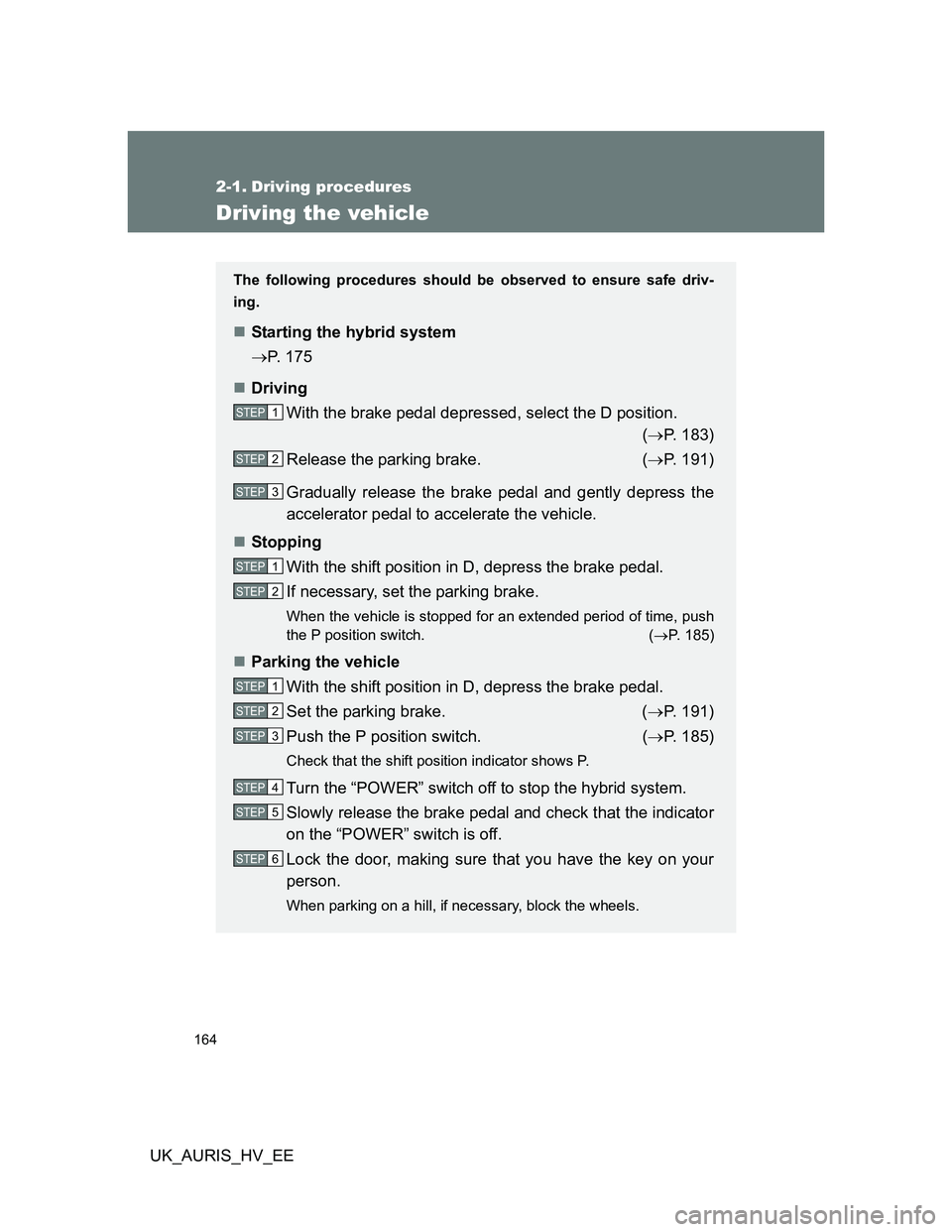
Driving the vehicle
The following procedures should be observed to ensure safe driv-
ing.
Starting the hybrid system
P. 175
Driving
With the brake pedal depressed, select the D position.
(P. 183)
Release the parking brake. (P. 191)
Gradually release the brake pedal and gently depress the
accelerator pedal to accelerate the vehicle.
Stopping
With the shift position in D, depress the brake pedal.
If necessary, set the parking brake.
When the vehicle is stopped for an extended period of time, push
the P position switch. (P. 185)
Parking the vehicle
With the shift position in D, depress the brake pedal.
Set the parking brake. (P. 191)
Push the P position switch. (P. 185)
Check that the shift position indicator shows P.
Turn the “POWER” switch off to stop the hybrid system.
Slowly release the brake pedal and check that the indicator
on the “POWER” switch is off.
Lock the door, making sure that you have the key on your
person.
When parking on a hill, if necessary, block the wheels.
STEP1
STEP2
STEP3
STEP1
STEP2
STEP1
STEP2
STEP3
STEP4
STEP5
STEP6
Page 194 of 524

194 2-2. Instrument cluster
UK_AURIS_HV_EE
Changing the display
Pressing this button switches among odometer, trip meter and instru-
ment panel light control displays.
Odometer
Trip meter A
*1
Trip meter B*1
Instrument panel light control
display*2 (when the headlight
switch is on and surrounding
are dark enough)
*1: Pressing and holding the button
will reset the trip meter.
*2: Pressing and holding the button
will adjust brightness of the instru-
ment panel lights.
Shift position indicator
Displays the shift position.
Odometer/trip meter display change button
Odometer: Displays the total distance the vehicle has been driven.
Trip meter: Displays the distance the vehicle has been driven since the
meter was last reset. Trip meters “A” and “B” can be used to
record and display different distances independently.
Odometer/trip meter display
Clock
P. 345
Page 235 of 524

235 2-5. Driving information
2
When driving
UK_AURIS_HV_EE
CAUTION
Things that must not be carried in the luggage compartment
The following things may cause a fire if loaded in the luggage compartment.
Receptacles containing gasoline
Aerosol cans
Storage precautions
Observe the following precautions.
Failing to do so may result in death or serious injury.
Do not place cargo or luggage in or on the following locations as the item
may get under the brake or accelerator pedal and prevent the pedals from
being depressed properly, block the driver’s vision, or hit the driver or pas-
sengers, causing an accident.
• Driver’s feet
• Front passenger or rear seats (when stacking items)
• Luggage cover
• Instrument panel
• Dashboard
• Auxiliary box or tray that has no lid
Do not stack anything in the luggage compartment higher than the seat-
backs.
Such items may be thrown about and possibly injure people in the vehicle
in the event of sudden braking or in an accident.
Secure all items in the occupant compartment, as they may shift and injure
someone during sudden braking, sudden swerving or an accident.
Never allow anyone to ride in the luggage compartment. It is not designed
for passengers. They should ride in their seats with their seat belts prop-
erly fastened. Otherwise, they are much more likely to suffer death or seri-
ous bodily injury, in the event of sudden braking, sudden swerving or an
accident.
Page 384 of 524

384 4-3. Do-it-yourself maintenance
UK_AURIS_HV_EE
Before recharging
When recharging, the 12-volt battery produces hydrogen gas which is flam-
mable and explosive. Therefore, before recharging:
If recharging with the 12-volt battery installed on the vehicle, be sure to
disconnect the ground cable.
Make sure the power switch on the charger is off when connecting and
disconnecting the charger cables to the 12-volt battery.
After recharging/reconnecting the 12-volt battery
Vehicles with a smart entry & start system: Unlocking the doors using the
entry function may not be possible immediately after reconnecting the
12-volt battery. If this happens, use the wireless remote control or the
mechanical key to lock/unlock the doors.
Start the hybrid system with the “POWER” switch in ACCESSORY mode.
The hybrid system may not start with the “POWER” switch turned off.
However, the hybrid system will operate normally from the second
attempt.
The “POWER” switch mode is recorded by the vehicle. If the 12-volt bat-
tery is reconnected, the vehicle will return the “POWER” switch mode to
the status it was in before the 12-volt battery was disconnected. Make
sure to turn the “POWER” switch off before disconnect the 12-volt bat-
tery. Take extra care when connecting the 12-volt battery if the “POWER”
switch mode prior to discharge is unknown.
When the 12-volt battery is reconnected, start the hybrid system, depress
the brake pedal, and confirm that it is possible to shift into each shift posi-
tion.
If the system will not start even after multiple attempts, contact any autho-
rized Toyota dealer or repairer, or another duly qualified and equipped pro-
fessional.
Page 442 of 524

442 5-2. Steps to take in an emergency
UK_AURIS_HV_EE
Once3 times
(Flashing)The driver’s
door has been
opened or
closed with the
shift position in
P, the “POWER”
switch in any
mode other
than off and the
electronic key
outside of the
detection area.Turn the
“POWER”
switch off or
confirm the
location of the
electronic key.
OnceContin-
uous
(Displayed alternately)
(Flashing)The electronic
key has been
taken outside
the vehicle and
the doors have
been locked
without first
turning the
“POWER”
switch to off.Turn the
“POWER”
switch to off and
lock the doors
again.
Contin-
uous
(Flashing)The driver's
door was
opened when
the shift position
was not in P
and the
“POWER”
switch was not
turned off.Push the P
position switch.
Interior
buzzerExterior
buzzerWarning messageDetailsCorrection
procedure
Page 443 of 524

5
443 5-2. Steps to take in an emergency
When trouble arises
UK_AURIS_HV_EE
Contin-
uousContin-
uous
(Displayed alternately)
(Flashing)The driver’s
door was
opened and
closed while the
electronic key
was not in the
vehicle, the shift
position was not
in P and the
“POWER”
switch was not
turned off.• Push the P
position switch.
• Confirm the
location of the
electronic key.
OnceContin-
uous
(Flashing)An attempt to
lock the doors
has been made
using the smart
entry & start
system while
the electronic
key is inside the
vehicle.Take the elec-
tronic key out-
side the vehicle,
and lock the
doors again.
Once
The key battery
is low.Replace the
battery.
(P. 397)
Interior
buzzerExterior
buzzerWarning messageDetailsCorrection
procedure
Page 478 of 524

478 5-2. Steps to take in an emergency
UK_AURIS_HV_EE
Starting the hybrid system when the 12-volt battery is discharged
The hybrid system cannot be started by push-starting.
Avoiding a discharged 12-volt battery
Turn off the headlights and the audio system while the hybrid system is
turned off.
Turn off any unnecessary electrical components when the vehicle is run-
ning at a low speed for an extended period, such as in heavy traffic, etc.
When the 12-volt battery is removed or discharged
If the 12-volt battery is depleted with the shift position in P, it will not be
possible to shift out of P. In this case, the vehicle cannot be towed without
lifting both front wheels because the front wheels are locked by the park-
ing lock. (P. 423)
The hybrid system may not start. (P. 384)
Charging the 12-volt battery
The electricity stored in the 12-volt battery will discharge gradually even
when the vehicle is not in use, due to natural discharge and the draining
effects of certain electrical appliances. If the vehicle is left for a long time, the
12-volt battery may discharge, and the hybrid system may be unable to start.
(The 12-volt battery recharges automatically while the hybrid system is oper-
ating.)
Once the hybrid system has started, remove the jumper
cables in the exact reverse order in which they were con-
nected.
Close the exclusive jump starting terminal cover and rein-
stall the fuse box cover.
Once the hybrid system starts, have the vehicle checked at any
authorized Toyota dealer or repairer, or another duly qualified and
equipped professional, as soon as possible.STEP7
STEP8
Page 518 of 524

518 Alphabetical index
UK_AURIS_HV_EE
Seat belts
Adjusting the seat belt............. 86
Child restraint system
installation........................... 150
Cleaning and maintaining
the seat belts ...................... 361
Emergency Locking
Retractor (ELR) .................... 88
How to wear your seat belt ..... 86
How your child should wear
the seat belt .......................... 89
Pregnant women,
proper seat belt use .............. 88
Reminder light ....................... 433
Seat belt pretensioners ........... 87
Seat heaters ............................. 350
Seats
Adjustment .............................. 80
Adjustment precautions .......... 80
Child seats/child restraint
system installation .............. 150
Cleaning ................................ 360
Head restraint ......................... 84
Properly sitting in the seat..... 127
Rear seat adjustment .............. 81
Rear seat adjustment
precautions ........................... 83
Seat heaters.......................... 350Service reminder
indicators .............................. 197
Shift lever
Transmission ........................ 183
Side airbags ............................. 129
Side mirror
Adjusting and folding .............. 94
Smart entry & start system
Entry function .......................... 44
Starting the hybrid system .... 175
Spare tire
Inflation pressure .................. 501
Storage location .................... 447
Spark plug ................................ 498
Specifications .......................... 492
Speech command switch........ 315
Speedometer ............................ 193
Steering wheel
Adjustment .............................. 91
Audio switches ...................... 292
Stop lights
Replacing light bulbs............. 411
Wattage ................................ 503S