Page 176 of 700

176 2-1. Driving procedures
4RUNNER_U
■If the engine does not start
The engine immobilizer system may not have been deactivated. ( P. 113)
■ Steering lock
After turning the “ENGINE START STOP” switch off and opening and closing
the doors, the steering wheel will be locked due to the steering lock function.
Operating the “ENGINE START STOP” switch again automatically cancels
the steering lock.
■ When the steering lock cannot be released
■ Steering lock motor overheating prevention
To prevent the steering lock motor from overheating, the motor may be sus-
pended if the engine is turned on and off repeatedly in a short period of time.
In this case, refrain from operating the engine. After about 10 seconds, the
steering lock motor will resume functioning.
■ When the “ENGINE START STOP” switch indicator flashes in amber
The system may be malfunctioning. Have the vehicle inspected by your
Toyota dealer immediately.
■ If the electronic key battery is depleted
P. 552
The green indicator light on the “ENGINE
START STOP” switch will flash. Press the
“ENGINE START STOP” switch again
while turning the steering wheel left and
right.
CTH21AS019
Page 185 of 700
185
2-1. Driving procedures
2
When driving
4RUNNER_U
Hor n
■After adjusting the steering wheel
Make sure that the steering wheel is securely locked.
The horn may not sound if the steering wheel is not securely locked.
(P. 93)
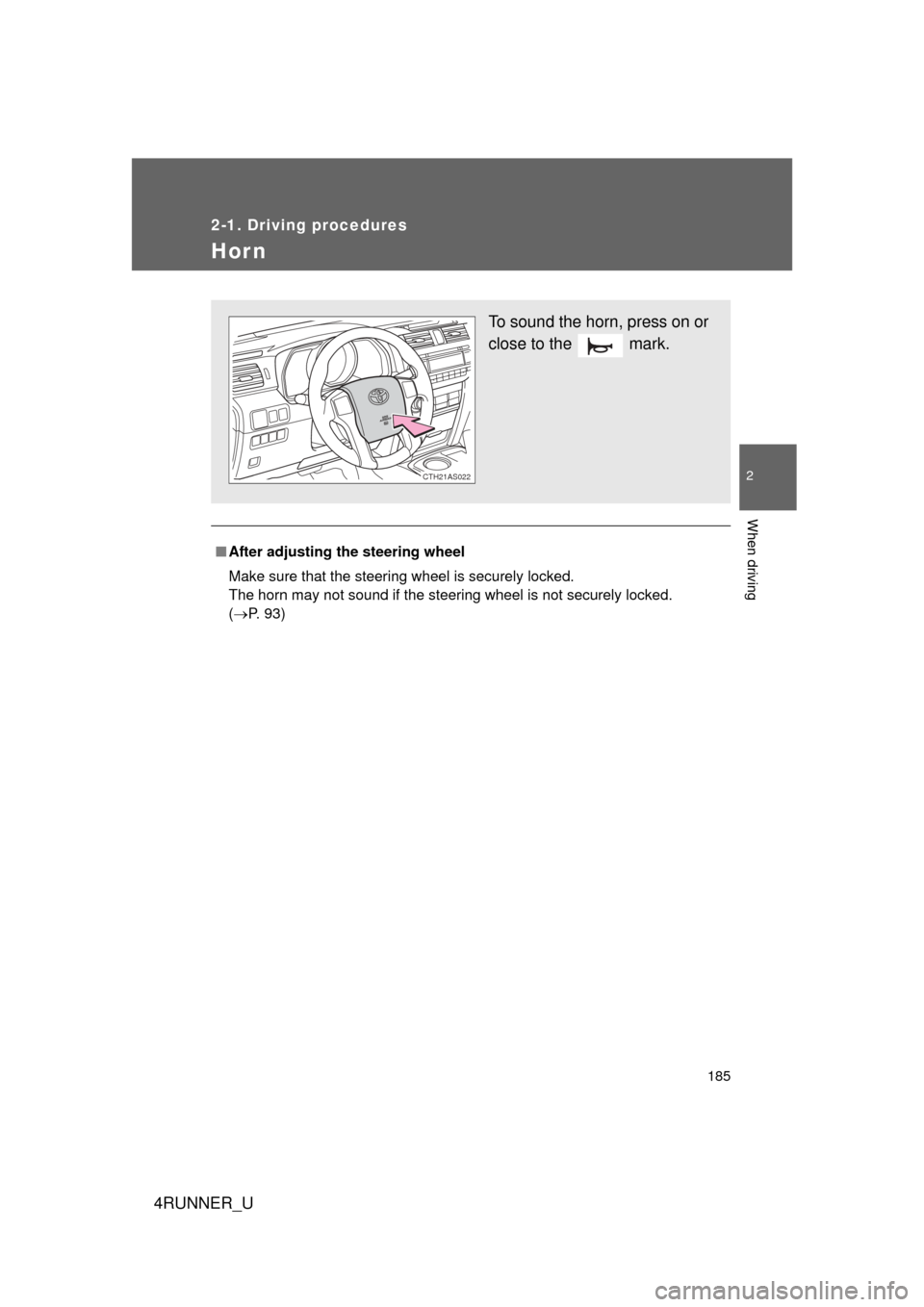
To sound the horn, press on or
close to the mark.
CTH21AS022
Page 195 of 700
195
2-2. Instrument cluster
2
When driving
4RUNNER_U
■
Indicators
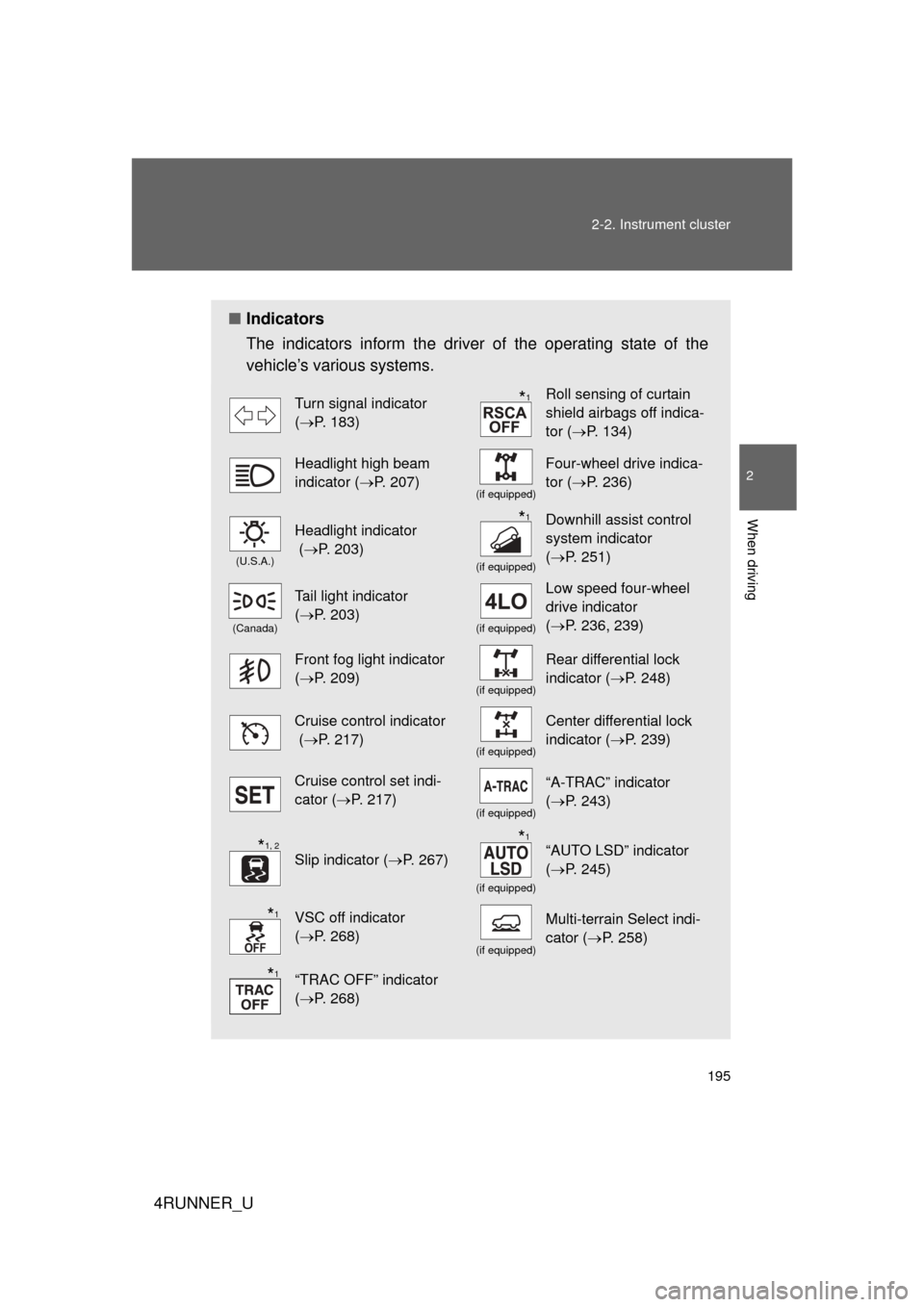
The indicators inform the driver of the operating state of the
vehicle’s various systems.
Turn signal indicator
(P. 183)Roll sensing of curtain
shield airbags off indica-
tor ( P. 134)
Headlight high beam
indicator ( P. 207)
(if equipped)
Four-wheel drive indica-
tor (P. 236)
(U.S.A.)
Headlight indicator
(P. 203)
(if equipped)
Downhill assist control
system indicator
(P. 251)
(Canada)
Tail light indicator
(P. 203)
(if equipped)
Low speed four-wheel
drive indicator
(P. 236, 239)
Front fog light indicator
(P. 209)
(if equipped)
Rear differential lock
indicator ( P. 248)
Cruise control indicator
(P. 217)
(if equipped)
Center differential lock
indicator ( P. 239)
Cruise control set indi-
cator (P. 217)
(if equipped)
“A-TRAC” indicator
(P. 243)
Slip indicator ( P. 267)
(if equipped)
“AUTO LSD” indicator
(P. 245)
VSC off indicator
(P. 268)
(if equipped)
Multi-terrain Select indi-
cator ( P. 258)
“TRAC OFF” indicator
(P. 268)
*1
*1
*1, 2*1
*1
*1
Page 234 of 700
234 2-4. Using other driving systems
4RUNNER_U
CAUTION
■When using the rear view monitor system
Observe the following precautions to avoid an accident that could result in
death or serious injuries:
● Never depend solely on the monitor system when reversing.
● Always check visually and with the mirrors to confirm your intended path is
clear.
● Use your own eyes to confirm the vehicle’s surroundings, as the displayed
image may become faint or dark, and moving images will be distorted, or
not entirely visible when the outside temperature is low. When backing up,
be sure to check behind and all around the vehicle visually and with the
mirrors before proceeding.
● Always check the vehicle surroundi ng area, because the guide lines are
ancillary lines.
● The guide lines are ancillary lines and do not change even if the steeri\
ng
wheel is turned.
● Depicted distances between objects and flat surfaces differ from actual
distances.
● Do not use the system if the back door is open.
■ Conditions which may affect the rear view monitor system
● If the back of the vehicle has been hit, the camera’s position and mounting
angle may have changed. Have the vehicle inspected by your Toyota
dealer.
● Rapid temperature changes, such as when hot water is poured on the
vehicle in cold weather, may cause the system to function abnormally.
● If the camera lens is dirty, it cannot transmit a clear image. Rinse with
water and wipe with a soft cloth. If the camera lens is extremely dirty, wash
with a mild cleanser and rinse.
● The displayed image may be darker and moving images may be slightly
distorted when the system is cold.
■ Caution while driving in reverse
Do not change modes while the vehicle is moving.
Page 236 of 700
236
2-4. Using other driving systems
4RUNNER_U
Four-wheel drive system (par t-time 4WD models)
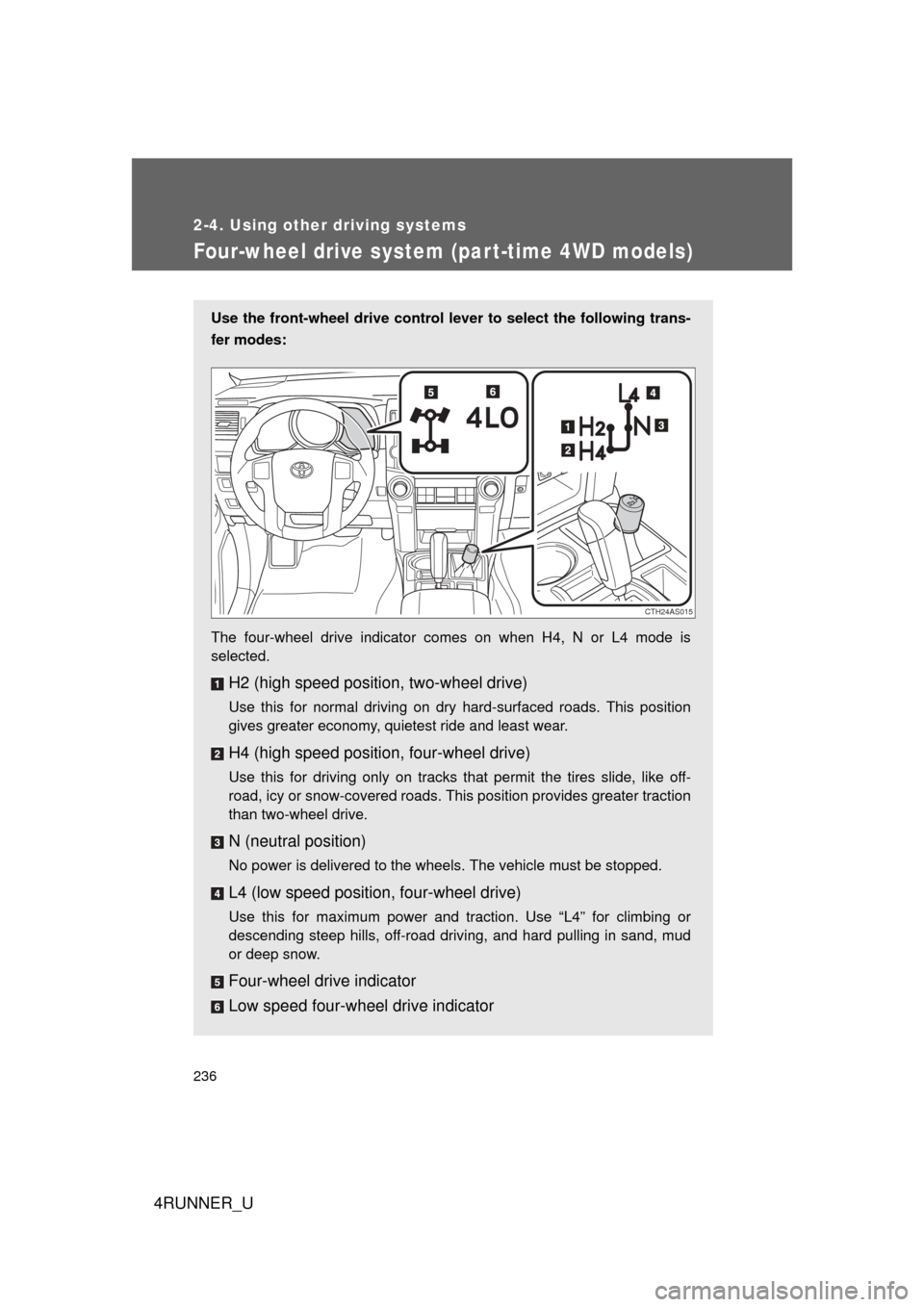
Use the front-wheel drive control lever to select the following trans-
fer modes:
The four-wheel drive indicator comes on when H4, N or L4 mode is
selected.
H2 (high speed position, two-wheel drive)
Use this for normal driving on dry hard-surfaced roads. This position
gives greater economy, quietest ride and least wear.
H4 (high speed position, four-wheel drive)
Use this for driving only on tracks that permit the tires slide, like off-
road, icy or snow-covered roads. This position provides greater traction
than two-wheel drive.
N (neutral position)
No power is delivered to the wheels. The vehicle must be stopped.
L4 (low speed position, four-wheel drive)
Use this for maximum power and traction. Use “L4” for climbing or
descending steep hills, off-road driving, and hard pulling in sand, mud
or deep snow.
Four-wheel drive indicator
Low speed four-wheel drive indicator
CTH24AS015
Page 237 of 700
237
2-4. Using other
driving systems
2
When driving
4RUNNER_U
Shifting between H2 and H4
■ Shifting from H2 to H4
Reduce vehicle speed to less than 50 mph (80 km/h).
Shift the front-wheel drive control lever to H4.
The four-wheel drive indicator will turn on.
■Shifting from H4 to H2
Shift the front-wheel drive control lever to H2.
This can be done at any speed.
The four-wheel drive indicator will go off.
Shifting between H4 and L4
Stop the vehicle completely.
Shift the shift lever to N.
Shift the front-wheel drive control lever to L4 or H4.
The low speed four-wheel drive indicator will turn on (L4) or go off
(H4).
■When the front-wheel drive control lever is shifted to L4
VSC and TRAC are automatically turned off.
■ If the four-wheel drive indicator flashes
The transfer mode may not successfully change. Drive straight ahead while
accelerating or decelerating, or drive in reverse.
■ If the four-wheel drive or low speed four-wheel drive indicator flashes
rapidly
There may be a malfunction in the four-wheel drive system. Have the vehicle
inspected by your Toyota dealer immediately.
■ Four-wheel drive usage frequency
You should drive in four-wheel drive for at least 10 miles (16 km) each
month.
This will assure that the front drive components are lubricated.
STEP 1
STEP 2
STEP 1
STEP 2
STEP 3
Page 238 of 700
238 2-4. Using other driving systems
4RUNNER_U
CAUTION
■Shifting the front-wheel drive control lever from H2 to H4 while driving
Never operate the front-wheel drive control lever if the wheels are slipping.
Stop the slipping or spinning before shifting.
Page 239 of 700
239
2-4. Using other driving systems
2
When driving
4RUNNER_U
Four-wheel drive system (full-time 4WD models)
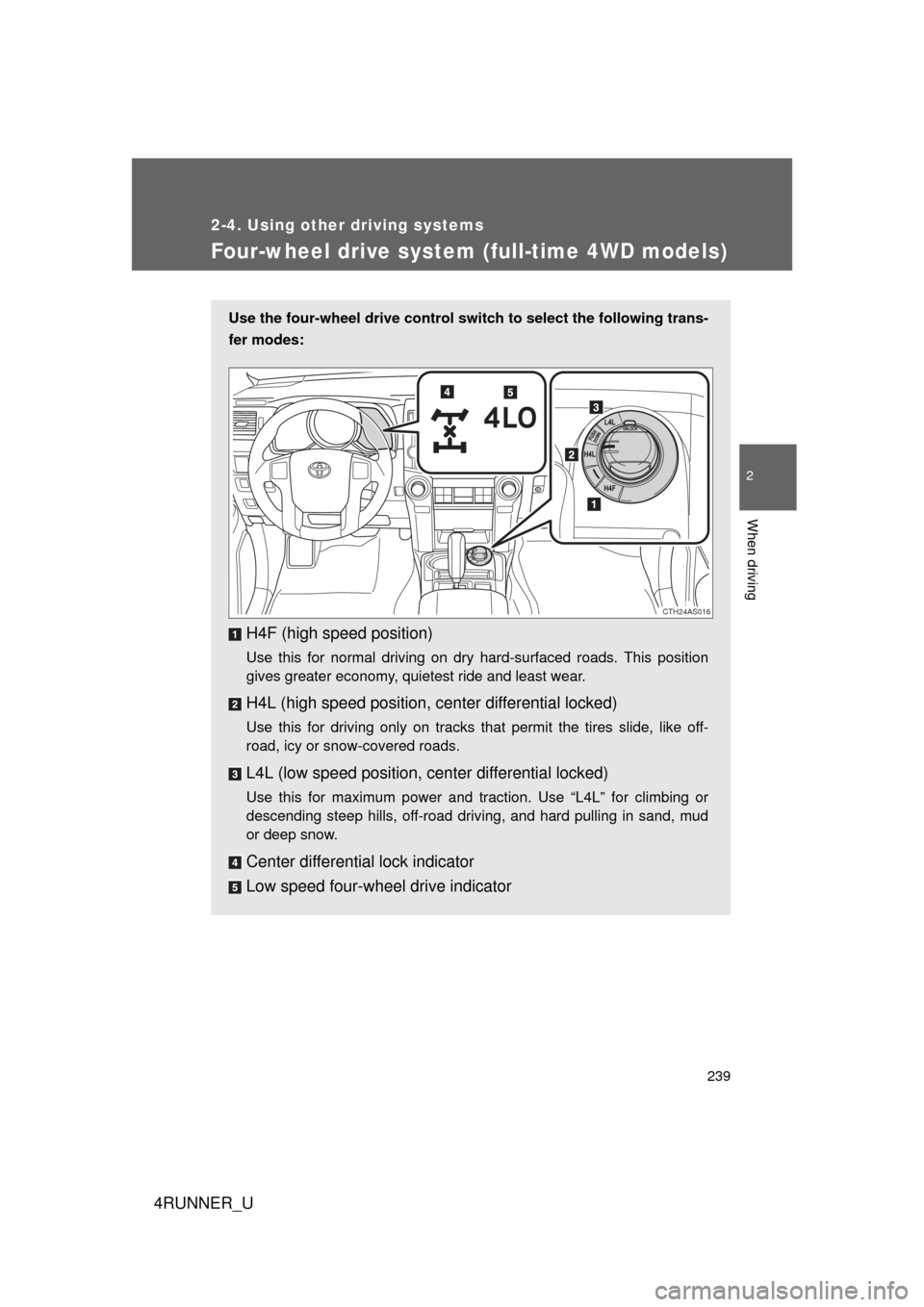
Use the four-wheel drive control switch to select the following trans-
fer modes:
H4F (high speed position)
Use this for normal driving on dry hard-surfaced roads. This position
gives greater economy, quietest ride and least wear.
H4L (high speed position, c enter differential locked)
Use this for driving only on tracks that permit the tires slide, like off-
road, icy or snow-covered roads.
L4L (low speed position, center differential locked)
Use this for maximum power and traction. Use “L4L” for climbing or
descending steep hills, off-road driving, and hard pulling in sand, mud
or deep snow.
Center differential lock indicator
Low speed four-wheel drive indicator
CTH24AS016