Page 267 of 700

267
2-4. Using other
driving systems
2
When driving
4RUNNER_U
When the VSC/TRAC systems are operating (2WD models)
If the vehicle is in danger of slip-
ping or if any of the drive wheels
spins, the slip indicator flashes to
indicate that the VSC/TRAC sys-
tems are operating.
When the VSC/TRAC/hill-start assist control systems are
operating (4WD models)If the vehicle is in danger of slip-
ping or rolling backward when
starting on an incline, or if any of
the drive wheels spins, the slip
indicator flashes to indicate that
the VSC/TRAC/hill-start assist
control systems are operating.
The stop lights and high mounted
stoplight turn on and a buzzer
(intermittent) sounds when the
hill-start assist control system is
operating.
■KDSS (Kinetic Dynamic Suspension System) (if equipped)
Enhances ride comfort and handling response by using a hydraulic
control system to control the suspension stabilizer bars in response to
road surface and driving conditions dur ing cornering or off-road driving
CTH24AS047
CTH24AS047
Page 302 of 700
302 2-5. Driving information
4RUNNER_U
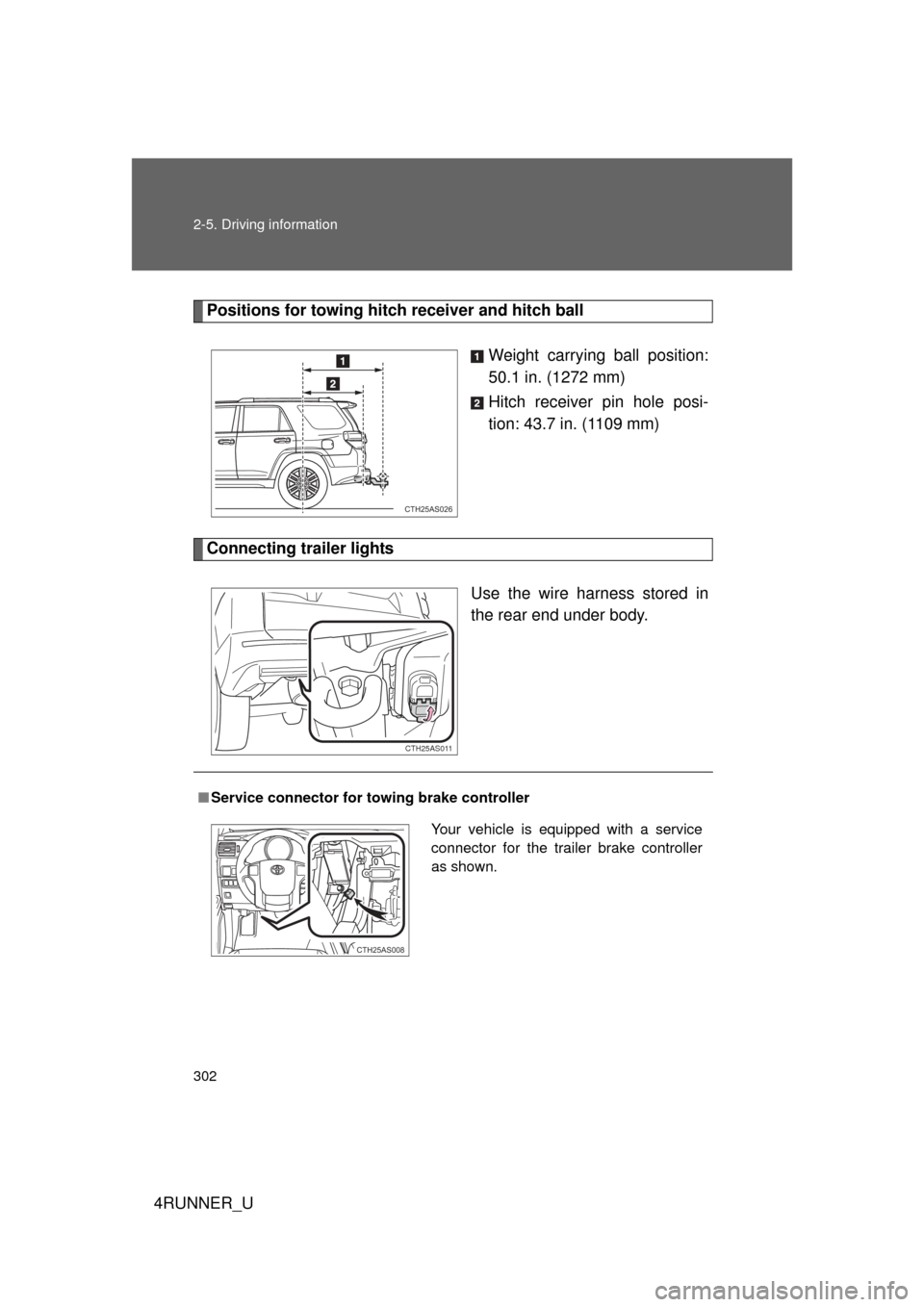
Positions for towing hitch receiver and hitch ballWeight carrying ball position:
50.1 in. (1272 mm)
Hitch receiver pin hole posi-
tion: 43.7 in. (1109 mm)
Connecting trailer lights
Use the wire harness stored in
the rear end under body.
CTH25AS026
CTH25AS011
■Service connector for towing brake controller
Your vehicle is equipped with a service
connector for the trailer brake controller
as shown.
CTH25AS008
Page 303 of 700

303
2-5. Driving information
2
When driving
4RUNNER_U
Trailer towing tips
Your vehicle will handle differently when towing a trailer. Help to avoid
an accident, death or serious injury, keep the following in mind when
towing:
● Speed limits for towing a trailer vary by state or province. Do not
exceed the posted towing speed limit.
● Toyota recommends that the vehicle-trailer speed limit is 65 mph
(104 km/h) on a flat, straight, dry road. Do not exceed this limit, the
posted towing speed limit or the speed limit for your trailer as set
forth in your trailer owner’s man ual, whichever is lowest. Instability
of the towing vehicle-trailer combin ation (trailer sway) increases as
speed increases. Exceeding speed limits may cause loss of con-
trol.
● Before starting out, check the trailer lights, tires and the vehicle-
trailer connections. Recheck after driving a short distance.
● Practice turning, stopping and reve rsing with the trailer attached in
an area away from traffic until you become accustomed to the feel
of the vehicle-trailer combination.
● Reversing with a trailer attached is difficult and requires practice.
Grip the bottom of the steering wheel and move your hand to the
left to move the trailer to the left. Move your hand to the right to
move the trailer to right. (This is generally opposite to reversing
without a trailer attached.) Avoid sharp or prolonged turning. Have
someone guide you when reversing to reduce the risk of an acci-
dent.
● As stopping distance is increased when towing a trailer, vehicle-to
vehicle distance should be increased. For each 10 mph (16 km/h)
of speed, allow at least o ne vehicle and trailer length.
● Avoid sudden braking as you may skid, resulting in the trailer jack-
knifing and a loss of vehicle control. This is especially true on wet
or slippery surfaces.
Page 306 of 700
306 2-5. Driving information
4RUNNER_U
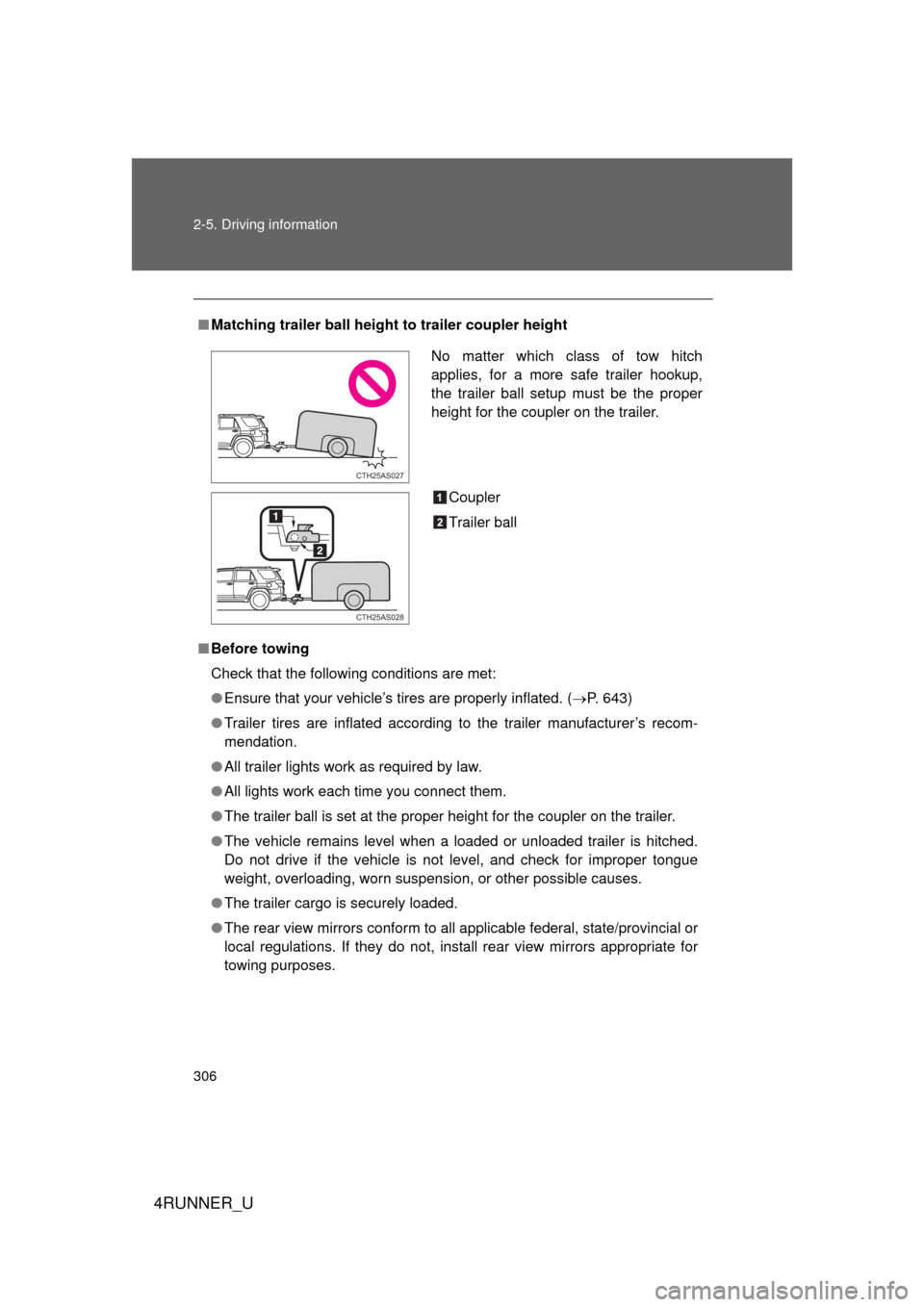
■Matching trailer ball height to trailer coupler height
■ Before towing
Check that the following conditions are met:
● Ensure that your vehicle’s tires are properly inflated. ( P. 643)
● Trailer tires are inflated according to the trailer manufacturer’s recom-
mendation.
● All trailer lights work as required by law.
● All lights work each time you connect them.
● The trailer ball is set at the proper height for the coupler on the trai\
ler.
● The vehicle remains level when a loaded or unloaded trailer is hitched.
Do not drive if the vehicle is not level, and check for improper tongue
weight, overloading, worn suspension, or other possible causes.
● The trailer cargo is securely loaded.
● The rear view mirrors conform to all applicable federal, state/provincial or
local regulations. If they do not, install rear view mirrors appropriate for
towing purposes.
No matter which class of tow hitch
applies, for a more safe trailer hookup,
the trailer ball setup must be the proper
height for the coupler on the trailer.
Coupler
Trailer ball
CTH25AS027
CTH25AS028
Page 310 of 700
310 2-5. Driving information
4RUNNER_U
CAUTION
■When towing a trailer
Toyota recommends trailers with brakes that conform to any applicable fed-
eral and state/provincial regulations.
● If the gross trailer weight exceeds unbraked TWR, trailer brakes are
required. Toyota recommends trailers with brakes that conform to all appli-
cable federal and state/provincial regulations.
● Never tap into your vehicle’s hydraulic system, as this will lower the vehi-
cle’s braking effectiveness.
● Never tow a trailer without using a safety chain securely attached to both
the trailer and the vehicle. If damage occurs to the coupling unit or hitch
ball, there is danger of the trailer wandering into another lane.
NOTICE
■When installing a trailer hitch
Use only the position recommended by your Toyota dealer. Do not install the
trailer hitch on the bumper; this may cause body damage.
■ Do not directly splice trailer lights
Do not directly splice trailer lights. Directly splicing trailer lights may damage
your vehicle’s electrical system and cause a malfunction.
Page 313 of 700
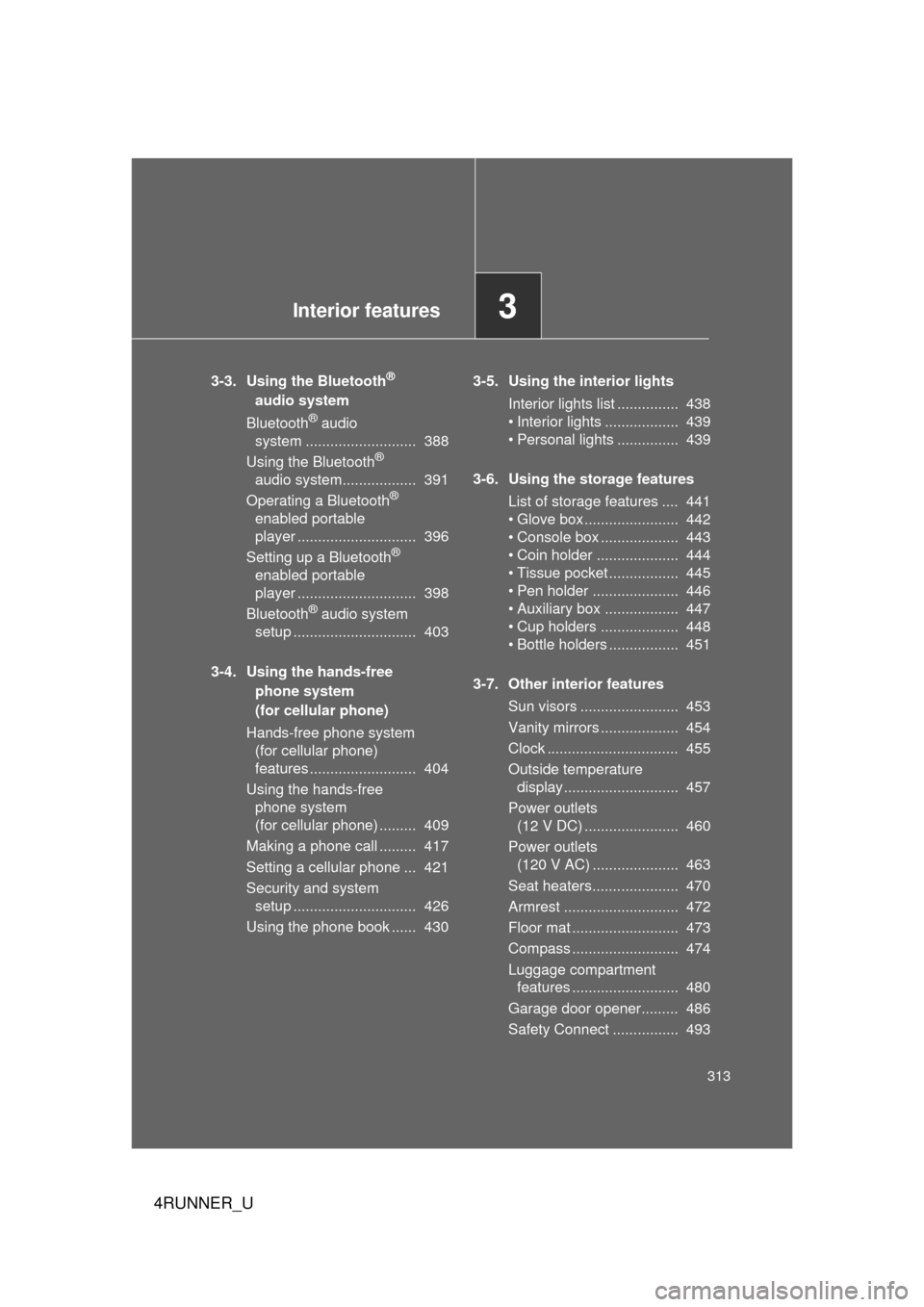
Interior features3
313
4RUNNER_U
3-3. Using the Bluetooth®
audio system
Bluetooth
® audio
system ........................... 388
Using the Bluetooth
®
audio system.................. 391
Operating a Bluetooth
®
enabled portable
player ............................. 396
Setting up a Bluetooth
®
enabled portable
player ............................. 398
Bluetooth
® audio system
setup .............................. 403
3-4. Using the hands-free phone system
(for cellular phone)
Hands-free phone system (for cellular phone)
features .......................... 404
Using the hands-free phone system
(for cellular phone) ......... 409
Making a phone call ......... 417
Setting a cellular phone ... 421
Security and system setup .............................. 426
Using the phone book ...... 430 3-5. Using the interior lights
Interior lights list ............... 438
• Interior lights .................. 439
• Personal lights ............... 439
3-6. Using the storage features List of storage features .... 441
• Glove box....................... 442
• Console box ................... 443
• Coin holder .................... 444
• Tissue pocket ................. 445
• Pen holder ..................... 446
• Auxiliary box .................. 447
• Cup holders ................... 448
• Bottle holders ................. 451
3-7. Other interior features Sun visors ........................ 453
Vanity mirrors ................... 454
Clock ................................ 455
Outside temperature display............................ 457
Power outlets (12 V DC) ....................... 460
Power outlets (120 V AC) ..................... 463
Seat heaters..................... 470
Armrest ............................ 472
Floor mat .......................... 473
Compass .......................... 474
Luggage compartment features .......................... 480
Garage door opener......... 486
Safety Connect ................ 493
Page 438 of 700
438
4RUNNER_U
3-5. Using the interior lights
Interior lights list
Rear interior light (P. 439)
Front personal lights/front interior light ( P. 439)
Shift lever light (when the engine switch is in the “ACC” or “ON”
position [without a smart ke y system] or “ENGINE START
STOP” switch is in ACCESSORY or IGNITION ON mode [with a
smart key system])
Inside door handle lights (if equipped)
Outer foot lights (if equipped)
Engine switch light (vehicles without a smart key system)
Footwell lights (if equipped)
Door courtesy lights (if equipped)
Turning the instrument panel light control dial fully downward
disables the inside door handle lights, footwell lights and shift
lever light. ( P. 191)
CTH35AS003
Page 439 of 700
439
3-5. Using the interior lights
3
Interior features
4RUNNER_U
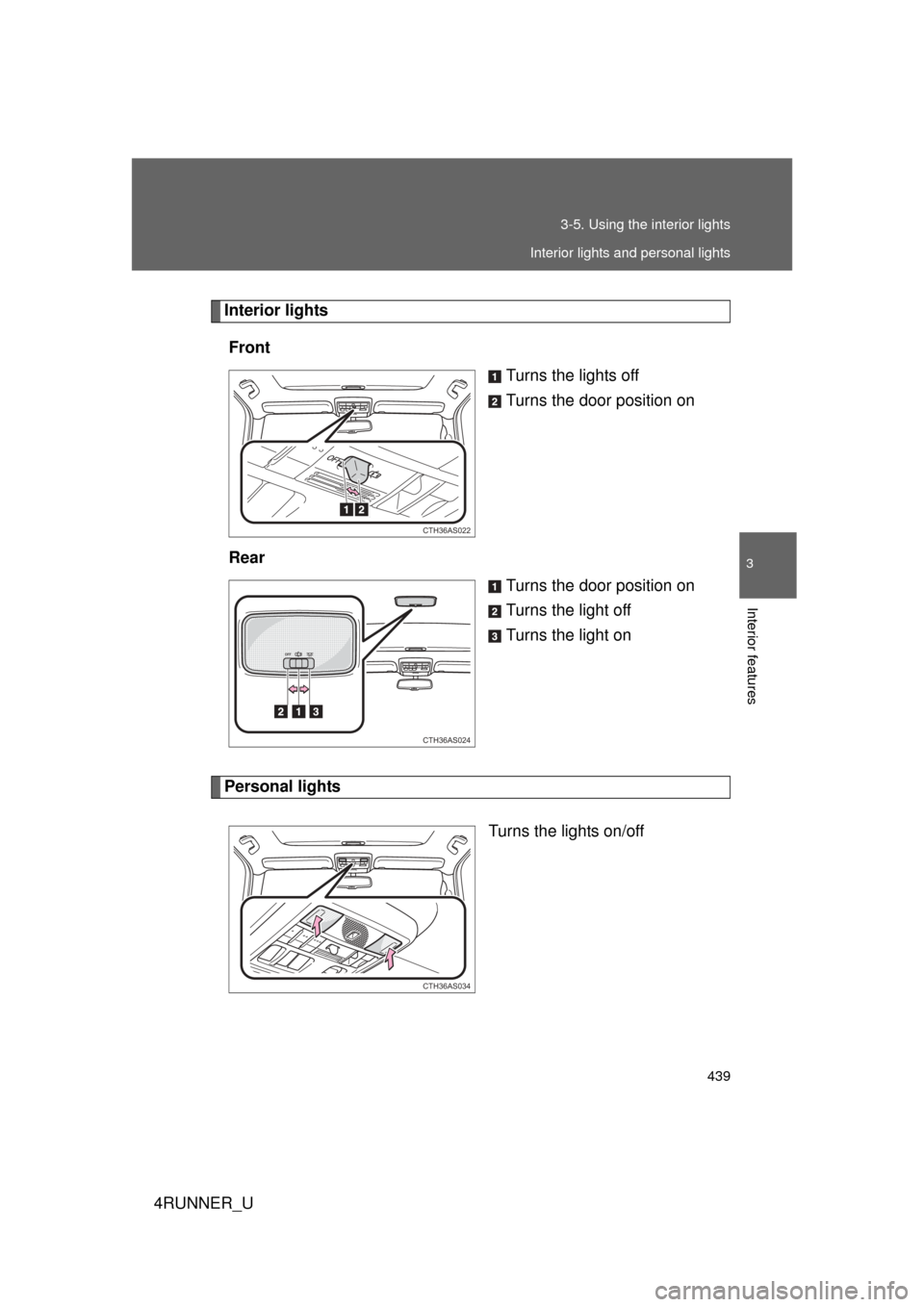
Interior lights
Front Turns the lights off
Turns the door position on
Rear Turns the door position on
Turns the light off
Turns the light on
Personal lights
Turns the lights on/off
CTH36AS022
CTH36AS024
CTH36AS034
Interior lights and personal lights