2012 SUBARU OUTBACK hill
[x] Cancel search: hillPage 197 of 474

5-14Audio
erly if the station reception is weakened by
distance from the station or proximity to
tall buildings and hills. !PTY (Program type) group tuning
(only FM reception) (type A and Baudio)
Type A audio
Type B audio
Press the “PTY/CAT ”button to change to
the PTY selection mode. At this time, the
PTY group that you are currently listening
to will be displayed for 10 seconds. In PTY
selection mode, “PTY SEL ”is displayed
on the screen. !
PTY (Program type) group selection
In the PTY selection mode, press the
following button to change the PTY group
by one step at a time.
Type A audio:
1) PTY group up by one step
2) PTY group down by one step
Type B audio:
PTY group up by
one step
PTY group down by
one step
This operation only changes the display. It
does not change the station that is
currently being received. !
Seek in PTY (Program type) group
Type A audio:
1) Seek up
2) Seek down
Type B audio:
Seek up
Seek down
In the PTY selection mode, when the
desired PTY group has been selected,
pressing the “SEEK ”button “
”or “”
seeks within that PTY group. In this case, “ PTY SEEK ”is displayed on the screen.
The control function returns to the normal
Page 198 of 474

mode after approximately 10 seconds. &HD Radio
®Technology (Digi-
tal AM and FM Radio) (type C audio)
! HD Radio Technology Information
! What is HD Radio
®Technology and
how does it work?
HD Radio
TMTechnology is the digital
evolution of analog AM/FM radio. Your
radio product has a special receiver which
allows it to receive digital broadcasts
(where available) in addition to the analog
broadcasts it already receives. Digital
broadcasts have better sound quality than
analog broadcasts as digital broadcasts
provide free, crystal clear audio with no static or distortion. For more information,
and a guide to available radio stations and
programming, please visit www.hdradio.com. !
Using HD Radio
®Technology
As a consumer works through the analog
radio stations, (where applicable) the radio
receiver will automatically tune from an
analog signal to a digital signal within five
seconds. An orange
logo indicator will
be seen on the screen when in digital. NOTE The
logo will first appear in a gray
color indicating the station is indeed
(an analog and) a digital station. Once
the digital signal is acquired, the logo
will be a bright orange color. ! Benefits of HD Radio
®Technology
1.
Information: The song title, artist name
and music genre will appear on the screen
when available by the radio station. 2.
Multicast: On the FM radio frequency
most digital stations have “multiple ”or
supplemental programs on one FM sta-
tion. When the consumer pushes the
multicast button, they will move between
the multiple unique program content. 3.
Clear Reception: Unlike analog radio
signals, digital signals do not pass along static, hiss or pops. !
HD Radio
®Technology Trouble-
shooting
1.
Station blending: When acquiring a
radio station, as usual, the radio will play
content in analog. If the radio verifies the
broadcast is an HD Radio Technology
station, it will then shift or blend smoothly
to a digital signal within five seconds.
Depending on the station quality, the
consumer may hear a slight sound change
when the station switches from the analog
to digital signal. 2.
Reception area: Topography of the
earth can affect radio signals. For exam-
ple, when a vehicle is behind a hill or large
building from the radio tower location
analog reception will be poor and it is
highly likely that HD Radio reception will
not occur. When a consumer is on the
multicast or supplemental programming
(HD2/HD3/HD4) and the reception is
weak or lost, this will result in a “mute ”
condition. On the main or HD1 program, a
weak or lost digital signal will result in the
playing of an analog signal until a digital
signal is available. 3.
Station issues: In order to provide the
best experience, a contact form has been
developed to report any radio station
issues found while listening to a broad- Audio
5-15
– CONTINUED –
Page 202 of 474

Auto-store function while selecting the
AM mode, even if you have selected the“AM ”station, the new stations are
stored in the AM-AS station memory. . If it is only possible to receive less
than 6 stations, the available stations
are stored from preset 1 in order by
frequency and the unused preset but-
tons are not registered to a station. . For type A and C audio, the pre-
viously registered station memories of
the unused preset buttons are cleared. . For type B audio, the previously
registered station memories of the
unused preset buttons are not cleared. . If no stations can be received, the
previously stored stations are not re- placed. . After pressing the Auto-store but-
ton, if more than 1 station is stored, the
radio receives the station stored in
preset 1. . After pressing the Auto-store but-
ton, if no stations are stored, the radio
receives the band and station that the
radio received before pressing thebutton. Satellite radio operation (if equipped)
To receive satellite radio, it is necessary to
install the SUBARU genuine satellite
receiver for some models, and to enter
into a contract with a satellite radio
network service such as
“Sirius XM
TM
satellite radio ”(for U.S.A. only). For de-
tails, please contact your SUBARU dealer. & Sirius XM
TMSatellite Radio
Activation (for U.S.A. only)
Models with Sirius XM
TMare eligible for a
3-month complimentary subscription to
the Sirius XM
TMSatellite Radio service.
! Activation process
If you would like to activate your Satellite
Radio online, please visit
http://www.sir-iusxm.com/activationhelp and follow the
step-by-step instructions for easy activa- tion. & Satellite radio reception
Satellite radio signals are best received in
areas with a clear view of the open sky. In
areas where there are tall buildings, trees,
tunnels or other structures that may
obstruct the signal of the satellites, there
may be signal interruptions. Other circum- stances that may result in signal loss
include driving near a wall, steep cliff, hill
or driving on the lower level of a multi-
tiered road or inside of a parking garage.
To help reduce this condition, satellite
radio providers have installed ground-
based repeaters in heavily populated
areas. However, you may still experience
reception problems in some areas. !
Sirius XM
TMsatellite radio reception
tips (for U.S.A. only —if equipped)
The Sirius XM
TMsatellite radio receiver
that is fitted to your vehicle receives the
necessary signals from two specially
designated satellites that are in a geosta-
tionary orbit over the equator. One satellite
covers the east coast and the other covers
the west coast. Both of them direct their
signals north. These signals are then
relayed throughout the radio reception
area by a network of ground repeater
stations. The satellite radio signals are
transmitted as “line of sight ”signals. The
line of sight signals can be blocked by
objects such as buildings, but the network
of repeater stations allows signal cover-
age within urban areas such as cities.
You may experience problems in receiving
Sirius XM
TMsatellite radio signals in the
following situations. Audio
5-19
– CONTINUED –
Page 203 of 474
5-20Audio
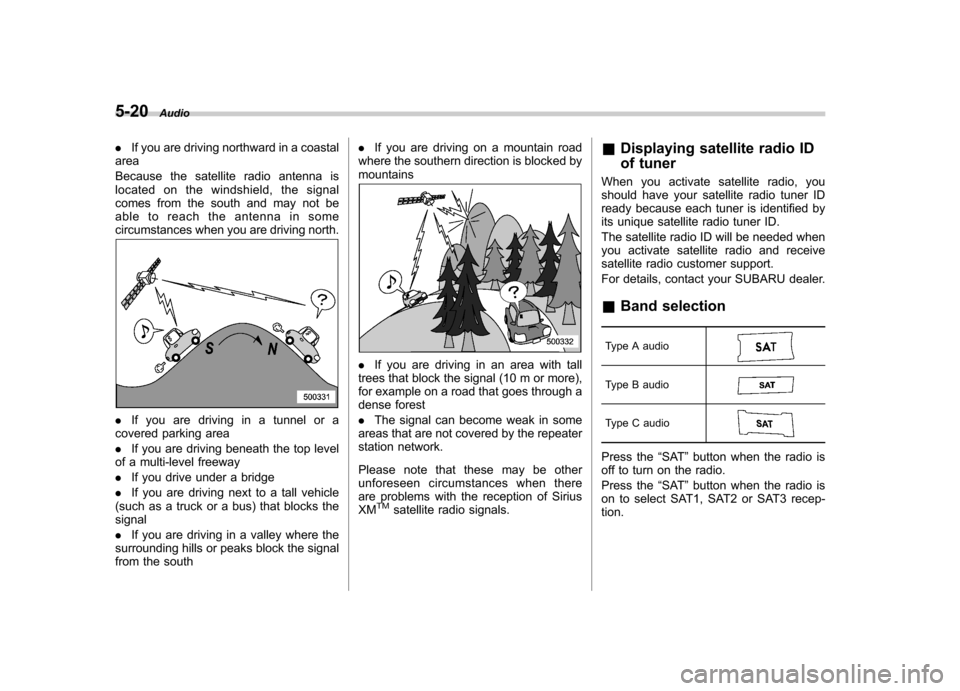
.If you are driving northward in a coastal
area
Because the satellite radio antenna is
located on the windshield, the signal
comes from the south and may not be
able to reach the antenna in some
circumstances when you are driving north.
. If you are driving in a tunnel or a
covered parking area . If you are driving beneath the top level
of a multi-level freeway. If you drive under a bridge
. If you are driving next to a tall vehicle
(such as a truck or a bus) that blocks the signal . If you are driving in a valley where the
surrounding hills or peaks block the signal
from the south .
If you are driving on a mountain road
where the southern direction is blocked bymountains
. If you are driving in an area with tall
trees that block the signal (10 m or more),
for example on a road that goes through a
dense forest . The signal can become weak in some
areas that are not covered by the repeater
station network.
Please note that these may be other
unforeseen circumstances when there
are problems with the reception of SiriusXM
TMsatellite radio signals. &
Displaying satellite radio ID
of tuner
When you activate satellite radio, you
should have your satellite radio tuner ID
ready because each tuner is identified by
its unique satellite radio tuner ID.
The satellite radio ID will be needed when
you activate satellite radio and receive
satellite radio customer support.
For details, contact your SUBARU dealer. & Band selection
Type A audio
Type B audio
Type C audio
Press the “SAT ”button when the radio is
off to turn on the radio.
Press the “SAT ”button when the radio is
on to select SAT1, SAT2 or SAT3 recep- tion.
Page 279 of 474

7-2Starting and operating
Fuel
CAUTION
Use of a fuel which is low in quality
or use of an inappropriate fuel
additive may cause engine damage.
& Fuel requirements
! Non-turbo models
The non-turbo engine is designed to
operate using unleadedgasoline with an
octane rating of 87 AKI (90 RON) or
higher .
! Turbo models
The engine is designed to operate at
maximum performance using premium
unleaded gasoline with an octane rating
of 93 AKI (98 RON) or higher . If 93 AKI
(98 RON) fuel is not readily available in
your area, unleaded gasoline with an
octane rating of 91 AKI (95 RON) may
be used with no detriment to engine
durability or driveability. However, you
may notice a slight decrease in maximum
engine performance while using 91 AKI
(95 RON) fuel. Use of 91 AKI (95 RON)
fuel will not affect your warranty coverage.
If premium unleaded gasoline is not available, regular unleaded gasoline with
an octane rating of 87 AKI (90 RON) or
higher may be temporarily used. For
optimum engine performance and drive-
ability, it is required that you use premium
grade unleaded gasoline.
NOTE
Be sure to use premium unleaded
gasoline of 91 AKI (95 RON) or higher
for a turbo engine model. If other
gasoline (lower than 91 AKI (95 RON))
is used, knocking, reduced output and
poor accelerator response will result. ! Fuel octane rating
This octane rating is the average of the
Research Octane and Motor Octane
numbers and is commonly referred to as
the Anti Knock Index (AKI).
Using a gasoline with a lower octane
rating can cause persistent and heavy
knocking, which can damage the engine.
Do not be concerned if your vehicle
sometimes knocks lightly when you drive
up a hill or when you accelerate. See your
dealer or a qualified service technician if
you use a fuel with the specified octane
rating and your vehicle knocks heavily or
persistently. !
Unleaded gasoline
The neck of the fuel filler pipe is designed
to accept only an unleaded gasoline filler
nozzle. Under no circumstances should
leaded gasoline be used because it will
damage the emission control system and
may impair driveability and fuel economy. ! California fuel
If your vehicle was certified to California
Emission Standards as indicated on the
underhood tune-up label, it is designed to
optimize engine and emission control
system performance with gasoline that
meets the clean burning low-sulfur Cali-
fornia gasoline specifications. If you live in
any other state than California, your
vehicle will operate on gasoline meeting
Federal specifications. Gasoline sold out-
side California is permitted to have higher
sulfur levels, which may affect the perfor-
mance of your vehicle ’s catalytic converter
and may produce a sulfur exhaust odor or
smell. SUBARU recommends that you try
a different brand of unleaded gasoline
having lower sulfur to determine if the
problem is fuel related before returning
your vehicle to an authorized dealer for
service. The CHECK ENGINE warning
light/malfunction indicator light may also
turn on. If this occurs, return to your
authorized SUBARU dealer for diagnosis.
If it is determined that the condition is
Page 291 of 474
7-14Starting and operating
will flash one time.
7. Repeat step 5 for any additional
transmitters (the system will accept up to
eight transmitters).
8. The system will exit the transmitter
learn mode if the key is turned to the“LOCK ”position, the door is closed or
after 2 minutes. & System maintenance
NOTE
In the event that the vehicle ’s battery is
replaced, discharged or disconnected,
it will be necessary to start the vehicle
a minimum of one time using the key
prior to activating the remote engine
start system. This is required to allow
the vehicle electronic systems to re-synchronize. ! Changing the batteries
CAUTION
. Do not let dust, oil or water get on
or in the remote engine start
transmitter when replacing the
battery.
. Be careful not to damage the
printed circuit board in the re-
mote engine start transmitter
when replacing the battery. .
Be careful not to allow children to
touch the battery and any re-
moved parts; children could
swallow them.
. There is a danger of explosion if
an incorrect replacement battery
is used. Replace only with the
same or equivalent type of bat-
tery.
. Batteries should not be exposed
to excessive heat such as sun-
shine, fire or the like.
The two 3-volt lithium batteries (model
CR-2032) supplied in your remote engine
start transmitter should last approximately
one year, depending on usage. When the
batteries begin to weaken, you will notice
a decrease in range (distance from the
vehicle that your remote control operates).
Follow the instructions below to change
the remote engine start transmitter bat-teries.
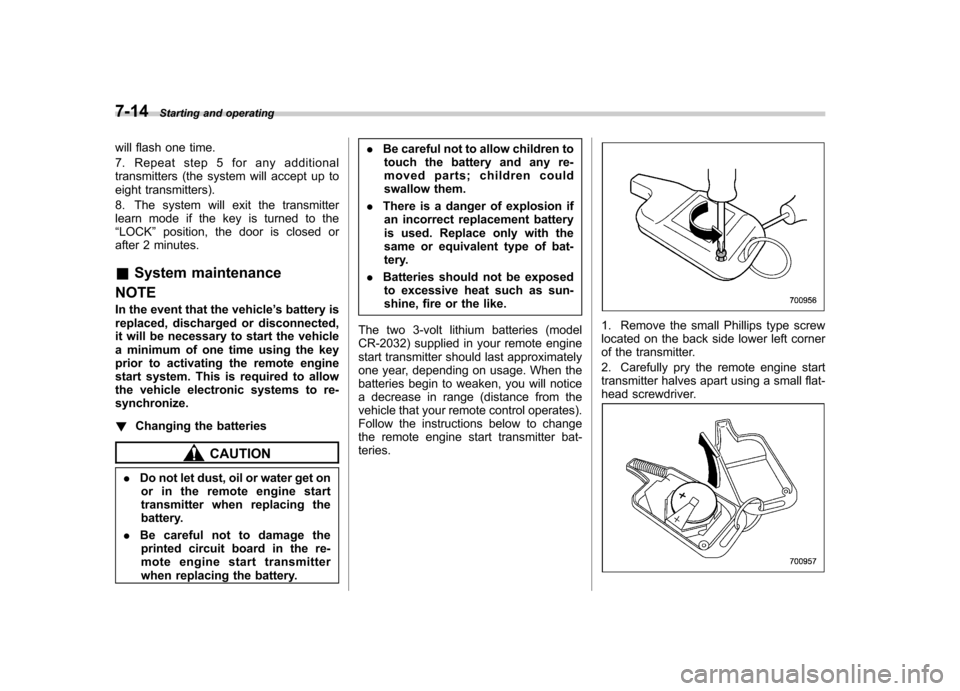
1. Remove the small Phillips type screw
located on the back side lower left corner
of the transmitter.
2. Carefully pry the remote engine start
transmitter halves apart using a small flat-
head screwdriver.
Page 292 of 474
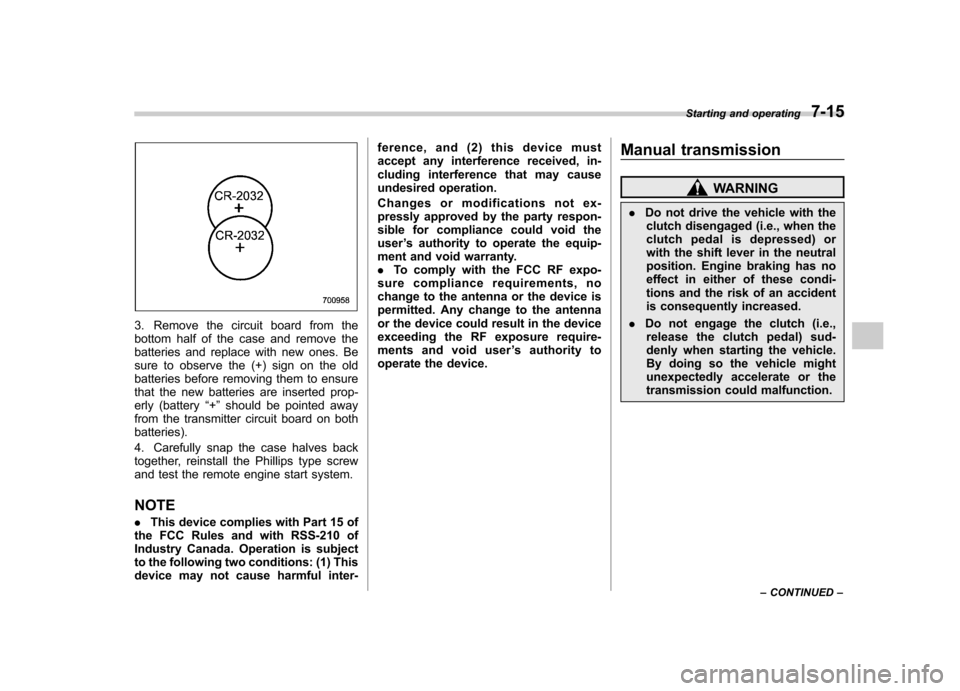
3. Remove the circuit board from the
bottom half of the case and remove the
batteries and replace with new ones. Be
sure to observe the (+) sign on the old
batteries before removing them to ensure
that the new batteries are inserted prop-
erly (battery“+ ” should be pointed away
from the transmitter circuit board on bothbatteries).
4. Carefully snap the case halves back
together, reinstall the Phillips type screw
and test the remote engine start system. NOTE . This device complies with Part 15 of
the FCC Rules and with RSS-210 of
Industry Canada. Operation is subject
to the following two conditions: (1) This
device may not cause harmful inter- ference, and (2) this device must
accept any interference received, in-
cluding interference that may cause
undesired operation.
Changes or modifications not ex-
pressly approved by the party respon-
sible for compliance could void theuser
’s authority to operate the equip-
ment and void warranty.. To comply with the FCC RF expo-
sure compliance requirements, no
change to the antenna or the device is
permitted. Any change to the antenna
or the device could result in the device
exceeding the RF exposure require-
ments and void user ’s authority to
operate the device. Manual transmission
WARNING
. Do not drive the vehicle with the
clutch disengaged (i.e., when the
clutch pedal is depressed) or
with the shift lever in the neutral
position. Engine braking has no
effect in either of these condi-
tions and the risk of an accident
is consequently increased.
. Do not engage the clutch (i.e.,
release the clutch pedal) sud-
denly when starting the vehicle.
By doing so the vehicle might
unexpectedly accelerate or the
transmission could malfunction. Starting and operating
7-15
– CONTINUED –
Page 294 of 474
enter the red area if these speeds are exceeded.
With the exception of cases where sudden
acceleration is required, the vehicle
should not be driven with the tachometer’s
needle inside the red area. Failure to
observe this precaution can lead to
excessive engine wear and poor fuel
economy. mph (km/h)
Gear Legacy
Outback
Non-turbo
models Turbo
models
1st 32 (52) 35 (56) 32 (52)
2nd 57 (92) 62 (100) 57 (92)
NOTE
Never exceed posted speed limits. & Driving tips
Do not drive with your foot resting on the
clutch pedal and do not use the clutch to
hold your vehicle at a standstill on an
upgrade. Either of those actions may
cause clutch damage.
Do not drive with your hand resting on the
shift lever. This may cause wear on the
transmission components.
When it is necessary to reduce vehicle
speed due to slow traffic, turning corners, or driving up steep hills, downshift to a
lower gear before the engine starts to
labor.
On steep downgrades, downshift the
transmission to 5th, 4th, 3rd or 2nd gear
as necessary; this helps to maintain a safe
speed and to extend brake pad life.
In this way, the engine provides a braking
effect. Remember, if you
“ride ”(over use)
the brakes while descending a hill, they
may overheat and not work properly.
The engine may, on rare occasions, knock
when the vehicle rapidly accelerates or
rapidly pulls away from a standstill. This
phenomenon does not indicate a problem. Automatic transmission/Con-
tinuously variable transmis-sion
The automatic transmission is electroni-
cally controlled and provides 5 forward
speeds and 1 reverse speed. The con-
tinuously variable transmission is electro-
nically controlled and provides an infinite
number of forward speeds and 1 reversespeed.
Both the automatic transmission and
continuously variable transmission have
a manual mode.
WARNING
Do not shift from the “P ” or “N ”
position into the “D ” or “R ” position
while depressing the accelerator
pedal. This may cause the vehicle
to jump forward or backward.
CAUTION
. Shift into the “P ” or “R ” position
only after the vehicle is comple-
tely stopped. Shifting while the
vehicle is moving may cause
damage to the transmission.
. Do not race the engine for more Starting and operating
7-17
– CONTINUED –