2012 SUBARU OUTBACK AUX
[x] Cancel search: AUXPage 213 of 474
5-30Audio
your SUBARU dealer. !When “No audio file ”is displayed
(type C audio)
Press the
button to eject the disc.
This message appears when a CD has
been loaded that does not contain any
playable files. Insert a CD that contains
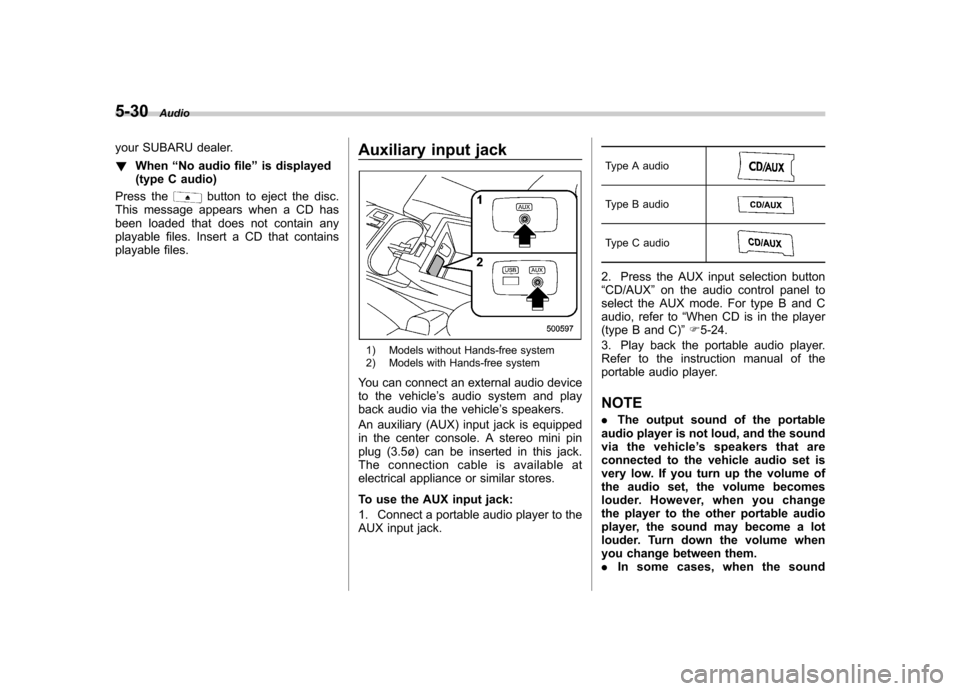
playable files. Auxiliary input jack
1) Models without Hands-free system
2) Models with Hands-free system
You can connect an external audio device
to the vehicle ’s audio system and play
back audio via the vehicle ’s speakers.
An auxiliary (AUX) input jack is equipped
in the center console. A stereo mini pin
plug (3.5ø) can be inserted in this jack.
The connection cable is available at
electrical appliance or similar stores.
To use the AUX input jack:
1. Connect a portable audio player to the
AUX input jack. Type A audio
Type B audio
Type C audio
2. Press the AUX input selection button “
CD/AUX ”on the audio control panel to
select the AUX mode. For type B and C
audio, refer to “When CD is in the player
(type B and C) ”F 5-24.
3. Play back the portable audio player.
Refer to the instruction manual of the
portable audio player. NOTE . The output sound of the portable
audio player is not loud, and the sound
via the vehicle ’s speakers that are
connected to the vehicle audio set is
very low. If you turn up the volume of
the audio set, the volume becomes
louder. However, when you change
the player to the other portable audio
player, the sound may become a lot
louder. Turn down the volume when
you change between them.. In some cases, when the sound
Page 224 of 474
Audio control buttons NOTE
For models with the genuine SUBARU
navigation system, refer to the Owner’s
Manual supplement for the navigationsystem.
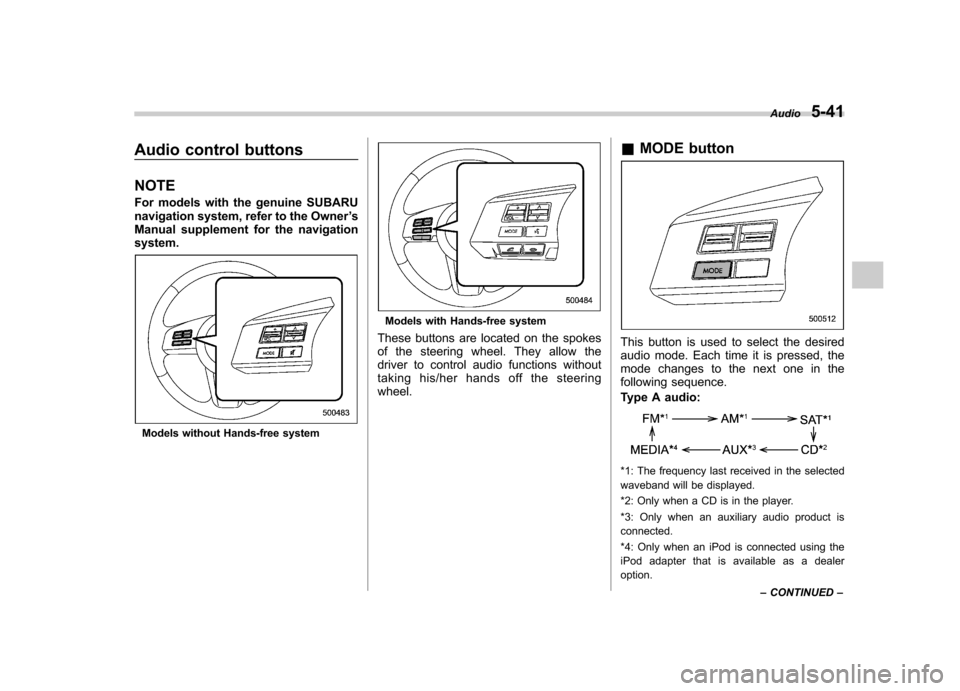
Models without Hands-free system
Models with Hands-free system
These buttons are located on the spokes
of the steering wheel. They allow the
driver to control audio functions without
taking his/her hands off the steeringwheel. &
MODE button
This button is used to select the desired
audio mode. Each time it is pressed, the
mode changes to the next one in the
following sequence.
Type A audio:
*1: The frequency last received in the selected
waveband will be displayed.
*2: Only when a CD is in the player.
*3: Only when an auxiliary audio product is connected.
*4: Only when an iPod is connected using the
iPod adapter that is available as a dealer option. Audio
5-41
– CONTINUED –
Page 231 of 474

5-48Audio
!Setting passkey
1. Select the “Set Passkey ”menu.
2. Press the “TUNE ”dial.
3. Input the new passkey (a 4 - 8 digit
number) by turning and pressing the“ TUNE ”dial.
4. After inputting the new passkey, pressthe “TUNE ”dial again.
– If the passkey is set, the new
passkey will be displayed.
! Deleting device
1. Select the “Delete Audio Player ”
menu.
2. Select the preferred device.
3. Select the “Confirm delete audio
Player? ”menu.
– If the device is deleted, “Audio
player has been deleted. ”will be
displayed.
& Bluetooth
®audio operation
NOTE
Depending on the connected device, it
may not activate as per the following
items or not work smoothly. Refer to
the instruction manual of the con-
nected device. !
How to play back
Type B audio
Type C audio
Press the “CD/AUX ”button and select the
“ BT-A ”(type B audio)/ “BT Audio ”(type C
audio) mode. ! To select a track from the beginning
Select a track in the same way as for a
CD. Refer to “To select a track from the
beginning ”F 5-24.
! Repeating (type B audio)
Repeating is operated in the same way as
for a CD. Refer to “Repeating ”F 5-26.
Each time you briefly press the
button, the mode changes in the following sequence.
! Random playback (type B audio)
Random playback is operated in the same
way as for a CD. Refer to “Random playback
”F 5-27. Each time you press
and hold the
button, the mode
changes in the following sequence.
! Display selection (type B audio)
Select an indication in the same way as
for a CD. Refer to “Display selection (type
A and B audio) ”F 5-28. Each time you
briefly press the
button, the indica-
tion changes in the following sequence.
! Fast-forwarding and rewinding
(type C audio)
Fast-forwarding and rewinding are oper-
ated in the same way as for a CD. Refer to“ Fast-forwarding and rewinding ”F 5-25.
! Folder selection
Select a folder in the same way as for a
CD. Refer to “Folder selection ”F 5-28.
Page 463 of 474

14-2Index
A
ABS (Anti-lock Brake System) ..................................... 7-24
Warning light ......................................................... 3-16
Accessories ....................................................... 5-3, 11-45
Accessory power outlet ............................................... 6-10
Air cleaner element ................................................... 11-18
Air conditioner Manual climate control system ................................... 4-6
Air filtration system ....................................................... 4-9
Airflow selection Automatic climate control system ............................... 4-5
Manual climate control system ................................... 4-6
Alarm system ............................................................ 2-15
All-Wheel Drive warning light ....................................... 3-20
Aluminum wheel ....................................................... 11-37
Cleaning ............................................................... 10-3
Antenna system ........................................................... 5-3
Anti-lock Brake System (ABS) ..................................... 7-24
Arming the system ..................................................... 2-16
Armrest ..................................................................... 1-12
Ashtray ..................................................................... 6-12
AT OIL TEMP warning light ......................................... 3-14
Audio Antenna system ....................................................... 5-3
Auxiliary input jack ................................................. 5-30
Bluetooth
®audio .................................................... 5-43
CD player operation ............................................... 5-23
Control button ........................................................ 5-41
FM/AM radio operation ........................................... 5-12
iPod
®operations .................................................... 5-33
Satellite radio operations ......................................... 5-19 Set ........................................................................ 5-4
USB storage device operations
................................ 5-33
Auto on/off headlights ................................................. 3-27
Sensor .................................................................. 3-27
Auto-dimming mirror/compass ..................... 3-36, 3-43, 3-45
Automatic climate control system ................................... 4-5
Automatic rain sensing windshield wipers ...................... 3-32
Automatic transmission ............................................... 7-17
Fluid ........................................................... 11-21, 12-8
Manual mode ......................................................... 7-21
Oil temperature warning light (AT OIL TEMP) ............. 3-14
Select lever ........................................................... 7-18
Shift lock function ................................................... 7-20
Automatic/Emergency Locking Retractor (A/ELR) ........... 1-13
Auxiliary input jack ...................................................... 5-30
B Battery .................................................................... 11-43
Drainage prevention function ..................................... 2-6
Jump starting ......................................................... 9-10
Replacement (remote engine start transmitter) ........... 7-14
Replacement (remote keyless entry system) .............. 2-10
Bluetooth
®audio ........................................................ 5-43
Booster seat .............................................................. 1-29
Bottle holder ............................................................... 6-9
Brake Assist .................................................................... 7-24
Booster ....................................................... 7-23, 11-27
Fluid ........................................................... 11-25, 12-8
Pad and lining ...................................................... 11-30
Parking ................................................................. 7-31