2012 SKODA SUPERB lights
[x] Cancel search: lightsPage 114 of 235

Shifting (manual gearbox)
Fig. 119
Gearshift pattern of 5 gear or
6 gear manual gearbox
Always depress the clutch pedal fully when changing gear, to prevent excessive
wear of the clutch.
The gearshift indicator must be observed when changing gear » page 11.
Only engage reverse gear when the vehicle is stationary. Depress the clutch pedal
and hold it fully depressed. Wait a moment before reverse gear is engaged to
avoid any shift noises.
The reversing lights will come on once reverse gear is engaged, provided the igni-
tion is on. WARNING
Never engage reverse gear when driving - risk of accident! Note
If not in the process of changing gear, do not leave your hand on the gearshift
lever while driving. The pressure from the hand can cause the gearshift mecha-
nism to wear excessively. ÐPedals
The operation of the pedals must not be hindered under any circumstances!
In the driver's footwell, only a footmat, which is attached to the two correspond-
ing attachment points, may be used. Only use footmats from the range of ŠKODA Original Accessories, which are fitted
to two attachment points. WARNING
No objects are allowed in the driver's footwell – risk of obstruction or limita-
tion in operating the pedal! Ð Parking aid
Fig. 120
Parking aid: Range of the sensors/activating the parking aid
The parking aid determines the distance between the front or rear bumper and
an obstacle with the aid of ultrasound sensors. The sensors are integrated in the
front/rear bumper.
The signal tones for the front parking aid sound higher than for the rear parking
aid. The tones of the parking aid can be adapted in the menu of the Information
display » page 16.
Range of sensors
The distance warning begins at a distance of about 160°cm from the obstacle at
the rear of the vehicle and about 120
cm from the obstacle in front of the vehicle A
» Fig. 120. The interval between the warning signals becomes shorter as the
clearance is reduced.
A continuous tone sounds from a distance of approx. 30
cm B
» Fig. 120 - danger
area. From this moment on do not continue driving!
On vehicles with a factory-fitted radio or navigation system, the distance to the
obstacle is simultaneously graphically illustrated on the display, refer to the oper-
ating instructions for the radio or navigation system. £
112 Using the system
Page 115 of 235

On vehicles with a factory-fitted towing device, the border of the danger area
starts (continuous tone) 5
cm further away from the vehicle. The length of the ve-
hicle can be increased with an installed detachable towing device.
On vehicles with a factory-fitted towing device, the rear sensors are deactivated
when towing a trailer.
Activating/deactivating the rear parking aid
The parking aid is activated automatically when reverse gear is engaged and the
ignition is turned on. This is confirmed by a brief audible signal.
The parking aid is deactivated by removing the reverse gear.
Activating/deactivating the front and rear parking aid
The parking aid is activated when the ignition is turned on and reverse gear is en-
gaged and or by pressing the button » Fig. 120 - the symbol
lights up in the
button. This is confirmed by a brief audible signal.
The parking aid is deactivated by pressing the button or at a speed of more
than 10 km/h (the symbol in the button is no longer illuminated). WARNING
■ The parking aid is not a substitute for the driver paying proper attention and
it is always the driver's responsibility to take care when reversing the vehicle
or carrying out similar manoeuvres. Pay particular attention to small children
and animals as they are not recognised by the parking aid sensors.
■ Before reversing or parking, check that there is no small obstacle, such as a
rock, thin post, trailer drawbar etc., in front of or behind the vehicle. Such ob-
stacles may not be recognised by the parking aid sensors.
■ Under certain circumstances, surfaces of certain objects and types of cloth-
ing cannot reflect the signals from the parking aid. Thus, these objects or peo-
ple who wear such clothing are not recognised by the parking aid sensors.
■ External sound sources can have a detrimental effect on the parking aid.
Under unfavourable conditions, objects or people may not be recognised. Note
■ If a warning signal sounds for about 3
seconds after activating the system and
there is no obstacle close to your car, this indicates a system fault. The fault is
confirmed additionally when the symbol flashes in the button . Have the
fault rectified by a
ŠKODA specialist garage.
■ The sensors must be kept clean (free of ice, etc.) to enable the parking aid to
operate properly.
■ If the parking aid is activated and the selector lever of the automatic gearbox is
in the position P, the warning signal is interrupted (the vehicle cannot move). Ð Park assist
ä
Introduction
This chapter contains information on the following subjects:
Park assist display on the information display 114
Parking with the help of the park assist system and completing the parking
procedure 115
Messages in the information display 116
The parking aid is part of the park assist system, therefore the information and
safety guidelines » page 112, Parking aid must be read and observed.
The park assist system helps you to park in a suitable parallel parking space be-
tween two vehicles or behind a vehicle.
After switching on the ignition and when driving at a speed of up to 30
km/h, the
park assist system automatically searches for suitable parking spaces on the driv-
er's and passenger's side of the vehicle.
During the parking procedure the park assist only takes over the steering move-
ments, the pedals continue to be operated by the driver.
If the park assist system is switched on, a yellow indicator light illuminates up in
the button » Fig. 121 on page 114.
The function of the system is based on:
› the measurement and evaluation of the size of parking spaces when driving,
› the determination of the correct position of the vehicle for parking,
› the calculation of the line on which the vehicle drives backwards into the park-
ing space,
› the automatic turning of the front wheels when parking.
£
113
Starting-off and Driving
Page 120 of 235

Switching off the cruise control system temporarily
First read and observe the introductory information and safety warn-
ings on page 116.
The cruise control system is
temporarily switched off by pressing the switchA
» Fig. 124 on page 117
into the spring-tensioned position CANCEL or by de-
pressing the brake or clutch pedal.
The set speed remains stored in the memory.
Briefly press the rocker button B
into the position RES
to resume the stored
speed after the clutch or brake pedal is released. ÐSwitching off the cruise control system completely
First read and observe the introductory information and safety warn-
ings on page 116.
›
Turn the switch A
» Fig. 124 on page 117
into the OFF position. ÐSTART/STOP
Fig. 125
Button for the START-STOP sys-
tem
The START-STOP system helps you to save fuel while at the same time reducing
harmful exhaust emissions and CO 2 emissions.
The function is automatically activated each time the ignition is switched on.
In the start-stop mode, the engine automatically switches to the vehicle's idle
phase, e.g. when stopped at traffic lights.
ä
ä Information regarding the current state of the START-STOP system is indicated in
the display of the instrument cluster.
Automatic engine shut down (stop phase)
› Stop the vehicle (where necessary, apply the handbrake).
› Take the vehicle out of gear.
› Release the clutch pedal.
Automatic renewed engine restart (start phase).
› Depress the clutch pedal.
Switching the
START-STOP system on and off
The START/STOP system can be switched on/off by pressing the button » Fig. 125.
When start-stop mode is deactivated, the indicator light in the button lights up.
If the vehicle is in the stop phase when manually switching off the system, the
engine starts immediately.
The START-STOP
system is very complex. Some of the procedures are hard to
check without servicing. The general conditions for the proper functioning of the
START-STOP system are listed in the following overview.
Conditions for the automatic engine shut down (stop phase):
› The gearshift lever is in Neutral.
› The clutch pedal is not depressed.
› The driver has fastened the seat belt.
› The driver's door is closed.
› The bonnet is closed.
› The vehicle is at a standstill.
› The factory-fitted towing device is not electrically connected to a trailer.
› The engine is at operating temperature.
› The charge state of the vehicle battery is sufficient.
› The stationary vehicle is not on a steep slope or a steep downhill section.
› The engine speed is less than 1 200 rpm.
› The temperature inside the vehicle battery is not too low or too high.
› There is sufficient pressure in the braking system.
› The difference between the outdoor- and the set temperature in the interior is
not too great.
› The vehicle speed since the last time the engine was switched off was greater
than 3 km/h.
› No cleaning of the diesel particle filter takes place
» page 24.
› The front wheels are not turned excessively (the steering angle is less than 3/4
of a steering wheel revolution).
£
118 Using the system
Page 124 of 235
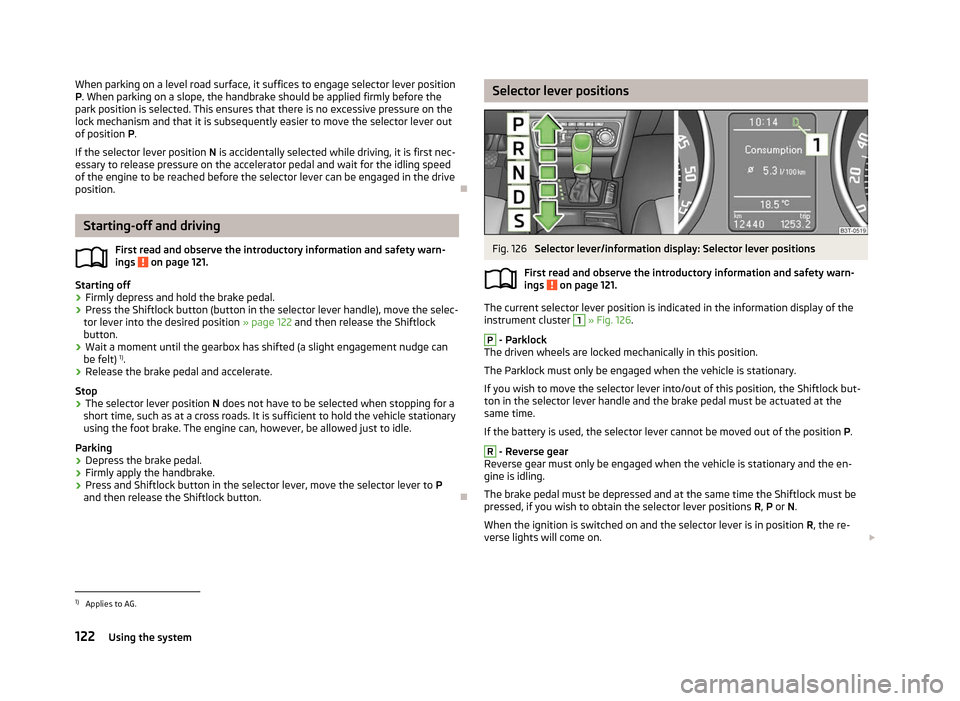
When parking on a level road surface, it suffices to engage selector lever position
P. When parking on a slope, the handbrake should be applied firmly before the
park position is selected. This ensures that there is no excessive pressure on the
lock mechanism and that it is subsequently easier to move the selector lever out
of position P.
If the selector lever position N is accidentally selected while driving, it is first nec-
essary to release pressure on the accelerator pedal and wait for the idling speed
of the engine to be reached before the selector lever can be engaged in the drive
position. ÐStarting-off and driving
First read and observe the introductory information and safety warn-
ings on page 121.
Starting off
›
Firmly depress and hold the brake pedal.
› Press the Shiftlock button (button in the selector lever handle), move the selec-
tor lever into the desired position » page 122 and then release the Shiftlock
button.
› Wait a moment until the gearbox has shifted (a slight engagement nudge can
be felt) 1)
.
› Release the brake pedal and accelerate.
Stop
› The selector lever position
N does not have to be selected when stopping for a
short time, such as at a cross roads. It is sufficient to hold the vehicle stationary
using the foot brake. The engine can, however, be allowed just to idle.
Parking
› Depress the brake pedal.
› Firmly apply the handbrake.
› Press and Shiftlock button in the selector lever, move the selector lever to
P
and then release the Shiftlock button. Ð
ä Selector lever positions
Fig. 126
Selector lever/information display: Selector lever positions
First read and observe the introductory information and safety warn-
ings on page 121.
The current selector lever position is indicated in the information display of the
instrument cluster
1
» Fig. 126.
P
- Parklock
The driven wheels are locked mechanically in this position.
The Parklock must only be engaged when the vehicle is stationary.
If you wish to move the selector lever into/out of this position, the Shiftlock but-
ton in the selector lever handle and the brake pedal must be actuated at the
same time.
If the battery is used, the selector lever cannot be moved out of the position P. R
- Reverse gear
Reverse gear must only be engaged when the vehicle is stationary and the en-
gine is idling.
The brake pedal must be depressed and at the same time the Shiftlock must be
pressed, if you wish to obtain the selector lever positions R, P or N.
When the ignition is switched on and the selector lever is in position R, the re-
verse lights will come on. £
ä
1)
Applies to AG.
122 Using the system
Page 129 of 235

Operating the phone on the multifunction steering wheel
Fig. 129
Multifunction steering wheel: Control buttons for the telephone The driver can set the basic functions of the telephone by simply operating the
buttons located on the steering wheel so that he can concentrate on the traffic
situation without being distracted as little as possible by operating the tele-
phone
» Fig. 129 .
This applies only if your vehicle has been equipped with the universal telephone
preinstallation (
“hands-free system ”) at the factory.
The buttons operate the functions for the operating mode of the current tele-
phone.
If the side lights are switched on, the buttons on the multifunction steering
wheel are illuminated.
Button Action Operation1
Press briefly
Switch on/off the voice control (Button PTT - Push to talk)
Cancellation of the played message 1
Turn upwards
Increase volume1
Turn downwards
Decrease volume2
Press briefly
Accept call, end call, entry in the main menu of the telephone, list of the dialed numbers, call the dialed contact2 Press button for a long pe-
riod of time Reject call, private call
a)
Reject call, list of the last calls, access to the main menu of the phone, list of dialled numbers b)3
Press briefly
Reach one level higher in the menu (according to the current position in the menu)3 Press button for a long pe-
riod of time Leave the phone menu4
Press briefly
Confirm menu selection4 Press button for a long pe-
riod of time To the next initial letter in the telephone book4
Turn upwards
The last chosen menu selection, name4
Turn downwards
The next menu selection, name4
Quickly turn upwards
To the previous initial letter in the telephone book4
Quickly turn downwards
To the next initial letter in the telephone booka)
Applies to GSM II.
b) Applies to GSM III. Ð
127
Communication
Page 139 of 235

Multimedia
Music playback via Bluetooth
®
The universal telephone preinstallation makes it possible to play back music via
Bluetooth ®
from devices such as MP3 players, mobile phones or notebooks.
To ensure the music can be played back via Bluetooth ®
, it is necessary to connect
the terminal device with the hands-free system in the menu Phone - Bluetooth -
Media player. The music playback process is performed on the connected device.
The universal telephone preinstallation GSM II ensures that the music played back
via the hands-free system can be controlled with the remote control » page 136,
Voice commands - GSM II . Note
The device being connected must support the Bluetooth ®
A2DP profile; refer to
the operating instructions for the relevant device being connected. ÐOperating the radio and navigation system on the multifunction steering wheel
Fig. 132
Multifunction steering wheel: control buttons The multifunction steering wheel comprises buttons for setting the basic func-
tions for the factory-fitted radio and navigation system » Fig. 132.
The radio and navigation system can of course still be operated on the devices. A
description is included in the relevant operating instructions.
If the side lights are switched on, the buttons on the multifunction steering
wheel are illuminated.
The buttons apply for the respective operating mode of the current radio or navi-
gation system.
The following functions can be completed by pressing or turning the buttons.
Button Action Radio, traffic information CD/CD changer/MP3 Navigation1
Press briefly
Switch off/on tone or voice controla)1 Press button for a
long period of time switch off/on1
Turn upwards
Increase volume1
Turn downwards
Decrease volume2
Press briefly
Changing to the next stored radio station
Changing to the next stored traffic information Interrupting the traffic report Changing to the next title2 Press button for a
long period of time Interruption of the traffic report
Fast forward£ 137
Communication
Page 141 of 235

Filling the CD changer with CDs
›
Press and hold the button C
» Fig. 133
for longer than 2 seconds and guide the
CDs one after the other (maximum 6 CDs) into the CD case B
. The indicator
lights in the buttons D
stop flashing.
Inserting a CD at a specific position
› Press the button C
» Fig. 133
. The indicator lights in the buttons D
illuminate
the memory spaces that are already assigned and flash in the case of free mem-
ory spaces.
› Touch the desired button D
and guide the CD into the CD-case B
.
Ejecting a CD
› Press the button A
» Fig. 133
to eject a CD. For assigned memory spaces, the
indicator lights now illuminate in the buttons D
.
› Press the corresponding button D
. The CD is ejected.
Ejecting all CDs
› Press and hold the button A
» Fig. 133
for more than 2
seconds. All CDs in the
CD-changer are ejected consecutively. Note
■ Always guide the CD into the CD case B
» Fig. 133
with the printed side facing
upwards.
■ Never force the CD into the CD case as it is drawn in automatically.
■ After loading a CD into the CD changer, wait until the indicator light of the cor-
responding button D
is illuminated. Then the CD case B
is free to load the next
CD.
■ If a position is selected, on which a CD is already located, this CD is ejected. Re-
move the ejected CD and load the desired CD. Ð DVD-preinstallation
Fig. 134
Seat backrest - left front seat/right front seat
Description Openings for attachment of DVD player holder
Audio/video input
Connection input, DVD player
Only one DVD pre-installation is factory-installed in the seat backrest of the front
seat.
The DVD player holder and DVD player can be purchased from
ŠKODA original ac-
cessories. For a description of the use, refer to the operating instructions for
these devices and equipment. WARNING
■ If there are passengers on both of the rear seats, the DVD player holder
must not be used on its own (without the DVD player) - risk of injury!
■ The inclination of the holder can be adjusted to three preset positions. Be
careful not to injure fingers between the holder and the backrest when
changes to the position of the DVD player holder are made.
■ The DVD player holder must not be used when the rear seat backrest or the
rear seat is folded forward or has been removed completely. Note
Follow the instructions given in the operating instructions of the DVD player hold-
er/DVD player. Ð A
B
C
139
Communication
Page 155 of 235

Monitoring the airbag system
The functionality of the airbag system is also monitored electronically when one
airbag has been switched off.
If the airbag was switched off using diagnostic equipment:
› The airbag indicator light illuminates for around 4
seconds after the ignition
is switched on and then flashes approximately another 12 seconds in 2 second
intervals.
The following applies if the airbag has been switched off using the key switch
in the storage compartment: › The airbag indicator light comes on for around 4 seconds after the ignition is
switched on;
› Switched off airbags are indicated in the middle of the dash panel by the indica-
tor light in the display coming on » Fig. 146 on page 153. Note
■ The national regulations for switching off airbags must be observed.
■ A ŠKODA Service Partner will be able to inform you which airbags in your vehicle
can/must be deactivated. ÐKey switch for the front seat passenger airbag
Fig. 146
Storage compartment: Switch for the front passenger airbag/indi-
cator light for the deactivated front seat passenger airbag
Only the front passenger airbag is deactivated with the key switch.
Deactivating an airbag › Switch off the ignition.
› Use the key to turn the slot of the key switch into position 2
» Fig. 146 OFF.›
Check that the airbag indicator light
in the display in the
middle of the dash panel lights up 3
» Fig. 146
when the ignition is turned on.
Activating an airbag
› Switch off the ignition.
› Use the key to turn the slot of the key switch into position 1
» Fig. 146 ON
.
› Check that the airbag indicator light
in the display
in the
middle of the dash panel does not light up 3
» Fig. 146 when the ignition is
turned on.
Indicator light in the display
(front passenger airbag switched
off)
If the front passenger airbag is switched off, the indicator light comes on for
about 4 seconds after the ignition is switched on.
There is a system fault in the deactivated airbag » if the airbag indicator light
flashes. Immediately visit a ŠKODA specialist garage. WARNING
■ The driver is responsible for whether the airbag is switched on or switched
off.
■ Only switch off the airbag when the ignition is switched off! Otherwise a
fault can occur in the system for deactivating the airbag. ■ If the airbag indicator light in the display
flashes, the
front passenger airbag will not be deployed in the event of an accident! Have
the airbag system checked by a ŠKODA specialist garage immediately. Ð 153
Airbag system