2012 SKODA SUPERB parking
[x] Cancel search: parkingPage 114 of 235

Shifting (manual gearbox)
Fig. 119
Gearshift pattern of 5 gear or
6 gear manual gearbox
Always depress the clutch pedal fully when changing gear, to prevent excessive
wear of the clutch.
The gearshift indicator must be observed when changing gear » page 11.
Only engage reverse gear when the vehicle is stationary. Depress the clutch pedal
and hold it fully depressed. Wait a moment before reverse gear is engaged to
avoid any shift noises.
The reversing lights will come on once reverse gear is engaged, provided the igni-
tion is on. WARNING
Never engage reverse gear when driving - risk of accident! Note
If not in the process of changing gear, do not leave your hand on the gearshift
lever while driving. The pressure from the hand can cause the gearshift mecha-
nism to wear excessively. ÐPedals
The operation of the pedals must not be hindered under any circumstances!
In the driver's footwell, only a footmat, which is attached to the two correspond-
ing attachment points, may be used. Only use footmats from the range of ŠKODA Original Accessories, which are fitted
to two attachment points. WARNING
No objects are allowed in the driver's footwell – risk of obstruction or limita-
tion in operating the pedal! Ð Parking aid
Fig. 120
Parking aid: Range of the sensors/activating the parking aid
The parking aid determines the distance between the front or rear bumper and
an obstacle with the aid of ultrasound sensors. The sensors are integrated in the
front/rear bumper.
The signal tones for the front parking aid sound higher than for the rear parking
aid. The tones of the parking aid can be adapted in the menu of the Information
display » page 16.
Range of sensors
The distance warning begins at a distance of about 160°cm from the obstacle at
the rear of the vehicle and about 120
cm from the obstacle in front of the vehicle A
» Fig. 120. The interval between the warning signals becomes shorter as the
clearance is reduced.
A continuous tone sounds from a distance of approx. 30
cm B
» Fig. 120 - danger
area. From this moment on do not continue driving!
On vehicles with a factory-fitted radio or navigation system, the distance to the
obstacle is simultaneously graphically illustrated on the display, refer to the oper-
ating instructions for the radio or navigation system. £
112 Using the system
Page 115 of 235

On vehicles with a factory-fitted towing device, the border of the danger area
starts (continuous tone) 5
cm further away from the vehicle. The length of the ve-
hicle can be increased with an installed detachable towing device.
On vehicles with a factory-fitted towing device, the rear sensors are deactivated
when towing a trailer.
Activating/deactivating the rear parking aid
The parking aid is activated automatically when reverse gear is engaged and the
ignition is turned on. This is confirmed by a brief audible signal.
The parking aid is deactivated by removing the reverse gear.
Activating/deactivating the front and rear parking aid
The parking aid is activated when the ignition is turned on and reverse gear is en-
gaged and or by pressing the button » Fig. 120 - the symbol
lights up in the
button. This is confirmed by a brief audible signal.
The parking aid is deactivated by pressing the button or at a speed of more
than 10 km/h (the symbol in the button is no longer illuminated). WARNING
■ The parking aid is not a substitute for the driver paying proper attention and
it is always the driver's responsibility to take care when reversing the vehicle
or carrying out similar manoeuvres. Pay particular attention to small children
and animals as they are not recognised by the parking aid sensors.
■ Before reversing or parking, check that there is no small obstacle, such as a
rock, thin post, trailer drawbar etc., in front of or behind the vehicle. Such ob-
stacles may not be recognised by the parking aid sensors.
■ Under certain circumstances, surfaces of certain objects and types of cloth-
ing cannot reflect the signals from the parking aid. Thus, these objects or peo-
ple who wear such clothing are not recognised by the parking aid sensors.
■ External sound sources can have a detrimental effect on the parking aid.
Under unfavourable conditions, objects or people may not be recognised. Note
■ If a warning signal sounds for about 3
seconds after activating the system and
there is no obstacle close to your car, this indicates a system fault. The fault is
confirmed additionally when the symbol flashes in the button . Have the
fault rectified by a
ŠKODA specialist garage.
■ The sensors must be kept clean (free of ice, etc.) to enable the parking aid to
operate properly.
■ If the parking aid is activated and the selector lever of the automatic gearbox is
in the position P, the warning signal is interrupted (the vehicle cannot move). Ð Park assist
ä
Introduction
This chapter contains information on the following subjects:
Park assist display on the information display 114
Parking with the help of the park assist system and completing the parking
procedure 115
Messages in the information display 116
The parking aid is part of the park assist system, therefore the information and
safety guidelines » page 112, Parking aid must be read and observed.
The park assist system helps you to park in a suitable parallel parking space be-
tween two vehicles or behind a vehicle.
After switching on the ignition and when driving at a speed of up to 30
km/h, the
park assist system automatically searches for suitable parking spaces on the driv-
er's and passenger's side of the vehicle.
During the parking procedure the park assist only takes over the steering move-
ments, the pedals continue to be operated by the driver.
If the park assist system is switched on, a yellow indicator light illuminates up in
the button » Fig. 121 on page 114.
The function of the system is based on:
› the measurement and evaluation of the size of parking spaces when driving,
› the determination of the correct position of the vehicle for parking,
› the calculation of the line on which the vehicle drives backwards into the park-
ing space,
› the automatic turning of the front wheels when parking.
£
113
Starting-off and Driving
Page 116 of 235

WARNING
■ The park assist does not take away the responsibility from the driver when
parking.
■ External sound sources can have a detrimental effect on the park assist sys-
tem and parking aid. Under unfavourable conditions, objects or people may
not be recognised. CAUTION
■ If other vehicles are parked behind or on the kerb, the park assist guides your
vehicle beyond the kerb or onto it. Ensure that the wheels or the wheel rims of
your vehicle are not damaged and if necessary intervene in time.
■ Under certain circumstances, surfaces or structures of certain objects, such as
wire mesh fences, powder snow etc., cannot be recognised by the system.
■ The evaluation of the parking space and the parking procedure depends on the
circumference of the wheels. The system only works correctly if the vehicle is fit-
ted with the wheel size approved by the manufacturer. If wheels other than
those approved by the manufacturer are mounted, the resulting position of the
vehicle in the parking space can differ slightly. This can be avoided by readjusting
the system at a ŠKODA
specialist garage. Under certain circumstances, the sys-
tem may not function correctly, for example, if the vehicle is fitted with snow
chains or a temporary spare wheel. Note
■ The traction control system (TCS) must always be switched on when parking.
■ Only the front parking aid operates if you are towing a trailer (applies only to ve-
hicles with a factory-fitted towing device). This is why it is not possible to reverse
into a parking space with the help of the park assist system when towing a trailer.
■ If the sensors find a suitable parking space, they store its parameters until an-
other suitable parking space has been found or until a distance of 10
m had been
driven after finding the parking space. This is why it is possible to switch on the
park assist after driving past the parking space and the information on whether
this parking space is suitable for parking appears in the information display. Ð Park assist display on the information display
Fig. 121
Switch on display of the park assist in the information display/infor-
mation display: Finding a suitable parking space
First read and observe the introductory information and safety warn-
ings on page 113.
Switching on
›
Press the button
» Fig. 121.
› Drive past the parking space at up to maximum 30 km/h and a distance of
0.5
– 1.5 m » Fig. 121.
The search area for the parking space on the driver's side is automatically indica-
ted on the information display.
Activate the turn signal on the driver's side if you wish to park on this side of the
road. In the information display the search area for the parking space is indicated
on the driver's side.
If the button is pressed at a speed greater than 30 km/h and less than 50 km/h,
the message indicating that the speed for detecting the space has been excee-
ded will be shown on the display of the instrument cluster. If the speed drops be-
low 30 km/h, the condition of the park assist system is automatically displayed in
the display of the instrument cluster. When exceeding a speed of 50 km/h, it is
necessary to activate the display again by pressing the button » Fig. 121.Ð
ä
114 Using the system
Page 117 of 235

Parking with the help of the park assist system and
completing the parking procedure
Fig. 122
Information display: Parking space detected including the informa-
tion to continue driving and to engage reverse gear
Fig. 123
Information display: Information to engage the forward gear
or
the reverse gear
First read and observe the introductory information and safety warn-
ings on page 113.
The time limit for the parking procedure with the help of the park assist system is
180 seconds.
› If the park assist system has recognised a suitable parking space, it is shown in
the information display » Fig. 122 - .
› Continue driving forwards until the display
» Fig. 122 -
appears.
› Stop the vehicle for at least 1 second.
› Engage reverse gear or move the selector lever into the position
R.
ä ›
As soon as the following message is shown in the information display:
Steering
intervent. active. Check area around veh.! , let go of the steering wheel and the
steering is taken over by the system.
› Observe the direct vicinity of the vehicle and reverse carefully.
› In the event that the parking procedure cannot be carried out in one go, the
parking process is completed in further stages. When the arrow in the informa-
tion display is flashing towards the front » Fig. 123 - , engage the 1st
gear or
move the selector lever to position D.
› Wait until the steering wheel automatically turns into the required position and
then carefully drive forwards.
› When the arrow in the information display is flashing towards the
rear » Fig. 123 , engage the reverse gear or move the selector lever to the po-
sition R.
› Wait until the steering wheel automatically turns into the required position and
then carefully reverse. You can repeat these steps several times.
› Terminate the parking procedure based on the distance information provided
by the park assist system.
As soon as the parking procedure is completed, an audible signal sounds and the
following message appears in the information display: Steering interv. finished.
Please take over steering!
Switch off park assist
The park assist switches off during one of the following occurrences:
› Speed of 30 km/h exceeded;
› Speed of 7 km/h exceeded during the parking procedure;
› Time limit of 180
seconds for the parking procedure exceeded;
› Button for the park assist system pressed;
› Parking aid activated;
› TCS system switched off;
› Automatic steering procedure interrupted by the driver (stopping the steering
wheel);
› Reverse gear disengaged or selector lever removed from the position
R when
reversing into the parking space. Ð
115
Starting-off and Driving
Page 118 of 235

Messages in the information display
First read and observe the introductory information and safety warn-
ings on page 113.
Park Assist finished.
The parking procedure has ended or after switching on the ignition, the vehicle
has not been driven above 10 km/h.
Park Assist: Speed too high.
Reduce the speed to below 30 km/h.
Driver steering intervention: Please take over steering!
The parking procedure is terminated due to driver intervention.
Park Assist finished. ASR deactivated.
The parking procedure cannot be carried out because the TCS system is switched
off.
ASR deactivated. Please take over steering!
The parking procedure was ended because the TCS system was switched off dur-
ing the parking procedure.
Trailer: Park Assist finished.
The parking procedure is not possible because the trailer is hitched and a plug is
inserted in the socket of the towing device.
Time limit exceeded. Please take over steering!
The parking procedure was ended because a time limit of 180 seconds for parking
was exceeded.
Park Assist currently not available.
The Park Assist cannot be switched on because a fault exists on the vehicle. Have
the fault rectified by a ŠKODA specialist garage.
Park Assist ended. System currently not available.
The parking procedure was ended because a fault exists on the vehicle. Have the
fault rectified by a ŠKODA specialist garage.
Park Assist faulty. Workshop!
The parking procedure is not possible because a fault exists on the park assist.
Have the fault rectified by a ŠKODA specialist garage.
Steering interv. active. Monitor area around veh.!
The Park Assist is active and takes over the steering movements. Observe the
surrounding area and carefully reverse while operating the pedals. ä
Please take over steering! Finish parking manually!
Assume control of the steering. Complete the parking procedure without using
the park assist system.
Speed too high! Please take over steering!
The parking procedure was ended because the speed was exceeded.
Park Assist: ASR intervention.
The intervention of the TCS while searching for a suitable parking place.
ASR intervention! Please take over steering!
The parking procedure is terminated by the intervention of the TCS.
Park Assist: Stationary time not sufficient.
The stationary time of the vehicle was less than 1 second.
Park Assist: Speed too low.
After the ignition is switched on, the vehicle must exceed the speed of 10 km/h at
least once. Ð Cruise control system (CCS)
ä
Introduction
This chapter contains information on the following subjects:
Storing a speed 117
Changing a stored speed 117
Switching off the cruise control system temporarily 118
Switching off the cruise control system completely 118
The cruise control system (CCS) maintains a constant speed, more than 30 km/h
(20 mph), once it has been set, without you having to depress the accelerator
pedal. This is only possible within the range which is permitted by the power out-
put and braking power of the engine.
The indicator light illuminates in the instrument cluster when the cruise control
system is activated. £
116 Using the system
Page 124 of 235
When parking on a level road surface, it suffices to engage selector lever position
P. When parking on a slope, the handbrake should be applied firmly before the
park position is selected. This ensures that there is no excessive pressure on the
lock mechanism and that it is subsequently easier to move the selector lever out
of position P.
If the selector lever position N is accidentally selected while driving, it is first nec-
essary to release pressure on the accelerator pedal and wait for the idling speed
of the engine to be reached before the selector lever can be engaged in the drive
position. ÐStarting-off and driving
First read and observe the introductory information and safety warn-
ings on page 121.
Starting off
›
Firmly depress and hold the brake pedal.
› Press the Shiftlock button (button in the selector lever handle), move the selec-
tor lever into the desired position » page 122 and then release the Shiftlock
button.
› Wait a moment until the gearbox has shifted (a slight engagement nudge can
be felt) 1)
.
› Release the brake pedal and accelerate.
Stop
› The selector lever position
N does not have to be selected when stopping for a
short time, such as at a cross roads. It is sufficient to hold the vehicle stationary
using the foot brake. The engine can, however, be allowed just to idle.
Parking
› Depress the brake pedal.
› Firmly apply the handbrake.
› Press and Shiftlock button in the selector lever, move the selector lever to
P
and then release the Shiftlock button. Ð
ä Selector lever positions
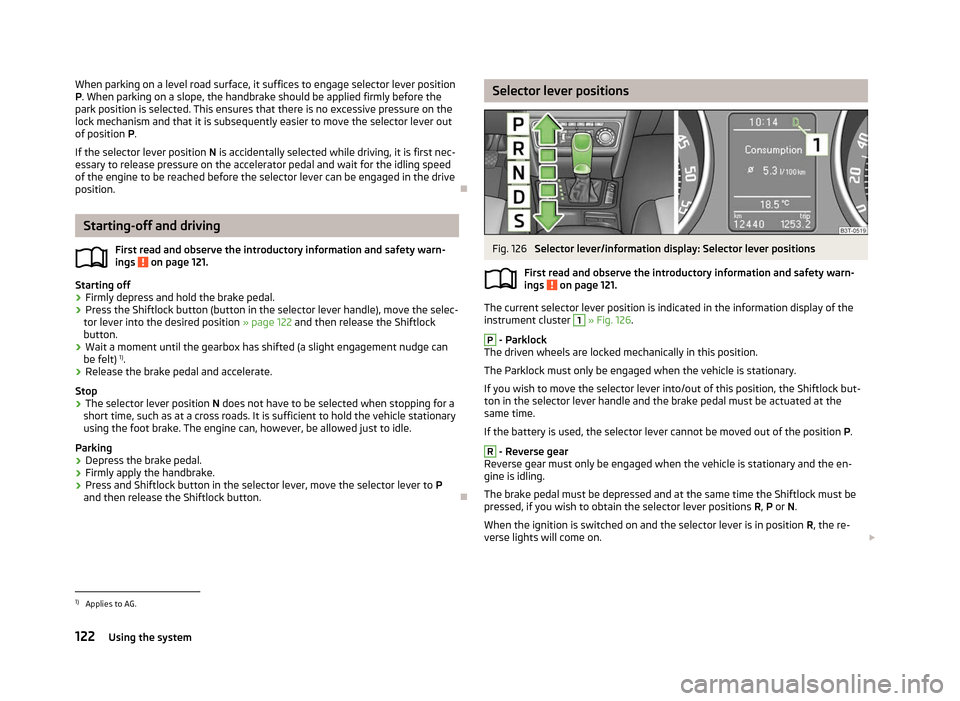
Fig. 126
Selector lever/information display: Selector lever positions
First read and observe the introductory information and safety warn-
ings on page 121.
The current selector lever position is indicated in the information display of the
instrument cluster
1
» Fig. 126.
P
- Parklock
The driven wheels are locked mechanically in this position.
The Parklock must only be engaged when the vehicle is stationary.
If you wish to move the selector lever into/out of this position, the Shiftlock but-
ton in the selector lever handle and the brake pedal must be actuated at the
same time.
If the battery is used, the selector lever cannot be moved out of the position P. R
- Reverse gear
Reverse gear must only be engaged when the vehicle is stationary and the en-
gine is idling.
The brake pedal must be depressed and at the same time the Shiftlock must be
pressed, if you wish to obtain the selector lever positions R, P or N.
When the ignition is switched on and the selector lever is in position R, the re-
verse lights will come on. £
ä
1)
Applies to AG.
122 Using the system
Page 169 of 235

General Maintenance
Taking care of and cleaning the vehicle
Taking care of your vehicle
ä
Introduction
This chapter contains information on the following subjects:
Washing the vehicle 168
Automatic car wash systems 168
Washing by hand 168
Washing with a high-pressure cleaner 168
Preserving and polishing the vehicle paintwork 169
Chrome parts 169
Paint damage 169
Plastic parts 169
De-icing windows and exterior mirrors 170
Radio reception and aerial 170
Headlight lenses 170
Rubber seals 170
Door lock cylinders 170
Wheels 171
Underbody protection 171
Protection of hollow spaces 171
Artificial leather and materials 172
Fabric covers on electrically heated seats 172
Natural leather 172
Seat belts 173
Regular and proper care help to retain the efficiency and value of your vehicle. It
may also be one of the requirements for the acceptance of warranty claims relat-
ing to corrosion damage and paint defects on the bodywork.
We recommend using care products from
ŠKODA Original Accessories that are
available from ŠKODA Service Partners. The instructions for use on the package
must be observed. WARNING
■ Care products may be harmful to your health if not used according to the in-
structions.
■ Always store care products in a safe place, out of the reach of children - risk
of poisoning! ■ When washing your vehicle in the winter: Water and ice in the brake system
can affect the braking efficiency - risk of accident! ■ Only wash the vehicle when the ignition is switched off - risk of accident!
■ Protect your hands and arms from sharp-edged metal parts when cleaning
the underfloor, the inside of the wheel housings or the wheel trims - risk of
cuts!
■ Air fresheners and scents can be hazardous to heath when the temperature
inside the vehicle is high. CAUTION
■ Be sure to check clothing for colourfastness to avoid any damage or visible
stains on the material (leather), panels and textiles.
■ Cleaners containing solvents can damage the material being cleaned.
■ Do not wash your vehicle in bright sunlight - risk of paint damage.
■ If washing the vehicle in the winter using a hose or high-pressure cleaner, en-
sure that the jet of water is not aimed directly at the locking cylinders or the
door/panel joints - risk of freezing!
■ Do not use any insect sponges, rough kitchen sponges or similar cleaning prod-
ucts - risk of damaging the surface of paintwork.
■ Do not stick any stickers on the inside of the rear windows, the rear side win-
dows and in the vicinity of the heating elements on the windscreen or near the
window aerial. These may get damaged. With regard to the antenna, they may in-
terfere with the radio or navigation system.
■ Do not clean the inside of the windows with sharp-edged objects or corrosive
and acidic cleaning agents - risk of damaging the heating elements or window
aerial.
■ Do not attach scents and air fresheners to the dashboard - risk of damage to
the dashboard.
■ To avoid damaging the parking aid sensors while cleaning with high-pressure
cleaners or steam jets, the sensors must only be directly sprayed for short periods
while a minimum distance of 10
cm must be observed.
■ Do not clean the roof trim with a brush - risk of damage to the trim surface. £
167
Taking care of and cleaning the vehicle
Page 170 of 235

For the sake of the environment
■ Used cans of vehicle care products represent a special type of hazardous waste.
These must be disposed of in accordance with national legal regulations. ■ Only wash the vehicle at washing bays intended for this purpose. Note
■ Remove fresh stains such as those from ball-point pens, ink, lipstick, shoe pol-
ish, etc., from the material (leather), panels and textiles as quickly as possible. ■ Due to possible issues with the cleaning and care of the interior of your vehicle,
the special tools and knowledge required, we recommend that this is completed
by a
ŠKODA Service Partner. ÐWashing the vehicle
First read and observe the introductory information and safety warn-
ings on page 167.
The best protection for your vehicle against harmful environmental influences is
frequent washing and wax treatment. How often the vehicle should be washed
depends on a wide range of factors, such as:
› Frequency of use;
› The parking situation (garage, below trees etc.);
› Season of the year;
› Weather conditions;
› Environmental influences.
The longer insect residues, bird droppings, tree sap, road and industrial dust, tar,
soot particles, road salt and other aggressive deposits remain adhering to the
paintwork of your vehicle, the more detrimental their destructive effect can be.
High temperatures, such as those caused by intensive sun's rays, accentuate this
caustic effect.
It is essential to also thoroughly clean the underside of the vehicle at the end of
the winter. ÐAutomatic car wash systems
First read and observe the introductory information and safety warn-
ings on page 167.ä
ä Your vehicle can be washed in automatic car wash systems.
The usual precautionary measures must be taken before washing the vehicle in
an automatic car wash system (closing the windows including the sliding/tilting
roof, etc.).
If your vehicle is fitted with any particular attached parts, such as a spoiler, roof
luggage rack, two-way radio aerial - it is best to consult the operator of the car
wash system beforehand.
It is important to degrease the lips of the windscreen wiper rubbers after passing
through the automatic vehicle wash system. Ð Washing by hand
First read and observe the introductory information and safety warn-
ings on page 167.
When washing by hand, first soften the dirt with plenty of water and rinse off as
much as possible.
Clean the vehicle with a soft sponge, a washing glove or a washing brush. Work
from the top to the bottom - starting with the roof. Only apply slight pressure
when cleaning the vehicle's paintwork. Only use a car shampoo for stubborn dirt.
Wash out the sponge or washing glove thoroughly at short intervals.
Clean wheels, door sills and similar parts last. Use a second sponge for such
areas.
Give the vehicle a good rinse after washing it and dry it off using a chamois leath-
er. Ð Washing with a high-pressure cleaner
First read and observe the introductory information and safety warn-
ings on page 167.
When washing the vehicle with a high-pressure cleaner, the instructions for use
of the equipment must be observed. This applies in particular to the pressure
used and to the spraying distance. Maintain a sufficiently large distance to the
parking aid sensors and soft materials such as rubber hoses or insulation materi-
al. £
ä
ä
168 General Maintenance